
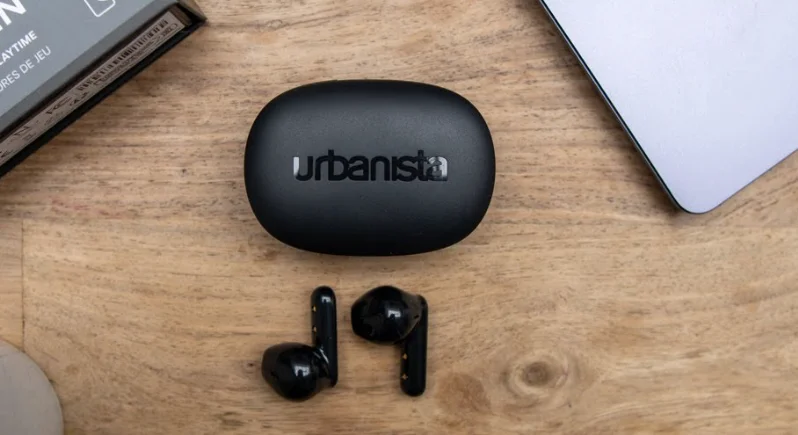

Urbanista COPENHAGEN 2 Earbuds
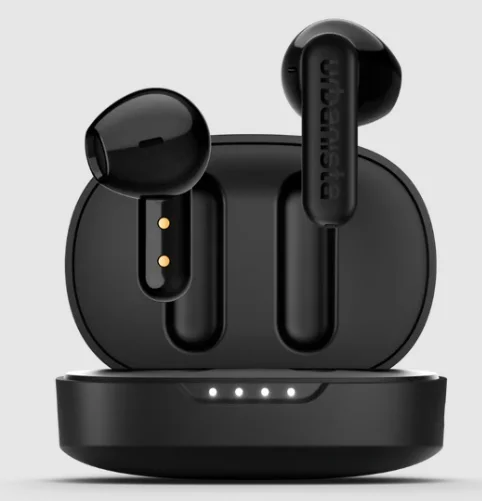
The Urbanista Copenhagen 2 Earbuds are stylish true wireless earbuds designed for everyday listening with reliable sound and modern connectivity. Featuring powerful 12 mm dynamic drivers, they deliver clear audio with customizable sound through three EQ presets—Default, Bass Boost, and Treble Boost—allowing you to adjust the listening experience to your preference. With up to 36 hours of total playtime (about 7 hours from the earbuds and an additional 29 hours from the charging case), they are ideal for long listening sessions without frequent charging.
The earbuds support Bluetooth multipoint connection, enabling seamless switching between two devices, and include four microphones with noise-reducing technology for clearer calls. Their lightweight open-fit design ensures comfort, while the IPX4 water-resistant rating makes them suitable for workouts and daily use. Combining modern design, stable Bluetooth 5.4 connectivity, and long battery life, the Urbanista Copenhagen 2 earbuds are a practical choice for music, calls, and entertainment on the go.
WELCOME TO URBANISTA
Thank you for choosing Urbanista Copenhagen 2. This guide will help you get the most out of your new earbuds.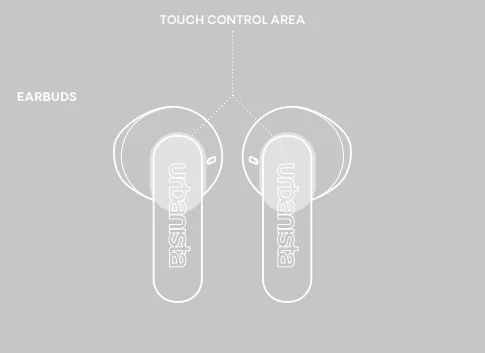
POWER ON AND OFF
The earbuds automatically power on when opening the charging case lid. To turn off the earbuds, put them back in the charging case and close the lid. The earbuds will automatically power off after 5 minutes of disconnection or 30 minutes of inactivity. Turn the earbuds on again by putting them in and taking them out of the charging case, or long press 4 seconds on each earbud.
FIRST PAIRING AND RECONNECTION
After removing the stickers on the earbud stems and putting them back in the case, open the charging case to initiate first-time pairing. The LED will first indicate the charging case battery level, then start flashing to indicate pairing mode. Go to the Bluetooth settings on your device and select “Urbanista Copenhagen 2” to connect. The LED will stop flashing as the earbuds successfully connect. The earbuds will automatically try to reconnect to the last connected device(s) every time they are powered on.
BLUETOOTH MULTIPOINT CONNECTION
Copenhagen 2 can be connected to two Bluetooth devices simultaneously through Bluetooth multipoint. This allows you to seamlessly switch between 2 connected devices, such as your phone and a computer, without disconnecting from one.
Pair and connect to a second device
Activate Bluetooth multipoint in two different ways:
- Long-press the touch control area on the left and right earbuds simultaneously for 2 seconds.
Or
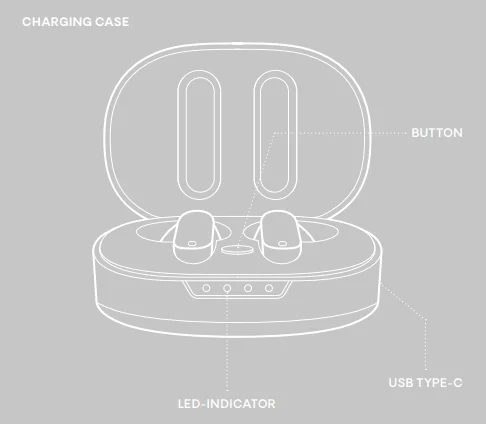
- Keep both earbuds in the charging case. With the lid open, press and hold the button on the charging case for 2 seconds. The LED will start flashing to indicate that Bluetooth multipoint is activated.
The earbuds can pair with and store up to 8 devices and will connect to the last two devices every time they are powered on. Bluetooth multipoint does not allow audio from 2 devices to be played simultaneously. Pause the music on your first device before switching to your second device.
TOUCH CONTROLS
Use the touch control area to control music and calls:
- Play/Pause: Double-tap left or right earbud.
- Next song: Long-press right earbud.
- Answer/Hang-up call: Double-tap left or right earbud.
- Reject a call: Long-press the left or right earbud.
- Activate voice assistant: Single-tap and long-press the left earbud.
- Toggle EQ setting: Long-press left earbud.
CHARGING AND BATTERY
The earbuds will automatically start charging when put back into the charging case. A “low battery” alert will notify you when the earphone battery level reaches 10%. When the batteries are empty, the earbuds will automatically power off. Use a qualified USB Type-C cable and adapter to charge your earbuds. While charging, the LED indicates the battery status as follows:
- 0–25%:

- 25–50%:

- 50–75%:

- 75–100%:


To check the charging case battery level, single-press the charging case button.
RESET
If you experience connection issues and the earbuds become unstable or unresponsive, place the earbuds back into the charging case and close the lid. After 10 seconds, reopen the case to attempt pairing or reconnecting with your device. If the issue persists, proceed with a full factory reset:
- Remove “Urbanista Copenhagen 2” from the Bluetooth settings on your device(s).
- While the earbuds are in the charging case with the lid open, press the reset button for 10 seconds until the LEDs become solid. The earphones will restart and enter pairing mode.
- Follow the instructions in “First Time Pairing and Reconnecting” to reconnect your earbuds.
NEED SUPPORT?
For further assistance and FAQs, please visit www.urbanista.com/support.
For More Manuals By Urbanista, Visit ManualsLibraryy.
Urbanista COPENHAGEN 2 Earbuds-FAQs
What are the main features of the Urbanista Copenhagen 2 earbuds?
Urbanista Copenhagen 2 earbuds are true wireless earbuds designed for everyday listening with modern connectivity and customizable sound. They feature Bluetooth 5.4 connectivity, touch controls, and multipoint pairing that allows connection to two devices at once. The earbuds also include three EQ presets—Default, Bass Boost, and Treble Boost—to adjust sound preferences. With four built-in microphones for calls and an open-fit design for comfort, they are built for music streaming, calls, and daily use.
Do Urbanista Copenhagen 2 earbuds have active noise cancelling?
Urbanista Copenhagen 2 earbuds do not include active noise cancelling (ANC). Instead, they rely on an open-fit design and environmental noise-cancelling microphones to improve call clarity. While they may reduce some surrounding noise during calls, they are mainly designed for comfortable everyday listening rather than complete noise isolation. This makes them suitable for casual use, such as commuting, working, or listening to music, while remaining aware of your surroundings.
What is the battery life of the Urbanista Copenhagen 2 earbuds?
Urbanista Copenhagen 2 earbuds offer up to 7 hours of playback on a single charge. When combined with the charging case, the total listening time can reach up to 36 hours. The charging case provides multiple additional charges, allowing users to listen to music or podcasts throughout the day without frequent charging. This extended battery life makes the earbuds practical for commuting, travel, or long listening sessions.
How do you pair Urbanista Copenhagen 2 earbuds with a device?
To pair Urbanista Copenhagen 2 earbuds, remove them from the charging case and enable Bluetooth on your smartphone, tablet, or computer. The earbuds automatically enter pairing mode when first activated. From your device’s Bluetooth settings, select “Urbanista Copenhagen 2” to complete the connection. After the first pairing, the earbuds automatically reconnect to the last used device whenever they are taken out of the case.
Do Urbanista Copenhagen 2 earbuds support Bluetooth multipoint?
Yes, Urbanista Copenhagen 2 earbuds support Bluetooth multipoint connectivity. This feature allows the earbuds to stay connected to two devices simultaneously, such as a smartphone and a laptop. Multipoint connectivity makes switching between devices easier, letting users listen to music on one device and quickly answer calls from another without manually reconnecting. This feature is particularly useful for people who frequently switch between work and personal devices.
Are Urbanista Copenhagen 2 earbuds good for phone calls?
Yes, Urbanista Copenhagen 2 earbuds are equipped with four microphones and environmental noise cancellation technology to improve voice clarity during calls. These microphones help filter background noise and focus on the user’s voice, making conversations clearer even in moderately noisy environments. This setup makes the earbuds suitable for phone calls, video meetings, and voice assistant commands while on the move.
How long does it take to charge Urbanista Copenhagen 2 earbuds?
Urbanista Copenhagen 2 earbuds take approximately 2.5 hours to fully charge when placed in the charging case and connected via a USB-C cable. The case itself holds a large battery that provides multiple additional charges for the earbuds. LED indicators on the case help users monitor charging status and battery level, ensuring the earbuds are ready for use when needed.
Are Urbanista Copenhagen 2 earbuds compatible with voice assistants?
Yes, Urbanista Copenhagen 2 earbuds support voice assistant features through compatible smartphones and devices. Users can activate their phone’s voice assistant using touch controls on the earbuds. This allows hands-free access to functions such as making calls, sending messages, checking directions, or controlling music playback without needing to interact directly with the phone.