
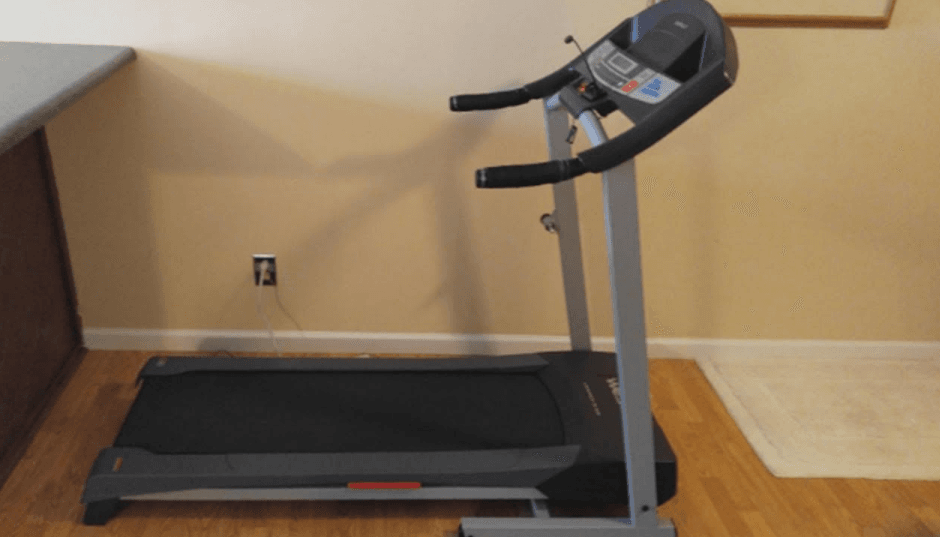

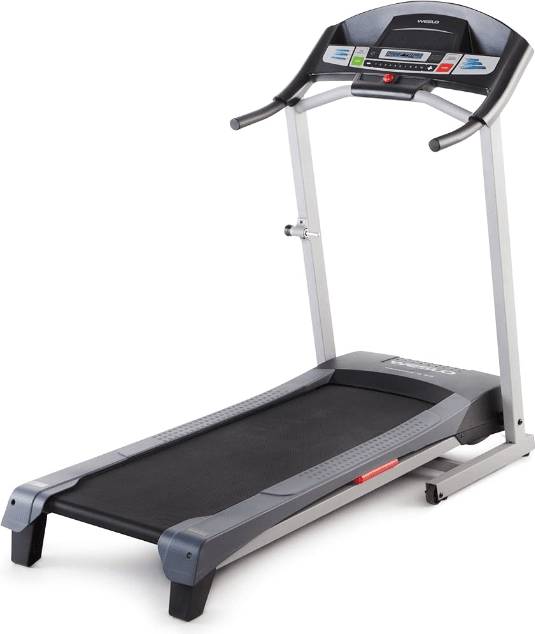
Weslo Cadence DL15 Treadmill
BEFORE YOU BEGIN
Thank you for selecting the WESLO® CADENCE DL15 treadmill. The CADENCE DL15 combines advanced technology with innovative design to let you enjoy an excellent form of cardiovascular exercise in the convenience and privacy of your home. And when you’re not exercising, the CADENCE DL15 can be folded up, requiring less than half the floor space of other treadmills.
For your benefit, read this manual carefully before using the treadmill. If you have additional questions, please call our Customer Service Department toll-free at 1-800-999-3756, Monday through Friday, 6 a.m. until 6 p.m. Mountain Time (excluding holidays). To help us assist you, please note the product model number and serial number before calling. The model number of the treadmill is WLTL41584. The serial number can be found on a decal attached to the treadmill (see the front cover of this manual for the location).
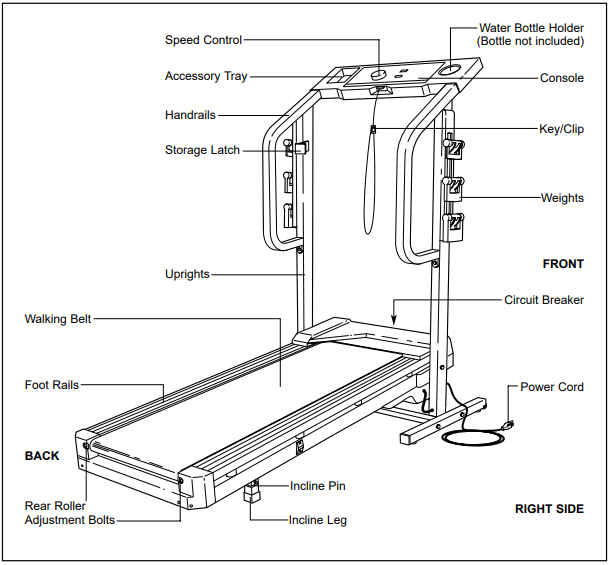
Before reading further, please familiarize yourself with the parts that are labeled in the drawing below.
ASSEMBLY
The assembly requires two people. Set the treadmill in a cleared area and remove all packing materials. Do not dispose of the packing materials until assembly is completed. Refer to the drawings below to identify the small parts used in assembly. Assembly requires your own Phillips screwdriver  , two adjustable wrenches
  , and scissors
  .
.
- Note that the Right rail and the Console Base are connected to the treadmill by a Wire Harness (not shown). During steps 1 through 5, be careful not to pull on or damage the Wire Harness.
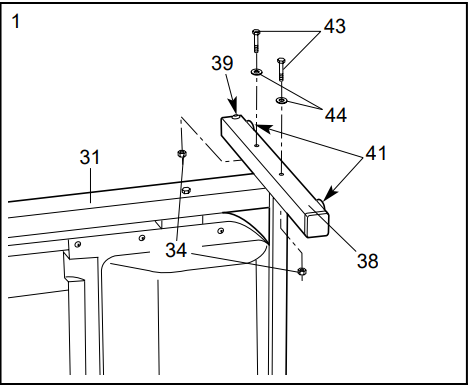
With the help of a second person, carefully lay the treadmill on its side. Position one of the Base Legs (38) on the base of the Upright (31) as shown. Make sure that the Base Leg Pads (41) and the Front Wheel (39) are in the indicated positions. Attach the Base Leg with two 3/8” x 2” Bolts (43), two 3/8” Washers (44), and two 3/8” Nuts (34).
Carefully turn the treadmill onto its other side. Assemble the other Base Leg (38) as described.
With the help of a second person, carefully raise the treadmill to the upright position so the Base Legs (38) are resting flat on the floor.
- Refer to HOW TO LOWER THE TREADMILL FOR USE on page 11. Follow the instructions in step 2 to lower the treadmill.
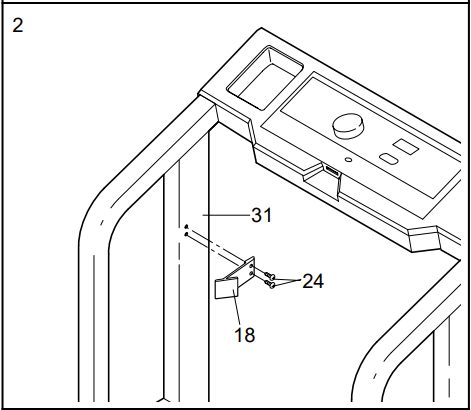
Attach the Storage Latch (18) to the left Upright (31) with two Screws (24). Be careful not to overtighten the Screws.
- Cut the plastic ties that hold the cage nuts in each Handrail (30, 32).
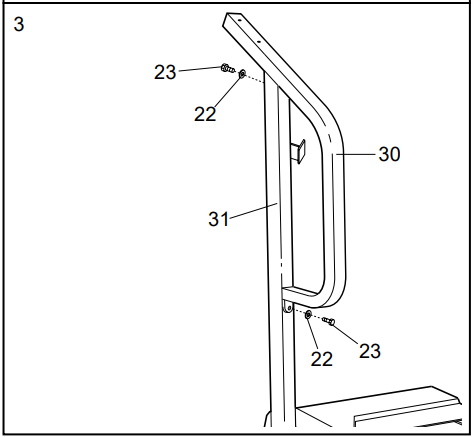
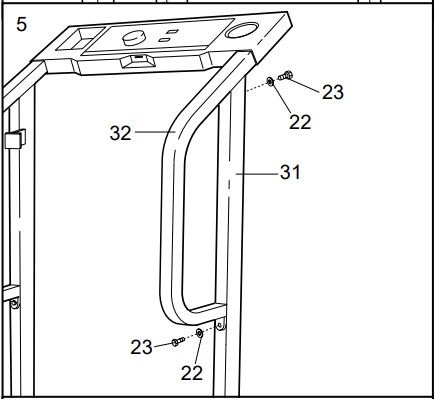
Position the Left rail (30) on the left Upright (31). Thread a 1/4” x 1” Bolt (23) with a 1/4” Washer (22) only two turns into the upper end of the left Upright and the Left Handrail. Do not tighten the Bolt yet.
Thread a 1/4” x 1” Bolt (23) with a 1/4” Washer (22) only two turns into the lower end of the Left Handrail (30) and the left Upright (31). Do not tighten the Bolt yet.
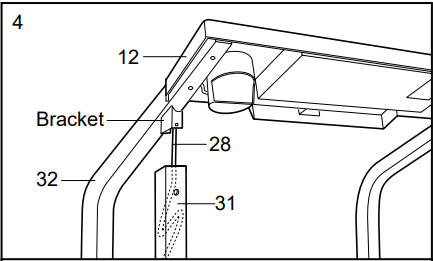
- With the help of a second person, hold the Console Base (12) and the Right Handrail (32) near the right Upright (31) as shown. Feed the excess Wire Harness (28) into the Handrail (32) and then insert it down the right Upright. Next, insert the bracket on the Right rail into the right upright. Be careful not to pinch the Wire Harness.

- Thread a 1/4” x 1” Bolt (23) with a 1/4” Washer (22) only two turns into the upper end of the right Upright (31) and the Right Handrail (32). Do not tighten the Bolt yet.
Thread a 1/4” x 1” Bolt (23) with a 1/4” Washer (22) only two turns into the lower end of the Right Handrail (32) and the right Upright (31). Do not tighten the Bolt yet.
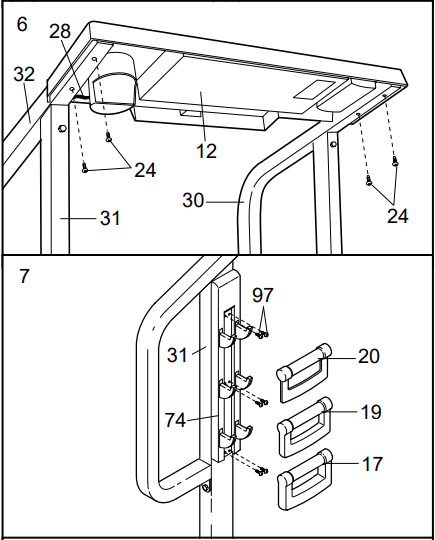
- Set the Console Base (12) on the Handrails (30, 32). Make sure that the Wire Harness (28) is out of the way as you loosely thread four 1 1/4” Screws (24) into the Handrails and the Console Base. Next, push the Wire Harness down the right Upright (31). It may be necessary to pull the Wire Harness out of the bottom of the right Upright.
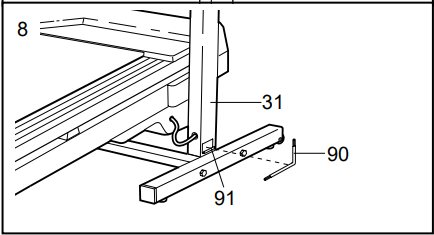
Tighten all parts used in steps 3 and 5. Then, tighten the 1 1/4” Screws (24) used in this step. - Remove the six Weight Rack Screws (97) from the right Upright (31). Attach a Weight Rack (74) to the right Upright with the Weight Rack Screws. Attach the other Weight Rack to the left Upright (not shown) in the same way.

Put the two 2-lb. Weights (20) on the upper hooks on the Weight Racks (74), the 3-lb. Weights (19) on the center hooks, and the 4-lb. Weights (17) on the lower hooks. - Remove the backing from the Wrench Clip (91). Press the Wrench Clip onto the base of the right Upright (31) in the indicated location. Press the Allen Wrench (90) into the Wrench Clip

- Make sure that all parts are tightened before you use the treadmill. To protect the floor or carpet, place a mat under the treadmill.
OPERATION AND ADJUSTMENT
THE PERFORMANT LUBETM WALKING BELT
Your treadmill features a walking belt coated with PERFORMANT LUBETM, a high-performance lubricant.
IMPORTANT: Never apply silicone spray or other substances to the walking belt or the walking platform. They will deteriorate the walking belt and cause excessive wear.
HOW TO PLUG IN THE POWER CORD
 DANGER: Improper connection of the equipment-grounding conductor can result in an increased risk of electric shock. Check with a qualified electrician or serviceman if you are in doubt as to whether the product is properly grounded. Do not modify the plug provided with the product—if it will not fit the outlet, have a proper outlet installed by a qualified electrician.
Your treadmill, like any other type of sophisticated electronic equipment, can be seriously damaged by sudden voltage changes in your home’s power. Voltage surges, spikes, and noise interference can result from weather conditions or from other appliances being turned on or off. To decrease the possibility of your treadmill being damaged, always use a surge protector (not included) with your treadmill.
Surge protectors are sold at most hardware stores and department stores. Use only a UL-listed surge protector, rated at 15 amps, with a 14-gauge cord of five feet or less in length.
This product must be grounded. If it should malfunction or break down, grounding provides a path of least resistance for electric current to reduce the risk of electric shock. This product is equipped with a cord having an equipment-grounding conductor and a grounding plug. Plug the power cord into a surge protector, and plug the surge protector into an appropriate outlet that is properly installed and grounded in accordance with all local codes and ordinances.
This product is for use on a nominal 120-volt circuit and has a grounding plug that looks like the plug illustrated in drawing 1 below. A temporary adapter that looks like the adapter illustrated in drawing 2 may be used to connect the surge protector to a 2-pole receptacle, as shown in drawing 2, if a properly grounded outlet is not available.
The temporary adapter should be used only until a properly grounded outlet (drawing 1) can be installed by a qualified electrician.
The green-colored rigid ear, lug, or the like extending from the adapter must be connected to a permanent ground such as a properly grounded outlet box cover. Whenever the adapter is used it must be held in place by a metal screw. Some 2-pole receptacle outlet box covers are not grounded. Contact a qualified electrician to determine if the outlet box cover is grounded before using an adapter. Important: The treadmill is not compatible with GFCI-equipped outlets.
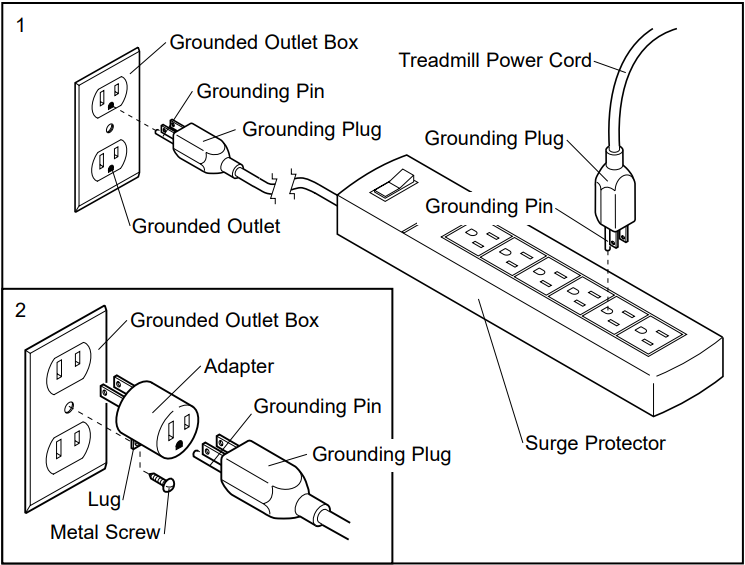
DIAGRAM OF THE CONSOLE
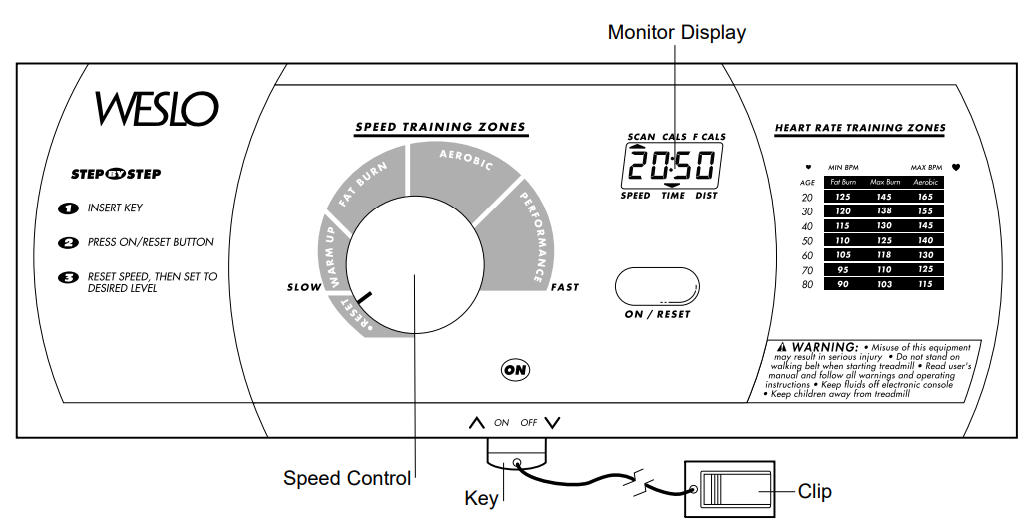
CAUTION: Before operating the console, read the following precautions.
- Do not stand on the walking belt when turning on the power.
- Always wear the clip (see the drawing above) while operating the treadmill. When the key is removed from the console, the walking belt will stop.
- Adjust the speed in small increments.
- The training zones marked above the speed control are general guidelines only. See page 14 for more information.
- To reduce the possibility of electric shock, keep the console dry. Avoid spilling liquids on the console and use only a sealable water bottle.
BATTERY INSTALLATION
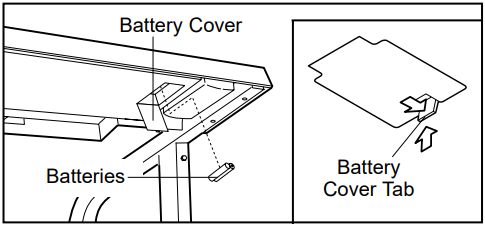
The console requires two “AA” batteries (not included). Alkaline batteries are recommended. To install batteries, open the battery cover as shown below. Press two batteries into the battery compartment, with the negative (–) ends of the batteries touching the springs. Close the battery cover, push up on the tab, and then push the tab forward as shown. Be sure that the tab locks into place.
STEP BY STEP CONSOLE OPERATION
Before operating the console, make sure that the power cord is properly plugged in. (See HOW TO PLUG IN THE POWER CORD on page 7.) If there is a thin sheet of clear plastic on the console, remove it.
Next, step onto the foot rails of the treadmill. Find the clip attached to the key (see the drawing above) and slide the clip onto your waistband.
Follow the steps on page 9 to operate the console.
- Insert the key fully into the power switch.
Inserting the key will not turn on the display. The display will turn on when the ON/RESET button is pressed or when the walking belt is started. Note: If you just installed batteries, the display will already be on.
- Reset the console and start the walking belt.
Turn the speed control to the RESET position. Note: Each time the walking belt is stopped, the speed control must be turned to the RESET position before the walking belt can be restarted. Next, slowly turn the speed control until the walking belt begins to move at a slow speed. Carefully step onto the walking belt and begin exercising. Change the speed of the walking belt as desired by turning the speed control.
To stop the walking belt, step onto the foot rails and turn the speed control to the RESET position. - Follow your progress with the monitor modes.
When the power is turned on, the console will automatically scan through five modes. A flashing mode indicator will show which mode is currently displayed. The modes are described below.
- Speed—This mode shows your speed, in miles per hour.
- Time—This mode shows the elapsed time. Note: If you stop exercising for ten seconds or longer, the time mode will pause.
- Distance (DIST)—This mode shows the total number of miles you have walked or run.
- Fat Calories (F CALS)—This mode shows the approximate number of fat calories you have burned. (See FAT BURNING on page 14.)
- Calories (CALS)—This mode shows the approximate number of calories you have burned.
If desired, reset the display by pressing the ON/RESET button.
- When you are finished exercising, stop the walking belt and remove the key.
Step onto the foot rails, stop the walking belt, and remove the key from the console. The displays will turn off about six minutes after the key is removed. Note: The displays will automatically turn off to conserve battery when the walking belt is stopped and the ON/RESET button is not pressed for six minutes.
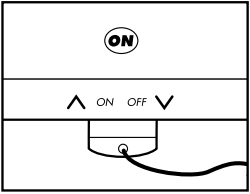
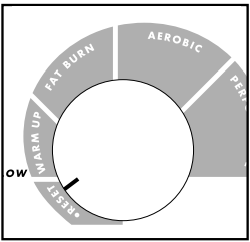 Next, slowly turn the speed control until the walking belt begins to move at a slow speed. Carefully step onto the walking belt and begin exercising. Change the speed of the walking belt as desired by turning the speed control.
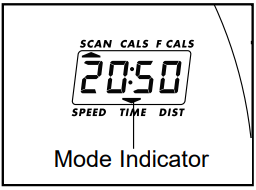 The modes are described below.
HOW TO CHANGE THE INCLINE OF THE TREADMILL
To vary the intensity of your exercise, the incline of the treadmill can be changed. There are three different incline levels. Before changing the incline, first remove the key and unplug the power cord. Next, fold the treadmill to the storage position (see HOW TO FOLD THE TREADMILL FOR STORAGE on page 11).
To change the incline, remove the incline pin from the right incline leg as shown below.
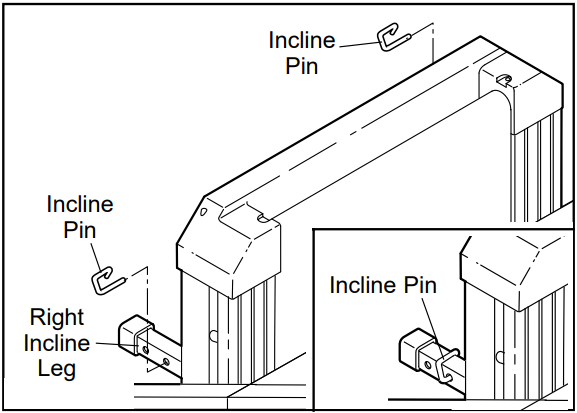
Adjust the incline leg to the desired height and fully reinsert the incline pin. Make sure that the incline pin is in the “locked” position shown in the inset drawing.
Adjust the left inclined leg in the same manner. Make sure that both inclined pins are inserted from the direction shown.
CAUTION: Before using the treadmill, make sure that both incline pins are fully inserted at the same height. Do not use the treadmill with the incline pins removed. After you have adjusted the incline legs, lower the treadmill (see HOW TO LOWER THE TREADMILL FOR USE on pages 11 and 12).
HOW TO FOLD AND MOVE THE TREADMILL
HOW TO FOLD THE TREADMILL FOR STORAGE
Before folding the treadmill, unplug the power cord.
Caution: You must be able to safely lift 45 pounds (20 kg) to raise, lower, or move the treadmill.
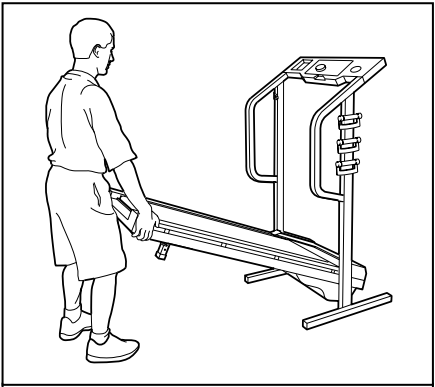
- Hold the treadmill with your hands in the locations shown at the right. To decrease the possibility of injury, bend your legs and keep your back straight. As you raise the treadmill, make sure to lift with your legs rather than your back. Raise the treadmill about halfway to the vertical position.

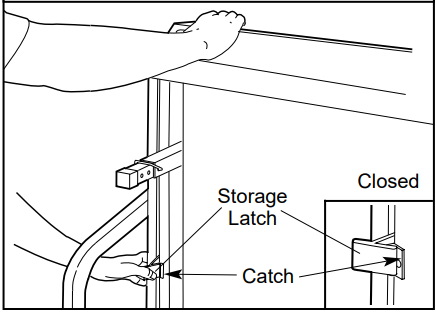
- Move your right hand to the position shown and hold the treadmill firmly. Raise the treadmill until the storage latch closes over the catch. Make sure that the storage latch is fully engaged over the catch.
To protect the floor or carpet from damage, place a mat under the treadmill. Keep the treadmill out of direct sunlight. Do not leave the treadmill in the storage position in temperatures above 85° Fahrenheit.
HOW TO MOVE THE TREADMILL
Before moving the treadmill, convert the treadmill to the storage position as described above. Make sure that the storage latch is locked fully over the catch.
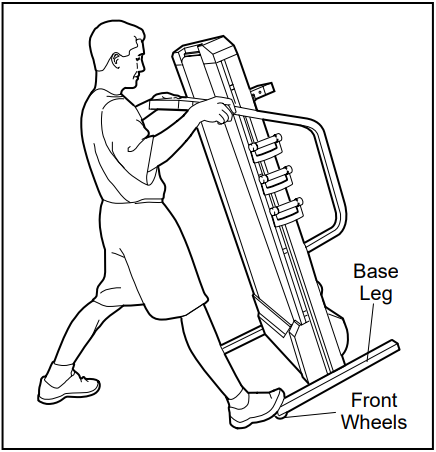
- Hold the upper ends of the handrails. Place one foot on one of the front wheels as shown.
- Tilt the treadmill back until it rolls freely on the front wheels. Carefully move the treadmill to the desired location. To reduce the risk of injury, use extreme caution while moving the treadmill. Do not attempt to move the treadmill over an uneven surface.
- Place one foot on the base, and carefully lower the treadmill until it is resting in the storage position.
HOW TO LOWER THE TREADMILL FOR USE
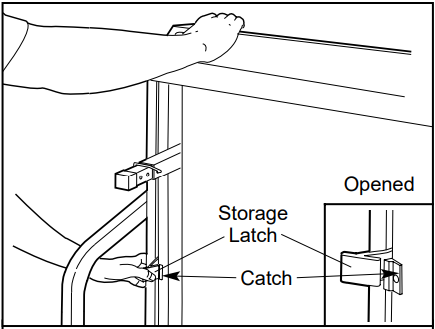
- Hold the upper end of the treadmill with your right hand as shown. Using your left thumb, press the storage latch and hold it. Pivot the treadmill until the frame and foot rail are past the storage latch.

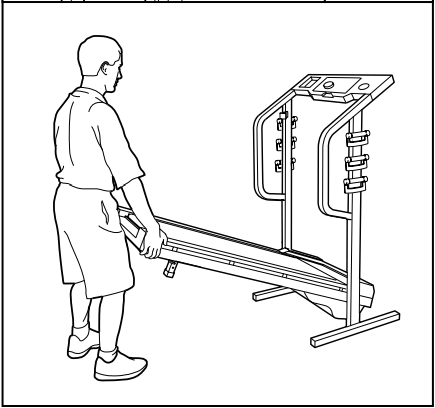
- Hold the treadmill firmly with both hands, and lower the treadmill to the floor. To decrease the possibility of injury, bend your legs and keep your back straight.
MAINTENANCE AND TROUBLESHOOTING
Most treadmill problems can be solved by following the steps below. Find the symptom that applies, and follow the steps listed. If further assistance is needed, please call our Customer Service Department toll-free at 1-800-999-3756, Monday through Friday, 6 a.m. until 6 p.m. Mountain Time (excluding holidays).
PROBLEM: The power does not turn on
SOLUTION
- Make sure that the power cord is plugged into a surge protector, and that the surge protector is plugged into a properly grounded outlet. (See HOW TO PLUG IN THE POWER CORD on page 7.) Use only a UL-listed surge protector, rated at 15 amps, with a 14-gauge cord of five feet or less in length. Important: The treadmill is not compatible with GFCI-equipped outlets.
- After the power cord has been plugged in, make sure that the key is fully inserted into the console.
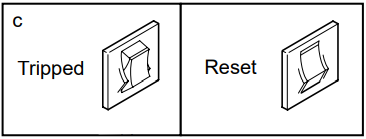
- Check the circuit breaker located on the treadmill frame near the power cord. If the switch protrudes as shown, the circuit breaker has tripped. To reset the circuit breaker, wait for five minutes and then press the switch back in.

PROBLEM: The power turns off during use
SOLUTION
- Check the circuit breaker located on the treadmill frame near the power cord (see the drawing above). If the circuit breaker has tripped, wait for five minutes and then press the switch back in.
- Make sure that the power cord is plugged in.
- Remove the key from the console. Reinsert the key fully into the console.
- If the treadmill still will not run, please call our Customer Service Department toll-free.
PROBLEM: The displays of the console do not function properly
SOLUTION
- Check the batteries in the console. If the batteries need to be replaced, see BATTERY REPLACEMENT on page 8. Most problems are the result of drained batteries.
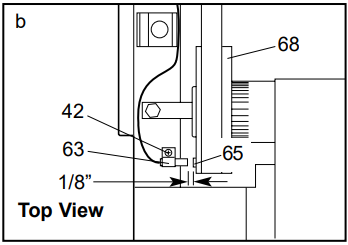
- Remove the key from the console and UNPLUG THE POWER CORD. Remove the screws from the hood. Carefully remove the hood. Locate the Reed Switch (63) and the Magnet (65) on the left side of the Pulley (68). Turn the Pulley until the Magnet is aligned with the Reed Switch. Make sure that the gap between the Magnet and the Reed Switch is about 1/8”. If necessary, loosen the Screw (42) and move the Reed Switch slightly. Retighten the Screw. Re-attach the hood, and run the treadmill for a few minutes to check for a correct speed reading.

PROBLEM: The walking belt is off-center or slips when walked on
SOLUTION
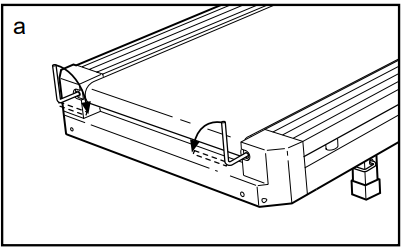
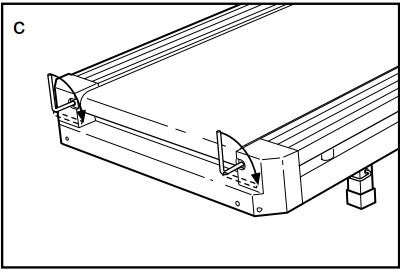
- a. If the walking belt has shifted to the left, first remove the key and UNPLUG THE POWER CORD. Using the Allen wrench, turn the left rear roller adjustment bolt clockwise and the right bolt counterclockwise, 1/4 of a turn each. Be careful not to overtighten the walking belt. Plug in the power cord, insert the key, and run the treadmill for a few minutes. Repeat until the walking belt is centered.

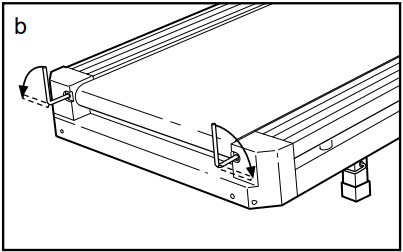
- b. If the walking belt has shifted to the right, first remove the key and UNPLUG THE POWER CORD. Using theAllenn wrench, turn the left rear roller adjustment bolt counterclockwise, and the right bolt clockwise, 1/4 of a turn each. Be careful not to overtighten the walking belt. Plug in the power cord, insert the key, and run the treadmill for a few minutes. Repeat until the walking belt is centered.

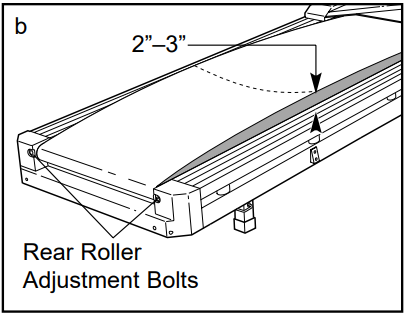
- c. If the walking belt slips when walked on, first remove the key and UNPLUG THE POWER CORD. Using theAllenn wrench, turn both rear roller adjustment bolts clockwise, 1/4 of a turn. When the walking belt is correctly tightened, you should be able to lift each side of the walking belt 2 to 3 inches off the walking platform. Be careful to keep the walking belt centered. Plug in the power cord, insert the key, and run the treadmill for a few minutes. Repeat until the walking belt is properly tightened.

PROBLEM: The walking belt slows when walked on
SOLUTION
- a. Use only a UL-listed surge protector, rated at 15 amps, with a 14-gauge cord of five feet or less in length.
- b. If the walking belt is overtightened, treadmill performance may decrease, and the walking belt may be permanently damaged. Remove the key and UNPLUG THE POWER CORD. Using the fallen wrench, turn both rear roller adjustment bolts counterclockwise, 1/4 of a turn. When the walking belt is properly tightened, you should be able to lift each side of the walking belt 2 to 3 inches off the walking platform. Be careful to keep the walking belt centered. Plug in the power cord, insert the key, and run the treadmill for a few minutes. Repeat until the walking belt is properly tightened.

- c. If the walking belt still slows when walked on, please call our toll-free Customer Service Department.
ORDERING REPLACEMENT PARTS
To order replacement parts, simply call our Customer Service Department toll-free at 1-800-999-3756, Monday through Friday, 6 a.m. until 6 p.m. Mountain Time (excluding holidays). To help us assist you, please be prepared to give the following information when calling:
- The MODEL NUMBER of the product (WLTL41584)
- The NAME of the product (WESLO CADENCE® DL15 treadmill)
- The SERIAL NUMBER of the product (see the front cover of this manual)
- The KEY NUMBER and DESCRIPTION of the desired part(s) (see the PART LIST and the EXPLODED DRAWING in the center of this manual).
WESLO is a registered trademark of ICON Health & Fitness, Inc.
LIMITED WARRANTY
ICON Health & Fitness, Inc. (ICON) warrants this product to be free from defects in workmanship and material, under normal use and service conditions, for ninety (90) days from the date of purchase. This warranty extends only to the original purchaser. ICON’s obligation under this warranty is limited to replacing or repairing, at ICON’s option, the product through one of its authorized service centers.
All repairs for which warranty claims are made must be pre-authorized by ICON. This warranty does not extend to any product or damage to a product caused by or attributable to freight damage, abuse, misuse, improper or abnormal usage, or repairs not provided by an ICON authorized service center, products used for commercial or rental purposes, or products used as store display models. No other warranty beyond that specifically set forth above is authorized by ICON.
ICON is not responsible or liable for indirect, special or consequential damages arising out of or in connection with the use or performance of the product or damages concerning any economic loss, loss of property, loss of revenues or profits, loss of enjoyment or use, costs of removal, installation or other consequential damages of whatsoever nature. Some states do not allow the exclusion or limitation of incidental or consequential damages. Accordingly, the above limitation may not apply to you.
The warranty extended hereunder is instead of any other warranties and any implied warranties of merchantability or fitness for a particular purpose are limited in their scope and duration to the terms set forth herein. Some states do not allow limitations on how long an implied warranty lasts. Accordingly, the above limitation may not apply to you.
This warranty gives you specific legal rights. You may also have other rights that vary from state to state.
ICON HEALTH & FITNESS, INC., 1500 S. 1000 W., LOGAN, UT 84321-9813
For more manuals by Weslo, visit ManualsLibraryy
Weslo Cadence DL15 Treadmill- FAQs
How do I start the Weslo Cadence DL15 treadmill?
Press the Start button or the speed increase (+) button to begin. The treadmill will automatically adjust to the first speed setting. Hold the handrails and start walking.
What is the weight limit for the Weslo Cadence treadmill?
Most Weslo treadmills support up to 250–300 lbs. Check your model’s manual for exact specifications.
How do I reset my Weslo treadmill?
Option 1: Flip the power switch off, wait 5 minutes, then turn it back on.
Option 2: Unplug the treadmill from the surge protector, then plug it back in.
Does the Weslo Cadence DL15 have an incline feature?
Some models (like the Cadence G 5.9i) have a manual 2-position incline (1.5%–6.1%). Adjust it by folding the rear legs under the treadmill.
Can I run uphill on this treadmill?
Yes, but the incline is limited (varies by model). For intense hill training, consider a treadmill with higher incline options (up to 15%).
How do I check if my treadmill speed is accurate?
Use a fitness tracker or running app to compare distance.
Manually measure belt movement over time.
If inconsistent, calibrate the treadmill (see manual).
How do I unlock the treadmill if it’s not starting?
Ensure the safety key is properly inserted.
Check if the power switch is ON.
Verify the treadmill is plugged directly into an outlet (not a power strip).
What is the warranty on a Weslo treadmill?
Most Weslo treadmills come with:
1-year parts & labor warranty (varies by model).
Extended coverage may be available for premium models.
How do I maintain my treadmill?
Lubricate the belt every 3 months (or every 130 miles).
Clean the deck regularly to prevent dust buildup.
Check belt tension to avoid slipping or wear.
Why won’t my treadmill turn on?
Possible fixes:
Check power supply (outlet/surge protector).
Reinsert the safety key.
Inspect the motor & belt alignment.