
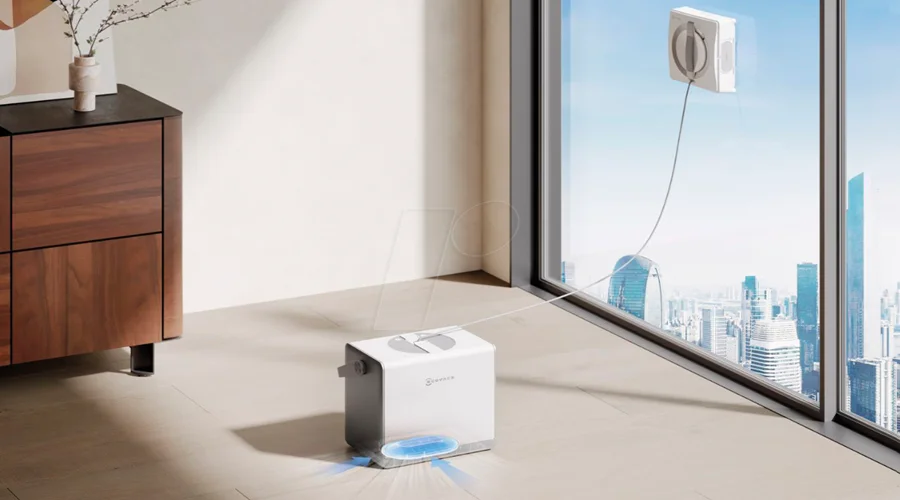

WINBOT W2 OMNI Window Cleaning Robot
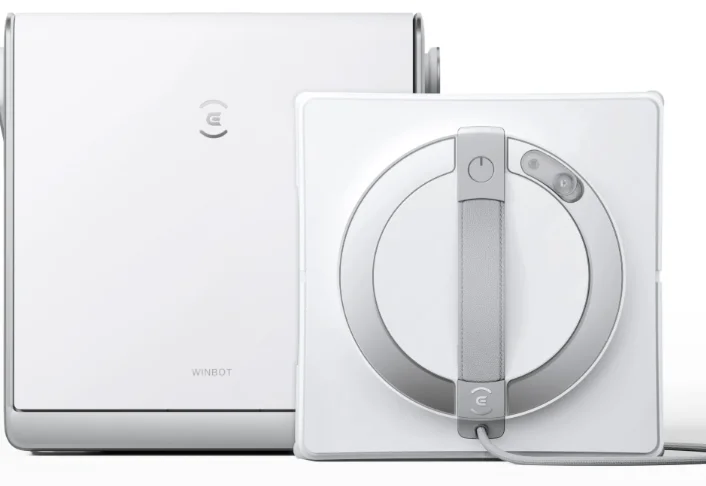
Important Safety Instructions
When using an electrical appliance, basic precautions should always be followed, including the following:
READ ALL INSTRUCTIONS BEFORE USING THIS APPLIANCE. SAVE THESE INSTRUCTIONS
- This appliance can be used by persons with reduced physical, sensory or mental capabilities or lack of experience and knowledge if they have been given supervision or instruction concerning use of the appliance in a safe way and understand the hazards involved. Children shall not play with the appliance. The appliance is not to be used if it has been dropped, if there are visible signs of damage or if it is leaking. Keep the appliance out of reach of children when it is energized.
- Do not use and charge the Appliance in extremely hot or cold environments (below 0˚C/32˚F or above 40˚C/104˚F, above 85% humidity), or it may affect battery life span.
- The Appliance can be used to clean exterior windows if it is properly tethered to a safe position with the Carabiner, winds are calm, and it is not raining or snowing.
- Before use, please use the Carabiner to lock the safety tether to a strong indoor railing, and make sure WINBOT is securely attached to it.
- Do not leave the Appliance unattended when using it. To prevent bodily injury or property damage caused by accidental falling of the Appliance, please make sure there are no people, animals, or valuable, fragile objects under the working area of WINBOT.
- Do not use the Appliance in whole gale storms and force-10 winds, or in areas where the altitude exceeds 2000 meters (6562 feet).
- Do not leave the Appliance unattended when it is plugged in.
- For household use ONLY (including exterior window). Do not use the Appliance in commercial or industrial environments.
- Do not use on broken or uneven glass, such as glass with static cling stickers, advertising posters, or raised patterns, so as to prevent glass breaking or appliances falling. Do not use on surfaces with gaps, such as a piece of glass with gaps or holes, or two pieces of adjacent, frameless glass with a gap between them, so as to prevent the Appliance from falling due to poor attachment.
- Only use accessories recommended or supplied by the manufacturer. Only use the Power Adapter supplied by the manufacturer.
- Please make sure your power supply voltage matches the power voltage marked on the Power Adapter.
- Do not use the Appliance on a framed glass with a frame smaller than 5 mm (0.2 in).
- Do not use on glass less than 3 mm (0.12 in) thick or mirrors less than 4 mm (0.16 in) thick.
- Do not use on glass or mirrors with a handle height of 70~105 mm (2.76~ 4.13 in).
- Do not use the Appliance on greasy windows.
- When used in a high-humidity environment, the cleaning performance will be affected.
- Store the Appliance away from heat and flammable materials.
- In rainy weather, do not use the Appliance on the exterior window to avoid the risk of the appliance’s damage or falling.
- Do not use the Appliance if it does not firmly attach to the glass or has visible signs of damage.
- To reduce the risk of electrical shock, do not put the Appliance in water or other liquids. Do not place or store the appliance where it can fall or be pulled into a tub or sink.
- Do not touch the power plug with wet hands.
- When charging the Appliance, do not place it on other electrical appliances and keep it away from fire and liquid.
- Take care not to damage the power cord. Do not pull on or carry the Appliance by the power cord, use the power cord as a handle, close a window on the power cord, or put heavy weights on the power cord. Keep the power cord away from hot surfaces.
- Do not use with a damaged power cord or receptacle. Do not use the Appliance if it is not working properly, has been dropped, damaged, or come in contact with water. It must be repaired by the manufacturer or its service agent to avoid a hazard.
- If the supply cord is damaged, it must be replaced by the manufacturer or its service agent to avoid a hazard.
- The plug must be removed from the receptacle before cleaning or maintaining the Appliance. Do not unplug the Power Adapter by pulling on the power cord.
- The Safety Battery must be replaced by the manufacturer or its service agent to avoid a hazard.
- The Safety Battery must be removed and discarded according to local laws and regulations before disposal of the Appliance.
- The Appliance must be disconnected from the receptacle before removing the battery for disposal of the Appliance.
- Please dispose of used batteries according to
local laws and regulations. - Do not incinerate the Appliance even if it is severely damaged. The battery can explode in a fire.
- The Appliance must be used in accordance with the directions in this Instruction Manual. The company cannot be held liable or responsible for any damages or injuries caused by improper use.
- WARNING: For the purposes of recharging the battery, only use the detachable supply unit GM65-240275-2D provided with this Appliance.
- The robot contains batteries that are only replaceable by skilled persons.
- The plug and the Power Adapter must be used indoors.
- If the vacuum glass, which WINBOT is working on, is leaking, remove WINBOT immediately after cleaning is completed.
- Before cleaning, please observe the area to attach WINBOT for any small particles. If there are any, please remove them or switch to a particle-free area to avoid scratching the glass.
- Clean the Mopping Pad in time and make sure that any small particles on it are completely removed to avoid scratching the glass.
To satisfy RF exposure requirements, a separation distance of 20 cm or more should be maintained between this device and persons during device operation. To ensure compliance, operations at closer than this distance is not recommended. The antenna used for this transmitter must not be co-located in conjunction with any other antenna or transmitter.
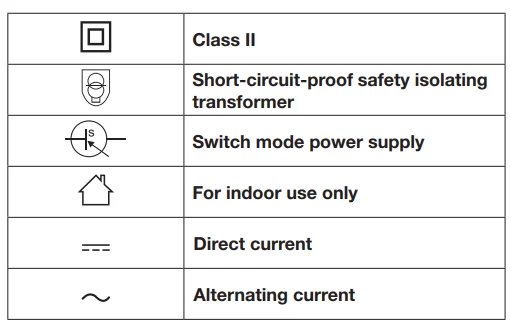
For EU Countries
For EU Declaration of Conformity information, visit https://www.ecovacs.com/global/compliance
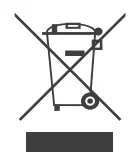
Correct Disposal of this Product
This marking indicates that this product should not be disposed of with other household waste throughout the EU. To prevent possible harm to the environment or human health from uncontrolled waste disposal, recycle it responsibly to promote the sustainable reuse of material resources. To recycle your used device, please use the return and collection systems or contact the retailer where the product was purchased. They can safely recycle this product.
Product Diagram
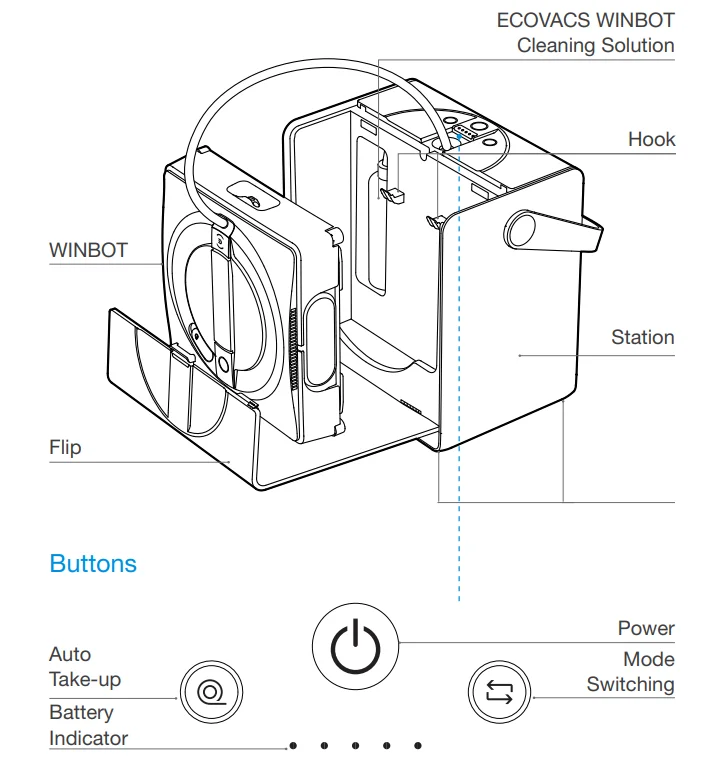
Note: Figures and illustrations are for reference only and may differ from actual product appearance. Product design and specifications are subject to changes without notice. 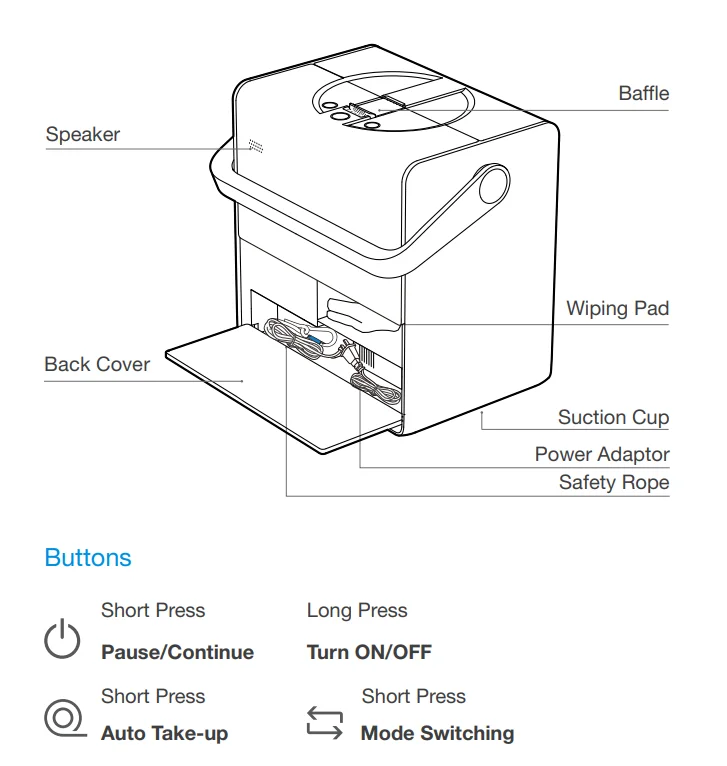
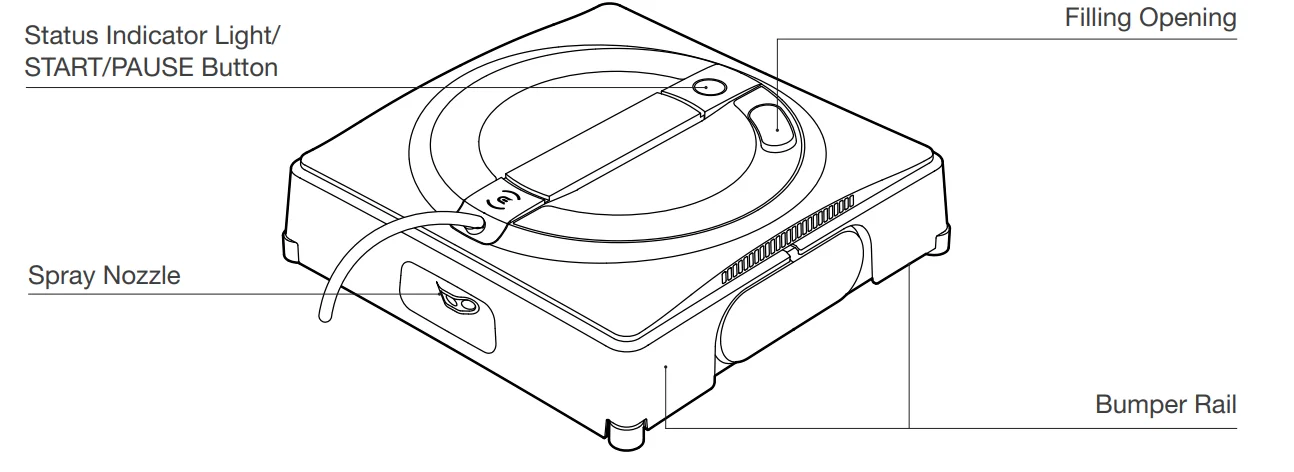
Product Diagram
WINBOT
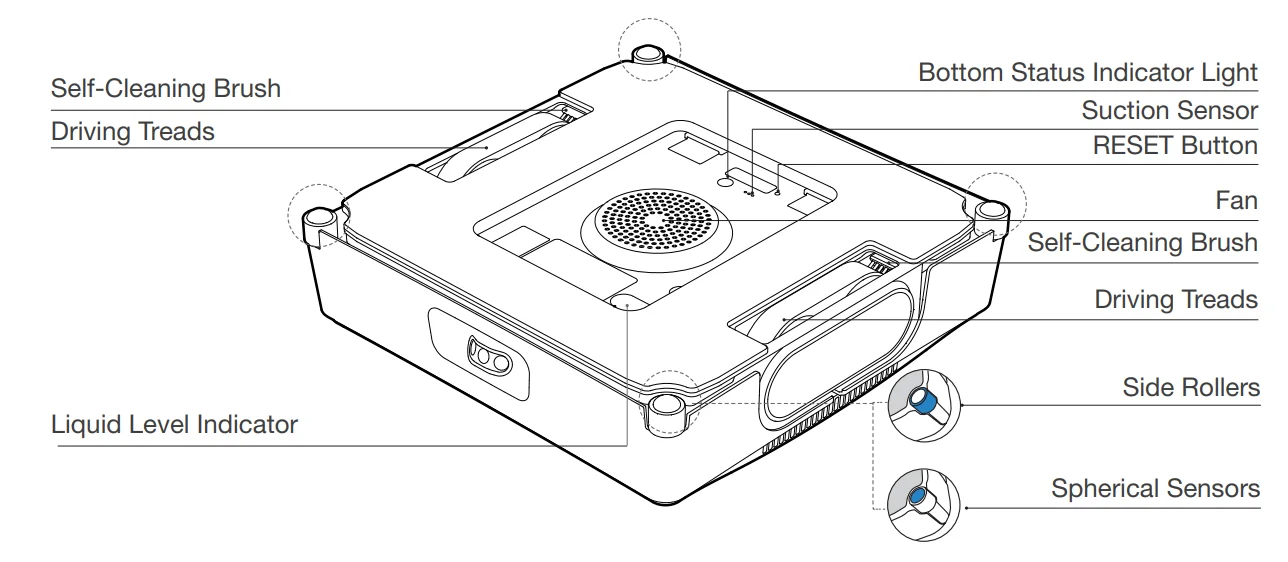
Bottom View
Quick Start
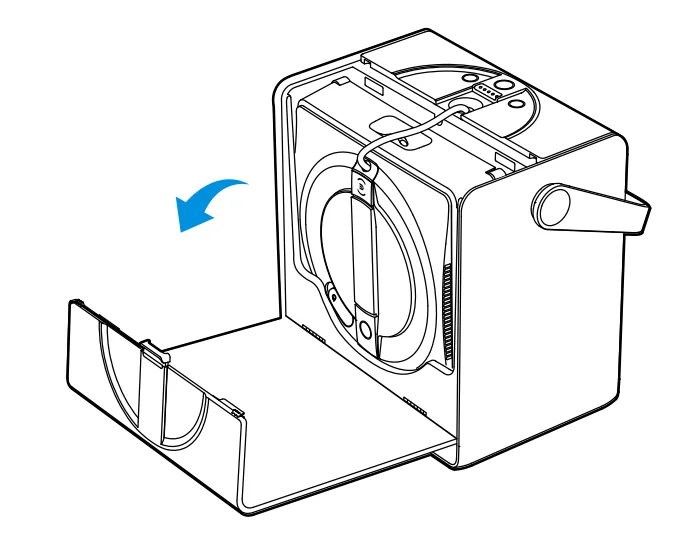
- Open the Flip as shown in the picture.

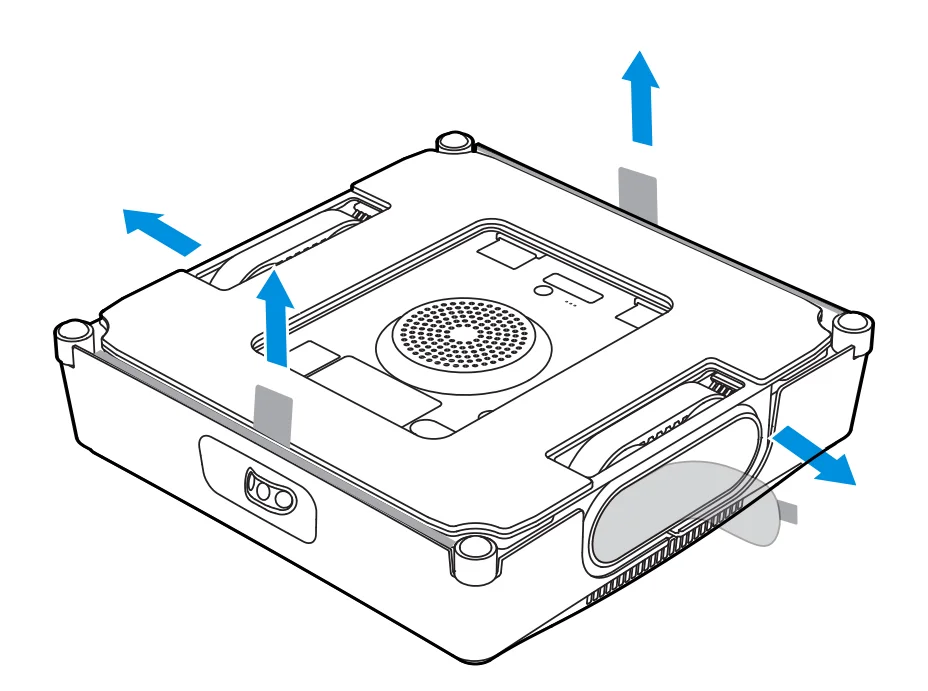
- Take WINBOT out and remove all protective materials.

- Long press Power button for 2 seconds to turn on Station and WINBOT.
 *The initial charge can sustain WINBOT for approximately 40 minutes of operation in the default mode.
 - Add ECOVACS WINBOT cleaning solution to the Water Tank.
 *Do not add too much cleaning solution to overflow the Water Tank.
*Do not use cleaning solutions from other manufacturers. - Wet and wring out the Wiping Pad and place it flat on the velcro at the bottom of WINBOT. Pay attention to align the narrow and wide side accordingly.

- Make sure to place Station on a flat, seamless surface.

- Long press START button for 2 seconds to start the fan. Place the bottom side of WINBOT (the side with Wiping Pad) against the window; WINBOT will auto-attach itself and start cleaning.
 *Before cleaning, please observe the area to attach WINBOT for any small particles. If there are any, please remove them or switch to a particle-free area to avoid scratching the glass.
*Clean the Wiping Pad in time and make sure that any small particles on it are completely removed to avoid scratching the glass. - When cleaning is completed, WINBOT automatically returns to the Initial Spot and waits to be removed. At this point, long press START button for 2 seconds to stop the fan. Then, take WINBOT off according to voice prompts.
 *If the vacuum glass, which WINBOT is working on, is leaking, remove WINBOT immediately after cleaning is completed.
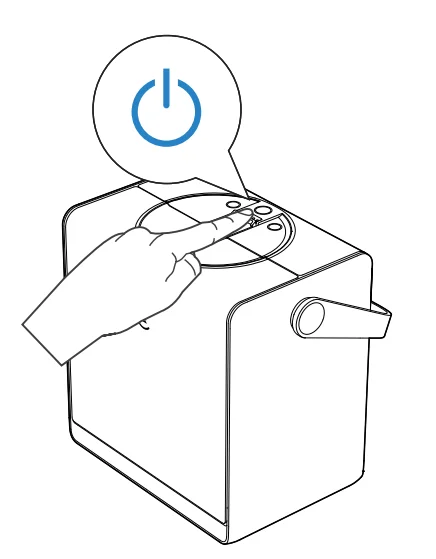 *The initial charge can sustain WINBOT for approximately 40 minutes of operation in the default mode.
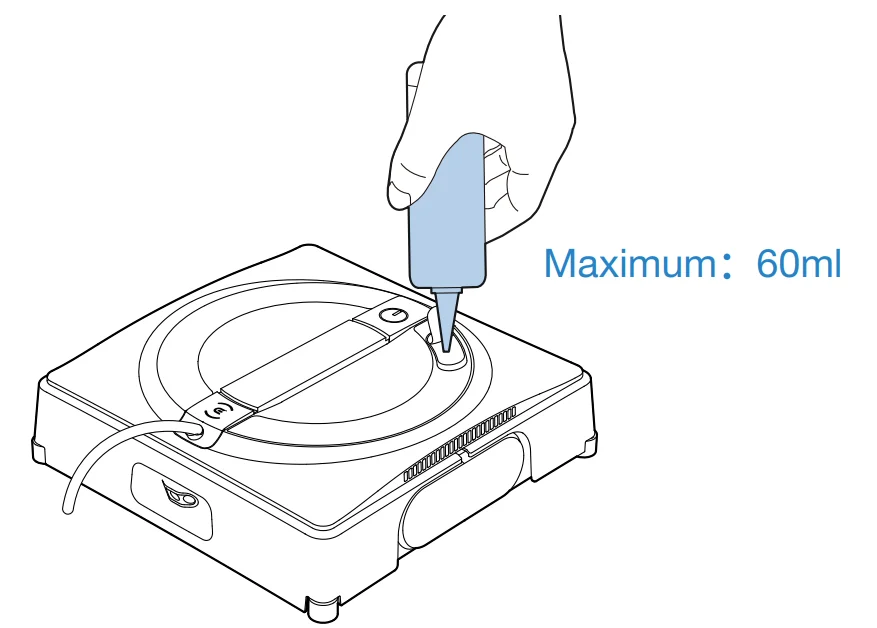 *Do not add too much cleaning solution to overflow the Water Tank.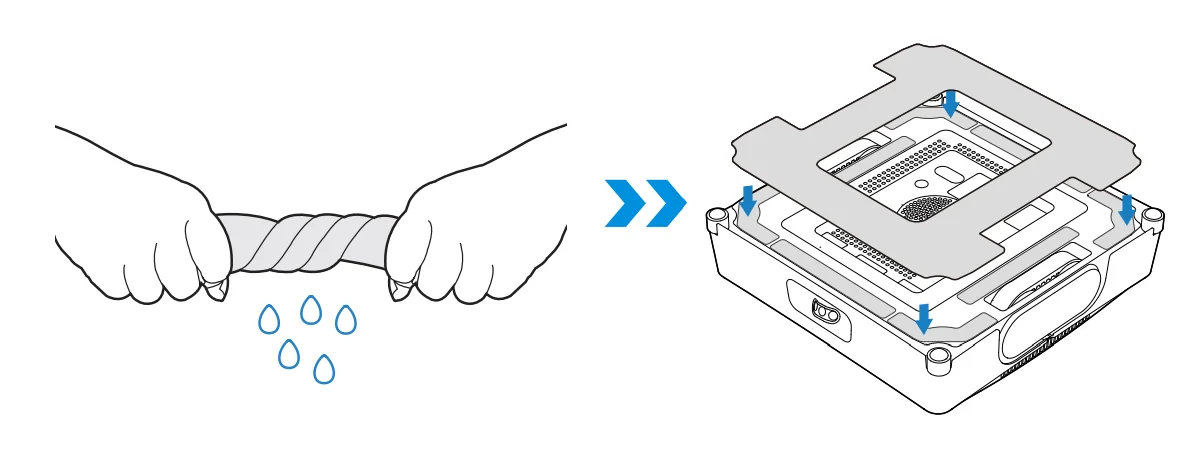
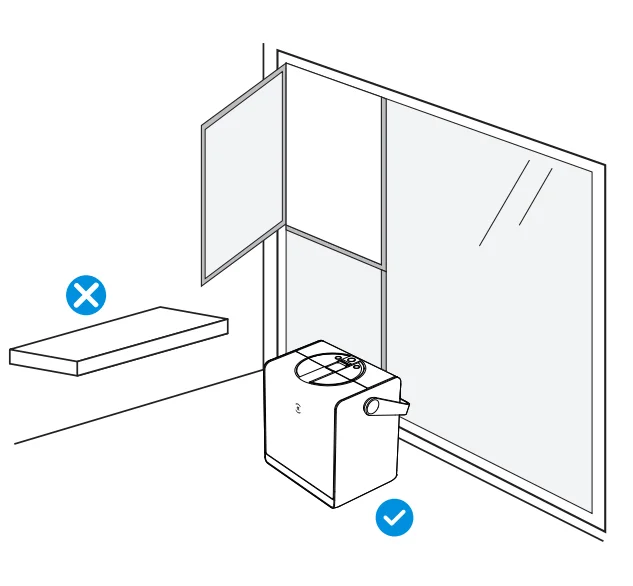
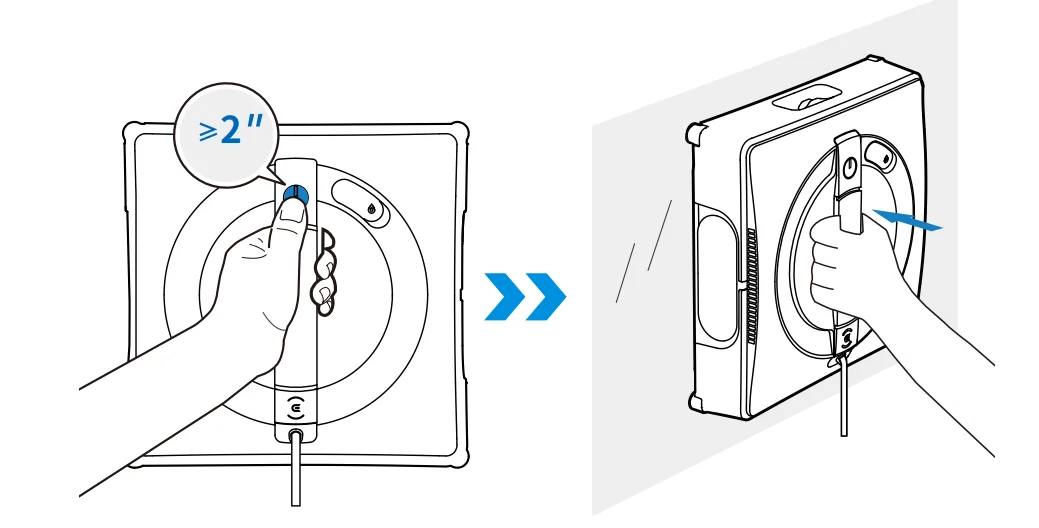 *Before cleaning, please observe the area to attach WINBOT for any small particles. If there are any, please remove them or switch to a particle-free area to avoid scratching the glass.
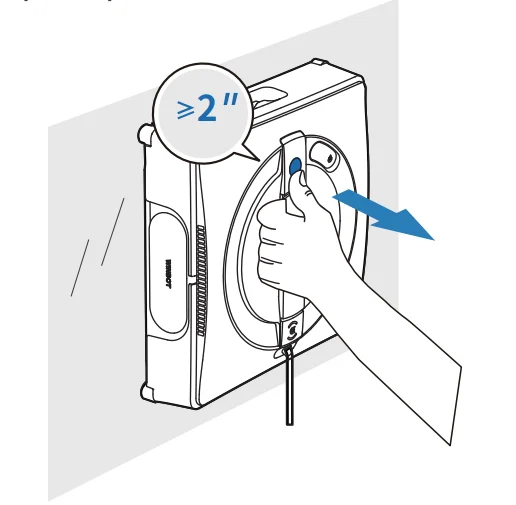 *If the vacuum glass, which WINBOT is working on, is leaking, remove WINBOT immediately after cleaning is completed.
Technical Specifications
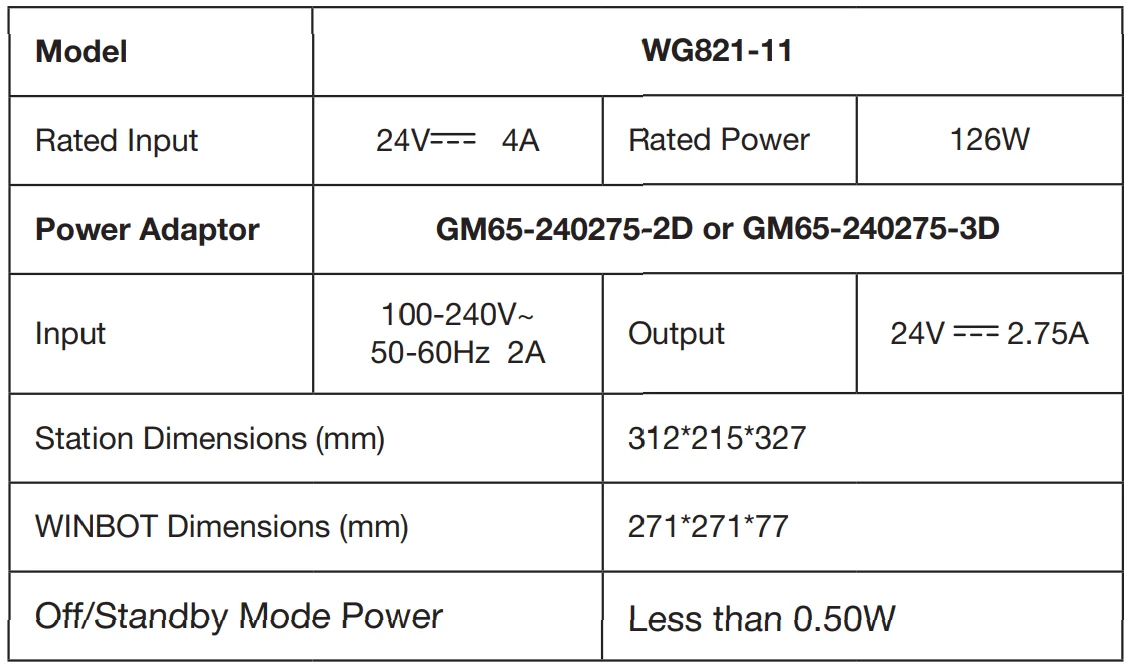
The output power of the wireless module is less than 100 mW.
Note: Technical and design specifications may be changed for continuous product improvement.
Scan the QR code for more information.

For more manuals by ECOVACS, visit ManualsLibraryy
WINBOT W2 OMNI Window Cleaning Robot-FAQs
How do I set up the WINBOT W2 OMNI?
First, plug in the device and attach the cleaning pad. Fill the water tank with the recommended cleaning solution. Place the robot on the glass and power it on. Use the ECOVACS HOME app to select a cleaning mode and start the process.
Does the WINBOT W2 OMNI really clean windows effectively?
Yes, robot window cleaners work well on most flat glass surfaces. The W2 OMNI uses strong suction and a smart cleaning path to remove dust, smudges, and light stains efficiently.
What is the difference between the WINBOT W2 OMNI and W2 Pro OMNI?
The W2 OMNI requires a power cable while operating. The Pro OMNI version includes an internal battery for cordless use and offers higher suction power with enhanced spray performance.
How long is the power cord on the W2 OMNI?
The DC cord connecting the adapter to the robot is approximately 5.5 meters (18 feet), while the AC power cord measures around 1.8 meters (6 feet).
Why is my WINBOT not spraying water?
Make sure Auto Spray is enabled in the app and that the water tank contains enough cleaning solution. Low water levels or empty tanks may prevent spraying.
How long does it take to clean a window?
Cleaning time depends on window size, but a large standard window typically takes around 10 minutes per side.
How do I know when the WINBOT is fully charged?
When charging, a blinking blue indicator light appears. Once fully charged, the indicator turns off and the robot enters sleep mode.
How do I update the firmware on the WINBOT W2 OMNI?
Open the ECOVACS HOME app, go to Settings, and select Firmware Upgrade. Follow the on-screen instructions to complete the update.
How noisy is the WINBOT W2 OMNI?
The robot operates at about 63 dB, similar to the sound of a running refrigerator. It also provides voice notifications during operation.
Can WINBOT clean exterior windows?
Yes, it can clean outside windows as long as it is securely attached to flat glass surfaces. Always use the safety tether for added protection.