
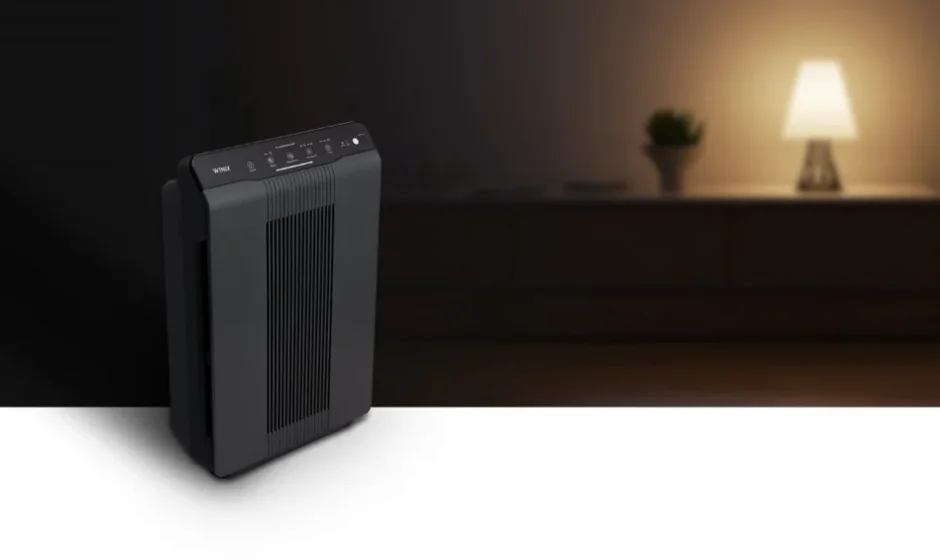

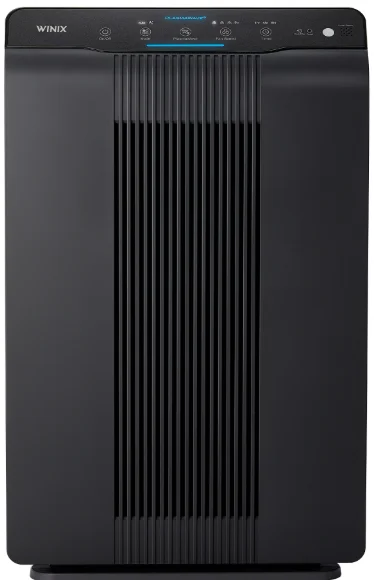
Winix 6300 True HEPA Air Cleaner
SAFETY INSTRUCTIONS
IMPORTANT CAUTIONS FOR USING YOUR AIR CLEANER
WARNING: Follow the instructions in this manual to reduce the risk of electric shock, short circuit, and/or fire:
- Do not repair or modify the unit unless specifically recommended in this manual. All other repairs should be completed by a qualified technician.
- The plug for this unit is polarized with one blade wider than the other. Do not force the plug into an electrical outlet. Do not alter the plug in any way. If the plug does not fit into the outlet, reverse the plug. If it still does not fit, contact a qualified technician to install a proper outlet.
- Do not use if the power cord or plug is damaged or the connection to the wall outlet is loose.
- Use AC 120V only.
- Do not damage, break, forcefully bend, pull, twist, bundle, coat, pinch, or place heavy objects on the power cord
- Periodically, remove dust from the power plug. This will reduce the chance that humidity will accumulate, which increases the risk of electric shock.
- If the power plug is damaged, it must be replaced by the manufacturer or a qualified technician.
- Remove the power plug from the outlet before cleaning the unit. When removing the power plug, grasp it by holding the plug itself; never hold the cord.
- Remove the power plug from the outlet when the unit is not in use.
- Do not handle the power plug with wet hands.
- Do not operate the unit when using indoor smoke-generating insecticides.
- Do not clean the unit with benzene or paint thinner. Do not spray insecticides on the unit.
- Do not use the unit where it is humid or where the unit may get wet, such as in a bathroom.
- Do not insert fingers or foreign objects into the air intake or outlet.
- Do not use the unit near flammable gases. Do not use near cigarettes, incense, or other spark-creating items.
- Unit will not remove carbon monoxide emitted from heating appliances or other sources.
IMPORTANT INSTRUCTIONS FOR USING YOUR AIR CLEANER
- Do not block the intake or outlet vents.
- Do not use near hot objects, such as a stove. Do not use where the unit may come into contact with steam.
- Do not use the unit on its side.
- Keep away from products that generate oily residue, such as a deep fryer.
- Do not use detergent to clean the unit.
- Do not operate without a filter.
- Do not wash and reuse the True HEPA Filter.
PACKAGE CONTENTS
- Winix PlasmaWave™ Air Cleaner/True HEPA and 1 Carbon Filter
- 3 replacement Carbon Filters
- Remote Control (1 unit)
- Batteries (2 AA batteries)
- Use and Care Guide
AIR CLEANER FEATURES
Ultra-Quiet Operation
This Winix air cleaner has a multispeed fan with ultra-quiet operation that is ideal for nighttime operation.
Easy Maintenance
Winix air cleaners are simple and economical to maintain. For optimum performance, replace the True HEPA Filter when the REPLACE FILTER indicator light is on. Change the Carbon Filter every 3 months.
Air Quality Sensor
The 6300 air cleaner is equipped with a digital sensor that automatically monitors air quality. Fan speeds will adjust automatically.
Simple Operation
The Winix 6300 air cleaner has a remote control and a user-friendly display for your convenience.
Sleep Mode
When set to Sleep Mode, display panel lights will dim, and the unit will not go above low fan speed to help keep the room dark and quiet.
MULTI-STAGE CLEANING
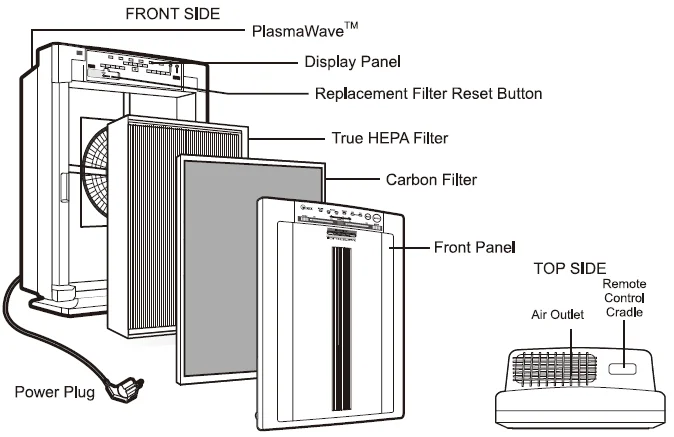
Air undergoes three separate processes before returning, freshened and cleaned, to the room.
Carbon Filter
Very effective Carbon Filter sheet collects large particles, dust, pollen, pet hair, and lint as well as odors caused by cigarette smoke, organic decay, and cooking.
True HEPA Filter
Captures 99.97% of particles and impurities as small as 0.3 microns, including smoke, dust, pollen, mold spores, and pet dander.
PlasmaWave™
In the final stage of cleaning, Winix PlasmaWave™ technology generates both positive and negative ions to create plasma clusters, which instantly neutralize viruses, bacteria, chemical vapors, and odors in the air.
PlasmaWave™ can be turned on and off using the remote control; however, we recommend leaving it on all the time.
Replacement Filter Indicator Light
Indicates when to replace the True HEPA Filter depending on usage.
AIR CLEANER SET-UP
NOTE: Follow these instructions for best results.
- Place the unit at least 7 feet from equipment that emits electric waves, such as televisions or radios.
- Place the unit at least 2 feet from the wall.
- Keep sensors away from drafty areas.
- Keep curtains away from sensors, as they may interfere with air intake/outlet.
- Place the unit on a stable surface with plenty of air circulation.
- Remove the front panel by grasping the bottom outside edges and gently pulling toward you.
- Pull out the filter package and remove the sealed plastic wrapper.
- Return the filters to the main unit; the Carbon Filter should be in front of the True HEPA filter.
- Replace the front panel by hooking the front panel to the top of the unit. Swing the panel in by pushing gently until the panel snaps into place.
- Plug in the power cord to a wall outlet.
- Press the POWER button until a short “beep” is heard.
Note: For the first 4 minutes after turning the unit on, the dust and odor indicators will flash while the unit measures air quality.
DISPLAY PANEL 6300
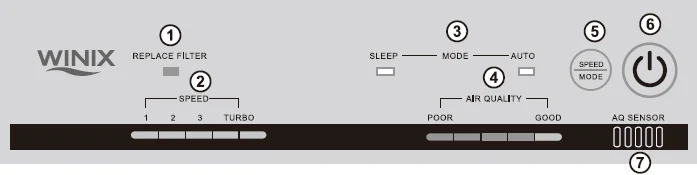
- REPLACE FILTER INDICATOR: The indicator will illuminate when to replace the True HEPA Filter.
- FAN SPEED INDICATOR: Shows current fan speed setting.
- MODES: Auto: The unit is set to default to AUTO mode when it is first turned on. The sensor will automatically adjust fan speed as needed. Sleep: When in SLEEP mode, the control panel will dim, and the unit will operate quietly at the lowest fan speed.
- AIR QUALITY LEVEL: Shows the current level of air quality in your room.
- SPEED/MODE: Change the fan speed and modes between AUTO and SLEEP.
- POWER BUTTON: Turn the unit on and off.
- AIR QUALITY SENSOR: Automatically monitors air quality level and adjusts fan speed accordingly.
Note: To get back into AUTO mode, the SPEED/MODE button must be pressed on the unit until the AUTO light is lit.
OPERATION
AUTOMATIC OPERATION
The unit is set to default to Automatic operation when it is first turned on. The air cleaner will automatically sense the air quality and adjust the fan speed accordingly.
MANUAL OPERATION
After you turn on the unit, you can switch to manual operation by using the FAN CONTROL button on the remote control or the FAN SPEED button on the unit.
1, 2, 3, AND TURBO
Select your desired speed. The TURBO level, the highest fan speed, can be activated manually for maximum air circulation.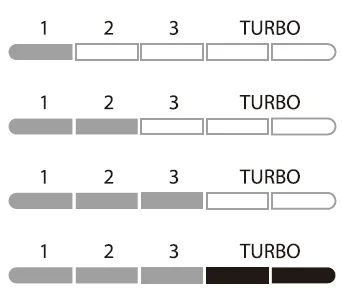
SLEEP MODE
When set on Sleep Mode, the display panel lights will dim, and the unit will not go above low fan speed to help keep the room dark and quiet.
AIR QUALITY SENSOR
The air quality sensor shows elevated levels of poor air quality. The green light indicates acceptable levels, the orange light indicates high levels, and the red light indicates poor air quality. If the unit is set on Automatic operation, it will adjust fan speeds to compensate for changes in air quality.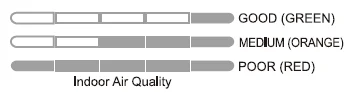
REMOTE CONTROL
PREPARATION
- Press and slide the back cover of the remote to remove.
- Insert batteries.
- Close the back cover.
BATTERY USE
- The batteries for the remote control are for initial use only. Change the batteries when necessary.
- When replacing the batteries, replace both at once with 2 new AA batteries.
- Incorrect battery usage may cause battery fluid leakage and/or damage.
- When not using the remote control for an extended period of time, remove the batteries.
- Avoid dropping or damaging the remote control. Keep the remote control away from direct sunlight or heaters.
USING THE REMOTE CONTROL
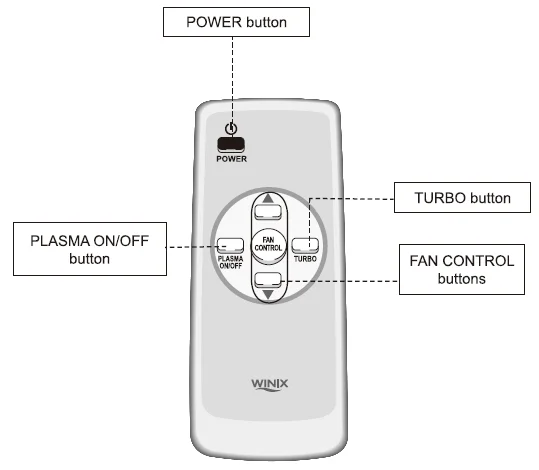
Proper conditions
- Operate the remote control facing the air cleaner.
- Operate within 20 feet of the air cleaner.
Poor conditions that may impair operation
- Any location where there is an inverter, lighting equipment, or electronic spontaneous lighting equipment.
- When objects or furniture are located between the remote and the air cleaner.
- When the air cleaner unit is located in direct sunlight.
- In areas where fluorescent lighting is flickering due to worn-out bulbs.
POWER
Use the POWER button to turn the power on and off. A short “beep” will sound when you turn the unit on or off. Once the unit is on, it will automatically switch into Automatic operation. Turn the unit to manual control by pressing one of the FAN CONTROL buttons.
FAN CONTROL
- UP: Use this button to switch from Automatic operation and increase the fan speed level.
- DOWN: Use this button to decrease the fan speed level.
TURBO
Use this button to switch from Automatic operation and begin the maximum amount of room cleaning and air movement.
PLASMA ON/OFF
Use this button to turn the PlasmaWaveTM generator on or off.
CARE AND MAINTENANCE
Cleaning
- Clean outside of unit as necessary by wiping with a dry, soft cloth; for stubborn stains, use a warm, damp cloth.
- Do not use volatile fluids such as benzene, paint thinner, or scouring powder, as they may damage the unit’s surface. Keep the unit dry.
- Clean the wall behind the air outlet periodically, as it may become dirty.
Filter Replacement
- The REPLACE FILTER INDICATOR will signal when to replace the True HEPA Filter. The replacement period will vary depending on the hours of use, air quality, and location of the unit.
- There are two separate filters: the HEPA filter and the Carbon Filter.
- Change only the True HEPA Filter when the REPLACE FILTER indicator is on.
- Push the reset button on the inside of the unit after changing the filter.
- For best performance, change the Carbon Filter every three months.
- Do not wash and reuse the Carbon Filter — it will not work effectively.
WARNING: Before replacing or cleaning any filters, make sure to remove the power plug from the wall outlet.
NOTE: Do not wash and reuse the True HEPA Filter and Carbon Filter.
Replacement Procedure
- Remove the front panel by grasping the bottom outside edges and pulling gently toward you.
- Pull out the filter(s) to be changed.
- Remove any packaging wrap from the new filter(s).
- Place the new filters in the main unit. (HEPA filter should always be inserted first, then the carbon filter.)
- To reset the filter once a new HEPA filter is installed: Plug the unit back in with the front cover off. Turn on the unit. Locate the reset button on the display panel. Press and hold the filter reset button for 3-5 seconds. A short beep will be heard, and the light should turn off. Place the front panel back on the unit. And the air cleaner is ready to use
- Plug in the power cord to a wall outlet and turn on the unit.
TROUBLESHOOTING
Before you call
Solutions to Common Problems
Review this list before you call for service. This list covers problems that are not the result of defective materials or workmanship.
The remote control does not work.
- Make sure the remote control batteries are inserted correctly.
- Replace worn-out batteries.
The unit leaves smoke and odors in the air.
- Make sure the sensor is not blocked or clogged.
- Move the unit closer to the offending odors.
- Replace filters as needed.
The unit seems to produce odors.
Replace filters as needed.
The Air Quality sensor light is green, but the air smells bad.
- Clear the Air Quality sensor with a vacuum cleaner, as it may be blocked or clogged.
- Compressed air may also be used to blow dust that may be clogging the sensor.
The Air Quality sensor light is orange or red, but the air seems clean.
Clear the Air Quality sensor with a vacuum cleaner, as it may be blocked or clogged.
The unit makes a ticking sound.
This indicates that the PlasmaWaveTM function is working. If the sound is distracting, turn off this function while you are in the room using the remote control.
The unit interferes with radio or television reception.
Because this unit radiates radio frequency energy, we suggest you try one or more of the following:
- For better reception, adjust the television/radio antenna.
- Move the unit away from the affected television/radio.
- Plug the unit power cord into an outlet different from the television/radio power cord.
The REPLACE FILTER INDICATOR remains lit after replacing the True HEPA filter.
- With the power on, press the FILTER REPLACEMENT RESET button and hold for 5~10 seconds or until the light turns off.
- See page 10 instruction 5 for details.
Contact Information
- Tel: 1.847.551.9900
- Fax: 1.847.551.9200
- Toll-free: 1-877-MY-WINIX (699-4649)
- Email: [email protected]
- Website: www.winixinc.com
For more Manuals by Winix, visit ManualsLibraryy
Winix 6300 True HEPA Air Cleaner-FAQs
Can I run the Winix 6300 24/7?
Yes, the Winix 6300 air purifier can operate continuously, but extended use shortens filter life. Use Auto Mode to adjust fan speed based on air quality, optimizing filter longevity.
What do light colors mean?
The Air Quality Indicator uses colors: Blue for good air, Amber for fair, and Red for poor. In Sleep Mode, the indicator turns off for a dark-friendly operation.
How to reset after filter change?
Turn on the unit, then press and hold the Filter Reset Button for 5 seconds using a paperclip until it beeps. The Filter Replacement Indicator will turn off, confirming the reset.
Is sleeping near it safe?
Yes, it is safe to sleep near the Winix 6300; place it in an open area for better circulation rather than right beside the bed. Sleep Mode runs quietly at minimum speed.
Best placement location?
Position on a flat surface, 12-18 inches from walls, electronics, and sunlight for optimal airflow. Avoid humid areas, heat sources, or blocked vents.
What signals a red light?
A red light indicates poor air quality or filter replacement time via the Check Filter Indicator. Address promptly by cleaning or replacing filters.
Can filters be washed?
Clean the Pre-Filter every 14 days with a vacuum or lukewarm water rinse; dry fully before reuse. Do not wash Activated Carbon or True HEPA filters—replace every 3-12 months.
How to check if working?
Feel steady airflow from the outlet and monitor the Air Quality Indicator changing colors. The Smart Sensor calibrates in 4 minutes after startup.