

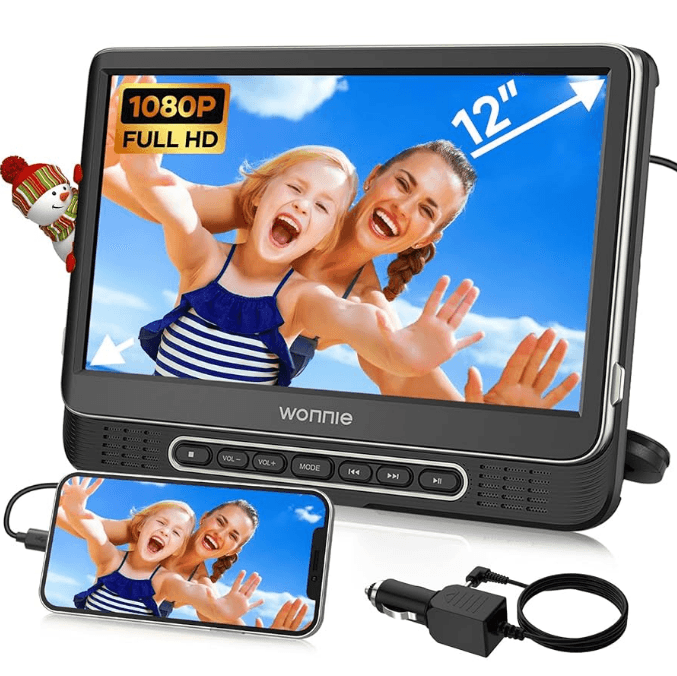
Wonnie W-HD1106S Portable Car DVD Player
Safety Precautions
- The DVD player is intended for household use only, and not for commercial or industrial use.
- This DVD player shall not be exposed to dripping or splashing water. Objects filled with liquids, like vases, should not be placed on the appliance. Dry location uses only.
- Do not expose the appliance, discs to extreme temperatures, excessive moisture, rain, or sand. Never use this device in high temperatures or in high humidity. The best operating temperature is between 5℃- 40℃.
- Open flames like lighted candles should not be placed on the appliance.
- Do not place the unit on an unstable surface to prevent it from falling. Do not place the unit on top of any other appliance.
- Do not place the appliance on or near a hot gas flame, electric element, or heaters, or in areas subjected to direct sunlight.
- Place the appliance in a place where it has good air ventilation. Any ventilation holes should not be impeded by covering with items, such as newspaper, tablecloths, curtains, etc.
- Don’t put the device near a magnetic field. The normal function of the product may be disturbed by strong electromagnetic interference. If so, simply reset the product to resume normal operation by switching it off from the main outlet and then switching it back on after several minutes.
- Do not operate the player if it is not working normally or has been damaged in any way. Turn the unit off, unplug it from the power source, and consult service personnel. Do not attempt to disassemble this unit yourself.
- Do not listen to headphones at high volumes. The excessive sound pressure from headphones can cause hearing loss. Please observe the local regulations regarding the disposal of packaging materials, exhausted batteries, and old equipment.
Cleaning and Care
- Always turn the power off and unplug it from the outlet before cleaning.
- Never spray or pour liquids directly on the screen or plastic casing, and clean with a dry towel only.
- Do not clean the unit with strong chemical agents or abrasive cleaners.
- Do not allow residue or liquids to enter any part of the appliance, as this may cause risk of electrocution.
- Be sure to remove the disc from the player before packing for moving.
Package Listing
Please make sure the following items are included in the package. If any item is damaged or missing, contact us at us-[email protected] to get a new one for free.
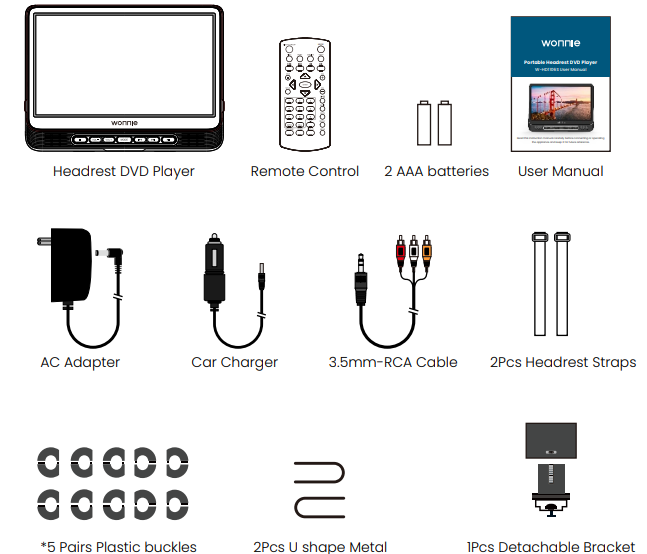
Pairs Plastic buckles
- It is equipped with 5 pairs of plastic buckles of 10.2mm (0.4’’), 11.2mm (0.44’’), 12.2mm (0.48’’), 12.9mm (0.51’’), 14mm (0.55’’). Choose the correct pair according to the size of the vehicle pole.
- It is universal for most car headrests (Not available for car seats without headrest poles or for car pillars that are curved).
Quick Keys of Accessories:
Remote Control
Before use, please place 2 AAA small batteries and aim towards the sensor area (near the blue working light or MODE button underneath the player’s panel at an angle of up to 30 degrees in 9.8ft).
AC Adapter (To charge the player)
Insert the small plug into the DC IN jack on the right side of the player; the other end inserts into an AC 100-240V 50/60Hz wall outlet.
Car Charger (To charge the player)
Insert the small plug into the DC IN jack on the right side of the player, and the other end into the cigarette lighter socket.
3.5mm-RCA Cable (The player connects TV, shares the same movie on a larger TV screen)
Insert the small plug into the AV OUT jack on the right side of the player; the other end connects audio/video input on the television (Red to Red, White to White, and Yellow to Yellow).
2Pcs Headrest Straps (Install to the car headrest)
Use the provided headrest strap and the headrest mount slot on the bottom cabinet of the player to install to car headrest (For the mounting guides, please see Page 26).
1Pcs Mounting Brackets (Install to car backseat)
It’s made of 5 pairs of plastic buckles, 2pcs U-shaped metal, and 1pcs detachable bracket. Choose one correct pair of plastic buckles and mount the player into your car backseat (For the mounting guides, please see pages 26-27).
Functional Overview
DVD Player View

Remote Control
Using the Remote Control
- Before using one remote control, please make sure you have installed two AAA batteries inside in the correct way.
- When using the remote control to control the player, kindly direct the sensor area (near the blue working light or MODE button underneath the player’s panel).
- The remote control works best at a distance of less than 9.8ft and at an angle of up to 30 degrees to the front of the unit.
- Please make sure no obstacles stand in the way between the remote control and the infrared sensor, and do not place the remote control in direct sunlight. If the remote control fails to work even when it is operated near the player, kindly first replace new battery to try again.
Notes on Batteries
- If the remote control is not used for a long period of time, please remove the battery from the compartment.
- Do not heat batteries or dispose of them in fires.
- Do not dismantle, deform, or modify batteries.
- Please keep the battery in a safe place to prevent being swallowed by kids.


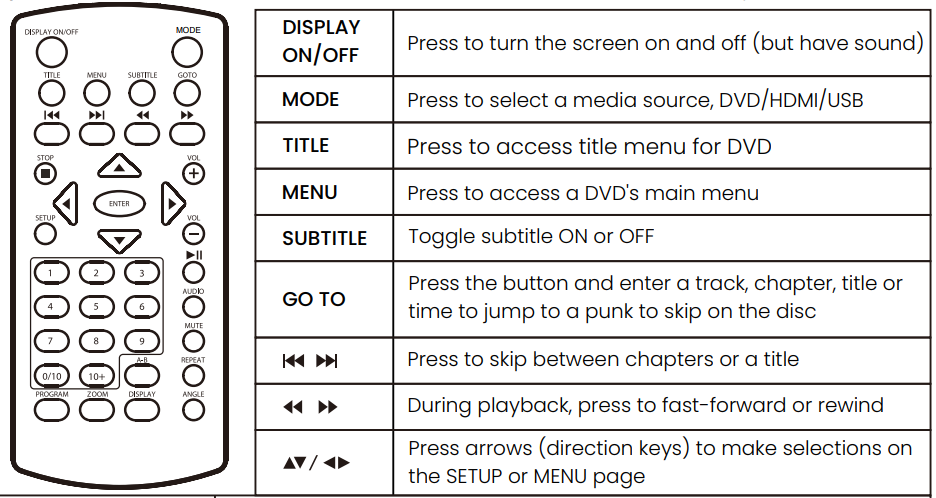
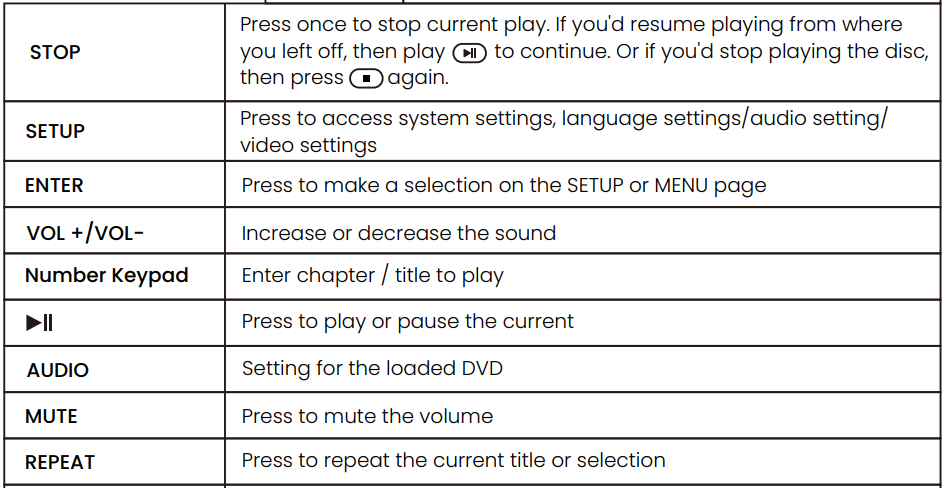
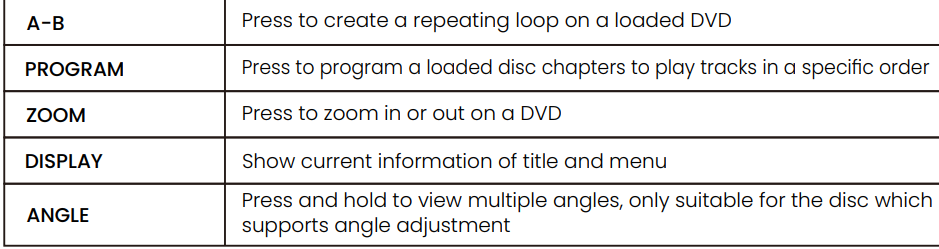
Buttons of the Remote Control
Tips: You could find functions clearer when checking the remote control from up to down.
Optical Discs
Disc Requirements
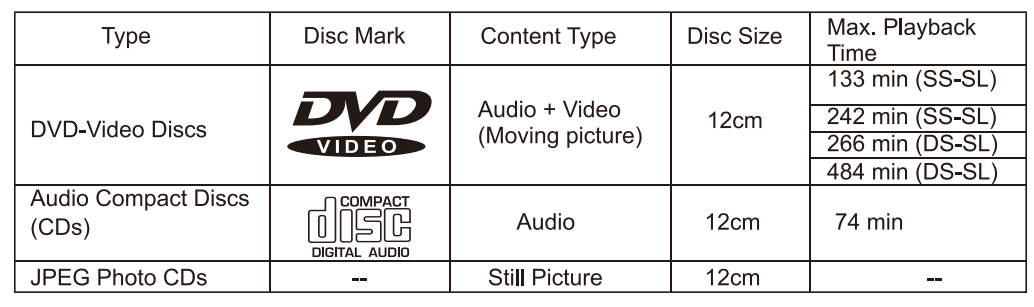
- This DVD player supports playback of the following discs and formats.
- This unit can play CD-R and CD-RW discs that contain JPEG picture files. This unit doesn’t support the discs which are not listed above (e.g., PC CD-ROM, CD-Extra, CD-G, CD-I).

Disc Care and Maintenance
- Optical discs (DVD, VCD, CD) contain high-density compressed data and need proper handling.
Handling a Disc
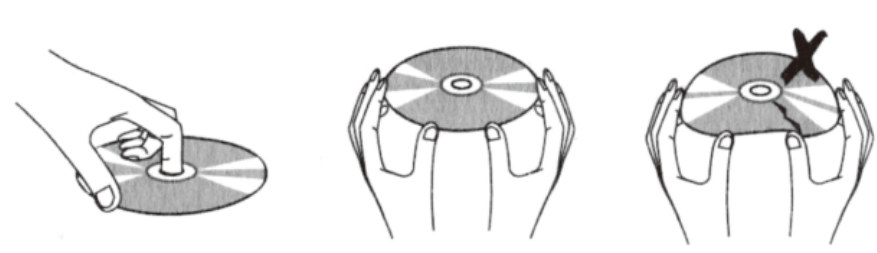
- Hold a DVD/VCD/CD disc by its edge.
- Avoid touching the recorded side of the disc. To remove a DVD/VCD/CD from its storage case, press down on the center retention mechanism of the case and lift the disc out.
- Do not subject discs to prolonged exposure to direct sunlight, high humidity, or high temperatures. Do not bend or press the disc.
- To reduce the risk of scratches, always put the disc back in its case after use. Store discs vertically in a cabinet.
- Do not place stickers or labels on either side of a disc.

Cleaning a disc
- Use a dry, soft cloth to wipe off any fingerprints and dust from the playing surface of the disc.
- Wipe in a straight line radially from the center to the outside edge of the disc. Small dust particles and light stains will not affect playback quality.
- Never use chemicals such as record sprays, anti-static sprays, benzene, or thinners to clean a disc. It will damage the surface of the disc permanently.
System Setup
GENERAL
The general menu allows you to modify basic settings such as language. The general options are as follows:
- TV Display: Adjust the screen aspect ratio between 4:3 Pan Scan/4:3 Letter Box/16:9/Wide Squeeze.
- Angle Mark: Display an icon on the screen when multiple angles are available.
- OSD Language: Allows you to change the menu language.
- Screen Saver: Display a screen saver when the portable DVD has not been used for a period of time.
- Last Memory: Revert back to the same spot on a DVD if the portable DVD is turned off in the middle of a program.
SPEAKER
The speaker menu allows you to change the audio setup of the portable DVD.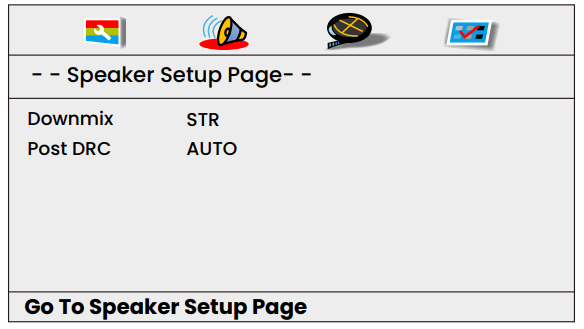
- Downmix: LT/RT, Stereo, Virtual Surround, Off.
- Post DRC: On/Off/Auto.
PANEL QUALITY
The video setup page menu allows you to adjust Resolution, Panel quality, and Audio source.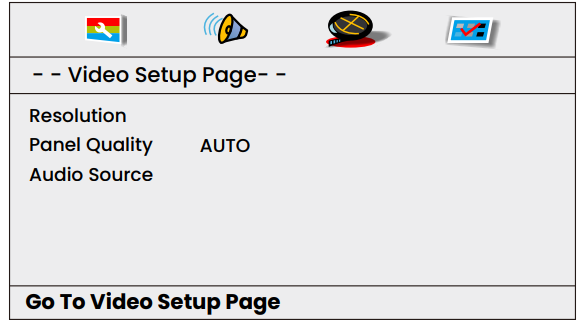
- Resolution(Output):576I(27Hz)/576P(27Hz)/720P(50Hz)/720P(60Hz)/1080I(50Hz)/1080I(60Hz)/1080P(50Hz)/1080P(60Hz).
Panel Quality:
- Sharpness: Adjust the screen sharpness between LOW / MID / HIGH.
- Brightness: Adjust the screen brightness.
- Contrast: Adjust the screen contrast.
- Gamma: Adjust the Gamma.
- Hue: Adjust the screen hue.
- Saturation: Adjust the screen saturation.
- Audio Source: AUTO/PCM.
PREFERRED SETTING
The preference menu option allows you to adjust the default DVD disc settings. (This setting is only available when no media is inside the unit.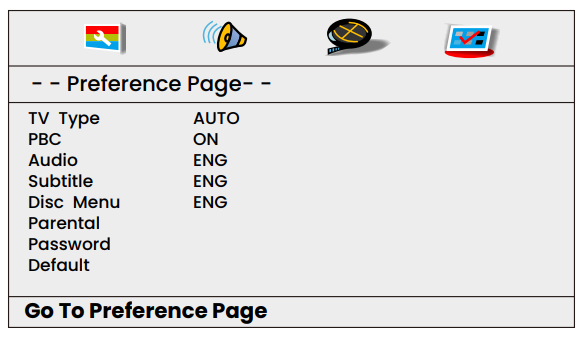
- TV Type: Set TV type to PAL, AUTO, or NTSC.
- PBC: Set PBC ON or OFF.
- Audio: Set the default audio language.
- Subtitle: Set the subtitle language.
- Disc Menu: Set the disc menu language.
- Parental: Set a maximum parental rating for discs that can be played without a password.
- Password: Set a parental lock password (The default password is 000000).
- Default: Reset the portable DVD to factory default.
Installation Guide
Way 1 – How to Use the Headrest Strap
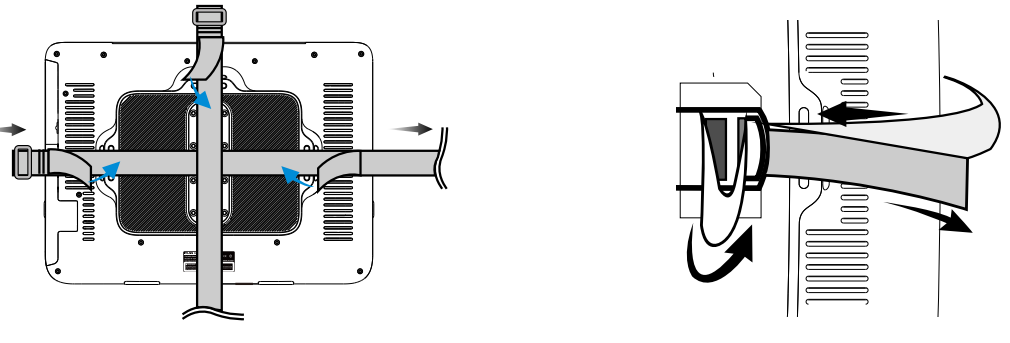
- Slide one strap through the two attachment points horizontally on the rear of the DVD player.
- Slide the other strap through the top attachment point on the rear of the player vertically.
- Attach the back side of the player to the proper position on the rear side of the car headrest.
- Pull the strap in horizontally through the buckles and tighten as desired to secure the DVD player on the headrest firmly horizontally.
- Finally, pull the vertical strap through the buckle as above to tighten the player in the vertical direction firmly.

Way 2 – How to Use the Mounting Bracket
How to take the brackets apart? Before installing, it is necessary to know some details about how to take some accessories apart first. This will be very helpful and convenient for you when you are installing or disassembling. Here we attached some pictures of the disassembly process for your future reference as below.
- How to take apart buckles and U-shaped metal.

- How to take apart the bracket.
- Make sure that you slide the button on the plate to
 turn on the stand. And take the other parts of the brackets.

 turn on the stand. And take the other parts of the brackets.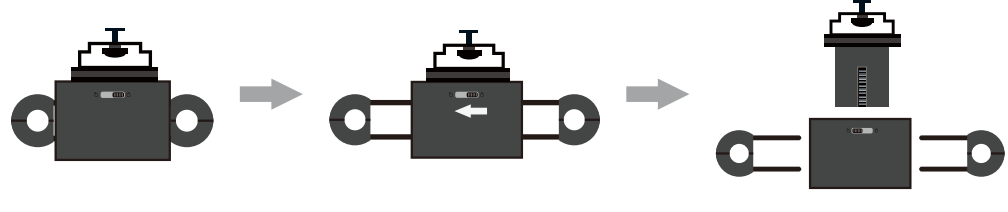
How to mount the bracket to the car headrest
Step 1.
- Choose one correct pair of plastic buckles according to the size of the vehicle pole. Put the individual buckles into the headrest post and then connect the buckles together firmly.

- Place the big plastic plate in the center of the headrest, then plug the two U-shaped metal pieces into the buckles.

- Push the U-shaped metal directly into the two joints on both sides of the plastic plate.

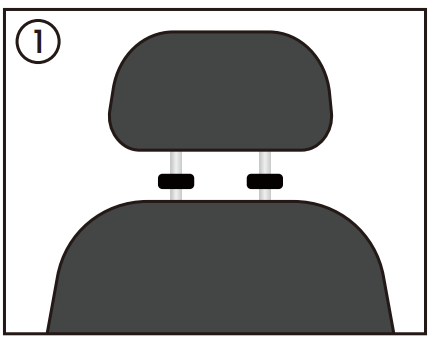
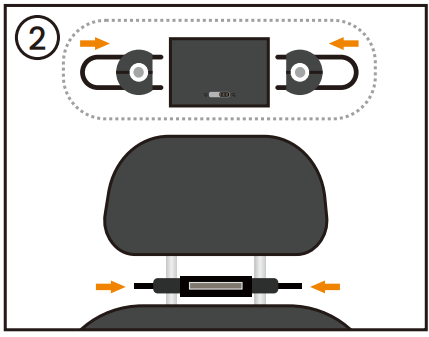
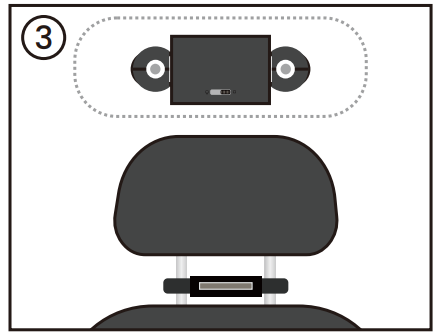
Step 2.
- Put the plastic stand with the screw into the round hole at the end of the long track on the back side of the DVD player.

- Slide the plastic stand into the suitable position on the track.

- Rotate the plastic screw nut to the right to fix the stand firmly.

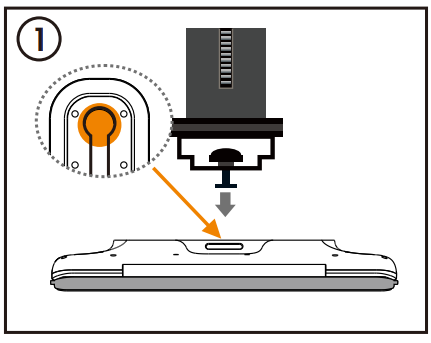
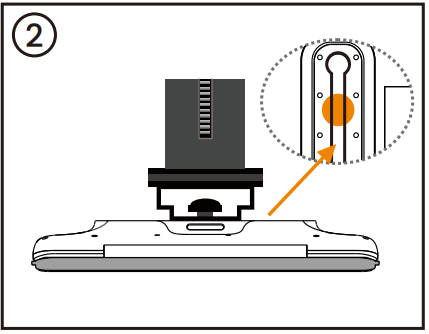
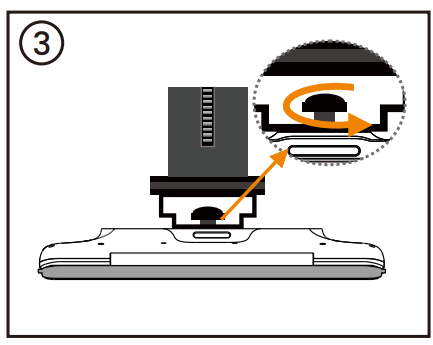
Step 3.
- Insert the stand into the big plastic plate connection jack.

- Slide the button on the plate to
 lock the stand.
- Hold the DVD player with your hand to press down or lift up to adjust the angle of the screen to the best visual.

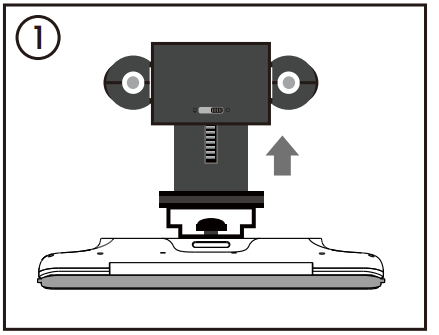
 lock the stand.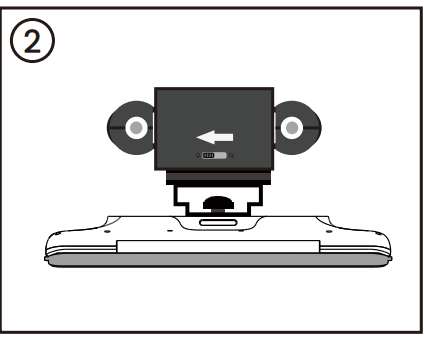
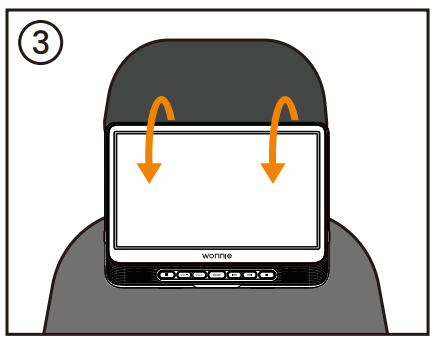
Compatibility Note:
- It is universal for most car headrests (Not available for car seats without headrest poles or car pillar is curved).
- The provided bracket is compatible with the headrest pole distance from 11cm-18cm (4.33 inches to 7.08 inches), and plastic buckles fit the diameter size of the pole from 10.2 mm to 14 mm (0.4 inch to 0.55 inch).
- Provided headrest straps are widely compatible with most headrest DVD players & headrests with or without poles.
- The exclusive mounting bracket brings you an easy installation or disassembly without any extra tools.
- Please use the provided brackets to install the device to the headrest, other than brackets from another supplier.
Warm Tips:
- When adopting the straps to fix the device to the headrest, please do your best to ensure the strap & the plastic buckles fasten firmly.
- Each buckle has the exact size on it. Before installing, please kindly first check the distance between the 2 poles in the seats and the diameter of the 2 poles, and then select the correct size from the provided 5 sets of buckles.
- Before installation, it is best to disassemble the required buckles and brackets first, which will be much helpful and convenient to install.
- When plugging the U-shaped metal into the plastic plate, please ensure the U metal is plugged into the hole.
- After connecting the stand to the big plate well, do not forget to slide the button on the big plastic plate from right to left to lock the stand. Or the stand connecting the DVD player will be possible to slide out and cause the device.
- After installing the DVD player in the headrest well, if you need to adjust the bracket angle, it is better that use one hand to hold the bracket and one hand to press the DVD player up/down to adjust the view angle. Such an operation will be helpful to extend the lifespan of the bracket and your use.
- If you don’t use the device for a long time, please kindly move all cables from the device and the power source, and keep all the spare parts in proper positions.
Trouble Shootings
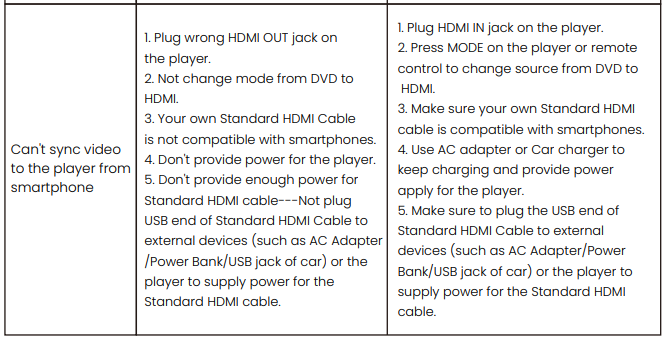
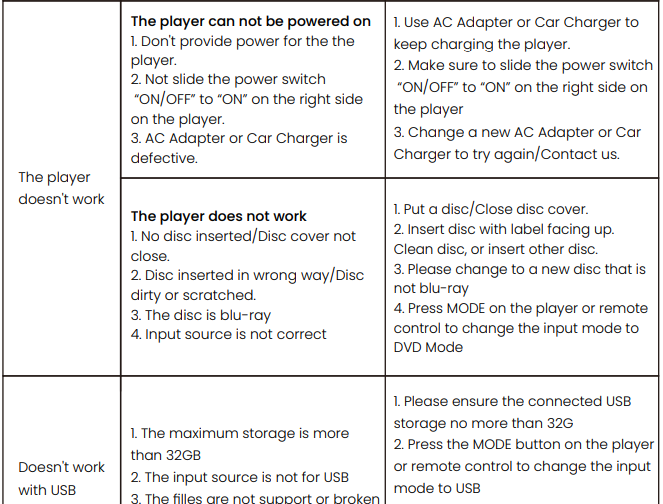
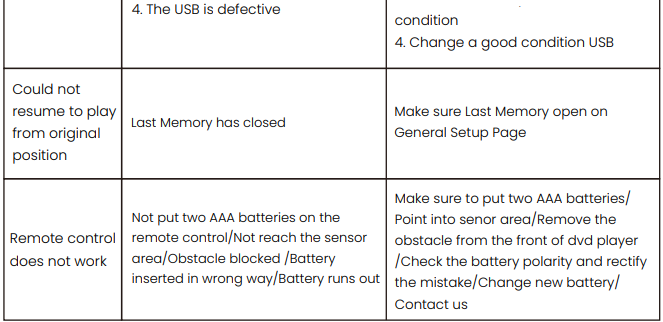
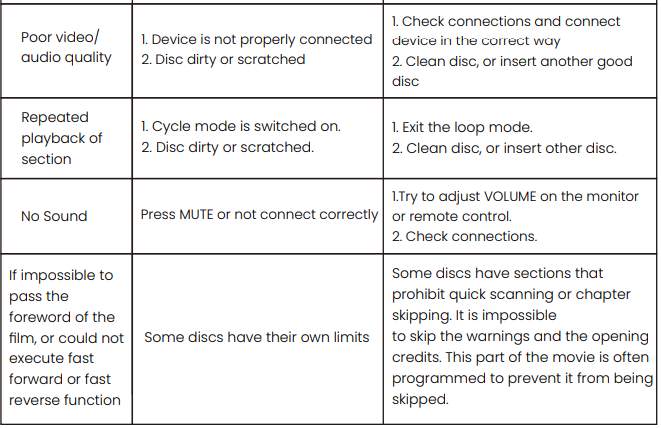
After having this item from the seller, if you encounter any issues while using it in daily life, please feel free to check the per guide below to find a solution by yourself first. If your product issue is not covered under the below or the solution below does not work with your device, do not hesitate to contact with seller for a solution.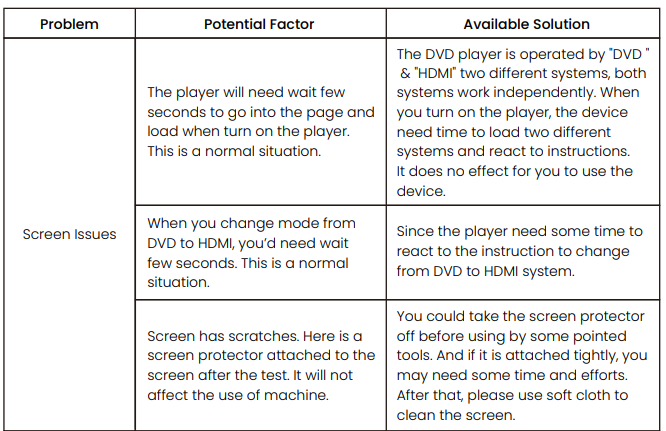
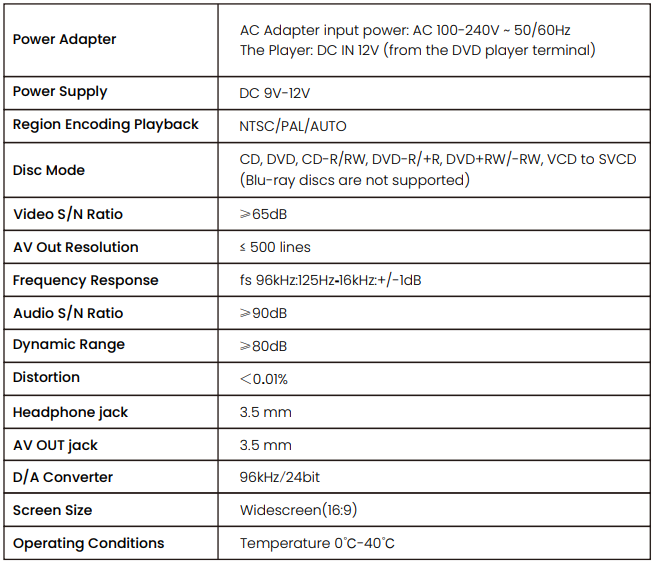
Specification
Warranty
Guarantee Regulations:
- Within the guarantee, our company will replace the products that are not damaged by a person.
- Within the guarantee, you can repair at the local dealer with the maintenance, which should be sealed.
- Within or after the guarantee, you should pay for maintenance if damaged by removing or by a person.
Warranty
The warranty will not be valid if:
- The product has not been installed, operated, or maintained in accordance with the manufacturer’s operating instructions of the product.
- The product has been used for purposes other than its intended function.
- The product has been used for purposes other than household use.
- The damage or malfunction of the product is caused by any of the following conditions:
- Incorrect voltage
- Accidents (including liquid or moisture damage)
- Misuse or abuse of the product
- Faulty or improper installation
- Main supply problems, including power spikes or lightning damage
- Tampering or modification of the product by persons other than authorized service personnel
- Exposure to abnormally corrosive materials
- Insertion of foreign objects into the unit
- Used with accessories not pre-approved
Please refer to and heed all warnings and precautions in the User Manual.
We provide 12 12-month warranty from the date you purchase. If you experience any problem not covered by the FAQ, please don’t hesitate to email us at:[email protected]. We will reply to you within 24 hours and give you a satisfactory solution. If there may less happen short delay due to the rest holidays, please wait patiently and we will reply to you asap once we see your emails.
For More Manuals By Wonnie, Visit ManualsLibraryy.
Wonnie W-HD1106S Portable Car DVD Player-FAQs
Q1. How do I know when my Wonnie portable DVD player is fully charged?
When charging, the indicator light shows red. Once the battery is fully charged, the light turns green.
Q2. How long does the battery last on this DVD player?
The built-in rechargeable lithium battery provides around 5 hours of playback time on a full charge.
Q3. Can I use the DVD player while it is charging?
Yes, the player can be used while charging, but the charging time will take longer.
Q4. How do I increase or decrease the volume?
You can adjust the volume using the VOL+ / VOL- buttons on the device or the remote control.
Q5. Why is the sound not working on my DVD player?
Make sure the volume isn’t muted. Also, check cable connections and try replacing the HDMI or RCA cable if needed.
Q6. What should I do if my DVD player won’t read a disc?
Clean the disc and lens with a soft cloth. Ensure the disc is scratch-free, compatible, and properly inserted.
Q7. How do I reset the Wonnie DVD player?
Turn on the device, open the disc tray, then press and hold the [n] and [►] buttons together for 5 seconds to reset.
Q8. Can the battery be replaced?
Yes, the rechargeable battery pack can be replaced by opening the battery compartment and inserting a new pack.