
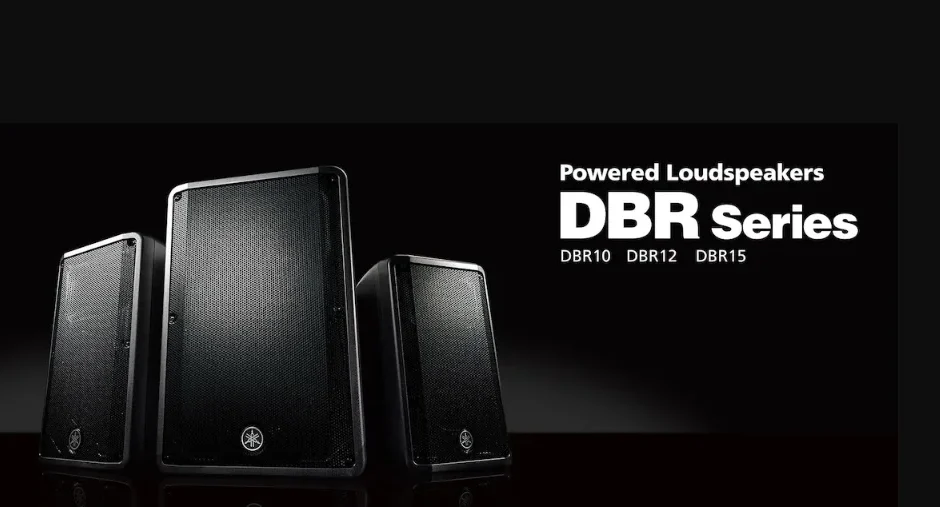

Yamaha DBR10 700-Watt Powered Speaker
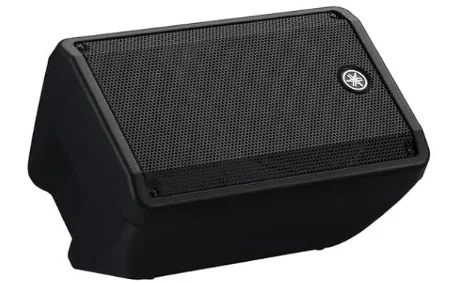
Features
FIR-X tuning™
Our proprietary sound-processing technology, utilizing a linear-phase FIR filter, delivers excellent sound quality with high resolution and a smooth frequency response that is unaffected by phase interference near the crossover point.
D-CONTOUR (Dynamic CONTOUR)
D-CONTOUR optimizes the level of each frequency range according to the application to be used or the listener’s preferences. There are two modes: an FOH/MAIN mode for use as a main speaker, and a MONITOR mode for use as a floor monitor.
Simple mixing function
The DBR features simple mixing functionality, enabling you to select either a direct output of channel 1 (CH1) (parallel connection) or a mixed output of CH1 and CH2.
Various input/output connectors
The comprehensive set of connectors—including XLR for a mixer, phone for a musical instrument, and RCA pin for an MP3 player—provides maximum flexibility in use with a wide variety of applications.
Lightweight, high power
A newly developed power supply and amplifier have enabled compact size and light weight, as well as powerful output.
Advanced protection functionality
DSP-controlled advanced protection functionality promotes optimum reliability even in challenging environments.
Included Accessories
- AC power cord
- Technical Specifications (English only): includes specifications, block diagram, and dimensions.
- Owner’s manual (this leaflet)
Controls and Connectors
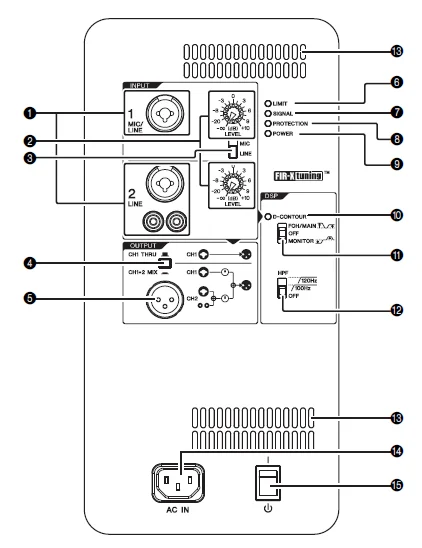
- Input jacks (CH1 and CH2): These are balanced combo jacks that support both XLR and phone plugs (both CH1 and CH2), and RCA pin plugs (CH2 only). For the combo jacks, connect a mixer, microphone, or digital musical instrument such as a keyboard. For RCA-pin jacks, connect a device such as an MP3 player or a CD player. For devices with high-level signals, such as a mixer, connect to CH2, or connect to CH1, then set the [MIC/ LINE] switch (3) to [LINE].

- [LEVEL] knobs: Adjust the level of each input jack (1).
- [MIC/LINE] switch: Set this switch to [MIC] or [LINE] for the CH1 jack, depending on the level of the input signal. For low-level signals (such as microphones), set the switch to [MIC]. For high-level signals (such as mixer), set the switch to [LINE].
- Output switch: Selects the output signal sent to the output jack (5). [CH1 THRU]: Delivers the direct output signal of CH1 only. Signal from CH2 will not be output. [CH1+2 MIX]: Outputs the mixed signals of CH1 and CH2.
- Output jack: This is a balanced XLR jack. This can be used to connect another DBR speaker. Outputs the signal selected by the 4-output switch.
- [LIMIT] indicator: Indicates (lit in red) that the limiter is on when the output voltage of the amplifier has exceeded the maximum level, or when excessive integral power consumption is detected. If this indicator stays lit, lower the input level. Note: Integral power consumption refers to the sum of power provided to the speaker driver per unit time.
- [SIGNAL] indicator: Indicates (lit in green) when an audio signal exceeding the threshold has been detected.
- [PROTECTION] indicator: Indicates (lit in red) when the protection circuit is active. The protection circuit will be activated, and the speaker outputs will be muted in the situations listed below. If amplifier overheating is detected. If overcurrent is detected. When turning the power on, the protection circuit will be activated for a few seconds to prevent noise. The indicator turns off when the power supply has started normally. If the protection circuit has engaged, waiting until the amplifier cools down or powering off and on again will return to normal operation. If the unit does not return to normal operation, please contact your Yamaha dealer.
- [POWER] indicator: Indicates (lit in green) when the (power) (15) switch is turned on.
- [D-CONTOUR] indicator: Indicates (lit in yellow) when the [D-CONTOUR] switch (A) is set to [FOH/MAIN] or [MONITOR].
- [D-CONTOUR] switch: Selects one of the D-CONTOUR (Dynamic CONTOUR) presets. [FOH/MAIN]: Boosts the high and low frequency components so that the frequency response is suitable for a main speaker. [MONITOR]: Reduces the low frequency range, which could otherwise tend to be boomy if the speaker is set directly on the floor. This enables you to hear mid and high frequency ranges clearly when using it as a floor monitor. [OFF]: Turns off D-CONTOUR. This is a generic frequency response setting.
- [HPF] switch: Selects the cutoff frequency of the high-pass filter. If you set this switch to [120Hz] or [100Hz], the low-frequency components below each threshold will be cut. If you use the unit alone, set this switch to [OFF]. If you plan to use the unit along with a subwoofer, we recommend that you set this switch to [120Hz] or [100Hz].
- Vent: The unit contains a cooling fan. Since the air for cooling is taken in and expelled here, be careful not to block this vent.
- [AC IN] socket: Connect the supplied power cord here. First, connect the power cord to the unit, then plug it into an appropriate AC power outlet. CAUTION: Turn off the power before you connect or disconnect the power cord.
- Power switch: Turns power to the unit on or off. First, turn on the power of the connected sound source (external device), then the unit. When turning off the power, reverse the order by turning off the power of the unit first and then the connected sound source (external device). CAUTION: Even when the switch is in the off position, a small amount of electricity is still flowing to the unit. If it will not be used for an extended period of time, therefore, be sure to unplug the power cord from the wall AC outlet.
- Screw holes (M8): Use these M8-size screw holes for installing separately sold brackets or commercially available eye bolts.
- Pole socket: This socket adapts to commercially available speaker stands and speaker poles of 35 mm diameter.

Setup Examples
Simple system with a single DBR
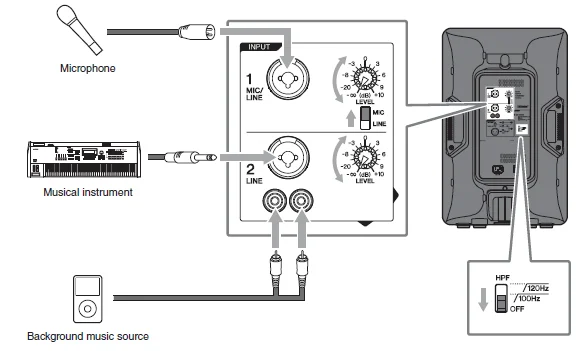
This example illustrates the system when connecting directly to a microphone, musical instrument, or background music source without using a mixer.
Main application: small-sized live venue, presentations, and restaurants
Note: For CH2, inputs to the combo jack and to the RCA pin jacks will be mono mixed at a fixed balance. If you want to change the balance, adjust the volume of the connected sound source.
System with two DBRs and subwoofers
This system is the most suitable for a main speaker system. If desired, you can add another DBR to create a floor monitor system.
Main application: small-sized live venue, house of worship, event site
Note: We recommend using the Yamaha DXS series (referred to in this manual as DXS) as a subwoofer. In this case, we recommend that the DBR’s HPF cutoff frequency and the DXS’s LPF cutoff frequency be set to the same settings; however, you can adjust them as desired.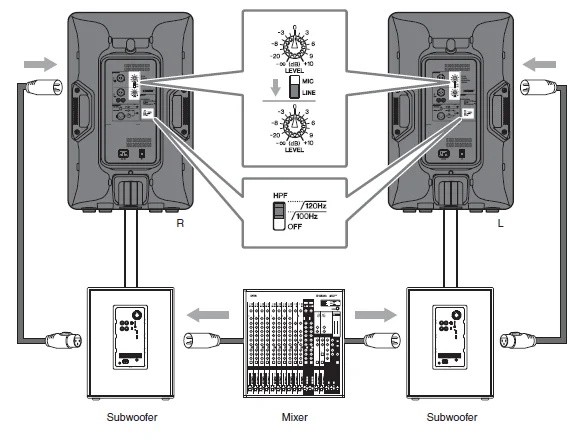
Floor monitor system
This system is suitable for a performer’s monitoring system. For use as a vocal monitor, set the [D-CONTOUR] switch to [MONITOR].
If necessary, you can additionally connect up to four speakers in parallel. In this case, we recommend that the signal be input to CH1 and the output switch be set to [CH1 THRU].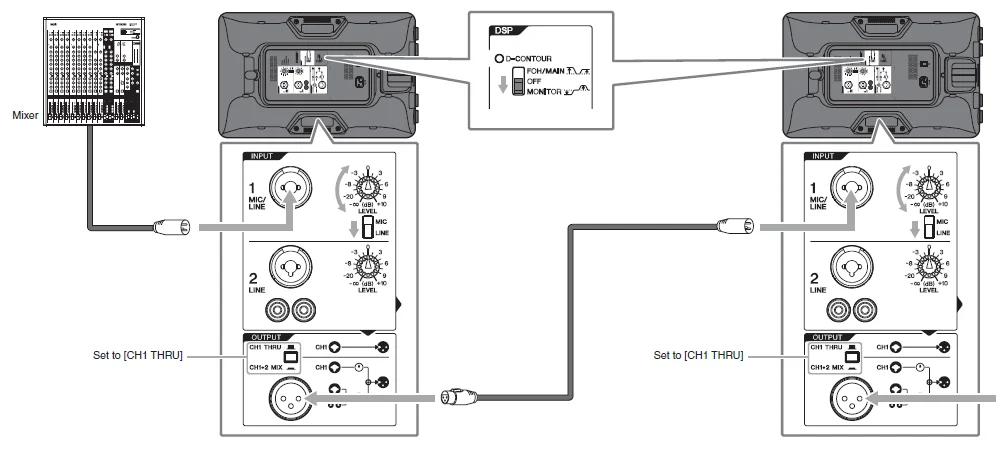
Troubleshooting
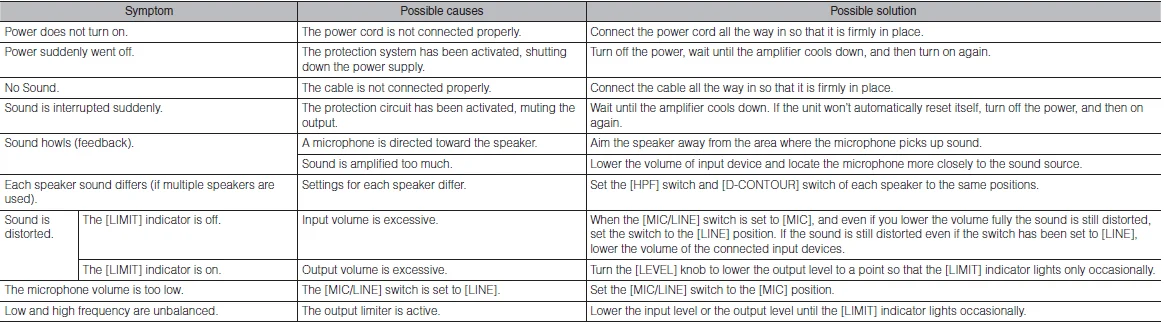
If any specific problem should persist, however, please contact your Yamaha dealer.
Installation Examples
CAUTION
- Before doing any installation or construction work, consult with your Yamaha dealer.
- For optimum safety, the installation should be checked thoroughly at regular intervals. Some fittings may deteriorate over extended periods of time due to wear and/or corrosion.
- When choosing the installation location, suspension wire, and mounting hardware, make sure all are strong enough to support the weight of the speaker.
- Make sure to take measures to prevent the speaker from falling down in the event of an installation failure.
- When installing the safety wire to the wall, install it higher than the wire’s attachment point on the speaker, with as little slack as possible. If the wire is too long and the speaker happens to fall, the wire may snap as a result of too much strain.
Yamaha cannot be held responsible for damage or injury caused by insufficient strength of the support structure or improper installation.
Installation using separately sold Yamaha speaker brackets
Attach the bracket to two screw holes at the bottom of the unit using commercially available screws (M8 x 16 mm) or eye bolts (M8 x 15 mm). For details on installing the bracket, refer to the corresponding manual.
Using the BWS251-300 or BWS251-400 wall mounting bracket
The tilt angle depends on the position relation between the speaker and the wall. The maximum downward tilt angle is shown in the following chart.
Using the BCS251 ceiling bracket
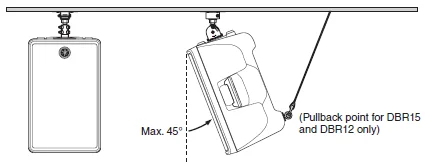
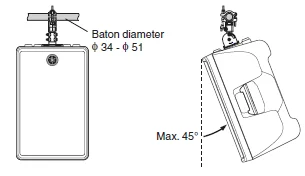
Using the BBS251 baton bracket
Pullback point (only for DBR15 and DBR12)
- When the unit is shipped from the factory, a seal is stuck on the pullback point (screw hole). Make sure to peel off the seal when using the pullback point.
- The DBR10 does not have a pullback point.
Securing the screws and eye bolts
Insert the screw or eye bolt through the washer to attach it.
Installation using eye bolts
Attach commercially available eye bolts (M8 x 15 mm) to the screw holes located at the bottom (two locations) and on the upper rear (one location, only for DBR15 and DBR12). Keep in mind that you will need two points at the bottom to suspend the unit.
Note: Make sure to use eye bolts according to the standards and safety regulations in your area.
NOTICE
The strength of an eye bolt differs depending on the suspension angle. Make sure to use eye bolts within a range of 0 to 45 degrees from a right angle.
Correct: Within 45° of a right angle.
Incorrect: Do not suspend the eye bolts.
Handling and maintenance
- Do not expose the device to excessive dust or vibration, or extreme cold or heat (such as in direct sunlight, near a heater, or in a car during the day), in order to prevent the possibility of panel disfiguration, unstable operation, or damage to the internal components.
- Do not place vinyl, plastic, or rubber objects on the device, since this might discolor the panel.
- When cleaning the device, use a dry and soft cloth. Do not use paint thinners, solvents, cleaning fluids, or chemical-impregnated wiping cloths.
- Condensation can occur in the device due to rapid, drastic changes in ambient temperature—when the device is moved from one location to another, or air conditioning is turned on or off, for example. Using the device while condensation is present can cause damage. If there is reason to believe that condensation might have occurred, leave the device for several hours without turning on the power until the condensation has completely dried out.
- When turning on the AC power in your audio system, always turn on the device LAST, to avoid speaker damage. When turning the power off, the device should be turned off FIRST for the same reason.
- Interference from Cell Phones: Using a cell phone near the speaker system can induce noise. If this occurs, move the cell phone further away from the speaker system.
- Air blowing out of the bass reflex ports is normal and often occurs when the speaker is handling program material with heavy bass content.
- Always turn the power off when the device is not in use.
Connectors
XLR-type connectors are wired as follows (IEC60268 standard): pin 1: ground, pin 2: hot (+), and pin 3: cold (-).
NORTH AMERICA
CANADA
Yamaha Canada Music Ltd.
- 135 Milner Avenue, Toronto, Ontario, M1S 3R1, Canada
- Tel: 416-298-1311
U.S.A.
Yamaha Corporation of America
- 6600 Orangethorpe Avenue, Buena Park, CA 90620,
- U.S.A.
- Tel: 714-522-9011
For more Manuals by Yamaha, visit ManualsLibraryy
Yamaha DBR10 700-Watt Powered Speaker-FAQs
Is the Yamaha DBR10 good for vocals?
The DBR10 can be used for vocals, but in small rooms it may sound a bit boomy and less clear. Using an EQ can help improve vocal clarity.
Can the DBR10 be used as a floor monitor?
Yes, it’s versatile. The DBR10 can function as a main speaker or a high-performance floor monitor by adjusting the D-Contour switch.
How much power does the DBR10 have?
It delivers 700 watts of power with a 10″ low-frequency driver and a high-frequency driver for clear sound.
What is the best use for the DBR10?
It’s ideal for small to medium live performances, practice sessions, DJ setups, and portable PA applications.
Does higher wattage mean better sound?
Not necessarily. Higher wattage allows louder volume with less distortion, but sound quality depends on speaker design, size, and room acoustics.
Do I need a subwoofer with the DBR10?
A subwoofer isn’t required, but for very deep bass below 40Hz, adding a subwoofer will improve low-frequency performance.
Can I mix speakers of different wattages?
Yes, but volume and sound balance may vary. Matching sensitivity and speaker type helps maintain a consistent audio output.
How loud can the DBR10 get?
It’s designed for small to medium venues and can produce high volume without significant distortion, though exact loudness depends on room size and acoustics.
Can I use the DBR10 outdoors?
Yes, it can be used outdoors for events, but avoid direct exposure to rain or extreme weather to protect the electronics.