


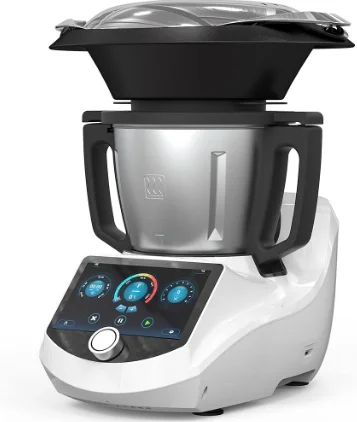
ChefRobot Ultracook CR-7 Smart Food Processor
Safety Precautions
 CAUTIONS
Prevent electric shock
- This product is equipped with grounding protection. Please use it only in homes or buildings that are properly grounded.
- Be sure Chef Robot is switched off when cleaning or removing the parts and when not using the machine.
- Never immerse, soak, or rinse the machine itself. Clean the main body of the Chef Robot only by wiping it with a damp cloth. Keep water and dirt outside the Chef Robot housing.
- Stop operating the machine if the power cord, plug, or other parts of the product are damaged, or if Chef Robot malfunctions and experiences product failure. Contact your nearest authorized service organization and send the machine for maintenance.
Open the mixing bowl lid carefully.
- Do not force open the mixing bowl lid.
- Only open the lid once the speed is set to 0 and the mixing bowl is set to the unlocked position.
Prevent heat and pressure-related injury.s
- Avoid touching or blocking the steam vents of the mixing bowl lid when Chef Robot is operating. When it is heating food, the mixing bowl can be under extreme pressure, and contact with the boiling or near-boiling food can cause scalding burns.
- If the vents of the mixing bowl lid are blocked or if food is ejected from the bowl or the measuring cup during use, unplug the machine immediately and don’t touch it until it has cooled down.
- Don’t put an excessive amount of food into the steamer or mixing bowl. Food should not exceed the maximum line marked on the appliance.
- Don’t cook food in the steamer that can easily block its vents.
- Don’t cover the mixing bowl lid or the steamer during cooking.
Prevent spills and steam-related injuries from
- high-temperature food spills. Such spills can cause burns either through escaping steam or through the ejection of boiling or near-boiling food during cooking.
- Be careful when moving the mixing bowl to avoid food spills.
- Chef Robot should be placed on a clean, flat, solid surface to prevent it from falling.
- When in use, keep the power cord safe and avoid entangling it in other objects.
- While heating food, don’t suddenly start the Turbo function or begin high-speed rotations. This may cause hot food to spill out of the machine. Process hot food slowly at first and increase the speed gradually.
- When heating food, the mixing bowl, the mixing bowl lid, the steamer, and the measuring cup can get very hot. Don’t touch these parts during cooking to avoid possible injury.
- During cooking, some operations can produce a lot of steam. Stay away from steam to avoid possible injury.
- Please be careful to avoid steam ejection from the mixing bowl, steamer, steamer rack, and the steamer lid when touching or moving those parts.
Prevent cuts.
- The mixing blade is very sharp. Please be very careful when operating. Hold the mixing blade from the top only when installing it in or removing it from the mixing bowl.
- When holding, installing, or removing the mixing blade, please be careful to avoid accidentally falling or dropping the blade.
- Don’t place your hands or any non-food items in the mixing bowl to prevent hurting yourself or damaging the mixing blade.
- Switch off the machine when either installing or removing the mixing blade.
- Make sure to keep any loose hair and clothing away from the machine while it’s operating.
CARE
Avoid personal injury and machine damage.
- If any parts of the machine are damaged, stop using the machine immediately and contact your service representative or the manufacturer for replacement parts.
- Don’t leave the machine unattended while it is operating.
- While kneading dough, cutting certain foods, and performing other operations, Chef Robot may rock back and forth slightly. Be sure not to place the machine on or near the edge of the countertop or table to prevent it from falling.
IMPORTANT SAFEGUARDS
When using electrical appliances, basic safety precautions should always be followed, including the following:
- Read all instructions.
- To protect against the risk of electrical shock, do not put the plug, power supply cord, or the main body in water or other liquids.
- This appliance is not intended for use by persons (including children) with reduced physical, sensory, or mental capabilities, or a lack of experience and knowledge, unless they are closely supervised and instructed concerning use of the appliance by a person responsible for their safety. Close supervision is necessary when any appliance is used by or near children. Children should be supervised to ensure that they do not play with the appliance.
- Turn the appliance OFF, then unplug from the outlet when not in use, before assembling or disassembling parts, and before cleaning. To unplug, grasp the plug and pull from the outlet. Never pull from the power cord.
- Do not touch moving parts. Do not attempt to defeat the cover interlock mechanism.
- Do not operate any appliance with a damaged cord or plug,g or after the appliance malfunctions, or is dropped or damaged in any manner. Contact the manufacturer at [email protected] for information on examination, repair, or adjustment.
- The use of attachments, not recommended by the manufacturer, er may cause a risk of injury to persons.
- Do not use outdoors.
- Do not let the cord hang over the edge of the table or counter, or touch hot surfaces.
- Do not place on or near a hot gas or electric burner, or in a heated oven.
- Do not touch hot surfaces. Use handles or knobs.
- Keep hands and utensils out of the machine during use to reduce the risk of severe injury to persons or damage to Chef Robot. The spatula may be used, but must be used only when the machine is not running.
- The blade assembly is sharp. When handling the blade assembly, always handle it carefully by the top. To avoid the risk of injury, when pouring out the contents, be careful to grasp with two hands when pouring out food or liquid.
- Always operate the machine with the cover in place.
- Allow to cool before assembling or disassembling parts and before cleaning the appliance.
- To reduce the risk of injury, never place the mixing blade assembly on the base without the bowl properly attached. Never place the mixing blade in the mixing bowl without locking it in place by rotating the latch on the underside of the mixing bowl clockwise.
- Unplug from the outlet when not in use and before cleaning. Allow to cool before putting on or taking off parts.
- Extreme caution must be used when moving an appliance containing hot liquids.
- Always attach the plug to the appliance first, then plug the cord into the wall outlet. To disconnect, turn any control to “off “, then remove the plug from the wall outlet.
- Do not use the appliance for anything other than its intended use.
About Your Chef Robot
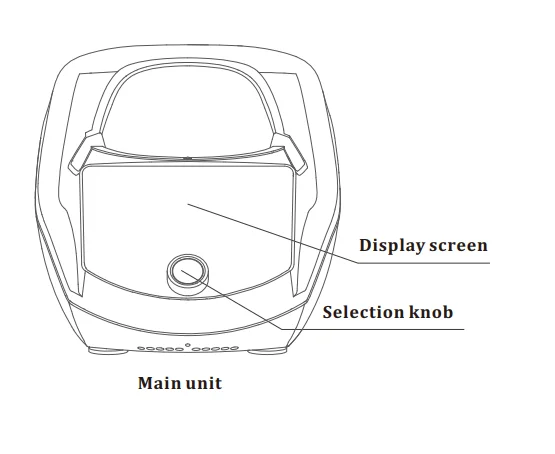
Chef Robot Overview
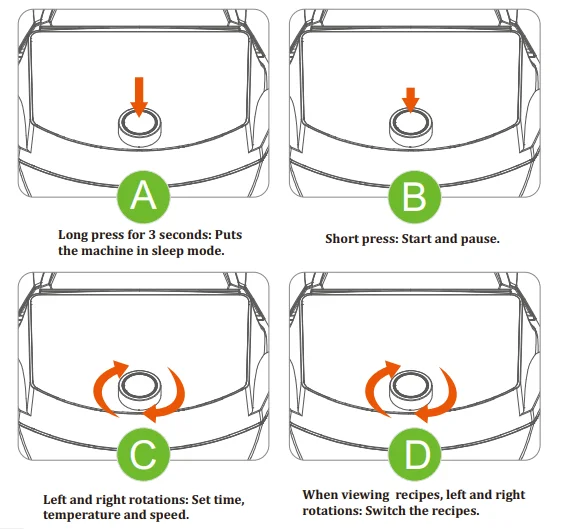
Knob Instructions
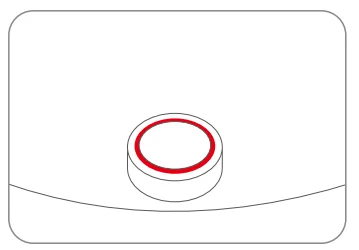
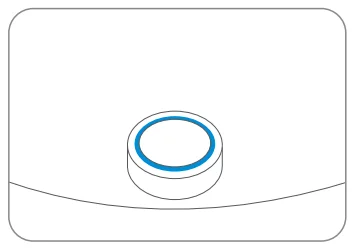
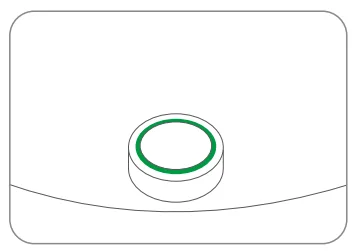
LED & Button Guidelines
- Red: Fault is reported.

- Blue: Normal operations
Flashing blue: Cooking
- Green: End of cooking

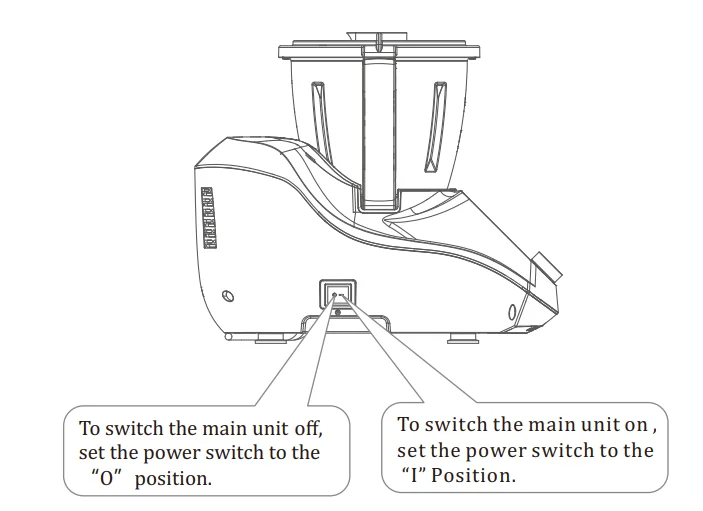
Switch On/Off
Connect the power cable to a suitable electrical wall outlet, ensuring each is dry and clean.
ATTENTION
After use, switch off, then unplug the Chef Robot from the electrical wall outlet.
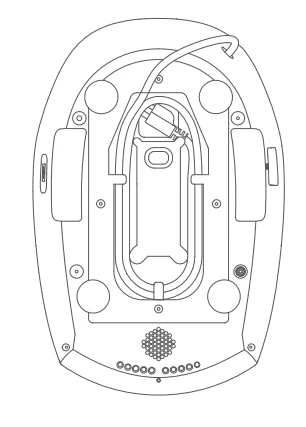
Use the power cable collector on the bottom of the device
- Before use, remove the power cable from the power cable collector.
- After use, store the power cable as shown in the figure.
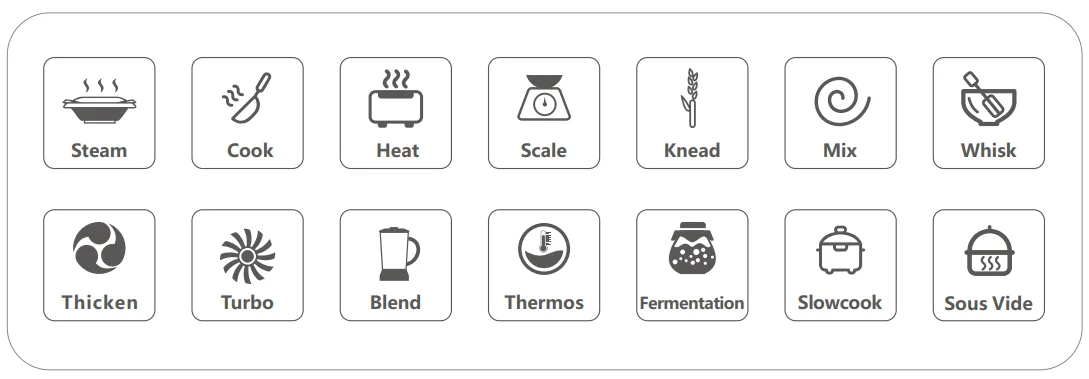
Main functions
Chef Robot is a multifunctional smart kitchen cooking machine that allows you to create and share your own recipes. It lets you cook more easily and makes food preparation fun!
- Chef Robot is intended for household use only and not for commercial use.
- Chef Robot is intended to be used in dry indoor areas only.
Use of Chef Robot
Mixing Bowl & Blade
Installing the mixing blade
The blade is sharp. Handle carefully to avoid being cut.
Do not turn over the mixing bowl when removing the blade. The blade might fall out suddenly.
Never hold the mixing blade by the blades themselves to avoid injury.
- Attach the blade seal the bottom of the mixing blade as pictured here.
- Grab the upper part of the mixing blade and place it in the mixing bowl, as shown here.
- Lock the blade in place by rotating the latch on the underside of the mixing bowl clockwise.
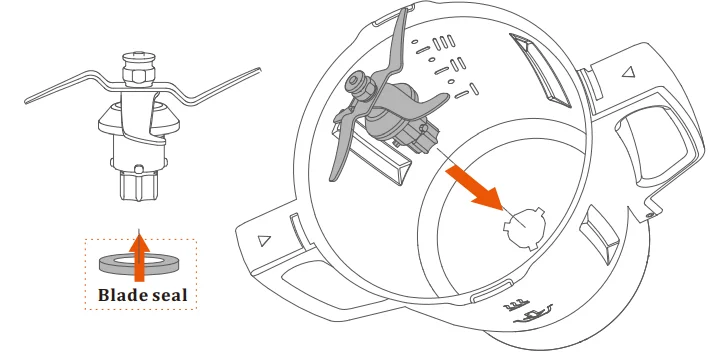
Rotate the latch clockwise to lock the blade after putting the blade into the bowl.

Removing the mixing blade
- Remove the mixing bowl from the main body, keeping the mixing bowl opening pointed upward.
- Rotate the latch on the underside of the mixing bowl counterclockwise.
- Then carefully pull the upper part of the mixing blade to remove it.
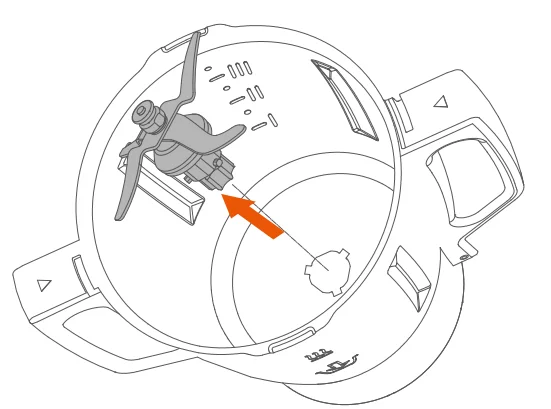
Rotate the latch counterclockwise to release the blade

CAUTION
· Make sure the mixing bowl is removed from the main body and the power switched off before removing or installing the mixing blade
· The mixing blade is very sharp, so be careful. Hold it only by the top piece when removing and installing it. Be careful to avoid accidentally dropping the blade.
· Keep your hair and clothes away from the machine while operating it.
· Do not put your hands or any non-food items in the mixing bowl to avoid personal injury or machine damage
ATTENTION
- When installing the mixing blade, make sure the blade seal, the bowl base, and the blade itself are closely connected to prevent liquid from leaking.
- If any liquid leaks into the machine, unplug it and then clean it.
Installing the mixing bowl
The maximum capacity of the mixing bowl is 3 liters (3.1 qts).
- Make sure the icons of the mixing bowl face outward. Install the mixing bowl as shown here.
- Make sure the connection pins are clean, dry, and unobstructed.
- Place the mixing bowl lid O-ring seal on.
- Place the lid and rotate it clockwise until it locks.

CAUTION
- Overfilling the mixing bowl may cause damage.
- Ensure the vents on the mixing bowl lid are not blocked during operation.
- The food in the mixing bowl should not exceed the maximum capacity.
- When moving the mixing bowl, take care to avoid food overflow or spills.
ATTENTION
- Make sure the mixing blade and bowl base are well-connected when installing the mixing bowl to avoid machine damage.
- To prevent corrosion to sensitive parts of the machine, don’t let the pins on the underside of the mixing bowl touch any corrosive object during cleaning. Completely dry the connection pins right after cleaning. This will prevent water from leaking into the machine through the connection pins, which can cause corrosion.

Mixing bowl lid
- The main function of the mixing bowl lid is to cover the mixing bowl. Make sure the mixing bowl lid is locked well during use, or the machine will not work.
- Never force open the mixing bowl lid.
- To attach the lid, place it on the top of the mixing bowl and rotate it clockwise to the middle of the bowl handle.
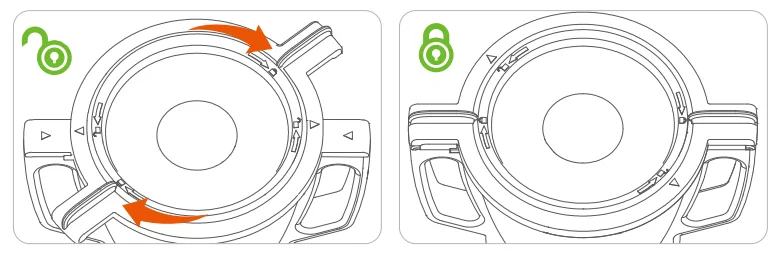
CAUTION
- Never cover the mixing bowl lid with rags, towels, or similar items.
- Doing so could prevent the steam from discharging, which could be dangerous.
ATTENTION
- Keep the silicone O-ring seal of the mixing bowl lid clean, so as not to negatively impact the sealing capacity of the seal.
- Regularly check if there is damage to the O-ring seal. If it is damaged, stop using it and replace it.
- Even if the O-ring seal is not damaged, it is recommended to replace it at least once every two years.
Steamer
Once you’ve installed the mixing bowl, you can begin using the following accessories.
The maximum capacity of the steamer is 3 liters (3.1 qts).
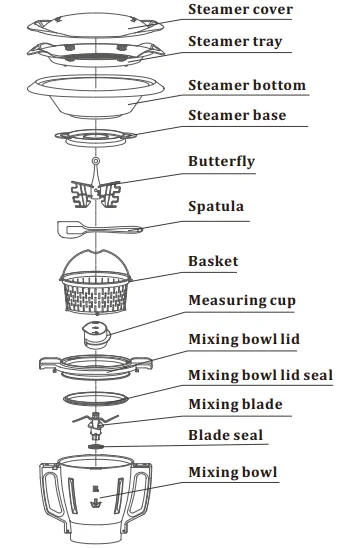
The steamer includes the steamer cover, steamer tray, steamer bottom, and steamer base.
Using the steamer
- Place the mixing bowl in the main body, add at least 500 mL of water to the bowl, and then cover it with the mixing bowl lid.
- Place the steamer base on the mixing bowl lid. When the steamer’s bottom is on the base, the base can collect drops of water from the steamer.
- Put ingredients into the steamer. If steaming various ingredients simultaneously, first place one group in the steamer bottom, then add the steamer rack on top and place the next group of ingredients there.
- Cover the steamer using the steamer cover after positioning all the ingredients.

CAUTION
- Don’t overload the steamer with food. This could prevent steam from lowering through the steamer’s bottom and tray.
ATTENTION
- Remove the measuring cup from the mixing bowl lid before using the steamer.
- Carefully connect the mixing bowl lid with the steamer base, steamer bottom, steamer tray (if in use), and steamer cover to prevent steam leakage.
- When starting the cook and steam function, do not exceed speed level 5; otherwise, Chef Robot will not start the heating function.
Basket
The basket is mainly used for:
- Filtering, primarily for fruit juices, vegetable juices, etc.
- Serving as a food barrier during cooking.
- Cooking small foods, such as rice, grains, and others.
- Draining excess water.
Install/remove:
To use the basket, lift it by the handle and place it inside the mixing bowl, and then place the handle on the edge of the pot. To remove it, simply lift it out using the handle.
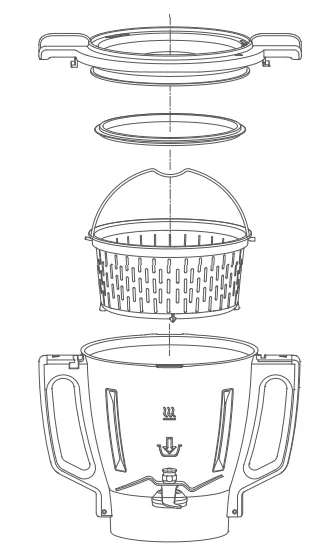
ATTENTION
Don’t put too much food in the basket when cooking, especially ingredients that can easily block the holes of the basket, such as rice, grains, etc.
Measuring Cup
The main functions of the measuring cup include the following:
- Closing the hole in the mixing bowl lid helps to seal the lid and maintain cooking heat.
- Preventing food in the mixing bowl from popping out or overflowing.
- Measuring liquid ingredients – full capacity is 150 milliliters.
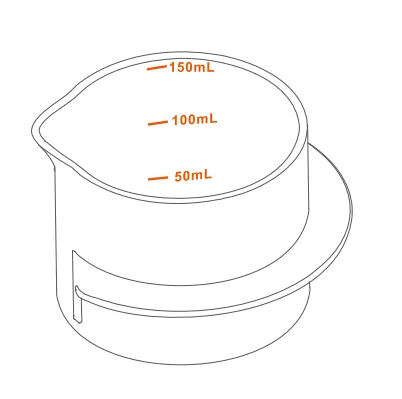
CAUTION
- During cooking, the opening of the measuring cup must be upward. Press it down to lock it in place.
- When removing the measuring cup either during or immediately following cooking, be careful of the rising steam to avoid scalding yourself.
Spatula
Use the spatula to remove the residual food from the mixing bowl.
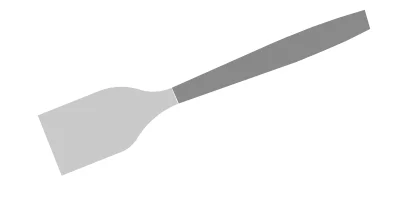
Butterfly
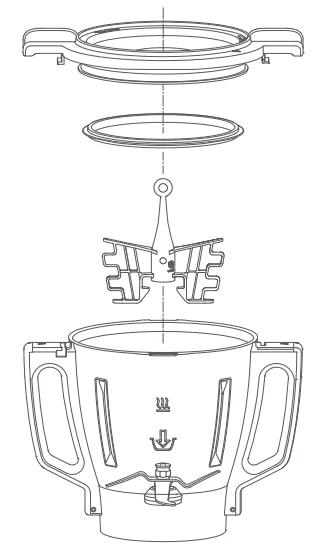
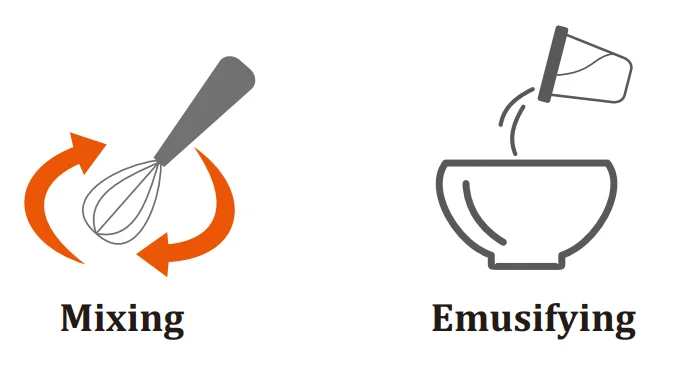
The butterly whisk is mainly used for mixing soft foods, such as creams, egg whites, and puddings.
Use it after attaching it tightly above the mixing blade, as shown at right.
ATTENTION
- Use the butterfly only after it is connected tightly above the mixing blade, as shown here.
- When using the butterfly, do not exceed speed level 4 or add ingredients during the mixing process.
- Don’t use the butterfly to mix solid ingredients or very thick ingredients.
- Don’t use the whisk to mix together too much food at one time. Doing so might not achieve good results.
Icons and User Interface
Main Icons
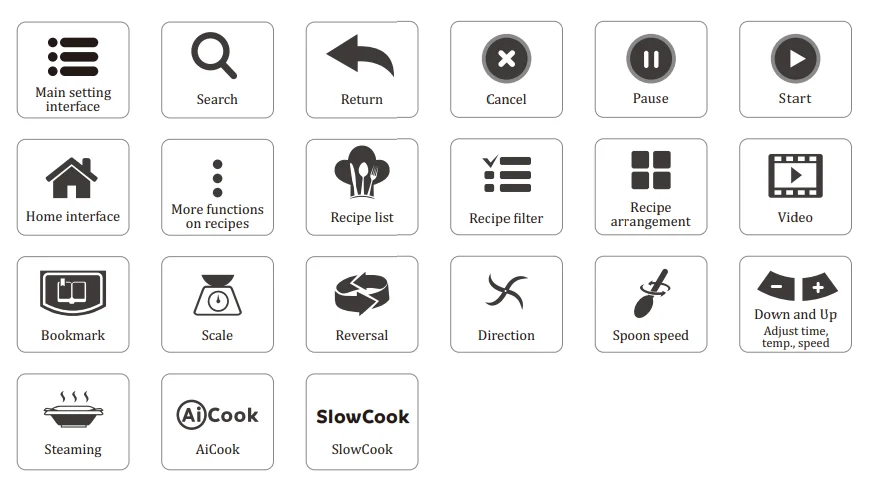
Main User Interface
Opening Screen
After turning on the screen, the Chef Robot’s opening screen is displayed.

Safety Guide
Tap the arrows to view the guide or tap Skip to proceed to the Home screen. On the last page, you can select “Don’t show again”, and the Safety Guide won’t be displayed after startup.

If you want to redisplay the Safety Guide after startup, follow the path below and tap Show Again.

Home Screen
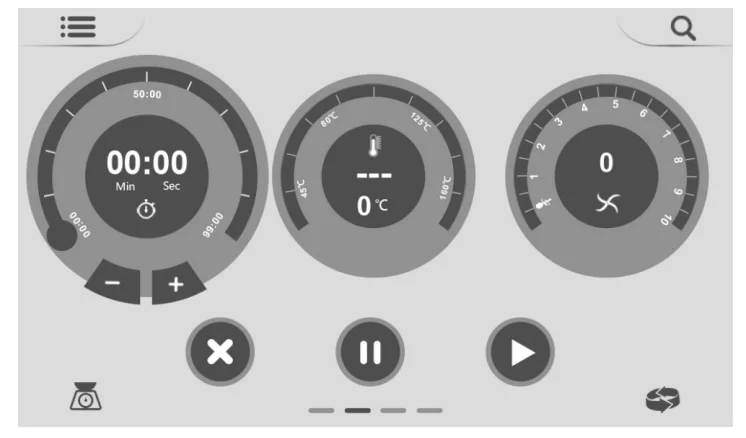
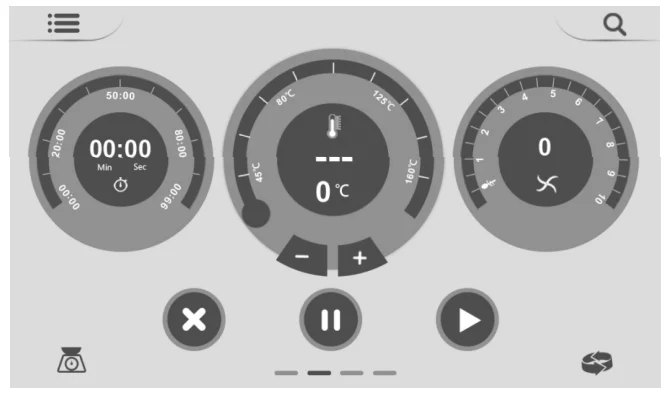
On the home screen, you can create or follow your own recipes, and freely adjust time, temperature, and speed.

- Setting the Cooking Time

- Set the cooking time by tapping the time icon on the home screen to select it and then adjusting the time by swiping the time slider, tapping the Down or Up buttons, or using the Selection knob. Cooking time can be set in the range of 0-99 minutes.
- The maximum time in the Slowcook and sous vide quick functions is 12 hours.
- Setting the Temperature
Set the cooking temperature by tapping the temperature icon on the home screen to select it and then adjusting the temperature by swiping the slider, tapping the Down or Up buttons, or using the Selection knob.
- Temperatures can be set in the range of 37℃ ~ 160℃ (max) (in 5° increments). SlowCook, AiCook, and Steaming temperatures are also available. Fahrenheit degree settings and increments are available as well.
- The cooking time must be set before adjusting the temperature.
- The default rotational speed is set
 when the temperature is activated.Special FunctionsSlowCook:
- Set the cooking time before starting.
- SlowCook is used to cook foods of thick consistency, such as milk and cheese. It is heated relatively slowly to prevent the bottom from getting burned.
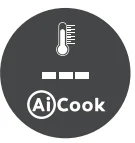
AiCook:

- Set the cooking time before starting.
- Use AiCook to stir fry meat that otherwise might stick to the bottom of the pot.
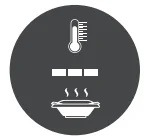
Steam:

- Set the cooking time before starting.
- Steaming cooks food by using boiling water vapor to heat ingredients.
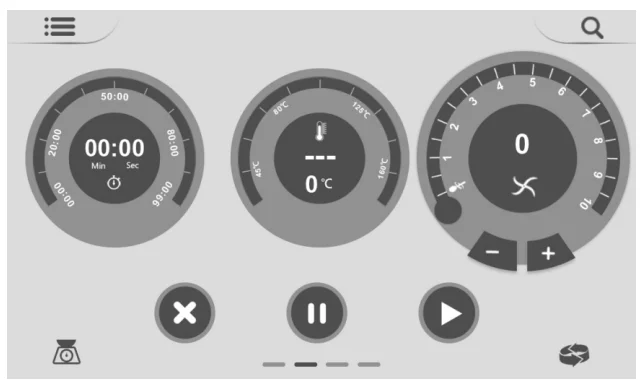
- Setting the Rotational Speed
Set the rotational speed by tapping the speed icon on the home screen to select it and then adjusting the speed by swiping the slider, tapping the Down or Up buttons, or using the Selection knob.
- Forward speed settings:
 and 0.5 – 10, in 20 increments of 0.5 rotations per second.
 - Reverse speed settings:
 and 0.5 – 4.5, in 9 increments of 0.5 rotations per second.
 - When the temperature is selected, the adjustable range of speed
 is -level 4.5.Special Functions
- Spoon speed: This slowest speed is similar to the effect of slow mixing with a wooden spoon.

- Reversal rotation: the machine mixing blade rotates counterclockwise.

- Spoon speed: This slowest speed is similar to the effect of slow mixing with a wooden spoon.
- Forward speed settings:
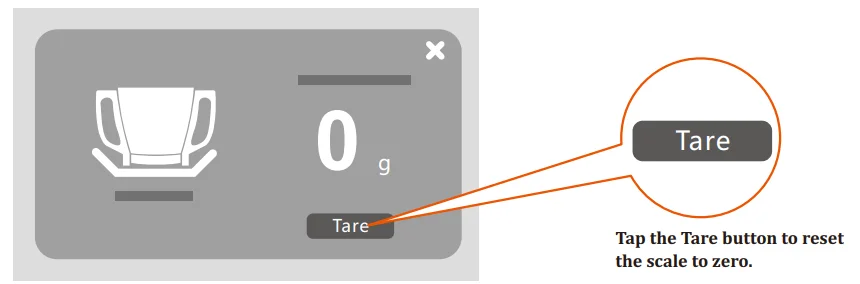
- Scale
- Each time you launch the scale function, it automatically resets to zero.

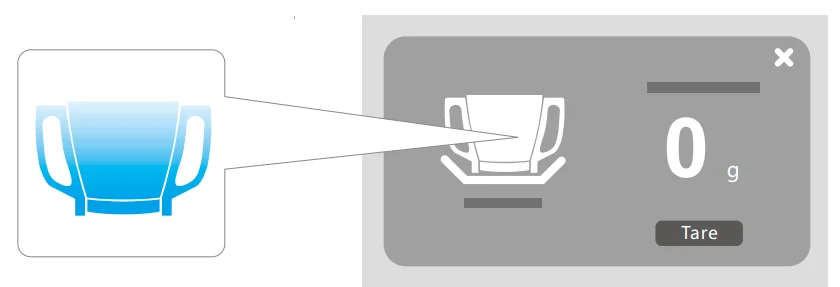
- As the weight on the scale increases, the “mixing bowl” image on the left gradually fills up in blue.

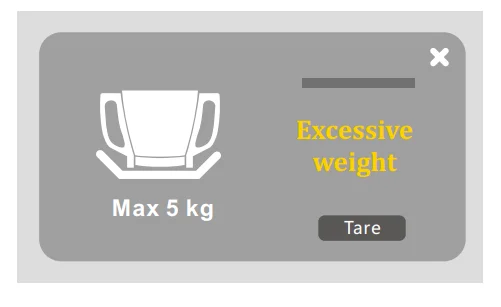
- Don’t use the scale for items that weigh more than 5 kg. Weights of 5 kg or more will prompt the warning. “Excessive weight”, as shown in the figure below.

- Calibration:
In the scale interface, press the “mixing bowl” image for 5 seconds to activate calibration:
Once activated, the Calibration button is displayed. First, click the Tare button to reset to zero, then put 1000g on the machine, click Calibration to calibrate until 1000g is stably displayed on the screen, and the weight is not fluctuating frequently during calibration.
Otherwise, click Calibration again to calibrate. After 1000g is stably displayed, click the button at the upper right to exit the calibration.
- Each time you launch the scale function, it automatically resets to zero.
 when the temperature is activated.Special FunctionsSlowCook:

 button at the upper right to exit the calibration.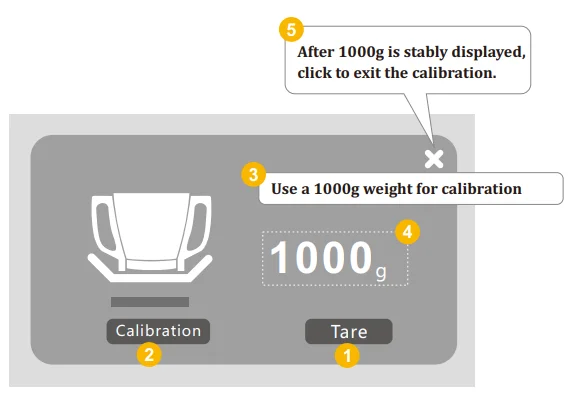
Quick Functions
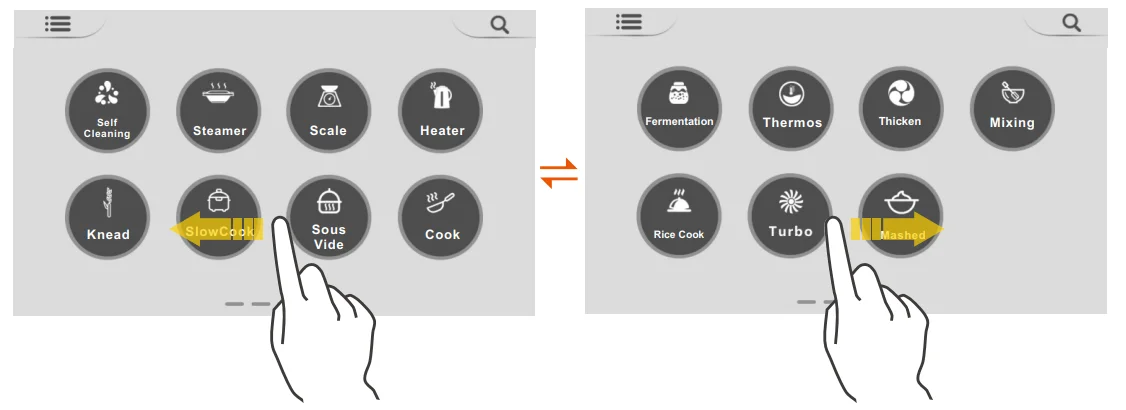
Swipe your finger to the left on the home screen to display the quick functions screen. There are 15 quick functions in total, as shown here. Follow the machine prompts for more information about each of the quick functions.
Recipes Screen
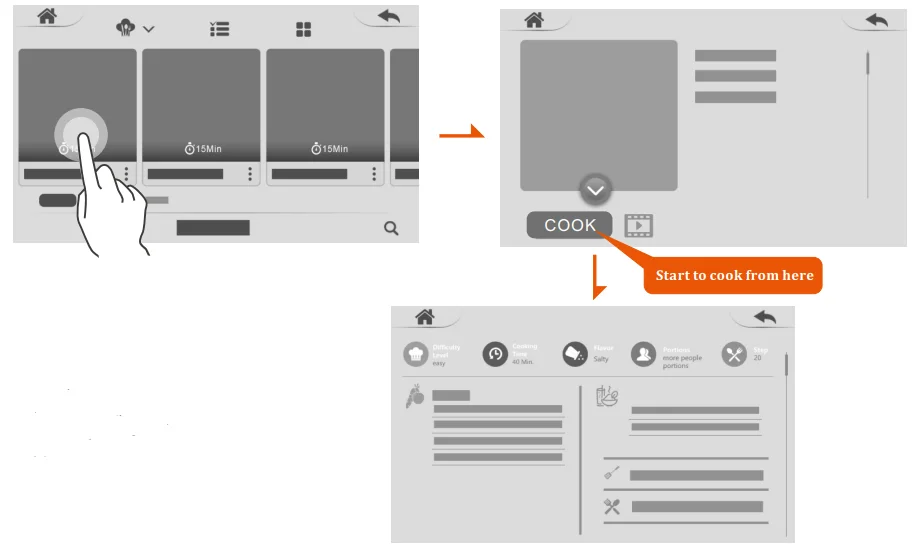
No login is required to access the internal recipes. Log in to your account to access the cloud recipes, self-created, my week, history, shared, and collection.

Following recipes is easy with Chef Robot.
If the recipe has a video, tap the video to watch. Once you’re ready to start cooking, tap Cook to get started. That displays the recipe screen, with steps and ingredients.
Special Function
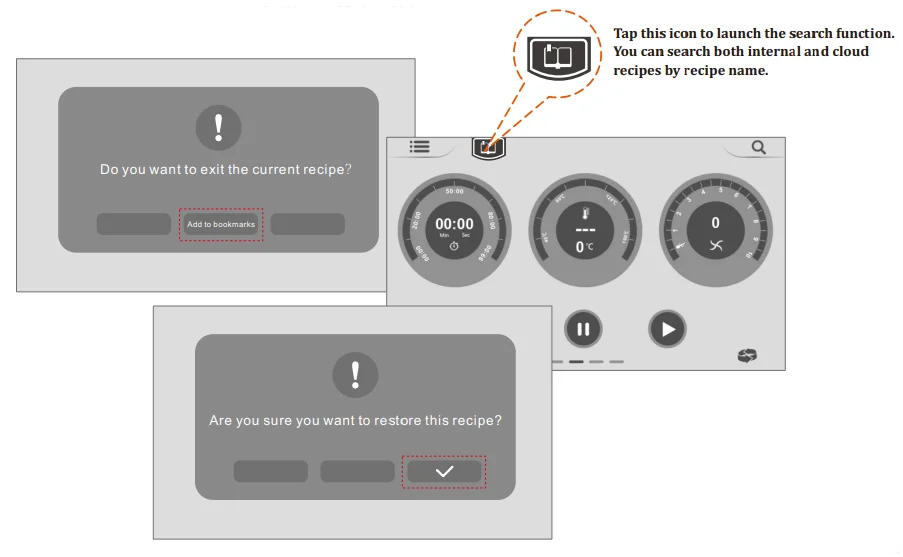
If you want to quit cooking in the middle of a recipe, you can select the bookmark function to remember the current steps of cooking, as shown below: Tap the bookmark icon to restore the recipe.
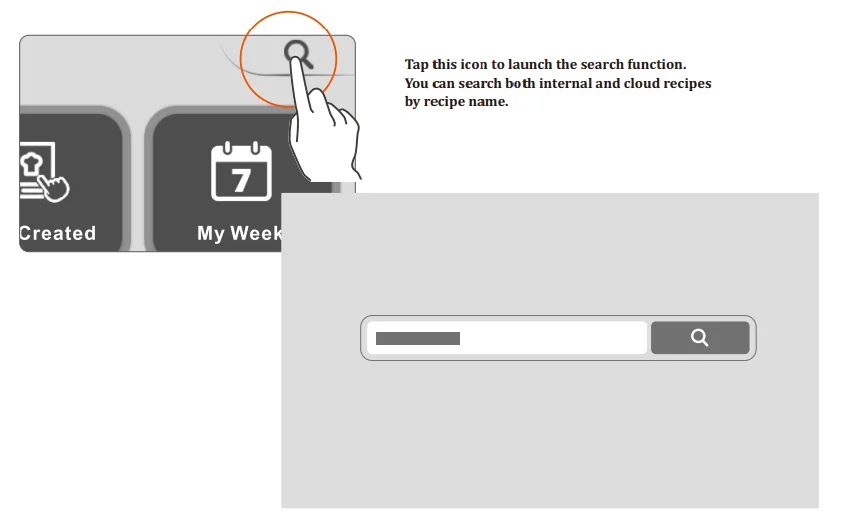
Recipe Search Screen
Tap this icon to launch the search function. You can search both internal and cloud recipes by recipe name.
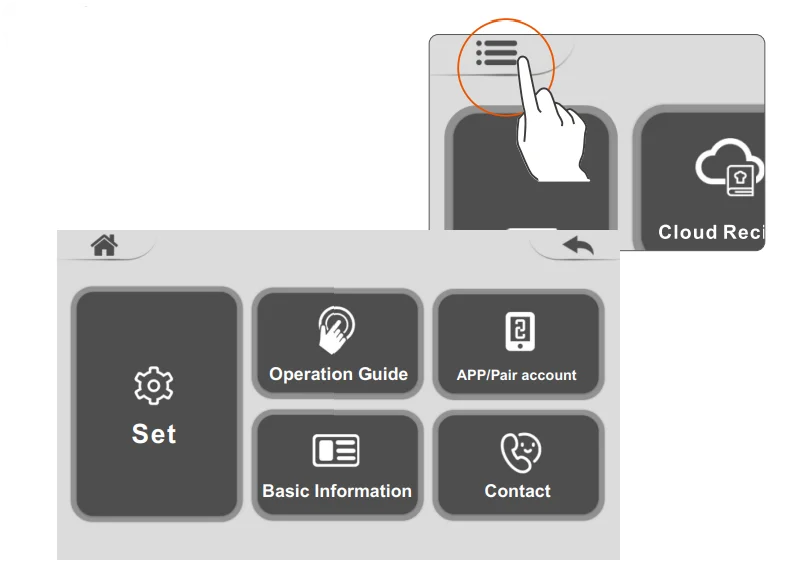
Main Settings Screen
Click the icon to launch the main settings screen. You can view five functional screens: Set, App / Pair account, operation guide, basic information, and contact.
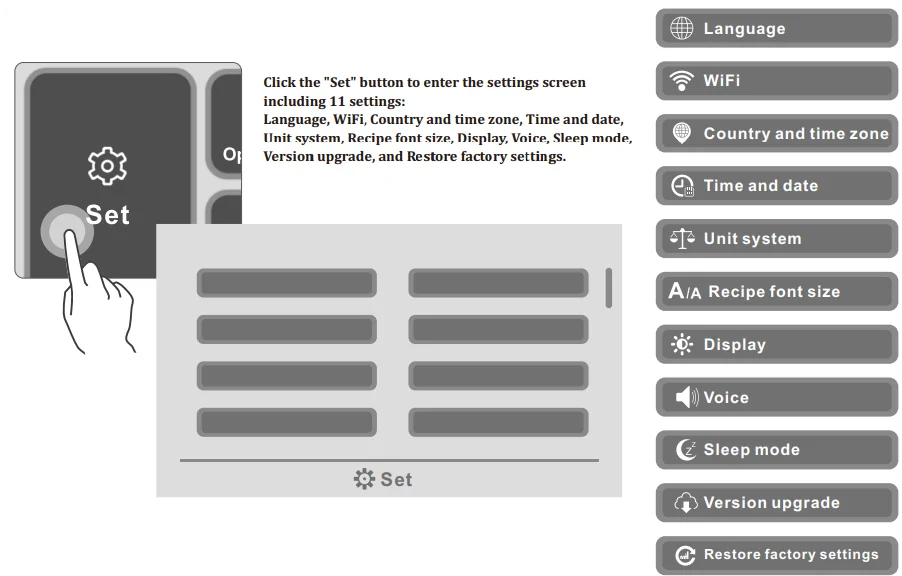
Settings
Click the “Set” button to enter the settings screen, including 11 settings: Language, WiFi, Country and time zone, Time and date, Unit system, Recipe font size, Display, Voice, Sleep mode, Version upgrade, and Restore factory settings.
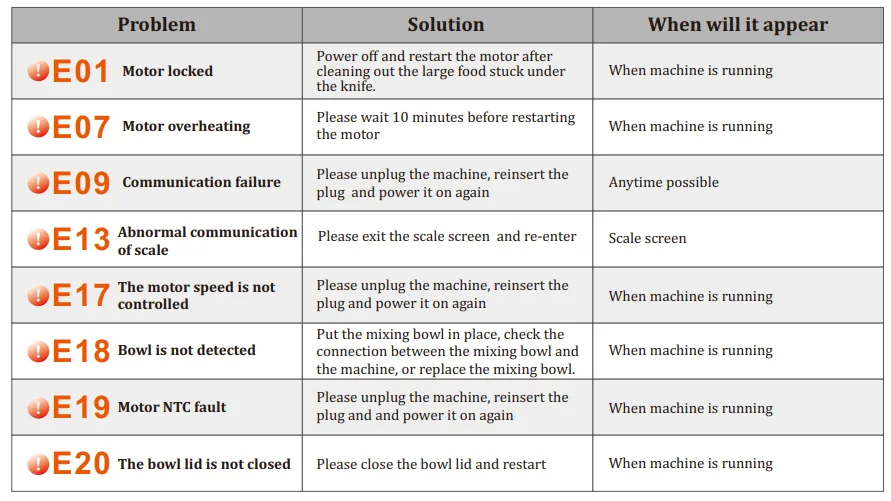
Troubleshooting
Cleaning & Maintenance
Cleaning the Main Unit
- Unplug the main unit before cleaning.
- Clean the main unit only with a dry or damp cloth.
- Do not pour water over the main unit.
- The main unit and electrical cables, and plugs should always be kept dry and clean.
- Do not immerse the main unit in water or other liquids.
- If water has managed to penetrate the main unit, contact our service center.
CAUTION
- Before cleaning the main unit, disconnect the machine from the power supply.
- If water penetrates the electrical components, you are in danger of an electric shock.
Self-Cleaning
- Using the self-cleaning mode of the quick functions, you can quickly clean the stubborn and sticky food left in the bowl and on the blade, such as dough.

- The time of self-cleaning can be adjusted according to your own needs.

Cleaning the Mixing Bowl
How to clean the mixing bowl?
- Remove the mixing bowl from the machine and remove the mixing blade as well.
- Scrub with a mild detergent and soft cleaning cloth, then rinse with water and let dry.
- It’s recommended that you not put the mixing bowl in the dishwasher.
CAUTION
- The mixing blade is extremely sharp.
- Please be very careful when removing it.
ATTENTION
- Do not use abrasive objects, such as steel wool, to clean the mixing bowl. Doing so could damage or negatively affect the capacity to use the mixing bowl.
- To prevent corrosion, don’t use corrosive cleaners to clean the mixing bowl. Be sure to fully dry the connection pins promptly after cleaning.
Cleaning the Mixing Blade
How to clean the mixing blade?
- Hold the upper part of the mixing blade, clean it with a soft cleanser, then rinse it with water and let it dry.
- The mixing blade is also dishwasher-safe.

ATTENTION
- To prevent corrosion and rust, don’t use corrosive cleaners to clean the mixing blade.
- Rust on the mixing blade is harmless, but it can be removed using a soft brush or vinegar.
- Don’t soak the mixing blade in water for long periods of time. This can cause the mixing blade seal to lose its efficacy.
Cleaning other accessories
How to clean other accessories (steamer, basket, measuring cup, spatula, and butterfly)?
- All the accessories are made of high-quality food-grade plastic. They can be cleaned with a mild detergent and a soft cleaning cloth.
- The accessories are also dishwasher-safe.
Storage & Maintenance
- No oil is needed when doing the maintenance.
- Store the machine in its original packaging in a dry area. Keep away from children and pets.
- Do not expose to direct sunlight.
- Any other servicing than mentioned in this manual should be performed by an authorized repair center.
- Ensure that the mixing bowl and especially the connection pins underneath are thoroughly dried after cleaning. If you use the mixing bowl when it is still wet, rust could form inside the main unit.
- Let the mixing bowl dry completely before inserting it into the main unit.
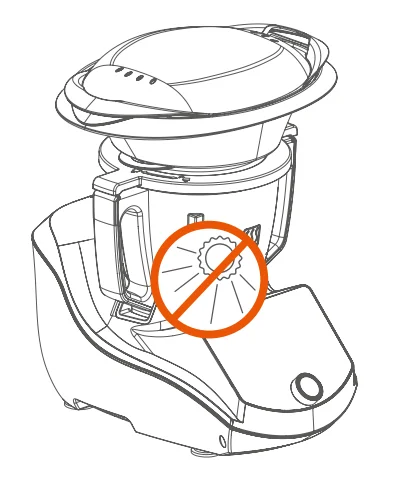
WARNING
- Any other servicing should be performed by an authorized service representative.
GROUNDING INSTRUCTIONS
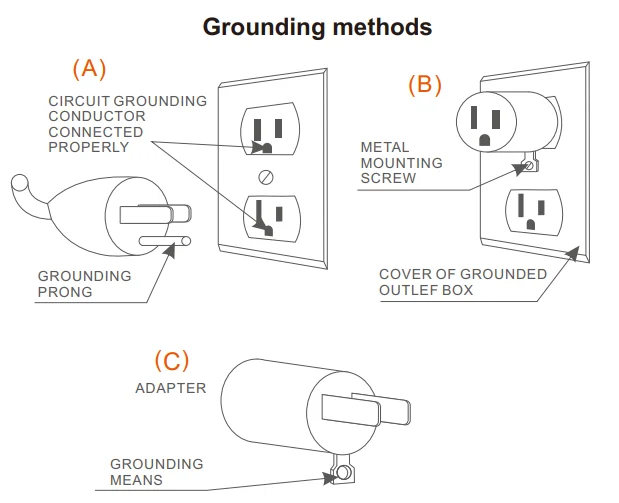
This appliance must be grounded while in use to protect the operator from electrical shock. The appliance is equipped with a 3-conductor cord and a 3-prong grounding-type plug to it the proper grounding-type receptacle. The appliance has a plug that looks like sketch A. An adaptor, sketch B, should be used for connecting sketch-A plugs to two-prong receptacles. The grounding tab, which extends from the adaptor, must be connected to a permanent ground such as a properly grounded outlet box, as shown in sketch C, using a metal screw.
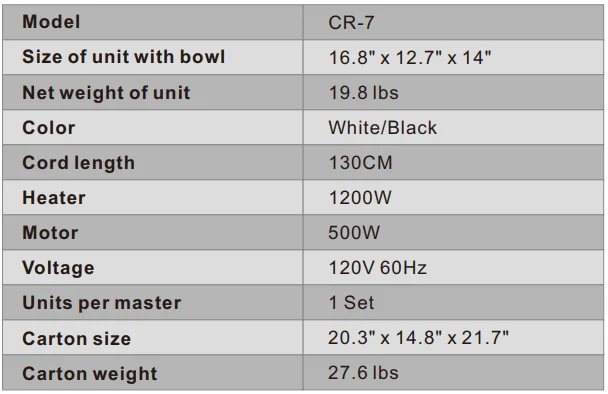
Specifications
For more manuals by ChefRobot, visit ManualsLibraryy
ChefRobot Ultracook CR-7 Smart Food Processor- FAQs
Are cooking robots worth the money?
Yes, for most users they are. Cooking robots like the CR-7 make meal prep faster and more consistent, especially for those who aren’t confident in the kitchen. However, they can be pricier than regular kitchen appliances.
Can the ChefRobot CR-7 replace a human chef?
Not entirely. The CR-7 can handle repetitive kitchen tasks such as chopping, stirring, and steaming with great accuracy, but it doesn’t replace the creativity and personal touch of a real chef.
What functions does the ChefRobot Ultracook CR-7 offer?
The CR-7 can chop, knead, blend, steam, cook, and mix. It also includes smart controls and preset cooking programs to make preparing complex dishes easier.
How is a smart food processor different from a regular one?
A smart processor like the CR-7 can automatically control temperature, speed, and time, offering guided recipes and Wi-Fi connectivity, while regular food processors only perform manual tasks like chopping or blending.
What are the advantages of using the ChefRobot CR-7?
It saves time, ensures consistent results, reduces cleanup, and helps users try new recipes with guided cooking steps—all in one appliance.
Are there any disadvantages to smart food processors?
Smart processors may require software updates, higher maintenance costs, and internet access for some features. They can also become outdated faster than standard appliances.
Are cooking robots safe to use?
Yes, the CR-7 includes safety locks, temperature control, and overheating protection to ensure safe and stable operation during cooking.Yes, the CR-7 includes safety locks, temperature control, and overheating protection to ensure safe and stable operation during cooking.
How much power does the ChefRobot CR-7 use?
It typically runs on standard kitchen voltage (220–240V) and consumes about 1000–1500 watts, similar to other high-performance food processors.
Which brand makes the best food processors in Pakistan?
Popular brands include Westpoint, Philips, Anex, Braun, and Gaba National, along with international smart brands like ChefRobot and TOKIT.