
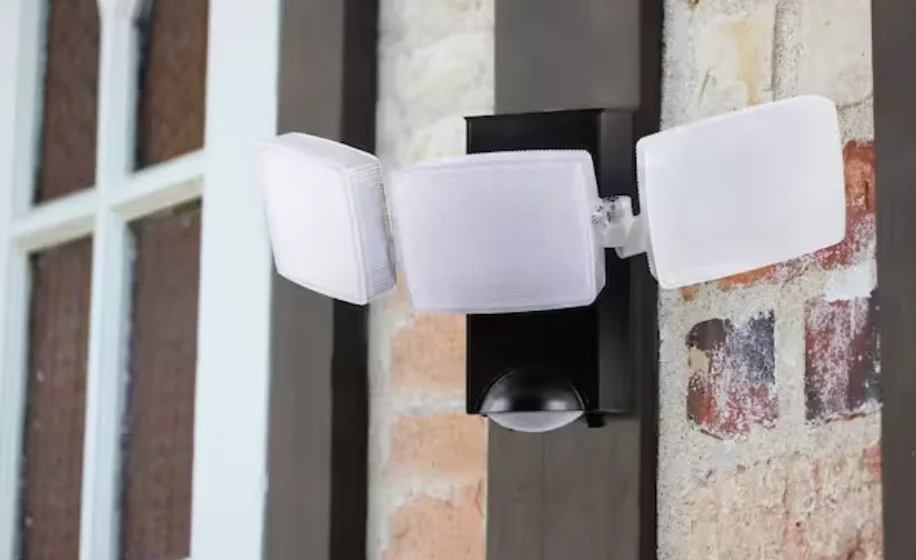

Defiant HB-2813 Battery-Operated Motion Light
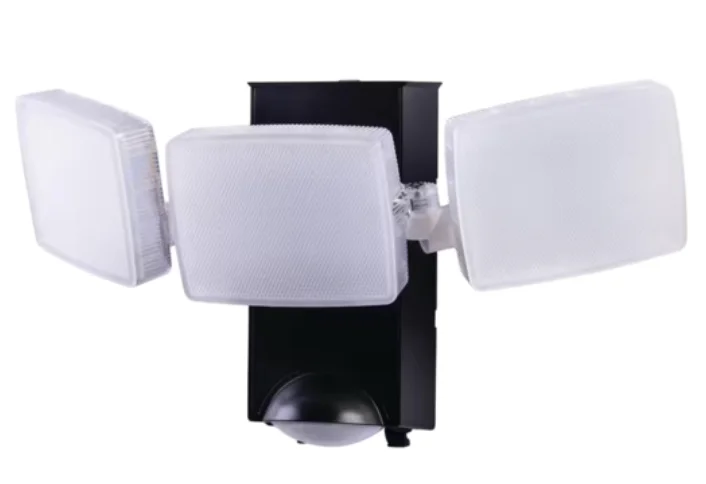
Safety Information
PRECAUTIONS
Please read and understand this entire manual before attempting to assemble, install, or operate this light fixture
For proper operation, this light fixture should be:
- Used indoors, for example, in a garage or shed, or outdoors.
- Ceiling/eave or wall-mounted.
- Installed on the ceiling, or 6 ft. – 8ft above the ground, if mounted on a wall.
- Do not immerse components in liquid.
 WARNING: To prevent possible SERIOUS INJURY or DEATH, never allow small children near batteries. If the battery is swallowed, immediately notify a doctor.
WARNING: “THIS PRODUCT MUST BE INSTALLED IN ACCORDANCE WITH THE APPLICABLE INSTALLATION CODE BY A PERSON FAMILIAR WITH THE CONSTRUCTION AND OPERATION OF THE PRODUCT AND THE HAZARDS INVOLVED”
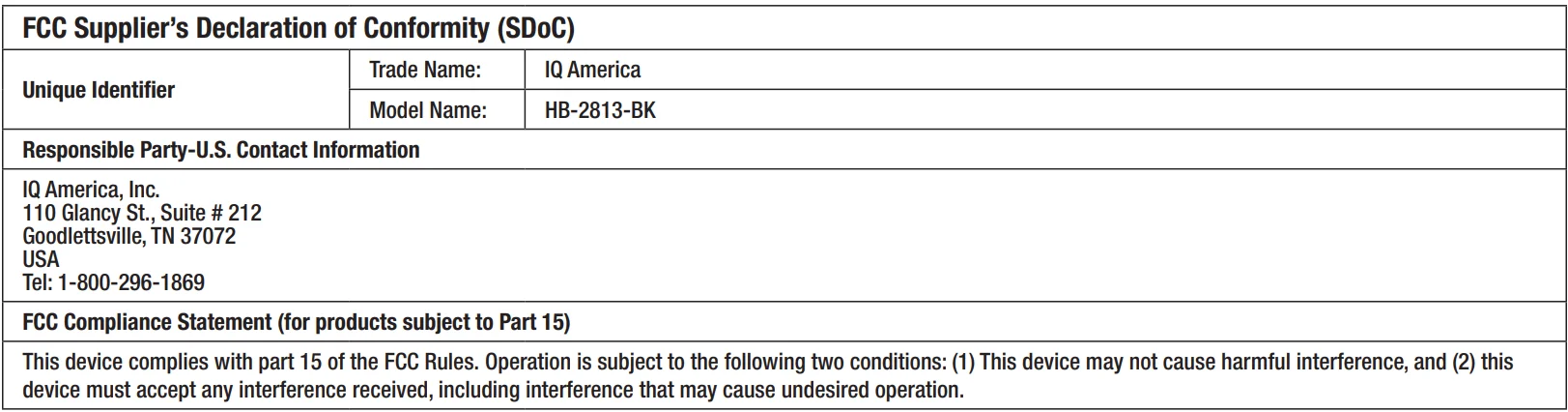
WARNING: This device complies with Part 15 of the FCC Rule. Operation is subject to the following two conditions:
- This device may not cause harmful interference, and
- This device must accept any interference received, including interference that may cause undesired operation.
WARNING: DO NOT mix old and new batteries. DO NOT mix battery types – such as alkaline, heavy duty, ty and rechargeable – in a single device. Battery leakage may occur.
WARNING: DO NOT DISPOSE OF BATTERIES IN FIRE. BATTERIES MAY EXPLODE OR LEAK.
 CAUTION: Please note that changes or modifications not expressly approved by the party responsible for compliance could void the user’s authority to operate the equipment.
NOTICE: When replacing batteries, recycle used batteries or dispose of them in accordance with local regulations.
WARNING: This equipment has been tested and found to comply with limits for a Class B digital device, pursuant to Part 15 of the FCC Rules.
These limits are designed to provide reasonable protection against harmful interference in a residential installation.
This equipment generates, us, and can radiate radio frequency energy and, if not installed and used in accordance with the instructions, may cause harmful interference to radio communications.
However, there is no guarantee that interference will not occur in a particular installation. If this equipment does cause harmful interference to radio or television reception, which can be determined by turning the equipment off and on, the user is encouraged to try to correct the interference by one or more of the following measures:
- Reorient or relocate the receiving antenna.
- Increase the separation between the equipment and the receiver.
- Connect the equipment into an outlet on a circuit different from that to which the receiver is connected. • Consult the dealer or an experienced radio/TV technician for help.
Warranty
3-YEAR WARRANTY
Contact the Customer Service Team at 1-866-308-3976 or visit www.HOMEDEPOT.COM.
Specifications

Pre-Installation
PLANNING INSTALLATION
Before installing the light fixture, ensure that all parts are present (see Hardware Included on page 3). If any part is missing or damaged, do not attempt to assemble, install, or operate this light fixture.
Estimated installation time: 15 – 20 minutes
TOOLS THAT MAY BE REQUIRED
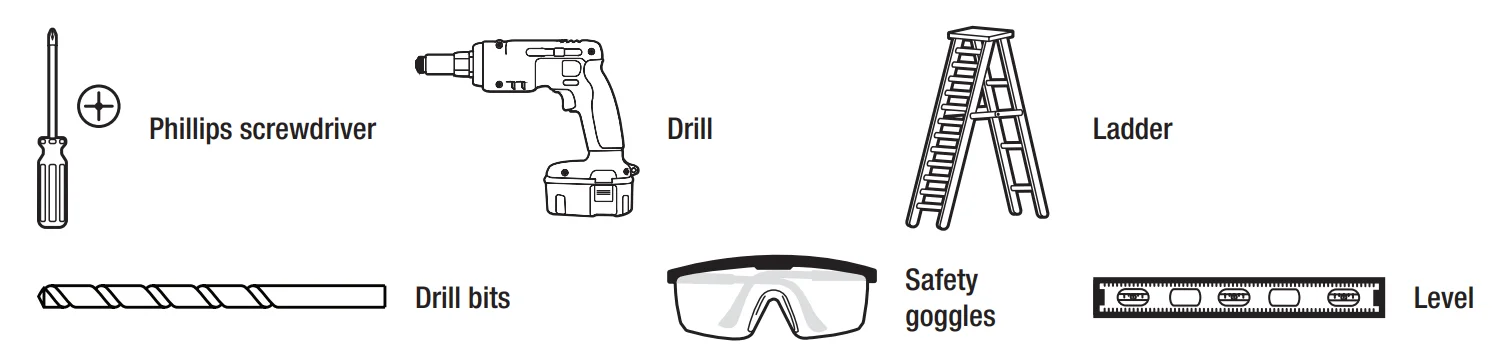
HARDWARE INCLUDED
NOTE: Hardware not shown to actual size.
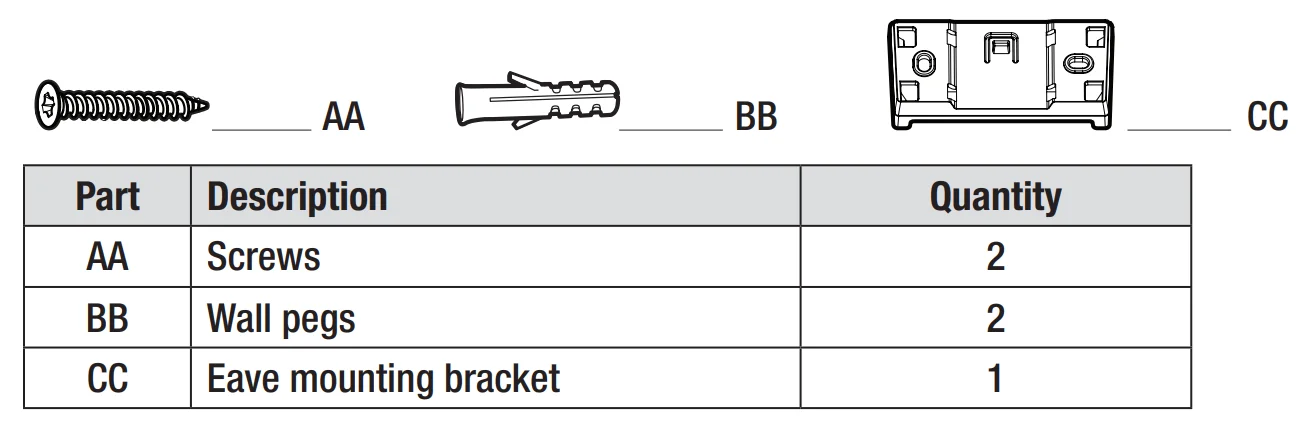
PACKAGE CONTENTS
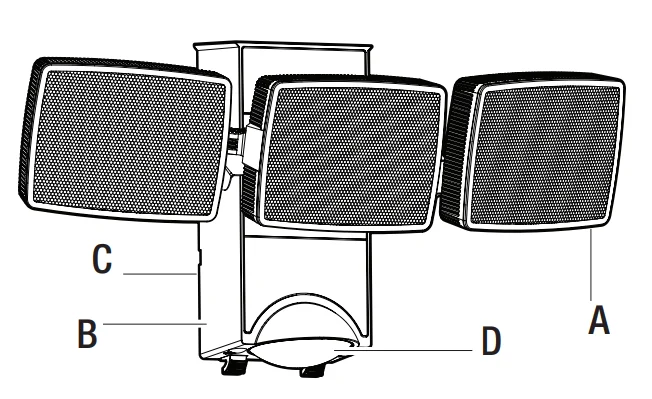
Installation
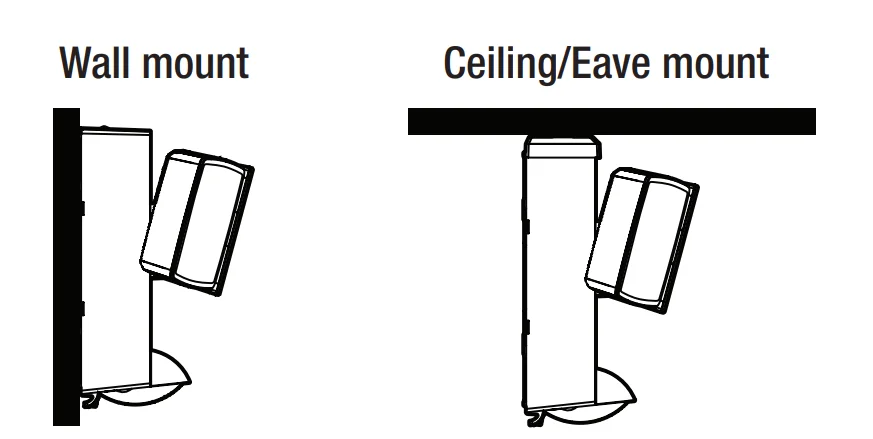
Determining the mounting location
- Determine the mounting location – ceiling/eave or wall mount
- Recommended installation height is 8 – 10 ft. for ceiling mounting and 6 – 8 ft. for wall mounting.
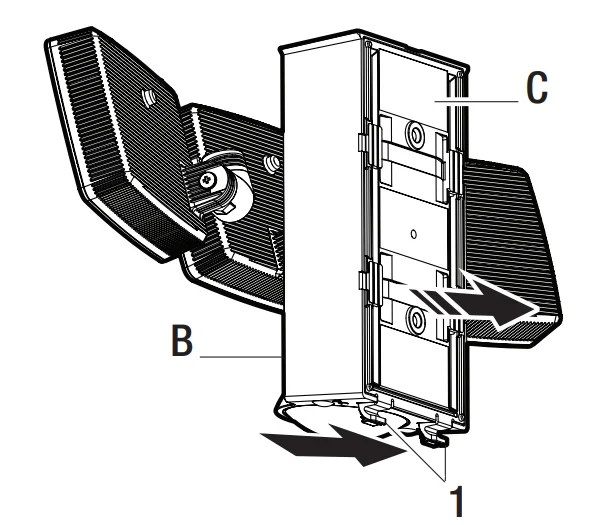
Removing the mounting plate
- Gently pull the two tabs (1) on the bottom of the mounting plate (C) away from the main body (B).
NOTE: This fixture comes with a mounting plate (C). It is pre-assembled on the light fixture (B) for shipping.
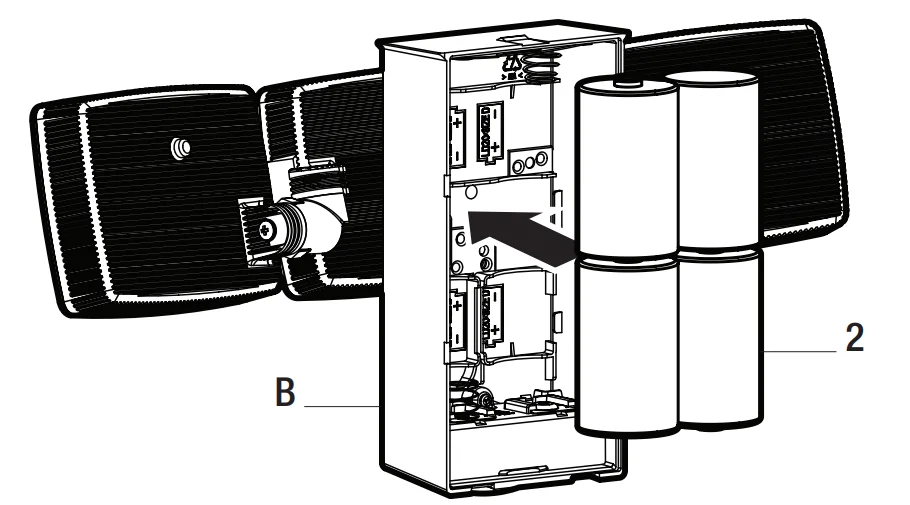
Installing the batteries
- Install 4 x Alkaline “D” 1.5 V batteries (2) (not included) into the battery compartment..ent
- Make sure the polarity (+ & – ) of the batteries is correct as shown in the battery compartment.
Installing the mounting plate or mounting bracket
WALL MOUNT
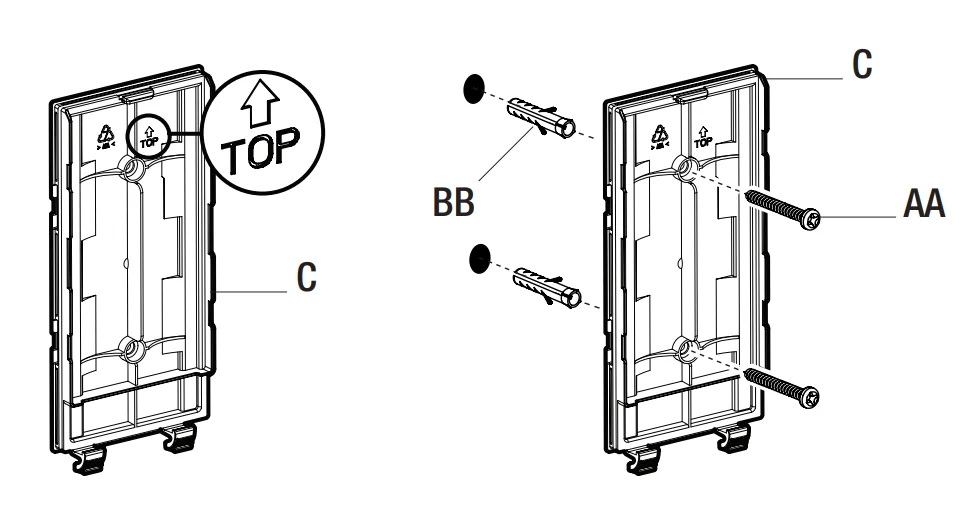
- Place the mounting plate (C) against the wall with the arrow and the word “TOP” facing you (see illustration). Ensure the mounting plate (C) is level. The backplate is designed to allow you to drive the screws directly through the thin plastic in the 2 locations indicated. Push firmly with a screwdriver and drive screws into the wall through the plastic. You can also use a drill and drive the scthroughhough the plastic or drill pilot holes first.
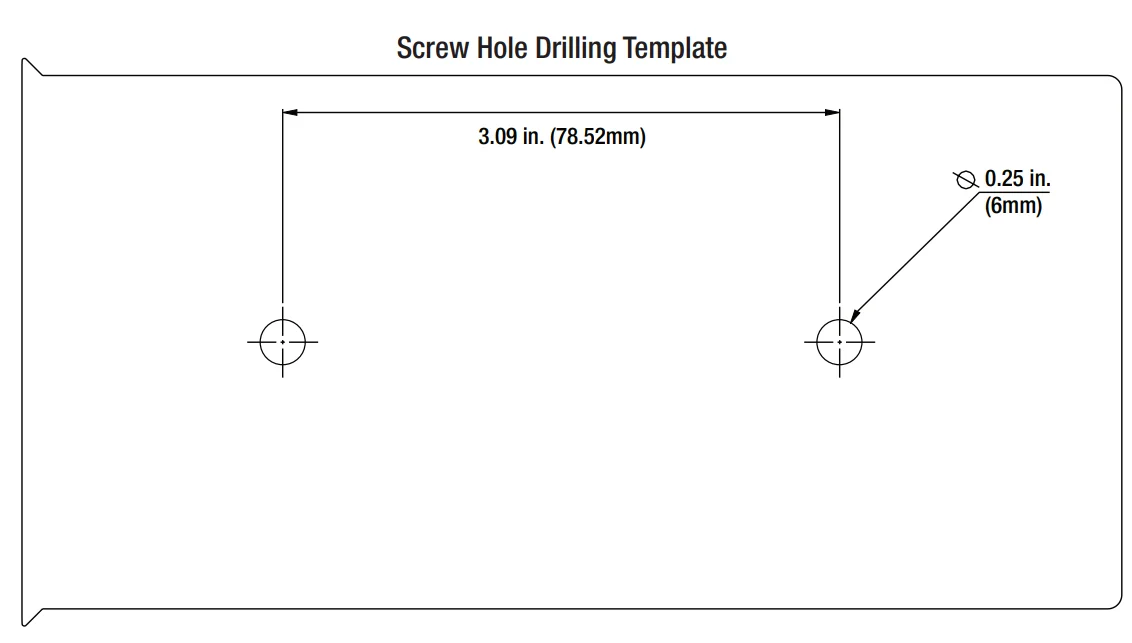
- We have also provided you with a template, in case you want to mark the hole locations and drill pilot holes first. This is located on the back cover of this Use and Care Guide. You simply cut out the template area and use it as a guide to mark the holes through the paper.
- If mounting to a wooden surface like a deck, you can install the mounting screws (AA) through the mounting plate (C) and into the wood with a screwdriver, or with a drill and bit driver.
- You can also drill two pilot holes into the wood mounting surface with a 1/8 inch drill bit and then install the screws.
- If mounting to wall board or brick, drill two pilot holes into the mounting surface, using a 7/32 inch drill bit.
- Insert the wall pegs (BB) and attach the mounting plate (C) using the two mounting screws (AA).
EAVE OR CEILING MOUNT
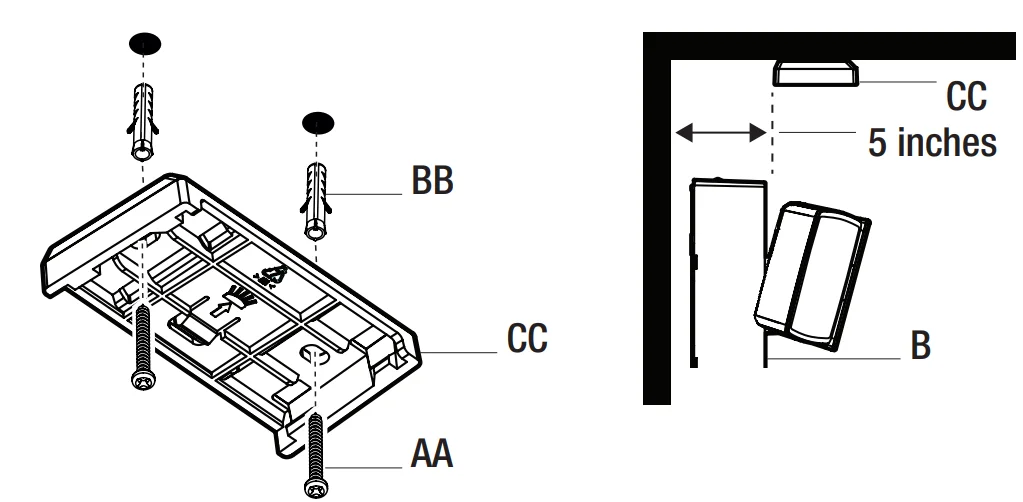
- Install the eave mounting bracket (CC) with the arrow facing the same direction as your light (B) will be facing with screws (AA). Make sure to allow 5 inches between the eave mounting bracket (CC) and the wall, so you have enough clearance to slide the light (B) onto the bracket.
- If mounting to a wooden surface like a deck, you can install the mounting screws (AA) through the mounting bracket (CC) and into the wood with a screwdriver, or with a drill and bit driver.
- You can also drill two pilot holes into the wood mounting surface with a 1/8 inch drill bit and then install the screws.
- If mounting to wall board or brick, drill two pilot holes into the mounting surface, using a 7/32 inch drill bit.
- Insert the wall pegs (BB) and attach the mounting bracket (CC) using the two mounting screws (AA) with a very long Phillips screwdriver.
Mounting the light fixture
WALL MOUNT
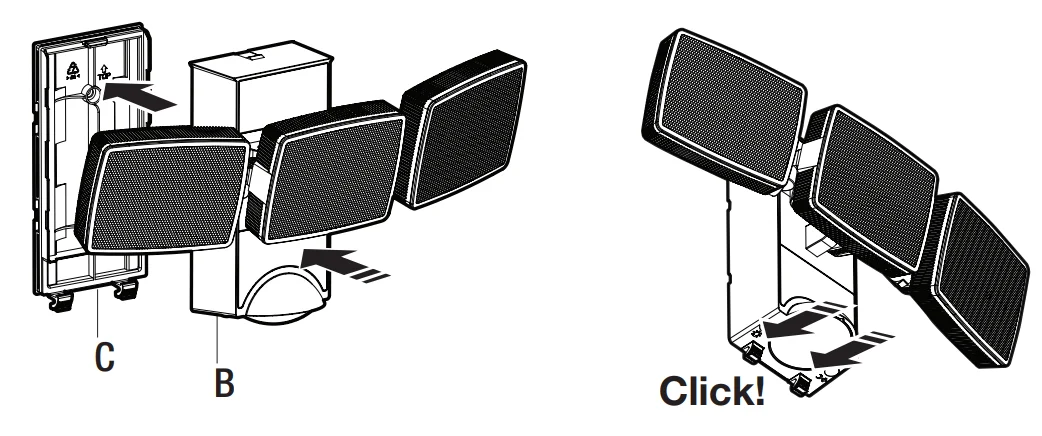
- Attach the light fixture (B) to the mounting plate (C).
- Press the unit on the top of the mounting plate. You should hear a “Click” sound. This indicates that the main body (B) is securely attached to the mounting plate (C).
EAVE OR CEILING MOUNT
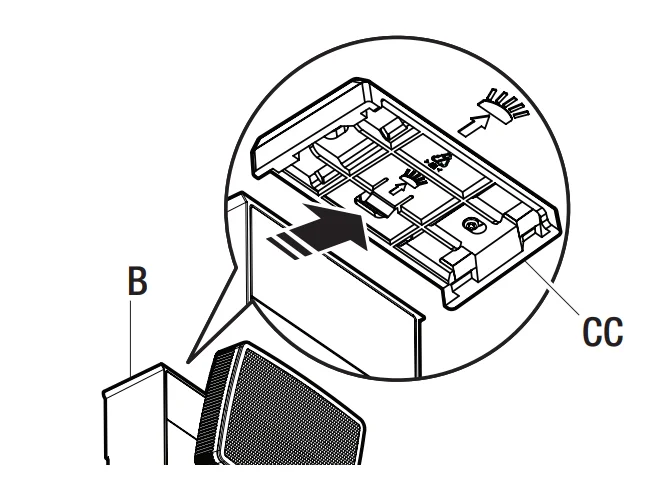
- Slide the front of the light fixture (B) onto the rear of the eave mounting bracket (CC), until it reaches the front of the bracket and “clicks” into place. This indicates that the main body (B) is securely attached to the eave mounting bracket (CC).
Operation
Adjusting the lamp heads
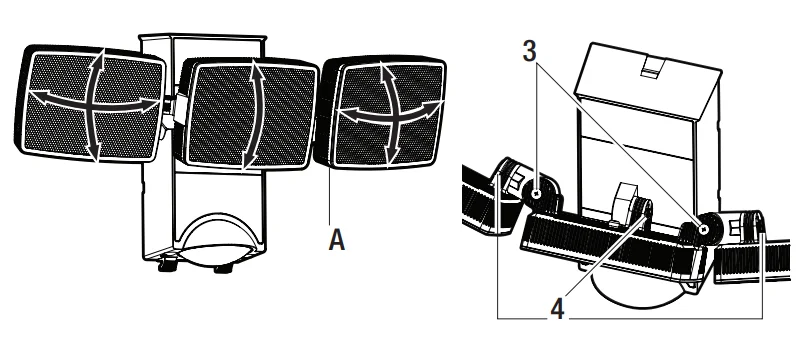
- If needed, gently grasp the lamp heads (A) and adjust. The middle lamp head can be tilted down by 85±5° and upward by 15±5°. The outside lamp heads can be tilted down by 65±5° and upward by 65±5°. They can also be panned out by 100±5° or in by 15±5°.
- Hinge (3) can pan the light in and out. Hinge (4) can tilt the lamp up and down.
Detecting motion
- When motion is detected, the light will turn on for 15 seconds at 100% brightness and stay on as long as motion is being detected. If no further motion is detected, after 15 seconds, the light will dim to 20% brightness for another 10 seconds, before turning the light off. If further motion is detected, the light will come on at 100% brightness.
Adjusting the DIM/ECO control
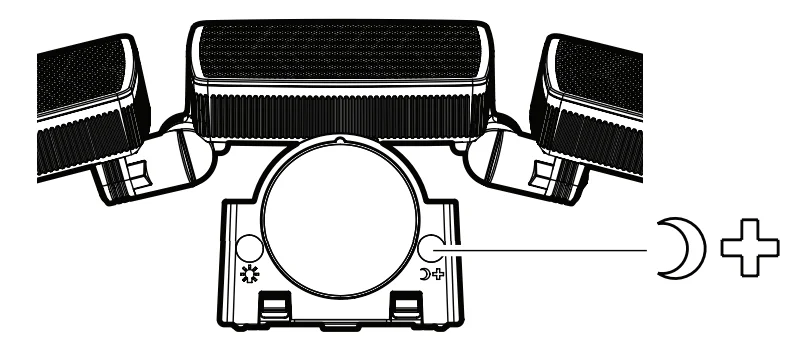
- Press the DIM/ECO button for 2 seconds, and the light will show its maximum brightness based on the current battery capacity.
- Release the DIM/ECO button and press it again within 5 seconds; the light will show the next lower dim level. Release the button, and press it again within 5 seconds. The dim level will further go down for the next level, and so on.
- When the dim level reaches the desired level, release the button for 5 seconds or more, and the dim level is set.
- During the DIM/ECO level setting, the light will go from the maximum brightness and dim in multiple steps until it reaches the lowest setting. If you keep pushing the button within 5 seconds, it will go from maximum, down in steps to the minimum, and from minimum, back to maximum. It will continue in this cycle until you stop pushing the button for 5 seconds or more, and this will be your new dim level setting.
Adjusting the Dusk Learn control
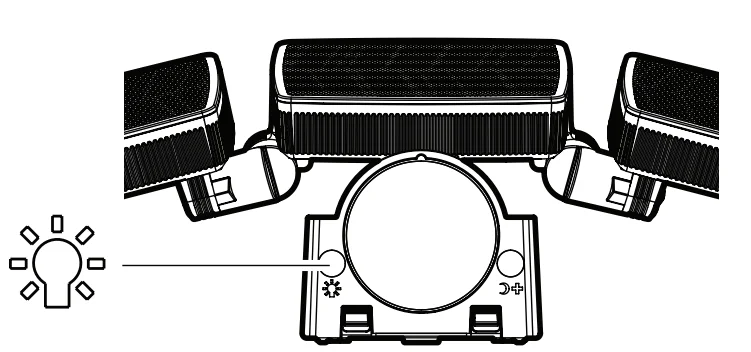
- To set the ambient lux, or dusk level, press and hold the Dusk Learn button for 2 or 3 seconds until the light flashes once, indicating it is calibrating the current lux level. After several more seconds, the light will flash again, indicating that the new dusk level has been set. You can return to the default factory setting by removing and reinstalling one of the batteries.
Using TEST mode
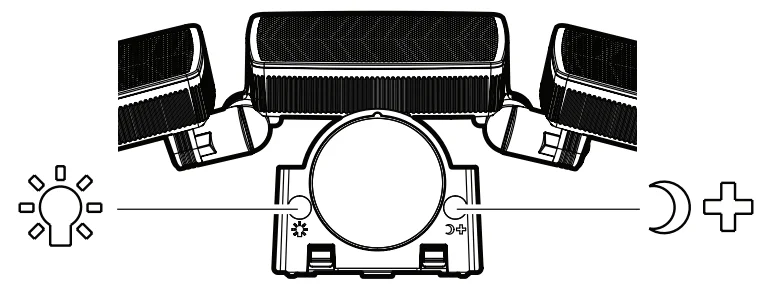
- Press the Dusk Learn and DIM/ECO buttons simultaneously for more than 10 seconds until the light flashes once. This indicates that light has entered the Test mode. Once motion is detected, the light will stay on for about 2 seconds. You can check the detection range during daylight hours in Test mode.
- To exit the Test mode, press either the Dusk Learn or DIM/ECO button once, or after 5 minutes without motion detection, it will automatically go back into the Auto mode.
Care and Cleaning
- To prolong the original appearance, clean with water and a soft, damp cloth only
- Do not use paints, solvents, or other chemicals on this light fixture. They could cause premature deterioration of the finish. This is not a defect in the finish and will not be covered by the warranty.
- Do not spray with a hose or power washer.
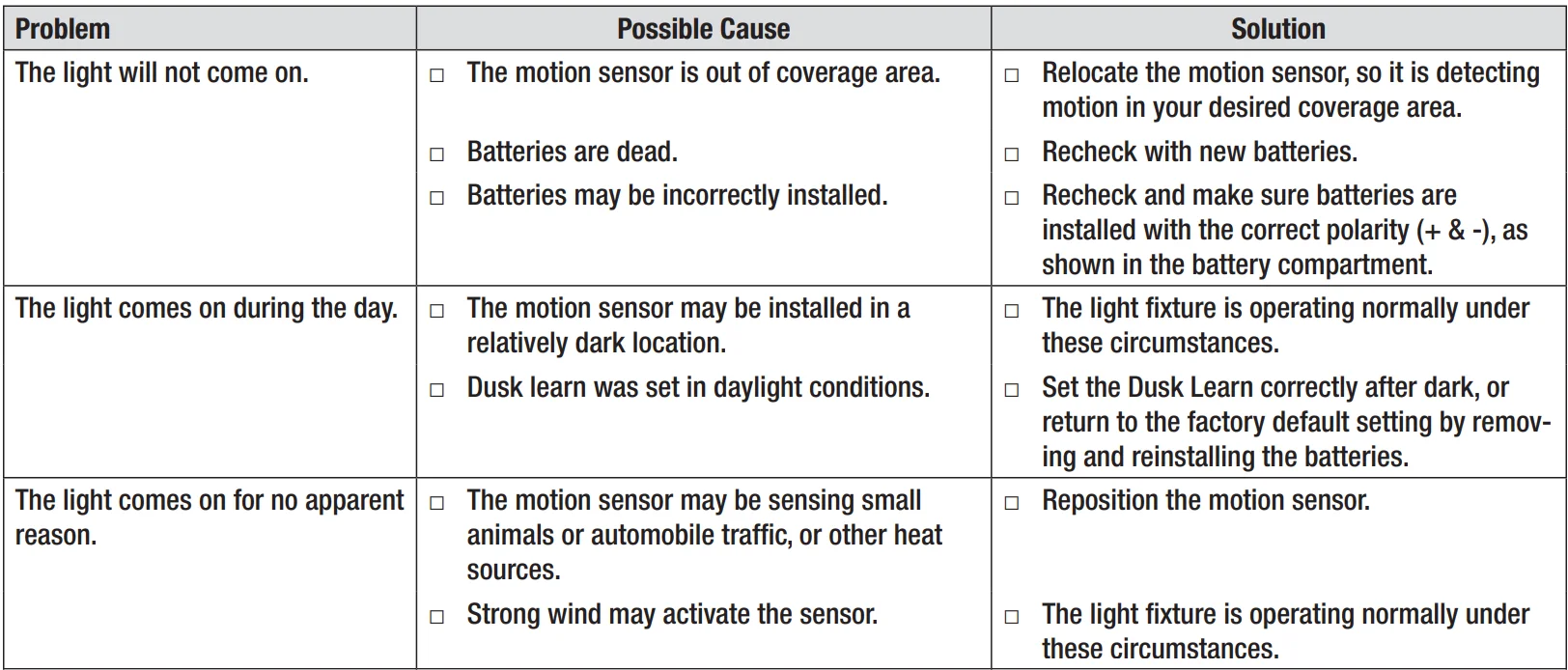
Troubleshooting

FCC Supplier’s Declaration of Conformity (SDoC)
Screw Hole Drilling Template
For more manuals by Defiant, visit ManualsLibraryy
Defiant HB-2813 Battery-Operated Motion Light- FAQs
Why is my Defiant motion light not working?
The battery may be low. Turn the light off and allow it to fully charge (usually 2–3 days). Also, check settings like LUX and sensitivity.
How do I reset a Defiant motion sensor light?
Flip the wall switch off and on, or press the reset button inside the sensor box if available. This often restores normal operation.
Why does my motion light stay on all night?
This can be caused by incorrect settings, a dirty sensor, battery issues, or electrical interference. Adjust the time, sensitivity, and LUX settings and clean the sensor lens.
How do I test if my motion sensor is working?
Ensure the system is armed. Walk in front of the sensor; the light should turn on. Some models have an LED indicator that flashes when motion is detected.
Can I manually turn on the Defiant motion light?
Yes. Some models allow manual operation through a wall switch or a button on the fixture. Refer to your user guide for exact instructions.
Why is my motion light blinking or flickering?
Flickering can indicate loose connections, low battery, or electrical interference. Check wiring, battery charge, and ensure the sensor is clean.
Do I need an electrician to install this motion light?
The Defiant HB-2813 is battery-operated, so no wiring is required. You can install it yourself. For hardwired lights, professional help is recommended.
How long does the battery last on the Defiant motion light?
Battery life varies depending on usage and settings, but typically lasts several months before needing a recharge or replacement.
Are Defiant motion lights reliable?
Yes. Users report bright illumination and easy installation. However, occasional false triggers may occur due to wind, pets, or sunlight.