
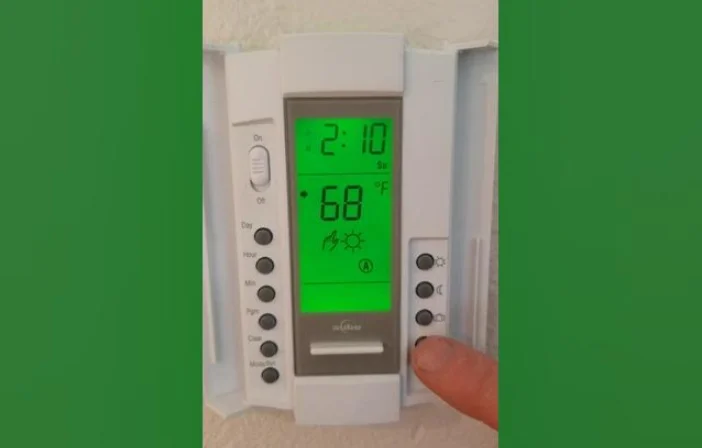

Aube Technologies TH102D Thermostat
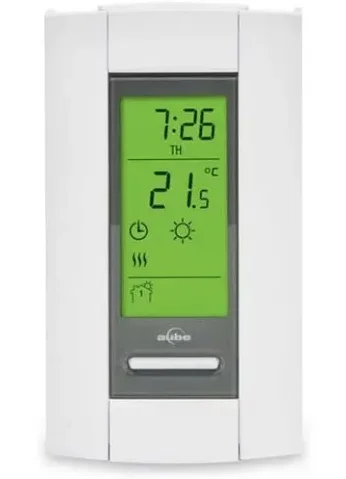
SUMMARY
- OPTIONS SELECTION
- To change the temperature from °C to °F and back, maintain the DAY button pressed down as the RESET button is being pressed on and released. Then release the DAY button.
- To change the time format from 24 hrs. to 12 hrs. and back, maintain the HOUR button pressed down as the RESET button is being pressed on and released. Then release the HOUR button.
- To change the heating control from proportional to on/off and back, maintain the MIN button pressed down as the RESET button is being pressed on and released. Then release the MIN button.
- TO SET TIME AND DAY
Press on DAY, HOUR, and MIN buttons to adjust time and day. - TO RECORD THE HEATING PROGRAMS
Set the operating mode to AUTO. Use the PGM button to select the program to be recorded or modified. Once the program is selected, use the HOUR and MIN buttons to set the time and ▲or ▼to selectthe temperature setting. - TO RECORD THE ECONO PROGRAMS
Set the operating mode to ECONO. Use the PGM button to select the program to be recorded or modified. Once the program is selected, use DAY, HOUR, and MIN buttons to set time and▲or ▼to select temperature setting. - OPERATING MODES
To select an operating mode, use the MODE button.- AUTO: Runs the program.▲or ▼shows the temperature setting and can override your programming temporarily.
- MAN: Maintain the selected temperature.▲Or ▼change the temperature setting.
- ECONO: Maintain a temperature setting up to the user’s preprogrammed day and time.▲or ▼shows the temperature setting and can override your programming temporarily.
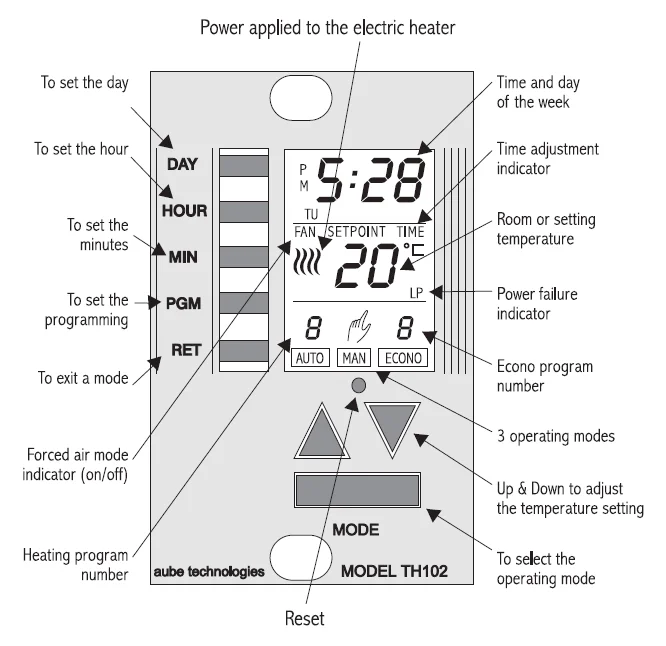
NOTE: To access the programmable keyboard, remove the cover by placing your fingers on the right side of the thermostat and pulling toward you.
INSTALLATION
Note: The “Problems and Solutions” section at the end of this user’s guide will help you to correct your problems during the installation.
This thermostat has been designed to operate with any installation which has a RESISTIVE load not exceeding 2500 W @ 240 VAC or 1250 W @ 120 VAC, such as electric baseboards, radiant ceilings and floors, electric convectors, etc. It is not compatible with a low-voltage controller used by a central heating system or systems using a contactor or a relay whose current is under 1.0 A. Electricians or experienced technicians should install the thermostat. This thermostat is designed to be used with a self-protected heating system equipped with a thermal cutoff and circuit breaker.
PARTS INCLUDED
- One (1) TH102D thermostat
- Two (2) 6-32 screws, 1 ½ inches
- Two (2) solderless connectors
TURN OFF THE POWER OF THE HEATING SYSTEM AT THE MAIN POWER PANEL TO AVOID ELECTRICAL SHOCK.
Keep the air vents of the thermostat clean and free from obstructions.
- Connecting wires and mounting the thermostat
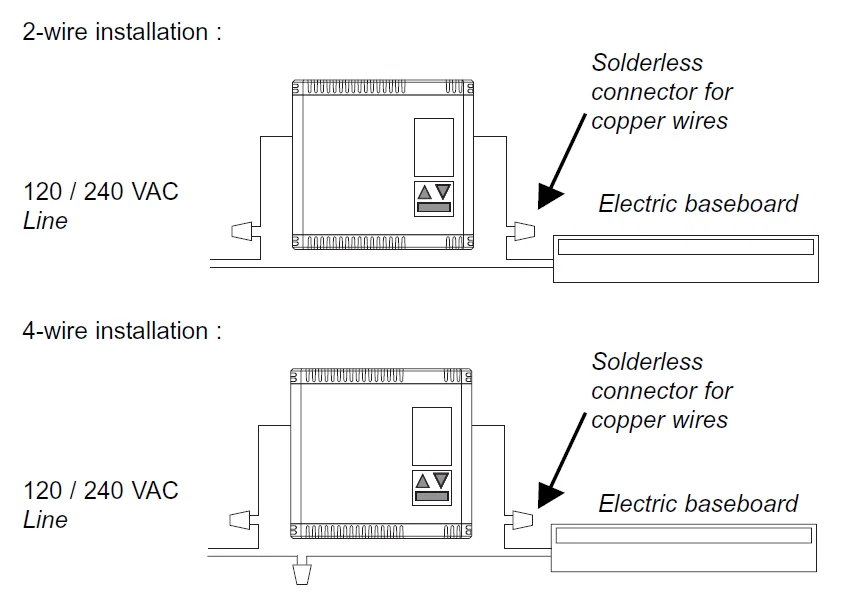
Connect the rear thermostat wires to the power supply and to the electric heater wires using solderless connectors for copper wires (there is no polarity for the wires). See schematic diagram.
Push the excess wire back into the electrical box to prevent interference with the thermostat. Secure the thermostat using the supplied screw. Once the thermostat is properly installed, return power to the heating system.- Note 1: All cables and connections must conform to the local electrical code.
- Note 2 : In normal use at full capacity (2500 W), the housing temperature of the thermostat can reach 35 to 40 °C.
- WARNING: Special CO/ALR solderless connectors must be used when connecting with aluminum conductors.
- Options selection
Some options have been factory set. Those default settings are :- The temperature is in °C, the heating control is proportional, and the time format is 24 hrs.
Temperature displayed in °C or °F
To change the temperature from °C to °F and back, maintain the DAY button pressed down as the RESET button is being pressed on and released. Then release the DAY button.
Time format displayed in 24 hours or 12 hours
To change the time format from 24 hrs. to 12 hrs. and back, maintain the HOUR button pressed down as the RESET button is being pressed on and released. Then release the HOUR button.
Proportional or ON/OFF heating control
This thermostat has been factory set to proportionally control electric baseboards, radiant systems, and convectors. Since proportional control uses a fast commutation rate, it is not compatible with fan-equipped systems (see characteristics). Also, this control mode could occasionally create light flickering, especially in rural areas. You can change the control mode to make it compatible with fan-equipped systems or to eliminate the light flickering. To do so, maintain the MIN button pressed down as the RESET button is being pressed and released. Then release the MIN button. Following this operation, the display will show the fan indicator. To return to proportional control, repeat the same operation.
- The temperature is in °C, the heating control is proportional, and the time format is 24 hrs.
- Memory backup
In the event of a power failure, an internal circuit will maintain the programming. The display will stay on for 15 minutes. An indicator “LP” will be shown on the display. Beyond this period, the display will turn off. Only the time will have to be set if the power failure is more than six hours. The thermostat will return to the same operation mode as set before the power failure. - First power-up

When power is applied for the first time, the display must show the day and hour as follows: 0:00 MO (Monday). The active operation mode is the framed MAN mode, the temperature setpoint is 20 °C, and the ambient temperature is displayed. If the display is different, maintain the PGM button pressed down as the RESET button is being pressed and released. Then release the PGM button.
500 WATTS OR LESS INSTALLATION
During the 30 minutes following the installation or a long power failure (more than 6 hours), the light intensity of the display decreases when a button is pressed while the thermostat is in the heat mode. This problem will disappear when the accumulator for the memory backup is charged.
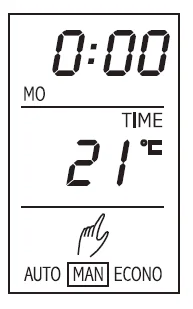
OPERATING MODES
The TH102D thermostat has three (3) operating modes:
AUTO, MAN, and ECONO.
They are selected through the MODE button. On display, the active mode is framed. The frame moves on to the next mode each time the MODE button is pressed on.
AUTO
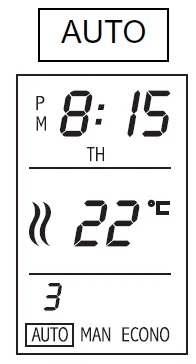
- The AUTOmatic mode runs in sequence (hourly) the programs recorded by the user.
- Pressing the▲Or ▼displays the temperature setting and the SETPOINT indicator for five (5) seconds.
- To see the weekday and weekend programs, select the AUTO mode and press successively on the PGM button to see the programs appear on the display.
MAN
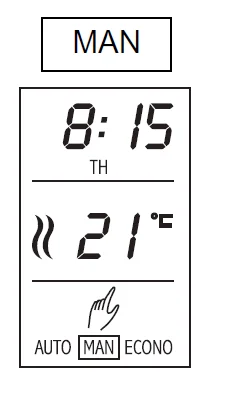
- The MAN mode allows the user to override the programming.
- The first time the▲Or ▼is pressed on, the temperature setting is displayed. For all subsequent times pressed on, the temperature setting will change 1 °C.
ECONO
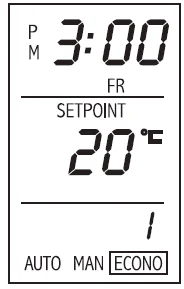
- The ECONO mode has two (2) programs in which the day, the time, and the setpoint have to be programmed. For instance, this operating mode can be used for a cottage installation where the user goes only on weekends.
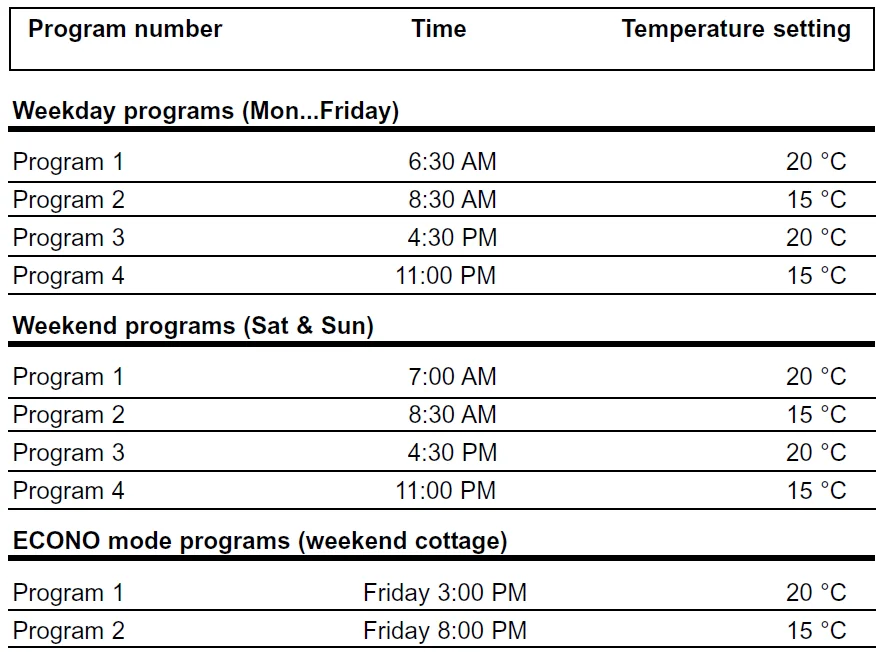
- Program 1: Friday 3:00 PM, 20 °C
- Program 2: Friday 8:00 PM, 15 °C
- The temperature will be maintained at 20 °C on Friday from 3:00 PM to 8:00 PM, and maintained at 15 °C the rest of the week.
- This gives you a comfortable temperature upon your arrival, and if you are not going to your cottage for the weekend, there will be only a minimal heating period.
- To see the ECONO programs, select the ECONO operating mode and press the PGM button successively to see programs 1 and 2 appear on the display. In ECONO mode, pressing the▲Or ▼displays the temperature setting.
PROGRAMMING
Adjustment of time and day
Example of setting: Thursday 8:15 AM
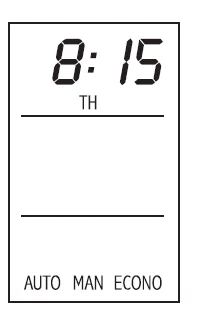
- Use DAY, HOUR, and MIN buttons to set the time.
- Once set, press the RET button to exit the time and day adjustment mode.
Note 1: The time indicator is showing you that the time must be set.
Note 2: The thermostat has an automatic return. When functions such as time recording, program recording, etc., are not completed by pressing the RET button, the thermostat will automatically exit the mode after 60 seconds.
Typical suggested programs
This thermostat can store up to four (4) daily programs for weekdays and four (4) daily programs for the weekend. Also, there is two (2) programs for the ECONO mode. To practice programming, use the following example.
Recording the heating programs
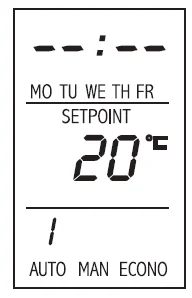
- Select the AUTO mode.
- Press the PGM button once.
- The default values or the last recording of program 1 will be displayed.
- The default values are : 20 °C and the time — — : — —
- The days Monday to Friday are displayed to show that this program is for weekdays.
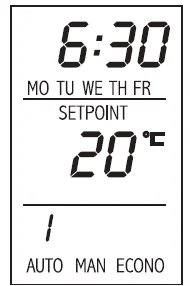
- Press the HOUR and MIN buttons until 6:30 AM is displayed.
- Press on▲or ▼ until 20 °C is displayed.
The first program is recorded.
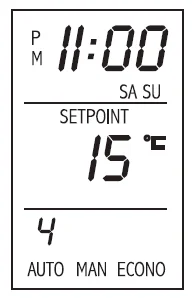
- Press the PGM button again to record or modify weekday programs 2, 3, and 4 and weekend programs 1, 2, 3, and 4.
- Use HOUR, MIN,▲Or ▼ buttons to modify the time and setpoint of programs.
- Programming is now completed. Press the RET button or wait for the “automatic return” to exit the programming mode.
Note: A program time left at — — : — — is considered inactive. - To reset a program, use the PGM button to select the program, then press the MODE button.
- To review programs, press the PGM button successively to see the programs one after the other and make modifications if required.
Recording the ECONO programs
- Select the ECONO mode.
- Press the PGM button once.
- The default values or the last recording of program 1 will be displayed.
- The default values are : 10 °C and the time — — : — —
- Use DAY, HOUR, MI, N, and▲Or ▼buttons to record the day, the time, and the setpoint of program 1.
- Press a second time on the PGM key.
- The default values or the last recording of program 2 will be displayed.
- Use DAY, HOUR, MIN, and▲OR ▼buttons to modify the day, time, and setpoint of program 2.
- Programming is now completed. Press the RET button or wait for the “automatic return” to exit the programming mode.
CHARACTERISTICS
- Proportional and on/off controls
This thermostat works differently from the conventional electromechanical one. The latter can have a differential of temperature up to 4 °C, while this electronic thermostat has one of only 0.3 °C. This slight oscillation eliminates the discomfort often found with conventional electromechanical thermostats. The proportional controller determines the amount of power required by the electric heating system to maintain the exact ambient temperature of the temperature setting. To see this process, the display shows, in real time, the percentage of power applied to the electric heating system. If you have programmed the heating control to ON/OFF to control a fan-equipped system, the display will show the fan indicator and 100% when the heating system turns ON and 0% when it turns OFF. In this case, the temperature regulation will be ±0.5 °C around the setpoint.
 - Characteristics
- Model: TH102D
- Electronic programmable line voltage thermostat (2 wires non-polarized)
- Supply: 120/240 VAC, 50/60 Hertz
- Load: 10.4 A maximum, 1.0 A minimum (Resistive only)
- Power: 2500 W @ 240 VAC or 1250 W @ 120 VAC
- Power consumption (off): 860 mW
- Approvals: CSA / UL
- Display range: 0 to 99 °C (0 to 99 °F)
- Setting range: 5 to 27 °C (40 to 80 °F)
- Storage: -20 to 50 °C (-4 to 120 °F)
- Temperature regulation: 0.3 °C (proportional), +/- 0.5 °C (ON/OFF)
- Precision: ± 0.5 °C (2500 W) of temperature setting
- 10 programs: 4 weekday programs, 4 weekend programs, and 2 ECONO programs
NOTE: In normal use at full capacity (2500 W), the housing temperature of the thermostat can reach 35 to 40 °C.
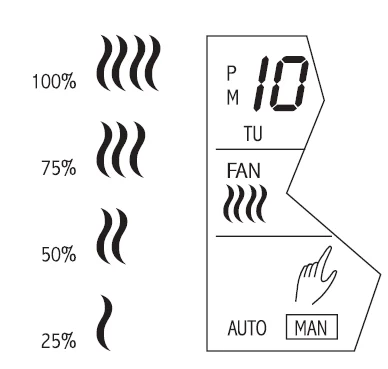 To see this process, the display shows, in real time, the percentage of power applied to the electric heating system. If you have programmed the heating control to ON/OFF to control a fan-equipped system, the display will show the fan indicator and 100% when the heating system turns ON and 0% when it turns OFF. In this case, the temperature regulation will be ±0.5 °C around the setpoint.
WARRANTY
AUBE TECHNOLOGIES INC. ONE (1) YEAR LIMITED WARRANTY
This product is warranted against material defects and workmanship in normal use for a period of one year, from the date of the original purchase from authorized dealers. During this period, AUBE Technologies Inc. will repair or replace the product with a new or of equivalent quality at AUBE’S option, without charge, any product proven defective in normal use. Warranty does not cover transportation costs. Nor does it cover a product subjected to misuse or accidental damage. This warranty does not cover the cost of installation, removal, or reinstallation. This limited warranty is instead of all other warranties, obligations or liabilities expressed or implied by the company. In no event shall AUBE Technologies Inc. be liable for consequential or incidental damages resulting from the installation of this product. Some states or provinces do not allow limitations on how long an implied warranty lasts, or the exclusion or limitation of incidental or consequential damages, so the above exclusions or limitations may not apply to you. This warranty gives you specific legal rights, and you may also have other rights which vary from state to state. The defective product and the original sale receipt must be returned to the original dealer or shipped prepaid, insured and addressed to: Aube Technologies Inc. Customer Service 705, Montrichard Iberville (Quebec) Canada J2X 5K8
If you have any questions concerning the installation or programming of this product, please call our technical assistance at (450) 358-4600 for the Montreal area or 1-800-831-AUBE for the outside area, Monday to Friday between 8:30 AM and 5:00 PM Eastern time.
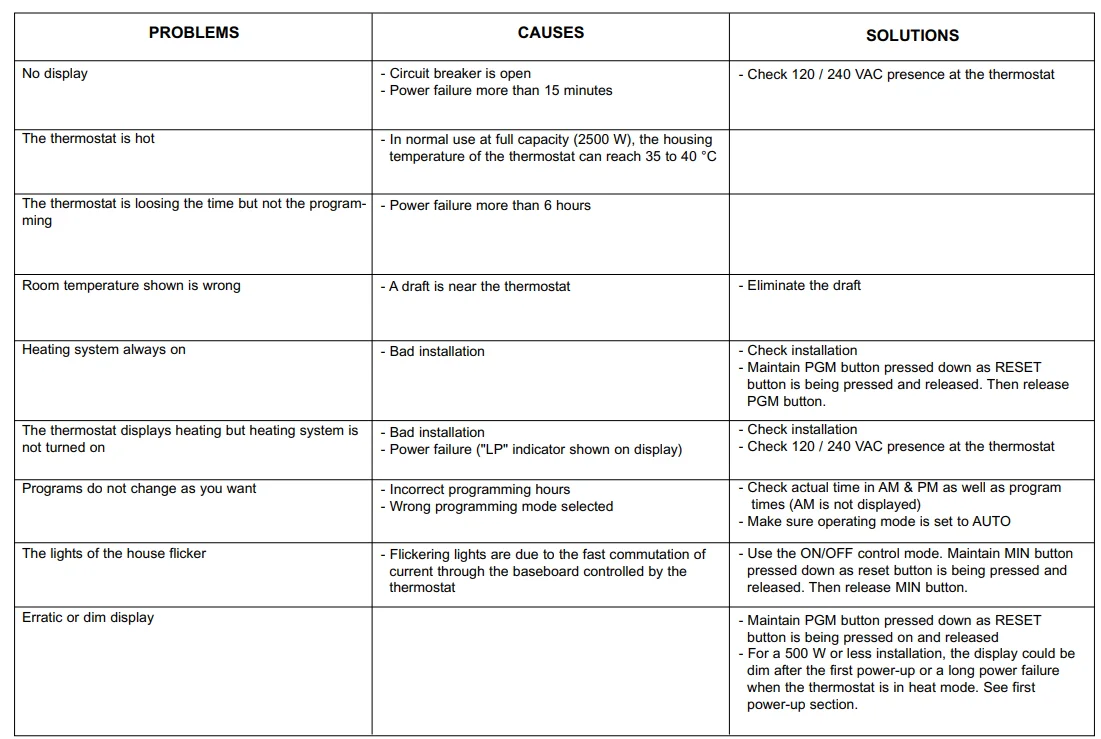
PROBLEMS AND SOLUTIONS
For more manuals by Aube Technologies, visit ManualsLibraryy
Aube Technologies TH102D Thermostat-FAQs
How do I set the temperature on the Aube TH102D thermostat?
To adjust the temperature on the Aube Technologies TH102D Thermostat, press the up or down arrow buttons until the desired temperature appears on the display. The system will activate automatically when the room temperature drops below your set point. You may hear a soft click when the heating system turns on. The display updates instantly to show your selected temperature.
Are Aube thermostats easy to use?
Yes, Aube thermostats are designed with simplicity in mind. The TH102D features a clear display, straightforward buttons, and an intuitive interface. Many models come factory pre-programmed with a 7-day schedule that you can modify as needed. It also allows switching between Celsius and Fahrenheit for convenience.
How do I change the time on my Aube thermostat?
To update the time, press the Clock or Mode button (depending on the version) until the time setting flashes. Use the arrow buttons to adjust hours and minutes. Once correct, press Mode or wait a few seconds for the thermostat to save automatically. Always ensure the time is accurate for proper schedule operation.
Why is my Aube thermostat not turning on?
If the screen is blank, check the circuit breaker and wiring connections. The TH102D is typically battery-free and powered directly from the electrical system. A blown fuse, tripped breaker, or damaged heating element may prevent it from turning on. Inspect the power supply before assuming the thermostat is faulty.
How do I reset the Aube TH102D thermostat?
To reset, press the Mode button until “Standby” appears. Then press and hold the main button for about 6 seconds until “rSt” displays briefly. The thermostat will return to normal mode with default settings restored. Resetting helps fix minor glitches or incorrect programming.
Does the Aube TH102D require batteries?
No, the TH102D model is typically battery-free. It is powered directly by your home’s electrical system (usually 120V or 240V depending on installation). This eliminates battery replacement concerns and ensures consistent operation.
How can I tell if my thermostat is working properly?
If the display is active and the heating system turns on when the room temperature falls below your set point, the thermostat is functioning correctly. You can test it by raising the temperature setting a few degrees above room temperature and listening for the system to engage.
What is the ideal temperature setting for a home?
Most experts recommend keeping indoor temperatures between 18–20°C (64–68°F) for comfort and energy efficiency. However, personal preference varies. For sleeping, some people prefer slightly cooler settings, while living areas may feel comfortable at 20–23°C.
What types of heating systems can the TH102D control?
The TH102D is designed for electric heating systems such as electric baseboards, radiant ceilings, convectors, and fan-forced heaters. It is not intended for gas or central HVAC systems. Always verify compatibility before installation.