
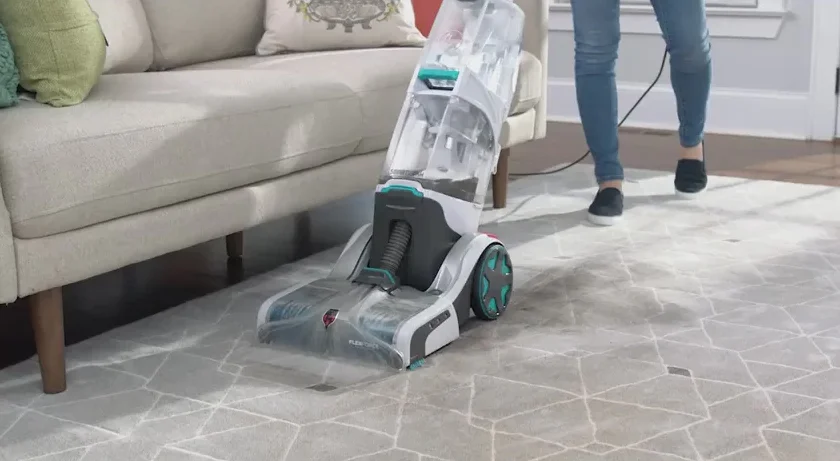

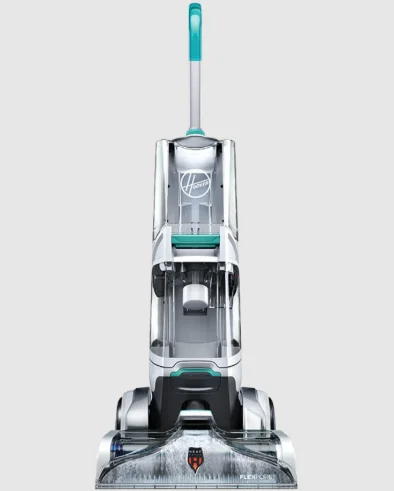
Hoover FH52000 Smartwash Automatic Carpet Cleaner
IMPORTANT SAFETY INSTRUCTIONS SAVE THESE INSTRUCTIONS
When using an electrical appliance, basic precautions should always be followed, including the following: READ ALL INSTRUCTIONS BEFORE USING THIS APPLIANCE. WARNING: TO REDUCE THE RISK OF FIRE, ELECTRIC SHOCK, DAMAGE, OR INJURY:
- Fully assemble before operating.
- Operate the vacuum only at the voltage specified on the data label on the back of the vacuum canister.
- Do not leave the appliance when plugged in. Unplug from the outlet when not in use and before cleaning or servicing.
- Do not use outdoors.
- Do not immerse. Use only on carpet moistened by the cleaning process.
- To reduce the risk of fire and electric shock due to internal component damage, use only HOOVER cleaning fluid intended for use with this appliance. See the Cleaning Fluid section (pg. 20) of this manual.
- Do not allow it to be used as a toy. Not intended for use by children age 12 and under. Close supervision is necessary when used near children. To avoid injury or damage, keep children away from the product, and do not allow children to place fingers or other objects into any openings.
- Use only as described in this manual. Use only the manufacturer’s recommended attachments and products.
- Do not use with a damaged cord or plug. If the appliance is not working as it should, has been dropped, damaged, left outdoors, or dropped into water, take it to a service center prior to continuing use.
- Do not pull or carry by cord, use cord as a handle, close a door on cord, or pull cord around sharp edges or corners. Do not place the product on the cord. Do not run the appliance over the cord. Keep the cord away from heated surfaces.
- Do not unplug by pulling on the cord. To unplug, grasp the plug, not the cord.
- Do not handle the plug or appliance with wet hands.
- Do not put any object into openings. Do not use with any opening blocked; keep free of dust, lint, hair, and anything that may reduce air flow.
- Keep hair, loose clothing, fingers, and all parts of the body away from openings and moving parts.
- Turn off all controls before unplugging.
- Use extra care when cleaning on stairs. To avoid personal injury or damage and to prevent the cleaner from falling, always place the cleaner at the bottom of the stairs or on the floor. Do not place cleaner on stairs or furniture, as it may result in injury or damage.
- Do not use to pick up flammable or combustible liquids, such as gasoline, or fine wood sandings, or use in areas where they may be present.
- Connect to a properly grounded outlet only. See Grounding Instructions.
- Do not pick up anything that is burning or smoking, such as cigarettes, matches, or hot ashes.
- Do not use without filters and tanks in place.
- Do not clean over the floor electrical outlets.
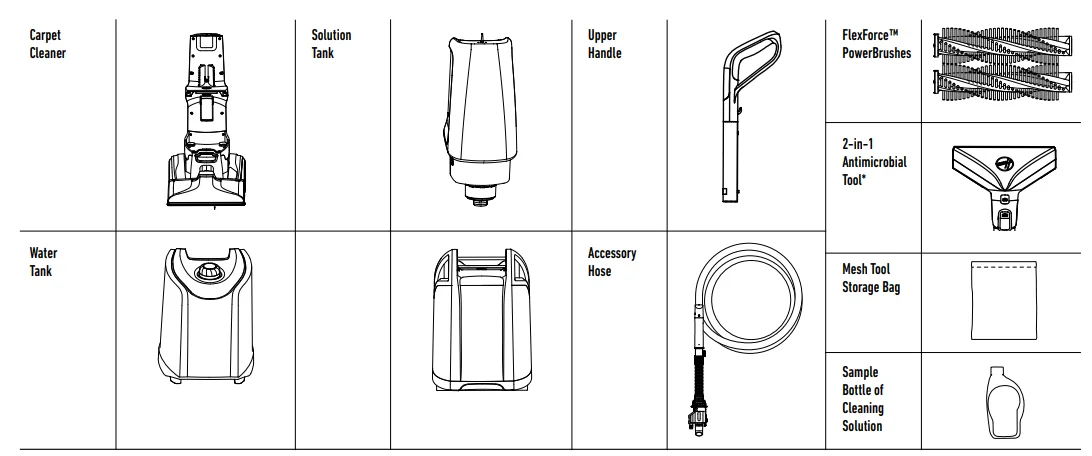
What’s in the Box?
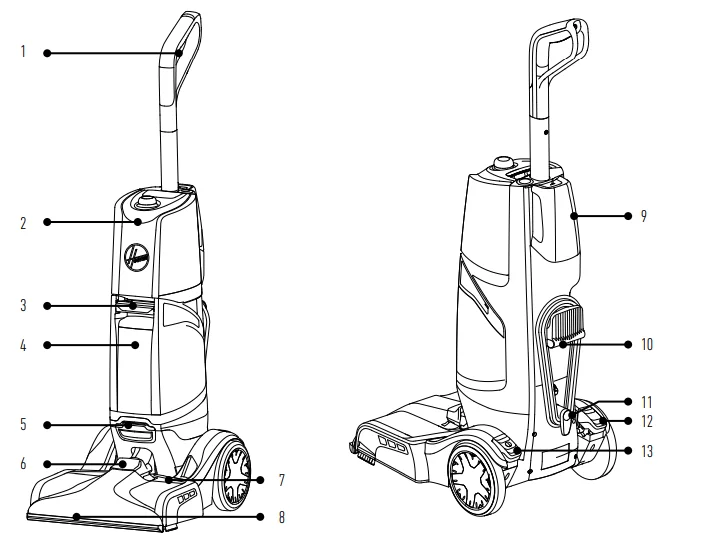
Getting to Know Your Hoover SmartWash
- Triggerless Handle Design
- Clean Water Tank
- Filter
- Dirty Water/Recovery Tank
- Hose Connection
- Removable Recovery Nozzle
- Automatic Wash/Dry LED Display
- Removable FlexDuo™ PowerBrushes
- Solution Tank
- Carry Handle
- Cord Wrap
- Handle Release Pedal
- On/Off Pedal

Tools & Accessories:

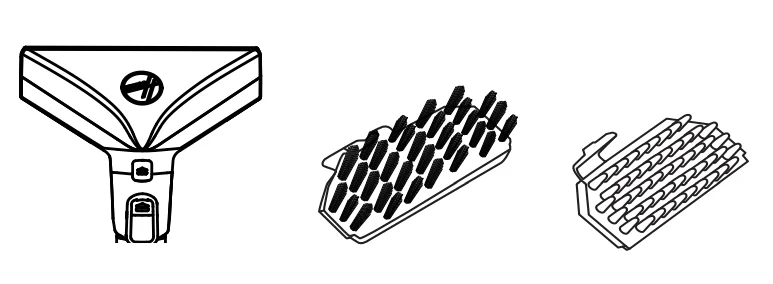
2-in-1 Antimicrobial Tool:
An antimicrobial tool that helps prevent bacterial growth and odors allows you to choose between two inserts.
- A. The rubber nub insert is for unpleasant stain removal and hygienic cleanups.
- B. The bristle insert is for tough scrubbing power.

Before You Begin Cleaning:
- Vacuum carpet and upholstery thoroughly with a Hoover vacuum before use.
- Don’t use the carpet cleaner as a traditional vacuum cleaner.
- Use your Hoover carpet cleaner only if the upholstery fabric is marked with a “W” (for “wet” clean) or “S/W” (for “solvent/dry” or “wet” clean). Don’t clean fabric marked “S” (“solvent/dry” clean only).
- Test for colorfastness in a small, hidden area. Gently rub the surface with a dampened white cloth. Wait ten minutes and check for color removal or bleed with a white paper towel.
- Move furniture out of the area to be cleaned. Place aluminum foil or wax paper under the legs of furniture too heavy to move to prevent wood finishes from staining carpet.
- Pin up furniture skirts and draperies.
- Pretreat spots and heavy traffic areas with a Hoover® Cleaning Solution*. See the “Cleaning Solutions” section.
- Available at additional cost if not included with your model.
Pretreating:
For best results, pretreat stains with a Hoover spot treatment (see Hoover Cleaning Solution Guide, pg. 18) to help loosen and remove even the most stubborn stains.
NOTE: To prevent staining, use plastic or aluminum foil to protect wood or metal surfaces from possible water spray.
NOTE: To avoid damage to wood floors underneath area rugs or carpet, place a waterproof material (ex, plastic) underneath them before cleaning.
CAUTION: Do not clean over the floor electrical outlets. Water will drip from the brushes and the underside of the product after use and may puddle. To avoid damage to wood and laminate flooring and to avoid potential slip hazard, after use, (a) do not leave the product on wood and laminate surfaces and move to a hard surface, and (b) place the unit on an absorbent material (such as a towel) to soak up drips.
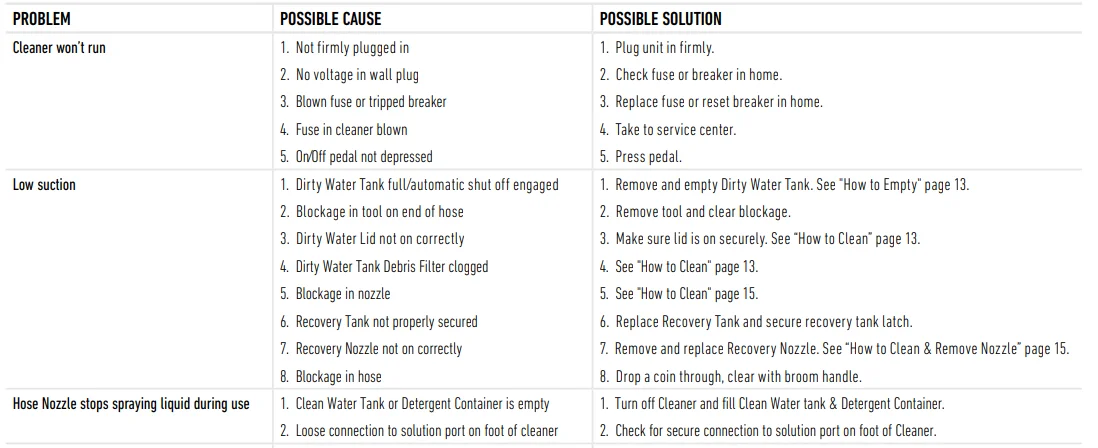
NOTE: Empty Dirty Water Tank when the motor sound becomes higher-pitched, and there is a loss in suction (see “Automatic shut-off”). You will also see the float rise and shut off suction at the same time.
IMPORTANT: For full suction, it is important that the Dirty Water Tank is properly secured before cleaning.
Getting Started With Your SmartWash™ Carpet Cleaner:
Assembly
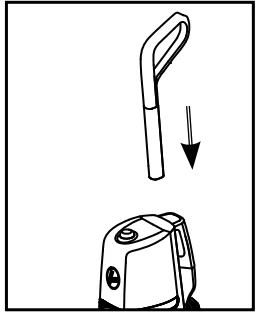
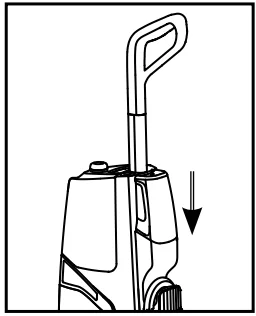
- Insert the handle into the base until you hear a “click”.

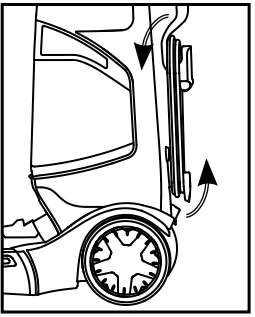
- Wrap the power cord around the cord hooks for convenient storage.

Fill the Clean Water Tank
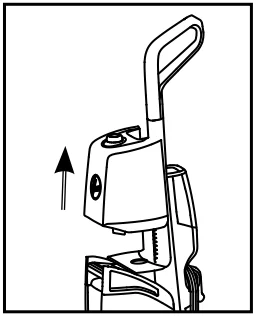
- Lift to remove the Clean Water Tank.

- Remove the cap and add warm water to the top of the tank. Replace cap.

- Align the Clean Water Tank with the body of the unit and press FIRMLY into place.

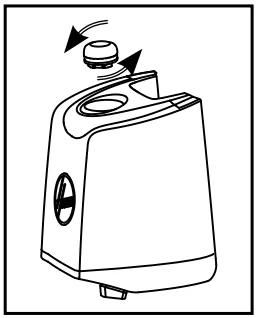
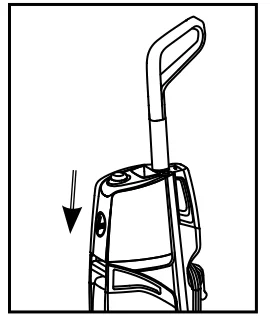
Fill the Solution Tank
- Remove the Solution Tank from the back of the unit.

- Remove the cap and fill with Hoover Cleaning Solution to the top of the tank. Replace cap.

- Place the Solution Tank back into the unit and press FIRMLY into place.

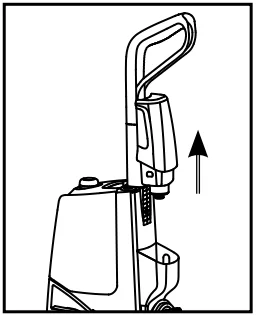
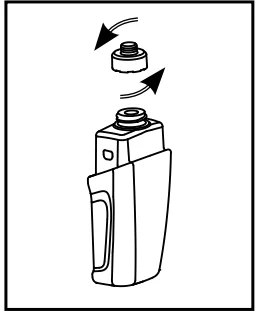
Using Your SmartWash™ Carpet Cleaner
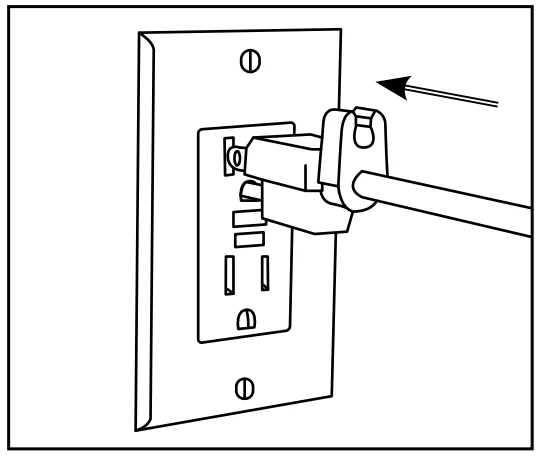
- Unwrap the power cord and plug the unit into an electrical outlet.

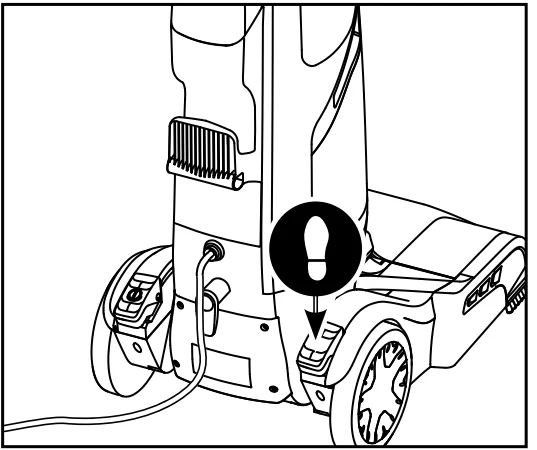
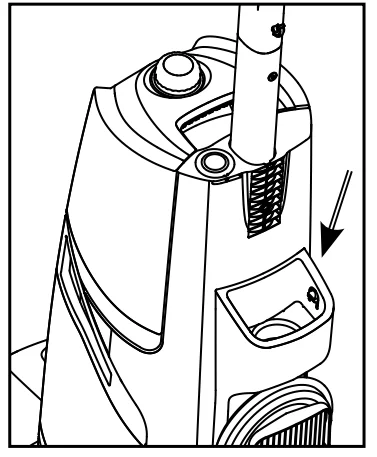
- Step on the Handle Release Pedal to recline the unit for cleaning position.

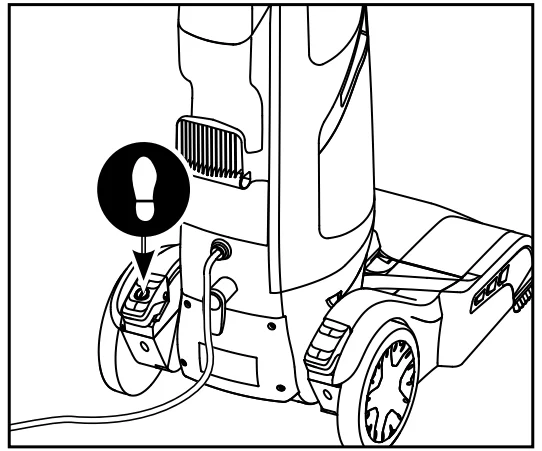
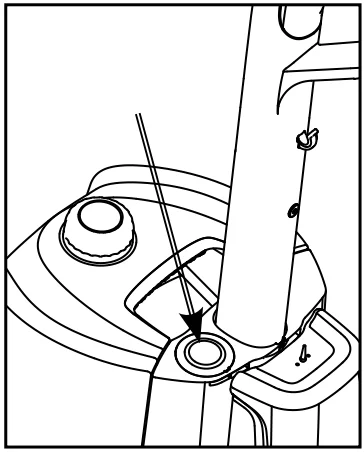
- Step on the Power Pedal to turn ON.

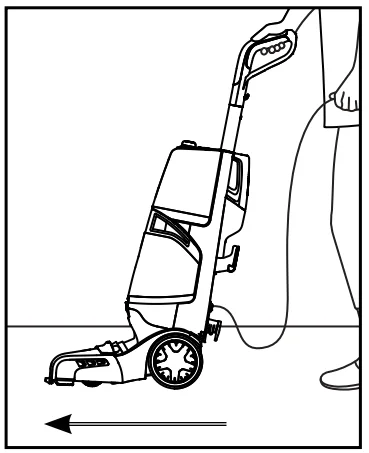
- Slowly move forward. The unit will automatically dispense the optimal amount of water and cleaning solution.

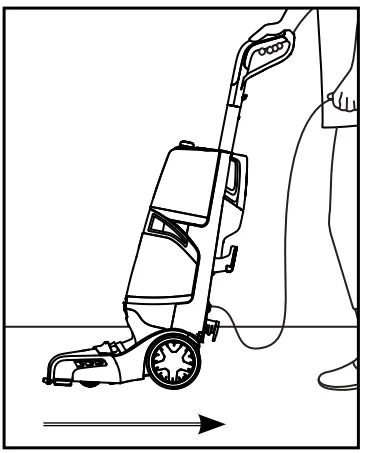
- Slowly pull backward. The unit will automatically dry your carpets by extracting the water.

- When your cleaning is complete, and you want to reduce the dry time, press the Dry Only button. The Dry Only mode will extract remaining water from your carpet. Continue in this mode until little water is visibly passing through the nozzle.

- For best results, Hoover recommends rinsing the carpet with clean water only. This will remove residual carpet cleaning solution from your carpets. To rinse with clean water only, remove the Solution Tank and then repeat steps 4 through 6.

Maintenance
How to Empty
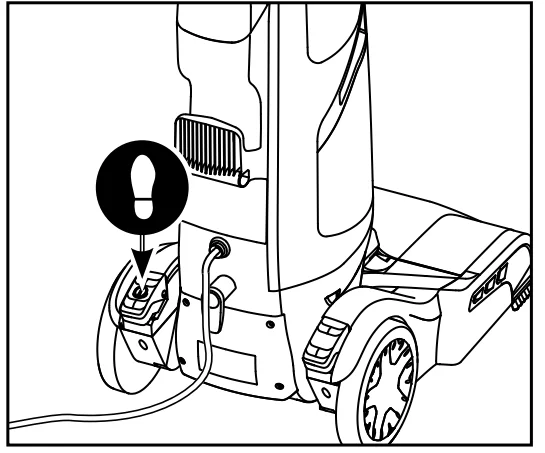
- Turn the cleaner off and unplug it from the electrical outlet.

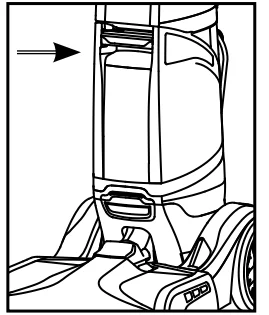
- Grab the Dirty Water Tank handle and pull up to release. Remove the tank from the carpet cleaner base at an angle.

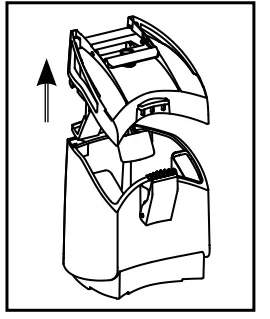
- Place on a flat surface and unlatch the Dirty Water Tank lid to remove the top of the tank.
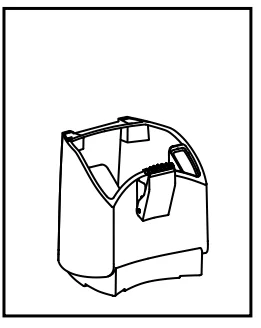
- Empty tank, rinse, wipe filter clean, and allow to air dry.

Notices
IMPORTANT: Regarding the Dirty Water Tank: For full suction, it is important that the Dirty Water Tank lid is securely in place. If misplaced, poor to no suction will result.
IMPORTANT: For full suction, it is important that the Dirty Water Tank is properly secured before cleaning. Continue using dry strokes until little water is visible passing through the nozzle. For best results, Hoover recommends rinsing carpet with water only. This removes residual carpet cleaning solution. Remove the Solution Tank and repeat. For heavily soiled areas, repeat. Avoid saturating carpet.
NOTE: Empty Dirty Water Tank when the motor sound becomes higher-pitched, and there is a loss in suction (see “Automatic shut-off”). You will also see the float rise and shut off suction at the same time.
CAUTION: Do not clean over the floor electrical outlets. Water will drip from the brushes and the underside of the product after use and may puddle. To avoid damage to wood and laminate flooring and to avoid potential slip hazard, after use, (a) do not leave the product on wood and laminate surfaces and move to a hard surface, and (b) place the unit on an absorbent material (such as a towel) to soak up drips.
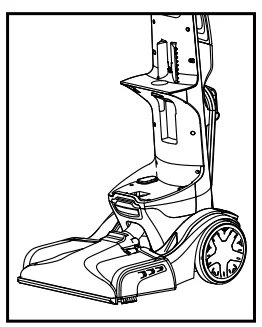
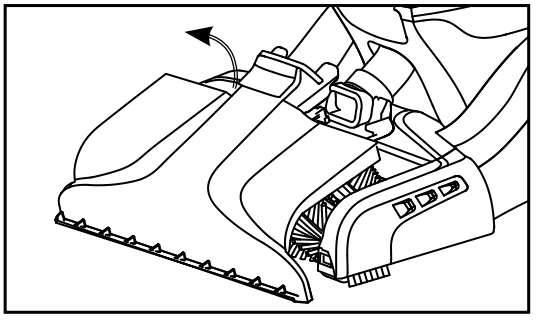
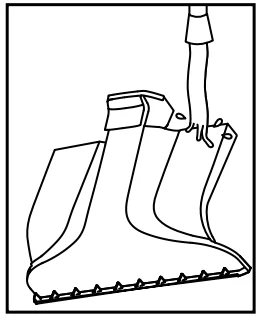
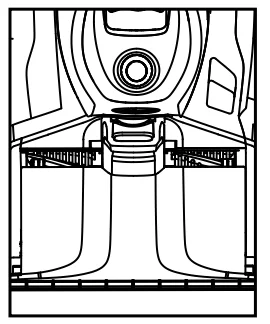
How to Remove and Clean the Nozzle
- To prevent possible leaking, remove and empty the Clean Water Tank, Dirty Water Tank, and Solution Tank.

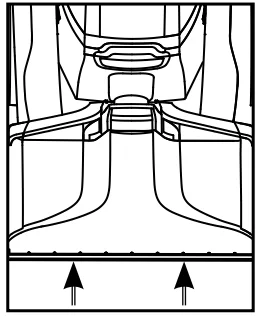
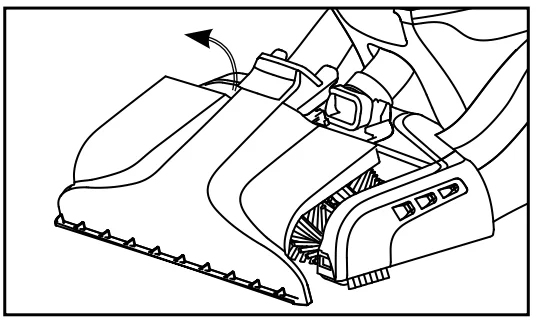
- With the handle in the upright position, lift the nozzle release, then pull the nozzle forward to remove it from the carpet cleaner. Be careful not to instantly pull the nozzle straight up.

- Rinse debris from the nozzle.

- Position the nozzle onto the foot, making sure to align the tabs at the top of the nozzle with the notches inside the foot.

- Slide the nozzle forward to snap into position.

How to Change and Clean Brushes
HOW TO REMOVE
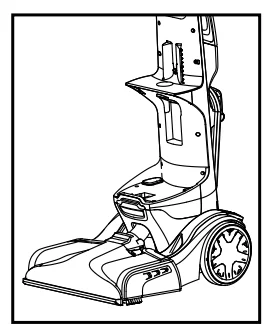
- To prevent possible leaking, remove the Clean Water Tank, the Dirty Water Tank, and the Solution Tank.

- With the handle in the upright position, follow “Nozzle: How to Remove and Clean” instructions.

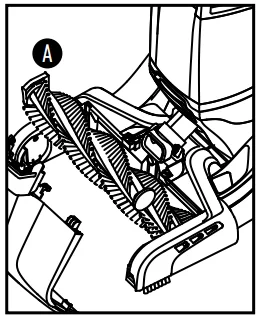
- Grab Side A and pull up to remove. Repeat on the other brush.

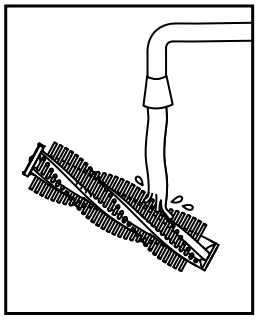
- The brushes can be cleaned under running water.

HOW TO REPLACE
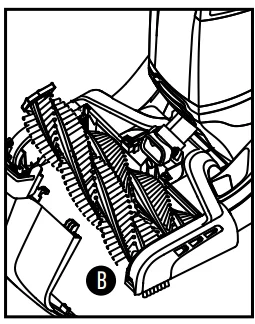
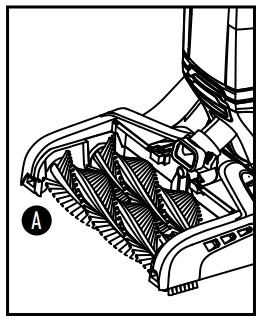
- At an angle, align Side B on the brush to the drive gear.

- Press Tab A down until the brush snaps in place.

STORAGE
Before storing: Empty the Clean Water Tank and let it air dry. Replace with on cleaner. Empty the Dirty Water Tank, rinse tank, and lid thoroughly with clean water and let air dry. Empty the Solution Tank, rinse the tank with clean water. Allow brushes and the underside of the carpet cleaner to air dry thoroughly before storing the carpet cleaner on a carpeted or wood surface.
LUBRICATION
The motor is equipped with bearings that contain sufficient lubrication for the life of the motor. The addition of lubricant could cause damage. Therefore, do not add lubricant to motor bearings or brushrolls.
Tools and Accessories
HOW TO ATTACH HOSE
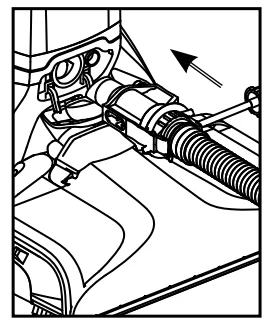
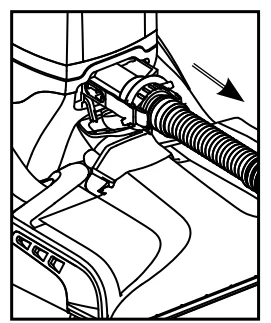
- Open the hose connection port. Insert the hose end by inserting FIRMLY into the hose solution port.

HOW TO REMOVE HOSE
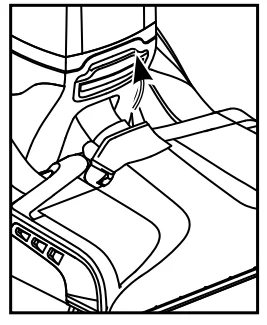
- Press the trigger on the tool to ensure all fluid has discharged from the hose. Press the button on the end of the hose and pull to remove the hose and solution connection from the unit.

- Close the hose port door back into place. Make sure to close the door to ensure proper suction. The unit may lose suction if not closed properly.

How to Attach Tools
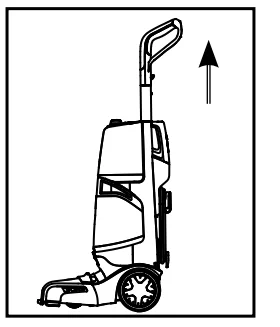
- To ensure maximum performance and to protect your carpet, be sure to place the handle in the upright position while using the hose. Placing the handle in the upright position shuts off the FlexForce™ PowerBrushes.

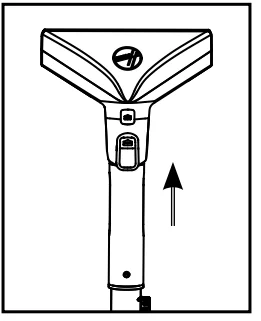
- Connect the tool to the hose by sliding it onto the connector until it securely locks into place.

- Using your thumb, push forward and up on the latch to remove the tool.

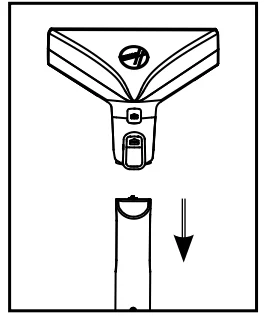
Cleaning Carpeted Stairs and Upholstery
- Read “Before You Begin Cleaning” instructions on page 9.
- Attach the hose as instructed (page 18).
- Place the handle in an upright position. FlexForce™ PowerBrushes will not rotate while the handle is in the upright position.
- Fill the Clean Water Tank according to instructions.
- Fill the Solution Tank with Hoover solution according to instructions.
- Attach the tool to the end of the hose.
- Dry your hands and plug the cleaner into a properly grounded outlet.
- Turn cleaner ON.
- Pre-spray the area by holding the tool about one inch above the carpet and pushing it forward while pressing the trigger.

- Slightly press the tool into the area being cleaned. Press the trigger and pull the tool slowly over the carpet. Release trigger at the end of the stroke.
- Lift the tool and position it against the nozzle. Pull the tool slowly over the carpet without pressing the trigger.

- Overlap strokes by ½ inch to help prevent streaking.
- It is best to alternate wet and dry strokes as described in the steps.
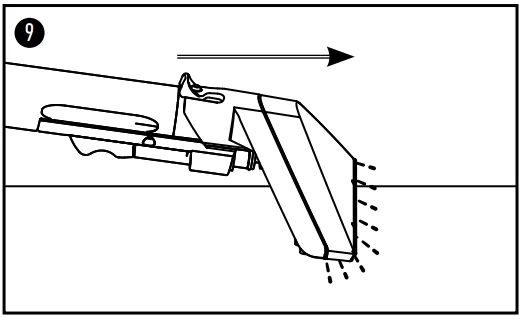
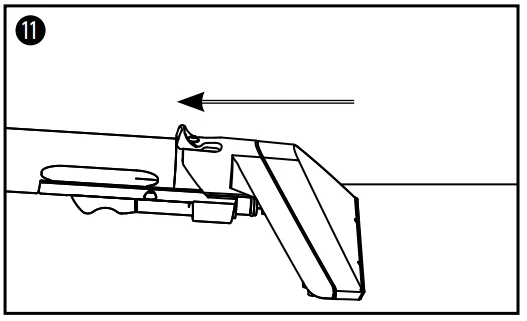
Tips
- To avoid saturating carpet, do not use more than 4 wet strokes over any one area. Always end with dry strokes.
- If additional cleaning is necessary, wait until the carpet is completely dry before using the tool again.
- An Empty Dirty Water Tank when the motor sound becomes higher-pitched and there is a loss of suction. You will also see the float rise and shut off suction at the same time.
- When finished cleaning, follow “After Cleaning” and “After Using Tool” instructions.
Need Help?
If you need further assistance: If your product needs servicing within the warranty period, please contact Customer Service at 1-800-944-9200; Mon-Fri 7 a.m.–6 p.m. EST. Always identify your carpet washer by the complete model number when requesting information or ordering parts. (The model number of the carpet washer is located on the data plate.) Please do not return this cleaner to the store.
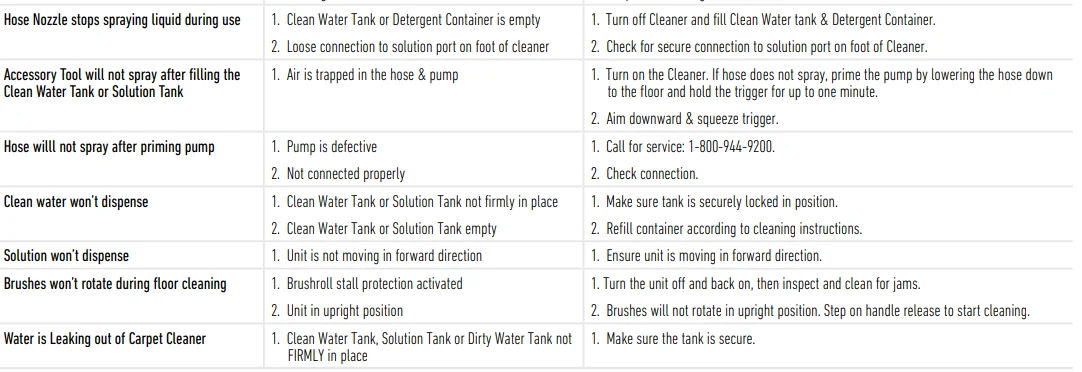
Troubleshooting:
- Any other servicing should be done by an authorized service representative.
- Use the troubleshooting guide as a first step to resolve any problems you may be experiencing.
- If the appliance is not working as it should, has been dropped, damaged, left outdoors, or dropped into water, call Customer Service at 1-800-944-9200 for further instructions before continuing use.


QUESTIONS OR CONCERNS?
Contact Us: 1-800-944-9200
If you have any questions, visit Hoover.com or connect with us: Twitter: @Hoover USA
Facebook: facebook.com/hoover
Do not return to the store. See the back of the product for the model number.
SERVICE & WARRANTY
SERVICE INFORMATION
ANY SERVICING SHOULD BE DONE BY AN AUTHORIZED SERVICE REPRESENTATIVE. CALL 1-800-944-9200 USA & CANADA. In the event that further assistance is required, visit an authorized service center. Find one nearest you by visiting our website at www.hoover.com. Costs of any transportation to and from any place of repair are to be paid by the owner. Always identify your product by the model number and manufacturing code when requesting information or ordering replacement parts. (The model number and manufacturing code are on the back of the product.)
LIMITED FIVE-YEAR WARRANTY (DOMESTIC USE)
WHAT THIS WARRANTY COVERS
When used and maintained in normal household use and in accordance with the Owner’s Manual, your HOOVER® product is warranted against original defects in material and workmanship for a full five years from the date of purchase (the “Warranty Period”). During the Warranty Period, Hoover® will provide labor and parts at no cost to you to correct any such defect in products purchased in the United States, U.S. Military Exchanges, and Canada.
HOW TO MAKE A WARRANTY CLAIM
If this product is warranted, take or send the product to either a Hoover® Sales and Service Center or a Hoover® Authorized Warranty Service Dealer along with proof of purchase. For an automated referral to authorized service outlets in the U.S.A., phone: 1-800-944-9200 or visit Hoover® online at www.hoover.com. For additional assistance or information concerning this warranty or the availability of warranty service outlets, call the Hoover® Consumer Response Center, Phone 1-800-944-9200, Mon-Fri 8 a.m.–7 p.m. EST. In Canada, contact Hoover® Canada, Carson Building, 100 Carson St., Etobicoke, Ontario M8W 3R9, Phone: 1-800-944-9200, Mon-Fri 8 a.m.–7 p.m. EST.
WHAT THIS WARRANTY DOES NOT COVER
This warranty does not cover: use of the product in a commercial operation (such as maid, janitorial, and equipment rental services), filter, brushroll, and belt, improper maintenance of the product, damage due to misuse, acts of God, nature, vandalism, or other acts beyond the control of Hoover®, owner’s acts or omissions, use outside the country in which the product was initially purchased, and resales of the product by the original owner. This warranty does not cover pickup, delivery, transportation, or house calls; however, if you mail your product to a Hoover® Sales and
Service Center for warranty service, the cost of shipping will be paid one way. This warranty does not apply to products purchased outside the United States, including its territories and possessions, outside a U.S. Military Exchange, and outside of Canada. This warranty does not cover products purchased from a party that is not an authorized retailer, dealer, or distributor of Hoover® products.
OTHER IMPORTANT TERMS
This warranty is not transferable and may not be assigned. This warranty shall be governed and construed under the laws of the state of Ohio. The Warranty Period will not be extended by any replacement or repair performed under this warranty. This warranty is the exclusive warranty and remedy provided by Hoover®. All other warranties, expressed or implied, including warranties of merchantability or fitness for a particular purpose, are disclaimed.
In no event will Hoover® be liable for any special, indirect, incidental, or consequential damages of any kind or nature to owner or any party claiming through owner, whether based in contract, negligence, tort, or strict products liability, or arising from any cause whatsoever. Some states do not allow the exclusion of consequential damages, so the above exclusion may not apply to you. This warranty gives you specific rights; you may also have others that vary from state to state.
For More Manuals By Hoover, Visit ManualsLibraryy
Hoover FH52000 Smartwash Automatic Carpet Cleaner -FAQS
Why is liquid not coming out of my carpet cleaner?
Check the solution tank, nozzle, and filters. Make sure the machine is on the correct cleaning mode and the tank is full.
Do I use hot or cold water in the Hoover carpet cleaner?
Use warm water. Hot water helps loosen dirt and kills bacteria, but avoid boiling water to prevent carpet or machine damage.
Do I need to vacuum before using a carpet cleaner?
Yes. Vacuuming first removes loose dirt and dust, making your carpet cleaner more effective.
How many passes should I do with the carpet cleaner?
Do at least two wet cleaning passes and then two dry passes without pressing the solution trigger. Overlap slightly for full coverage.
Do I need to rinse after using the carpet cleaner?
Yes, run the rinse cycle or go over the cleaned area with plain water to remove leftover solution.
Can I use any solution or detergent with my Hoover?
It’s recommended to use Hoover solutions. Non-Hoover solutions may void your warranty or damage the machine.
Can I put vinegar in my carpet cleaner?
No. Vinegar is corrosive and can damage the machine permanently.
How do I improve suction on my Hoover Smartwash?
Empty the dirt tank and clean both filters regularly. Check that no blockages are in the suction path.
How long should I wait for carpet to dry after cleaning?
Allow at least 6–8 hours for walking and up to 24 hours for complete drying.
How many times should I shampoo or vacuum my carpet?
Two wet cleaning passes followed by dry passes is standard. Vacuuming once before cleaning is usually enough, but repeat if heavily soiled.