
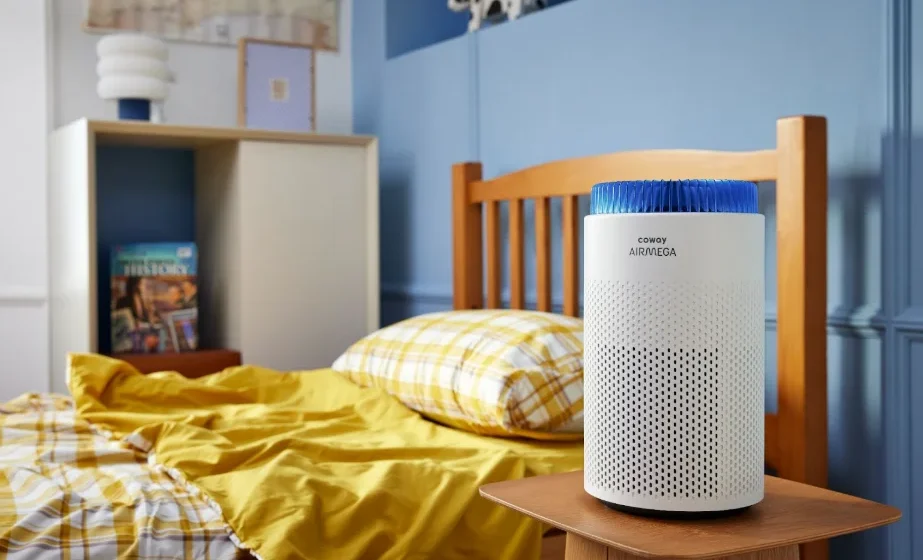

Coway AIRMEGA 50 Air Purifier
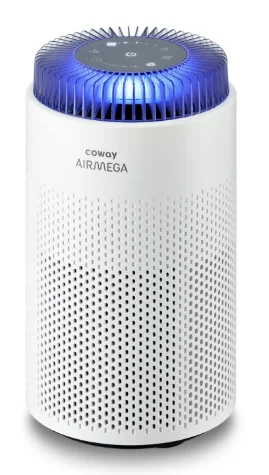
KEY FEATURES
Small, but powerful air purifier
Reduced size, enhanced air purification capacity for bedroom use. Sleep mode minimizes the airflow noise to avoid annoyance in bedroom settings.
Powerful 3-in-1 Filter
Efficiently filters various harmful substances and captures ultrafine particles such as dust, viruses, and bacteria.
Light display
- AQI Lighting: Intuitively indicates the air quality.
- Night light: Soothing night light for bedroom usage.
Smart sensor and automatic mode
The PM 2.5 sensor accurately measures the level of ultra-fine dust.
The AQI and auto mode adjust the airflow speed (1, 2, and 3) for optimal operation depending on the indoor air quality.
ECO-Friendly air purifier
Eco-friendly air purifier with low energy consumption.
QUICK START GUIDE
Do not operate the product until you complete these steps first.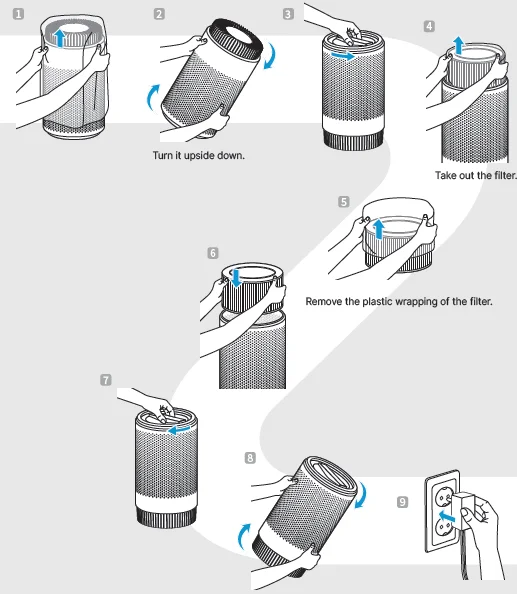
BEFORE USING THE PRODUCT
SAFETY INSTRUCTIONS
Read and follow all the safety tips and warnings before using the product.
WARNING
- Do not exceed the voltage and power rating of the power outlet or connection device. This may generate excessive heat and cause electric shock or fire.
- Only use the appropriate type of electric socket for the product. Connecting the product to an incorrect socket may result in damage.
- Do not immerse the product or any of its parts in water. Operate the product only after a qualified technician examines and replaces the parts that were underwater.
- Do not touch the power plug with wet hands.
- If the electric outlet is wet, do not connect the power plug of the product. Wait till the electric outlet dries completely before use.
- Do not operate the product if the motor fan fails to operate or is damaged.
- Disconnect the power plug from the electric outlet if strange sounds, smells, or smoke come from the product. Contact the customer service center immediately for instructions.
- Disconnect the power plug from the electric outlet when the product is not in use and before cleaning, inspecting, or replacing parts.
- Use a dedicated electric outlet for the product. Do not connect the product to a power strip that has connections to several other products.
- Do not operate the product if the power plug or cords are damaged.
- Do not forcibly bend, twist, pinch, or damage the power cord.
- Do not force the power plug into an incorrect electric outlet or into a loose electric outlet. Contact a qualified technician to install a proper electric outlet.
- If the supply cord is damaged, it must be replaced by the manufacturer, its service agent, or similarly qualified persons in order to avoid a hazard.
- Remove the power plug from the electric outlet by grasping the power plug and pulling it gently. Never pull the cord to remove the power plug.
PREPARATION
PARTS DIAGRAM
Exterior
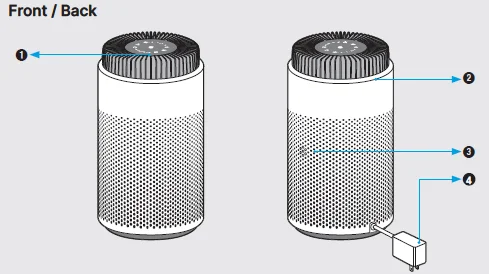
- Control Panel
- AQI and Light
- Particle Sensor
- Power Cord
PARTS DIAGRAM
Control Panel
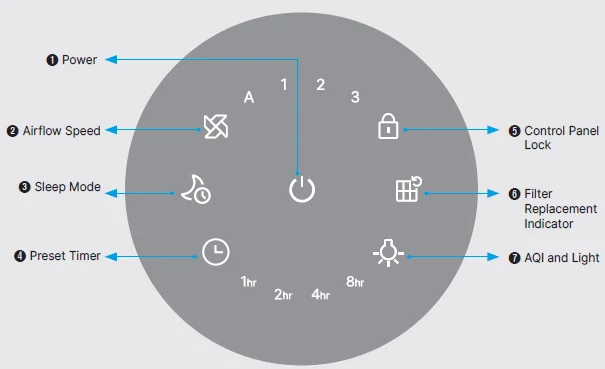
- Power: Press the button to turn the product on and off.
- Airflow Speed: Press the Airflow button to switch the mode. “A” (Auto), “1” (Low), “2” (Med), ”3” (High).
- Sleep Mode: If the product is set to sleep mode, it reduces noise and power consumption. Press the Sleep mode button while the power is on to enter the Sleep mode. In the Sleep Mode, the fan speed is reduced for low noise operation in order not to interrupt the user’s sound sleep. Also, the brightness of the Power button and Sleep mode button (if the timer is operating, the AQI and Light button, and Preset buttons) on the display panel is restricted to 50 %. If you press the Sleep Mode button once again, it returns to the previous air speed.
- Preset Timer: Touch the Preset timer button until the indicator light displays the desired time. When pressing the button, it is set in the order of 1hr → 2hr → 4hr → 8hr → OFF, and the set time is displayed on the display panel.
USE OF EACH FUNCTION BUTTON
Control Panel Lock
Press and hold the button for 3 seconds to lock and unlock when the power is turned on.
When pressing another button while the product is locked, the button indicator blinks three times with a beep sound, and the button does not operate.
When pressing and holding the Control Panel Lock button again for 3 seconds in the Lock mode, the Lock mode is deactivated, and the button turns off. If the power cord is plugged in after being removed, or if the power of the product is turned on after being turned off by the timer, the lock is deactivated automatically.
Filter Replacement Indicator
Filter Replacement Indicator will pop up on the display panel when it’s time to replace the filter. After replacing the filter, press and hold the reset button for 3 seconds to reset the filter replacement indicator.
AQI and Light
Press the button to switch between AQI and night light or to turn off the light. According to the air quality, the color of the AQI light changes.
- Blue: Good, Green: Moderate, Orange: Unhealthy, Purple: Very Unhealthy
In the default operation status, the button and AQI indicator are displayed in maximum brightness on the display panel. When pressing the button, the AQI indicator, Night Light, and off functions are alternately performed.
AQI mode ->Night light ->All off -> AQI mode
MAINTENANCE
HOW TO ADJUST THE SENSITIVITY OF THE PARTICLE SENSOR
When the product is shipped out, the pollution sensor is set to standard sensitivity. If the setting needs to be changed, users can adjust the sensitivity of the pollution sensor as follows.
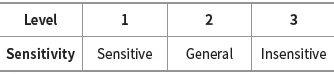
- While the product is operating, press the Power button and the Airflow Speed button at the same time for more than 2 seconds.
- The second speed (2) indicator flashes at approximately 0.5-second intervals.
- Press the Airflow Speed button to adjust it to the desired sensitivity. The mode indicator blinks as shown below once sensor sensitivity has been selected.

- Press the Power button and the Airflow Speed button at the same time for more than about 2 seconds, the selected sensitivity will be inputted, and the product will start operating normally. If the Power button and the Airflow Speed button are not pressed for 10 seconds, the selected sensitivity of the sensor is automatically entered.
PRODUCT CLEANING
- Before cleaning the product, please be sure to turn off the power and unplug the machine.
- Use a dry cloth to clean the product. Do not use detergents that contain solvents, thinners, bleach, chlorine, or abrasives.
- Place the product in a well-ventilated shade.
- Gently brush off the collected dust on the surface of the prefilter with a dry cloth or a vacuum cleaner for optimal performance.
FILTER REPLACEMENT INSTRUCTION
- Unplug the product and turn the product upside down to replace the filter.
- Grab the handle and turn clockwise to close and turn counterclockwise to open the rear cover.
- Please take the used filter out and replace it with a new filter.
PARTICLE SENSOR CLEANING (CLEAN EVERY 2 MONTHS)
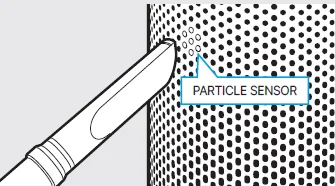
If there are dust or foreign objects in the particle sensor, the dust density may be detected as high, so clean the pit periodically to remove the dust.
- If not cleaned periodically, the particle sensor performance will be degraded
- The cleaning cycle may differ depending on the environment. Clean more often in very dusty environments.
- Do not let dust drop into the air vent hole when you clean it.
- Use a vacuum cleaner or a soft brush to clean the holes of the particle sensor. Use the lowest power of the vacuum cleaner to clean.
- Clean the holes of the particle sensor with a wet cotton swab, then wipe them off with a dry cotton swab to remove moisture.
APPENDIX
SPECIFICATION
The specification is subject to minor changes to improve the product performance.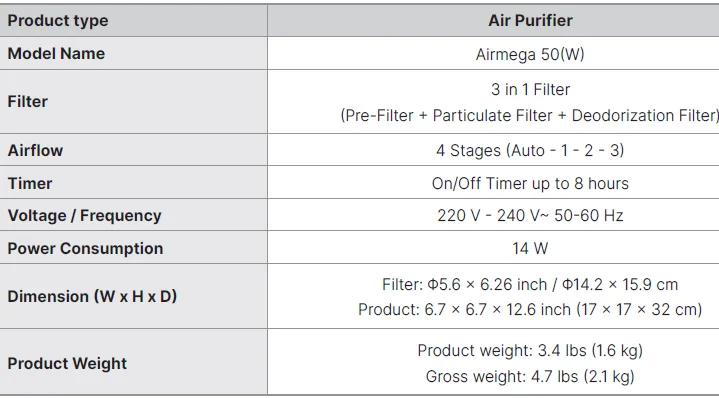
For more Manuals by Coway, visit ManualsLibraryy
Coway AIRMEGA 50 Air Purifier-FAQs
Is the Coway AIRMEGA 50 worth buying?
Yes. Coway air purifiers are known for strong filtration performance, low noise levels, and long-lasting filters, making them a good value for daily home use.
Is Coway better than Dyson air purifiers?
Coway focuses on quiet operation, durability, and effective particle removal, while Dyson emphasizes design, smart features, and odor control. The better choice depends on your needs and budget.
Does the Coway AIRMEGA 50 use a HEPA filter?
Yes. The Coway AIRMEGA 50 is equipped with a HEPA filter that captures fine particles such as dust, smoke, pollen, and allergens.
How large an area can the Coway AIRMEGA 50 cover?
The Coway AIRMEGA 50 is suitable for small to medium rooms and is designed to effectively clean air in bedrooms, offices, or living spaces.
Which country is Coway from?
Coway is a South Korean brand founded in 1989 and is globally recognized for air and water purification products.
Is Coway a good and reliable brand?
Yes. Coway is considered a world leader in air care and is trusted for its innovation, product quality, and filtration technology.
How long do Coway AIRMEGA filters last?
Under normal usage, Coway AIRMEGA filters typically last 8 to 12 months, depending on air quality and operating hours.
Can the Coway AIRMEGA 50 remove smoke and odors?
Yes. It helps reduce smoke particles and unpleasant odors using its multi-stage filtration system.
Is it safe to sleep with the Coway AIRMEGA 50 turned on?
Yes. It is safe to run the air purifier overnight, and many users prefer using it while sleeping for cleaner air.