
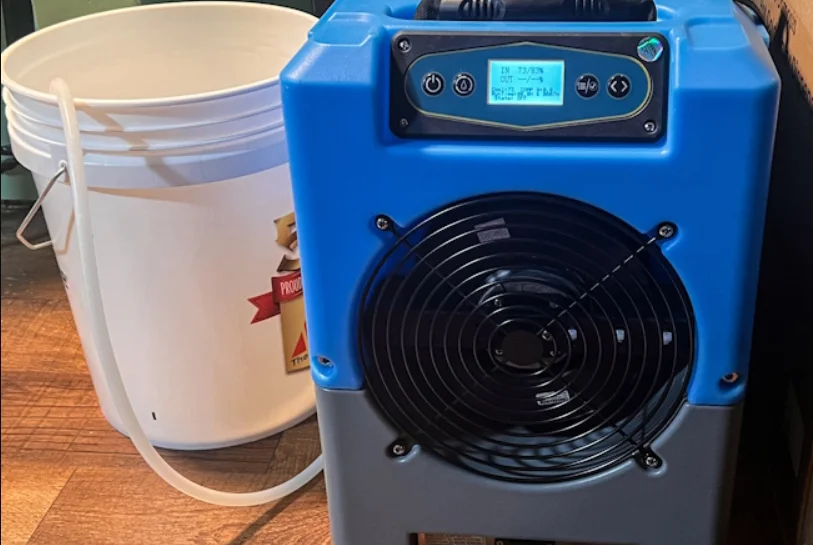

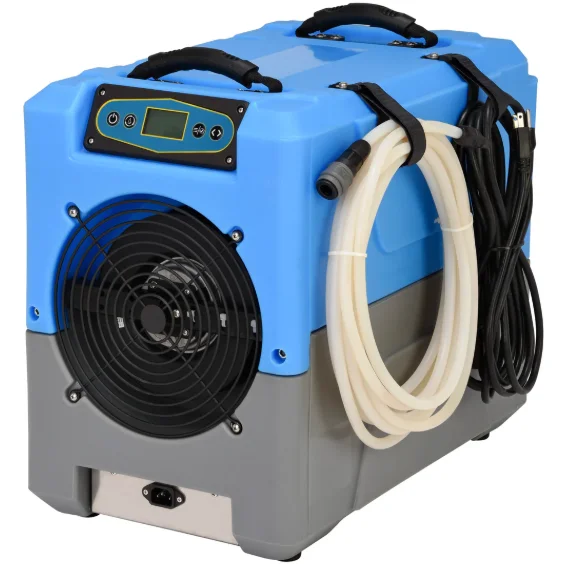
BlueDri DH76 150 PPD Portable Commercial Dehumidifier
IMPORTANT SAFETY INSTRUCTIONS
When using electrical appliances, these instructions and warnings should always be followed to reduce the risk of fire, electrical shock, and injury to persons: READ AND SAVE ALL WARNINGS AND INSTRUCTIONS BEFORE USING THIS UNIT.
WARNING
 DO NOT use this unit to ventilate areas where flammable liquids or vapors are used, stored, or are present, including paints, gasoline, varnishes, floor refinishing products, or solvents. ALWAYS read and follow all warnings and instructions on the containers for these products!
- DO NOT use the unit near combustible gas or hot air, as the unit could melt and cause a fire or electrical hazard.
 ALWAYS be sure the plug fits tightly into the outlet and that it fits tightly into the unit. When plugs fit loosely into outlets, they may slip partially out of the outlet and create a poor connection. This may cause outlets to overheat and create a potential fire hazard. Outlets in this condition should be replaced by a qualified electrician.
- DO NOT take the unit apart or repair it unless you are qualified to do so. NEVER repair or service the unit while the unit is plugged in.
- ALWAYS unplug the power cord when cleaning or moving the unit. DO NOT use the Power switch as the sole means of disconnecting power. NEVER leave children unattended when the unit is on or plugged in. ALWAYS turn off and unplug the Unit when not in use.
- Store the unit in a clean, dry environment. DO NOT store outdoors or allow water inside the unit’s motor. If the motor becomes wet, allow it to thoroughly dry before use.
- The unit should never be operated near standing water, as it will create a risk of serious injury from electrical shock. Never plug in or unplug the unit with wet hands or while standing in water. Handle the unit with care to avoid causing damage or injury.
- BE CERTAIN that the power source for the Unit is 120V AC, 60Hz. DO NOT plug the Unit into 240V or any other power source.
- The power cord is equipped with a three-prong, grounded plug that must be inserted into a grounded receptacle. Under no circumstances must the grounding prong be cut off the plug. WARNING: Do not use a three-prong to two-prong adapter. Where a two-prong wall receptacle is encountered, it must be replaced with a properly grounded three-prong receptacle installed in accordance with the National Electrical Code (NEC) and all applicable local codes and ordinances. This work must be done only by a qualified electrician, using copper wire only.
- USE OF A THREE-PRONG TO TWO-PRONG ADAPTER IS NOT PERMITTED. IMPROPER CONNECTION MAY CREATE THE RISK OF ELECTRICAL SHOCK. USE OF SUCH ADAPTERS IS NOT PERMITTED IN CANADA.
 DO NOT use this unit to ventilate areas where flammable liquids or vapors are used, stored, or are present, including paints, gasoline, varnishes, floor refinishing products, or solvents. ALWAYS read and follow all warnings and instructions on the containers for these products!
 ALWAYS be sure the plug fits tightly into the outlet and that it fits tightly into the unit. When plugs fit loosely into outlets, they may slip partially out of the outlet and create a poor connection. This may cause outlets to overheat and create a potential fire hazard. Outlets in this condition should be replaced by a qualified electrician.
CAUTION
- AVOID the use of extension cords, power strips, power taps, outlet-style air fresheners, or other cord-connected devices, as these devices may overheat and cause a fire hazard.
- DO NOT route the power cord under rugs, carpets, runners, or furniture. This may damage the cord or cause it to overheat, creating a fire hazard.
- ALWAYS place the Unit on a stable, flat, level surface while in operation to prevent the Unit from overturning.
- NEVER insert or allow fingers or objects to enter grill openings while the Unit is in operation, or injury and/or damage to the Unit may occur.
- DO NOT block, cover, or obstruct airflow to or from the Unit while in operation.
- DO NOT use this unit outdoors or in standing water. Keep the motor and wiring dry.
- DO NOT run the cord under carpeting. Do not cover the cord with throw rugs, runners, or similar coverings. Do not route the cord under furniture or appliances. Arrange the cord away from traffic areas and where it could be tripped over.
- NEVER use a single extension cord to operate more than one Unit or other electrical device.
- DO NOT operate this product with a damaged power cord plug. If the supply cord is damaged, it must be replaced by qualified personnel or other similarly qualified persons to avoid a hazard.
- The use of attachments or accessories not recommended or sold by the product distributor may cause injury to persons or property damage.
- This appliance is NOT intended for use by persons (including children) with reduced physical, sensory, or mental capabilities, or lack of experience and knowledge, unless they have been given supervision or instruction concerning use of the appliance by a person responsible for their safety.
- DO NOT leave children unsupervised with the appliance.
- DO NOT use this Unit if it has been damaged or is not functioning properly.
- THIS Unit DOES NOT MEET THE REQUIREMENTS OF NEC ARTICLE 547-7 (2008). This Unit is not suitable for use in agricultural facilities, including areas where livestock, poultry, or other animals are confined. Please refer to National Electric Code (NEC) Article 547-7 (2008), or applicable state or local codes or standards relating to electrical requirements for agricultural buildings.
- THIS Unit DOES NOT MEET THE REQUIREMENTS OF NEC ARTICLE 500 (2008). This Unit is not suitable for use in hazardous locations. Please refer to the National Electric Code (NEC) Article 500 or applicable state or local codes or standards relating to electrical requirements for hazardous locations.
MAINTENANCE
WARNING: To reduce the risk of electrical shock and fire, please observe the following instructions. Cleaning the Unit regularly will help to maintain its efficiency.
 Always unplug the cord before moving, servicing, or cleaning.
- NEVER place the unit in or near standing water. DO NOT IMMERSE THE UNIT IN WATER.
- Clean the unit only with a vacuum equipped with a brush attachment; the vacuum will remove the lint and dirt from the surface of the unit.
- Vacuum intake grills and filter every two weeks; this will help to maintain optimum performance.
- Clean the body of the unit with a soft cloth only.
- NEVER use ALCOHOL or SOLVENTS such as gasoline, benzene, paint thinner, or other harsh cleaners.
Unit Assembly
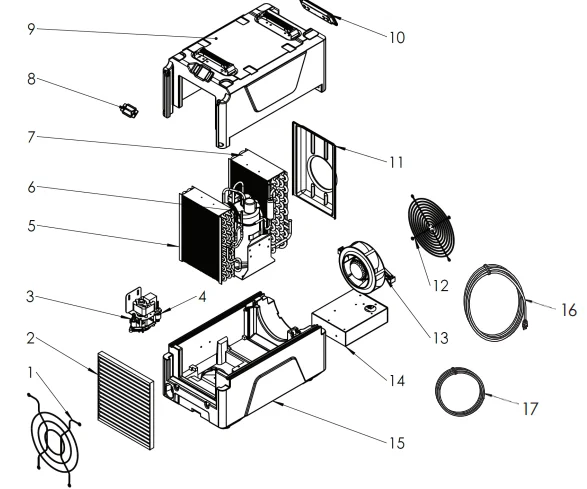
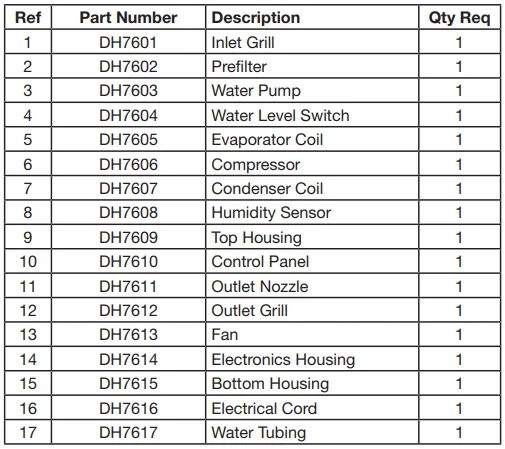
SETUP DRAIN HOSE
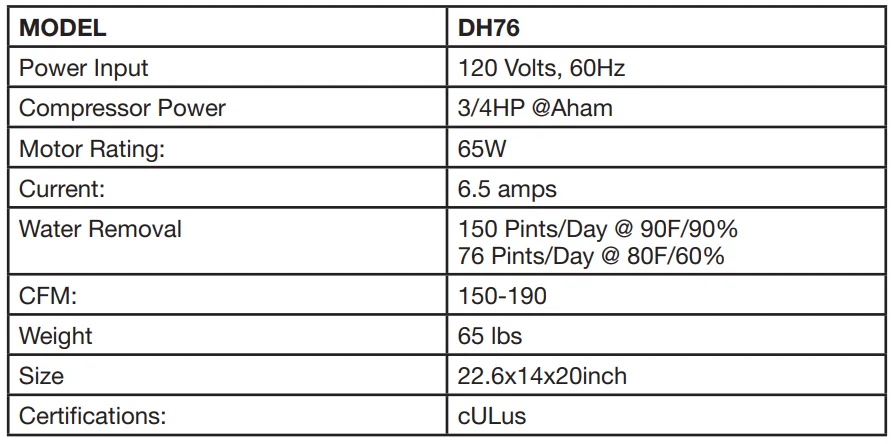
The DH76 condensation pump connects to a plastic drainage hose. This hose is equipped with a quick-connect fitting for quick attachment to the provided 25 ft. (7.5 m) drain hose. Unwrap the entire hose and place the unattached end in a sink, drain, bucket, or outdoors—anywhere that water can drain out safely. If you use a bucket or other container for water collection, check it regularly to prevent overflows.
NOTICE: Uncoil and straighten the entire drain hose. Do not leave any part of the hose coiled, and do not place the end of the hose higher than 17 ft. (5 m) above the bottom of the unit. Also check for kinks or other obstructions that might restrict the flow of water. Obstructions may cause a water backup and result in overflows.
DISPLAY MODES
When the unit is first plugged into AC power, the control panel display will briefly cycle through a series of readouts. This is part of the unit’s self-diagnosis procedure, and no user intervention is required.
NOTICE: The DH76 must be plugged into a 120VAC/60Hz outlet rated for at least 10 amps. Always plug the cord firmly into the unit first, and then plug the other end into a suitable wall outlet.
CONTROL PANEL
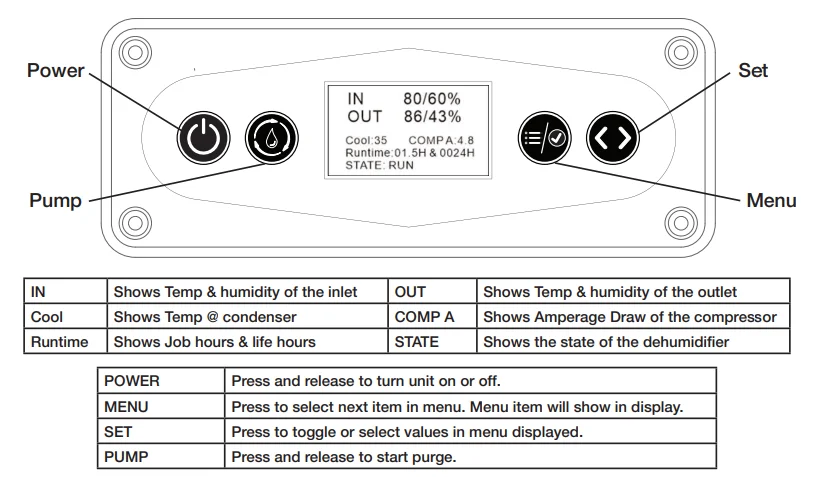
HUMIDISTAT SETTING
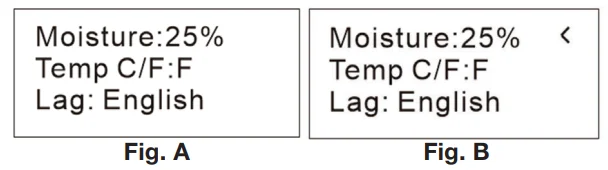
The default operating mode keeps the dehumidifier running at its maximum capacity. This is ideal for most restoration applications. To control humidity at a specific level, as described below:
- Press MENU once, and the screen shows as FIG A. Press SET once so the screen shows as FIG B, with an arrow pointing at the Moisture line.

- Press SET to adjust the target Moisture. Each press of the button increases the setting by 5% increments, cycling through 90%RH and starting again at 0%RH.
- Press MENU once to confirm your %RH, and then two more times to return to the main screen.
TEMPERATURE SETTING
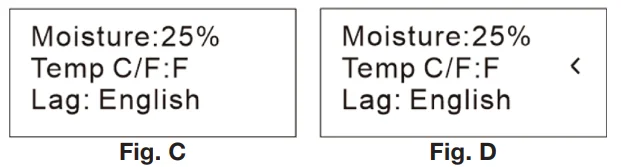
To change the unit of temperature, described below:
- Press MENU once, and the screen shows as FIG C. Press SET once, and then MENU once, so the screen shows as FIG D, with an arrow pointing at the Temperature line.
- Press SET to select Fahrenheit or Centigrade.

AFTER THE JOB
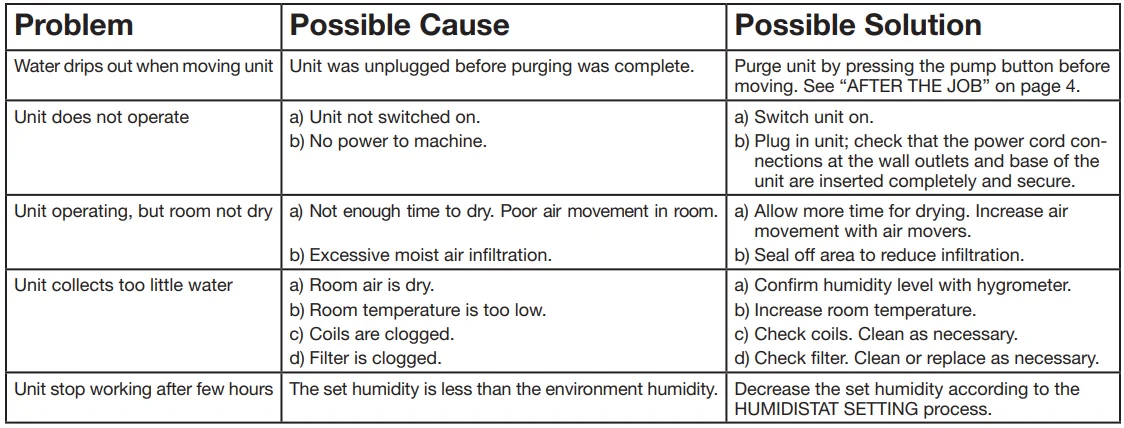
To reduce the possibility of drips when moving the unit, follow these additional steps to ensure that all water is removed from the unit.
NOTICE: To ensure the condensate tank empties completely while purging, make sure the unit is positioned horizontally on a flat surface.
- Gently rock the machine to ensure any water remaining on interior surfaces falls into the sump area.
- Press the PUMP key. When the purge cycle is complete, turn the unit off.
- Remove the external drain hose, drain it carefully, coil it, and secure it with one of the Velcro straps provided on the side of the unit.
- Unplug the power cord from the power supply and from the base of the machine, coil it neatly, and secure it with one of the Velcro straps provided on the side of the unit.
TRANSPORTATION AND STORAGE
NOTICE: Handle the unit carefully. Do not drop, throw, or place the unit where it could fall. Rough treatment can damage this equipment and may create a hazardous condition or void the warranty.
- Do not expose the control panel to moisture, snow, or rain.
- Protect from freezing.
- Store and transport securely, and in the upright position, to avoid damaging internal parts.
- Secure during transport to prevent sliding and possible injury to vehicle occupants.
MAINTENANCE SCHEDULE
- WARNING! ELECTRIC SHOCK HAZARD. Unplug the unit before cleaning or servicing.
- WARNING: Risk of dust and contaminants exposure. Use of a respirator mask and gloves is recommended. If the unit has been exposed to potentially dangerous contaminants, clean thoroughly and sanitize before reuse.
- NOTICE: The unit is fitted with sensitive electronic sensors. Protect the sensors and their lead wires from damage and do not expose them to water or cleaning solution.
- Before each use, inspect the electrical cord for damage. Look for fraying, cuts, etc. Replace the cord if you find any damage.
- Inspect, vacuum, or replace the filter.
- Monthly, inspect coils. Clean when dust accumulation is visible. In normal use, dust can accumulate and restrict airflow, reducing performance and causing the unit to overheat. Use a vacuum cleaner with a brush tool and a soft cloth to remove any debris. Take care not to damage any interior components.
- To maintain appearance, wipe interior surfaces with a damp cloth.
- Clean Pump Check Valve and Basin: If the unit displays the message “STATE PUMP,” which means the pump may be blocked, the check valve and pump basin may need to be cleaned. This operation must be performed by a qualified technician. Unplug the dehumidifier before cleaning. Remove grills and cover. Remove screws from the pump base and lift out the pump. Wipe out the pump basin with a damp cloth. Inspect the pump base for build-up of debris and clean if needed. Unthread the barbed fitting with the check valve and rinse the fitting and check valve with clean water. Reinstall the check valve into the barbed fitting and install the barbed fitting into the pump. Do not over-tighten. Reinstall the pump in the base. Reinstall the cover and grills.
- Clean Coils: With the cover removed, inspect both coils. If excessive dust and debris are present, vacuum thoroughly and/or clean with coil cleaner. This operation must be performed by a qualified technician.

SYSTEM MESSAGES
The DH76 control system constantly monitors internal operating conditions. If the system detects a problem, the state row will change to an ERROR message instead of RUN/OFF. If the display shows an ERROR message, first unplug the unit and then plug it back in. This will usually reset the electronics, and the unit will begin operating normally. If the ERROR message reappears, refer to the explanation and solution shown below.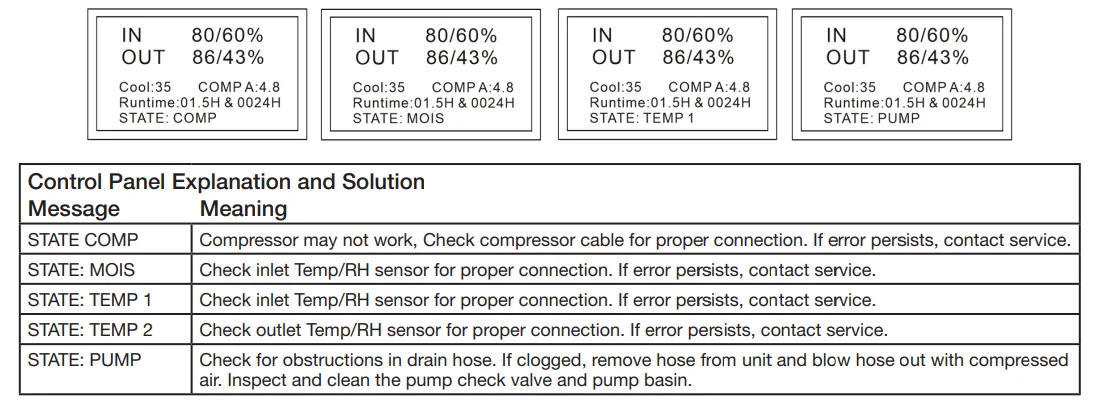
TROUBLE SHOOTING
LIMITED MANUFACTURER’S WARRANTY
Intertex, LLC (the “manufacturer”) warrants that this product (the “Product”) sold to the original user (the “User”) shall be free from defects in material and workmanship as follows:
This limited warranty shall extend for one (1) year for the entire Product and five (5) years on the sealed system, which shall include only the compressor, evaporator, and condenser. The limited warranty shall include parts and labor to repair the Product or replacement of the Product, at the sole discretion of the manufacturer.
If this limited warranty is exercised in the first fifteen (15) days following purchase, in addition to the remedies listed above, the manufacturer shall be responsible for the shipping costs of providing a replacement Product to the User. The limited warranty, following the first fifteen (15) days, shall not include shipping costs.
The User shall provide proof of purchase date to establish coverage under this limited warranty. In the event the User is unable to provide such proof, the manufacturer will establish the purchase date as thirty (30) days following the date of manufacture for the Product.
This limited warranty shall not cover:
- Useful filter life and replacement filters.
- Damage due to failure to perform normal maintenance as outlined in the Instruction Manual.
- Failures of the Product due to voltage conditions, blown fuses, open circuit breakers, or any other damages due to the inadequacy or interruption of electrical services.
- Damage due to misapplication, abuse, neglect, unauthorized alteration, improper servicing, or operation, including operation outside the voltage and frequency limitations as stated on the unit rating plate, or failure to follow warnings as stated on the Product and in the Instruction Manual.
- Damage due to flooding, fires, lightning, freezing of residual water, corrosive environment, or other conditions beyond the control of the manufacturer.
- Damage due to the use of replacement parts not supplied by the manufacturer.
- Shipping damage.
Further, the manufacturer does not warrant that the Product is merchantable or fit for any particular purpose. All other warranties, guaranties, or representations, express or implied, by operation of law or otherwise, are expressly disclaimed. Returned Product for limited warranty service, which is found by the manufacturer to be free from defect and to conform to specifications, shall be held for the User’s shipping instructions and payment, which shall be furnished promptly upon request, but no later than thirty (30) days following the date of return.
The manufacturer shall not be liable under any circumstances for special, contingent, incidental, or consequential damages, losses, or expenses directly or indirectly arising from the use of the Product, including, without limitation, warehousing, labor, handling, and service charges, die, equipment, or machine breakage, lost profits, or loss of goodwill. Any replacement parts supplied under this limited warranty will be warranted for the balance of the Product’s limited warranty. For warranty information and assistance, contact B-Air at 877.800.2247 or email [email protected] / [email protected] or visit www.b-air.com.
For More Manuals By BlueDri, Visit ManualsLibraryy.
BlueDri DH76 150 PPD Portable Commercial Dehumidifier -FAQs
How do I turn on the BlueDri DH76 dehumidifier?
To start the BlueDri DH76, plug the unit into a grounded power outlet and press the ON/OFF button on the control panel. The dehumidifier will begin operating automatically using its default settings. When turning the unit off, the internal pump may continue running for about 40 seconds to drain any remaining water before shutting down completely.
How do I set the controls on the BlueDri DH76?
The BlueDri DH76 features simple digital controls designed for commercial use. You can set the desired humidity level using the control panel, and the built-in humidistat will automatically maintain that level. Once set, the unit cycles on and off as needed, so manual adjustments are usually not required during continuous operation.
What does the E4 error code mean on a BlueDri dehumidifier?
An E4 error code on the BlueDri DH76 usually indicates either a full water tank, a drainage issue, or insufficient temperature change during operation. Check that the unit is properly draining, the pump is working, and the ambient temperature is within the recommended operating range. Restart the unit after resolving the issue.
What causes an E3 error code on the BlueDri DH76?
The E3 error code is commonly linked to coil frosting or defrost system problems. This may happen in low-temperature environments or if there is a refrigerant or sensor issue. Inspect the air filter, ensure proper airflow, and allow the unit to defrost. Persistent E3 errors may require professional servicing.
How do I fix an E1 or E2 error on a dehumidifier?
E1 and E2 error codes usually relate to sensor or communication faults. Start by powering off the dehumidifier, unplugging it for several minutes, and then restarting it. Make sure the unit is placed on a level surface and operating in suitable temperature conditions. If the error continues, technical support may be needed.
How many hours per day should I run the BlueDri DH76?
You can run the BlueDri DH76 for extended periods or 24/7 if needed, especially during water damage restoration or high-humidity conditions. The built-in humidistat ensures efficient operation by cycling the unit on and off automatically once the target humidity level is reached.
What humidity level should I set on the BlueDri DH76?
For most commercial and residential drying applications, setting the humidity between 40% and 50% is ideal. This range helps prevent mold growth, reduces moisture damage, and maintains indoor comfort without over-drying the air.
Is it safe to run the BlueDri DH76 overnight?
Yes, the BlueDri DH76 is designed for continuous commercial use, including overnight operation. As long as the unit is properly ventilated, connected to a reliable drainage system, and placed on a stable surface, it can safely run for long durations without supervision.