
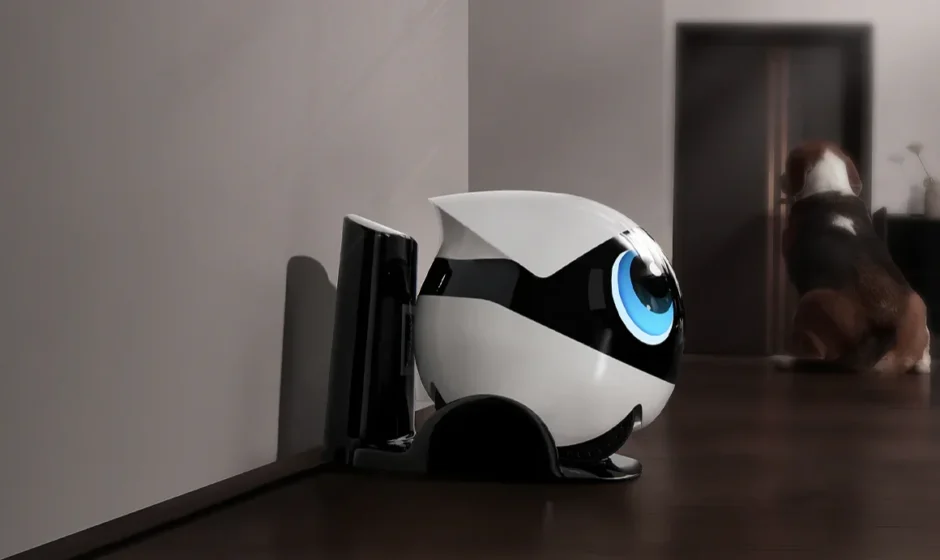

Enabot EBO Air 2 Plus
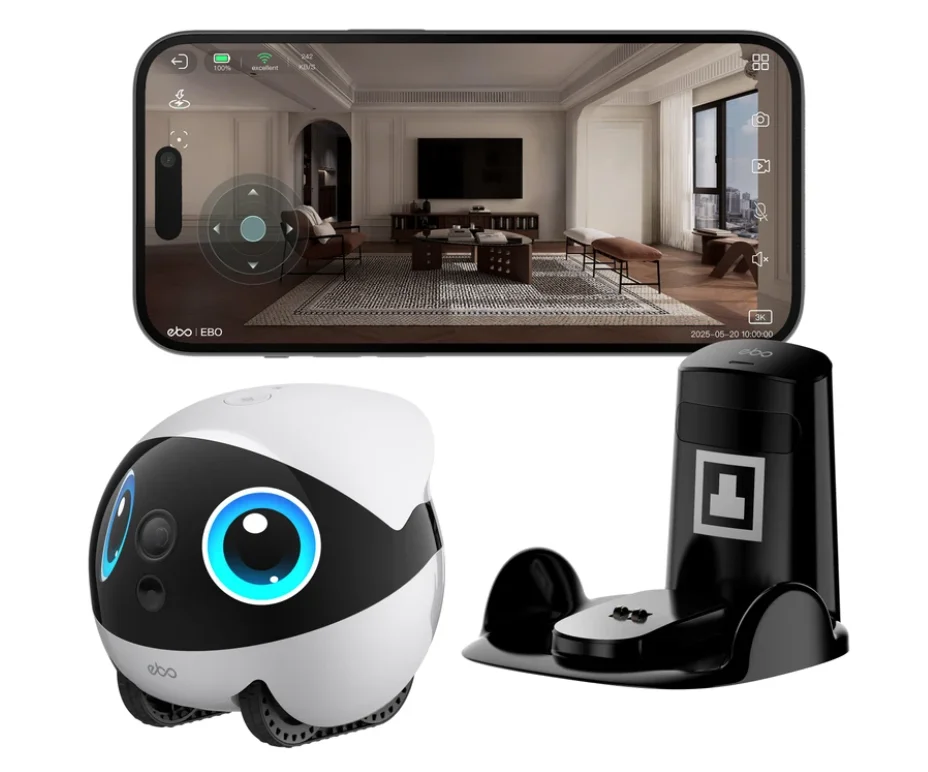

Scan the QR code above
Download the EBO HOME App
Product Overview
EBO Air2 Plus is a smart home guardian robot developed by Enabot. Featuring a compact spherical design with dual-wheel tracks, it combines 3K HD camera and voice modules for real-time video and audio communication. With functions like autonomous patrol, smart alerts, and interactive entertainment, it provides home monitoring, pet companionship, and life recording experiences. (This device is intended for
monitoring only. It does not support eavesdropping or covert recording. All data transmission is encrypted.)
Key Features
- Autonomous Whole-Home Navigation: Smart mapping and obstacle avoidance for full coverage.
- Auto Recharge: Automatically returns to the charging dock when the battery is low.
- 3K Real-Time Video+ Night Vision: Clear visibility day and night.
- Smart Security Alerts: Motion detection with instant push notifications.
- Two-Way Voice communication: Talk to family or pets remotely.
- Interactive Movements: Rolling. spinning. and shaking to engage pets.
- Expression Lights & Custom Drawing: Animated emoji lights to enhance emotional interaction.
Ideal Scenarios
- Remote care During Absence: Check on pets, children, or elderly family members anytime.
- Pet companionship at Home: Keeps pets entertained with interactive features.
- Long-Distance Parent-Child Interaction: Communicate with kids even when away.
- Night Patrol: Night vision+ alerts ensure nighttime security.
- Memory Recording: Capture and relive special family moments.
Core Advantages
- 360° Mobile Monitoring: Combines camera movement and obstacle avoidance for complete home coverage.
- 24/7 Peace of Mind: Night vision and real-time alerts keep your home safe anytime.
- Hands-Free Charging: Self-recharging for continuous operation.
- Anti-Tip Design: Patented self-righting structure ideal for homes with pets.
- Online Playback: Instantly review past footage without downloading.
- Emotional Duign: Lights and voice interactions enhance companionship and home warmth.
Safety Information
Please read the following safety instructions carefully and take normal safety precautions before using this product.
- Only authorized technicians can disassemble the product. Users should not try this themselves.
- Remove the protective film from the product before use to ensure normal operation of the robot.
- To avoid damage from falling, do not place the robot in places where it may fall, such as tables, coffee tables, TV cabinets, etc.
- Do not use the robot in an environment with open flames, fragile items, or flammable items.
- Do not drop or kick the product.
- Avoid using the product on wet floors, such as bathrooms or near kitchen sinks.
- Only use the product in an environment with a temperature between 0°c and 35°C.
- Ensure that the Wi-Fi signal covers the product’s range of activity.
- Avoid excessively bending wires and placing heavy or sharp objects on the product.
- Do not let pets bite the product’s wires, as it may cause pet safety hazards.
- Any operation inconsistent with the instructions may cause damage to the product.
- The main unit of this product cannot be immersed or soaked in water.
- When charging this product using a charging station, you need to use a power adapter with an output voltage of 12Vand an output current of lA; when charging using USB-C, you need to use a power adapter with an output voltage of 5V and an output current of no less than 2A.
- If using a power adapter to supply power, please purchase a power adapter that meets the corresponding safety standards.
Packaging

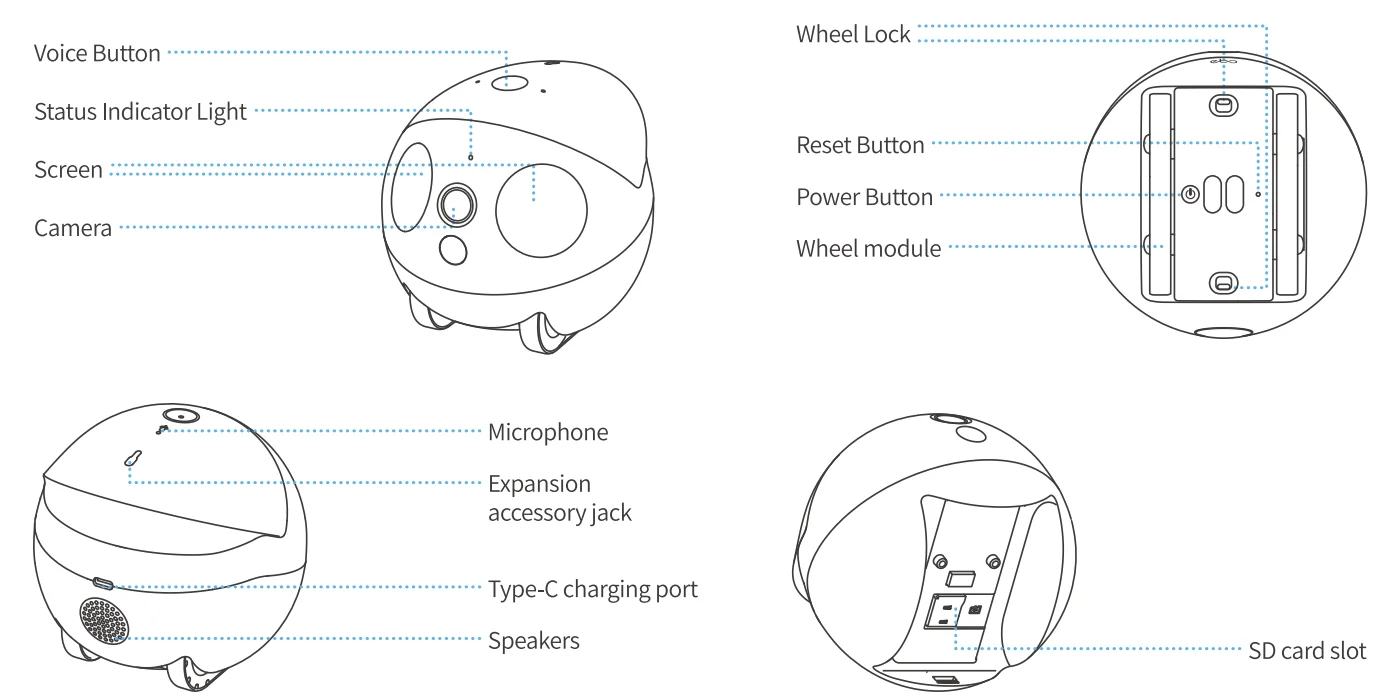
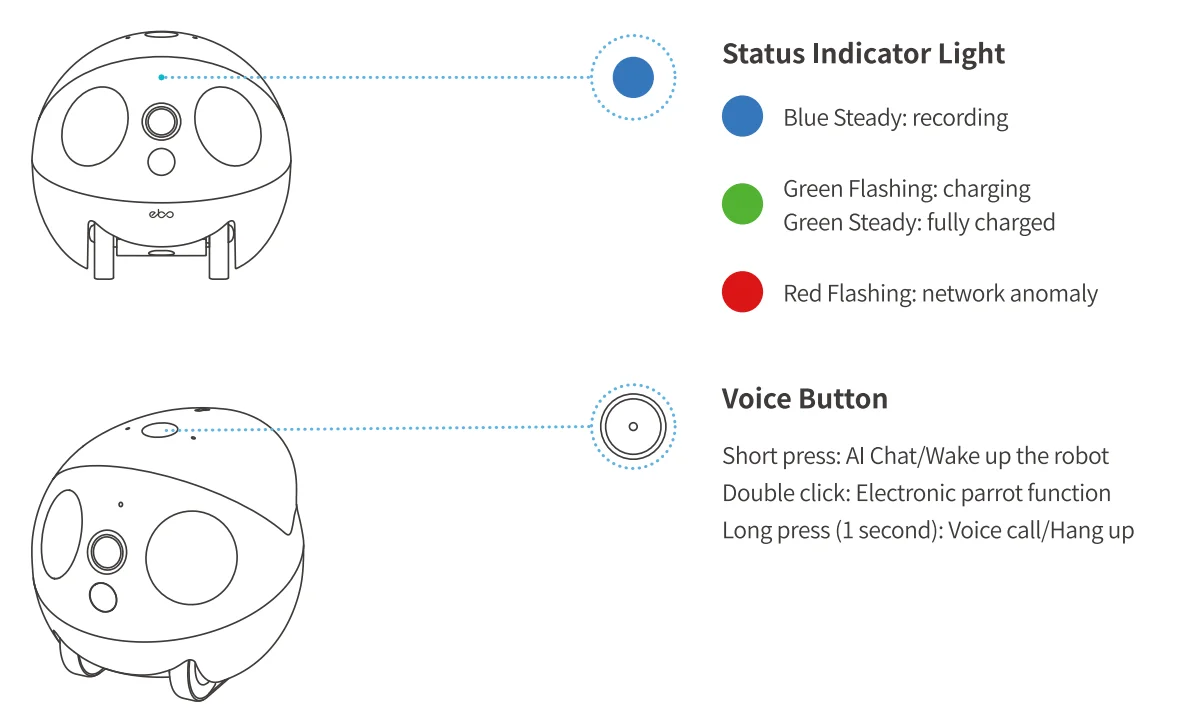
Product Introduction
Networking Instructions
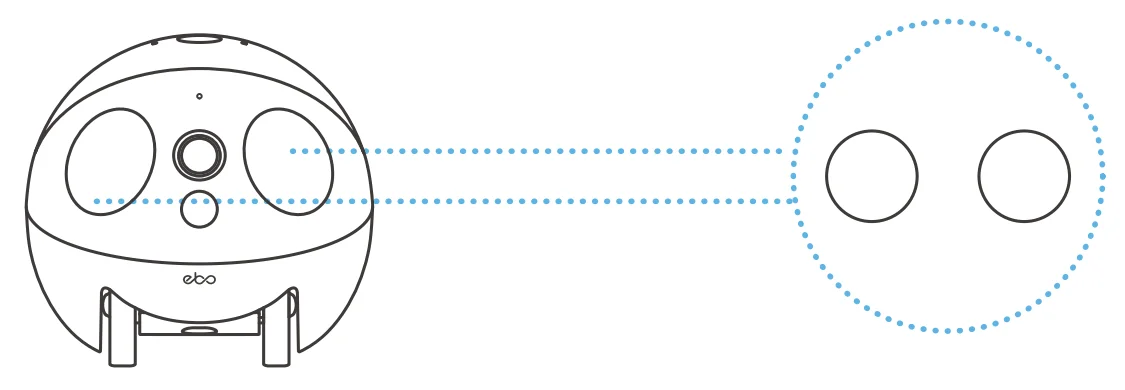
- Press and hold the power button for 1 second or place the robot on the charging dock. Wait for the screen to switch to scanning mode. At this point, the robot enters the QR code binding state.

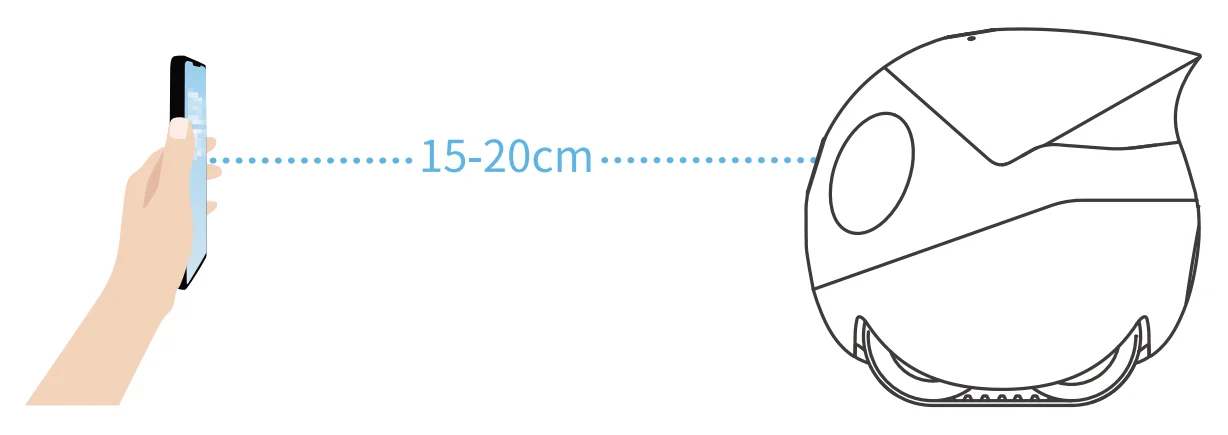
- Download the EBO HOME APP, click “Add Device” or “+” on the home page, and follow the steps to prepare your robot for network access. Please pay careful attention and fill iin the correct Wi-Fi name and password. After generating the QR code, scan the code about 15-20cm away from the robot to connect it to the network.

- When the robot has successfully connected to the network, it will emit a successful binding sound, and the App will alert you that the binding is successful.
Usage Instructions
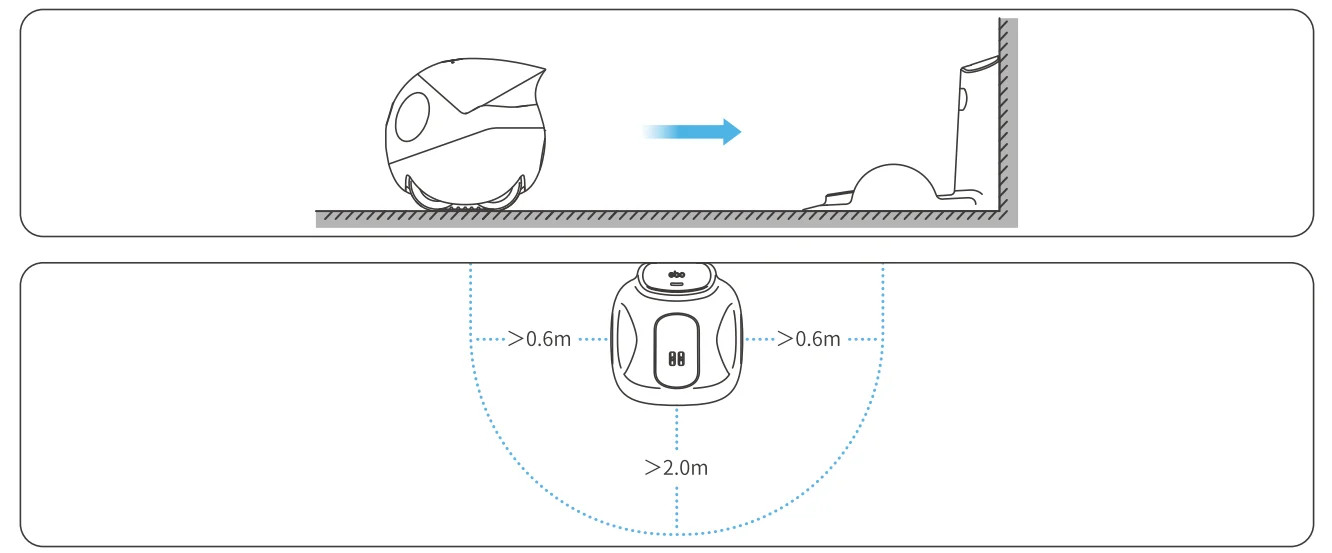
Securing the Charging Dock
Please ensure that the back of the charging dock is placed against a wall whenever possible. Maintain a clearance of 0.6 meters on both sides of the dock and at least 2.0 meters of unobstructed space in front to facilitate the robot’s return for charging.
Restore Factory Settings
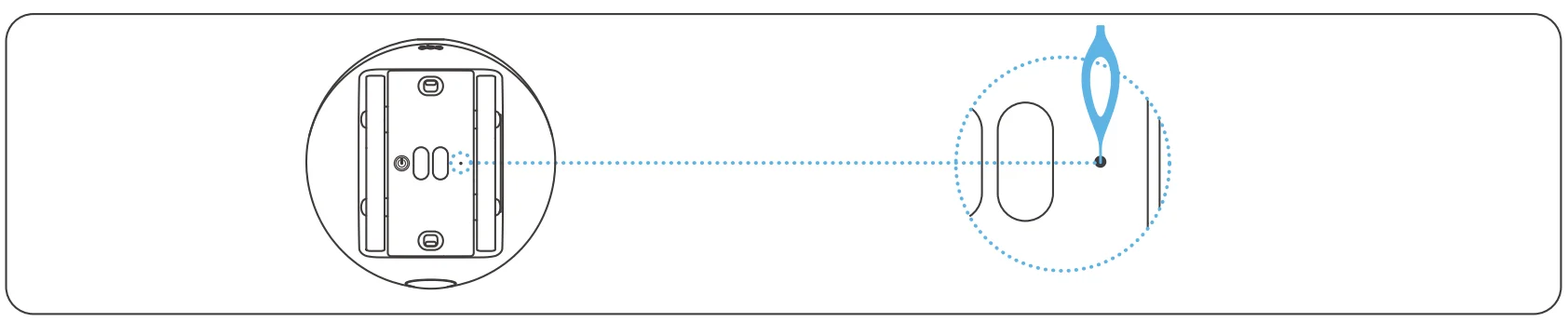
Hold the reset button on the bottom of the robot for>S seconds. When you hear the “Reset Successfully” prompt tone, reconnect to the network.
Expansion Accessory Installation (‘Expansion accessories must be purchased separately)
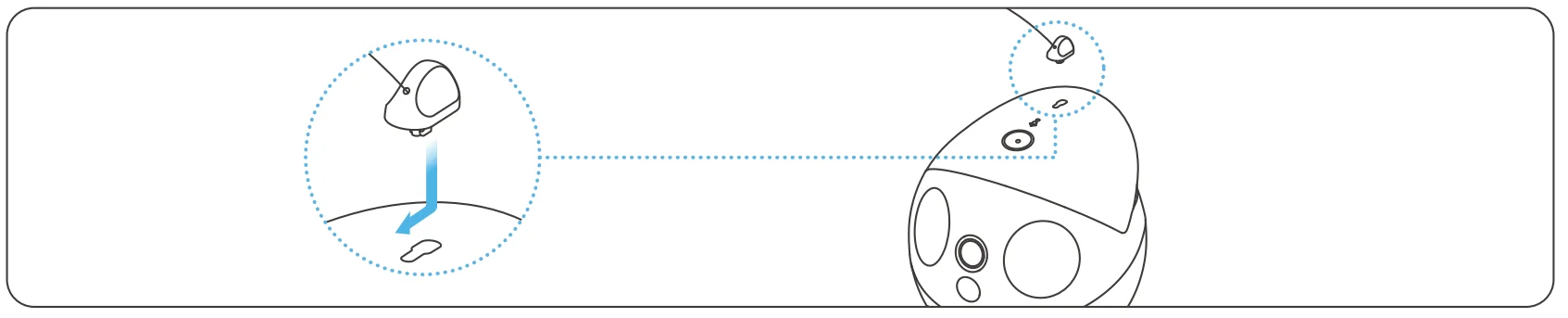
Insert the male end of the expansion accessory into the accessory socket on the top of the robot. Slide forward to lock it in.
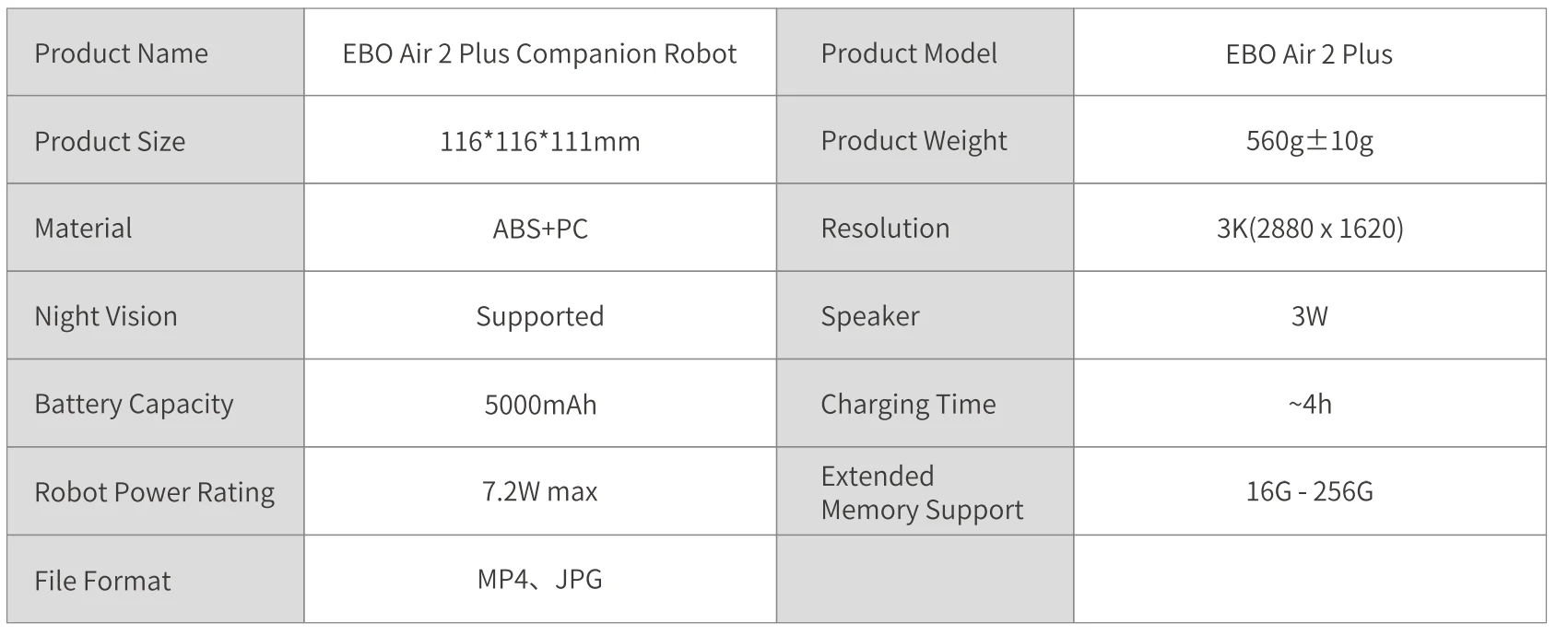
Specifications and Parameters
Legal Statement
- Before using the product, please read this document and keep it for reference.
- The illustrations and descriptions in this document are for reference only, and the actual product should take precedence. For certain specifications and configurations, please check the relevant specification documents or consult the seller.
- The nominal storage capacity and technical performance indicators are only specifications. Actual data may vary depending on the environment and settings, etc. Factors vary.
- If you use other products or software, you are solely responsible for compatibility and legality.
- No content in this document shall constitute a modification of Enabot’s product warranty policy.
- This product is not designed for organ transplantation or other life support system applications. In such applications, product failure may result in personal injury or death.
- No one may copy, delete, compile, store, transmit, or translate this document without Enabot’s authorization.
IC Warning
This device complies with Innovation, Science and Economic Development Canada’s License exempt RSSstandard(s). Operation issubjecttothefollowing two conditions:
- This device may not cause harmful interference, and
- This device must accept any interference received, including interference that may cause undesired operation of the device.
The device complies with RF exposure guidelines, and users can obtain Canadian information on RF exposure and compliance. The minimum distance from the body to use the device is 20cm. The device is restricted to indoor use only when operating in the 5150-53SOMHz frequency range.
FCC Warning
Any Changes or modifications not expressly approved by the party responsible for compliance could void the user’s authority to operate the equipment. This device complies with part 15 of the FCC Rules. Operation is subject to the following two conditions:
- This device may not cause harmful interference, and
- This device must accept any interference received, including interference that may cause undesired operation.
Note: This equipment has been tested and found to comply with the limits for a Class B digital device, pursuant to part 15 of the FCC Rules. These limits are designed to provide reasonable protection against harmful interference in a residential installation. This equipment generates, uses, and can radiate radio frequency energy and, if not installed and used in accordance with the instructions, may cause harmful interference to radio communications. However, there is no guarantee that interference will not occur in a particular installation. If this equipment does cause harmful interference to radio or television reception, which can be determined by turning the equipment off and on, the user is encouraged to try to correct the interference by one or more of the following measures:
- Reorient or relocate the receiving antenna.
- Increase the separation between the equipment and receiver.
- Connect the equipment into an outlet on a circuit different from that to which the receiver is connected.
- Consult the dealer or an experienced radio/JV technician for help.
RF Exposure Statement
This equipment complies with FCC radiation exposure limits set forth for an uncontrolled environment. This equipment should be installed and operated with a minimum distance of 20cm between the radiator &your body.
NB-EU Warning
This product complies with the radio interference requirements of the European Community. This equipment should be installed and operated with a minimum distance of 20cm between the radiator &your body.
- Product name: EBO Air2 Plus
- Product model: EB0Air2 Plus
- Manufacturer: Fuzhi Technology (Shenzhen) Co., Ltd.
- Frequency Range: 2412MHz to 2472MHz, 5180MHz to 5240MHz, 5260MHz to 5320MHz
- Max. Transmit Power:
- 16.47dBm for WiFi 2.4G;
- 13.lldBm for WiFi 5.2G;
- 13.SldBm for WiFi 5.3G;
Simplified EU Declaration Of Conformity
The simplified EU declaration of conformity referred to in Article 10(9) shall be provided as follows: Hereby, Fuzhi Technology (Shenzhen) Co., Ltd. declares that radio equipment type EBO Air 2 Plus complies with Directive 2014/53/EU, and this product is allowed to be used in all EU member states. EUT Operating temperature: -10-45°C
Caution: Risk of explosion if the battery is replaced with an incorrect type. Dispose of used batteries according to the instructions.
The device is restricted to indoor use only when operating in the 5150-5350MHz frequency range.
For manuals by Enabot, visit ManualsLibraryy
Enabot EBO Air 2 Plus-FAQs
How do I set up the Enabot EBO Air 2 Plus?
To set up your EBO Air 2 Plus, download the EBO HOME app on your smartphone. Power on the robot and press the reset button once to enter pairing mode. Open the app, tap “Add Device,” and select your model. Connect it to a 2.4 GHz Wi-Fi network and enter your password. Once paired, you can control movement, video, and settings directly from the app.
Can I control the EBO Air 2 Plus from another country?
Yes, you can operate the robot remotely from anywhere in the world. As long as both your phone and the robot are connected to the internet, you can access live video, move the robot, and interact through the app. However, long-distance connections may cause slight delays depending on network speed and stability.
What is the difference between EBO Air 2 Plus and EBO Air 2S?
The Air 2S is a more budget-friendly version of the Air 2 Plus. While both share core features like mobile monitoring and pet interaction, the 2 Plus includes additional smart features such as an AI assistant. The 2S is typically limited in color options and advanced capabilities, making the Plus version more feature-rich overall.
How do I reset the EBO Air 2 Plus?
To power off the robot, press the reset button twice. For a factory reset, press and hold the reset button for about five seconds until you hear a confirmation prompt. A factory reset restores the device to default settings and removes Wi-Fi and account information, so you will need to set it up again in the app.
Does EBO Air 2 Plus need Wi-Fi to work?
Wi-Fi is required for full functionality, including live streaming, remote control, alerts, and cloud features. Without Wi-Fi, only limited basic operations may be possible. For best performance, connect the robot to a stable 2.4 GHz network to ensure smooth video streaming and responsive controls.
Can EBO Air 2 Plus record video continuously?
Yes, the robot supports 24/7 video recording with smart playback options. You can review recorded clips through the app, adjust playback speed, and monitor activity when you are away. This makes it useful for home security, pet observation, and staying connected with family members.
Does the EBO Air 2 Plus work on carpets?
Yes, the robot can move across low-pile carpets. It can typically handle carpet thickness up to around 6 mm. For thicker rugs or uneven surfaces, performance may vary. Keeping floors clear of obstacles helps ensure smoother movement and navigation.
Does the EBO Air 2 Plus have night vision?
Yes, it includes infrared night vision, allowing it to capture clear video even in low-light or dark environments. This feature ensures round-the-clock monitoring, making it helpful for checking on pets or home security during nighttime hours.
Is the Enabot EBO Air 2 Plus worth buying?
The EBO Air 2 Plus is ideal for pet owners and families who want a mobile home monitoring solution. Its 2K camera resolution, wide field of view, AI tracking, and interactive features provide strong value. If you want a combination of entertainment, monitoring, and remote interaction, it offers a versatile solution compared to standard stationary cameras.