
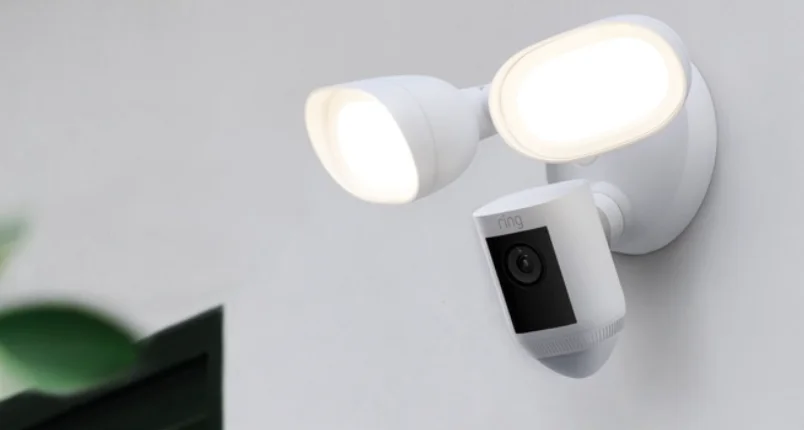

Floodlight Cam Wired Pro
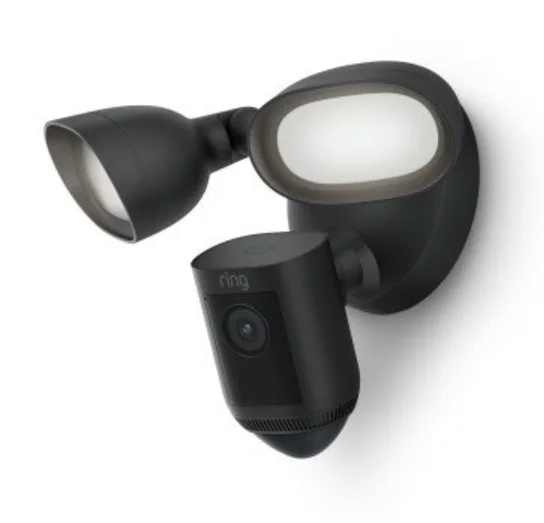
Quick Start
- Open the Ring app and select Set Up a Device.
Then follow the in-app instructions - Scan this code.
This identifies your Ring device to make setup fast and easy.

WARNING: Risk of electrical shock.
Disconnect power at the fuse or circuit breaker before installing. Verify that the supply voltage is correct. Connect the fixture to a 100 VAC~240 VAC 50/60 Hz power source. Properly ground fixture. Always follow code standards when installing wired connections.
CAUTION: Risk of fire. Do not install near combustible or flammable surfaces.
NOTICE: Do not connect this light fixture to a dimmer switch or timer.
Your Floodlight Cam must be installed on a 4” round UL-listed weatherproof electrical box. This manual is for informational purposes only. Working with electricity can be dangerous unless proper safety precautions are taken. If you are not comfortable or are inexperienced with the processes and tools described in this manual, we recommend that you hire a licensed electrician.
Shut off the power at the breaker!
You’ll be working with electrical wires during the install process. If you don’t know where your breaker is or how to turn off power to your floodlight circuit, we recommend you hire a licensed electrician.

Prep your Floodlight Cam for installation.
First, rotate the lights out of the way, like this…
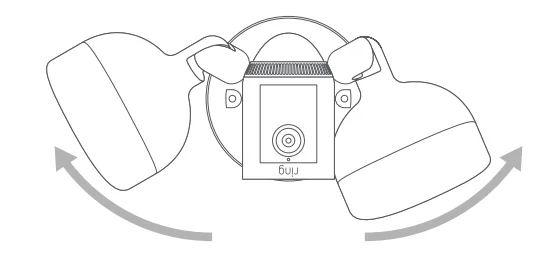
If you’re mounting on an eave or overhang, your camera is already in position.
If you’re mounting to a wall, rotate the camera into position like this…
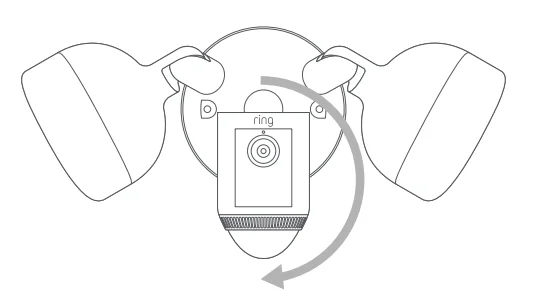
Remove your existing floodlight.
With power off at the breaker, remove your existing floodlight from the junction box it’s attached to and disconnect the wires.

If there is a metal bracket attached to your junction box, remove that as well.

Choose your screws.
Select a set of screws from the bags marked “A” through “F” that fit your junction box to secure the metal mounting bracket. One size does not fit all here, so we sent several. Save a screw from either Bag B or C. You will use it on the next page.

Attach the metal mounting bracket.
With the screws you selected in the previous step, secure the metal mounting bracket to your junction box using either pair of screw holes. Be sure to align the bracket so that the “FRONT” text faces outwards.

Install the plastic mounting plate.
Pull gently from the opening of the plastic plate to free it from the fixture, then feed your power wires though the opening. With your power wires fed through the mounting plate, center it over the metal mounting bracket. If you’re installing on a wall, the “UP” arrow should point up. If you’re installing under an eave, it should point towards the wall. Then, insert one of the screws from Bag B or C into the center hole, and tighten to secure.
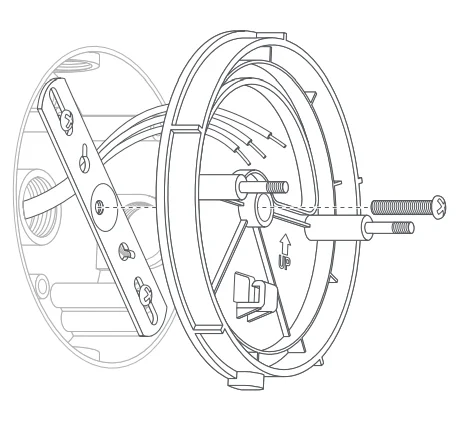
Hang it up.
Locate the nylon strap on the back of your Floodlight Cam light fixture, and loop the buckle at the end over the hook on the mounting plate. Make sure the buckle and hook are secure before releasing the light fixture.
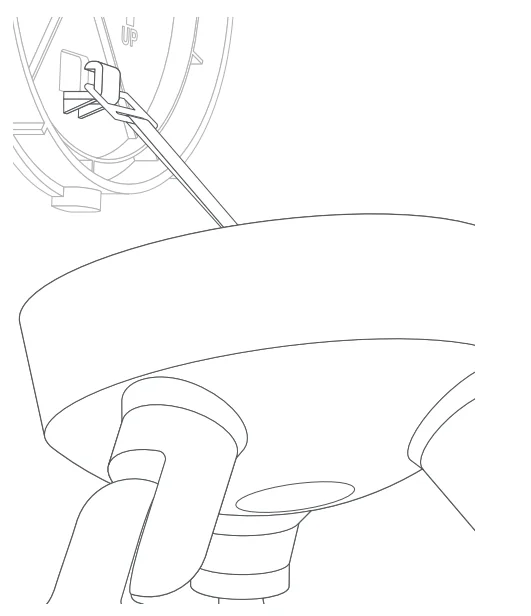
Connect the wires.
The green wire on your Floodlight Cam is the ground wire. With power still off at the breaker, use a wire nut from the bag marked “G” to connect the green (or ground) wire from your Floodlight Cam to the green wire coming from your junction box. The white wire on your Floodlight Cam is neutral. Use another wire nut from the bag marked “G” to connect the white wire from your Floodlight Cam to the white (or neutral) wire coming from your junction box. The black wire on your Floodlight Cam is hot. Use another wire nut from the bag marked “G” to connect the black wire from your Floodlight Cam to the black (or hot) wire from your junction box. Give all 3 wire connections and wire nuts a gentle tug to make sure they are secure.
WARNING: If you can’t easily identify the wires coming out of your junction box, or have difficulty with or are uncomfortable connecting them, consult with a licensed electrician.
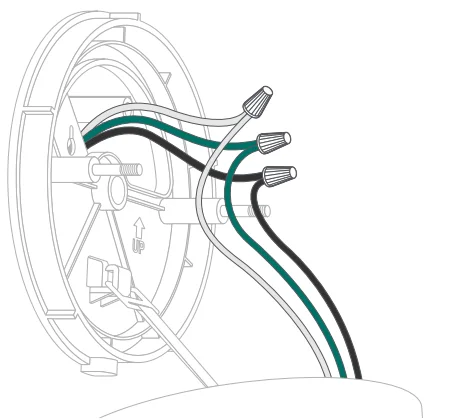
Mount the light fixture.
Tuck the power wires into the junction box, then align the two holes on the light fixture with the threaded posts on the plastic mounting plate. Slide the light fixture onto the posts and push it firmly into place. Secure your fixture using two of the hex cap nuts from Bag G over the ends of the threaded posts. Remove the reversible bit from the included screwdriver and use the handle to tighten the hex cap nuts.
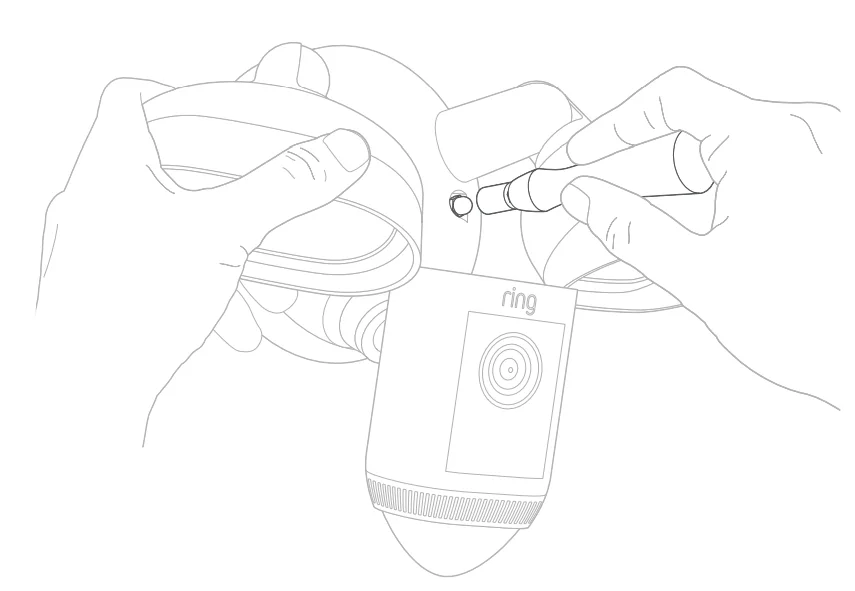
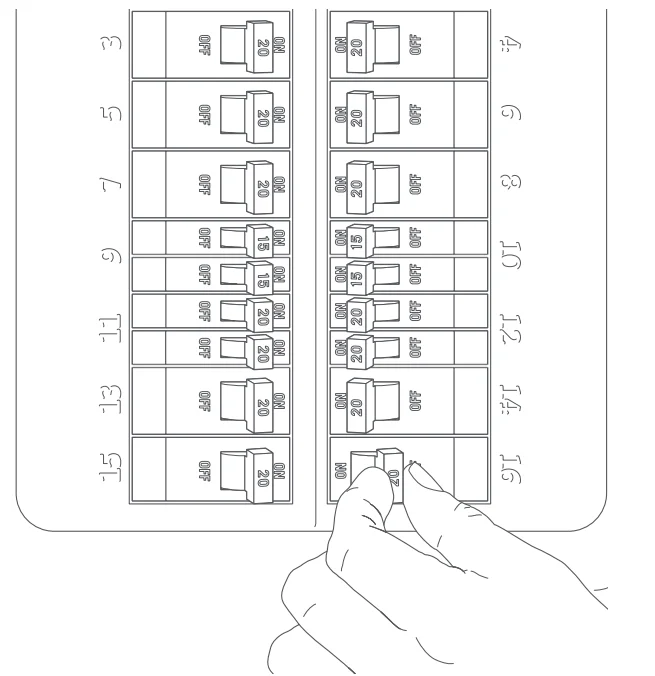
Restore power at the breaker.
Now that your Floodlight Cam is installed, you can turn power back on at the breaker. The lamps on your Floodlight Cam will flash once it’s powered on.
Complete setup in the Ring App.
Once your Floodlight Cam powers on, follow the instructions in the app to continue setup.
Review, share, and download.
Your new device comes with a free 30-day trial of our Ring Protect video recording service. To continue your subscription and save your videos, please visit ring.com/protect-plans
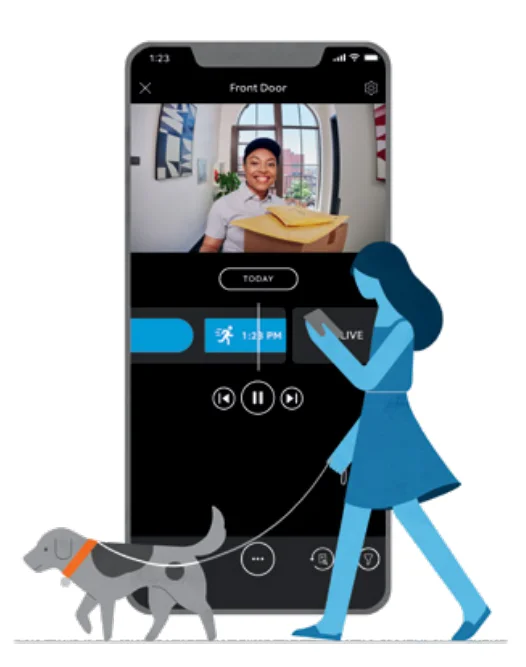
- What is Ring Protect?
Ring Protect is a subscription service that stores videos from your Ring devices. - Why do I want it?
Ring lets you interact with visitors and monitor your property in real time, while Ring Protect allows you to review and share those videos anytime. - How much does it cost?
Ring Protect starts at $3 USD/month or $30 USD/year per Ring doorbell or camera.* - How do I sign up?
Simply log into your Ring account at ring.com/protect-plans, and follow the on-screen instructions.
For additional help, visit ring.com/help
Or give us a call
- US 1 800 656 1918
- Canada 1 855 300 7289
- Worldwide +1 310 929 7085
For a list of all our customer support numbers, visit ring.com/callus
For more manuals by Ring, visit ManualsLibraryy
Floodlight Cam Wired Pro-FAQs
What is the Floodlight Cam Wired Pro and how does it work?
The Ring Floodlight Cam Wired Pro is a smart outdoor security camera with built-in LED floodlights. It connects to your home’s wired electrical system and Wi-Fi network to provide continuous power and real-time monitoring. The camera records high-quality video, detects motion, and automatically activates bright lights when activity is detected. Through the Ring App, users can view live footage, receive alerts, talk to visitors, and manage security settings from their smartphone.
Is the Floodlight Cam Wired Pro worth buying?
Many homeowners consider the Floodlight Cam Wired Pro a worthwhile investment for outdoor security. It offers advanced features such as 2K HDR video, powerful LED floodlights, motion alerts, and customizable detection zones. Users also appreciate its easy installation and integration with smart home devices. Because it combines lighting and surveillance in one device, it can improve visibility around entry points and help monitor activity around your home more effectively.
What makes the Floodlight Cam Wired Pro different from Floodlight Cam Plus?
Compared with Ring Floodlight Cam Plus, the Wired Pro model offers more advanced technology. It includes 2K HDR video quality, 3D Motion Detection, and Bird’s Eye View that maps motion events around your property. These features provide more precise alerts and improved monitoring. The Plus model still offers solid security features, but the Wired Pro version is designed for users who want enhanced motion tracking and higher-resolution video performance.
Do floodlight cameras help prevent crime?
Floodlight cameras can help discourage suspicious activity by combining bright lighting with video surveillance. When motion is detected, the lights turn on instantly, illuminating dark areas and recording what happens. This sudden lighting often makes intruders more visible and less likely to approach the property. In addition, recorded footage can be useful for identifying events or providing evidence if an incident occurs.
Can the Floodlight Cam Wired Pro work without Wi-Fi?
The camera needs Wi-Fi to provide full smart features such as live streaming, motion notifications, and remote viewing through the Ring app. Without internet access, the device may still power on and operate its lights, but video streaming and cloud recording will not function. For best performance and real-time alerts, a stable Wi-Fi connection is recommended.
How bright are floodlight cameras like the Floodlight Cam Wired Pro?
Floodlight security cameras are designed to illuminate outdoor areas effectively. Models like the Floodlight Cam Wired Pro typically produce thousands of lumens, enough to light up driveways, backyards, and entryways. Bright lighting improves nighttime visibility for the camera and helps homeowners see activity clearly. The brightness can often be adjusted in the Ring app to match your lighting needs.
Do floodlight cameras use a lot of electricity?
Most modern floodlight cameras use energy-efficient LED lights. LEDs consume far less electricity than older halogen floodlights while still providing strong illumination. Because the lights usually activate only when motion is detected or when manually turned on, overall energy usage remains relatively low. This makes smart floodlight cameras a practical security solution for long-term use.
Are Ring cameras better than traditional CCTV systems?
Ring cameras are designed for convenience and smart-home integration, making them easy to install and manage through a mobile app. Traditional CCTV systems, on the other hand, are often used for larger properties that require multiple cameras and continuous recording. For homeowners who want quick setup and app-based monitoring, Ring devices are a popular choice, while CCTV systems may be better for full-property surveillance setups.
What are some possible drawbacks of floodlight cameras?
While floodlight cameras provide strong security benefits, there are a few potential downsides. The initial purchase cost can be higher than standard outdoor lights, and they rely on Wi-Fi for full functionality. Some users may also have privacy concerns when installing cameras around shared spaces. However, proper placement and secure network settings can help reduce these concerns while maximizing the device’s effectiveness.