
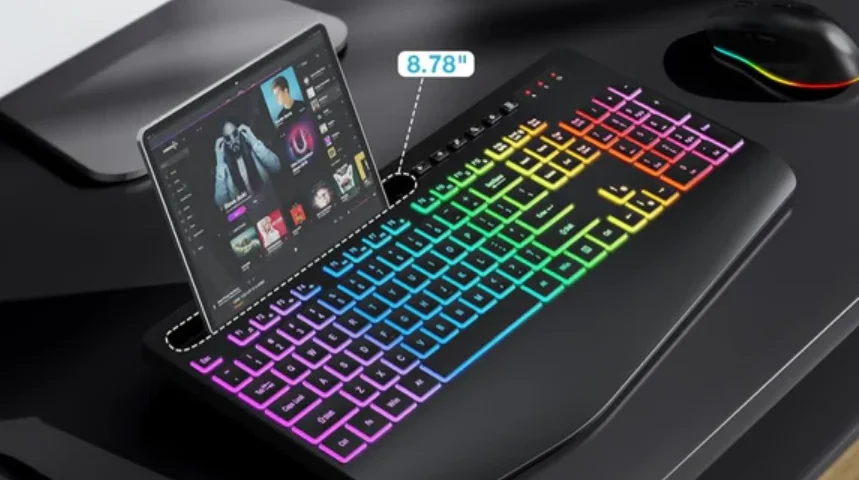

Sablute KM22Max Wireless Keyboard Combo
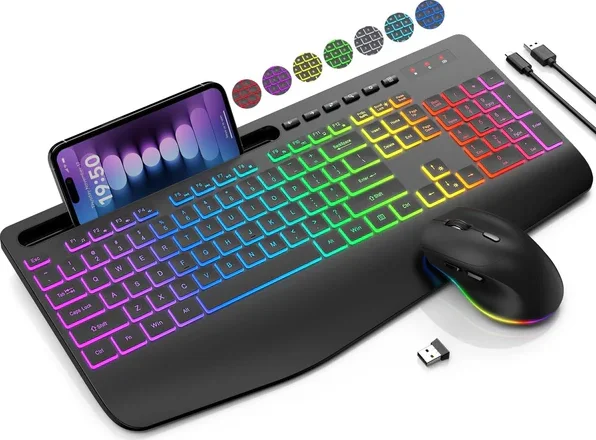
Product Specification
Keyboard parameters:
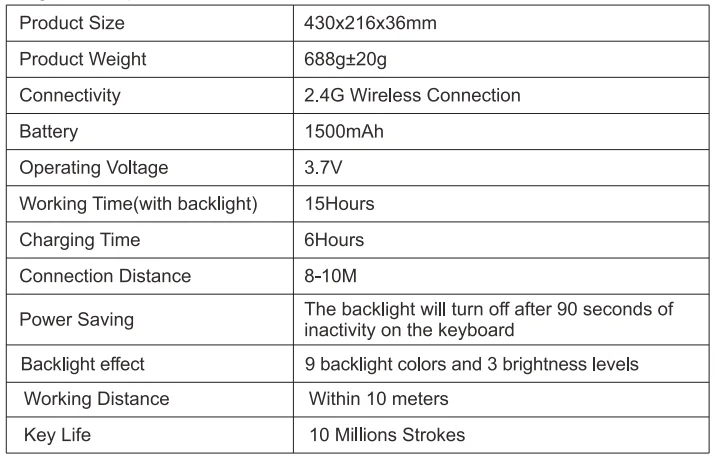
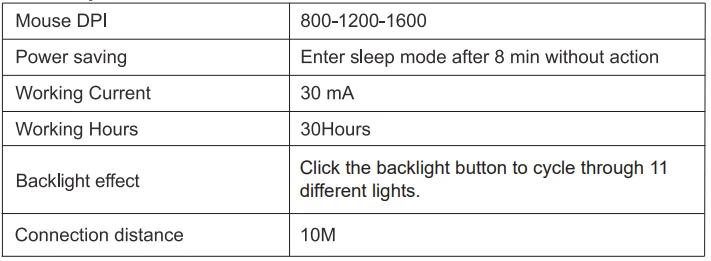
Mouse parameters:
Compatible Systems: Windows XP, Windows 7/8/10/11, Mac OS, iPad OS, IOS, Android.
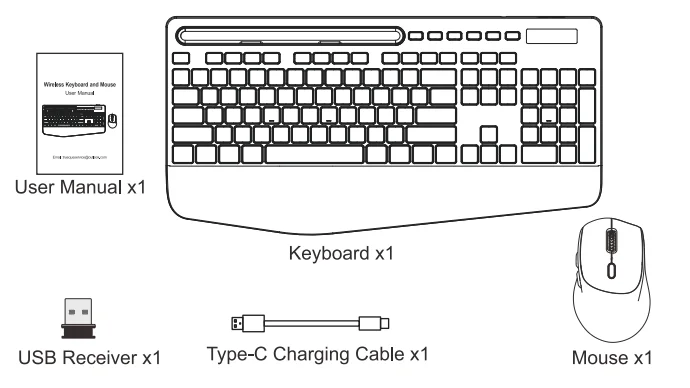
You will receive.
Where is my USB receiver?
The keyboard and the mouse share a USB receiver, which is placed in the internal slot of the mouse.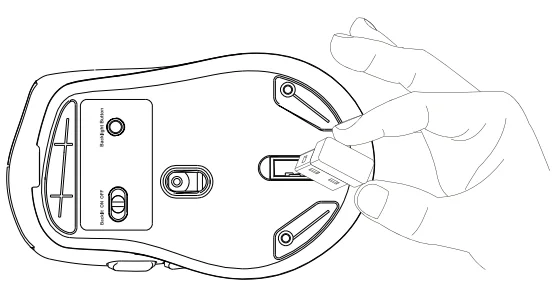
How to set up
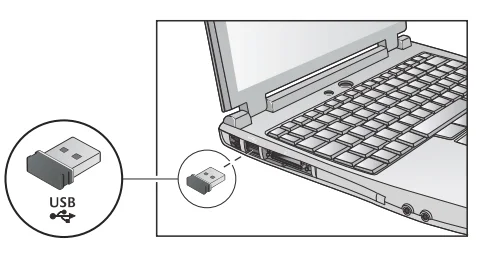
- Please put the USB receiver into your computer.

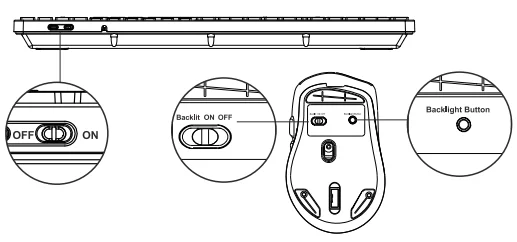
- Turn on the keyboard and mouse. Note: Only when you turn on the mouse backlit switch can you adjust different light colours through the backlight button.

- The keyboard and mouse will automatically connect to the computer, no driver needed.
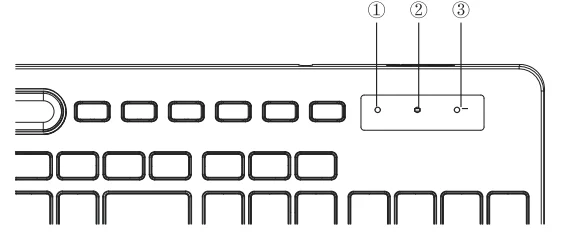
Indicator Light
LED Indicator of the Keyboard
- Num Lock: The Num Lock indicator will turn red when Num Lock is activated.
- Caps Lock: The Caps Lock indicator will turn red when Caps Lock is activated.
- Low battery warning: The battery will run out soon when the light flashes slowly.

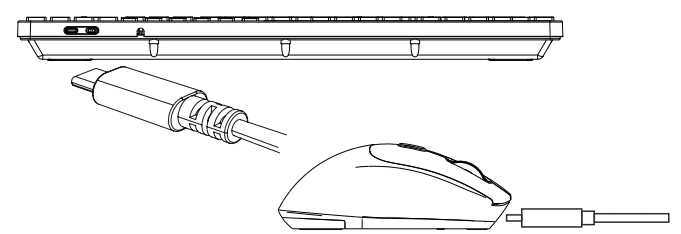
Instruction for charging
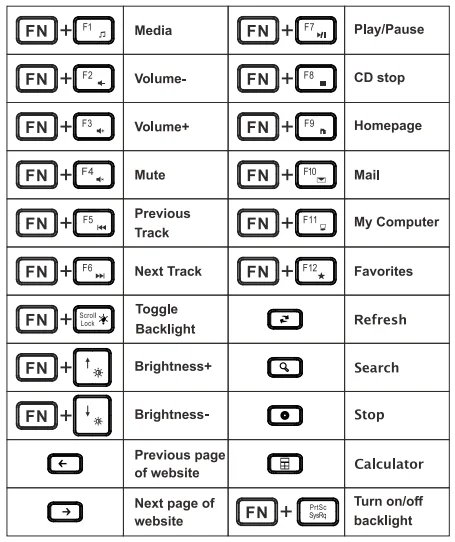
Multimedia button description
FAQ
Q1: The keyboard cannot be connected.
A1: Please switch on the keyboard 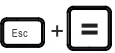 . The light flashes quickly. Plug the 2.4GHz USB receiver into the computer. Within 10 seconds, put the keyboard at 10 cm from the receiver for pairing. When the light turns off, the keyboard pairing is successful.
Q2: What should I do if the keyboard gets delayed or stuck?
A2: Please check that there is no 2.4GHz device (e.g., router) nearby to interfere with the connection. Please check that there is no full metal case that may block the signal.
Q3: Where is my USB receiver?
A3: The keyboard and the mouse share a USB receiver, which is placed in the internal slot of the mouse.
Note
The multimedia keys are for Win 8 and Win 10; for other systems, there may be no function for some combined keys. This equipment has been tested and found to comply with the limits for a Class B digital device, pursuant to part 15 of the FCC Rules. These limits are designed to provide reasonable protection against harmful interference in a residential installation. This equipment generates, uses, and can radiate radio frequency energy and, if not installed and used in accordance with the instructions, may cause harmful interference to radio communications.
However, there is no guarantee that interference will not occur in a particular installation. If this equipment does cause harmful interference to radio or television reception, which can be determined by turning the equipment off and on, the user is encouraged to try to correct the interference by one or more of the following measures:
- Reorient or relocate the receiving antenna.
- Increase the separation between the equipment and receiver.
- Connect the equipment into an outlet on a circuit different from that to which the receiver is connected.
- Consult the dealer or an experienced radio/TV technician for help.
Changes or modifications not expressly approved by the party responsible for compliance could void the user’s authority to operate the equipment. This device complies with Part 15 of the FCC Rules. Operation is subject to the following two conditions:
- This device may not cause harmful interference.
- This device must accept any interference received, including interference that may cause undesired operation.
Cautions
- Please fully charge the keyboard when you first receive the product, as this helps to maintain the battery life.
- Please remove the power supply when charging is complete.
- If the keyboard is not used for a long time, it is recommended to turn off the power switch of the keyboard.
- Please do not expose this product to water because it may cause a short circuit and damage the product.
- Please do not drop or hit this product because shocks may damage the components inside.
- Please do not place this product near extreme heat or sources of fire.
After-Sales
Email: [email protected]
Website URL: sablute.com
For More Manuals By Sablute, Visit ManualsLibraryy.
Sablute KM22Max Wireless Keyboard Combo-FAQs
What features make the Sablute KM22Max different from standard keyboard combos?
The Sablute KM22Max stands out with its ergonomic wrist rest, colorful backlighting, and built-in device holder. It also offers larger key characters for better visibility and additional shortcut keys, making it more user-friendly for both productivity and comfort compared to typical wireless keyboard combos.
Does the Sablute KM22Max have backlit keys for low-light use?
Yes, the KM22Max includes multiple backlight options, featuring several color modes and lighting effects. These help improve key visibility in dim environments while also enhancing workspace aesthetics. Users can easily adjust or turn off the lighting depending on their preference.
Is the Sablute KM22Max keyboard and mouse rechargeable?
The combo comes with built-in rechargeable batteries for both the keyboard and mouse. It also includes an energy-saving sleep mode that activates after inactivity, helping extend battery life and reducing the need for frequent charging during regular daily use.
How does the Sablute KM22Max connect to devices?
It connects using a 2.4GHz wireless USB receiver, allowing both the keyboard and mouse to pair through a single dongle. This plug-and-play setup ensures stable performance with minimal lag and typically works within a range of up to 10 meters.
Is the Sablute KM22Max comfortable for long typing sessions?
Yes, the KM22Max is designed for comfort with an oversized wrist rest that improves wrist support significantly. This ergonomic design helps reduce strain during extended typing sessions, making it suitable for office work, studying, and long hours of computer use.
Does the Sablute KM22Max support quiet typing and clicking?
The keyboard uses soft membrane keys that reduce typing noise, while the mouse features silent click technology. Together, they create a quieter working environment, making the combo ideal for shared spaces, offices, or late-night use without disturbing others.
Can the Sablute KM22Max hold a phone or tablet?
Yes, the keyboard includes a built-in holder designed for phones and tablets up to around 11.9 inches. This feature allows users to multitask easily, such as checking messages or watching content while working on their computer.
Is the Sablute KM22Max suitable for beginners or seniors?
The keyboard features oversized, high-visibility letters that make typing easier for beginners, seniors, or users with vision challenges. This design improves readability and reduces typing errors, making it a practical option for a wide range of users.
Does the Sablute KM22Max mouse have adjustable sensitivity?
Yes, the included mouse supports multiple DPI levels, allowing users to adjust cursor sensitivity based on their needs. This makes it suitable for general tasks like browsing as well as more precise activities requiring better control.
Is the Sablute KM22Max compatible with different operating systems?
The KM22Max is compatible with major operating systems including Windows, macOS, and laptops or desktops that support USB receivers. Its plug-and-play functionality ensures quick setup without requiring additional software or complex installation steps.