
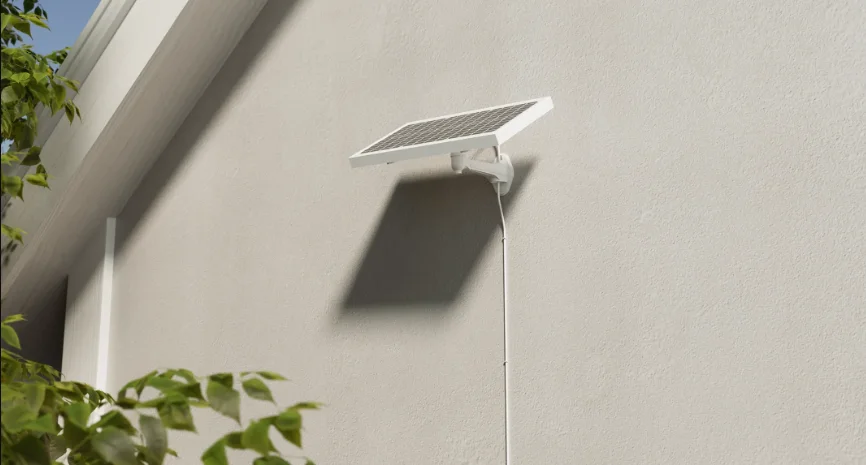

Pawport Solar Wall Mount
WARNING
Important Safety Information – Please Read First
Before you begin installation, please read all instructions, safety information, and warnings provided in this manual and in the included safety documentation. Use proper tools and safety precautions when installing the Solar Wall Mount. The Solar Wall Mount must be securely fastened to a stable wall surface using the appropriate hardware for your specific wall type. Failure to properly install and secure the Solar Wall Mount may result in the Solar Panel becoming loose or falling, which could cause damage to the product, property, or result in injury. Always follow the installation instructions carefully, and do not attempt to modify or substitute the provided hardware unless required for your wall type.
What’s included
Before you start installing your Solar Wall Mount, check that you have everything you need.
- Wall mount
- H-bracket
- Hole plugs ×2
- Wall screws and anchors ×4
- 18-8 hex screws ×2
- M4.8 screws ×4
- Mounting template
- 3 m extension cable


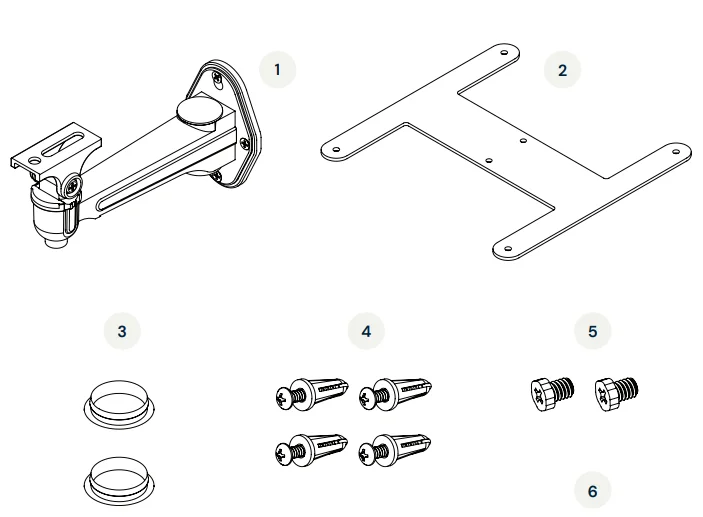
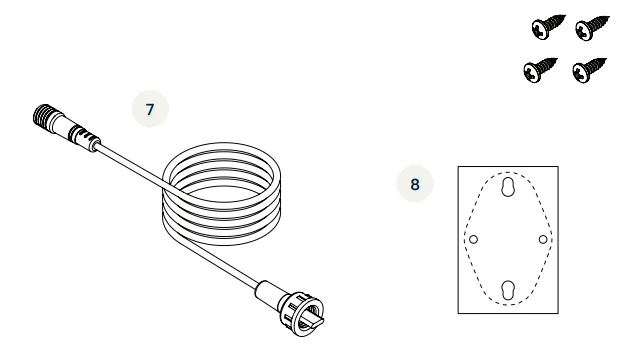
You will also need the Pawport Solar Panel (sold separately).
Getting started
STOP!
For installations with a Pawport Tunnel & Frame System, you must have access to the exterior frame. If you have a Pawport Outdoor Pet Door or magnetic trim installed, remove it now.
IMPORTANT!
The Solar Panel connector cable is required to connect a Solar Panel. It is recommended to install the connector cable at the same time as the Pawport Tunnel & Frame System. For instructions, refer to the Tunnel & Frame System Installation Manual. If you did not install the connector cable during the Tunnel & Frame System installation, or if you have a retrofit installation, remove the Smart Pet Door now and proceed to the next step.
Location considerations
CAUTION
Do not install the Solar Panel and Solar Wall Mount in areas where they may be exposed to standing water, excessive moisture, or where children or pets may interfere with them.
- To ensure effective use of the Pawport Solar Panel, follow these recommendations when choosing the location of the Solar Wall Mount:
- The Solar Panel can be installed up to approximately 12 ft (3,658 mm) away using the included 3 m extension cable. You may not need the extension cable if you’re installing the Solar Panel within a few feet of your pet door opening. Use the 1 m connector cable included with the Solar Panel for close installations. Always test cord length before selecting a location for the Solar Wall Mount.
- The Solar Wall Mount allows you to install the Pawport Solar Panel on an exterior wall. This is ideal if your pet door opening is in a shaded area.
- Ensure the Solar Wall Mount is installed where the Solar Panel will receive plenty of direct sunlight. Avoid spots that stay shaded for long periods, as this will reduce charging performance.
- The Solar Panel angle can be adjusted for best results. Position it so it faces the general direction of the sun in your area and make sure it isn’t blocked by plants, furniture, or other objects.
- Check periodically that the Solar Panel is clean and properly aligned for maximum efficiency.
Hate to read?
We feel you! Scan below to view the instructional video and follow along.
Step 1
Using screws that are appropriate for your wall type, install the wall mount (item 1) to your exterior wall. Wall screws and anchors are provided if suitable (item 4). The mounting template (item 8) is included to assist with alignment if needed.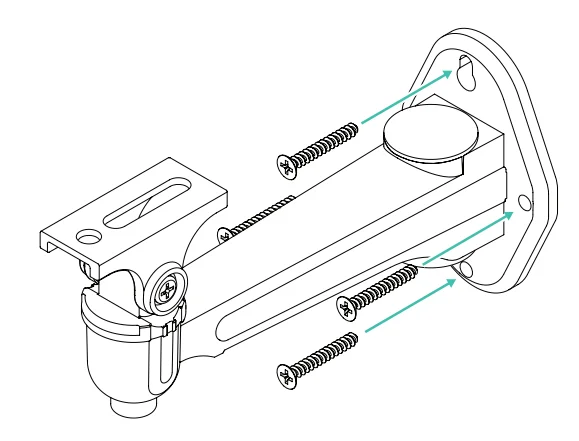
Step 2
Align the two center holes on the H-bracket (item 2) with the holes on the wall mount. From underneath the wall mount, insert the hex screws (item 5) into the H-bracket and tighten with a Phillips head screwdriver until secure, as shown.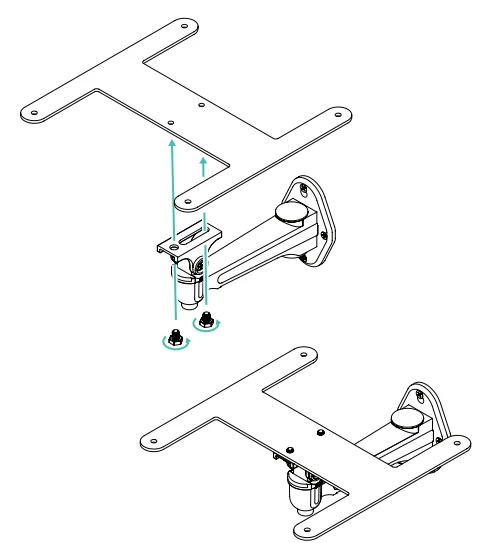
Step 3
Align the four holes on the underside of the Solar Panel with the four holes on the H-bracket. From underneath, insert the M4.8 screws (item 6) through the H-bracket and into the Solar Panel and tighten with a Phillips head screwdriver until secure.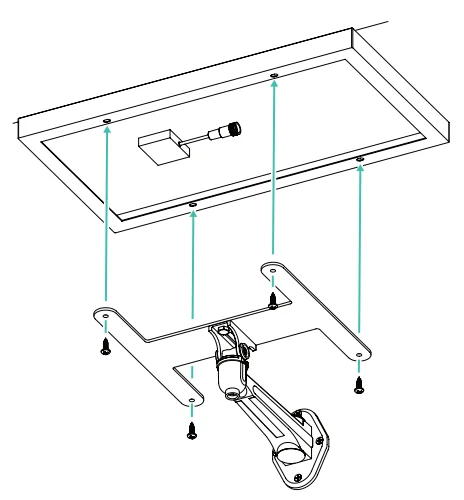
Step 4
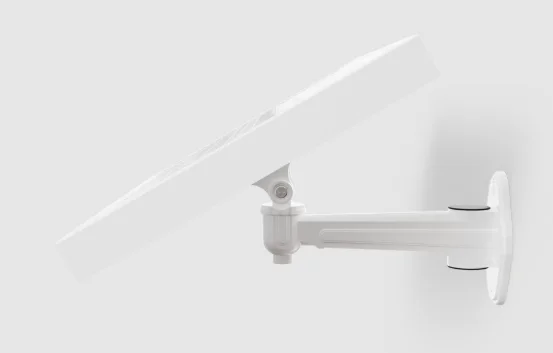
The mount allows the Solar Panel to tilt up or down up to 90°. To adjust, use a screwdriver to loosen the screw on the side of the wall mount. Tilt the panel to the desired angle and tighten the screw to secure it in place.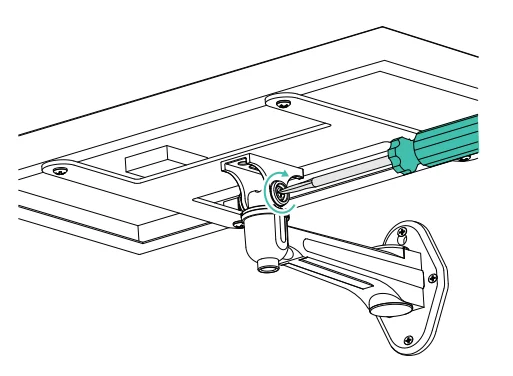
Step 5
The mount allows the Solar Panel to rotate 360° left or right. To adjust, use a screwdriver to loosen the screw on the bottom of the wall mount. Rotate the panel to the desired direction and tighten the screw to secure it in place.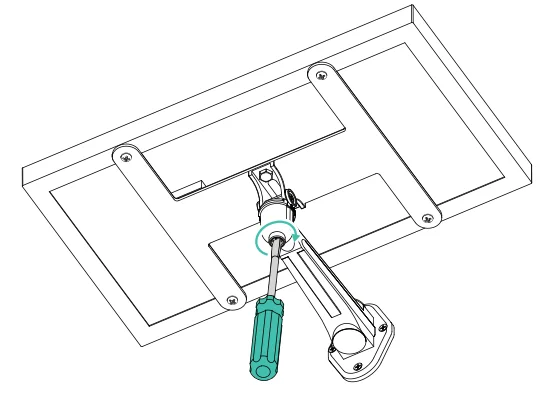
Step 6
There are two options for connecting the Solar Panel to your Smart Pet Door. Choose the option below that fits your installation type:
IMPORTANT!
The right-angle USB-C end of the 1 m connector cable (included with the Solar Panel) should be positioned on the interior of the home. The end with the screw-on waterproof connector should be positioned on the exterior.
Option 1
For retrofit installations, thread the 1 m cable through the tunnel. Conceal the cable with the Pawport Cable Raceway (sold separately) if preferred.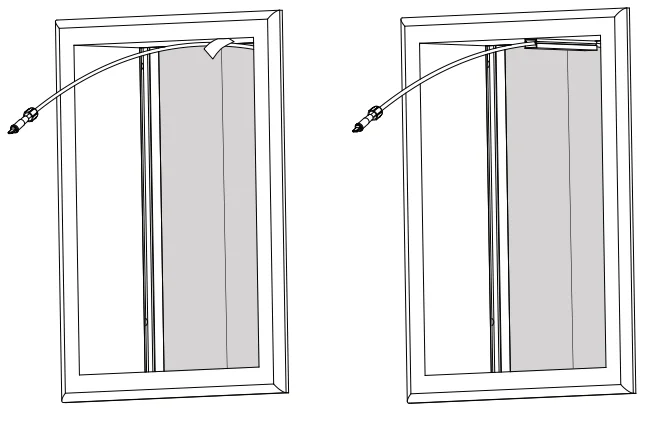
Option 2
For installations with a Pawport Tunnel & Frame System, thread the 1 m cable above the tunnel through the slots in the interior and exterior frames. You will need to push the cable through the opening using a fish tape.
CAUTION
Do not pinch or sharply bend the cable. Ensure cable ends remain dry and undamaged. Improper handling may cause connection failure or damage to the Smart Pet Door system.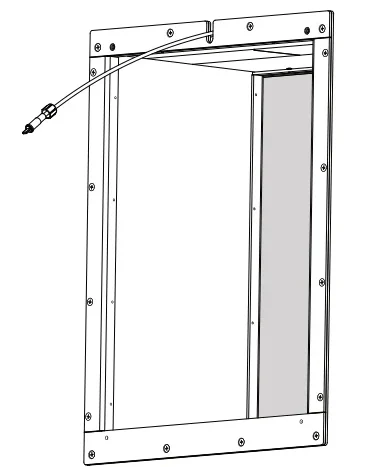
Step 7
On the interior of your home, plug the right-angle USB-C end of the cable into the USB-C input on the top back of the Smart Pet Door. Make sure the cable is fully inserted; do not force it. Reinstall the Smart Pet Door, making sure not to pinch any wires or cables. Tuck the excess cable into the wall.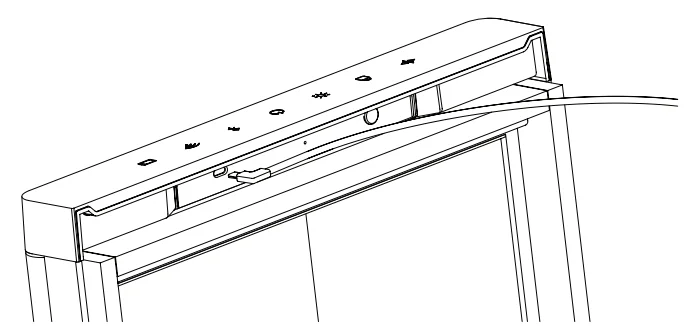
Step 8
Depending on how far away the Solar Panel is from the Smart Pet Door, you may need to use the included 3 m extension cable (item 7). If additional length is needed, connect the screw-on waterproof end of the 1 m cable to the threaded end of the 3 m extension cable.
Locate the plug under the Solar Panel and insert the screw-on waterproof end of the extension cable into the plug. If you do not need the extension cable, insert the screw-on waterproof end of the 1 m cable. Twist the locking cap tightly to secure the connection. Thread the cable through the holes in the wall mount if preferred. Insert the hole plugs (item 3) and secure the cable to the wall as needed.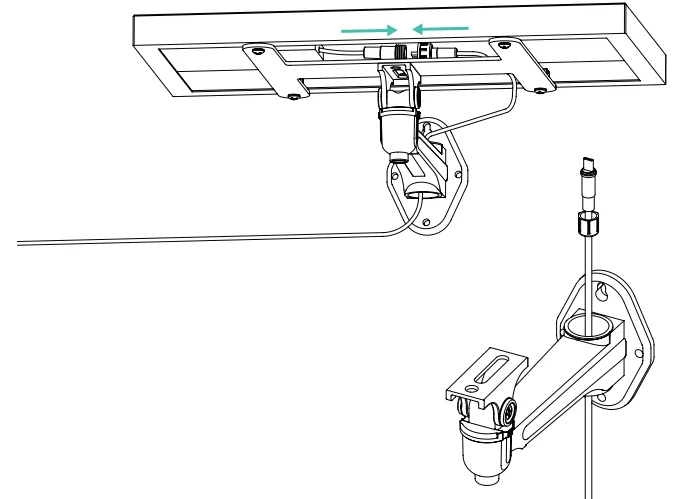
Job done!
Your Solar Wall Mount installation is now complete. For additional manuals and video tutorials, visit: www.pawport.com/support.
For More Manuals By Pawport, Visit ManualsLibraryy.
Pawport Solar Wall Mount-FAQs
What is the Pawport Solar Wall Mount used for?
The Pawport Solar Wall Mount is designed to securely install the Pawport solar panel on a wall or ground surface. It allows flexible positioning of the panel to maximize sunlight exposure while maintaining a stable and weather-resistant mounting solution for outdoor use.
Can the Pawport Solar Wall Mount be used for ground installation?
Yes, the Pawport Solar Wall Mount supports both wall and ground installation. Its adjustable design allows users to position the solar panel at optimal angles, making it suitable for various setups where sunlight exposure and installation flexibility are important factors.
How far can the solar panel be placed from the Pawport door?
The mounting kit includes an extension cable that allows the solar panel to be installed up to 15 feet away from the Pawport Smart Pet Door. This provides flexibility in choosing the best sunlight location without being restricted by the door’s position.
What comes included with the Pawport Solar Wall Mount kit?
The kit typically includes a wall mount, H-bracket, screws, anchors, extension cable, mounting template, and installation guide. These components ensure a complete setup, allowing users to install the solar panel securely without needing additional hardware.
Is the Pawport Solar Wall Mount adjustable?
Yes, the mount is designed for angle-specific positioning, allowing users to adjust the solar panel direction for better sunlight capture. This flexibility helps improve charging efficiency by ensuring the panel is aligned with the strongest sunlight throughout the day.
Is the Pawport Solar Wall Mount weather-resistant?
The mount is built for outdoor use and is designed to withstand typical weather conditions like rain and sun exposure. Proper installation using the included hardware helps maintain durability and ensures long-term stability in different environmental conditions.
Do you need the wall mount to use the Pawport Solar Panel?
No, the solar panel can function without the wall mount, but using it is recommended for optimal placement. The mount improves positioning, stability, and exposure to sunlight, which directly enhances charging performance and overall system efficiency.
Is the installation of the Pawport Solar Wall Mount difficult?
Installation is straightforward and designed for DIY users. With the included mounting template and hardware, users can easily secure the mount to a wall or surface. Basic tools like a drill and screwdriver are typically sufficient for proper installation.
Why is proper angle positioning important for the solar panel?
Proper angle positioning ensures the solar panel receives maximum sunlight throughout the day, improving charging efficiency. Adjustable mounts help align the panel with the direction of sunlight, which can significantly impact energy generation and overall battery performance in solar-powered systems.
Is the Pawport Solar Wall Mount worth using?
The solar wall mount is a valuable accessory for improving solar panel efficiency and installation flexibility. It ensures secure placement, better sunlight exposure, and cleaner cable management, making it a practical addition for users relying on solar power for their Pawport system.