
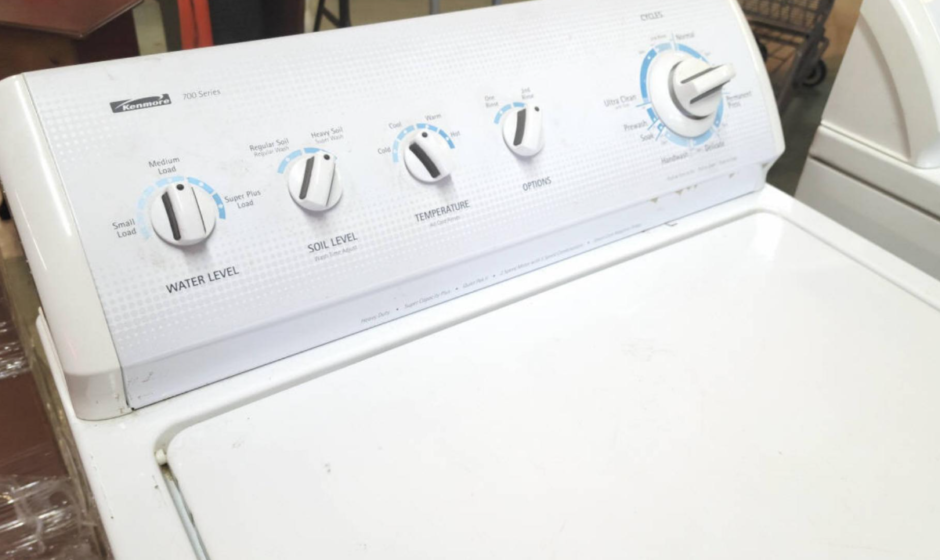

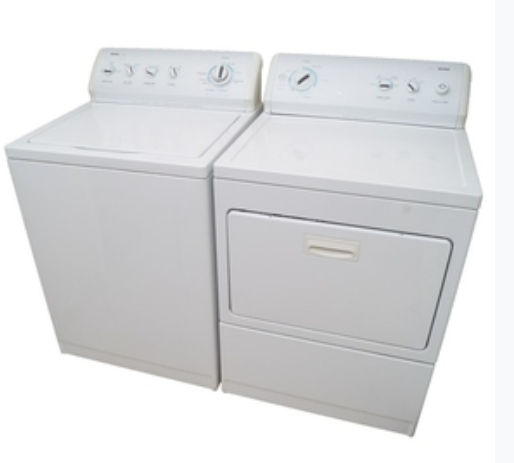
Kenmore 700 Series Washer
IMPORTANT SAFETY INSTRUCTIONS
WARNING: To reduce the risk of fire, electric shock, or injury to persons when using the washer, follow basic precautions, including the following:
- Read all instructions before using the washer.
- Do not wash articles that have been previously cleaned in, washed in, soaked in, or spotted with gasoline, dry-cleaning solvents, other flammable, or explosive substances, as they give off vapors that could ignite or explode.
- Do not add gasoline, dry-cleaning solvents, or other flammable or explosive substances to the wash water. These substances give off vapors that could ignite or explode.
- Under certain conditions, hydrogen gas may be produced in a hot water system that has not been used for 2 weeks or more. HYDROGEN GAS IS EXPLOSIVE. If the hot water system has not been used for such a period, before using the washing machine, turn on all hot water faucets and let the water flow from each for several minutes. This will release any accumulated hydrogen gas. As the gas is flammable, do not smoke or use an open flame during this time.
- Do not allow children to play on or in the washer. Close supervision of children is necessary when the washer is used near children.
- Before the washer is removed from service or discarded, remove the door or lid.
- Do not reach into the washer if the drum, tub or agitator is moving.
- Do not install or store the washer where it will be exposed to the weather.
- Do not tamper with controls.
- Do not repair or replace any part of the washer or attempt any servicing unless specifically recommended in this manual or in published user-repair instructions that you understand and have the skills to carry out.
- See “Electrical Requirements” located in the installation instructions for grounding instructions.
SAVE THESE INSTRUCTIONS
WHAT’S NEW UNDER THE LID?
Your new washer will operate differently from your past agitator-style washer.
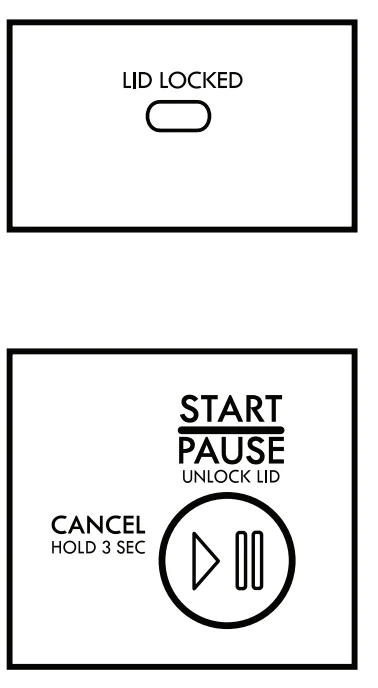
Lid Lock
To allow for higher spin speeds, the lid will lock and the Lid Locked light will turn on. When this light is lit, the lid is locked and cannot be opened. When this light is blinking, the washer is paused. When this light is off, the lid can be opened. After a cycle is started, the washer will fill to the appropriate water level. When the washer is done filling, it will start to agitate. If you need to open the lid to add a garment after this point, the lid will remain unlocked during the entire agitation portion of the wash phase. The cycle will automatically pause when the lid is opened, and the cycle will resume once the lid is closed. The lid will lock before the spin phase begins. If you need to pause or stop after this point, you must press the START /PAUSE /Unlock Lid button and wait for the lid to unlock. The lid will only unlock after the washer movement has stopped. Depending on when in the cycle you try to pause, it may take several seconds to several minutes for the lid to unlock. Press START /PAUSE /Unlock Lid to resume the cycle.
Water Level Options
Set the Water Level knob to the Auto setting, and the washer automatically adjusts the water level to the load size. Set the Water Level knob to the Deep Fill setting, and the washer will fill to the maximum water level.
Sensing
This washer will perform a series of spins to check for load balance. During this time, a series of clicks and a whirring noise signal that sensing technology is determining if there is an off-balance load.
Normal Sounds You Can Expect
At different stages of the wash cycle, you may hear sounds and noises that are different from those of your previous washer. For example, you may hear a clicking and humming at the beginning of the spin phase, as the lid lock goes through a self-test. There will be different kinds of humming sounds as the agitator tests for load balance or moves the load. And sometimes, you may hear nothing at all, as the washer determines the correct water level for your load or allows time for clothes to soak.
Spray Rinse
Select cycles default to a spray rinse. During these cycles, you will hear water enter the washer as the tub spins, allowing the rinse water to penetrate clothes. Check the “Cycle Guide” for details.
Choosing the Right Detergent
Use only high-efficiency detergents. The package will be marked “HE” or “High Efficiency.” Using a non-HE detergent will likely result in longer cycle times and reduced rinsing performance. It may also result in component malfunction and, over time, buildup of mold or mildew. The detergents should be low-sudsing and quick-dispersing to produce the right amount of suds for the best performance. They should hold soil in suspension so it is not redeposited onto clean clothes. Not all detergents labeled as High Efficiency are identical in formulation and their ability to reduce suds. For example, natural, organic, or homemade HE detergents may generate a high level of suds. Always follow the detergent manufacturer’s instructions to determine the amount of detergent to use.
IMPORTANT:
- The lid must be closed before the washer basket fills with water, and for the wash cycle to start. If the lid is open and filling stops, close the lid and press START/PAUSE /Unlock Lid to complete the cycle.
- Rinse options must be set fo either One Rinse with Fabric Softener or Two Rinses with Fabric Softener when using fabric softener in the fabric softener dispenser. This ensures that fabric softener is added at the correct time in the rinse phase and is evenly distributed.
CONTROL PANEL AND FEATURES
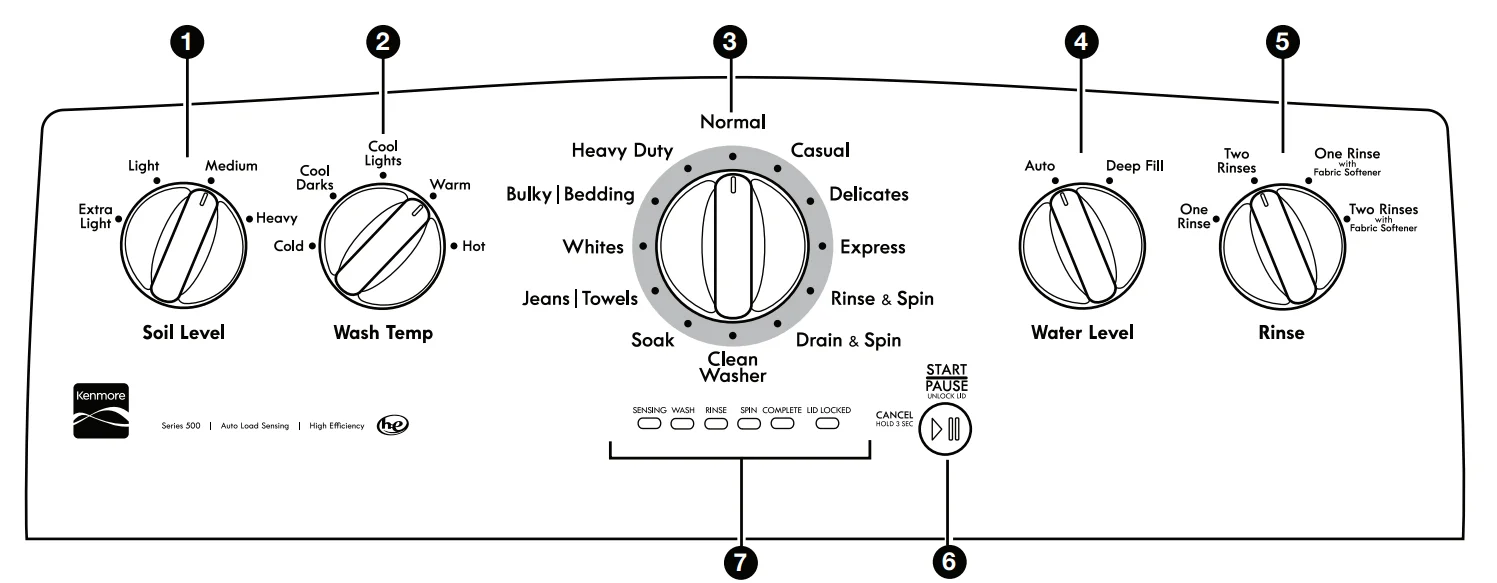
- SOIL LEVEL
Select the setting most suitable for your load. For heavily soiled and sturdy fabrics, select Heavy Soil Level for more wash time. For lightly soiled and delicate fabrics, select Light Soil Level for less wash time. A lighter soil-level setting will help reduce tangling and wrinkling. - WASH TEMP
‘Wash Temp senses and maintains uniform water temperatures by regulating incoming hot and cold water. Select a wash temperature based on the type of fabric and soils being washed. For best results and following the garment label instructions, use the warmest wash water safe for your fabric.- On some models and cycles, warm and hot water may be. cooler than your previous washer.
- Even in a cold and cool water wash, some warm water may be added to the washer to maintain a minimum temperature.All rinses are cold.
- WASH CYCLE KNOB
Use the Wash Cycle knob to select cycles on your washer. See “Cycle Guide” for detailed descriptions of cycles. - WATER LEVEL
Set the Water Level knob to the Auto setting, and the washer will automatically sense the appropriate water level for the load size and type. Set the Water Level knob to the Deep Fill setting, and the washer will fill to the maximum water level.
NOTE: Expect longer cycle times due to extended fill times when using the Deep Fill option. - RINSE OPTIONS
The following options may be added to most cycles. See “Cycle Guide” for additional details.- ‘ONE RINSE
This option is used to limit a cycle to one rinse. - “TWO RINSES
This option can be used to automatically add a second rinse to most cycles. - ONE RINSE WITH FABRIC SOFTENER
This option must be selected if using fabric softener during. a cycle. It ensures that fabric softener is added at the correct time in the rinse for even distribution. - TWO RINSES WITH FABRIC SOFTENER
This option turns on both the Fabric Softener and the Two Rinses option.
- ‘ONE RINSE
- START/PAUSE/Unlock Lid BUTTON
Press fo start the selected cycle; press again to pause the cycle and unlock the lid.
NOTE: If the washer is spinning, it may take several minutes fo unlock the lid. Press and hold for 3 seconds to cancel a cycle. - CYCLE STATUS LIGHTS
The Cycle Status Lights show the progress of a cycle. At each stage of the process, you may notice sounds or pauses that are different from your previous washer.
- SENSING
When the Start /Pause/Unlock Lid button is pressed, and the Water Level knob is set to Auto, the washer will fill and begin sensing to determine load size and balance. Once sensing is left, the washer will fill to the Oe etaave one detected load size and begin the wash phase of the cycle.
NOTE: Sensing and wash phases will be paused by opening the unlocked lid. Close the lid to resume the cycle. If the lid is left open for more than 10 minutes, the washer will cancel the cycle and pump out the water. The lid will lock after the wash phase to begin the initial spinout and remain locked for the remainder of the cycle. - WASH
The washer will ll to the correct water level based on the load size and the Water Level selection. Certain cycles may agitate during the fil process 10 boost cleaning. You will hear the agitator rotate, followed by a pause lasting several seconds. When the wash cycle begins, you will hear the agitator increase speed. The motor sounds may change at different stages in the wash cycle while the washer performs different wash actions. - RINSE
Certain cycles use a spray rinse, which adds water to the 1ub while the basket spins. When a fabric softener option is selected, you will hear sounds similar to the wash cycle as the washer rinses and moves the load. You may hear the motor turning on briefly (short hum) fo move the basket while filling. - SPIN
The washer spins the load af increasing speeds for proper water removal, based on the selected cycle and spin speed. - COMPLETE
Once the cycle is complete, his light will come on. Remove the load promptly for best results. - LID LOCKED
The Lid Locked feature allows for higher spin speeds. When the Lid Locked light is on, the lid is locked and cannot be opened without pausing the cycle. When the light is off, the lid can be opened. To open the lid after it has been locked,
press START/PAUSE /Unlock Lid. The lid will unlock once the washer movement has stopped. This may take several minutes if the load was spinning at high speed. Press START/PAUSE/ Unlock Lid again 10 resume the cycle.
- SENSING

CYCLE GUID
For best fabric care, choose the cycle that best fits the load being washed. Recommended settings for best performance are shown in Bold. Not all cycles and options are available on all models.
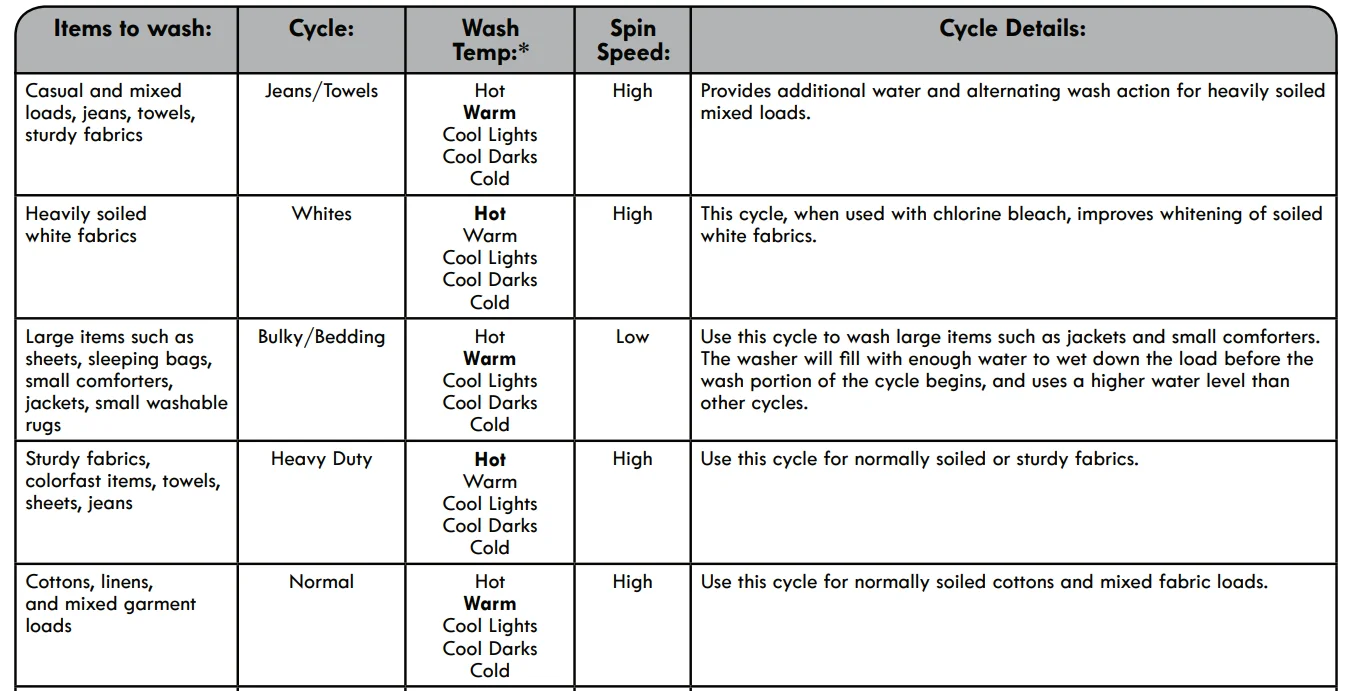
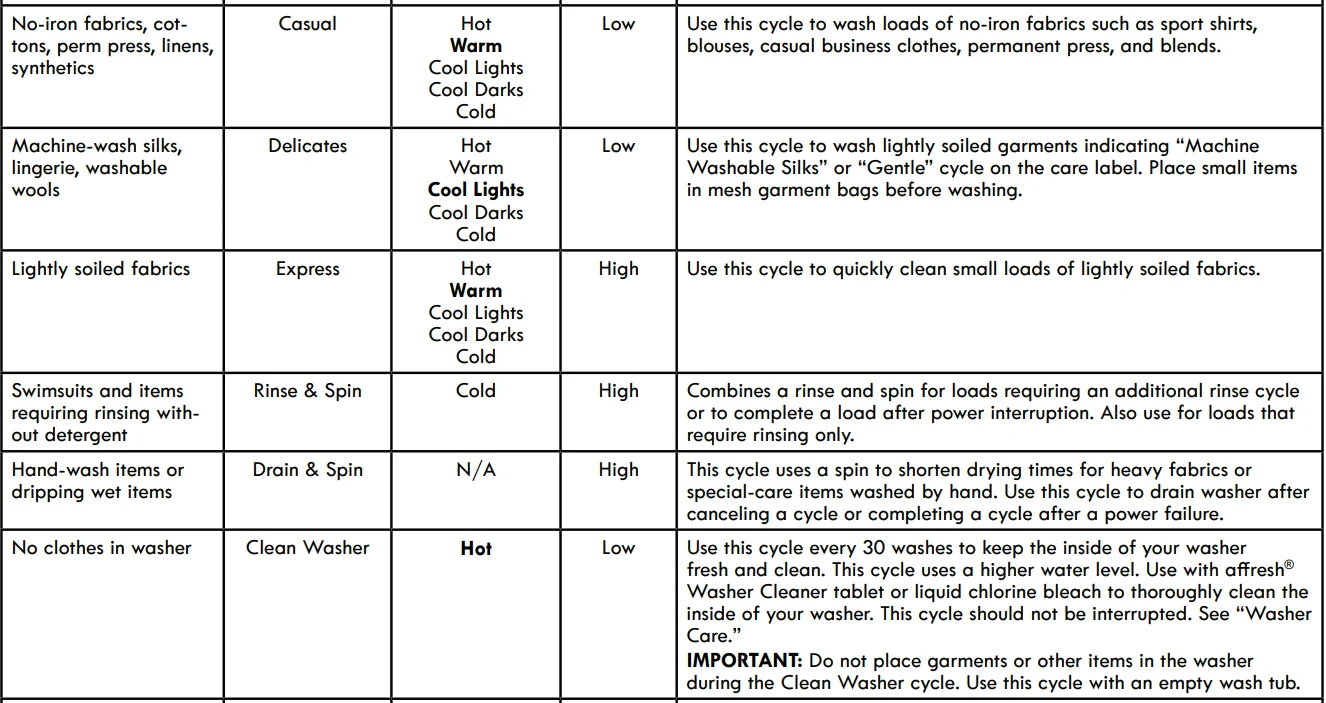

NOTE: If you are using fabric softener, be sure to turn the Rinse knob to either One Rinse with Fabric Softener or Two Rinses with Fabric Softener.
“All rinses are cold.
USING YOUR WASHER
- Sort and prepare your laundry
- Empty pockets. Loose change, buttons, or any small object can pass under the agitator and become trapped, causing unexpected sounds.
- Sort items by recommended cycle, water temperature, and colorfastness.
- Separate heavily soiled items from lightly soiled.
- Separate delicate items from sturdy fabrics.
- Do not dry garments if stains remain after washing, because heat can set stains into fabric.
- Treat stains promptly.
- Close zippers, fasten hooks, tie strings and sashes, and remove non-washable trim and ornaments.
- Mend rips and tears to avoid further damage to items during washing.
Helpful Tips: - When washing waterproof or water-resistant items, load evenly.
- Use mesh garment bags to help avoid tangling when washing delicate or small items.
- Turn knits inside out to avoid pilling. Separate lint-takers from lint-givers. Synthetics, knits, and corduroy fabrics will pick up lint from towels, rugs, and chenille fabrics.
NOTE: Always read and follow fabric care label instructions to avoid damage to your garments.
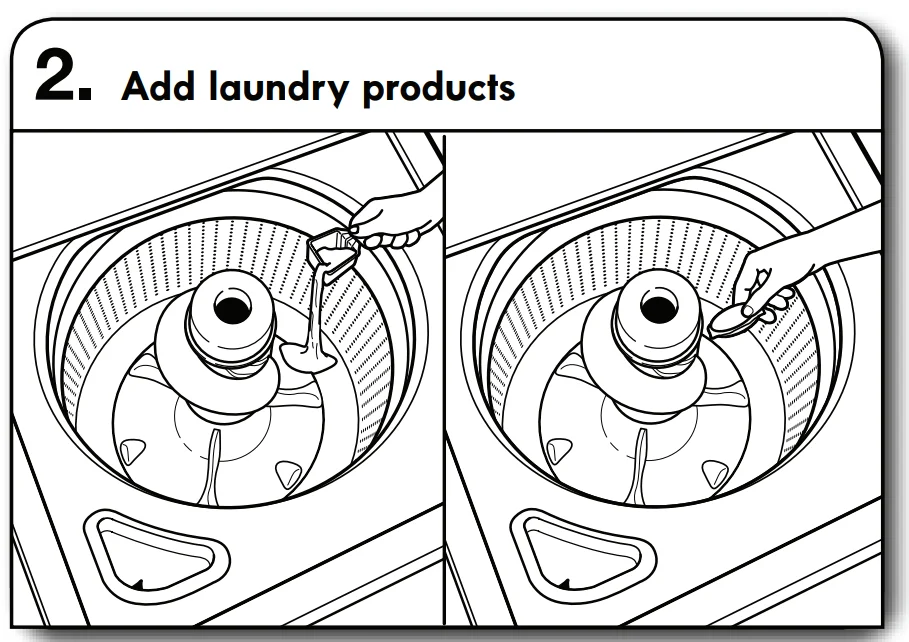
- Add laundry products
Add a measured of amount of HE detergent or a single-dose laundry packet into the basket. If using Oxi-type boosters, color-safe bleach, or fabric softener crystals, add to the bottom of the washer basket before adding clothes.
IMPORTANT: Use only high-efficiency detergents. The package will be marked “HE” or “High Efficiency.” Using regular detergent will likely result in longer cycle times and reduced rinsing performance. It may also result in component failures and noticeable mold or mildew. The detergents are made to produce the right amount of suds for the best performance. Follow the manufacturer’s instructions to determine the amount of detergent to use.
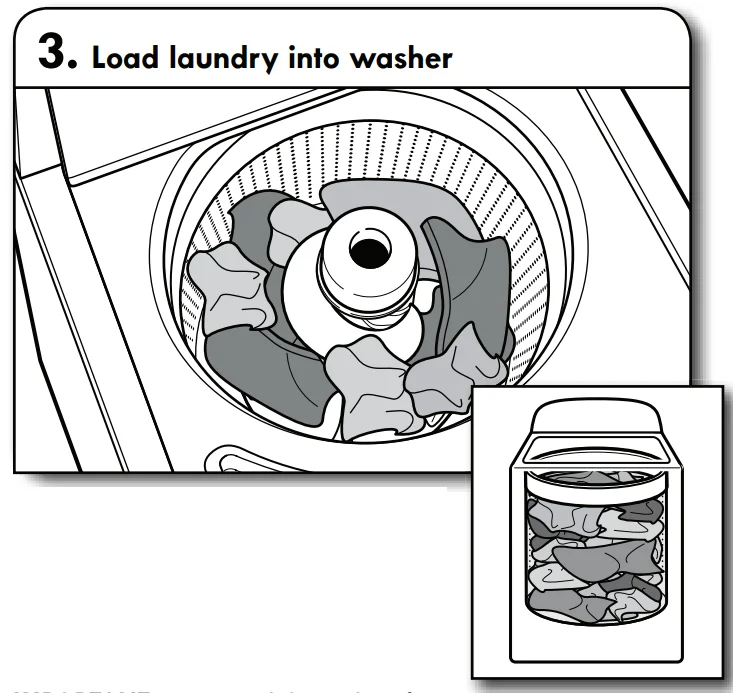
- Load laundry into the washer
Load garments in loose heaps evenly around the basket wall. For best results, do not pack the load tightly. Do not wrap large items such as sheets around the agitator; load them in loose piles around the sides of the basket. Try mixing different-sized items to reduce tangling.
IMPORTANT: Do not tightly pack or force items into the washer. Items need to move freely for the best cleaning and to reduce wrinkling and tangling.
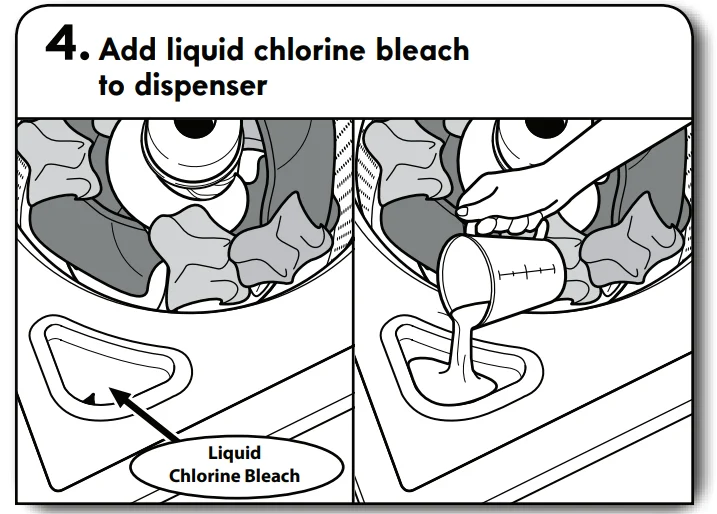
- Add liquid chlorine bleach to the dispenser
Do not overfill, dilute, or use more than 1 cup (250 mL). Do not use color-safe bleach or Oxi products in the same cycle with liquid chlorine bleach.
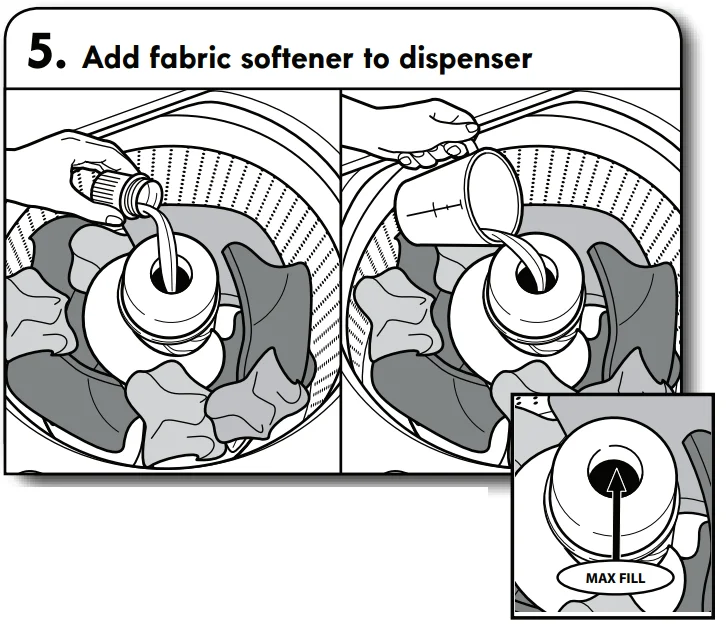
- Add fabric softener to the dispenser
Pour a measured amount of liquid fabric softener into the dispenser; always follow the manufacturer’s directions for the correct amount of fabric softener based on your load size. Dilute liquid fabric softener by filling the dispenser with warm water until the liquid reaches the underside of the rim. See max fill line arrows.
IMPORTANT: The Rinse knob must be set to either One Rinse with Fabric Softener or Two Rinses with Fabric Softener when using fabric softener in the fabric softener dispenser. This ensures that fabric softener is added at the correct time in the rinse phase and is evenly distributed.
Adding Liquid Fabric Softener Manually to Wash Load: During the final rinse, wait until the washer is filled, then press the START/PAUSE/Unlock Lid button to pause the washer. Lift the lid and add the measured recommended amount of liquid fabric softener. Do not use more than the recommended amount. Close the lid and press the START/PAUSE /Unlock Lid button again to start the washer.
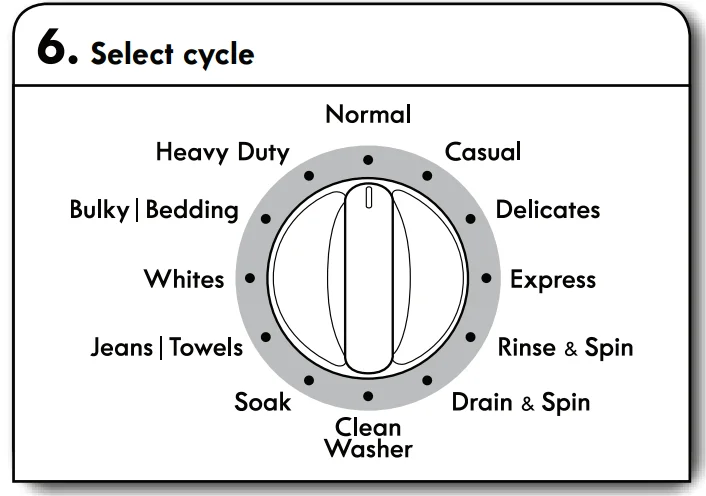
- Select cycle
Turn the cycle knob to choose your wash cycle. For more information, see “Cycle Guide”.
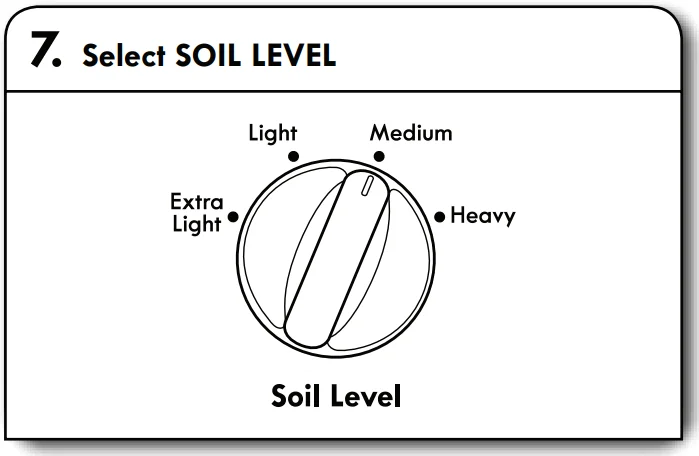
- Select SOIL LEVEL
Once you select a cycle, select the soil level by turning the Soil Level knob to the desired setting.
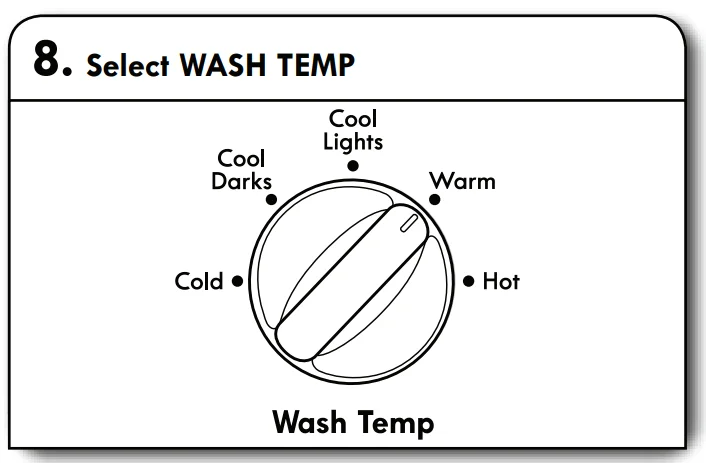
- Select WASH TEMP
Select the Wash Temp by turning the knob to the desired temperature. All rinses are tap cold.
NOTE: Always read and follow fabric care label instructions to avoid damage to your garments.
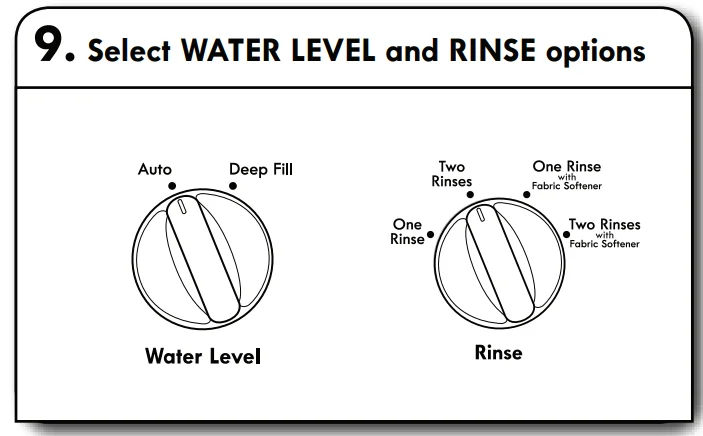
- Select WATER LEVEL and RINSE options
Select the number of rinses by turning the Rinse knob to the
desired setting.
IMPORTANT: The Rinse knob must be set to an option “with Fabric Softener” when using the fabric softener dispenser. This ensures that fabric softener is added at the correct time in the rinse for even distribution. Set the Water Level knob to the Auto setting, and the washer will automatically sense the appropriate water level for the load size and type. Set the Water Level knob to the Deep Fill setting, and the washer will fill to the maximum water level.
Note: The cycle will be longer due to extended fill times when using the Deep Fill setting.
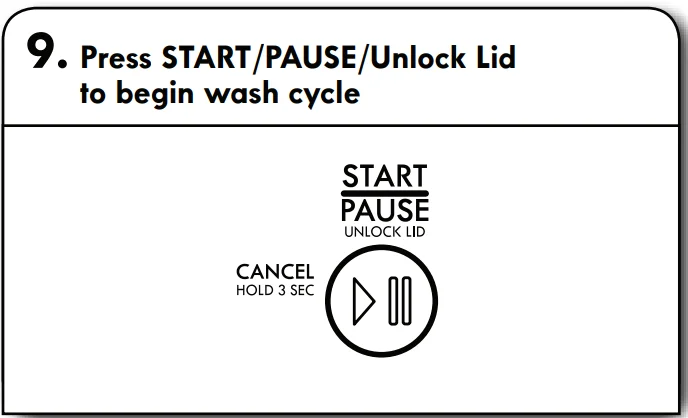
- Press START/PAUSE/Unlock Lid to begin wash cycle
Press the START /PAUSE /Unlock Lid button to start the wash cycle. When the cycle has finished, the Complete status light will light. Promptly remove garments after cycle has completed to avoid odor, reduce wrinkling, and avoid rusting of metal hooks, zippers, and snaps.
Unlocking the lid to add garments
If you need to add 1 or 2 missed garments after the wash has started, simply open the lid, and this will pause the cycle. After adding the garments, simply close the lid, and the cycle will resume. If, instead, you press the START/PAUSE /Unlock Lid button to pause the cycle and then open the lid fo add garments, you will need to press the START/PAUSE/Unlock Lid button after closing the lid to resume the cycle.
NOTE: Washer will not fill with the lid open.
IMPORTANT: If lid is left open for more than 10 minutes, the water will pump out automatically.
Manual soak
If you would like to manually soak your garments at any time during the wash portion of the cycle, press START/PAUSE/Unlock Lid and leave the lid closed. Once your desired soak time has elapsed, press START/PAUSE /Unlock Lid again to continue the cycle. As long as the lid remains closed, your soak time can be longer than 10 minutes. However, if the lid is opened during the soak and remains open for more than 10 minutes, the water will pump out automatically.
WASHER MAINTENANCE
WATER INLET HOSES
Replace inlet hoses after 5 years of use to reduce the risk of hose failure. Periodically inspect and replace inlet hoses if bulges, kinks, cuts, wear, or leaks are found. When replacing your inlet hoses, mark the date of replacement on the label with a permanent marker.
NOTE: This washer does not include inlet hoses. See the “Installation Instructions” for more information.
WASHER CARE
Recommendations to Help Keep Your Washer Clean and Performing at Its Best
- Always use High Efficiency (HE) detergents and follow the detergent manufacturer’s instructions regarding the amount of detergent 10 use. Never use more than the recommended amount because that may increase the rate af which detergent and soil residue accumulate inside your washer, which in turn may result in undesirable odor.
- Use warm and hot wash water settings sometimes (not exclusively cold water washes), because they do a better job of controlling the rote ot which soils and detergent accumulate.
- Always leave the washer lid open between uses 10 help. dry out the washer and prevent the buildup of odor-causing residue.
Cleaning Your Top-Loading Washer
Read these instructions completely before beginning the routine cleaning processes recommended below. This Washer Maintenance Procedure should be performed, at a minimum, once per month or every 30 wash cycles, whichever occurs 500ner, 10 control the rate at which soils and detergent may otherwise accumulate in your washer.
Cleaning the Inside of the Washer
To keep your washer odor-free, follow the usage instructions provided above, and use this recommended monthly cleaning procedure:
Clean Washer Cycle
This washer has a special cycle that uses higher water volumes In combination with the Affresh Washer Cleaner or liquid chlorine bleach to clean the inside of the washer.
Begin procedure
- Affresh Washer Cleaner Cycle Procedure (Recommended for Best Performance):
- a. Open the washer lid and remove any clothing of tems.
- b. Place an affresh® Washer Cleaner tablet in the bottom of the washer basket.
- c. Do not place an affresh® Washer Cleaner tablet in the detergent dispenser.
- d. Do not add any detergent or other chemical to the washer when following this procedure.
- e. Close the washer lid.
- f. Select the cycle recommended for cleaning the inside of the washer.
- g. Press the START/PAUSE/ Unlock Lid button fo start the cycle.
NOTE: For best results, do not interrupt the cycle. If the cycle must be interrupted, press START/PAUSE/ Unlock Lid once. After the cycle has stopped, run a RINSE/SPIN cycle to rinse cleaner from the washer.
TROUBLESHOOTING
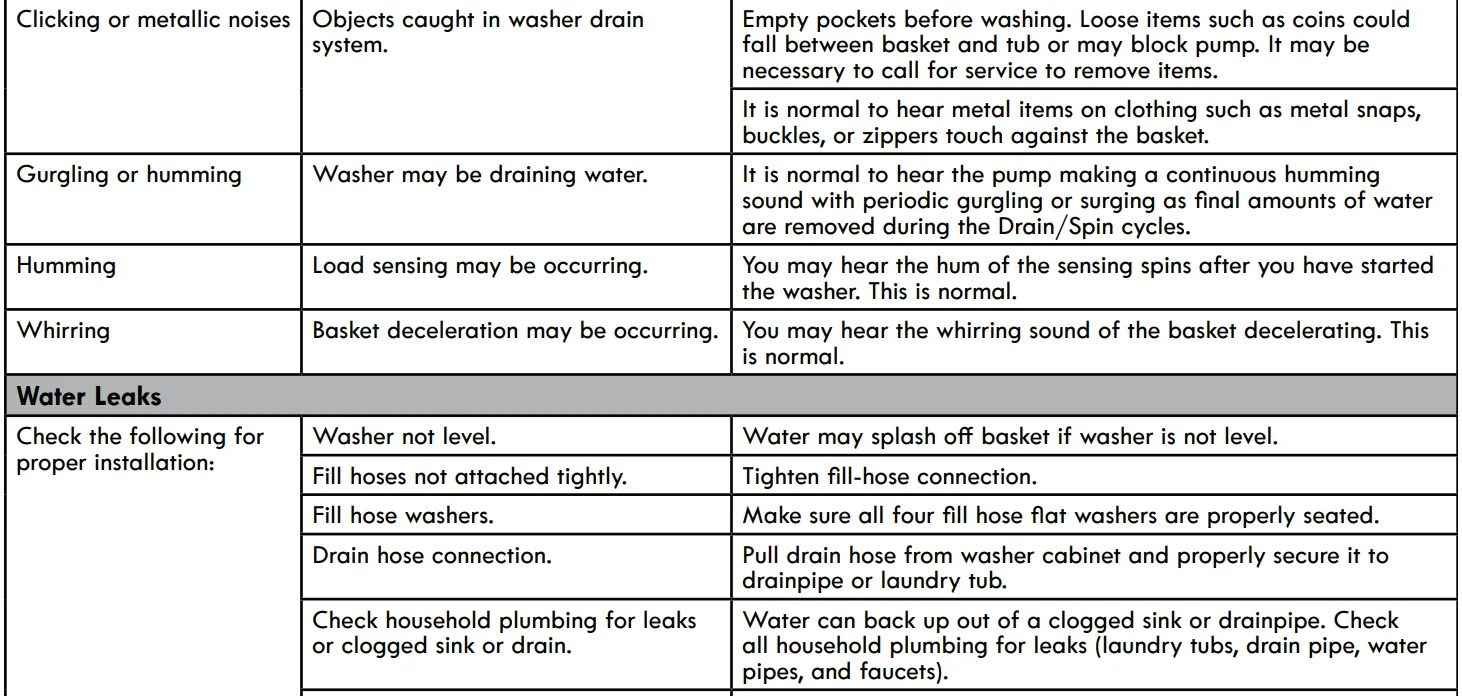
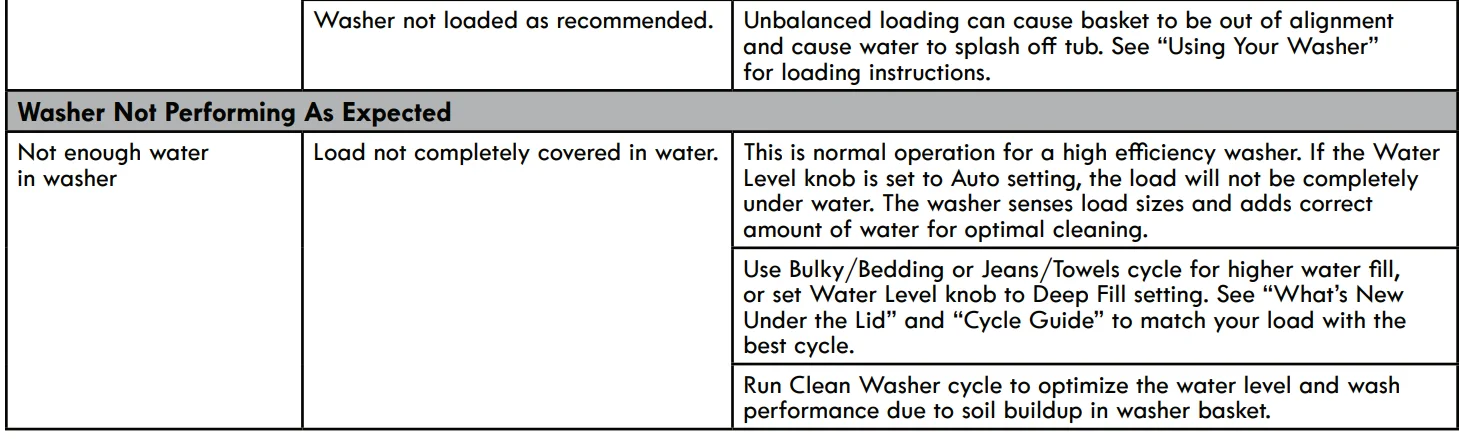
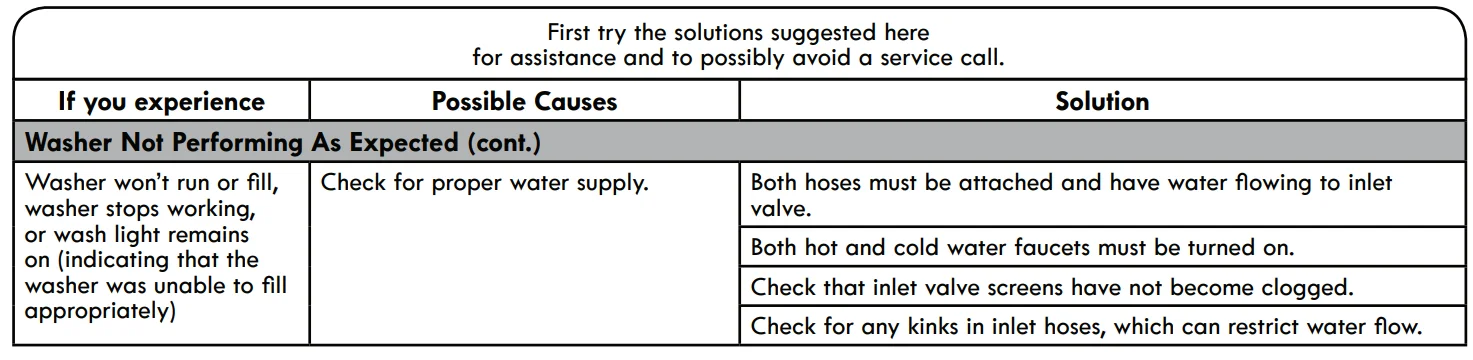
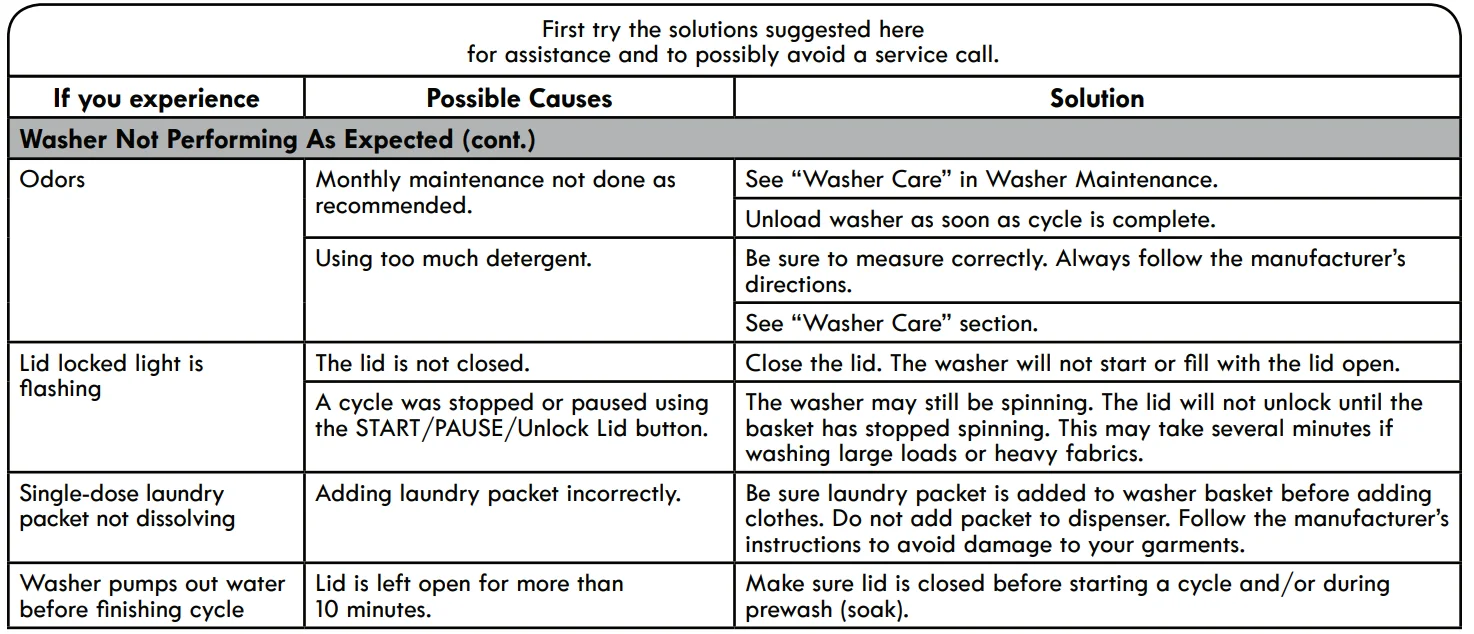
For more manuals by Kenmore, visit ManualsLibraryy
Kenmore 700 Series Washer-FAQs
What is the capacity of the Kenmore 700 Series washer?
The Kenmore 700 Series washer typically offers around 3.5 cubic feet of capacity. This size is suitable for medium households and can handle everyday laundry loads, including bedding and bulky clothing items.
How can I reset the Kenmore 700 washer?
To reset the washer, unplug it from the power source and wait for about 1–5 minutes. Then plug it back in. This simple power cycle often clears minor glitches and restores normal operation.
How long does a Kenmore washer usually last?
A Kenmore washer generally lasts between 10 to 15 years. Proper use, regular cleaning, and timely maintenance can help extend its lifespan and keep it running efficiently.
How do I clean a Kenmore 700 Series top-load washer?
Run an empty wash cycle using hot water and a washer cleaner or white vinegar. Wipe the drum, lid, and detergent dispenser regularly to prevent residue buildup and odors.
Does the Kenmore 700 washer have a lint filter?
This model does not include a traditional lint filter. Instead, it uses a self-cleaning pump system with a coin trap that helps remove lint and debris during the wash cycle.
Why is my Kenmore 700 washer not spinning?
Common causes include a faulty lid switch, unbalanced load, damaged motor, or issues with the control board. Checking these components can help identify the problem.
Is Kenmore still a reliable appliance brand?
Yes, Kenmore remains a trusted brand known for durable and efficient home appliances. It has a long-standing reputation for performance and user-friendly designs.
Should I repair or replace my washer?
If your washer is relatively new and the repair cost is low, fixing it is usually the better option. However, if it’s older and repairs are expensive, replacing it may be more cost-effective.
Why is my Kenmore washer not starting?
This issue can be caused by power supply problems, a faulty lid switch, or a malfunctioning control board. Start by checking the outlet and circuit breaker before inspecting internal components.
How do I know if the control board is faulty?
A defective control board may cause the washer to stop responding, fail to start, or display error codes. In such cases, professional inspection or replacement may be required.