
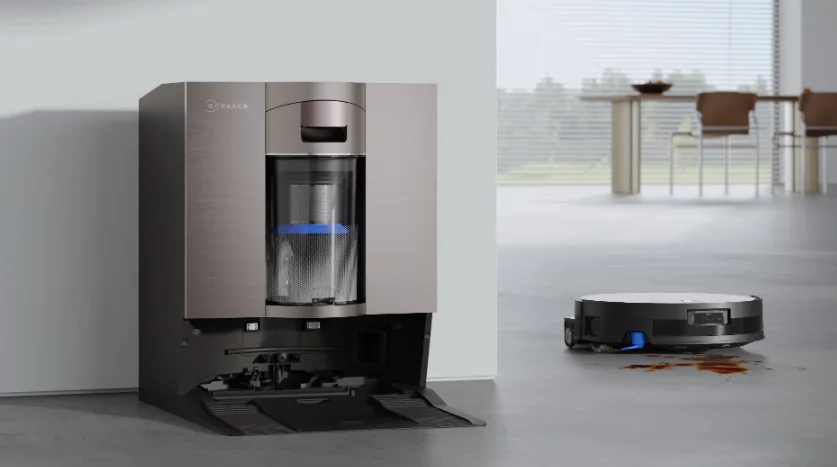

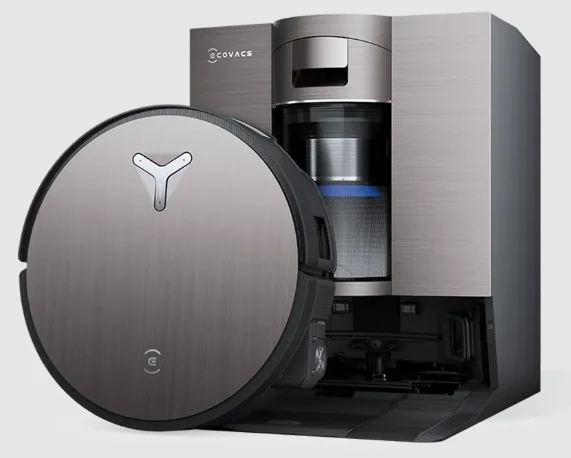
Ecovacs Deebot X11 OmniCyclone
IMPORTANT SAFETY INSTRUCTIONS
When using an electrical appliance, basic precautions should always be followed, including the following:
READ ALL INSTRUCTIONS BEFORE USING THIS APPLIANCE. SAVE THESE INSTRUCTIONS
- Do not allow it to be used as a toy. Close attention is necessary when used by or near children.
- Clear the area to be cleaned. Remove power cords and small objects from the floor that could entangle the appliance. Tuck rug fringe under the rug base, and lift items such as curtains and tablecloths off the floor.
- If there is a drop off in the cleaning area due to a step or stairs, you should operate the appliance to ensure that it can detect the step without falling over the edge. It may become necessary to place a physical barrier at the edge to keep the unit from falling. Make sure the physical barrier is not a trip hazard.
- Only use as described in this manual. Only use attachments recommended or sold by the manufacturer.
- Do not handle the plug or appliance with wet hands.
- Non-rechargeable batteries are prohibited.
- Do not use without a dust bin and/or filters in place.
- Do not operate the vacuum in an area where there are lit candles or fragile objects on the floor to be cleaned.
- Do not use and store in extremely hot or cold environments (below -5°C /23°F or above 40°C/104°F). Please charge the robot at temperatures between 0°C/32°F and 40°C/104°F.
- Keep hair, loose clothing, fingers, and all parts of the body away from any openings and moving parts.
- Do not operate the appliance in a room where an infant or child is sleeping.
- For INDOOR use ONLY. Do not use the appliance in outdoor, commercial or industrial environments. Do not use the appliance on wet surfaces or surfaces with standing water.
- Do not allow the appliance to pick up large objects like stones, large pieces of paper, or any item that may clog the appliance.
- Do not use to pick up flammable or combustible materials such as gasoline, printer or copier toner, or use in areas where they may be present.
- Do not pick up anything that is burning or smoking, such as cigarettes, matches, hot ashes, or anything that could cause a fire.
- Do not put any object into openings. Do not use with any opening blocked; keep free of dust, lint, hair, and anything that may reduce air flow.
- Take care not to damage the power cord. Do not pull on or carry the appliance or docking station by the power cord, use the power cord as a handle, close a door on the power cord, or pull the power cord around sharp edges or corners. Do not run the appliance and the docking station over the power cord. Keep the power cord away from hot surfaces. Do not unplug by pulling on the cord. To unplug, grasp the plug, not the cord.
- If the power cord is damaged, it must be replaced by the manufacturer or its service agent to avoid a hazard.
- Do not use with a damaged power cord or plug. Do not use the appliance or docking station if it is not working properly, has been dropped, damaged, left outdoors, or has come in contact with water. It must be repaired by the manufacturer or its service agent to avoid a hazard.
- Turn OFF the power switch before cleaning or maintaining the appliance. Turn off all controls before unplugging. Always turn off this appliance before connecting or disconnecting the motorized nozzle.
- Turn OFF the power switch before removing the dust bin.
- Remove the appliance from the docking station, and turn OFF the power switch to the appliance before removing the battery for disposal of the appliance.
- The battery must be removed and discarded according to local laws and regulations before disposal of the appliance.
- Please dispose of used batteries according to local laws and regulations.
- Do not incinerate the appliance even if it is severely damaged. The batteries can explode in a fire.
- When not using the docking station, unplug it from the outlet when not in use and before servicing.
- The appliance must be used in accordance with the directions in this instruction manual. Ecovacs Home Service Robotics cannot be held liable or responsible for any damages or injuries caused by improper use.
- Prevent unintentional starting. Ensure the switch is in the off position before connecting to the battery pack, picking up, or carrying the appliance.
- When the battery pack is not in use, keep it away from other metal objects, like paper clips, coins, keys, nails, screws, or other small metal objects, that can make a connection from one terminal to another. Shorting the battery terminals together may cause burns or a fire.
- Under abusive conditions, liquid may be ejected from the battery; avoid contact. If contact accidentally occurs, flush with water. If liquid contacts the eyes, additionally seek medical help. Liquid ejected from the battery may cause irritation or burns.
- Do not use a battery pack or appliance that is damaged or modified. Damaged or modified batteries may exhibit unpredictable behavior, resulting in fire, explosion, or risk of injury.
- Do not expose a battery pack or appliance to fire or excessive temperature. Exposure to fire or temperature above 130°C may cause an explosion. The temperature of 130°C can be replaced by the temperature of 265°F.
- Follow all charging instructions and do not charge the battery pack or appliance outside of the temperature range specified in the instructions. Charging improperly or at temperatures outside of the specified range may damage the battery and increase the risk of fire.
- Have servicing performed by a qualified repair person using only identical replacement parts. This will ensure that the safety of the product is maintained.
- Do not modify or attempt to repair the appliance or the battery pack (as applicable) except as indicated in the instructions for use and care.
- Place the cords from other appliances out of the area to be cleaned.
- Do not operate the vacuum in a room that has lit candles on furniture that the vacuum may accidentally hit or bump into.
- Do not allow children to sit on the vacuum.
- Use only as described in this manual. Use only the manufacturer’s recommended attachments.
- Recharge only with the charger specified by the manufacturer. A charger that is suitable for one type of battery pack may create a risk of fire when used with another battery pack.
- Use appliances only with specifically designated battery packs. Use of any other battery packs may create a risk of injury and fire.
- The robot contains batteries that are only replaceable by skilled persons. To replace the robot’s battery, please contact customer service.
- If the robot will not be used for a long time, fully charge the robot and power OFF for storage, and unplug the docking station.
- To reduce the risk of electric shock – Do not use on wet surfaces. Do not expose to rain. Store indoors.
- To reduce the risk of injury from moving parts – Unplug before servicing.
- Risk of injury. Brush may start unexpectedly. Unplug before cleaning or servicing.
- To reduce the risk of injury, the user must read the instruction manual.
- To reduce the risk of electric shock – Do not use outdoors or on wet surfaces.
- Please make sure your power supply voltage matches the power voltage marked on the docking station.
- Do not use the docking station if it is damaged.
- The plug must be removed from the receptacle before cleaning or maintaining the docking station.
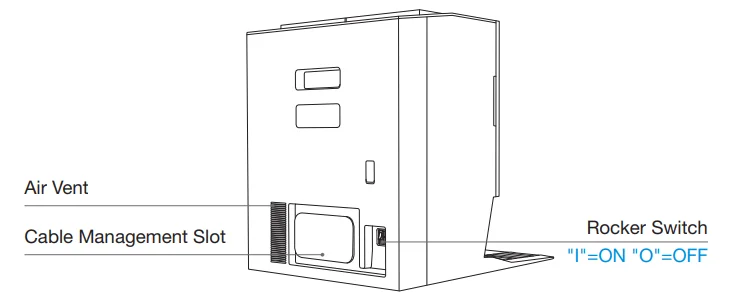
- Power switch: “I”=ON, “O”=OFF.
- Connect to a properly grounded outlet only. See grounding instructions.
GROUNDING INSTRUCTIONS
This appliance must be grounded. If it should malfunction or break down, grounding provides a path of least resistance for electric current to reduce the risk of electric shock. This appliance is equipped with a cord having an equipment-grounding conductor and grounding plug. The plug must be inserted into an appropriate outlet that is properly installed and grounded in accordance with all local codes and ordinances.
WARNING – Improper connection of the equipment-grounding conductor can result in a risk of electric shock. Check with a qualified electrician or service person if you are in doubt as to whether the outlet is properly grounded. Do not modify the plug provided with the appliance – if it will not fit the outlet, have a proper outlet installed by a qualified electrician.
This appliance is for use on a nominal 120 V circuit and has a grounding attachment plug that looks like the plug illustrated in the following photo. Make sure that the appliance is connected to an outlet having the same configuration as the plug. No adapter should be used with this appliance.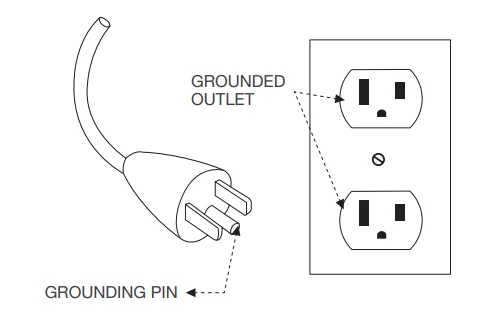
For INDOOR household use ONLY.
This device contains licence-exempt transmitter(s)/receiver(s) that comply with Innovation, Science and Economic Development Canada’s licence-exempt RSS(s). Operation is subject to the following two conditions:
- This device may not cause interference.
- This device must accept any interference, including interference that may cause undesired operation of the device.
To satisfy FCC & IC RF exposure requirements, a separation distance of 20 cm or more should be maintained between the antenna of this device and persons during device operation. To ensure compliance, operations at closer than this distance are not recommended.
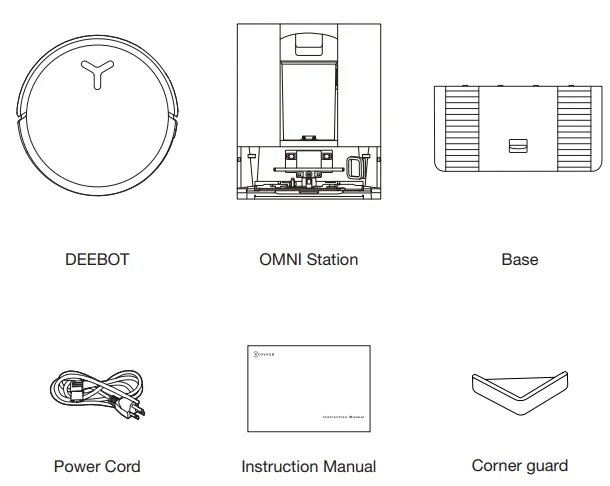
PACKAGE COMPONENTS
Note:
- A thoughtful pair of corner guards is included to enhance user safety and improve handling comfort.
To install: Align the inner slot of the corner guard with the edge and press it into place. Compatible with all DEEBOT corner designs. - Figures in this manual are for reference only and may differ from the appliance. Product design and specifications are subject to changes without notice.
Product Diagram
1. DEEBOT Front View
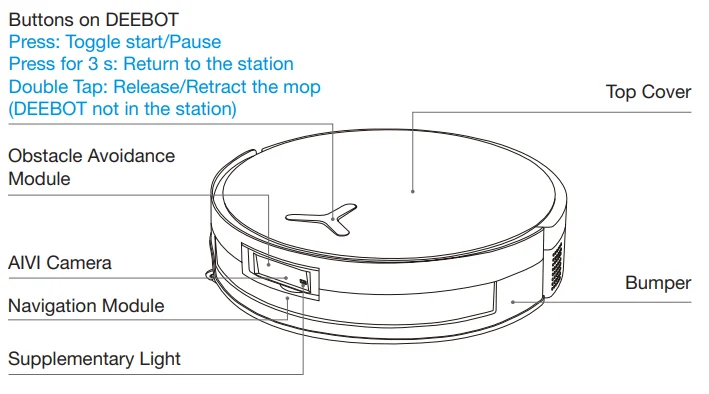
2. DEEBOT Bottom View
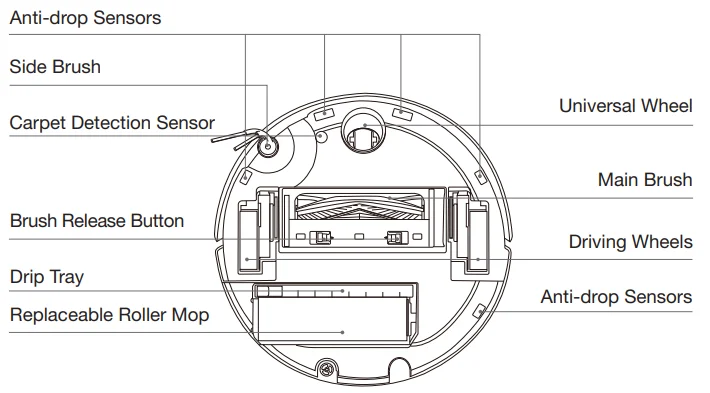
3. Inside DEEBOT (Under the Top Cover)
RESET Button
- Network Setup: Press the RESET button, and a voice prompt will be heard to connect DEEBOT to the app.
- Restore default settings: Press and hold the RESET button for 5 seconds. After hearing the voice prompt, the startup music will play, and DEEBOT will be restored to its default settings. Exercise caution when using this function.

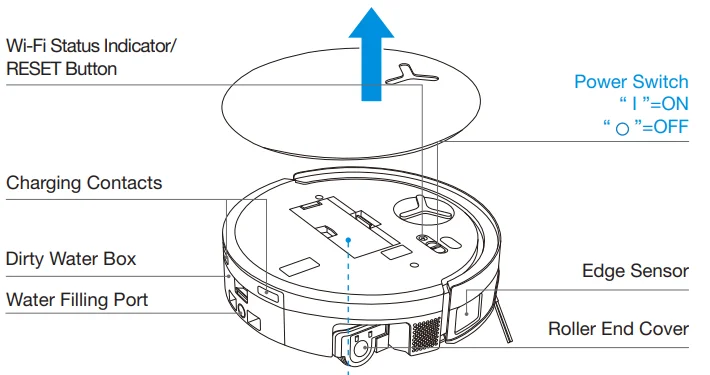
4. Dust Bin
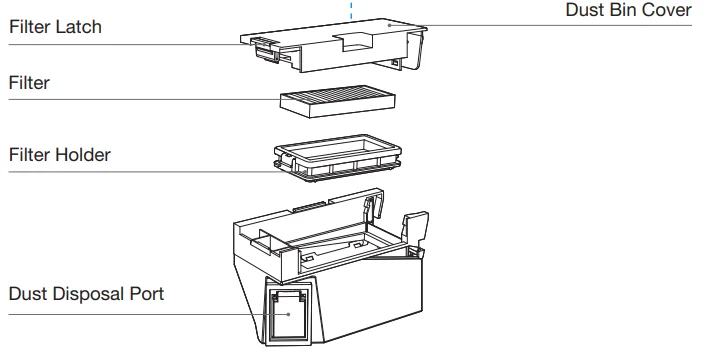
5. OMNI Station Front View
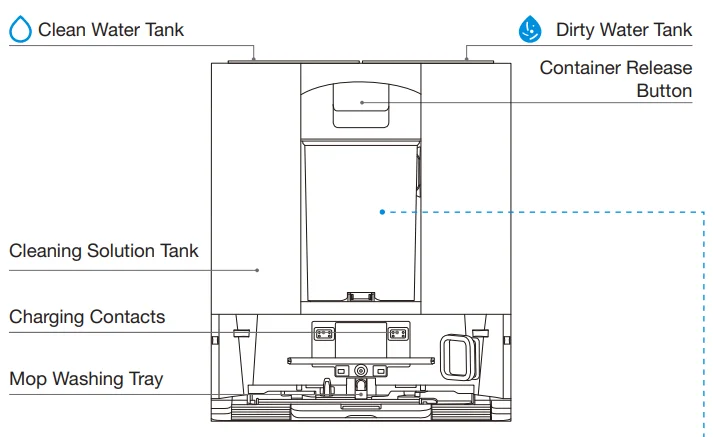
Note:
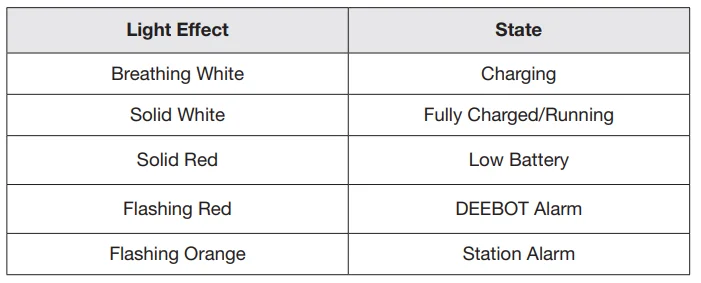
- Flashing Orange: Please check the ECOVACS HOME app for the cause of the malfunction.
- If DEEBOT fails to charge, please wipe the charging contacts with a clean and dry cloth.
6. Dust Container
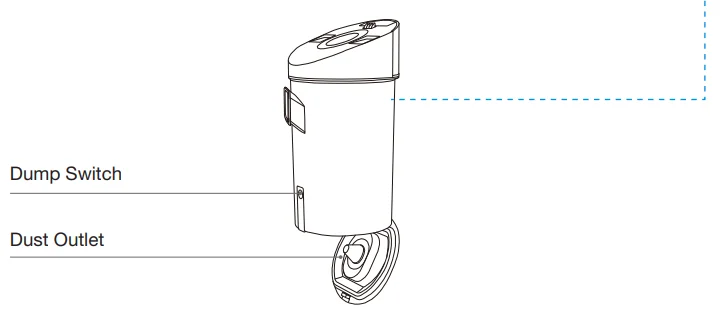
7. OMNI Station Back View
8. Indicator Light
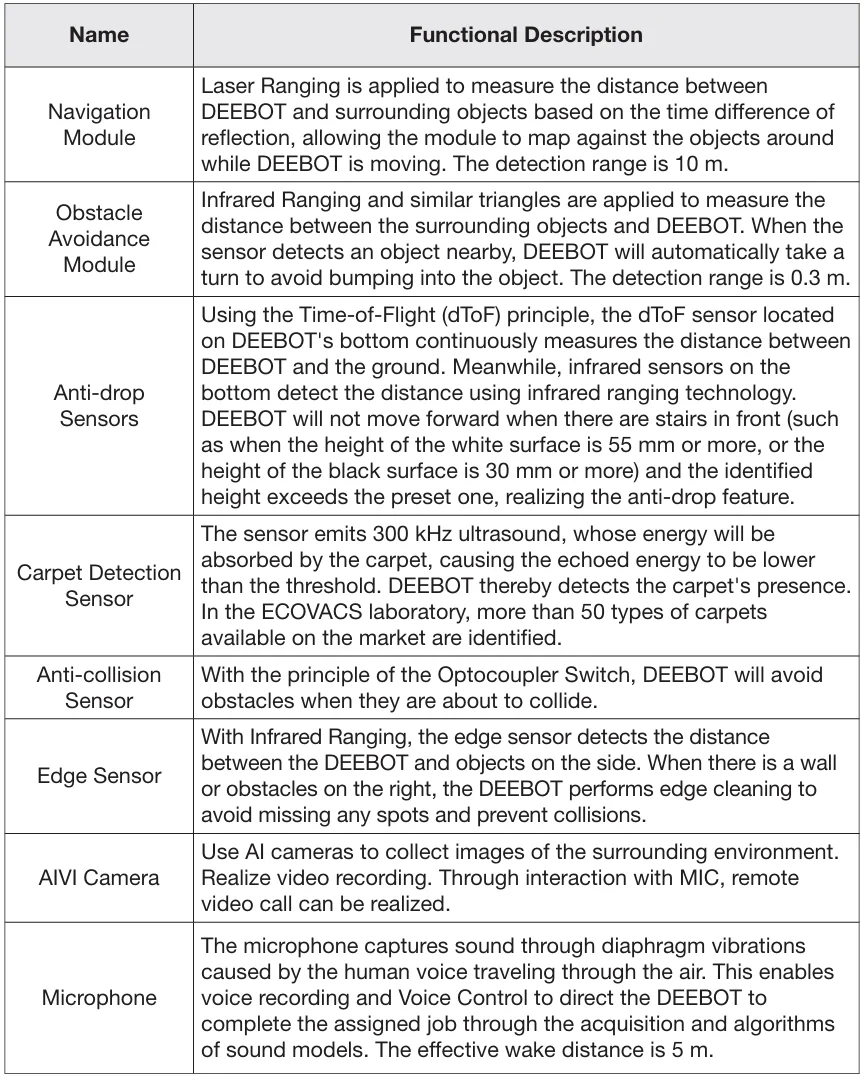
9. Sensors Overview
Quick Start
Remove all protective materials before using the appliance.
- Station Installation

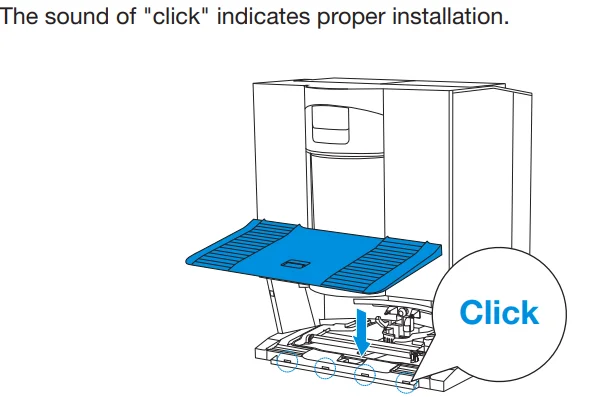
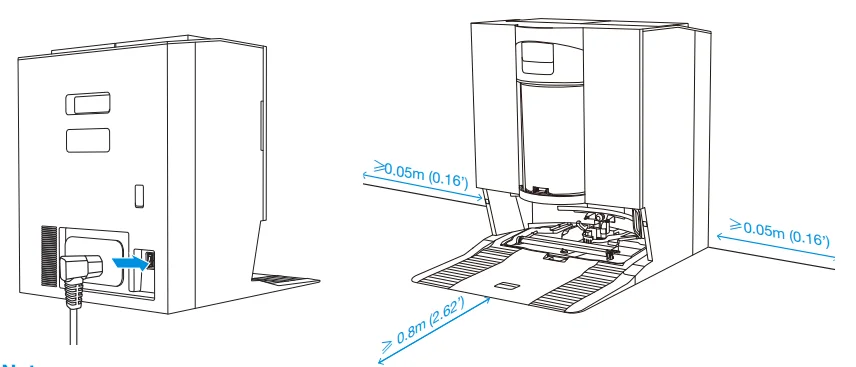
- Assemble and Place the Station. Place the OMNI station against the wall on a flat, hard surface. Do not place items within 0.05 m on either side and 0.8 m in front. Wrap the excess power cord around the cable management slot on the back of the station.

3 Download ECOVACS HOME APP**
To enjoy all available features, it is recommended that you control your DEEBOT via the ECOVACS HOME app.
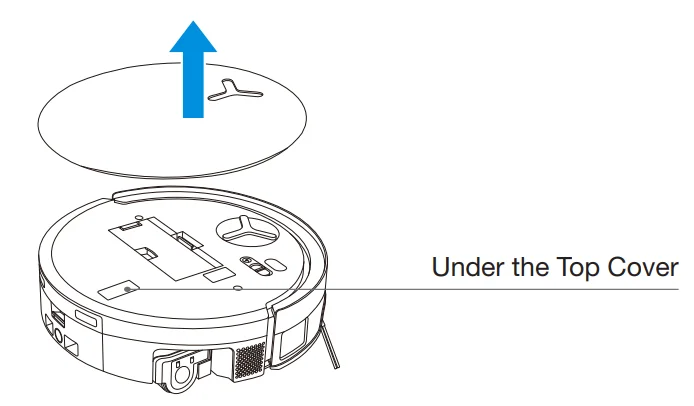
- Scan the QR code under the top cover to download the app.

- Search “ECOVACS HOME” on the App Store or Google Play to download the app.

Note: Follow the instructions on the app to complete the registration, login, and connection.
4 Connect DEEBOT with APP
- Via Bluetooth: Turn on DEEBOT and your mobile phone Bluetooth. Allow the app to obtain mobile phone Bluetooth permission. Tap to scan the QR code on DEEBOT or tap
 Add in the app to find the nearby DEEBOT.
 - Via Wi-Fi: You can also choose to connect DEEBOT with the app through other methods according to the prompts on the app’s page.
 Add in the app to find the nearby DEEBOT.
Note: Please connect via Bluetooth for a better experience.
Wi-Fi Network Requirements:
- You are using a 2.4 GHz or 2.4/5 GHz mixed network.
- Your router supports 802.11b/g/n and IPv4 protocol.
- Do not use a VPN (Virtual Private Network) or proxy server.
- Do not use a hidden network.
- WPA and WPA2 using TKIP, PSK, AES/CCMP encryption.
- WEP EAP (Enterprise Authentication Protocol) is not supported.
- Use Wi-Fi channels 1-11 in North America and channels 1-13 outside North America (refer to local regulatory agency).
- If you are using a network extender/repeater, the network name (SSID) and password are the same as those of your primary network.
- Please enable WPA2 on your router.
Wi-Fi Indicator Light

Please be aware that intelligent features such as remote startup, voice interaction, 2D/3D map display and control settings, and personalized cleaning (depending on the appliance) require the ECOVACS HOME app, which is constantly updated. You need to agree to our Privacy Policy and User Agreement so that we can process some of your essential and necessary information before you can use certain features of the ECOVACS HOME app to control the appliance. If you disagree with our Privacy Policy and User Agreement, such features will be unavailable. However, you can still use the basic features of this appliance for manual operation.
5 Power on and Charge DEEBOT
Turn on the power switch under DEEBOT’s cover (“|” = ON,  = OFF), and place DEEBOT in front of the station that is connected to the power supply. Use the ECOVACS HOME app or voice control to recall DEEBOT, or press and hold
  on DEEBOT for 3 seconds, to allow DEEBOT to dock for charging.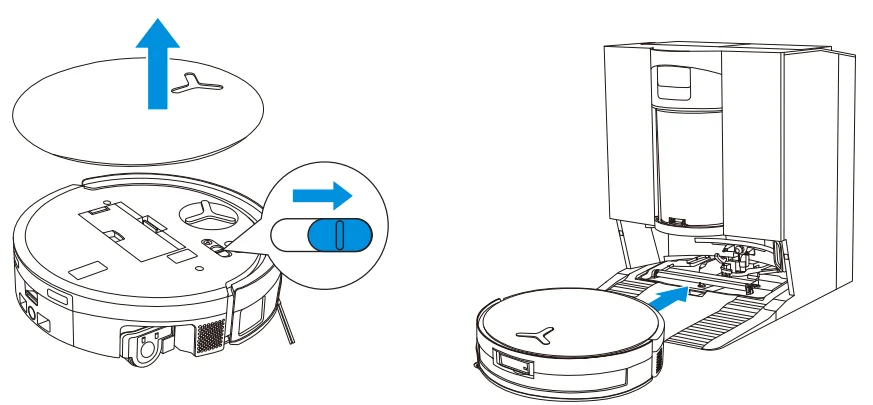
Note:
- DEEBOT cannot charge when it is powered off.
- After cleaning, it is recommended to keep DEEBOT powered on and charging to ensure it is ready for the next cleaning session.
- To ensure DEEBOT can return to charge smoothly after cleaning, start cleaning from the station and avoid moving the station during the process.
6 Fill the Clean Water Tank
Take out the clean water tank, open the tank cover, and fill the tank with water. Close the tank cover and reinstall the clean water tank.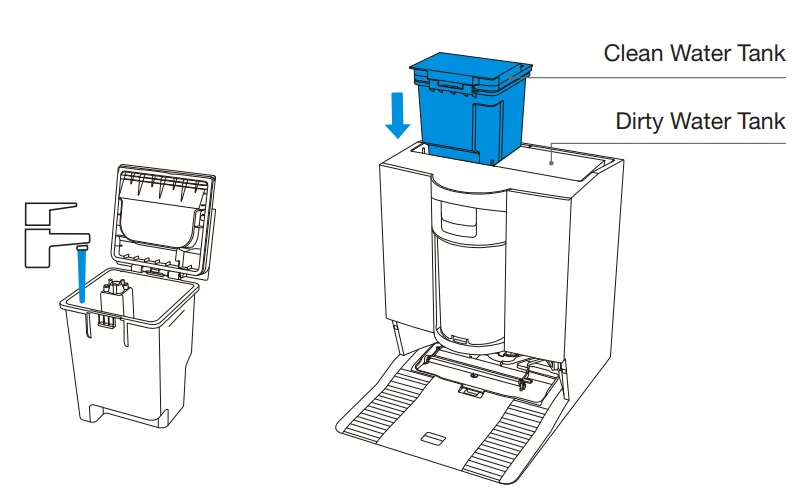
Note:
- Use only ECOVACS DEEBOT cleaning solution to avoid malfunctions.
- Use a clean, dry cloth to wipe off any water on the surface of the tank before placing it in position.
- Make sure to lock the top covers of both water tanks securely before use.
- Any watermarks in the water tanks are from function testing. Please use it with confidence.
Add Cleaning Solution (sold separately)
- Take off the cleaning solution tank’s cover, pull out the two cleaning solution boxes, and place them on a level, hard surface.

- Pour the standard cleaning solution into the blue box and the heavy-duty cleaning solution into the black box. After securing the box lids, push them back into the station and close the tank lid.

- Note: For better performance and longer lifespan of the product, please use ECOVACS DEEBOT cleaning solution (sold separately).
- Do not pour cleaning solution into the clean water tank. Add it to the cleaning solution tank instead. Otherwise, an incorrect ratio may cause excessive foaming and reduce cleaning effectiveness.
- Return the cleaning solution tank’s cover and press the cover firmly to secure it in position.

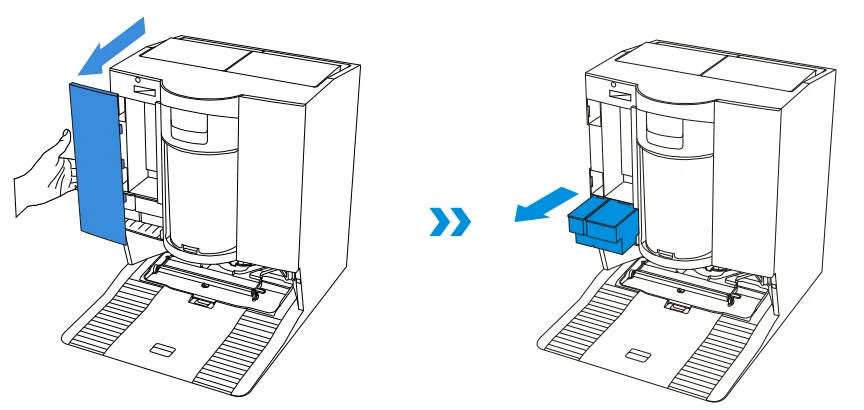
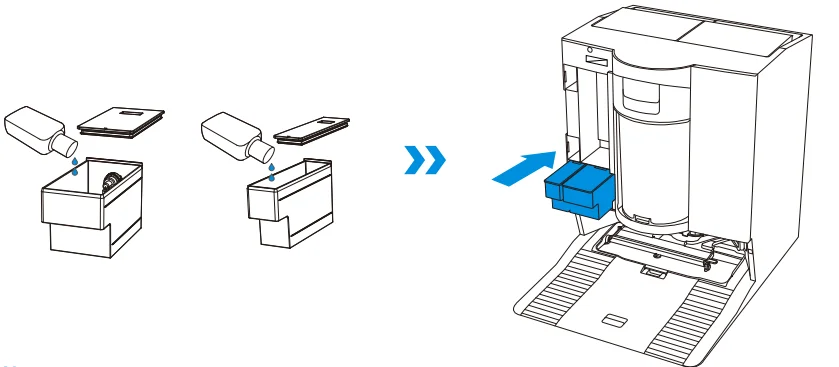
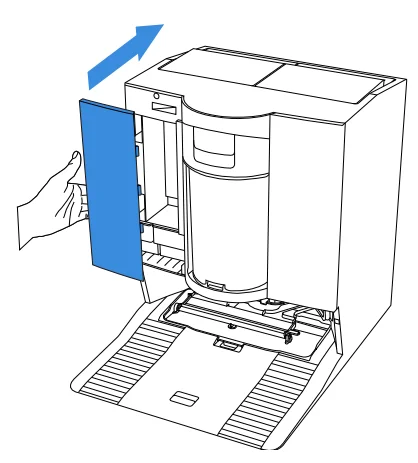
Note: Please make sure that no foreign objects fall into the cleaning solution box.
8 Operate DEEBOT for Cleaning
1. Start Mapping
When creating a map for the first time, please follow DEEBOT to help with some minor issues. For example, DEEBOT may get stuck under furniture. Please refer to the following solutions:
- Raise the low-sitting furniture if possible.
- Cover the bottom of the furniture.
- Set up a virtual boundary via the app.
2. Start Cleaning
- The DEEBOT’s water tank is automatically refilled through the station. Manual refilling is not needed.
- When mopping, DEEBOT will recognize floor types and can lift mops automatically when encountering carpets. Please do not use DEEBOT on shaggy rugs or carpets with fibers longer than 10 mm. It is recommended to fold up the shaggy rugs with fibers longer than 10 mm during the cleaning process, or set the shaggy carpeted area as a no-entry zone by setting a virtual boundary in the ECOVACS HOME app.
Please ensure that DEEBOT is in the station and is fully charged before cleaning for the first time. Tap on DEEBOT to start. You can also use the ECOVACS HOME app or voice control to start.
3. Pause
Tap on DEEBOT to pause it while it is working. You can also use the ECOVACS HOME app or voice control to pause DEEBOT.
4. Wake Up
After pausing for a while, all indicator lights on DEEBOT will go out. To wake up DEEBOT, press .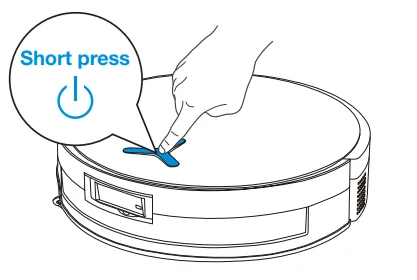
5. Back to Station
Use the ECOVACS HOME app or voice control to recall DEEBOT, or press and hold the button on DEEBOT for 3 seconds, to allow DEEBOT to dock for charging.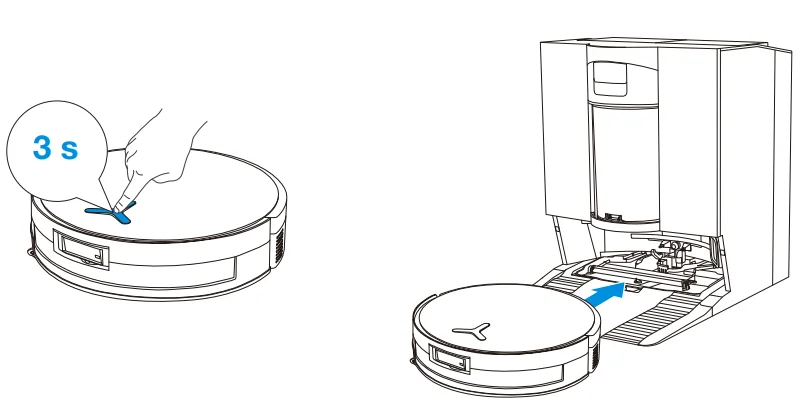
6. Deep Sleep Mode
DEEBOT will enter deep sleep mode if it stays outside the station for about 10 hours to protect the battery. Please switch OFF and ON to wake DEEBOT up.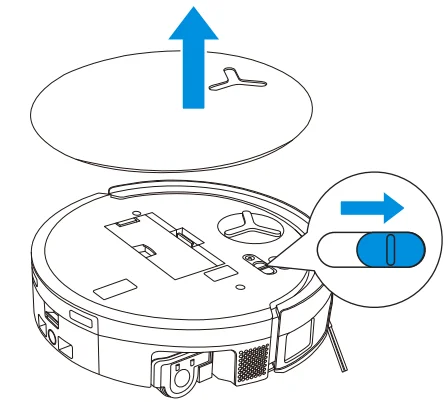
When PowerBoost Charging is enabled, DEEBOT will fast charge for about 5 minutes after returning to the station. It will then switch to standard charging and stop automatically once fully charged.
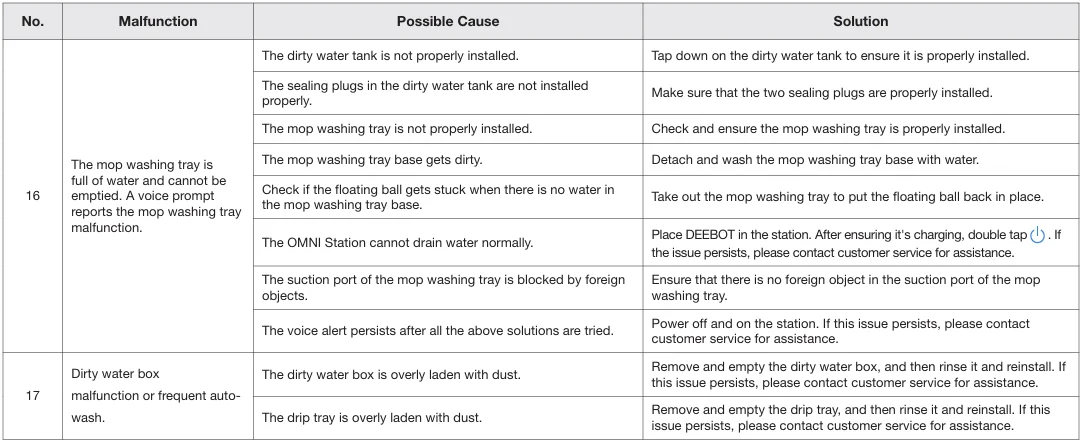
TROUBLESHOOTING
For the following possible issues, refer to the corresponding solutions.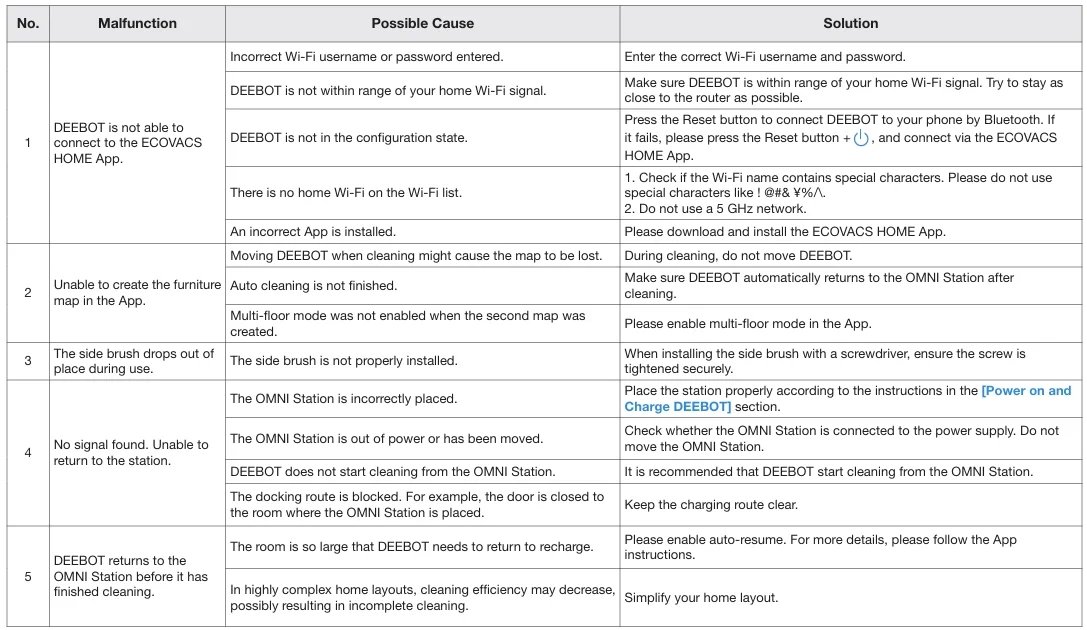
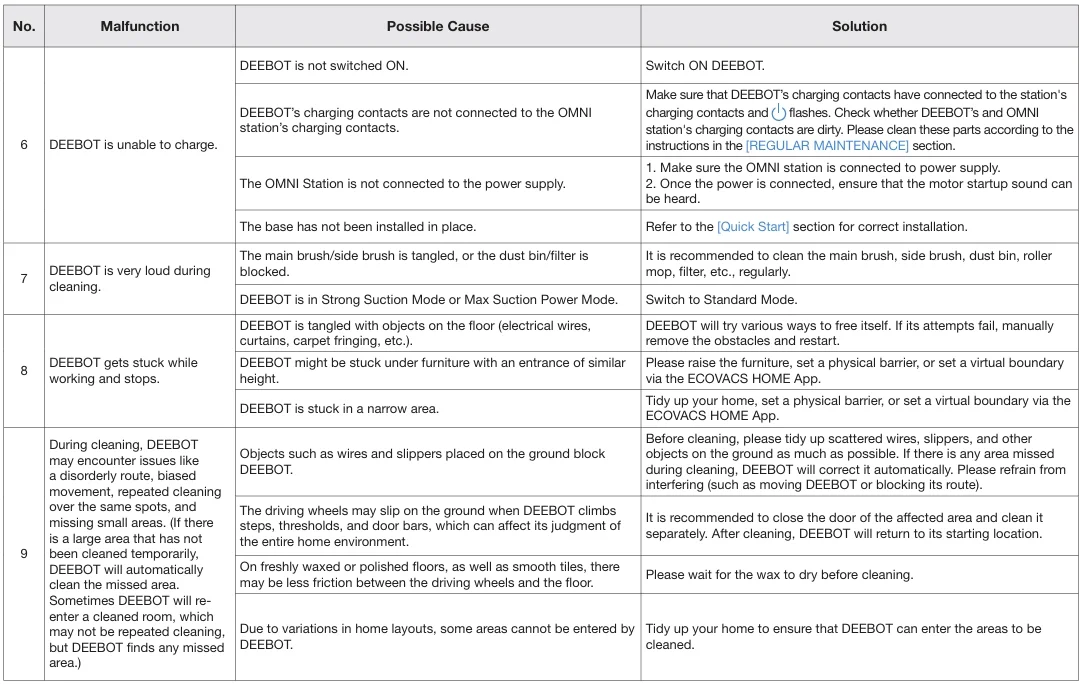
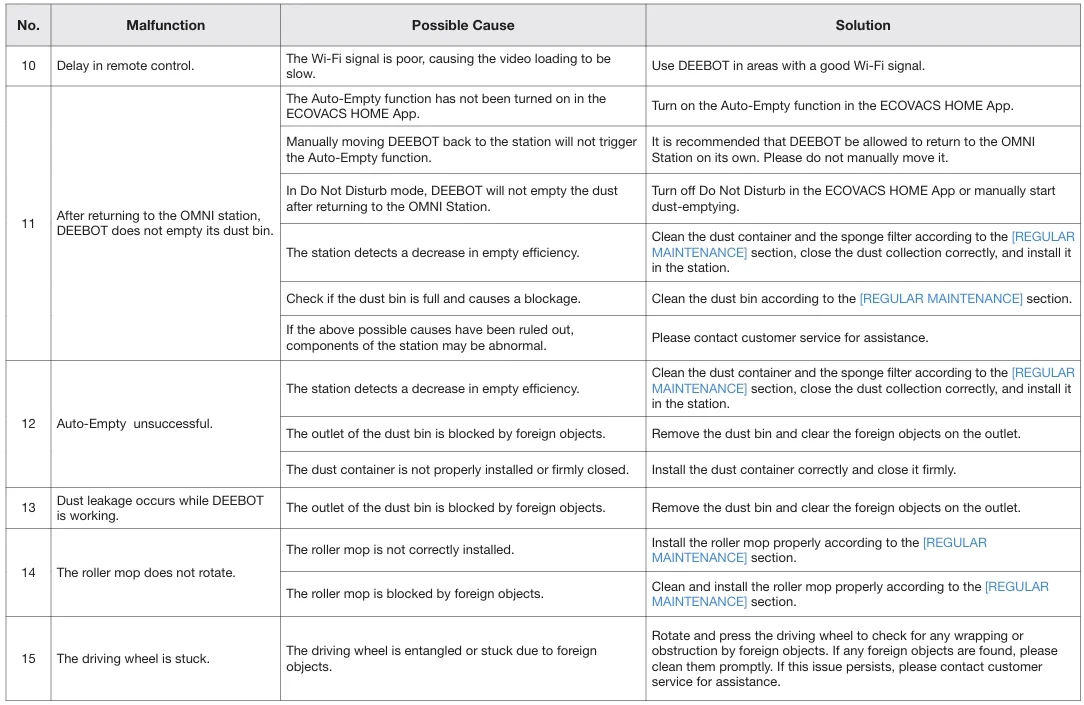
TECHNICAL SPECIFICATIONS
The output power of the wireless module is less than 100 mW.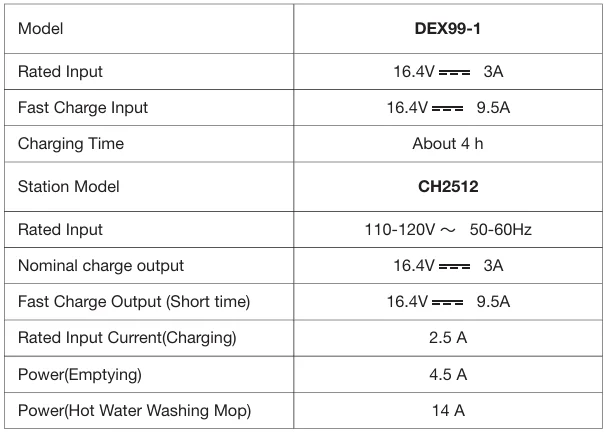
Note: Technical and design specifications may be changed for continuous product improvement. Explore more accessories at https://www.ecovacs.com.
For More Manuals By ECOVACS, Visit ManualsLibraryy.
Ecovacs Deebot X11 OmniCyclone-FAQs
What is the Ecovacs Deebot X11 OmniCyclone?
The Ecovacs Deebot X11 OmniCyclone is a premium robot vacuum and mop designed for automated floor cleaning. It combines strong suction power, advanced AI navigation, self-cleaning mopping technology, and a cyclone-based OMNI station to reduce maintenance while delivering hands-free cleaning performance for modern homes.
How powerful is the suction on the Deebot X11 OmniCyclone?
The robot features high-powered suction designed to remove dust, pet hair, and debris from hard floors and carpets efficiently. Its advanced airflow system improves deep-cleaning performance while maintaining quieter operation compared to many traditional robot vacuums in the premium smart-cleaning category.
What is the OmniCyclone station on the Deebot X11?
The OmniCyclone station is an advanced self-maintenance dock that automatically empties dust, washes mop pads, dries components, and manages debris using cyclone separation technology. This design helps reduce filter clogging and lowers maintenance requirements while improving long-term cleaning efficiency.
Does the Ecovacs Deebot X11 OmniCyclone mop floors automatically?
Yes, the robot includes an intelligent mopping system that automatically scrubs and refreshes floors while cleaning. The OMNI station also cleans and dries the mop components after each session, helping maintain hygiene and reducing manual cleaning work for users.
Can the Deebot X11 OmniCyclone avoid obstacles effectively?
The robot uses AI-powered obstacle detection combined with LiDAR navigation and advanced sensors to identify furniture, cables, shoes, and household objects. This helps reduce collisions and improve navigation accuracy while allowing the robot to clean efficiently around obstacles throughout the home.
Is the Ecovacs Deebot X11 OmniCyclone good for pet hair?
Yes, the robot is designed to handle pet hair effectively with anti-tangle brush technology and strong suction performance. Many users consider it suitable for homes with cats or dogs because it can collect fur from both carpets and hard floors efficiently.
How long does the battery last on the Deebot X11 OmniCyclone?
Battery life depends on cleaning mode, floor type, and suction settings. Under standard operation, the robot can clean for several hours before automatically returning to the dock for recharging, making it practical for medium and large-sized homes requiring extended cleaning sessions.
What are the common problems with the Deebot X11 OmniCyclone?
Some users report occasional mapping inconsistencies, navigation errors in cluttered spaces, and noisy dock maintenance cycles. Others mention that edge cleaning performance may vary on thick carpets, although software updates can improve navigation and cleaning reliability over time.
Does the Ecovacs Deebot X11 OmniCyclone support app control?
Yes, the robot works with the ECOVACS HOME app, allowing users to customize cleaning schedules, create virtual boundaries, adjust suction settings, and manage room-specific cleaning directly from a smartphone for more personalized automated cleaning control.
Is the Ecovacs Deebot X11 OmniCyclone worth buying?
The Deebot X11 OmniCyclone is considered a strong premium robot vacuum option for users wanting advanced automation and low-maintenance cleaning. While expensive, many buyers appreciate its smart navigation, self-cleaning dock, powerful suction, and convenience for everyday household floor maintenance.