


Pawport Charging Dock

WARNING
Important Safety Information – Please Read First
Before you begin installation, please read all instructions, safety information, and warnings provided in this manual and in the included safety documentation. This product is intended for use only with official Pawport Rechargeable Lithium-Ion Batteries and the included Pawport Charging Dock power supply. Improper use may result in fire, electric shock, product damage, serious injury, or death.
- Do not use damaged Batteries or cables.
- Do not charge near water or in excessively hot or cold environments.
- Always supervise charging and place the Charging Dock on a stable, ventilated surface away from flammable materials.
- Keep out of reach of children and pets.
What’s included
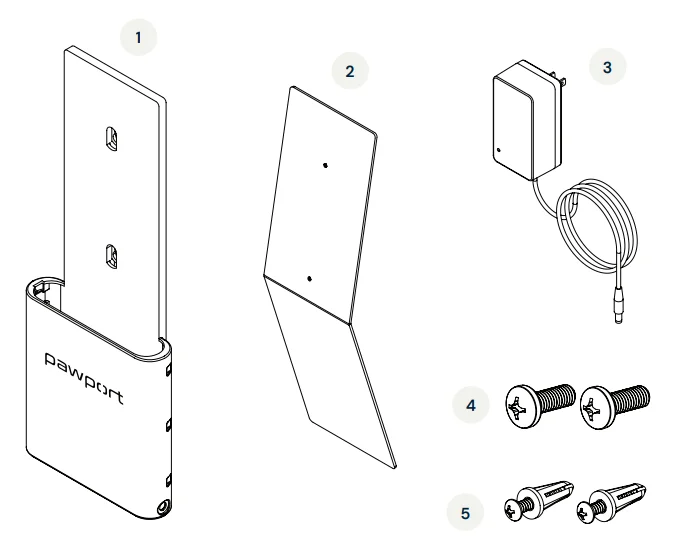
Before you start setting up your Charging Dock, check that you have everything you need. Depending on your installation type, some items may not be required.
- Charging Dock
- Kickstand
- Power supply
- M3 screws ×2
- Wall screws and anchors ×2

Hate to read?
We feel you! Scan below to view the instructional video and follow along.
Suggested setups
The Charging Dock can stand upright with the included kickstand, lie flat on a surface, or be mounted to a wall using the included wall screws and anchors. To attach the optional kickstand, continue to the next page. To mount to a wall, continue to page 9.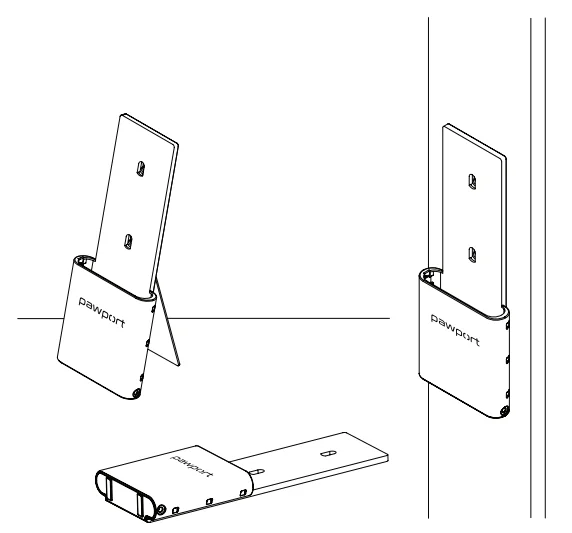
Kickstand attachment
Partially install the two included M3 screws (item 4) into the threaded holes of the kickstand (item 2) with a Phillips head screwdriver. Leave about 3/16″ (5 mm) of the screws exposed, as shown.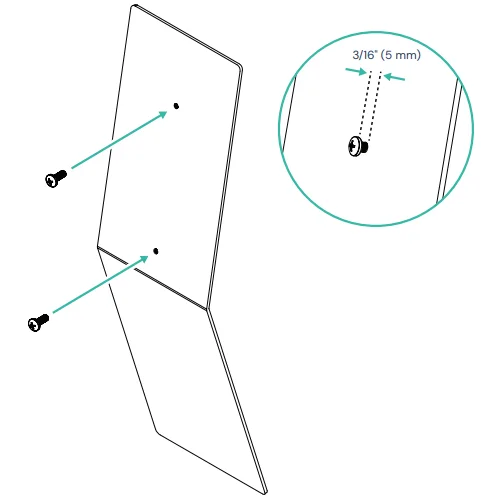
Hook the Charging Dock (item 1) onto the exposed screws of the kickstand and slide it down. Tighten the screws with a Phillips head screwdriver to secure.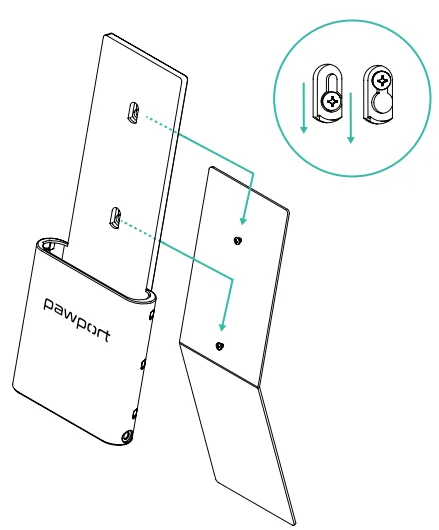
Wall mounting
Use the two provided wall screws and anchors (item 5), or wood screws (not included), to hang the Charging Dock on a wall. If installing into drywall, drill two 1/4″ (6 mm) holes and insert the wall screws and anchors. Leave about 3/16″ (5 mm) of space between the wall and screw head to hang the Charging Dock. Slide the Dock down to lock it in place. Once in position, tighten the screws with a Phillips head screwdriver.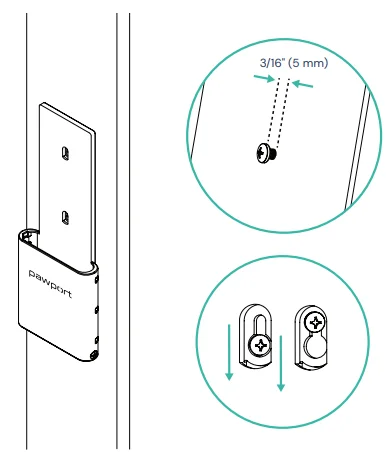
Connect to power
Connect the power supply (item 3) to the Charging Dock and plug it into a standard electrical outlet (100-240V AC, 50/60Hz, 1.5A).
IMPORTANT! Only use the included Pawport power supply.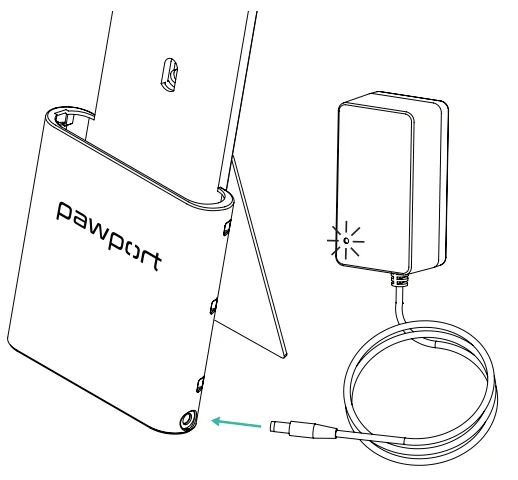
Charge the Battery
Slide the Battery into the Charging Dock as shown, ensuring it is fully inserted. Note the notch key on the side of the Battery to ensure proper orientation. The LED indicator light will be RED while charging and will turn GREEN once the Battery is fully charged.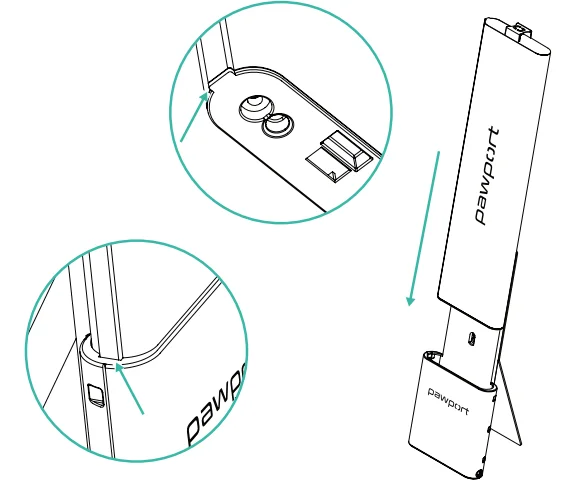
Job done!
Your Charging Dock setup is now complete. For additional manuals and video tutorials, visit: www.pawport.com/support.
For More Manuals By Pawport, Visit ManualsLibraryy.
Pawport Charging Dock-FAQs
What is the Pawport Charging Dock used for?
The Pawport Charging Dock is designed to charge Pawport rechargeable lithium-ion batteries separately from the smart pet door. It provides a convenient way to keep a backup battery fully charged, ensuring uninterrupted operation of your pet door without needing a nearby power outlet.
Do you need a Pawport Charging Dock to charge the battery?
No, the Pawport battery can charge directly inside the Smart Pet Door using a USB-C connection. However, the charging dock is useful if you want to charge a spare battery separately or if your installation location makes direct charging inconvenient.
How long does the Pawport Charging Dock take to charge a battery?
Charging time depends on battery size. The larger Pawport battery typically takes around 16 hours to fully charge using the dock, while smaller batteries can charge within a few hours, making them ideal for quick backup power preparation.
Can you charge a battery without removing it from the pet door?
Yes, the Pawport battery can be charged without removal using a USB-C cable while installed in the door. However, the charging dock is specifically designed for charging spare batteries separately, allowing quick swapping when needed for continuous operation.
What comes included with the Pawport Charging Dock?
The Pawport Charging Dock package typically includes the dock unit, a kickstand, a power supply, mounting screws, wall anchors, and a setup guide. These components allow both wall-mounted and tabletop installation, depending on your preferred setup.
Can the Pawport Charging Dock be wall-mounted?
Yes, the charging dock can be mounted directly onto a wall using the included hardware. Alternatively, it can be placed on a flat surface using the provided stand, giving users flexible installation options based on available space and convenience.
Is the Pawport Charging Dock useful for backup power setups?
Yes, the dock is especially useful for maintaining a fully charged backup battery. You can quickly swap batteries when needed, ensuring your smart pet door continues functioning during power outages or when direct charging is not possible.
What temperature range is safe for using the charging dock?
The Pawport battery and charging system should operate within a temperature range of 0°C to 50°C. Using the dock outside this range may affect charging efficiency and could pose safety risks, so proper environmental conditions are important.
Can the Pawport Charging Dock charge multiple batteries at once?
The standard Pawport Charging Dock is designed to charge one battery at a time. However, you can keep multiple batteries on hand and rotate them, ensuring that one is always charging while another powers the pet door.
Is the Pawport Charging Dock worth buying?
The charging dock is worth considering if you rely on battery-powered operation or want uninterrupted performance. It adds convenience by enabling fast swaps between batteries and ensures you always have a charged backup ready, especially in locations without easy power access.