
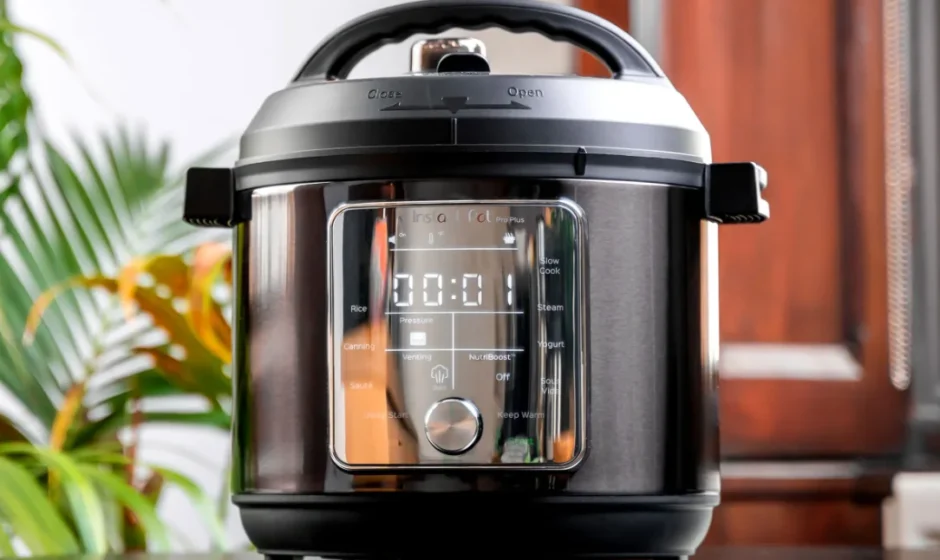

Instant Pot Pro Plus
IMPORTANT SAFEGUARDS
READ ALL INSTRUCTIONS
- DO place the appliance on a countertop only. Always operate the appliance on a stable, noncombustible level surface.
- DO make sure all parts are dry and free of food debris before placing the cooking pot on the cooker base.
- DO NOT place the appliance on or close to a hot gas or electric burner, or a heated oven.
- DO NOT use the appliance near water or flame.
- DO NOT use outdoors. Keep out of direct sunlight.
- DO NOT place on anything that may block the vents on the bottom of the appliance.
General Use
The removable inner cooking pot is extremely hot during use, and can be extremely heavy when full of ingredients.
- DO use oven mitts when handling the inner cooking pot and removing accessories.
- DO place hot accessories on a heat-resistant surface or cooking plate.
- DO use care when lifting the cooking pot from the cooker base to avoid burn injury.
- DO use extreme caution when the cooking pot contains hot food, hot oil or other hot liquids.
- DO use only the Instant Brands lid that came with this cooker base. Using any other pressure cooker lids may cause personal injury and/or property damage.
- DO NOT use the appliance without the removable inner cooking pot installed.
- DO NOT touch the metal portion of the lid, the appliance’s hot surfaces, or any accessories during or immediately after cooking because they will be hot. Only use the side handles for carrying or moving.
- DO NOT use this appliance for deep frying or pressure frying with oil.
- DO NOT move the appliance while it is in use and use extreme caution when disposing of hot grease.
- DO NOT allow children or persons with reduced physical, sensory or mental capabilities to operate this appliance. Close supervision is necessary when any appliance is used by or near children and persons with reduced physical, sensory or mental capabilities. Children should not play with this appliance.
- DO NOT use the appliance for anything other than household use. It is not intended for commercial use.
- DO NOT leave the appliance unattended while in use.
Electrical Warning
The cooker base contains electrical components that are an electrical shock hazard. Failure to follow these instructions may result in electric shock. To protect against electrical shock: disconnect, select Cancel, then remove plug from power source. Always unplug when not in use, as well as before adding or removing parts or accessories, and before cleaning. To unplug, grasp the plug and pull from the outlet. Never pull from the power cord.
- DO regularly inspect the appliance and power cord.
- DO NOT operate the appliance if the power cord or plug is damaged, or after the appliance malfunctions or is dropped or damaged in any manner. For assistance, contact Customer Care by email at [email protected] (if located in the UK) or [email protected] (if located in the EU) or by phone at +44 (0) 3331230051. DO NOT attempt to repair, replace or modify components of the appliance, as this may cause electric shock, fire or personal injury, and will void the warranty.
- DO NOT tamper with any of the safety mechanisms, as this may result in personal injury and/or property damage.
- DO NOT put liquid or food of any kind into cooker base without the inner cooking pot.
- DO NOT immerse power cord, plug or the appliance in water or other liquid.
- DO NOT use the appliance in electrical systems other than 220- 240V~ 50/60Hz.
- DO NOT clean the appliance by rinsing it under a faucet.
SAVE THESE INSTRUCTIONS
Product, parts and accessories
Before using your new Instant Pot Pro Plus, make sure everything is accounted for, then see Care, cleaning and storage: Removing and installing parts to find out how everything fits together.
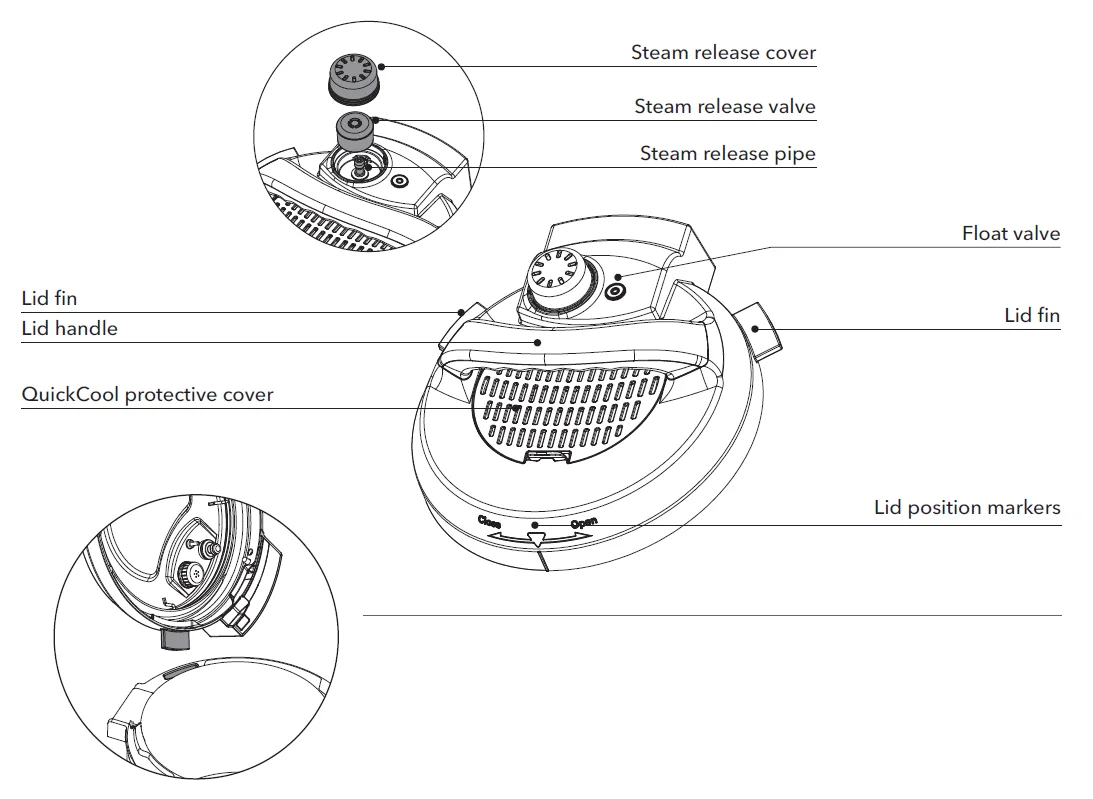
Top of lid
Steam release assembly
Bottom of lid
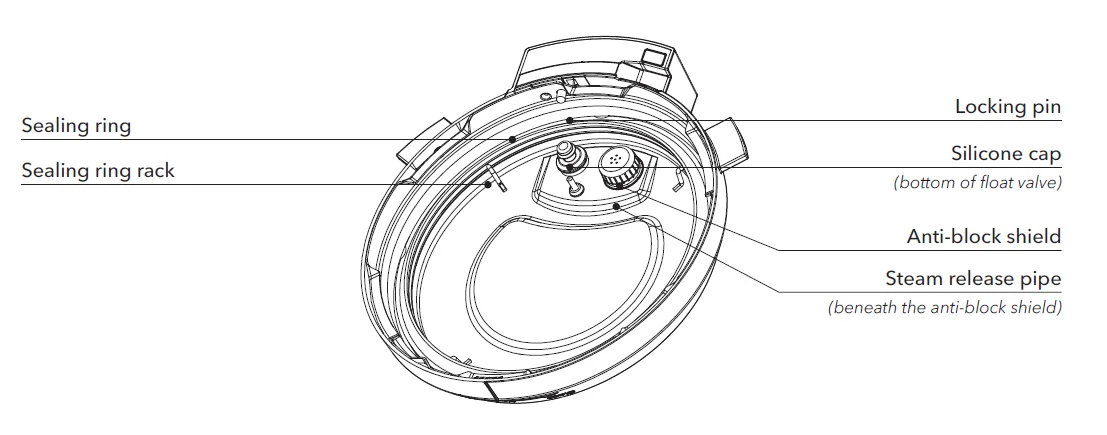
Instant Tip: Stand the pressure cooking lid up to keep it off your countertop. Insert the left or right lid fin into the corresponding lid holders on the base to stand it up and save some space!
Illustrations in this document are for reference only and may differ from the actual product. Always refer to the actual product.
Cooking pot
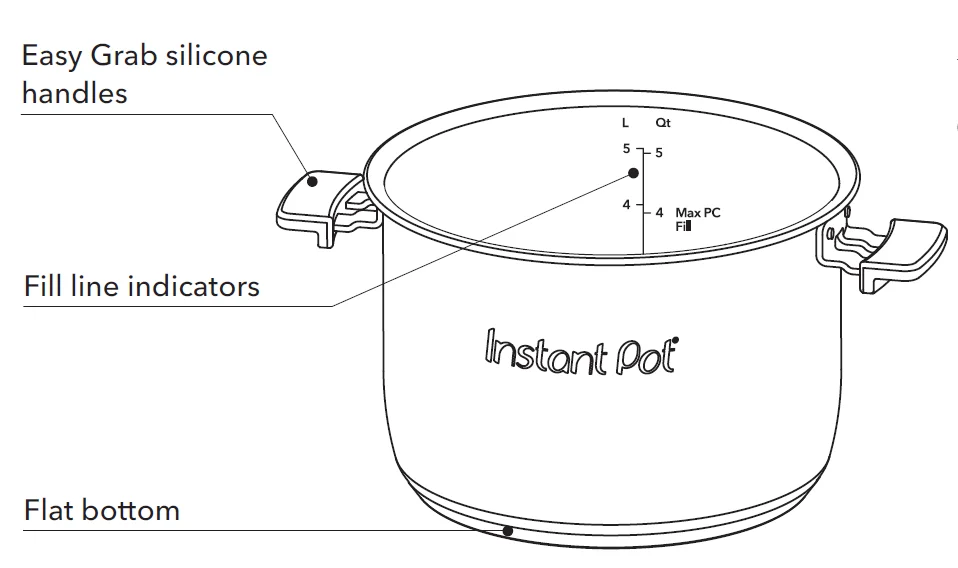
Instant Tip: Stove top and oven-friendly up to 204°C The cooking pot features a cookware-grade impact-bonded tri-ply bottom, which sounds complicated, but really just means you can use it just about anywhere — from the multicooker base to any electric, ceramic, gas or induction cooktop.
Multicooker base
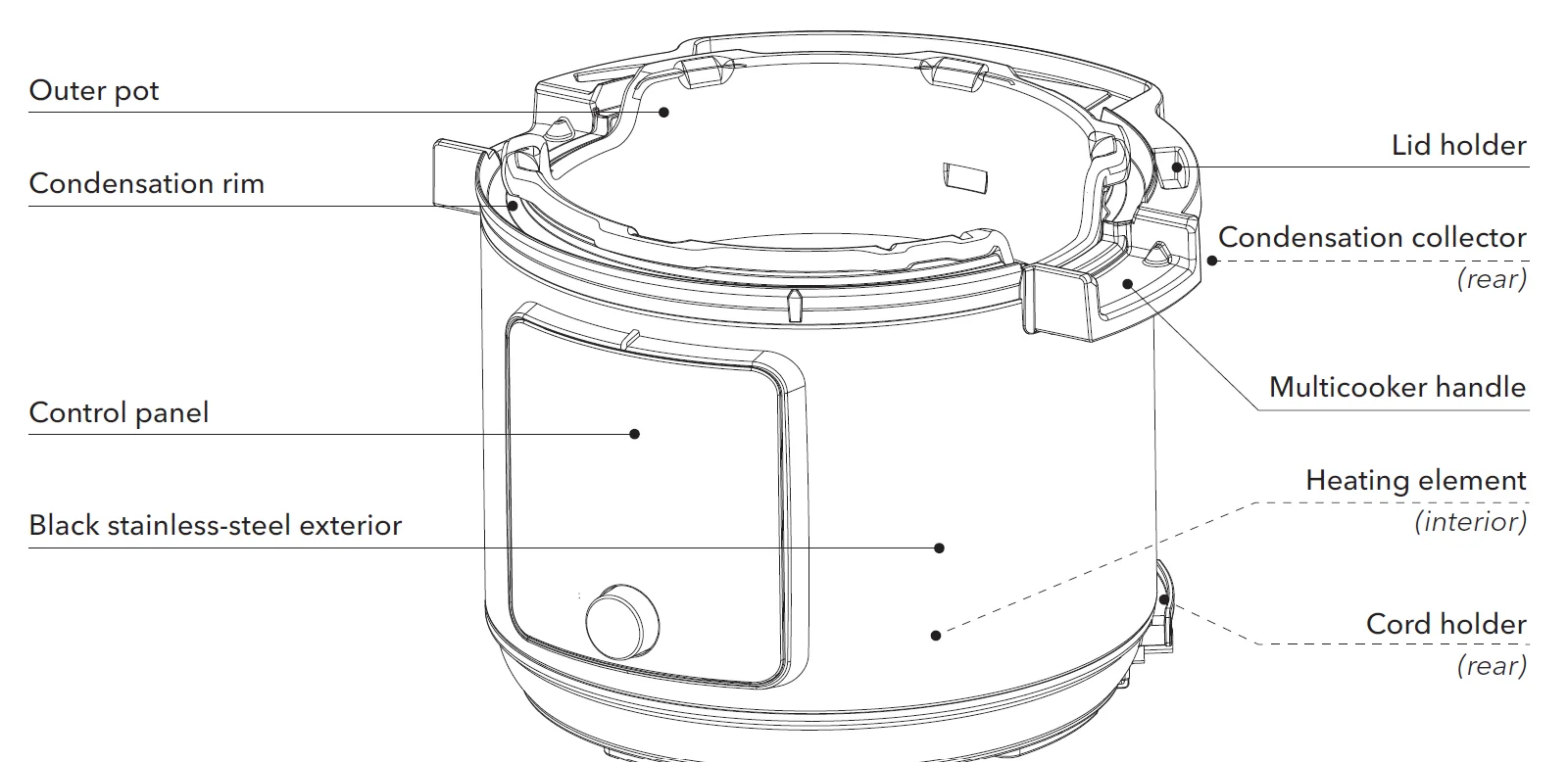
Accessories
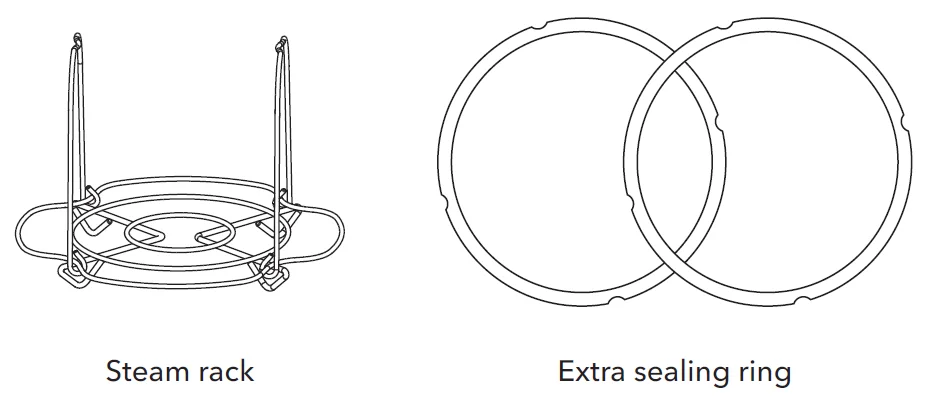
Get started
Initial setup
- Pull that Instant Pot Pro Plus out of the box!
- Remove the packaging material and accessories from in and around the multicooker and make sure all the parts are accounted for. See Product, parts and accessories for a full parts breakdown. Make sure to check under the cooking pot!
- Wash the cooking pot in a dishwasher or with hot water and dish soap. Rinse it well with warm, clear water and use a soft cloth to thoroughly dry the outside of the cooking pot.
- Wipe the heating element with a soft, dry cloth to make sure there are no stray packaging particles left in the multicooker base. Don’t remove the safety warning stickers from the lid (unless specified on the sticker!) or the labels from the back of the multicooker base.
- You may be tempted to put the Pro Plus on your stovetop — but don’t do it! Place the multicooker base on a stable, level surface, away from combustible material and external heat sources.
Is something missing or damaged?
Get in touch with a Customer Care Advisor by email at [email protected] (if located in the UK) or [email protected] (if located in the EU) and and we’ll happily make some magic happen for you!
CAUTION
- Read the Important safeguards before using the appliance. Failure to read and follow those instructions for safe use may result in damage to the appliance, property damage or personal injury.
- DO NOT place the appliance on a stovetop or another appliance. Heat from an external source will damage the appliance.
- To avoid risk of property damage and/or personal injury, DO NOT place anything on top of the appliance, and DO NOT cover or block the steam release assembly or anti-block shield, located on the appliance lid.
Initial test run (water test)
Before using your new Pro Plus for the first time, you must perform a pressure cooking test run to ensure everything is working correctly.
Stage 1: Setting up the Pro Plus for pressure cooking
- Remove the cooking pot from the multicooker base and fill it to the first line (1) with water.
- Insert the cooking pot into the multicooker base.
- Connect the power cord to a 220-240 V power source. The display shows OFF.
- Place and close the lid as described in Pressure control features: Pressure cooking lid. The lid automatically seals for pressure cooking.
Stage 2: “Cooking” (…but not really, this is just a test!) - Touch Pressure Cook.
- When the minutes field flashes, turn the dial to adjust the cook time to 5 minutes (00:05). Customizations are saved to the Smart Programme when cooking begins.
- Touch the Venting field to toggle between Natural, Pulse and Quick release options. Select Quick for a quick pressure release after the test finishes. See Releasing pressure for more information.
- ouch Keep Warm to turn automatic warming off after the test finishes.
- Touch Start to begin. The display shows On and the cooking progress bar shows Pre-heating.
Stage 3: Releasing pressure
When the Smart Programme finishes, the quick-release icon flashes until venting is finished - Check the pressure indicator on the control panel to make sure the lid is safe to open, then carefully open and remove the lid as described in Pressure control features: Pressure cooking lid. Please read the Pressure Control Features (pressure indicator) section on page 29.
- Using proper hand protection, remove the cooking pot from the multicooker base, discard the water and thoroughly dry the cooking pot.
You’re ready to start cooking with your Instant Pot® Pro Plus!
CAUTION: Pressurized steam releases through the top of the steam release valve. Keep exposed skin away from the steam release valve to avoid burn injury.
DANGER: DO NOT attempt to remove the lid while the pressure indicator is on and NEVER attempt to force the lid open. Contents are under extreme pressure. The pressure indicator light must be off before attempting to remove the lid. Failure to follow these instructions may result in serious personal injury and/or property damage
CAUTION: The cooking pot will be hot after cooking. Always use appropriate heat protection when handling a hot cooking pot to avoid burn injury.
Cooking from the Instant Brands Connect App
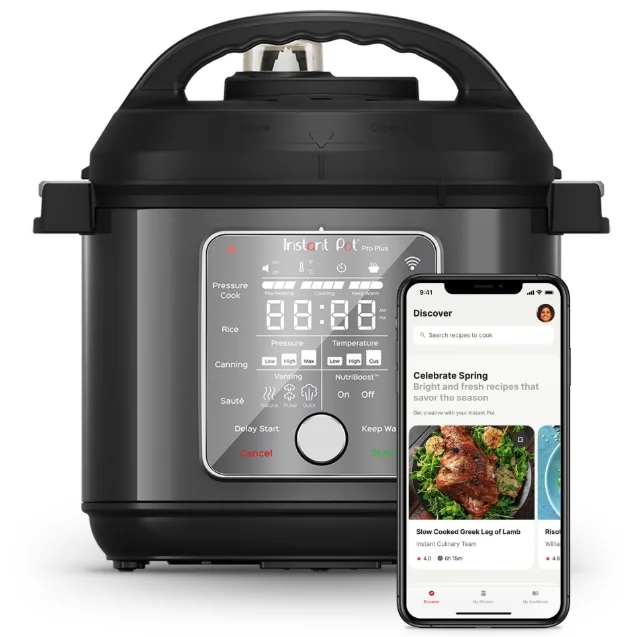
Make cooking simple and easy when you control your Instant Pot® Pro Plus using the Instant Brands Connect App from your mobile device. You have full control of the cooking programmes, plus access to 1000+ interactive guided cooking recipes.
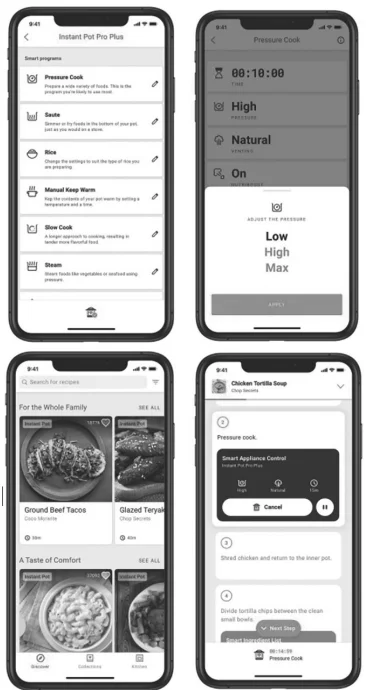
Control cooking programmes
The Pro Plus includes 9 smart programmes and you can control each of them and then monitor cooking within the App. You can use the default cooking settings, or choose your own settings for things like time, pressure level, temperature and venting type.
Guided recipes
The Instant Brands Connect App includes over 1000 delicious recipes. But unlike standard recipes, the App can interactively guide your cooking on the Pro Plus. The App will start the cooker, and control the settings exactly as the recipe specifies. All you have to do is prepare the ingredients and add them to the cooker.
Pairing with the Instant Brands Connect App

You can control your Pro Plus with the Instant Brands Connect App using your mobile device.
To download the App, either:
- Scan the QR code, or;
- Search “Instant Brands Connect” in the Apple Store or the Google Play Store.
To get started, you’ll need to create an account.
Requirements for pairing
You can use these compatible mobile devices to pair via WiFi and Bluetooth:
- Android version 5.0 or later.
- iOS version 12.0 or later.
The Instant Pot can only connect to a 2.4GHz WiFi network. Bluetooth must be turned on to pair the Instant Pot.
Follow the steps below to start the pairing process.
Before you start, make sure you:
- Download the Instant Brands Connect App and create an account if you don’t already have one.
- Know your home WiFi network name and password.
- Make sure your Bluetooth setting is set to On.
- Make sure your Pro Plus is plugged in and not currently cooking. It should display OFF.
- Make sure you have your mobile device near the Pro Plus.
- Open the App and select the Appliances section, then select Add an Appliance.
- From the list of appliances, select “Instant Pot Pro Plus”.
- Follow the instructions in the App to start the pairing process.
When you’re done, you’re set to control your Pro Plus from your App, and take advantage of even smarter, easier cooking!
Note: The Initial Water Test run can be done using the mobile app. Ensure the device is connected using the steps above before starting the test.
Control panel
The Pro Plus has a touch-screen control panel that’s easy to use and understand.
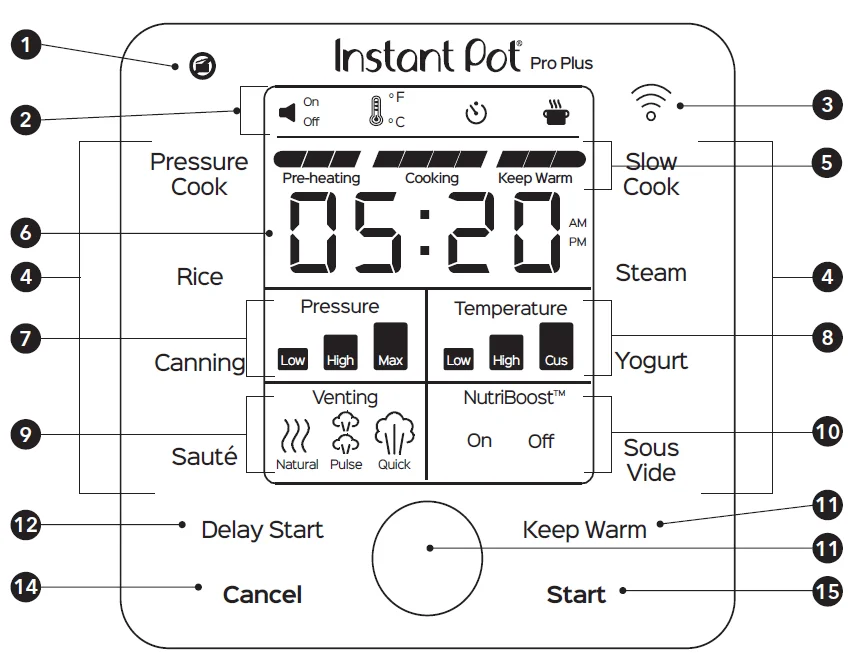
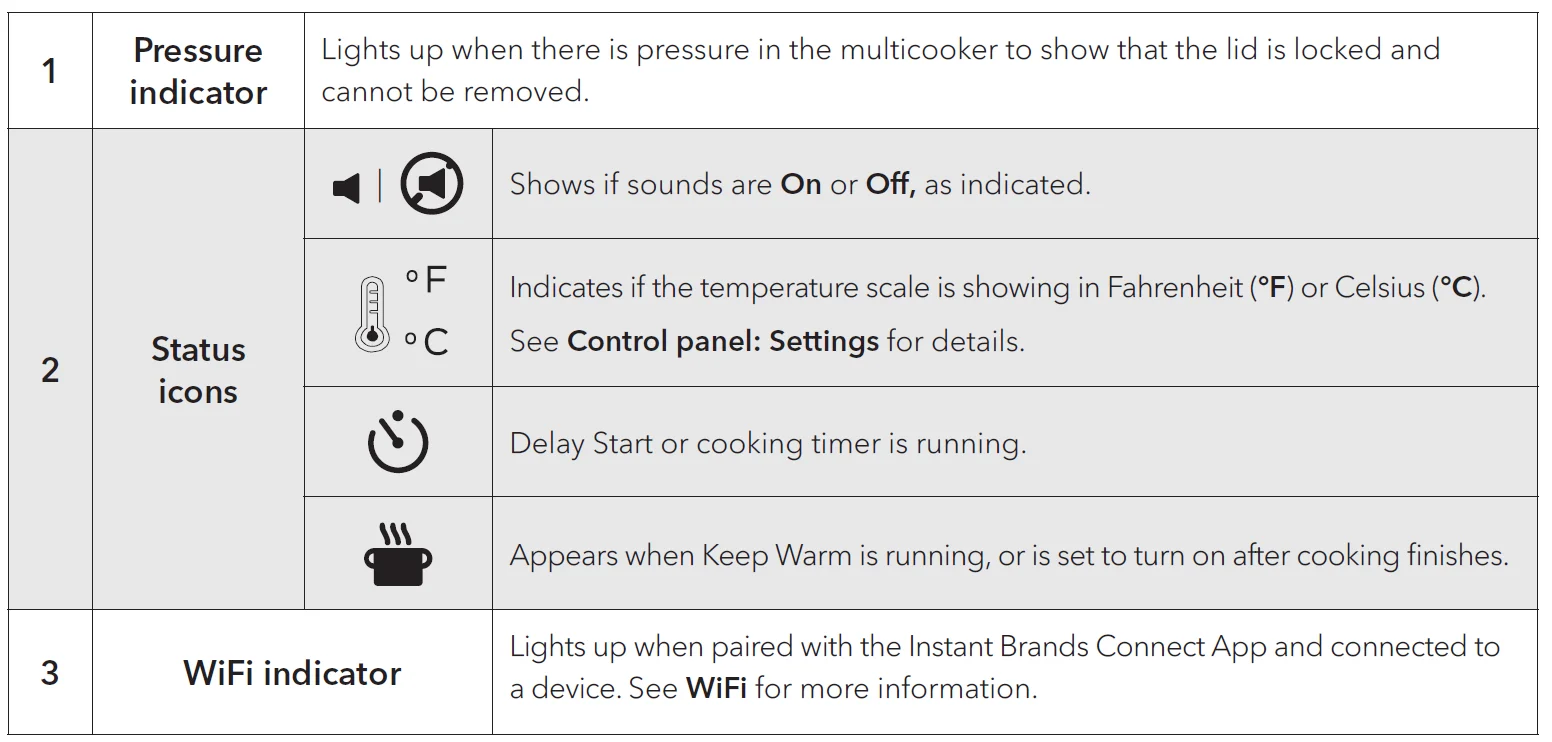
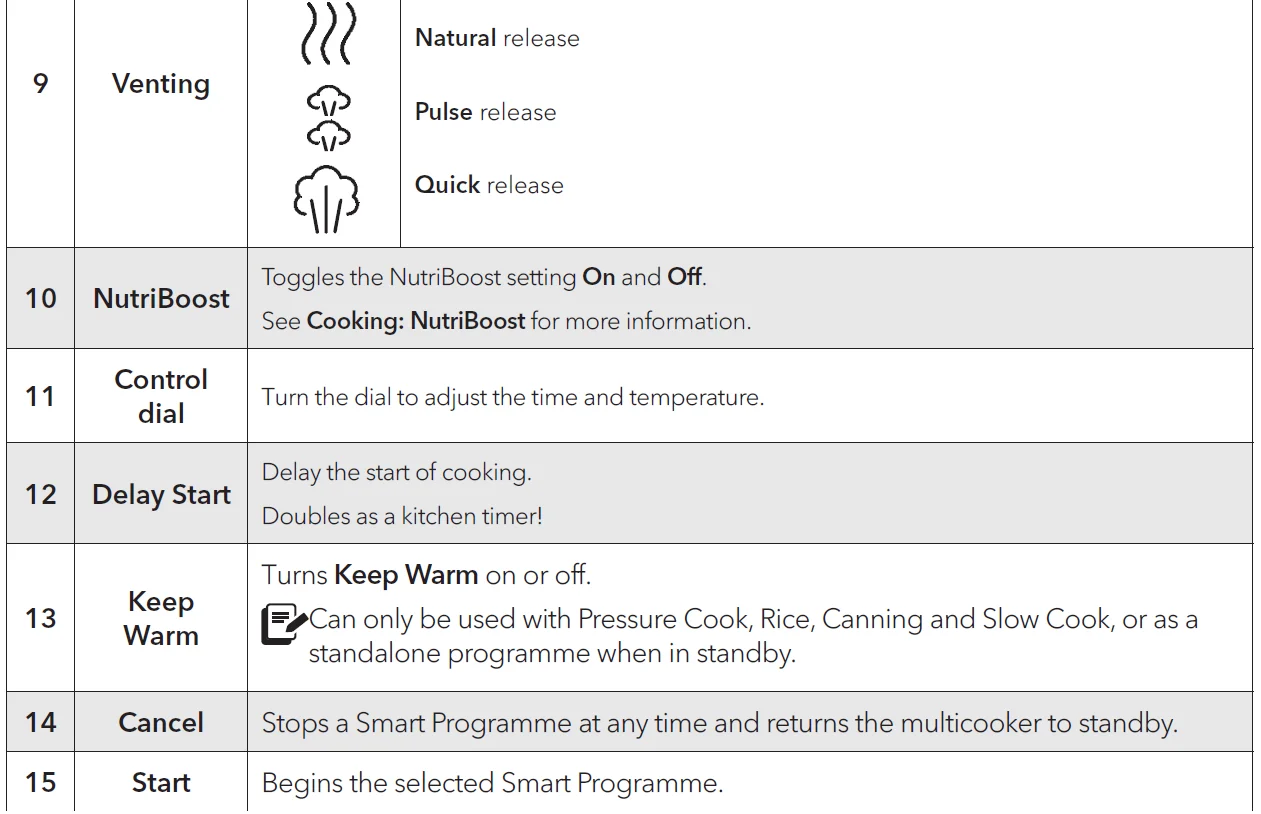
Pressure control features
QuickCool
For the fastest Natural release after pressure cooking, use the QuickCool tray*.
- What we love about it
It’s a huge timer saver — you can release pressure naturally up to 50% faster! - What you should know about it
The metal portion of the lid gets extremely hot, so don’t remove the protective cover unless you’re using QuickCool.
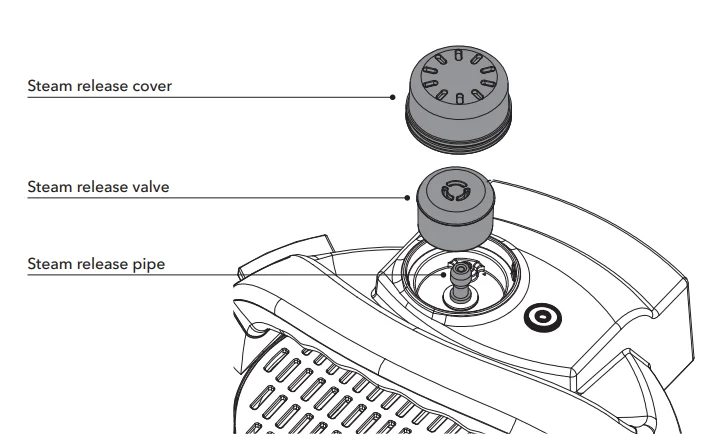
Steam release assembly
The steam release assembly must be fully installed before use.
- What we love about it
The steam release cover disperses the steam, so the pressure releases gently. - What you should know about it
The steam release valve sits loosely on the steam release pipe. When releasing pressure, steam travels up from the cooking pot, through the steam release pipe and steam release valve, and out the top of the steam release cover. It’s important to keep the area clean and clear.
WARNING: Do not cover or block the steam release assembly in any way to avoid personal injury and/or property damage.
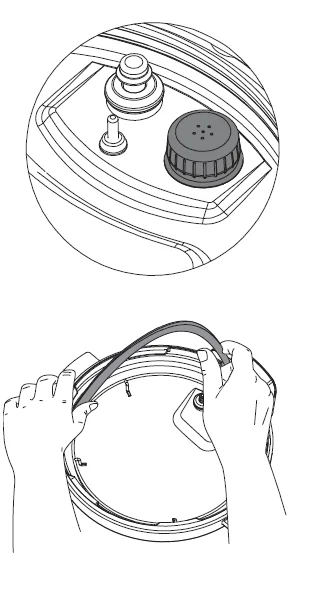
Anti-block shield
The anti-block shield prevents food particles from coming up through the steam release pipe, which assists with pressure regulation. The anti-block shield is integral to product safety and necessary for pressure cooking, so it must be installed before use.
Sealing ring
When the pressure cooking lid is closed, the sealing ring creates an air tight seal between the lid and the cooking pot. The sealing ring must be installed before use. Only one sealing ring should be installed in the lid
at a time.
Instant Tip: Silicone is porous, so it absorbs strong aromas and certain flavours. Keep extra sealing rings on hand to limit the transfer of those aromas and flavours between dishes. Visit our store to start colour-coding your cooking!

Pressure indicator
The pressure indicator on the control panel indicates when the lid is safe to open.
- Pressurised
The pressure indicator icon will highlight in red indicating it is not safe to open the lid. - Depressurised
When the pressure indicator icon is not lit the unit is safe to open.
The float valve and silicone cap work together to seal in pressurized steam. Do not attempt to operate the Instant Pot without the float valve properly installed.
Cooking
The Instant Pot Pro Plus is amazingly versatile in the kitchen. If you need to make changes to the cooking time, pressure level, venting or temperature after a programme has started, just touch the related field, customize the Smart Programme as you like, then touch Start!
CAUTION
Always inspect the lid and cooking pot carefully to make sure they are clean and in good working condition before use.
- To avoid personal injury or damage to the appliance, replace the cooking pot if it is dented, deformed, or damaged.
- Use only authorized Instant Pot cooking pots made for this model when cooking.
Always make sure the heating element is clean and dry before inserting the cooking pot into the multicooker base. Failure to follow these instructions may damage the multicooker. Replace damaged parts to make sure safe function.
WARNING
- DO NOT fill cooking pot higher than the Max PC Fill line as indicated on the cooking pot. When cooking foods that expand (e.g., rice, beans, pasta) do not fill the cooking pot higher than the Half Fill line as indicated on the cooking pot.
- Always cook with the cooking pot in place. DO NOT pour food or liquid into the multicooker base. To avoid risk of personal injury and/or property damage, place food and liquid ingredients in the cooking pot, then insert the cooking pot into the multicooker base.
CAUTION
When cooking meat, always use a meat thermometer to ensure the internal temperature reaches a safe minimum temperature.
Pressure Cook, Rice and Canning
Jump start magic! These programmes use pressurized steam to cook food quickly, evenly, and deeply, for delicious results every time! For the best pressure cooking results, always follow an authorized Instant Pot recipe or our tried, tested and true pressure cooking timetables, which feature grain-to-water ratios for making a variety of rice and grains. Choose from 3 pressure levels, depending on the Smart Programme.
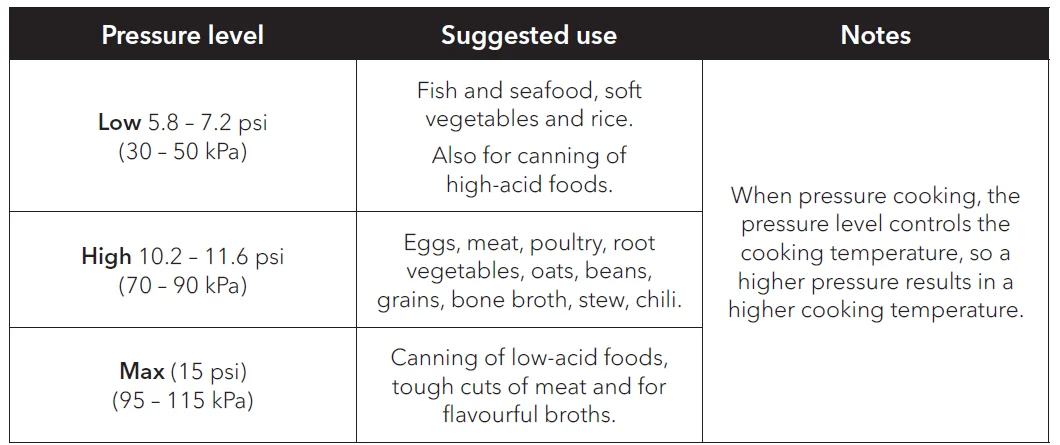
Pressure cooking liquids should be water-based, such as broth, stock, soup or juice. If using canned, condensed or cream-based soup, add liquid as directed below.
- Instant Pot size: 5.7 Litres
- Minimum liquid for pressure cooking*: 375 mL
*Unless otherwise specified in the recipe.
Instant Tip: Use the multi-functional rack to heat food evenly, prevent nutrients from leeching into the cooking liquid, allow oil and grease to drip off the food, and prevent food from scorching the bottom of the cooking pot.
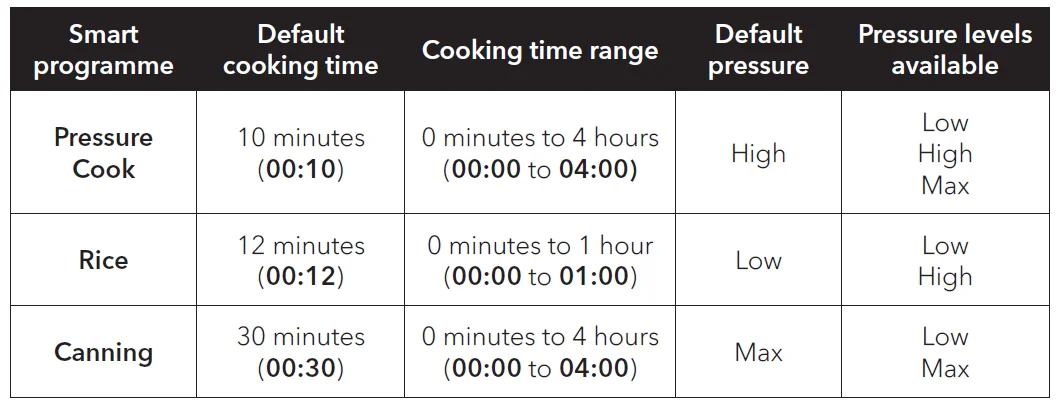
- Add food and liquid to the cooking pot as indicated in your recipe.
- Insert the cooking pot into the multicooker base.
- Place and close the pressure cooking lid as described in Pressure control features: Pressure cooking lid.
- Touch the Smart Programme you want to use: Pressure Cook, Rice or Canning.
- Touch the hours field or the minutes field, then turn the dial to adjust the cooking time in hours and/or minutes.
- Touch the Pressure field to toggle between available Low, High and Max pressure levels.
- Touch the Venting field to toggle between Natural, Pulse and Quick release options.
- Touch Start to begin.
The display shows On, and the cooking progress bar shows Pre-heating. Read Pressure Cooking 101 to get a glimpse behind the curtain and find out what’s going on in that big ol’ magic pot. - When the Smart Programme finishes, the display shows End if Keep Warm is turned off. If not, the timer begins counting from 00:00 up to 10 hours (10:00).
Keep Warm comes on automatically. If you don’t want the Pro Plus to Keep Warm after cooking, press Keep Warm to turn it off at any time. A delayed start timer can be set to automatically start pressure cooking. To set a delay start timer, see Control Panel: Settings.
About Canning
The Canning Smart Programme is a pressure cooking function based on traditional canning principles. Following proper canning processes, canning can be an easy, economical way to preserve quality food at home. The Pro Plus uses 2 pressure canning settings:
- Low
Perfect for canning high-acid fruit, including sauces, jams and chutneys. - Max
Store your amazing vegetarian sauces and high-acid vegetables, as well as low-acid foods such as sauces and soups containing meat.
Sterilizing jars for canning
Your preserves must be placed into sterile, empty jars.
NOTICE: Always check your jars, lids, and seals for chips and other imperfections. Sterilization of jars should occur just before filling. Excess contact with the air should be avoided for safe canning.
- Wash the jars with hot water and dish soap, then rinse them thoroughly.
- Place the cooking pot into the cooker base, then lay the steam rack on the bottom of the cooking pot.
- Place the jars on the steam rack. The pressure cooker will hold up to 4 x 500 mL jars.
- Fill the cooking pot to the first line (1) with water.
- Follow steps 03 to 07 in Pressure Cook, Rice and Canning to programme the following:
- Pressure level: Low
- Time: 10 minutes (00:10)
- Venting method: Quick
- Touch Start to begin sterilization.
Canning 101
Filling jars for canning
Choose a recipe that has been pre-tested and approved for pressure canning. Though ingredients may vary, the process will be the same!
- Fill warm, sterilized canning jars with food and liquid. Follow your recipe to allow for the required headspace.
- Use a sterilized, flexible, nonporous spatula to remove trapped air bubbles.
- Place a sterilized lid on top of the jar, then add a screw band. Hand-tighten the band. Do not over-tighten. Place the filled and sealed jars on the steam rack in the cooking pot.
- Pour hot water into the cooking pot until the jars are ¼ of the way immersed, 1½ L.
- Follow the steps in Cooking: Pressure Cook, Rice and Canning (starting at step 02) to set the appropriate canning time and pressure levels for your recipe.
For more manuals by Instant Pot, visit ManualsLibraryy
Instant Pot Pro Plus-FAQs
What is the difference between Instant Pot Pro and Pro Plus?
The Pro Plus includes Wi-Fi smart controls, guided cooking through the app, and slightly higher power output for faster heating. It also features a front steam-release button, while the standard Pro model focuses more on manual operation without smart connectivity.
Is the Instant Pot Pro Plus worth buying?
Yes, it is a good choice for users who want convenience, multiple cooking functions, and smart features in one appliance. It saves time, reduces the number of kitchen appliances needed, and offers consistent cooking results for many recipes.
Is the Instant Pot easy to clean?
Yes, the inner cooking pot, sealing ring, and lid components are removable for easy cleaning. The stainless-steel inner pot is dishwasher safe in many cases.
Does the Instant Pot Pro Plus have a Keep Warm function?
Yes, it includes an automatic Keep Warm feature that helps maintain food temperature after cooking is complete.
What are the most common Instant Pot mistakes?
Common mistakes include overfilling the pot, forgetting liquid, sealing the lid incorrectly, blocking the steam valve, or using the wrong cooking settings for certain foods.
Can Instant Pots explode?
Serious accidents are very rare and usually happen because of improper use, damaged seals, blocked valves, or opening the lid before pressure is fully released. Proper maintenance greatly reduces risks.
Why are some people afraid of using Instant Pots?
Many first-time users worry about pressure buildup and steam release. Modern Instant Pots are designed with multiple safety systems, making them much safer than older pressure cookers when used correctly.
Is the Instant Pot Pro Plus safe to use?
Yes, it includes several safety features such as lid locking, overheating protection, pressure control systems, and steam release protection. Following the user manual and instructions helps ensure safe operation.