
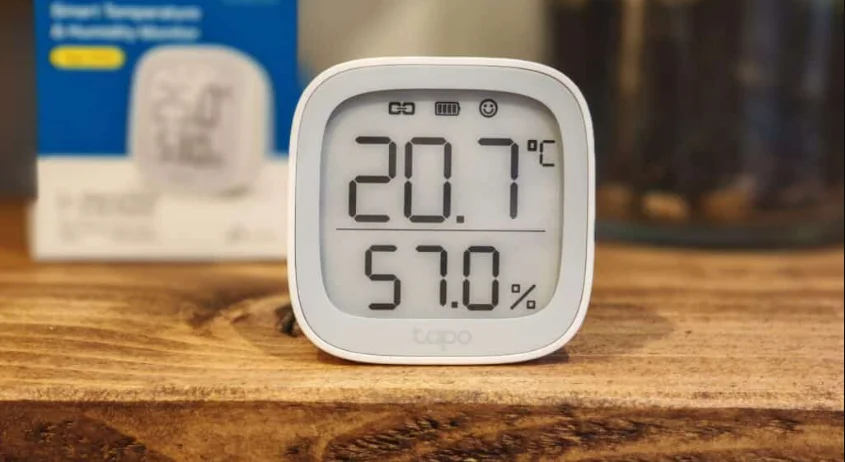

Tapo T315 Smart Temperature-Humidity Monitor
About This Guide
This guide provides a brief introduction to the Smart Temperature & Humidity Monitor and the Tapo app, as well as regulatory information. Please note that features available in Tapo may vary by model and software version. Tapo availability may also vary by region. All images, steps, and descriptions in this guide are only examples and may not reflect your actual Tapo experience.
Conventions
In this guide, the following convention is used:
More Info
- Specifications can be found on the product page at https://www.tapo.com.
- Our Technical Support and troubleshooting information can be found at https://www.tapo.com/support/.
- The setup videos can be found at https://www.tp-link.com/support/setup-video/#smart-sensors.
Introduction
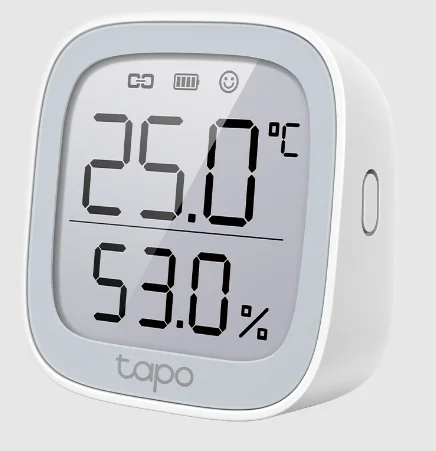
The Smart Temperature and Humidity Monitor with a 2.7″ E-ink display detects real-time temperature and humidity with great accuracy. Receive instant app notifications when temperature or humidity levels fall outside your customized ranges. React promptly to sudden air conditioning changes whenever the need arises.
- Real-Time & Accurate Monitoring – Detects real-time temperature and humidity with great accuracy. (Measurement Accuracy: ±0.54 ºF, ±3% RH).
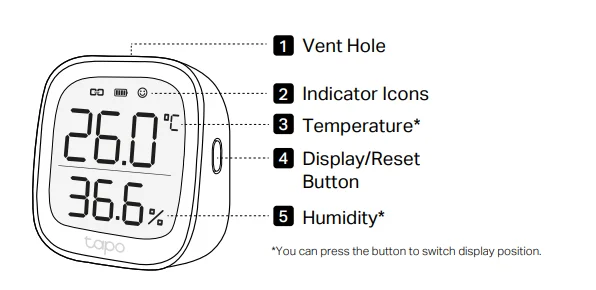
- 2.7″ E-ink Display – Indicates temperature & humidity, comfort level with facial expressions, battery condition, and signal.
- Home Automation – Automatically turn on/off home electronics (e.g., heater, fan, humidifier, and more) to maximize comfort and save energy.
- Instant App Notification – Receive app alert notifications when conditions fall outside the preset range.
- Free Data Storage & Visual Graphs – Record temperature and humidity data and generate periodic data summaries.
- Flexible Installation – Just place it on the desk or mount it on the wall.
- Hub Required – The Tapo Hub is required to support smart features, like remote monitoring, home automation, data export, and more.
Appearance
Tapo Smart Ecosystem
Tapo is the easy way to turn your home into a smart home. With the Tapo Hub as a bridge, the Tapo Smart Sensor works with a wide range of Tapo accessories. So you can easily control and monitor your home from anywhere.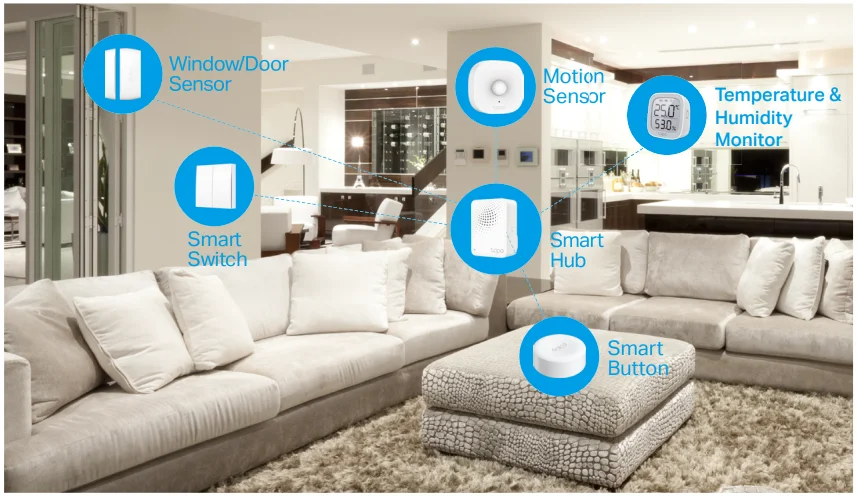
Automate Your Home
Create a Smart Action to automate your smart devices and activate them all with motion. Customize your own Smart Actions to group your Tapo products together any way you want.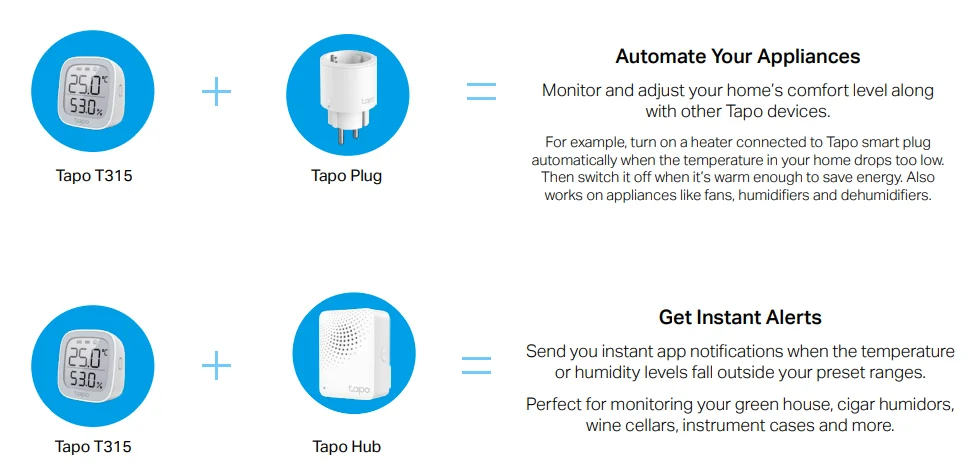
Set Up Your Smart Monitor
Watch setup videos at https://www.tp-link.com/support/download/tapo-t315/.
Before You Start
A Tapo Hub is required. Make sure your Tapo Hub is successfully added via the Tapo app.
1. Set Up Your Monitor
Tap the button in the Tapo app, tap Sensors, and select your model.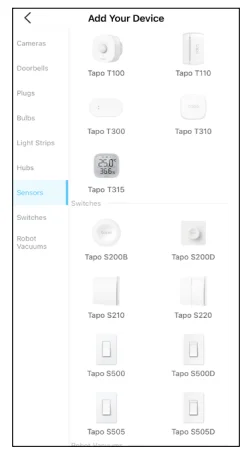
2. Power Up Your Monitor
Remove the back panel and insert the batteries. The screen will light up.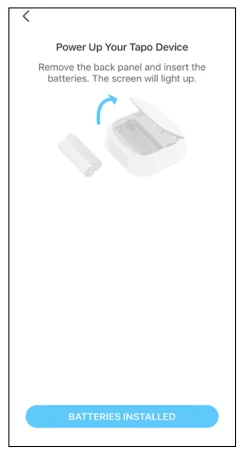
3. Enter Pairing Mode
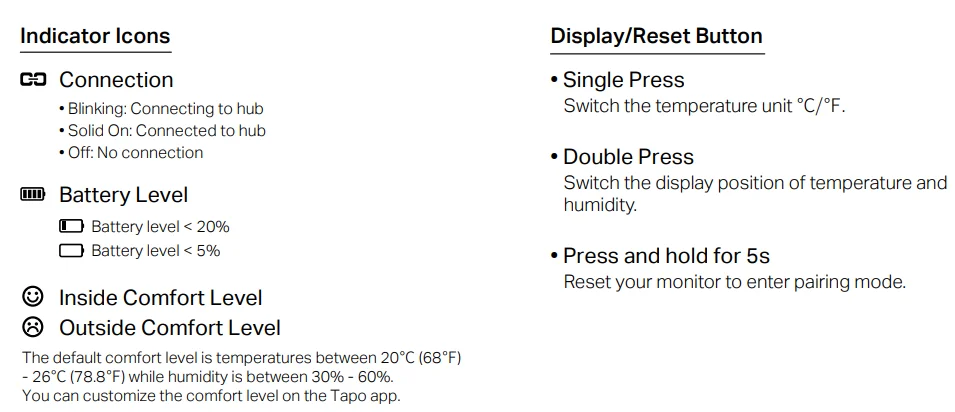
Press and hold the button for at least 5 seconds until the Connection icon starts to blink.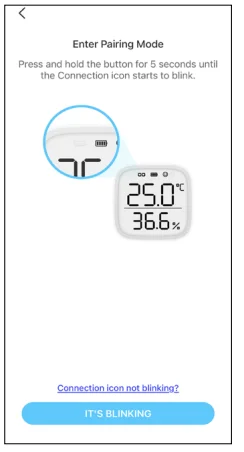
4. Complete Setup
Follow the app instructions to set up your monitor.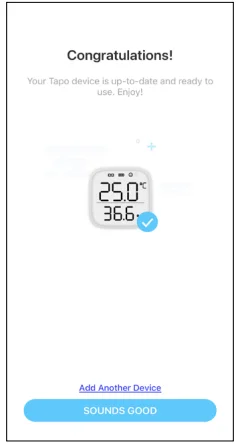
5. Test Your Sensor
Take the monitor to your preferred location. Make sure the Connection icon on the screen is solid on. If there is no connection icon, move it closer to your hub.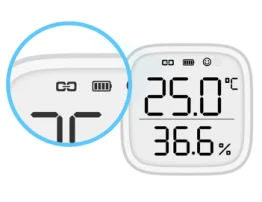
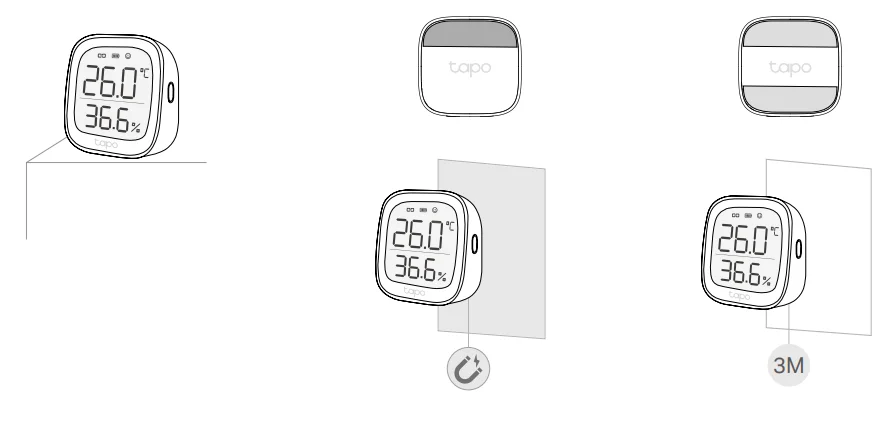
6. Place Your Monitor
- Option 1: Place it on a table or a shelf.
- Option 2: Attach the non-slip pad to the back and magnetically attach it to metallic surfaces.
- Option 3: Stick it to a clean wall with the included adhesive.

Use Your Smart Monitor
After you successfully set up your hub and monitor, you will see your devices listed on the home page. With the Tapo app, you can view and manage your devices and get instant notifications anytime, anywhere.
Home Page
This page lists all the devices you’ve added, and you can view them directly and manage them easily. Tap the card to enter its Status page.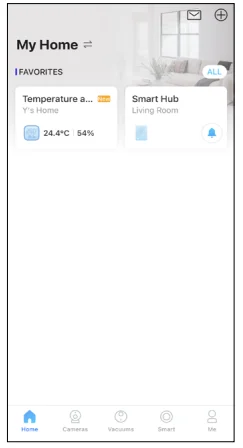
Home Page Settings
Long-press on a card, then you can reorder cards, tap to remove your device from your account, share your device, favorite/unfavorite the device, or relocate your device to another Home.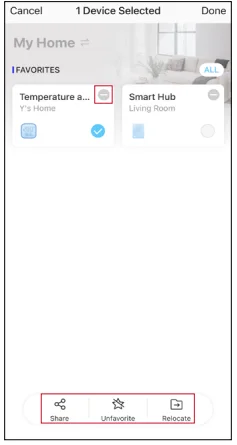
Status Page
You can check the temperature/humidity data. Slide the panel up to check more settings or tap the gear icon to enter the Settings page.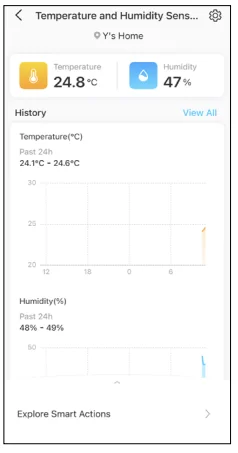
Featured Smart Actions
The monitor can work with other Tapo devices to automate your home. You can customize smart actions based on the templates.
Device Settings
Check/edit the basic info, set Comfort Zone, view the User Manual and Placement Guide, or remove your device from your account.
Comfort Zone
Customize the comfort zone and turn on Reminder, then you can get instant notifications when temperature or humidity levels fall outside your customized ranges.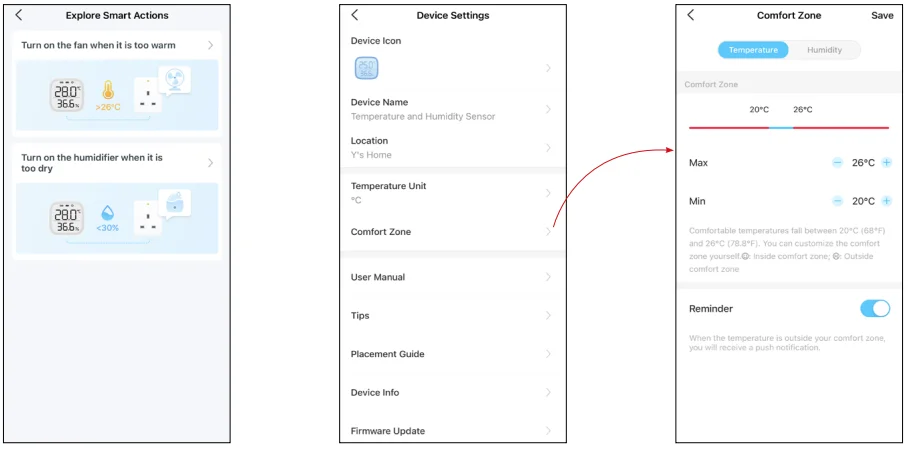
How to Reset Your Smart Monitor
Option 1. Via the Button
Press and hold the button for at least 5 seconds until the Connection icon starts to blink.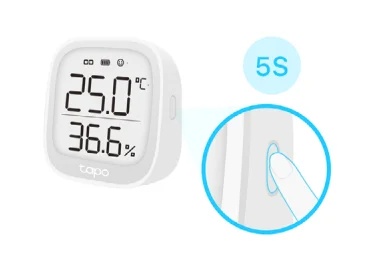
Option 2. Via the Tapo App
Long-press the card on the home page and tap, or go to the Device Settings page and tap the Remove button to remove your sensor from your account.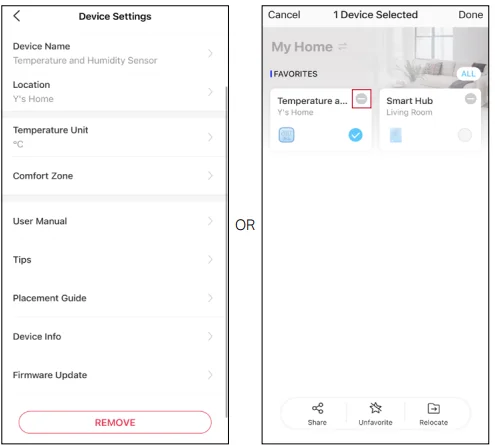
Safety Information
- Keep the device away from water, fire, humidity, or hot environments.
- Do not attempt to disassemble, repair, or modify the device. If you need service, please contact us.
- Do not use the device where wireless devices are not allowed.
- Please read and follow the above safety information when operating the device. We cannot guarantee that no accidents or damage will occur due to improper use of the device. Please use this product with care and operate at your own risk.
- Do not ingest the battery. Chemical Burn Hazard.
Warnings
- Operating Temperature: 0 ºC–50 ºC (32°F–122°F)
- Operating Humidity: 10%–90% RH, Non-condensing
Handling Instructions for Battery
Please read and follow the handling instructions for the battery before use. Improper use of the battery may cause heat, fire, explosion, damage, or capacity deterioration of the battery.
- Do not place or leave the battery and equipment within the reach of infants so that they are not able to swallow or mistreat the battery by mistake. In case of ingestion, consult a doctor immediately.
- Do not let leaked electrolyte come into contact with eyes or skin. In such a case, immediately wash the area of contact with clean water and seek help from a doctor. If not treated soon, prolonged contact may cause serious injury.
- Do not put the battery into a fire. Do not use it or leave it in a place near fire, heaters, or high-temperature sources. In such a case, the insulator in the battery may be melted, the safety vent and structure may be damaged, or the electrolyte may catch fire, all of which may cause heat generation, explosion, or fire.
- Do not submerge the battery in water or wet the battery.
- Do not use or leave the battery near fire or in a car under the blazing sun. Such a high temperature may cause damage to the protective device in the battery, which may result in an abnormal reaction, and then heat generation, explosion, or fire.
- Do not connect the battery reversed in positive (+) and negative (-) terminals in the equipment.
- Do not let the battery terminals (+ and -) contact a wire or any metal (like a metal necklace or a hairpin) with which it is carried or stored together. In such a case, the battery will be shorted and cause an excessive current, which may result in heat generation, explosion, or fire.
- Do not connect the battery directly to an electric outlet or cigarette heater socket in a car. With a high voltage applied, the battery may overheat, explode, or cause fire.
- Do not throw or drop the battery. Strong impact may damage the protective device, which may cause an abnormal chemical reaction during charging and result in heat generation, explosion, or fire of the battery.
- Do not drive a nail into, hit with a hammer, or stamp on the battery. In such a case, the battery may be deformed and shorted, which may cause heat generation, explosion, or fire of the battery.
- Do not solder the battery directly. Heat applied during soldering may damage the insulator of the safety vent and mechanism, which may result in heat generation, explosion, or fire of the battery. The battery employs a safety mechanism and a protective device in order to avoid any danger. If these are damaged, heat, explosion, or fire may be caused.
CAUTION
- Do not put the battery in a microwave or a pressure cooker. Sudden heat may damage the seal of the battery and may cause heat generation, explosion, or fire of the battery.
- Do not use the battery with other makers’ batteries, different types, and/or models of batteries, such as dry batteries, nickel-metal hydride batteries, or nickel-cadmium batteries.
- Do not leave the battery in the equipment if it generates an odor and/or heat, changes color and/or shape, leaks electrolyte, or causes any other abnormality.
- Do not use the battery in a place where static electricity (more than the limit of the manufacturer’s guarantee) occurs. Otherwise, the protective device in the battery might be damaged and cause heat generation, explosion, or fire.
- Do not use the battery in conditions other than the operating conditions; otherwise, the battery might cause heat generation, damage, or deterioration of its performance.
Please read and follow the above safety information when operating the device. We cannot guarantee that no accidents or damage will occur due to improper use of the device. Please use this product with care and operate at your own risk.
For More Manuals By Tapo, Visit ManualsLibraryy.
Tapo T315 Smart Temperature-Humidity Monitor-FAQs
What is the Tapo T315 Smart Temperature-Humidity Monitor used for?
The Tapo T315 is designed to track indoor temperature and humidity levels in real time. It helps users maintain comfortable room conditions, monitor sensitive environments, and automate smart home devices. Many people use it in bedrooms, nurseries, greenhouses, wine storage areas, and office spaces for climate monitoring.
Does the Tapo T315 require a hub to work?
The Tapo T315 can display readings directly on its screen without a hub, but advanced features require a compatible Tapo Hub. Functions like remote monitoring, smart automations, app notifications, and historical data tracking become available once the sensor is connected through the Tapo ecosystem.
How accurate is the Tapo T315 sensor?
The Tapo T315 uses a high-precision sensor designed for reliable indoor monitoring. It provides temperature readings with strong accuracy and refreshes data frequently for near real-time updates. This makes it useful for spaces where stable humidity and temperature levels are important for comfort or storage.
Can the Tapo T315 send notifications to my phone?
Yes, the Tapo T315 supports instant mobile notifications through the Tapo app when connected to a compatible hub. Users can set custom humidity and temperature ranges, allowing the device to send alerts whenever environmental conditions rise above or fall below selected limits indoors.
Does the Tapo T315 support smart home automation?
The Tapo T315 can trigger automations within the Tapo smart home ecosystem. For example, users can automatically activate fans, humidifiers, heaters, or dehumidifiers based on temperature or humidity levels. This helps improve indoor comfort while reducing the need for constant manual adjustments throughout the day.
How long does the Tapo T315 battery last?
The Tapo T315 is designed for long-term indoor monitoring and typically offers up to two years of battery life under standard usage conditions. Its low-power E-ink display helps conserve energy, making it suitable for continuous operation without frequent battery replacements or charging interruptions.
Can the Tapo T315 store historical temperature data?
Yes, the Tapo T315 can track and store environmental history through the Tapo app when paired with a hub. Users can review trends, analyze humidity fluctuations, and export data reports over time, making the device useful for long-term room monitoring and climate management tasks.
Where should I place the Tapo T315 for accurate readings?
For the best performance, the Tapo T315 should be placed away from direct sunlight, heating vents, windows, and strong airflow. Keeping the device in a stable indoor location helps prevent inaccurate readings and ensures more consistent temperature and humidity measurements throughout the monitored environment.
Is the Tapo T315 compatible with Alexa or Google Home?
The Tapo T315 supports integration with smart home platforms like Amazon Alexa and Google Home through compatible Tapo hubs. This allows users to include the sensor in broader smart home routines, voice commands, and automation systems for easier environmental monitoring and device management.
What makes the Tapo T315 different from regular hygrometers?
Unlike standard hygrometers, the Tapo T315 combines real-time monitoring, mobile alerts, historical tracking, and smart automation support in one device. Its integration with the Tapo ecosystem makes it more useful for users who want remote access and automated climate control features at home.