
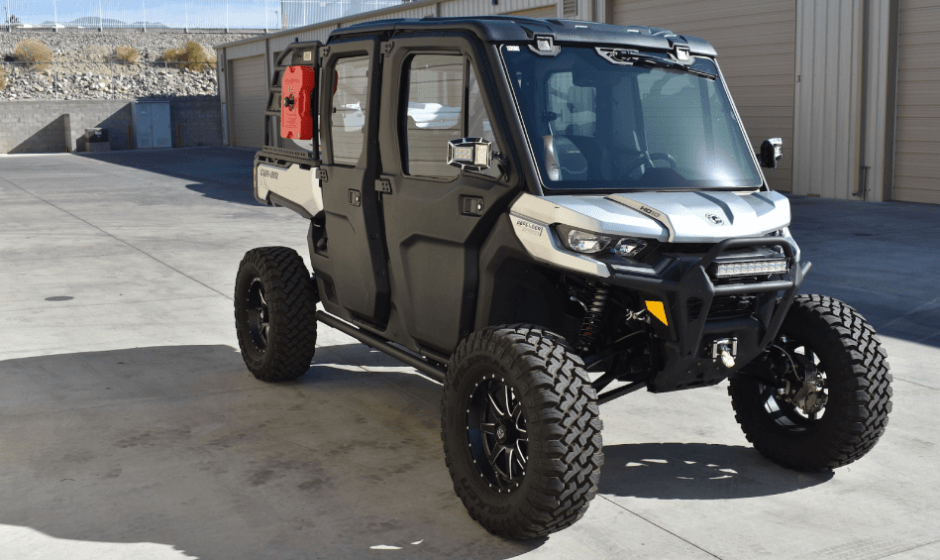

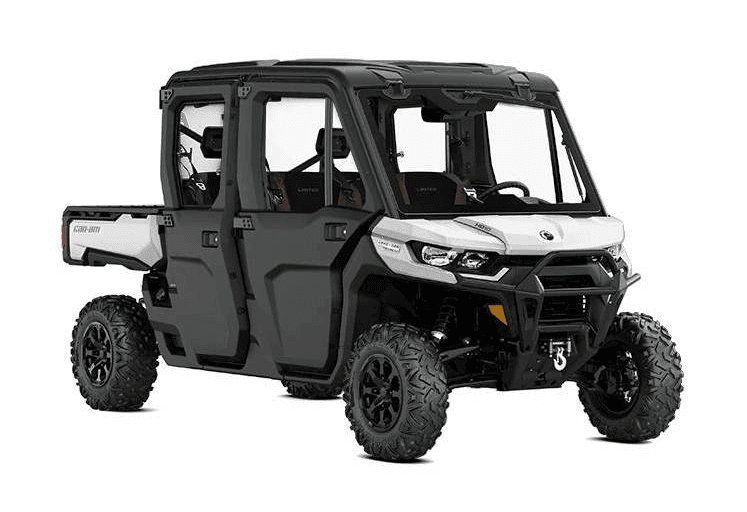
Can-Am Defender Max Series 2021 Vehicle
GENERAL PRECAUTIONS
Avoid CarbonMonoxide Poisoning
All engine exhaust contains carbon monoxide, a deadly gas. Breathing carbon monoxide can cause headaches, dizziness, drowsiness, nausea, confusion, and eventually death.
Carbon monoxide is a colorless, odorless, tasteless gas that may be present even if you do not see or smell any engine exhaust. Deadly levels of carbon monoxide can collect rapidly, and you can quickly be overcome and unable to save yourself. Also, deadly levels of carbon monoxide can linger for hours or days in enclosed or poorly ventilated areas. If you experience any symptoms of carbon monoxide poisoning, leave the area immediately, get fresh air, and seek medical treatment.
To prevent serious injury or death from carbon monoxide:
- Never run the vehicle in poorly ventilated or partially enclosed areas such as garages, carports, or barns. Even if you try to ventilate engine exhaust with fans or open windows and doors, carbon monoxide can rapidly reach dangerous levels.
- Never run the vehicle outdoors where engine exhaust can be drawn into a building through openings such as windows and doors.
Avoid Gasoline Fires and Other Hazards
Gasoline is extremely flammable and highly explosive. Fuel vapors can spread and be ignited by a spark or flame many feet away from the engine.
To reduce the risk of fire or explosion, follow these instructions:
- Use only an approved gasoline container to store fuel.
- Never fill the gasoline container in the vehicle cargo box or on the vehicle. An electrical static discharge may ignite the fuel.
- Strictly adhere to instructions in FUELING PROCEDURE.
- Never start or operate the engine if the fuel cap is not properly installed.
Gasoline is poisonous and can cause injury or death.
- Never siphon gasoline by mouth.
- If you swallow gasoline, get any in your eye(s), or inhale gasoline vapor, see a doctor immediately.
If gasoline spills on you, wash with soap and water and change your clothes.
Accessories and Modifications
Any modifications or additions of accessories may affect the handling of your vehicle. It is important to take the time to get familiar with the vehicle once modifications are made to understand how to adapt your driving behavior accordingly.
Do not tamper with unauthorized modifications or install equipment not specifically certified by BRP for the vehicle. These modifications have not been tested by BRP, and they may increase the risk of injury or loss of control, or render the vehicle illegal to ride. As an example, tampering with tire specifications may affect the behavior of the vehicle and increase the risk of a loss of control.
Ask your authorized BRP dealer for suitable available accessories for your vehicle.
SAFE OPERATION – RESPONSIBILITIES
This is a high-performance off-road vehicle. Operators must be responsible and use care to avoid rollovers, tipovers, collisions, and other accidents. Even with vehicle safety features (such as protective structure, seat belts, side nets) and protective gear (such as a helmet), there is always a risk of injury or death in these accidents. To reduce the risk of serious injury or death, follow the rules in this section.
Riding Carefully
- This vehicle handles differently from other vehicles. A collision or rollover can occur quickly, during abrupt maneuvers such as doing sharp turns, acceleration, or deceleration and driving on hills or over obstacles, if you fail to take proper precautions.
- Never operate at excessive speeds. Always go at a speed that is proper for the terrain, visibility, and operating conditions, and your experience.
- Never attempt jumps, side slides, donuts, or any other stunts.
- Never attempt rapid acceleration or deceleration when performing a sharp turn. This may result in a rollover.
- Never attempt skidding or sliding. Suppose vehicle starts to skid or slide, counter-steer in the direction of skidding or sliding. On extremely slippery surfaces, such as ice, go slowly and be very cautious in order to reduce the chance of skidding out of control.
- Always be sure there are no obstacles or people behind the vehicle when you operate in reverse. Pay attention to blind spots. When it is safe to proceed in reverse, go slowly.
- Never exceed the stated load limits for this vehicle. Cargo must be properly secured. Reduce speed, allow for greater braking distance, and follow other instructions in MOVING LOADS AND DOING WORK.
- Always remember that this vehicle is heavy! Its pure weight alone may entrap you should it tip or rollover.
PREPARE TO RIDE
Before you Ride
Perform pre-ride inspection to confirm the safe operating condition of your vehicle. Refer to PRE-RIDE INSPECTION.
Driver and passengers must:
- Be properly seated.
- Latch side nets and fasten seat belts.
- Wear appropriate riding gear. (Refer to RIDING GEAR.)
Riding Gear
It is important that the operator and passengers always wears appropriate protective clothing and apparel, including:
- An approved helmet
- Eye protection
- Boots
- Gloves
- A long-sleeved shirt or jacket
- Long pants.
Depending on conditions, anti-fogging goggles may be required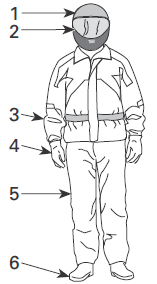
- Approved helmet
- Eye and face protection
- Long-sleeved shirt or jacket
- Gloves
- Long pants
- Boots (over-the-ankle footwear)
VEHICLE INFORMATION
PRIMARY CONTROLS
It is important to know the location and operation of all controls, and to develop and practice smooth and coordinated use of them.
NOTE: Some vehicle safety labels are not shown on illustrations. For information on vehicle safety labels, refer to IMPORTANT ON-PRODUCT LABELS.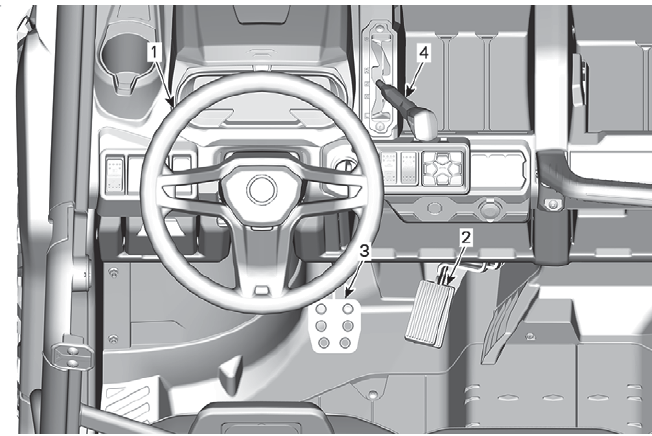
SteeringWheel
The steering wheel is located in front of the driver’s seat. The steering wheel steers the vehicle to the left or right. Turn the steering wheel in the direction you want to go.
Grip the steering wheel with both hands, without having thumbs rolled around the steering wheel.
CAUTION: Under rough trail conditions or when crossing an obstacle, the steering wheel could suddenly jerk on one side, causing hand or wrist injuries if the thumbs are rolled around the steering wheel.
Models with DPS
The DPS (Dynamic Power Steering) reduces the effort to turn the steering wheel.
Accelerator Pedal
The accelerator pedal is located on the right side of the brake pedal. The accelerator pedal controls the engine speed.
To increase or maintain vehicle speed, press on the accelerator pedal with your right foot. To decrease vehicle speed, release the accelerator pedal.
The accelerator pedal is spring-loaded and should return to rest position (idle) when not pressed.
NOTE: The accelerator pedal should never be disassembled.
BrakePedal
The brake pedal is located on the left side of the accelerator pedal.
The brake pedal function is to slow down or stop the vehicle.
To decrease vehicle speed or to stop the vehicle, press down the brake pedal with your right foot.
The brake pedal is spring-loaded and should return to its resting position when not pressed.
Shift Lever
The shift lever is located on the upper console to the right of the steering wheel.
The shift lever is used to change the gearbox position.
TYPICAL
- Shift lever
- Park
- Reverse
- Neutral
- High range (forward)
- Low range (forward)
The vehicle must be stopped and brakes applied prior to selecting any gear.
WARNING: This gearbox is not designed to shift while the vehicle is moving.
Park
The park position locks the gearbox to help prevent vehicle movement.
WARNING: Always use the PARK (P) position when the vehicle is not in operation. The vehicle can roll if the shift lever is not set to P (PARK).
Reverse
The reverse position allows the vehicle to go backwards.
NOTE: In reverse operation, the engine’s RPM is limited, thus limiting the vehicle’s reverse speed
WARNING: When driving downhill in reverse, gravity can increase the vehicle speed above the set limited reverse speed.
Neutral
The neutral position disengages the gearbox.
High Range (Forward)
This position selects the high-speed range of the gearbox. It is the normal driving speed range. It allows the vehicle to reach its maximum speed.
Low Range (Forward)
This position selects the low speed range of the gearbox. It allows the vehicle to move slowly with maximum torque at the wheels.
NOTICE: Use the low speed range to pull a trailer, carry heavy cargo, go over obstacles, or drive uphill and downhill.
SECONDARY CONTROLS
Some vehicle safety labels are not shown on illustrations. For information on vehicle safety labels, refer to IMPORTANT ON PRODUCT LABELS.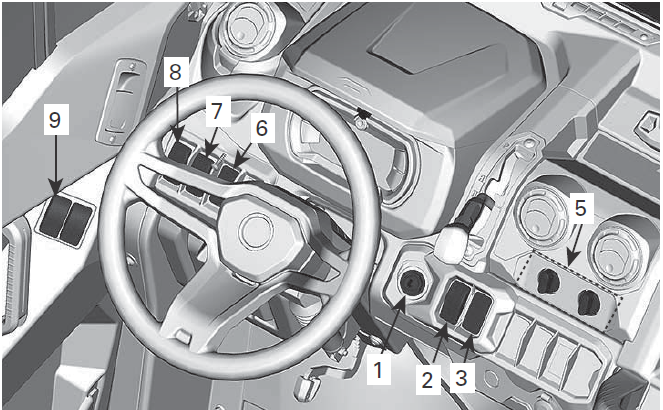
TYPICAL – CAB MODEL WITH HEATING SYSTEM SHOWN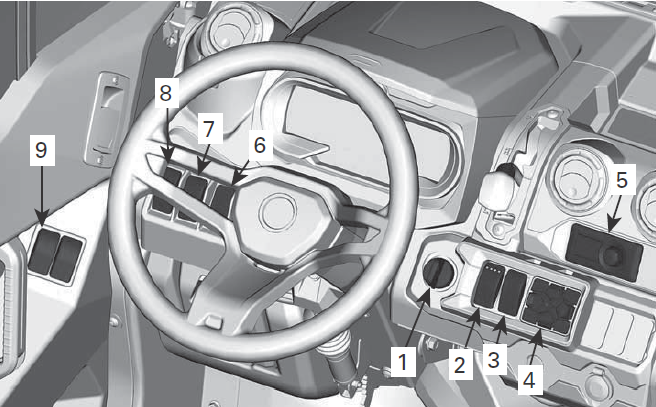
TYPICAL – CAB MODEL WITH HEATING AND A/C SHOWN
Ignition Switch and Keys
Ignition Switch
The ignition switch is located on the upper console area.
IGNITION SWITCH POSITION
- OFF
- ACC
- ON
- START
OFF
The key can be inserted or removed in this position only.
In OFF position, the electrical system of the vehicle is disabled. The engine is shut down by turning the ignition switch to OFF position.
ACC
Only accessories such as the heater, wiper, or radio are powered up.
NOTE: The ACC position also shuts down the engine
NOTICE: Remember to always return your key to the OFF position for a complete electrical shutdown. Leaving the key in ACC will drain the battery, and the vehicle may not restart.
ON
When the key is turned in this position, the electrical system of the vehicle is activated.
- The gauge should wake up.
- The vehicle lights are turned on.
- The engine can be started.
START
This position starts the engine.
NOTE: If the ignition switch is left ON for more than 30 minutes, engine will not start unless ignition switch is turned OFF, then ON again.
Keys
Basic Key
The vehicle is delivered with 2 basic keys. One with a rubber protection and one without.
D.E.S.S. Key
For all D.E.S.S. related options, see an authorized Can-Am dealer for information.
Digitally Encoded Security System (D.E.S.S.)
The ignition keys contain an electronic circuit that gives it a unique electronic serial number.
The D.E.S.S. system reads the key code and allows engine starting for keys it recognizes.
This vehicle can be operated using 3 different types of key programming:
- Work
- Normal
- Performance
Refer to your dealer for complete information.
NOTE: Additional keys are available from your dealer as an accessory.
WARNING
Rollovers, tipovers, collisions, and loss of control resulting in serious injury or death are possible with the performance or normal key. Using the normal key is not a substitute for the operator being prepared, qualified, and operating with care.
Performance Key
The performance key allows the user to access the full torque of the engine as well as the top speed of the vehicle.
This may be useful for riders who prefer crisper throttle response, and for environments where higher speeds and greater acceleration are appropriate.
For example, in wide-open straight trails, operators may prefer the performance key.
Normal Key
The normal key limits the vehicle rate of acceleration and/or the vehicle speed to 70 km/h (43MPH).
Work key
The work key allows for usage of 100% of maximum engine torque but limits vehicle speed to 40 km/h (25MPH).
WARNING: On steep downhills, the engine speed limiter may not prevent the vehicle from accelerating beyond this speed.
This key may be useful for riders who prefer more gradual acceleration, or for riding in environments where full speed and high acceleration are not desirable. For example, in narrow, winding trails, operators may prefer a normal key.
D.E.S.S. Flexibility
The D.E.S.S. of your vehicle can be programmed by your authorized Can-Am dealer to accept up to 8 different keys. If you have more than one D.E.S.S. equipped Can-Am vehicle, each can be programmed by your authorized Can-Am dealer to accept the other vehicle’s D.E.S.S. keys.
2WD/4WDSwitch
The 2WD/4WD switch is located on the upper console.
This switch selects 2-wheel drive or 4-wheel drive mode when the vehicle is stopped and the engine is running.
NOTICE: The vehicle must be stopped to engage or disengage the 2WD/4WD switch. Mechanical damage may occur if switch is engaged or disengaged while driving. Always unlock the front diff. before disengaging 4WD.
WARNING
Abruptly changing direction can cause loss of control or injury. Never engage Front Diff Lock before entering a turn or when turning.
The 4WD mode is engaged when the switch is in the middle position. The 2WD mode is engaged when the switch is pushed downwards. The vehicle is then rear wheel drive only.
MAINTENANCE PROCEDURES
This section includes instructions for basic maintenance procedures. Due to the complexity of some of the maintenance procedures, good mechanical skills are required. If you are not comfortable with these procedures, do not hesitate to contact an authorized Can-Am off-road dealer, repair shop, or person of your own choosing.
WARNING: Unless otherwise indicated, always turn ignition switch to the OFF position before performing any maintenance and remove key.
WARNING: Should removal of a locking device be required (e.g. lock tab, self-locking fastener, etc.), always replace it with a new one.
Engine Air Filter
NOTICE: Never modify the air intake system. Otherwise, engine performance degradation or damage can occur. The engine is calibrated to operate specifically with these components.
Engine Air Filter Replacement Guideline
Engine Air filter inspection and replacement frequency should be adjusted according to riding conditions, as it is critical to ensure proper engine performance and life span.
Engine Air filter inspection and replacement frequency must be increased for the following severe riding conditions:
- Riding on dry sand.
- Riding on dry dirt-covered surfaces.
- Riding on dry gravel trails or similar conditions.
- Riding in areas with high concentrations of seeds or crop husks.
- Riding in severe snow conditions.
NOTICE: When riding in dusty conditions or sand, the air box needs to be cleaned before every ride.
NOTE: Riding in a group under these conditions would increase even more the air filter replacement frequency. Engine Air Filter Removal Open cargo box. Unlatch air filter cover and remove air filter.
RH SIDE OF VEHICLE, UNDER CARGO BOX
- Air filter cover
- Latches
The filter fits tightly over the outlet tube, and there will be some initial resistance.
Gently move the end of the filter back and forth to break the seal, then rotate while pulling straight out.
Avoid knocking the filter against the housing.
Engine Air Filter Cleaning
Inspect the filter for any signs of leaks.
A streak of dust on the clean side of the filter is a telltale sign. Replace filter if there is any damage. Eliminate any source of air leaks before installing a new filter.
Clean engine air filter by tapping out heavy dust from paper element; this will allow dirt and dust to get out of the paper filter.
NOTICE: It is not recommended to blow compressed air on the paper element; this could damage the paper fibers and reduce its filtration ability when used in dusty environments. If the engine air filter is too dirty and cannot be cleaned following the recommended procedure, it should be replaced.
Use a clean, damp cloth to wipe both the filter sealing surface and the inside of the outlet tube. Ensure that the outlet tube sealing area is undamaged.
Inspect air filter housing for cleanliness.
Duckbill Valve Cleaning
Visually check and physically squeeze the duckbill valve. Make sure the valve is flexible and not inverted, damaged, or plugged.
Engine Air Filter Installation
Insert the filter carefully. Seat the filter by hand, making certain it is inserted completely into the air cleaner housing. Apply pressure by hand at the outer rim of the filter, not the flexible center.
Secure air filter cover with latches.
For more Manuals by Can-Am, visit ManualsLibraryy
Can-Am Defender Max Series 2021 Vehicle-FAQs
What’s the difference between HD7 and HD9 engines?
HD7: 650cc single-cylinder (fuel-efficient, lighter use).
HD9: 976cc V-twin (more torque, better for heavy loads).
Does the Can-Am Defender have air conditioning (AC)?
Yes, the Defender MAX Limited HD10 comes with 3-mode AC for climate control.
How do I adjust the headlights on a Can-Am Defender?
Use the adjustment knobs near the headlights:
Turn clockwise/counterclockwise for vertical/horizontal alignment.
What is limp mode, and how do I reset it?
Limp mode reduces power to protect the engine (due to sensor/mechanical issues).
Reset: Diagnose the issue (check sensors, fluids) and restart the vehicle.
Where is the MAP sensor located?
Typically near the intake manifold. Test with a multimeter—voltage should fluctuate (1–2V) when revving.
Does the Defender have turn signals?
Stock models may not, but aftermarket kits (plug-and-play) can add auto-canceling signals.
How do I save fuel in my Can-Am Defender?
Use ECO mode for city driving.
Maintain steady speeds.
Keep tires properly inflated.
Reduce unnecessary weight.
What is Smart Lok on the Can-Am Defender?
A locking differential system for improved traction in off-road conditions.
How often should I service my Defender Max?
Follow the hour-based intervals (e.g., oil every 100–200 hours) and annual checks for optimal performance.
Can I switch to B mode while driving?
B mode (if equipped) increases regenerative braking—safe to switch while driving, ideal for downhill terrain.