
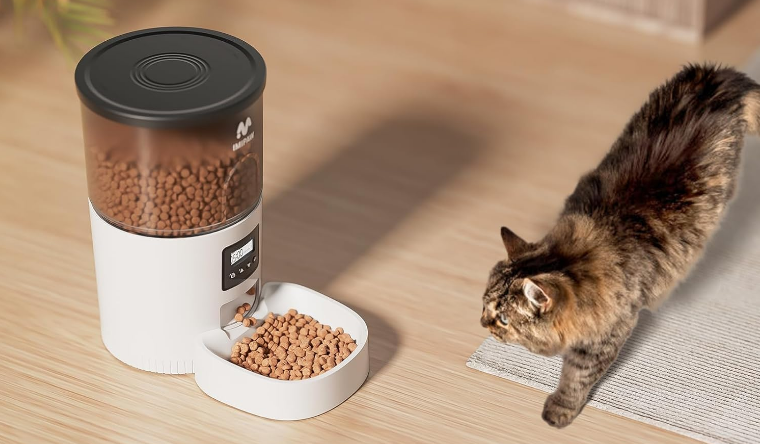

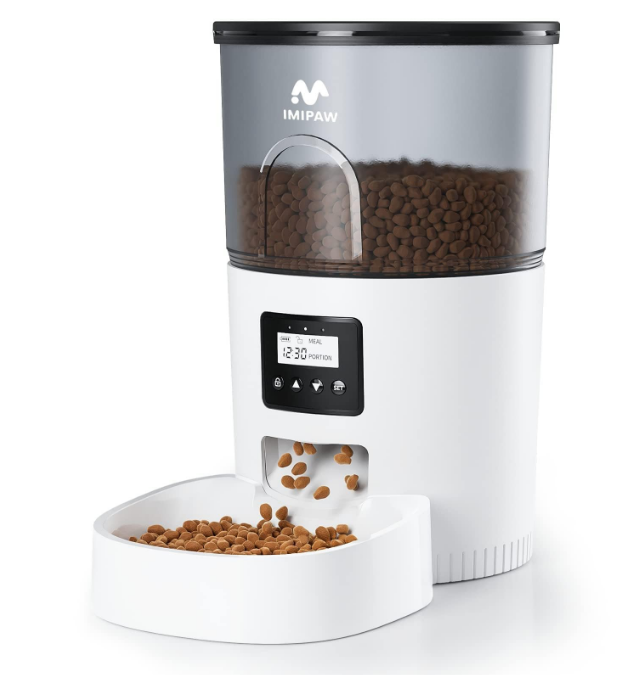
IMIPAW DU3L-KY Automatic Pet Feeder
Safety Instruction
- Children need to be used in the company of adults.
- Do not use the feeder with pets that cannot reach the food tray or have any physical disabilities.
- Do not immerse the base part in water at any time, because this will damage the control panel and other electronic components.
- Do not place any foreign objects in the pet feeder.
- Do not use canned, wet food.
- Do not disassemble the device in any manner other than the instructions in this user guide.
- Do not modify the pet feeder.
- If the equipment is malfunctioning or damaged, please do not try to repair the pet feeder by yourself; contact the seller immediately and solve it.
- Always unplug the power plug when not in use and before deaning.
- If the power plug gets wet, turn off the power to the outlet. Don’t try to unplug the power plug.
Notice
- Do not allow pets to chew or swallow any part. If you are worried about the power a>rd, please purchase a wire guide (hard plastic protector) at a hardware store to protect the power cord.
- Do not lnst:nll or store pet feeders in places where they will be exposed to weather or temperatures below -10• CN40″ C.
- Use an alkaline D-size battery for the power supply. Do not use rechargeable batteries.
- Ched< the battery regularly. Before leaving for a long time, be sure to replace the battery with a new one.
- Do nouse t 11ft pet feeders with lids, food buckets, and food bowl. Carry or move with both hands, and the base should keep the device in an upright position.
- Only supports dry food; the size range is 2-12 mm in diameter. Larger foods will get stuck at the food outlet.
- Please read and follow all Important Instructions listed on the pet feeder and packaging.
Product Image
Front view
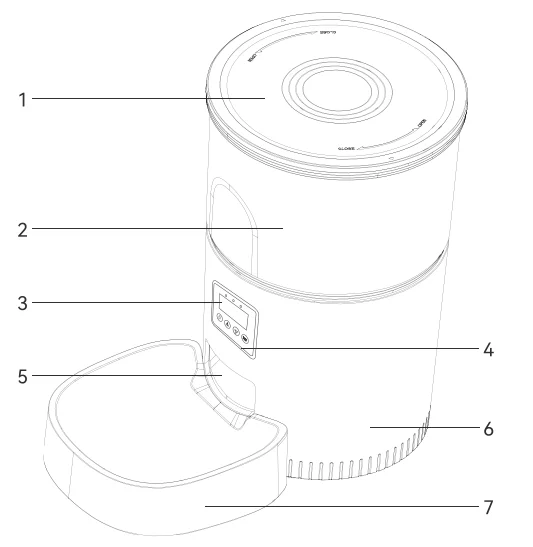
- Food Tank lid
- FoodTank
- Display Saeen
- Control Panel
- Food Outlet
- Body
- Food Bowl
 Bottom View
 - Speakar
- Battery Compartment
- DC Interface
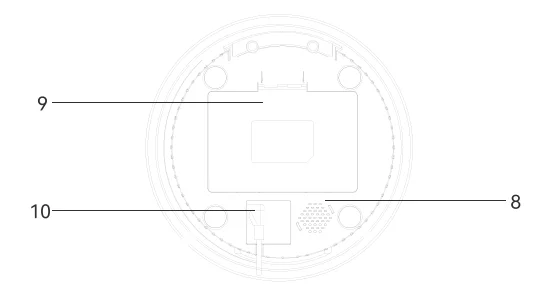 Bottom View
Unlock Screen State

 Prompt the current battery level: The external power supply shows the fully charged state; the battery power is displayed according to the battery level
 Unable to operate in locked state, long-press the unlock
  button to open the lock
  , then you can operate
- MEAL can set 4 meals. In the setting mode, the up and down buttons can switch the selected number of meals
 Display the current time
- PORTION: Display the feeding portions
 Prompt the current battery level: The external power supply shows the fully charged state; the battery power is displayed according to the battery level
 Unable to operate in locked state, long-press the unlock
  button to open the lock
  , then you can operate
 Display the current time
Button Description
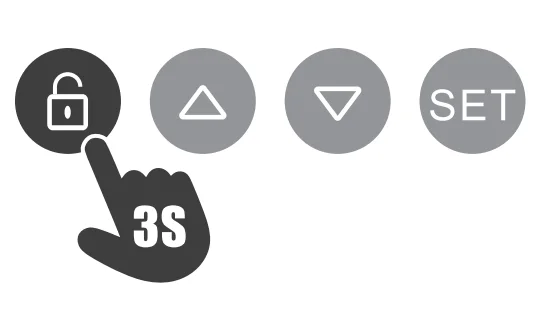
 Unlock button: Press and hold for 3 seconds until you hear a beep and the screen is unlocked successfully,
 changes to.
 Up Button: This button can be set to switch numbers.
 Down Button: This button can be set to switch numbers.
 Setting Button: when entering the operation of the setting button in the settings.
 changes to
 Up Button: This button can be set to switch numbers.
 Down Button: This button can be set to switch numbers.
 Setting Button: when entering the operation of the setting button in the settings.
Note: The screen will automatically turn off after 30s standby.
Cleaning and Maintenance
- Please clean the feeder regularly to keep your pet’s health.
- When it starts to get dirty and a lot of loose food in the food trough, you can remove the food cover to clean it.
- Use a soft, damp cloth to clean the base of the feeder and the control panel. Do not get wet on this part, and do not clean it with running water.
- Do not put the product in the dishwasher, otherwise it will be permanently damaged!
Packing list
After opening the product package, please confirm whether the machine is in good condition.
Please check the list to confirm whether the accessories are complete.
- The Feeder ×1
- Food Bowl ×1
- Product Manual ×1
- Power Cord ×1
- Feeding Guide ×1
- Power Adapter ×1
Instructions
Installation
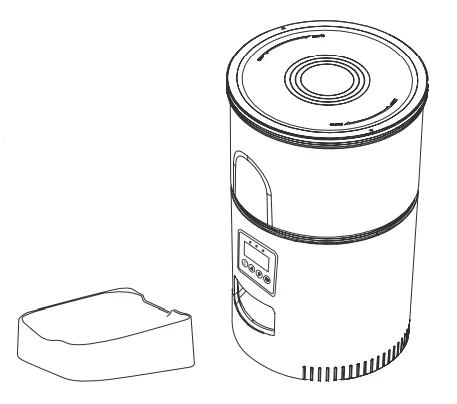
- Remove the feeder from the box.
- Place the feeder in a suitable location.
- Combine the food 1ray with the base of the feeder.
Connect the power supply.
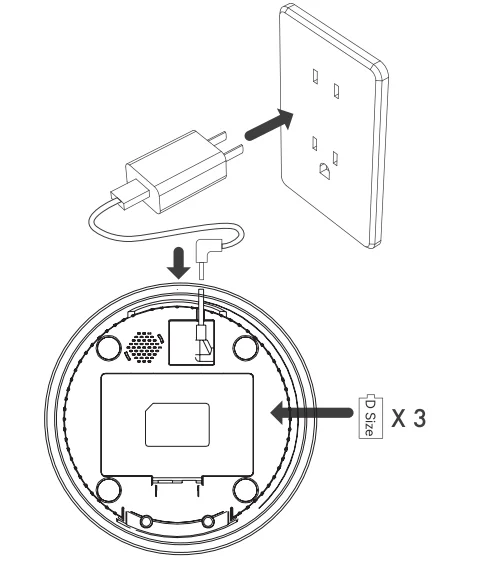
- Plug the 5V/1A power adapter into the wall socket and connect the device.
- Open the battery compartment at the bottom of the feeder and install 3 pcs D-size batteries [not necessary) to prevent power failure.
- The display will automatically light up, indicating that the feeder is turned on.
Note:
- Do not include the battery.
- Before turning on the power, make sure that all parts are clean and completely dry.
Put pet food in the food tank.
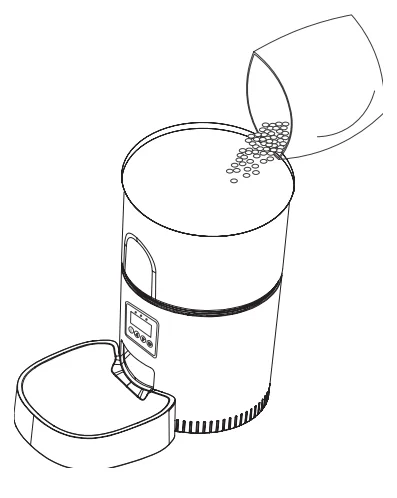
- Fill the food tank with dry pet food. Close the lid, and it will snap into place due to gravity.
Note:
- Do not use canned, wet, or damp pet food.
- The recommended pet food size range is 2-12 mm.
Setting Time
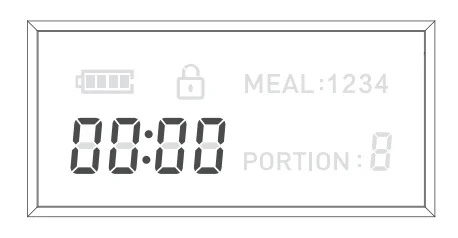
- Press and hold the unlock button
 for 3s to unlock the screen.
 - After pressing and holding the setting button
 for 3,secondsthe time icon 0000 will flash the hour setting.
 - Press the up
 /down buttons
 to scroll through the numbers to set the hour.
 - Press the set button to move to the minute setting, and set the minute to the same as the hour setting step.
Set up a daily feeding plan.
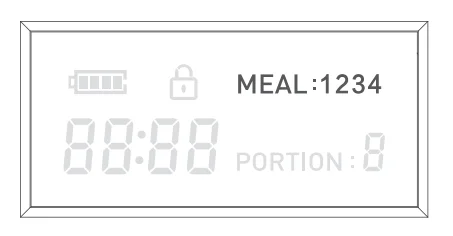
- After the current time is set, press the set button , and the display will flash the number of meals. Press the up /down buttonsto set 1-4 meals a day.
Set the meal time and portion.ns
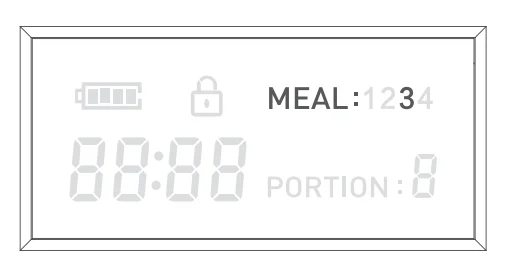
- After setting the number of meals, the display will flash the current number of meals.
E.g.: The number of meals flashes ·3· means that 3 meals per day have been set.
Set the feeding time
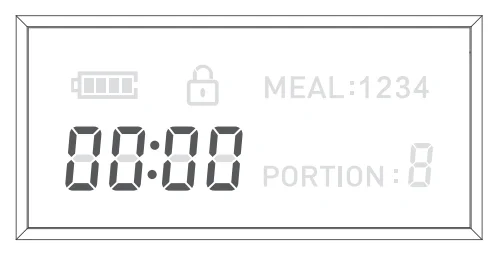
- Press the “Set” button , and the hour field of the ~ time icon will flash. nn-nn
- Press the up /down buttons to set the hour.
- Press the set button and the up /down buttons to set the minutes in the same step.
Set the feeding portion.n
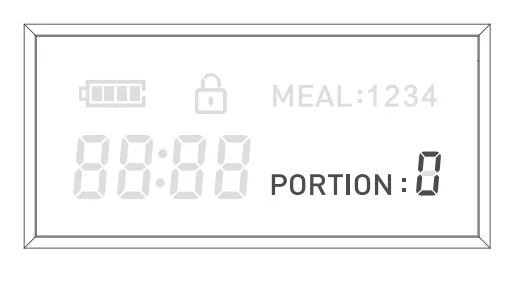
- Press the “Set” button , and the number of portions will flash.
- Press the up /down buttons to set the feeding portion.
- If necessary, press the set button to repeat the above process for meals 2 to 4.
Unlock the screen
- Press and hold for 3 seconds until you hear a beep and the screen is unlocked successfully,
 changes to.
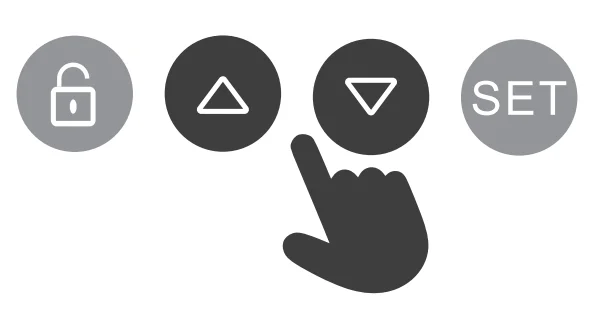
Manual Feeding
- While unlocking the screen, press both up and down buttons to manually feed one portion.
Note:
The feeding plan will not be affected.
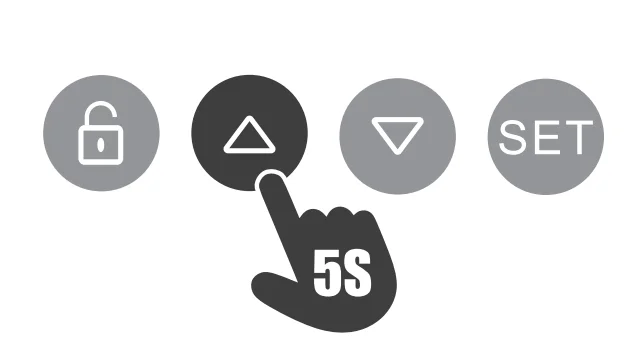
Restore factory settings
- In the lock screen state, press and hold the up button for 5s to reset all settings (time, feeding plan end portion per meal).
Troubleshooting
Question Answer
Q: I press any button,,n but doesan not work.
A: Lock the screen when there is no operation for 30 seconds. Please press and hold the unlock button for 3s to unlock the screen.
Q: I forgot the specific content of the feeding plan
A: Unlock the screen and press the settings button. You can see meals displayed (but not portion per meal).
Q: Can’t get food
A:
- Make sure to put in dry food, and the diameter of the food should be between 2-12 mm.
- Check whether the battery power is low.
- Whether the power adapter is connected.
- Whether the power is cut off when the battery is not installed, if the power is cut off, please reset the feeding plan.
Q: The display does not light up
A:
- Without any operation within 30 seconds, the screen is locked and dimmed. Please press and hold the unlock button for 3s to unlock the screen.
- Check whether the power adapter is connected or the battery is installed.
- When the device is connected to the power supply, the display still does not light. Please contact the seller to solve it.
Specification
- Food Tank Capacity: 3L
- Screen: LCD screen
- Power supply: DC 5V/1A power adapter; 3pcs alkaline batteries
- Power adapter: ACl 10-240V input, DC5V output
- G.W: 1.65KG
- Size: 18.2*18.2″28.3cm
For more manuals by IMIPAW, visit ManualsLibraryy
IMIPAW DU3L-KY Automatic Pet Feeder- FAQs
How does the IMIPAW DU3L-KY automatic pet feeder work?
The feeder dispenses food at scheduled times that you set using its control panel or connected app. It allows portion control, ensuring your pet gets the right amount of food even when you’re away.
How do I connect my IMIPAW automatic pet feeder to Wi-Fi?
Open the “Smart Life” app, tap Add Device, and select Pet Feeder. Choose your 2.4GHz Wi-Fi network and enter your password. If the indicator light doesn’t blink, press and hold the SET button for 5 seconds to reset the feeder, then reconnect.
Why is my pet feeder not connecting to Wi-Fi?
Ensure you’re using a 2.4GHz Wi-Fi network, not a 5GHz one. Disable mesh networks or Wi-Fi extenders if needed, and keep the feeder close to your router during setup.
How do I reset the IMIPAW DU3L-KY feeder?
Press and hold the Feed button for about 5 seconds until you hear a beep. This will restore the feeder to its factory settings, erasing previous schedules and data.
How do I program the feeding schedule?
Unlock the screen by holding the button for 3 seconds. Then:
Set the current time.
Choose the number of meals per day.
Set the meal times and portion sizes.
Confirm each setting before exiting to save your schedule.
Can I use wet food in the IMIPAW automatic feeder?
No, the IMIPAW DU3L-KY is designed for dry food only. Wet food may clog the dispenser or cause hygiene issues.
Why is my feeder not dispensing food?
Check that it’s plugged in or that the batteries aren’t depleted. Make sure the food isn’t jammed in the dispenser and that the feeding tray is correctly aligned.
Can I leave my cat alone for 3–4 days with the feeder?
It’s not recommended to leave your cat alone for more than 2–3 days, even with an automatic feeder. Have someone check on your pet’s food, water, and health regularly.
How do I manually feed my pet?
Press the Feed button on the control panel or use the manual feed option in the app to dispense food instantly.
Do automatic feeders require Wi-Fi to work?
Wi-Fi is only needed for remote control via the app. You can still program feeding times and use the feeder offline using the onboard control panel.