
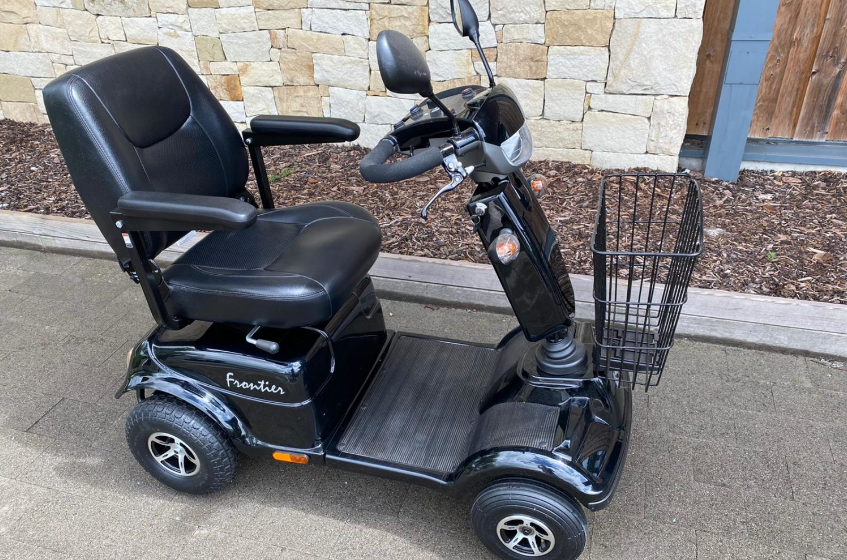

Rascal 600T-600F Mobility Scooter
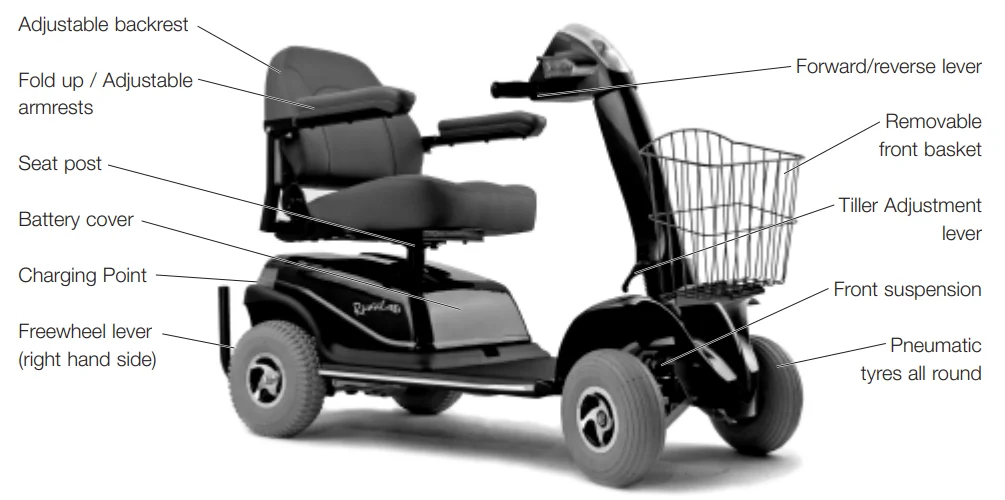
Features and Layout
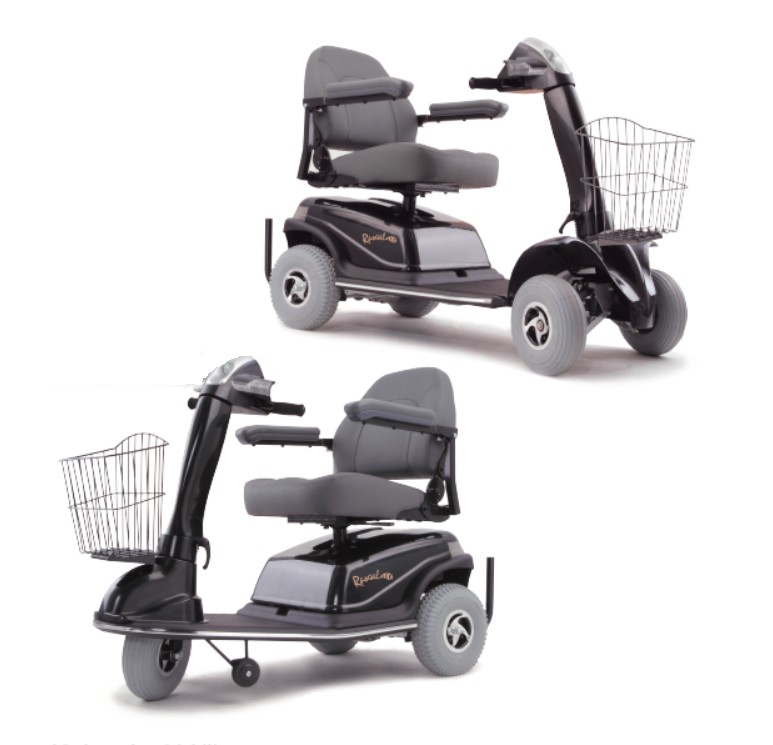
The photo shows a 600F model scooter. The 600T is a 3-wheel version. See the technical specification for differences.
Intended use of the vehicle
- This vehicle is designed for use by adults with a disability (up to the maximum recommended weight) who require a robust, comfortable pavement scooter that is ideal for shopping and other visits. The scooter is intended for use in shopping areas and trips on reasonably paved areas. It is also capable of maneuvering on uneven surfaces and on grassy areas, unless they are slippery. Rutted tracks and rough fields should be avoided.
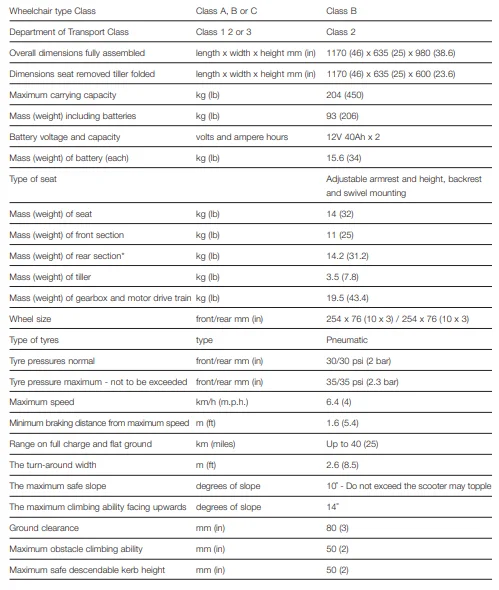
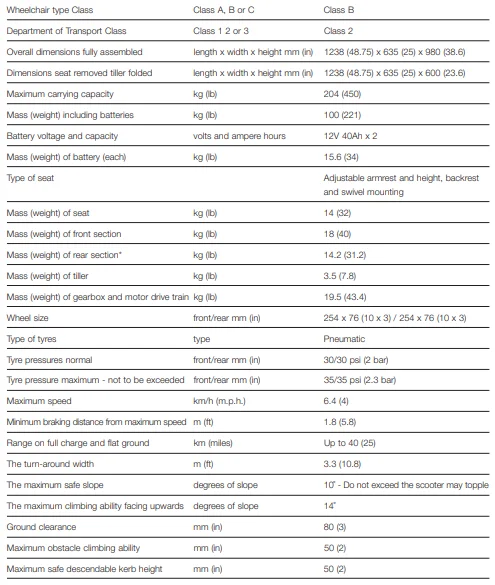
- The 600 series has been designed to mount curbs and small obstacles up to the maximum stated in the technical specification table. By law, the 600 T and F model scooters are limited to 4 m.p.h. for pavement use and are not suitable for road use.
- Users could endanger themselves and others if they are not capable of driving their scooters safely. Dealers will advise on the most suitable vehicle from the Rascal range, but it is up to users to ensure that they have the manual dexterity to drive the vehicle, adequate sight and hearing to perceive danger in time, and can at all times operate the scooter safely in the expected conditions. If in doubt, we suggest you consult a healthcare professional or your nearest dealer for advice on the most suitable scooter for your particular condition.
- Users should regularly assess their ability to operate their vehicle safely.
Controls – Dashboard
Before driving your vehicle, it is important to familiarise yourself with the controls. Do not attempt to drive the vehicle before reading the rest of this Handbook.
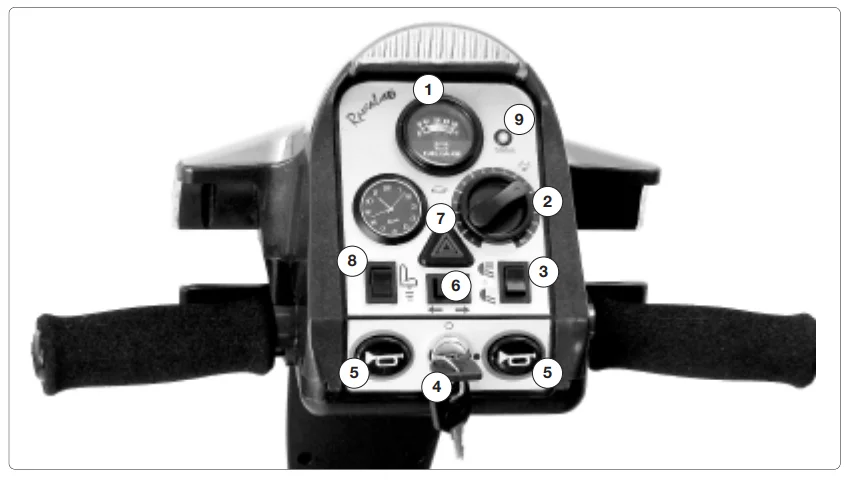
Dashboard Description
- Battery Indicator: This instrument shows the level of charge in the batteries. When the green is on, the batteries are fully charged. When in the yellow area, the batteries need recharging, and when in the red area, the batteries urgently need recharging. Note: When the vehicle is climbing a steep incline or starting, the level may drop momentarily; this is normal.
- Speed Control Dial: This controls the top speed of your scooter. It is located on the dashboard below and to the right of the battery indicator. When the dial is turned anticlockwise to the left, this is its slowest speed. As the dial is turned to the right, the speed will increase to a maximum, which is the highest speed. Set the speed before you move off. Try not to adjust when the vehicle is moving.
- Light Switch: When the ignition key switch is on, the head and tail lights can be switched on using the 3-position switch on the bottom right-hand side of the dashboard. In the upper position, both the head main beam and tail lights are on; in the lower position, only the tail lights and front “dipped” beam are on. In the center position, all lights are off.
- Ignition Switch: The ignition key switches power to the vehicle. Remember to remove the key when not in use. Do not leave the ignition or lights on when not in use, especially when charging the vehicle.
- Horn: Press the button on the bottom left-hand or bottom right side, and the horn will sound. Release, and the horn will cease.
- Indicators: Even when the ignition key switch is off, the indicator left or right can be selected using the rocker switch above the key switch.
- Hazard Warning Switch: Above the indicators is a triangular hazard-warning switch for selecting the hazard warning lights. This will operate whether the ignition key is on or off.
- Seatlift Switch. If this seat lift accessory is fitted, this switch enables the seat to be raised or lowered. See page 11 for instructions on how this is operated.
- Status light. (see page 16).
Controls – Driving Controls
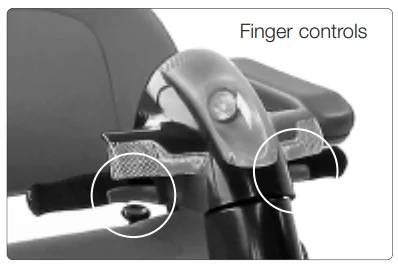
Finger control – To operate, turn on the ignition. Pull the right-hand lever towards you, and the machine moves forward. The
more you pull the lever, the faster the scooter goes. To brake, release the lever. Again, the faster the lever is released, the quicker you will stop. To reverse, pull the left-hand lever towards you. Do not pull both levers at once.
Freewheel Device
When the vehicle is switched off, the brakes are automatically engaged. This is called “Failsafe Braking”. Also, if the batteries are flat, the brakes are applied. There may be occasions when you may wish to move the vehicle without power. To do this, there is a Freewheel Device fitted. The Freewheel device allows the vehicle to be pushed without power. To activate, first locate the lever. It is located below the cover on the right-hand side of the rear of the vehicle when standing behind it.
- Make sure the ignition is switched off.
- Move the lever up. The vehicle can now be pushed in “Freewheel”.
- Move the lever down to engage “drive”. The vehicle is now braked. This is the normal operating position.
- IF YOU ARE NOT COMPLETELY SURE OF THIS FEATURE, CONTACT YOUR DEALER BEFORE OPERATING THE SCOOTER.
Pull the lever UP to the upper “freewheel” position to enable the vehicle to be moved without power. Braking is disabled. NEVER sit in the vehicle with the lever in this position. Push the lever DOWN to the lower “drive” position. This is the normal operating position. The brakes are enabled, and the vehicle can only operate with the lever in this position.
Brakes
There are 2 braking systems. The first works with the accelerator. When the accelerator is released, the scooter will automatically brake and bring the scooter to a stop. When the scooter stops, the primary brake will engage. This will stop the vehicle from rolling forward or backward. When you start the handbrake will automatically disengage. If the battery should go flat, the brakes automatically engage. Note that even when freewheel is selected, a secondary braking system is applied automatically to limit the maximum speed. You may notice this system when moving the scooter in freewheel, and it is known as “regenerative braking”.
Seat Adjustment
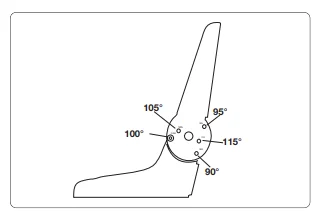
The seat back can be positioned in one of 5 positions by moving the bolts on the left and right-hand side of the seat. Remove the bolts using the supplied wrench and Allen key. Adjust the seat back to the most comfortable position. Re-position the bolts and tighten them in the desired position. Make sure that both sides are in the same position.
Armrest Adjustment
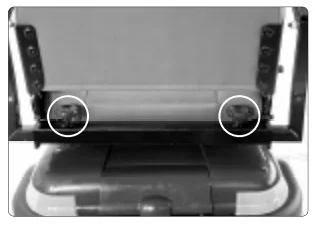
When getting seated on the scooter, lift the armrest. When riding, always have the armrest in the down position. Beware pinch points as the armrests are lowered. If you require more room in the width of the seat, undo the black knobs as shown. Slide the armrests in or out to suit. Tighten both knobs to clamp. (shown). To ensure that the user is sitting centrally, the armrests should always be adjusted to be equidistant from the center of the seat.
Swivel seat
This allows easier access to the seat
- To operate, locate the release lever under the seat.
- Pull the lever up, and the seat will release, allowing it to rotate.
- Release the lever, and the seat will lock automatically.
Tiller Head Adjustment
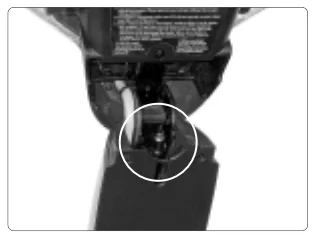
The tiller head angle adjustment allows the handlebar/dashboard assembly to be rotated to provide a comfortable riding position. To adjust the tiller head lift to an upright position. By adjusting the screw below the tiller, the angle of the tiller head can be changed. This is done with the Allen key supplied. When the tiller head is lowered, it will be in its new position.
Tiller Adjustment
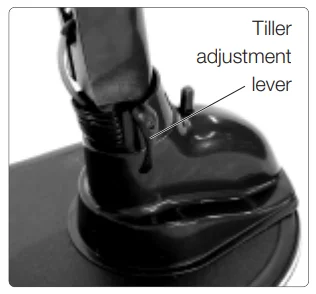
The tiller adjustment lever allows you to alter the angle of the tiller to suit your driving style or to fold the tiller down for transporting.
- Locate the lever at the base of the tiller.
- With one hand holding the tille, rotate the lever anti-clockwise.
- The tiller is now free to move. Move the tiller to the desired position and tighten the lever by rotating it firmly clockwise.
Dashboard Clock
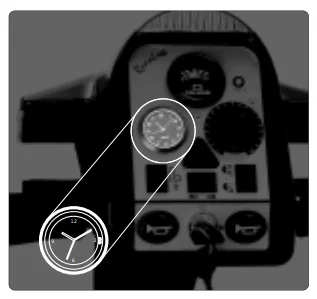
Your Rascal 600 Series Scooter comes with a removable, battery-powered, quartz clock that mounts directly in the dashboard of the scooter. This clock is shipped separately to allow you to set it to your local time before installing it in the dashboard. Instructions are provided below to set the correct time and install it in the dash.
Setting the Clock: Locate the bag containing keys, clock, and other items shipped separately with the scooter. Unwrap the clock from its protective packing. If the clock includes a small, plastic collar around the stem, remove the collar and push the stem “in” to start the clock. Set the clock to your local time by pulling the stem out and turning to adjust the hour/minute hands. Push the stem in to start the clock.
Installing the Clock: When you have set the clock to your correct, local time, you can install it in the dashboard of your Rascal scooter. Install the clocininnthee location adjacent to the Speed Control Dial. The rubber gasket around the clock face is sufficient to secure the clock in place. Make sure the “12” faces “up.”
Replacing the Battery: Remove the clock from the dash, and pry open the case and insert the new battery, type SR626SW or UCC 377, or Ray–O-Vac RW 329. Remember to install the battery with the positive end outwards.
Seat Post Height Adjustment
The seat height can be adjusted as follows:
- Remove the seat by pulling the seat swivel lever and lifting the seat off the seat post.
- Unscrew the nut and bolt and remove them from the tube. Try and avoid touching the top of the post as it has serrations which could cut your hand.
- Position the seat post tube to your desired height and align the holes.
- Replace the bolt and secure it by tightening the nut.
- Replace the seat by holding the release lever and inserting the seat onto the seat post assembly.
- Ensure that the seat is fully engaged and that it rotates and locks correctly
E.lectric Seat Height Adjustment
When the seatlift accessory is installed, the seat height can be adjusted electrically. The seatlift rocker switch is on the bottom left-hand side of the dash, above the horn (see page 7). To raise and lower the seat:
- Push the rocker switch into the up position
- Pull the right finger control lever towards you to raise the seat
- Put the left-hand finger control towards you to lower the seat. Never pull both levers together.
- Switch off the electric seat height adjustment by pushing the rocker switch into the down position.
Driving the Vehicle
- Before you set out, do check the weather forecast. We suggest that you make sure you are wearing suitable clothing, whether your journey is long or short.
- If you are taking medication, check with your doctor or physician that your ability to control the vehicle will not be impaired, and do not drink alcohol and drive.
- Only use the vehicle for the purpose it is intended for. Do not drive through water or on slippery surfaces; do not transport more than one person; do not tow other vehicles or carry excess weight.
- Before getting onto your scooter, check that the freewheel lever is not in the Freewheel position.
- Check that the battery charger is disconnected.
- Raise the dash and an armrest to ease your transfer onto the seat. You can also rotate the seat to ease your entry..
- Check that you have adjusted the seat as instructed in this manual, and it is locked in the forward position, and the armrests are down.
- Ensure that the dash has been pulled down into the driving position.
- Get comfortable; set the speed control dial to a low setting.
- Make sure the way ahead is clear.
- Switch on the vehicle. Check that the battery level indicator is in the green area.
- Pull the right-hand lever slowly towards you. The vehicle will now move off. The more you pull the lever, the faster the vehicle will go.
- To brake, release the lever. If you become unsure or feel unsafe, release the lever immediately.
- As you get accustomed to the power, you can increase the speed.
Driving the vehicle – hazards
- Getting on and off the vehicle: When getting on, make sure that the vehicle is on level grun d ot in freewheel mode. Ensure that the armrests are secure. When getting out, park on level ground, turn off the ignition, and remove the key before leaving your seat. Make sure you get out of the vehicle in a safe area.
- Handlebar Position. Before driving, the handlebars should always be lowered into the driving position. This correctly positions the headlight and ensures all the controls are in the right position for comfortable operation.
- Tiller Position. Never drive with the tiller in the unlocked position, as injury could result from unintended tiller movement while driving. Do not use the dash as a support, as it could mo,, causing you to faCurbserbs and Obstacles: Do not ride up curbs or obstructions higher than in the Technical Specification Sheets. Always tackle obstacles. The anti-tip rollers at the rear of the scooter may contact the curb as you descend; this may cause a loud click. This is normal.
- Hills & Slopes: Going Up Hill. Lean forward when going up. Make sure you have enough speed to climb the slope. Do not stop or turn the vehicle around. If you have to turn while climbing an incline, keep going until you reach a level area. If you have to start on an incline, lean forward and apply power slowly – do not start and stop. If you are not comfortable with the hill gradient, consider an alternative route. Try to avoid crossing a slope. If you have to cross a slope, take great care to avoid tipping. Note: Always check that the battery level is high; going up hill takes a lot of energy. If the level drops too low, the vehicle will cut out, leaving you stranded.
- Hills & Slopes: Going Downhill. Lean back in the seat when going down, and turn the speed control dial to low. If you are not comfortable with the hill gradient, consider an alternative route. Always try to avoid crossing a slope. If you have to cross a slope, take great care to avoid tipping. Never make sharp turns on slopes. Always try to drive straight up or down the slope. NEVER BACK DOWN A SLOPE!
- Turning: Slow down and look in the direction you are traveling – If there is a blind corner, sound the horn.
- Bad Weather: If it is snowing or ic,y, stay at home! Remember that ice, snow, and slippery surfaces such as manhole covers, wet grass, and drains could affect braking and steering. Use caution at all times.
- Wheels anand tiresRepair of tires or wheels should be by your local dealer. If you are particularly concerned about punctures, consult your local dealer for advice on puncture-proofing products.
Transporting your Scooter
- Lift the swivel lever to unlock the seat and, using two able people, lift the seat off the chassis.
- Raise the tiller head until it is in the uppermost position.
- Rotate the tiller adjustment lever until the lock is disengaged, and lower the tiller to the horizontal position.
- Remove the basket by pushing up from below.
- Using ramps, drive the scooter into the boot of the estate car. Take great care that the ramps are secure and the scooter is always aligned with the ramps. Ask your dealer for a demonstration.
- Secure the chassis so it cannot move when the car is in motion or stops suddenly.
- Stow the seat using two people to load it into the vehicle.
Dismantling Your Scooter
Your scooter can be dismantled further, but you are advised to get guidance from your dealer. The Tiller and the Dash can be removed, and the batteries can be taken out and carefully stowed in the upright position. See the Technical Specification for the weights of the components.
Battery Charging
Connection Instructions
When you receive your vehicle, the batteries are only partially charged – always fully charge them before use, preferably overnight. Correct battery charging prolongs the life of your batteries.
- Place your machine in an area that is dry and well-ventilated. Make sure a power point is nearby.
- Check the vehicle is switched off and the key removed.
- Check that the mains switch is off. Never connect or disconnect the charger from the mains on.
- Undo the battery cover lid and take out the power cord. Check that the power cord is undamaged.
- Plug the power cord into a thirteen-amp earthed plug and switch on.
- Check the ammeter registers greater than 1 to ensure that the vehicle is being charged.
- Check the battery indicator on the dash when it reads fully charged (extreme right of the green area)
- Switch off the mains and remove the plug, return the cable, and close the battery cover.
- Do not leave the charger plugged in with the power off. This will gradually discharge your battery.y
Troubleshooting Guide
This table is a guide to fault-finding. The fault may be a simple fix. If you have any doubts, phone your dealer.
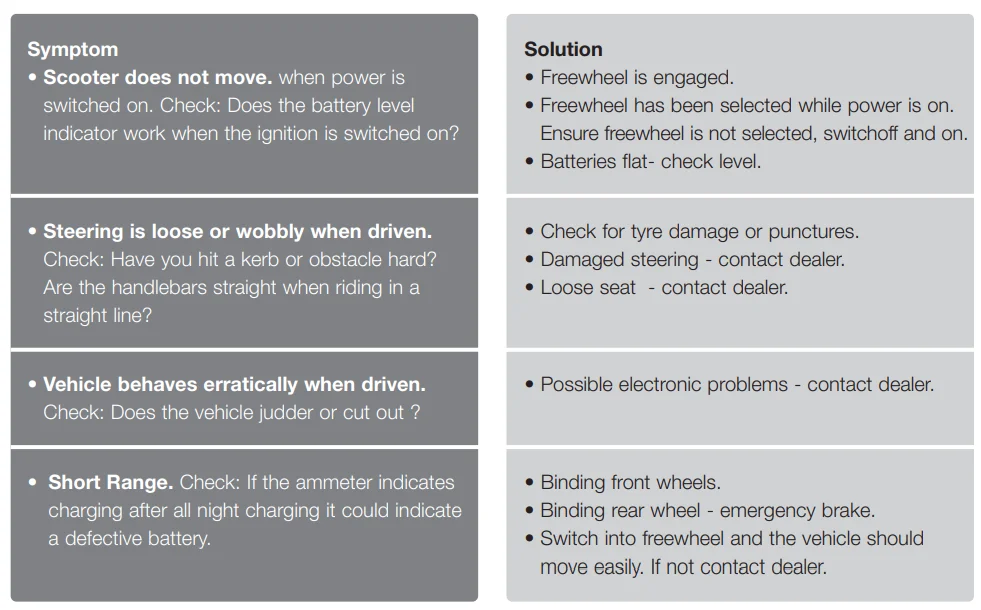
Your dealer is there to help you, but they can only do this if you give them as much information as possible. Remember, correct information will get the problem fixed quicker and save you money. Phone the dealer and explain exactly what the problem is. Remember, small points help the engineer to identify the problem before he calls to fix it.
Use of the Status Light Signals for Diagnostics
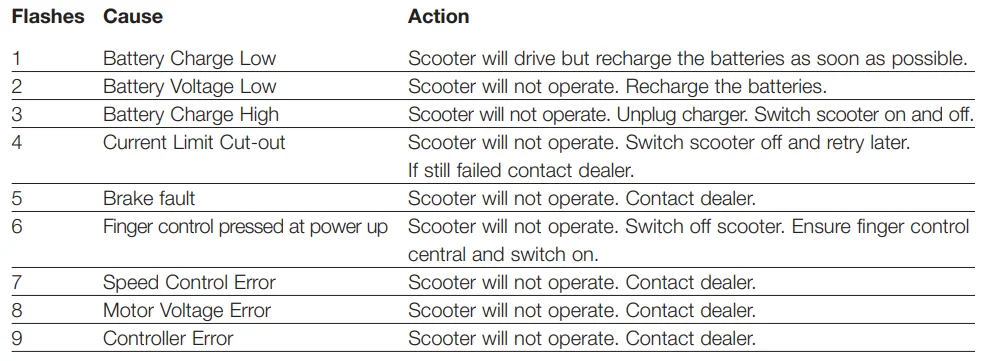
Your scooter is fitted with a status light on the top right-hand side of the dash. This light flashes to help you identify a fault. The flash codes ( number of consecutive flashes) are listed below:
User Maintenance
- Visually check the machine for damage.
- Visually check the tires for damage and check if they need inflating.
- Check that the steering moves freely.
- Check that the Tiller adjustment lever is secure and locked.
- Check that the Seat is located correctly and locked.
- Check that the armrests are secure and the knobs are tight.
- Batteries should be fully charged.
- Ensure batteries are secured by battery straps.
- Ensure the front basket is secure (if fitted).
- Keep your vehicle clean by washing with a sponge and soapy water – never use a hose.
Technical Specification – Rascal 600T Scooter
FOR MORE MANUALS BY RASCAL POWER MOBILITY, VISIT MANUALSLIBRARYY
Rascal 600T Three-Wheel Mobility Scooter-FAQs
Are Rascal scooters reliable?
Yes. They offer modern design, strong suspension, and powerful batteries, making them a good value for comfort and reliability.
Are Rascal scooters suitable for outdoor use?
Yes. While designed for both indoor and outdoor travel, models like the Rascal Venture provide better stability on uneven terrain.
How do I charge the Rascal scooter?
Plug the charger into the scooter’s charging port and a wall outlet. Ensure cables are secure and ports are clean for proper charging.
What is the top speed of the Rascal 600T?
The scooter has a top speed of 4 mph.
How far can the Rascal 600T travel on a full battery?
It can travel up to 25 miles on a single full charge, depending on terrain and rider weight.
Can I ride my scooter in the rain?
Light rain is usually safe, but avoid heavy rain or puddles to protect electrical components.
What is the average lifespan of a mobility scooter?
With proper care, most mobility scooters last around 5 years.
What is the most common problem with mobility scooters?
Battery issues are most frequent, including shorter range, charging difficulties, or failure to hold a charge.