
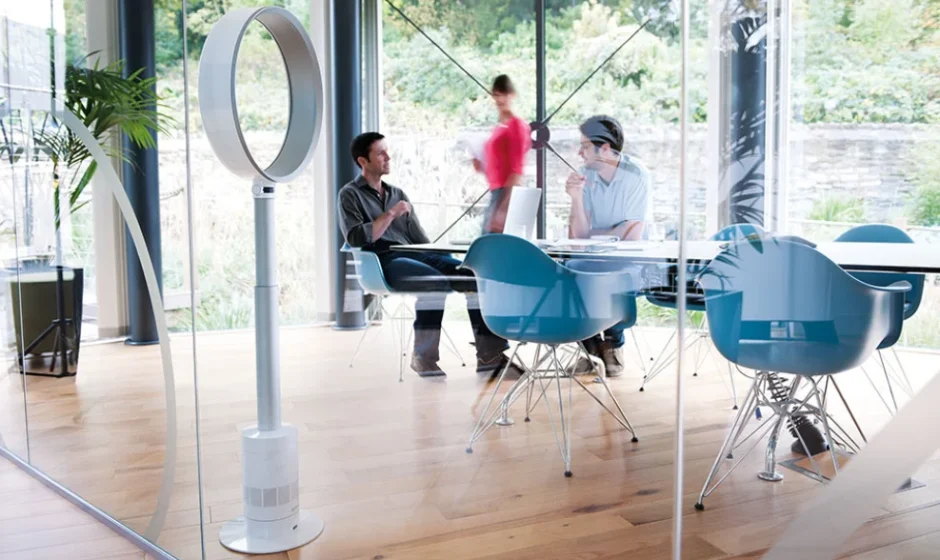

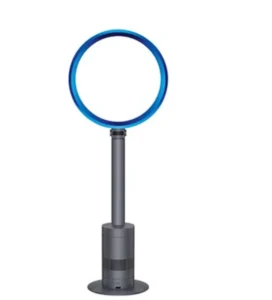
Dyson Cool AM03 Pedestal Fan
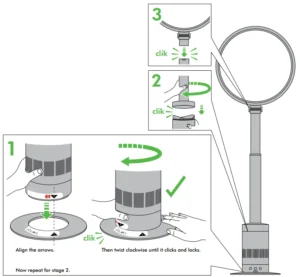
ASSEMBLY
Do not allow the machine to twist at the blue tape. Allowing the machine to twist at the blue tape may result in accidental damage.
Remove blue tape and clear film once the machine is assembled.
Your Dyson fan will be covered for parts and labour for 2 years from the date of purchase, subject to the terms of the guarantee.
If you have a query about your Dyson fan, call the Dyson Customer Care Helpline quoting the serial number and details of where/when you bought the fan. The serial number can be found on the rating plate which is on the base of the product.
Most queries can be solved over the phone by one of our Dyson Customer Care Helpline experts or by visiting www.dyson.co.uk/support
IMPORTANT SAFETY INSTRUCTIONS
READ ALL INSTRUCTIONS BEFORE USING THIS FAN
When using an electrical appliance, basic precautions should always be followed, including the below:
 WARNING
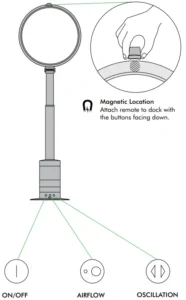
The fan and the remote control both contain magnets.
- Pacemakers and defibrillators may be affected by strong magnetic fields. If you or someone in your household has a pacemaker or defibrillator, avoid placing the remote control in a pocket or near the device.
- Credit cards and electronic storage media may also be affected by magnets and should be kept away from the remote control and the top of the fan.
 WARNING
TO REDUCE THE RISK OF FIRE, ELECTRIC SHOCK, OR INJURY:
- This fan is not intended for use by young children or infirm persons with reduced physical, sensory, or reasoning capabilities, or lack of experience and knowledge, unless they have been given supervision or instruction by a responsible person concerning use of the appliance to ensure that they can use the appliance safely.
- Young children should be supervised to ensure that they do not play with the fan.
- The loop amplifier, stand, a nd base plate must be fitted securely before operating this fan. Do not use without the loop amplifier fitted.
- Do not operate any fan with a damaged cord or plug. If the cord or plug is damaged, do not use the fan and contact the Dyson Customer Care Helpline. If the supply cord is damaged, it must be replaced by Dyson, our service agent, or similarly qualified persons in order to avoid a hazard.
- If the fan is not working as it should or has been damaged, do not use it and contact the Dyson Helpline.
- Do not run cord under carpeting. Do not cover the cord with throw rugs, runners, or similar coverings. Arrange the rd away from the traffic area and where it will not be tripped over.
- Turn off all controls before unplugging. Unplug from the outlet when not in use for extended periods. To avoid a tripping hazard, safely coil the cord.
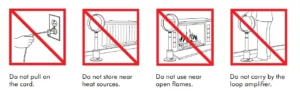
- Do not unplug by pulling on the cord. To unplug, grasp the plug, not the cord.
- Suitable for dry locations ONLY. Do not use outdoors or on wet surfaces, and do not expose to water or rain.
- Do not handle the plug othe r the fan with wet hands.
- Do not stretch the cord or place the cord under strain. Keep the cord away from heated surfaces.
- Do not put any object into openings or the inlet grille. Do not use with any opening blocked; keep free of dust, lint, hair, and anything that may reduce airflow.
- Do not use near furnaces, fireplaces, stoves, es other high-temperature heat sources.
- Do not use in conjunction with or directly next to an air freshener or similar products.
- Do not use any cleaning agents or lubricants on this fan. Unplug before servicing, cleaning, or carrying out any maintenance.
- Use only as described in this manual. Do not carry out any maintenance other than that shown in this manual or advised by the Dyson Helpline.
- The use of an extension cord is not recommended.
- Always carry the fan by the body, do not carry it by the loop amplifier.
READ AND SAVE THESE INSTRUCTIONS
POLARIZATION INSTRUCTIONS
This appliance has a polarized plug (one blade is wider than the other). To reduce the risk of electric shock, this plug is intended to fit in a polarized outlet only one way. If the plug does not fit fully in the outlet, reverse the plug. If it still does not fit, contact a qualified electrician to install a proper outlet. Do not attempt to defeat this safety feature.
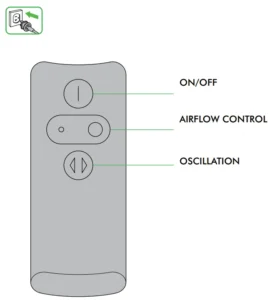
Remote control
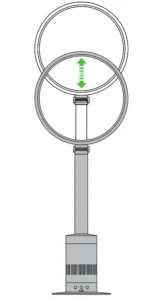
Height adjustment
Gently raise or lower the loop amplifier to adjust height.
Tilt function
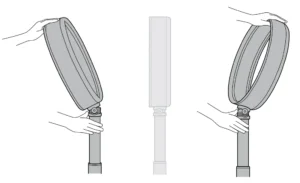
While holding the stand, tilt the loop amplifier towards or away from you to adjust the airflow angle.
Clearing blockages
Look for blockages in the air inlet holes and in the small aperture inside the loop amplifier. Use a soft brush to remove debris.
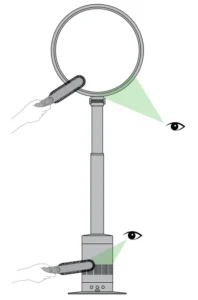
Cleaning
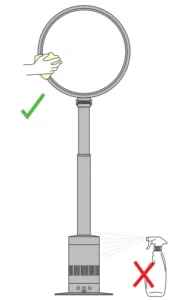
To clean, wipe with a dry or damp cloth. Do not use detergents or polishes to clean the fan.
Replacing the battery
A blue light on the machine will flash when the remote’s buttons are pressed. If the blue light stops flashing, replace the remote’s battery.
Battery type CR 2032.
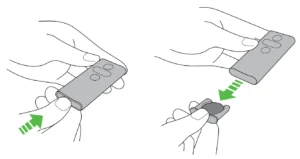
Press the end of the remote to release the battery.
Battery replacement
Caution:
- Switch off and unplug the machine before replacing the batteries.
- Do not install backwards or short-circuit the batteries.
- Do not attempt to dismantle or charge the batteries. Keep away from fire.
- Follow battery manufacturers’ instructions when installing new batteries (battery type CR 2032).
USING YOUR DYSON FAN
Cleaning
- To clean, wipe with a dry or damp cloth.
- Do not use detergents or polishes to clean the fan.
2 YEAR WARRANTY
Terms and conditions of the Dyson 2-year limited warranty.
WHAT IS COVERED
- The repair or replacement of the fan if it is found to be defective due to faulty materials, workmanship, or function within 2 years of purchase (if any part is no longer available or out of manufacture, Dyson will replace it with a functional replacement part).
WHAT IS NOT COVERED
Dyson, .Inc. shall not be liable for costs of repair or replacement of a product incurred as a result of:
- The repair to any fan that has had the serial number altered or removed.
- Normal wear and tear.
- Accidental damage, faults caused by negligent use or care, neglect, careless operation, or handling of the fan that is not in accordance with this manual.
- Damage as a result of use not in accordance with the rating plate.
- Blockages – please refer overleaf for details.
- Use of the fan outside the country of intended use.
- Fans not purchased from an authorized dealer.
- Use of parts and accessories other than those produced or recommended by Dyson, Inc.
- Damage from external sources such as transit, weather, electrical outa, or power surges.
- Repairs or alterations carried out by parties other than Dyson, Inc. or its authorized agents.
- Failures caused by external sources, such as weather outside of Dyson.Inc’s control.
WARRANTY SERVICE
- Please fill out and return the Warranty Form.
- Before service can take place, the terms of the limited warranty require that you contact the Dyson Helpline with your model name/number, serial number, date, and place of purchase. Please keep your purchase receipt in a safe place to ensure you have this information, which you may be required to provide to Dyson. The serial number is found on the fan’s rating plate, which is on the base of the product.
- All work will be coordinated by DysoInc..Inc. or its authorized agents.
- Any replaced defective parts will become the property of Dyson, Inc.
- Service under this warranty will not extend the period of this warranty.
- If your fan is not functioning properly, please call the Dyson Helpline at 1-866-693-9766. Most issues can be rectified over the telephone by our trained Customer Care staff.
WARRANTY LIMITATIONS AND EXCLUSIONS
- Any implied warranties relating to your fan, including but not limited to the warranty of merchantability or warranty of fitness for a particular purpose, are limited to the duration of this warranty. This limitation is not allowed by some States, and so this limitation may not apply to you.
- Your remedy for breach of this warranty is limited to the warranty service described in ’what is covered’ above. Dyson Inc. will not be liable for any consequential damages or incidental damages you may incur in connection with your purchase and use of your fan. This limitation is not allowed by some St,ates, and so this limitation may not apply to you.
- This product is intended for use in the United States.
- This limited warranty gives you specific legal rights. You may also have other rights which vary by State.
- This limited warranty is not transferable.
PLEASE REGISTER AS A DYSON FAN OWNER
To help us ensure you receive prompt and efficient service, please register as a Dyson fan owner.
There are three ways to do this:
- Online at www.dyson.com
- By calling the Dyson Helpline: 1-866-693-9766.
- By completing and returning the attached Warranty Form to us by mail.
This will confirm ownership of your Dyson fan in the event of an insurance loss, and enable us to contact you if necessary.
DYSON CUSTOMER CARE
THANK YOU FOR CHOOSING TO BUY A DYSON FAN
If you have a question about your Dyson fan, call the Dyson Helpline at 1-866-693-9766 with your serial number and details of where and when you bought the fan. Your serial number can be found on the rating plate, which is on the base of the product.
Most questions can be solved over the phone by one of our Dyson Helpline experts. If your fan needs servicing, call the Dyson Helpline so we can discuss the available options. If your fan is under warranty, it will be repaired at no cost.
DYSON HELPLINE
Call 1-866-693-9766 toll-free, 7 days a week.
IMPORTANT DATA PROTECTION INFORMATION
Your details will be held by Dyson, Inc. or others on behalf of Dyson, Inc., so that we can assist you more quickly in our Customer Service department. From time to time, DDyson Inc. may send you special offers and news of our latest innovations. Check the box on the Warranty Form within the Operating Manual if you do not wish to receive marketing or promotional information from Dyson, Inc. For more information about our data collection practices, please refer to the DysInc.. Inc… privacy policy at www.dyson.com/privacy
DISPOSAL INFORMATION
Dyson products are made from high-grade recyclable materials. Please dispose of this product responsibly and recycle where possible. Batteries should be removed from the product before it is disposed of. Dispose of or recycle batteries in accordance with local ordinances or regulations. California: This product includes a separate remote control device with a coin cell battery. The coin cell battery contains Perchlorates. Special handling may apply.
See www.dtsc.ca.gov/hazardouswaste/perchlorate
CONFORMITY INFORMATION
This device complies with Part 15 of the FCC rules. Operation is subject to the following two conditions: (1) this device may not cause interference, and (2) this device must accept any interference, including interference that may cause undesired operation of the device. Changes or modifications not expressly approved by the party responsible for compliance could void the user’s authority to operate the equipment.
PRODUCT INFORMATION
Product weight 9.44lbs/4.29kg.
Please note: Small details may vary from those shown.
3 EASY WAYS TO REGISTER
ONLINE
Convenient and instant.
www.dyson.com/register
PHONE
Just call our Helpline on 1-866-693-9766. It’s open from 7 a.m. to 9 p.m. Monday to Friday, 8 aam pm Saturday,,rda9 ammnand pmpmm Sunday CST.
Complete and return the form in the envelope supplied.
For more manuals by Dyson, visit ManualsLibraryy.
Dyson Cool AM03 Pedestal Fan- FAQs
How do I control my Dyson Cool AM03 fan?
You can use the remote control to adjust airflow speed, oscillation, and airflow direction. Press the airflow direction button to switch between front and back airflow for your comfort.
Can I use the Dyson Cool AM03 manually without the remote?
Yes. You can press the power button on the fan to turn it on or off. However, features like oscillation and timer control require the remote.
How do I adjust the airflow speed?
Use the airflow speed button on the remote control to increase or decrease fan speed. The LED indicator shows your selected level.
Can I leave my Dyson fan running all the time?
Yes, the Dyson Cool AM03 can safely run 24/7. It’s designed for continuous use and energy efficiency. You can use Sleep Mode for quieter nighttime operation.
Does the Dyson Cool AM03 actually cool the air?
No, Dyson fans do not lower room temperature. Instead, they create a powerful, smooth airflow that helps your body feel cooler through evaporation.
How do I make the Dyson Cool AM03 fan blow cooler air?
To feel cooler, increase airflow speed or use the fan in a well-ventilated space. You can also enhance cooling by positioning it near an open window.
How much electricity does the Dyson Cool AM03 use?
The AM03 is highly energy-efficient, consuming only around 65 watts at maximum speed — much less than standard air conditioners or cooling units.
Can I control the Dyson Cool AM03 with my phone?
No, the AM03 does not support app connectivity. Only newer Dyson purifying fans feature smartphone control through the MyDyson™ app.
Is it safe to sleep with my Dyson fan on?
Yes. The Dyson Cool AM03 is safe for overnight use. Its bladeless design makes it child- and pet-friendly, and you can use Sleep Mode for quieter operation.
How do I clean the Dyson Cool AM03 fan?
Unplug the fan and wipe the loop amplifier and main body with a dry or slightly damp cloth. Do not use cleaning sprays or immerse the fan in water.