
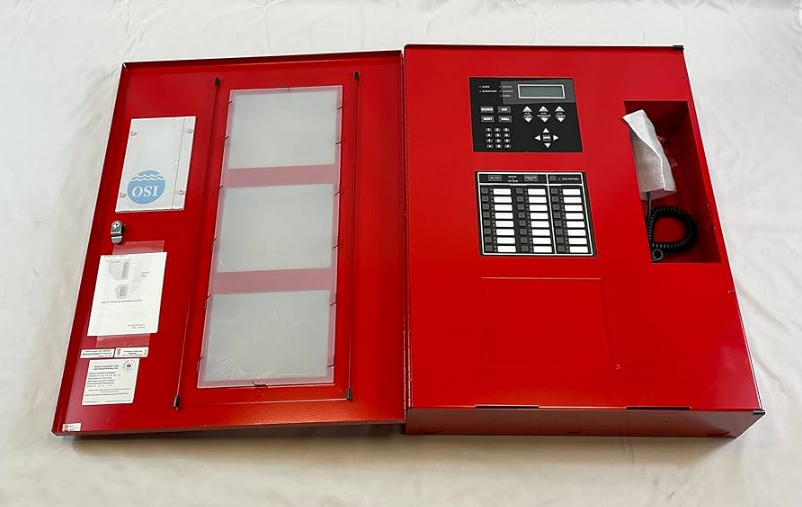

Silent Knight IFP-100 ECS Fire Alarm Control Panel
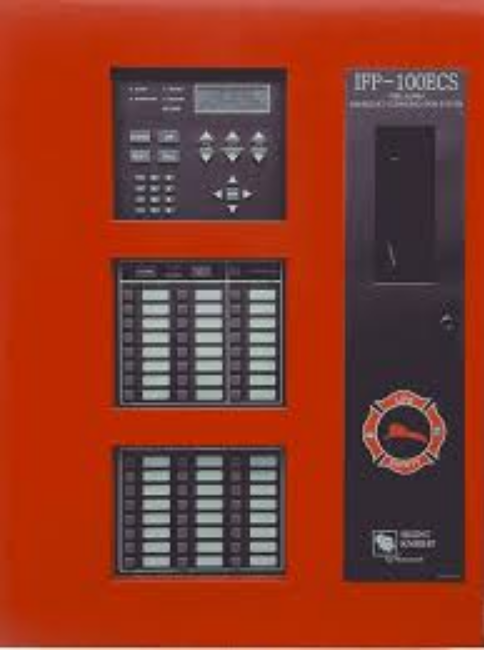
1.1 Overview of Basic System
The IFP-100 base system is an addressable system with a built-in annunciator that can also be used to program the system.
1.1.1 Hardware Features
- The IFP-100 has one signaling line circuit (SLC) that supports Intelligent Device Protocol (IDP) devices or Hochiki protocol devices.
- The control panel’s SLC supports 99 IDP detectors and 99 IDP modules or 127 Hochiki protocol devices.
- 6.0A of output power is available through 4 sets of terminals for notification appliance circuits or auxiliary applications. Each circuit is power-limited per UL 864 and can source up to 3.0A (total output power for all 6 circuits must not exceed 6.0A).
- Built-in dual phone line, digital alarm communicator/transmitter (DACT).
- Reports events to the central station by point or by zone.
- UL Listed for pre-action and deluge releasing systems.
- Two general-purpose Form C programmable relays.
- One Form C Trouble Relay.
- Can be used with up to 8 Model RA-100 or RA-1000 Remote Annunciators (sold separately).
- Can be used with Model 5865-3, 5865-4, and 5880 in any combination for a total of eight devices on one control panel. See Sections 4.8 and 4.9 for additional information on these models.
- Printing of detector status, event history, and real-time event log available through the Model 5824 serial/parallel printer interface module (sold separately).
- 125 software zones, 125 output groups.
- Add 4 Notification/Auxiliary power circuits with each 5496 Intelligent Power Module (up to 8, 5496s per system).
- Add 6 Flexput circuits with each RPS-1000 Intelligent Power Module (up to 8, 5496s and 8 RPS-1000s per system).
1.1.2 Software Features
- Advanced smoke detector features:
- Automatic drift compensation
- Automatic day/night sensitivity adjustment
- Maintenance alert region
- Point status eliminates calibrated smoke test requirements for NFPA 72
- “JumpStart” feature for easy programming
- Non-volatile event history stores 1000 events
- A choice of output patterns available for notification outputs, including ANSI 3.41 temporal signal
- Built-in synchronization appliance support for AMSECO, Faraday, Gentex®, System Sensor®, and Wheelock®.
1.2 About this Manual
This manual is intended to be a complete reference for all installation and operation tasks for the IFP-100. Please let us know if the manual does not meet your needs in any way. We value your feedback!
1.2.1 Terms Used in this Manual
The following terminology is used with the IFP-100 system: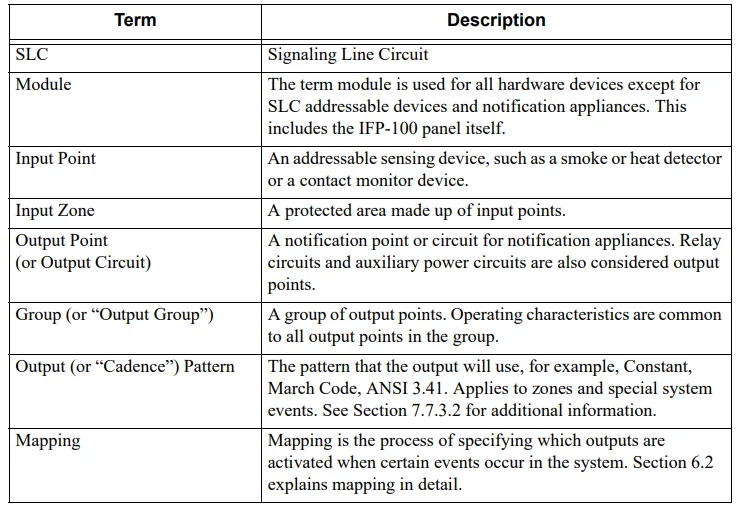
1.3 Compatible Products
The chart below lists the products available from Silent Knight for use with the IFP-100.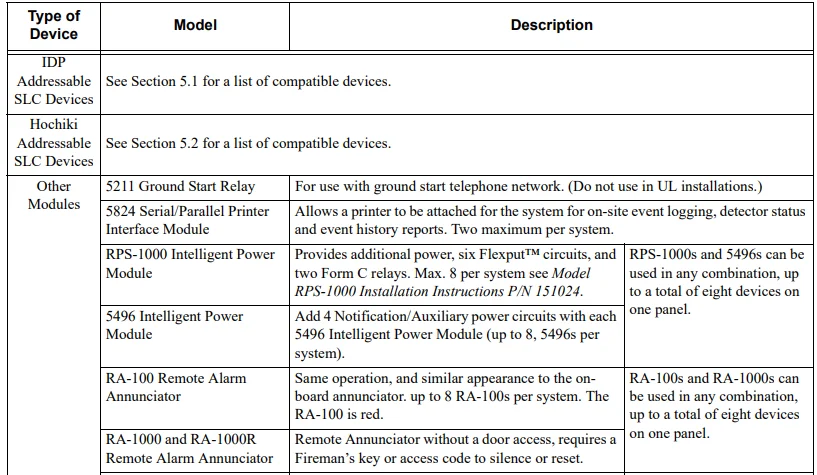
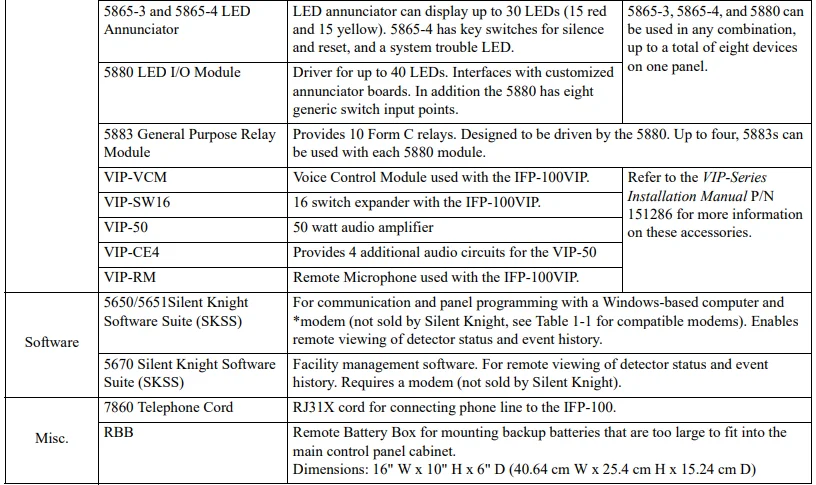
The following modems have been tested by Silent Knight for compatibility with the IFP-100 and the Silent Knight Software Suite software packages: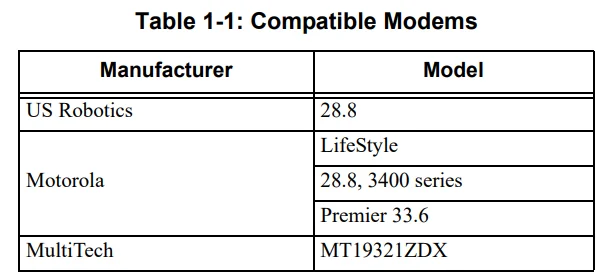
1.4 How to Contact Silent Knight
If you have a question or encounter a problem not covered in this manual, contact Silent Knight Technical Support at 800-328-0103 (or 763-493-6455). To order parts, contact Silent Knight Sales at 800-446-6444 (or 763-493-6435).
2.2 Underwriters Laboratories (UL)
2.2.1 Requirements for All Installations
General requirements are described in this section. When installing an individual device, refer to the specific section of the manual for additional requirements. The following subsections list specific requirements for each type of installation (for example, Central Station Fire Alarm systems, Local Protected Fire Alarm systems, and so on). See Section 8.6 for information on releasing the operation.
- All field wiring must be installed in accordance with NFPA 70, National Electric Code.
- Use the addressable smoke detectors specified in Section 5 of this manual and or conventional detectors listed in the compatibility chart (see Appendix A).
- Use UL-listed notification appliances compatible with the IFP-100 from those specified in Appendix A at the back of this manual.
- A full system checkout must be performed any time the panel is programmed.
Restricted Options:
- The loss of the AC signal is defaulted to 3 hours; however, the system allows settings from 0 to 3 hours. For UL-certified installations, this number must be set from 1 to 3 hours.
- The system allows the use of non-latching spot-type smoke detectors. This feature may not be used in commercial applications where a general alarm is sounded. It is intended for elevator recall, door holding applications, and hotel/motel room applications.
- The system allows the Alarm Verification time to be set from 1 to 255 seconds. For UL-certified installations, the setting must be a minimum of 60 seconds.
- Call forwarding shall not be used.
- When two count is used, detector spacing shall be cut in half, you shall not use the alarm verification feature, and no delay shall be used.
- P.A.S. feature shall be used only with automatic detectors.
2.2.2 Requirements for Central Station Fire Alarm Systems
Minimum system requirements are one Silent Knight addressable initiating device.
- Use both phone lines. Enable phone line monitors for both lines.
- You must program a phone number and a test time so that the IFP-100 sends an automatic daily test to the central station.
- Do not use the ground start option.
- The AC Loss Hours option must be set from 1 to 3 hours.
- The Attempts to Report option must be set to 5.
2.2.3 Requirements for Local Protected Fire Alarm Systems
At least one UL-listed supervised notification appliance must be used. Minimum system requirements are one Silent Knight addressable initiating device.
2.2.4 Requirements for Remote Station Protected Fire Alarm Systems
Minimum system requirements are one Silent Knight addressable initiating device and either a 5220, Keltron 3158, or the built-in Digital Alarm Communicator Transmitter (DACT).
- Do not exceed the current load restrictions shown in Section 3.6.1.3.
- The AC Loss Hours option must be set from 1 to 3 hours.
2.2.5 Requirements for Auxiliary Protected Fire Alarm Systems for Fire Alarm Service
The Model 5220 Direct Connect module must be installed (see Section 4.15.3.1 for wiring).
Before You Begin Installing
This section of the manual is intended to help you plan your tasks to facilitate a smooth installation. Please read this section thoroughly, especially if you are installing an IFP-100 panel for the first time.
3.1 What’s in the Box?
The IFP-100 ships with the following hardware:
- A cabinet with all hardware assembled
- Two keys for the front door
- Ten 4.7K ohm end-of-line resistors
- A battery cable for batteries wired in series
3.2 Environmental Specifications
It is important to protect the IFP-100 control panel from water. To prevent water damage, the following conditions should be avoided when installing the units:
- Mount indoors in dry locations only
- Do not mount directly on exterior walls, especially masonry walls (condensation)
- Do not mount directly on exterior walls below grade (condensation)
- Protect from plumbing leaks
- Protect from splash caused by sprinkler system inspection ports
- Do not mount in areas with humidity-generating equipment (such as dryers, production machinery)
When selecting a location to mount the IFP-100 control panel, the unit should be mounted where it will not be exposed to temperatures outside the range of 0°C–49°C (32°F–120°F) or humidity not exceeding 93% noncondensing.
3.3 Electrical Specifications
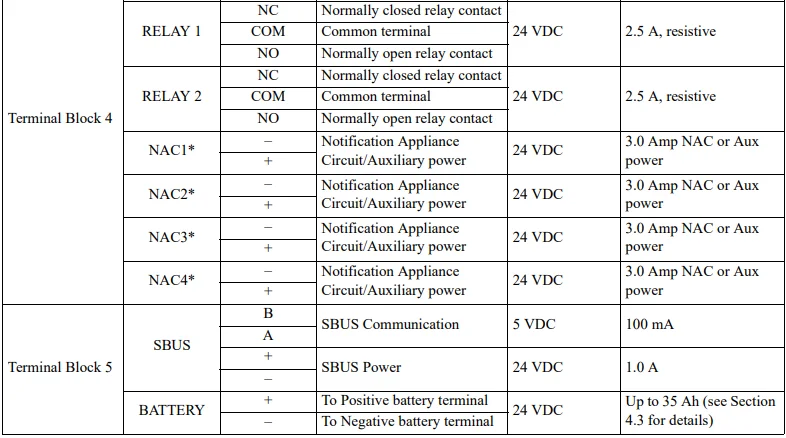
Table 3-1 lists the terminal block on the IFP-100 as well as a description of each terminal and its respective electrical rating. For the location of the terminals, refer to Table 3-1.
3.4 Wiring Specifications
Induced noise (transfer of electrical energy from one wire to another) can interfere with telephone communication or cause false alarms. To avoid induced noise, follow these guidelines:
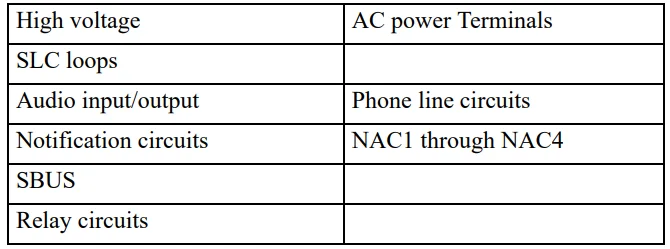
- Isolate input wiring from high-current output and power wiring. Do not pull one multiconductor cable for the entire panel. Instead, separate the wiring as follows:

- Do not pull wires from different groups through the same conduit. If you must run them together, do so for as short a distance as possible or use shielded cable. Connect the shield to the earth ground at the panel. You must route high and low voltages separately.
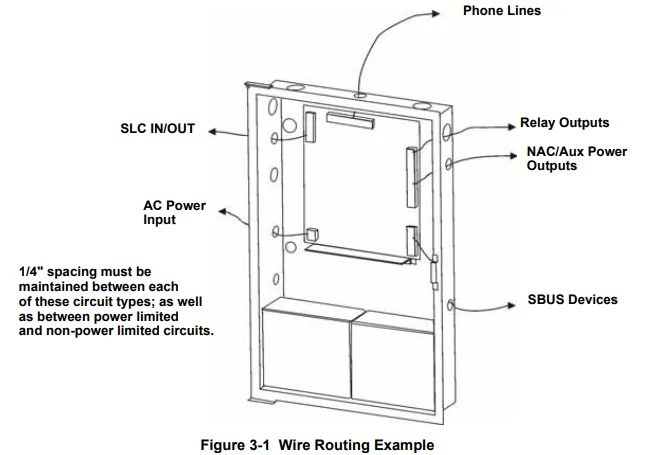
- Route the wiring around the inside perimeter of the cabinet. It should not cross the circuit board, where it could induce noise into the sensitive microelectronics or pick up unwanted RF noise from the high-speed circuits. See Figure 3-1 for an example.
- High-frequency noise, such as that produced by the inductive reactance of a speaker or bell, can also be reduced by running the wire through ferrite shield beads or by wrapping it around a ferrite toroid.

3.5 Board Assembly Diagram
Figure 3-2 shows the circuit boards and annunciator that attach the IFP-100 assembly to the cabinet. If you need to remove the board assembly for repair, remove the nine mounting screws (six on the main circuit board and three on the heat-sink) that hold the assembly in the cabinet. Then lift the entire assembly out of the cabinet.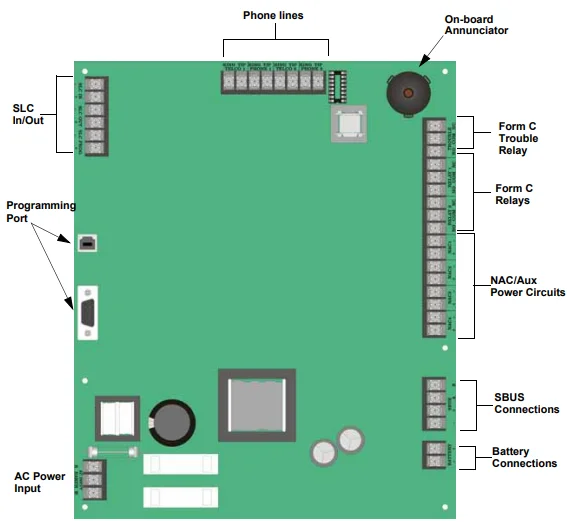
3.6 Calculating Current Draw and Standby Battery
This section is for helping you determine the current draw and standby battery needs if you are using IDP addressable devices (Table 3-2) or Hochiki addressable devices (Table 3-3).
3.6.1 Current Draw Worksheet Requirements
The following steps must be taken when determining IFP-100 current draw and standby battery requirements.
- Use the Current Draw Worksheet to determine current draw and standby battery requirements. Use Table 3-2 if installing IDP SLC Devices and Table 3-3 if installing Hochiki SLC Devices to determine current draw. For the IFP-100, the worst-case current draw is listed for the panel, addressable devices, and all SBUS expanders. Fill in the number of addressable devices that will be used in the system and compute the current draw requirements for alarm and standby. Record this information in the Current Draw Worksheet on Line A.
- Add up the current draw for all auxiliary devices and record in the table at Line B.
- Add up all notification appliance loads and record in the table at Line C.
- For notification appliance circuits and auxiliary devices not mentioned in the manual, refer to the device manual for the current ratings.
- Make sure that the total alarm current you calculated, including current for the panel itself, does not exceed 6.0
- This is the maximum alarm current for the IFP-100 control panel. If the current is above 6.0 A, you will need to use a notification power expander(s), such as the Silent Knight 5496 Intelligent Power Module, to distribute the power loads so that the IFP-100 or the power expanders do not exceed their power rating. Refer to the current draw worksheets provided with the 5496 manual, so you do not exceed their power requirements.
- Complete the remaining instructions in the Current Draw Worksheet for determining battery size requirements.
Control Panel Installation
4.1 Mounting the Control Panel Cabinet
Read the environmental specifications in Section 3.2 before mounting the IFP-100 panel. The IFP-100 cabinet dimensions are 16″ W x 26.4″ H x 3.5″ D (40.64 cm W x 67.06 cm H x 8.89 cm D). The IFP-100 panel should be located within a secured area where it is accessible to the main drop wiring runs and where it can be easily tested and serviced. End-users responsible for maintaining the panel should be able to hear alarms and troubles.
When selecting a location, keep in mind that the panel itself is the main source of alarm and trouble annunciation. When mounting on interior walls, use appropriate screw anchors in plaster. When mounting on concrete, especially when moisture is expected, attach a piece of 3/4 inch plywood to the concrete surface and then attach the IFP-100 to the plywood. Also, mount any other desired components to the plywood. Do not flush-mount the IFP-100 cabinet in a wall designated as a fire break.
4.1.1 Preventing Water Damage
Water damage to the fire system can be caused by moisture entering the cabinet through the conduits. Conduits that are installed to enter the top of the cabinet are most likely to cause water problems. Installers should take reasonable precautions to prevent water from entering the cabinet. Water damage is not covered under warranty.
4.1.2 Removing the IFP-100 Assembly from the Housing
If it should ever be necessary to remove the control panel assembly from the cabinet for repair, do so by removing the screws that hold the control panel in the cabinet. Do not attempt to disassemble the circuit boards.
4.2 AC Connection
At installation, connect the AC terminals to the power source as shown in Figure 4-1. It may be necessary for a professional electrician to make this connection. The AC terminals are rated at 120 VAC, 60 Hz, 3.6A.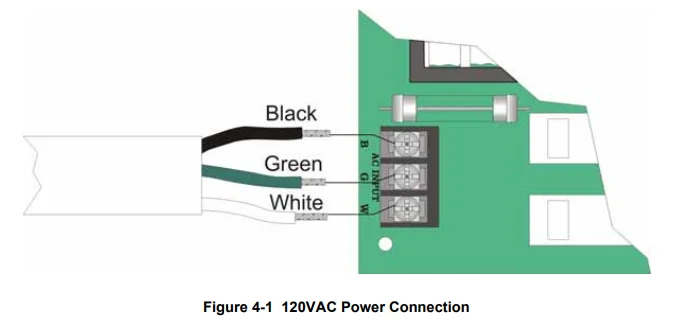
4.3 Battery Connection
The control panel battery charge capacity is 7.0 to 35 AH. The main control cabinet can house batteries up to 18 AH; larger capacity batteries can be housed in an RBB (see Section 4.3.1 for details). Use 12V batteries of the same AH rating. Determine the correct AH rating as per your current load calculation (see Section 3.6). Wire batteries in series to produce a 24-volt equivalent. Do not parallel batteries to increase the AH rating.
The following steps and diagram explain how to connect the batteries.
- Connect the black wire from the control panel negative (–) battery terminal to the negative (–) side of Battery #2.
- Connect the jumper wire provided (P/N 140694) from the positive (+) side of Battery #2 to the negative (–) side of Battery #1.
- Connect the red wire from the control panel’s positive (+) terminal to the positive (+) side of Battery #1.


4.3.1 RBB Accessory Cabinet
The Model RBB Accessory cabinet can be used when your backup battery requirements use backup batteries that are too large to fit into the main control panel cabinet. The RBB cabinet holds batteries up to the 35 AH size. The RBB dimensions are 16″ W x 10″ H x 6″ D (40.64 cm W x 25.4 cm H x 15.24 cm D).
4.3.1.1 Installing the RBB Accessory Cabinet and Batteries
To properly install the accessory cabinet and backup batteries, follow these steps.
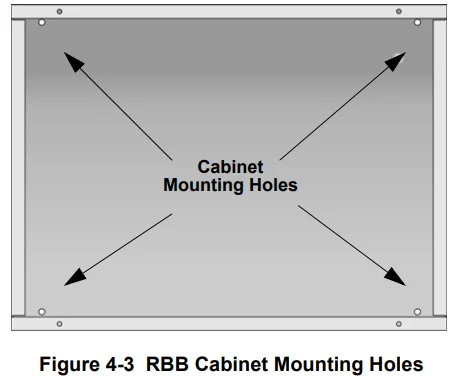
- Mount the accessory cabinet. See Figure 4-3 for the four cabinet mounting holes.
- If mounting onto drywall, the accessory cabinet must be mounted onto 3/4-inch plywood. This is necessary because the weight of the batteries inside the accessory cabinet could cause the cabinet to pull away from the drywall.
- When mounting on concrete, especially when moisture is expected, attach a piece of 3/4-inch plywood to the concrete surface and then attach the RBB cabinet to the plywood.
- If using the battery cable extenders provided (P/N 140643), mount the RBB cabinet no more than 18″ away from the main control panel cabinet. This will ensure that the battery cables reach the battery terminals.

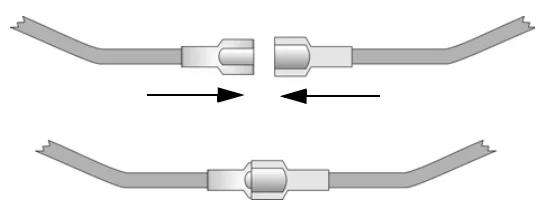
- Connect the main control panel battery cables to the battery cable extenders as shown in Figure 4-4.

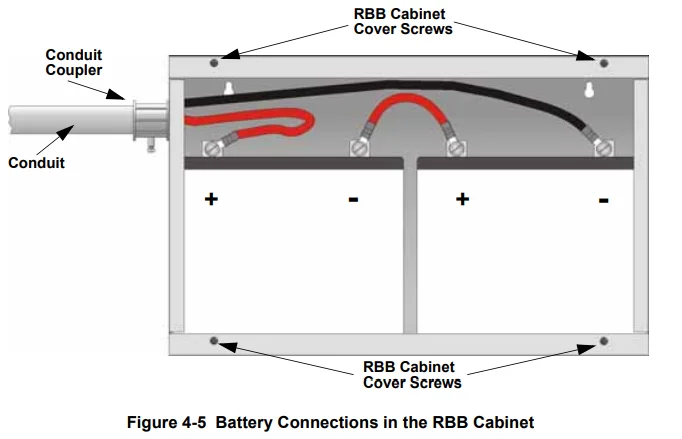
- Run the extended battery cable from the control panel cabinet through the conduit to the RBB cabinet. See Figure 4-5.

- Connect the battery leads to the backup battery terminals. See Figure 4-5. Observe the proper polarity to prevent damage to the batteries or the control panel.
- Insert the RBB cover screws into the cover mounting holes (see Figure 4-5). Screw the cover screws 3/4 of the way into the cover mounting holes.
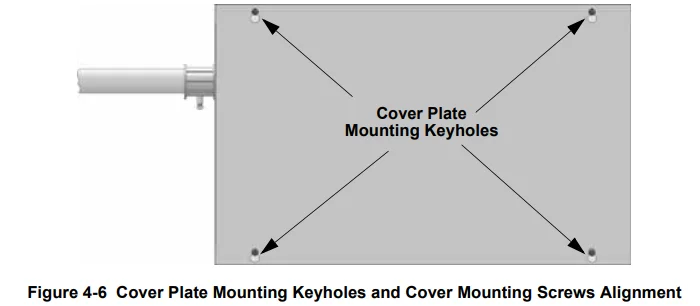
- Align the cover plate mounting keyhole over the cover mounting screws. See Figure 4-6.

- Slide the cover into place and tighten the cover mounting screws. See Figure 4-6.
4.4 SBUS Wiring
This section contains information on calculating SBUS wire distances and the types of wiring configurations (Class B).
4.4.1 Calculating Wiring Distance for SBUS Modules
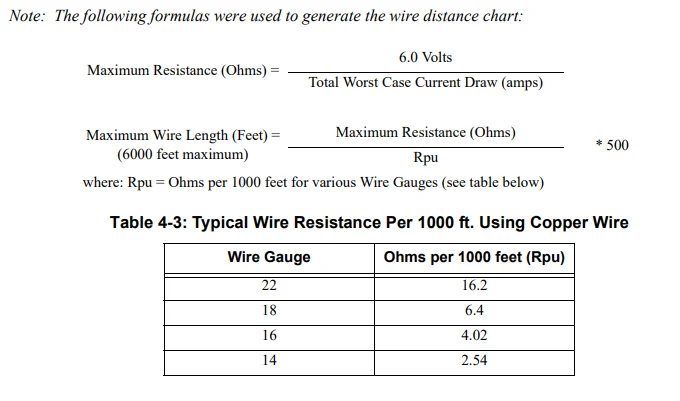
The following instructions will guide you in determining the type of wire and the maximum wiring distance that can be used with control panel SBUS accessory modules. To calculate the wire gauge that must be used to connect SBUS modules to the control panel, it is necessary to calculate the total worst-case current draw for all modules on a single 4-conductor bus. The total worst-case current draw is calculated by adding the individual worst-case currents for each module. The individual worst-case values are shown in the table below. Note: Total worst-case current draw on a single SBUS cannot exceed 1 amp.
After calculating the total worst-case current draw, Table 4-2 specifies the maximum distance the modules can be located from the panel on a single wire run. The table ensures 6.0 volts of line drop maximum. In general, the wire length is limited by resistance, but for heavier wire gauges, capacitance is the limiting factor. These cases are marked in the chart with an asterisk (*). Maximum length can never be more than 6,000 feet, regardless of gauge used (the formula used to generate this chart is shown in the note below).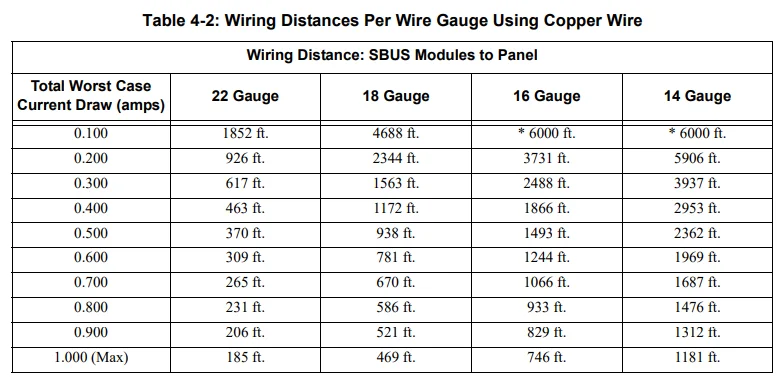
4.5 RA-100 Remote Annunciator Installation
The optional Model RA-100 Remote Annunciator, shown in Figure 4-14, performs the same functions as the onboard annunciator. The operation is identical. The RA-100 can be surface or flush-mounted. Up to 8 RA-100s can be added to the IFP-100 system.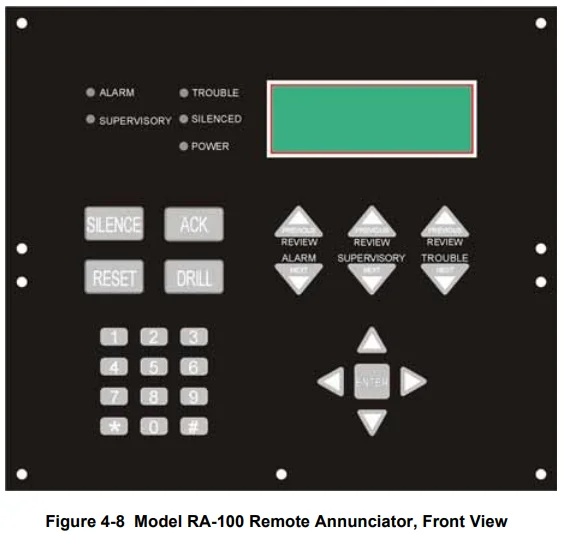
RA-100 installation involves the following steps.
- Make sure the power is off at the panel.
- Mount the RA-100 in the desired location (see Section 4.5.1).
- Connect the RA-100 to the panel (see Section 4.4.2).
- Use the dipswitches on the back of the RA-100 to assign an ID# to the RA-100 (see Section 4.10.1).
- The new RA-100 module must be added to the system through programming. JumpStart will add the module automatically (see Section 6.1). You can also add it manually (see Section 7.3.2). Select a name, if desired (see Section 7.3.1.1).
Limited Warranty
SILENT KNIGHT warrants products manufactured by it to be free from defects in materials and workmanship for eighteen (18) months from the date of manufacture, under normal use and service. Products are date-stamped at the time of manufacture. The sole and exclusive obligation of SILENT KNIGHT is to repair or replace, at its option, free of charge for parts and labor, any part that is defective in materials or workmanship under normal use and service. All returns for credit are subject to inspection and testing at the factory before an actual determination is made to allow credit.
SILENT KNIGHT does not warrant products not manufactured by it, but assigns to the purchaser any warranty extended by the manufacturer of such products. This warranty is void if the product is altered or repaired by anyone other than SILENT KNIGHT or as expressly authorized by SILENT KNIGHT in writing, or is serviced by anyone other than SILENT KNIGHT or its authorized distributors.
This warranty is also void if there is a failure to maintain the products and systems in which they operate in a proper and workable manner. In the event of a defect, obtain a Return Material Authorization form from our Return Authorization Department. This writing constitutes the only warranty made by SILENT KNIGHT with respect to its products.
SILENT KNIGHT does not represent that its products will prevent any loss by fire or otherwise, or that its products will in all cases provide the protection for which they are installed or intended. Buyer acknowledges that SILENT KNIGHT is not an insurer and assumes no risk for loss or damages or the cost of any inconvenience, transportation damage, misuse, abuse, accident, or similar incident.
SILENT KNIGHT GIVES NO WARRANTY, EXPRESS OR IMPLIED, OF MERCHANTABILITY, FITNESS FOR ANY PARTICULAR PURPOSE, OR OTHERWISE WHICH EXTENDS BEYOND THE DESCRIPTION ON THE FACE HEREOF. UNDER NO CIRCUMSTANCES SHALL SILENT KNIGHT BE LIABLE FOR ANY LOSS OF OR DAMAGE TO PROPERTY, DIRECT, INCIDENTAL,
OR CONSEQUENTIAL, ARISING OUT OF THE USE OF, OR INABILITY TO USE SILENT KNIGHT ALARM’S PRODUCTS. FURTHERMORE, SILENT KNIGHT SHALL NOT BE LIABLE FOR ANY PERSONAL INJURY OR DEATH WHICH MAY ARISE IN THE COURSE OF, OR AS A RESULT OF, PERSONAL, COMMERCIAL, OR INDUSTRIAL USE OF ITS PRODUCTS.
This warranty replaces all previous warranties and is the only warranty made by SILENT KNIGHT. No increase or alteration, written or verbal, of the obligation of this warranty is authorized. “SILENT KNIGHT” is a registered trademark. Visit www.silentknight.com for more details.
For More Manuals By Silent Knight, Visit ManualsLibraryy.
Silent Knight IFP-100 ECS Fire Alarm Control Panel-FAQS
What is the Silent Knight IFP-100 ECS Fire Alarm Control Panel?
The Silent Knight IFP-100 ECS is an addressable fire alarm control panel designed to monitor fire detection devices, process alarm signals, and activate notification systems in commercial and industrial buildings.
How does a fire alarm control panel work?
The panel receives signals from smoke detectors, heat detectors, or manual call points. When a fire condition is detected, it activates alarms, notification devices, and can transmit signals to a larger networked fire system.
What type of fire alarm system is the IFP-100 ECS?
It is an addressable fire alarm control panel, meaning each connected device has a unique address for precise location identification.
What are the main components of a fire alarm system?
A complete system includes initiating devices (detectors and call points), notification appliances (horns and strobes), the control panel, primary power supply, and backup batteries.
How do you test a fire alarm control panel?
Testing involves activating detectors or call points, checking alarm signals, verifying notification devices, and ensuring the panel displays correct status information.
What do the indicator lights on the panel mean?
Green indicates normal power, red signals a fire alarm, and amber shows a fault, supervisory condition, or system trouble.
How do smoke detectors connected to the panel work?
Optical smoke detectors detect smoke by sensing scattered infrared light, while ionization detectors detect changes in air ionization caused by smoke particles.
Does the fire alarm panel use AC or DC power?
Fire alarm panels typically use 24V DC for system operation, while the main power supply is usually 120V AC with battery backup.
What is the difference between SLC and NAC circuits?
SLC (Signal Line Circuit) connects initiating devices like detectors, while NAC (Notification Appliance Circuit) powers alarms such as sirens, horns, and strobes.