
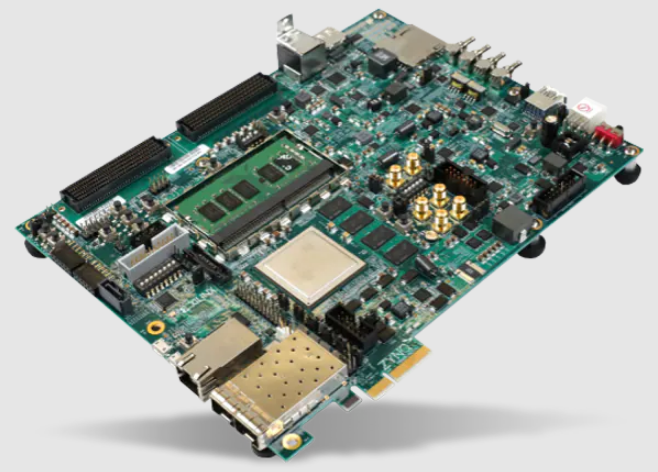

ZCU106 Evaluation Board Kit
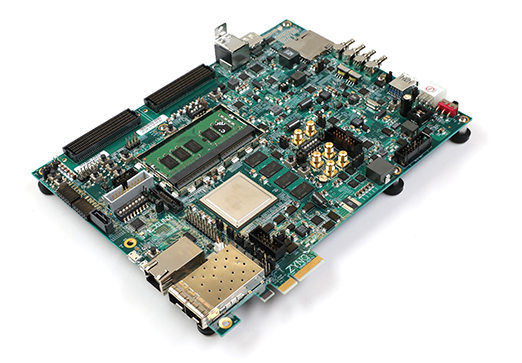
Introduction
Overview
The ZCU106 is a general-purpose evaluation board designed for rapid prototyping based on the ZU7EV silicon part and package in the 16 nm FinFET Zynq UltraScale+ MPSoC. The ZU7EV device integrates a quad-core Arm® Cortex™-A53 processing system (PS) and a dual-core Arm Cortex-R5F real-time processor, which provides application developers an unprecedented level of heterogeneous multiprocessing. The ZCU106 evaluation board provides a flexible prototyping platform with high-speed DDR4 memory interfaces, FMC expansion ports, multi-gigabit per second serial transceivers, video codec unit (VCU), several peripheral interfaces, and FPGA fabric for customized designs.
Block Diagram
The ZCU106 board block diagram is shown in Figure 1-1.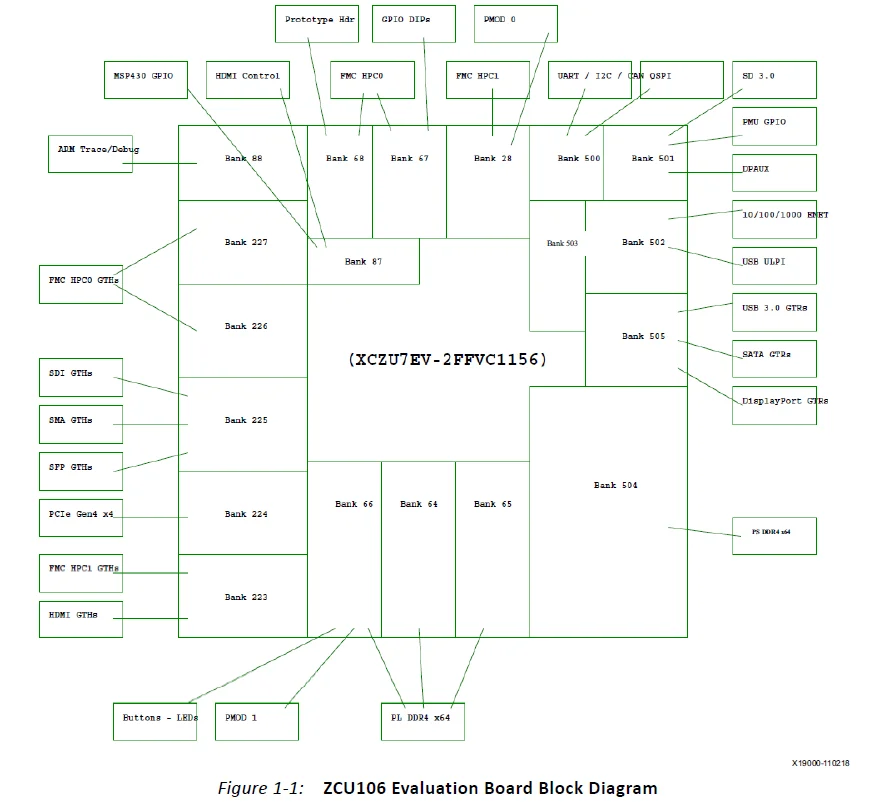
Board Features
The ZCU106 evaluation board features are listed here. Detailed information for each feature is provided in Component Descriptions in Chapter 3.
- XCZU7EV-2, FFVC1156 package
- PL VCCINT for range in data sheet
- Form factor for PCIe® Gen[1-3]x4 endpoint (PL GTH transceiver), Micro-ATX chassis footprint
- Configuration from Quad SPI
- Configuration from SD card
- Configuration over JTAG with the platform cable USB header
- Configuration over JTAG with Arm 20-pin header
- Configuration over USB-to-JTAG bridge
- Clocks
- USER_MGT_SI570
- PL_74.25M, PL_125M, PL_300M
- USER_SMA_MGT
- GTR_DP, GTR_USB3, GTR_SATA
- PS_REF_CLK
- PS DDR4 64-bit SODIMM
- PL DDR4 64-bit component (4×16-bit)
- PS-GTR assignment
- DisplayPort (two GTRs)
- USB3 (one GTR)
- SATA (one GTR)
- PL GTH transceiver assignment (20 total)
- High-definition multimedia interface (HDMI®) (three GTH transceivers)
- FMC HPC1 DP (one GTH transceiver)
- PCIe (four GTH transceivers)
- SDI (one GTH transceiver)
- SMA (one GTH transceiver)
- SFP+ (two GTH transceivers)
- FMC HPC0 DP (eight GTH transceivers)
- PL FMC HPC0 connectivity – full LA bus
- PL FMC HPC1 connectivity – partial LA bus
- PS MIO: dual Quad SPI
- PS MIO: two channels of quad-UART bridge
- PS MIO: CAN
- PS MIO: I2C shared across PS and PL
- PS MIO: SD
- PS MIO: DisplayPort
- PS MIO: system controller I/F
- PS MIO: Ethernet
- PS MIO: USB3
- PS-side user LED (one)
- PS-side user pushbutton (one)
- PL-side user LEDs (eight)
- PL-side user DIP switch (8-position)
- PL-side user pushbuttons (five)
- PL-side CPU reset pushbutton
- PL-side PMOD headers
- PL-side bank 0 PROG_B pushbutton
- Security – PSBATT button battery backup
- SYSMON (previously XADC), prototype header
- Operational switches (power on/off, PROG_B, boot mode DIP switch)
- Operational status LEDs (power status, INIT, DONE, PG, JTAG status, DDR power good)
- Power management
The ZCU106 provides designers a rapid prototyping platform using the XCZU7EV-2FFVC1156 device. The ZU7EV contains many PS hard block peripherals exposed through the multi-use I/O (MIO) interface and several FPGA programmable logic (PL), high-density (HD), and high-performance (HP) banks. Table 1-1 lists a summary of the resources available within the ZU7EV. A feature set overview, description, and ordering information is provided in the Zynq UltraScale+ MPSoC Data Sheet: Overview (DS891)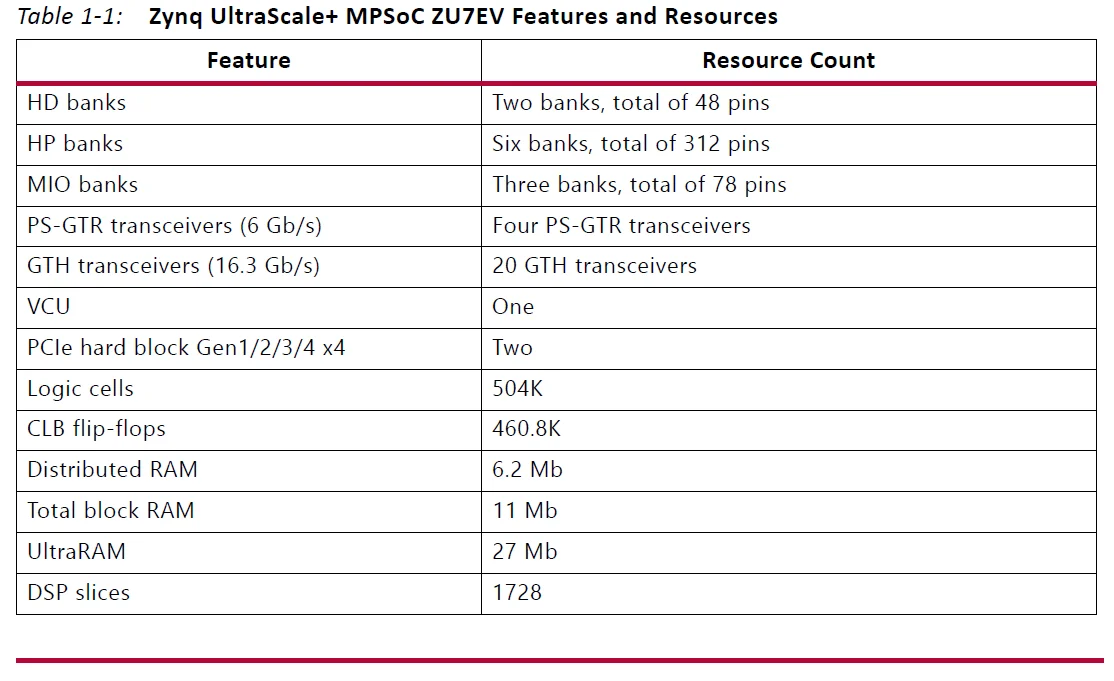
Board Specifications
- Dimensions
- Height: 7.323 inch (18.60 cm)
- Length: 9.5 inch (24.13 cm)
- Thickness: 0.062 inch ±0.005 inch (0.157 cm ±0.0127 cm)
Note: A 3D model of this board is not available.
IMPORTANT: The ZCU106 board height exceeds the standard 4.376 inch (11.15 cm) height of a PCI Express® card.
- Environmental
- Temperature
- Operating: 0°C to +45°C
- Storage: -25°C to +60°C
- Humidity
- 10% to 90% non-condensing
- Temperature
- Operating Voltage
- +12 VDC
Board Setup and Configuration
Board Component Location
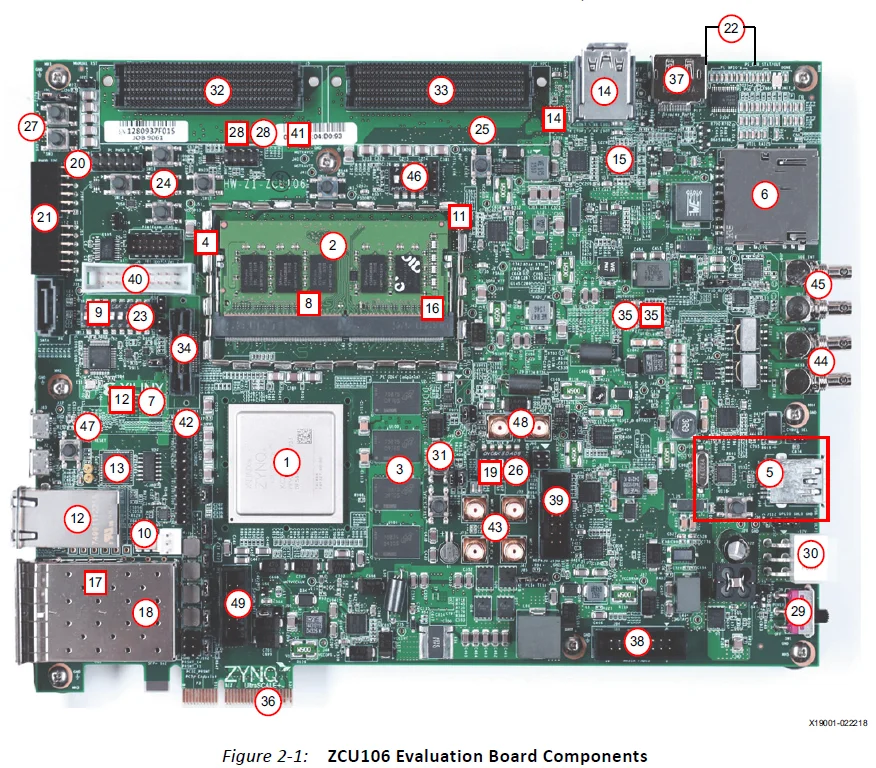
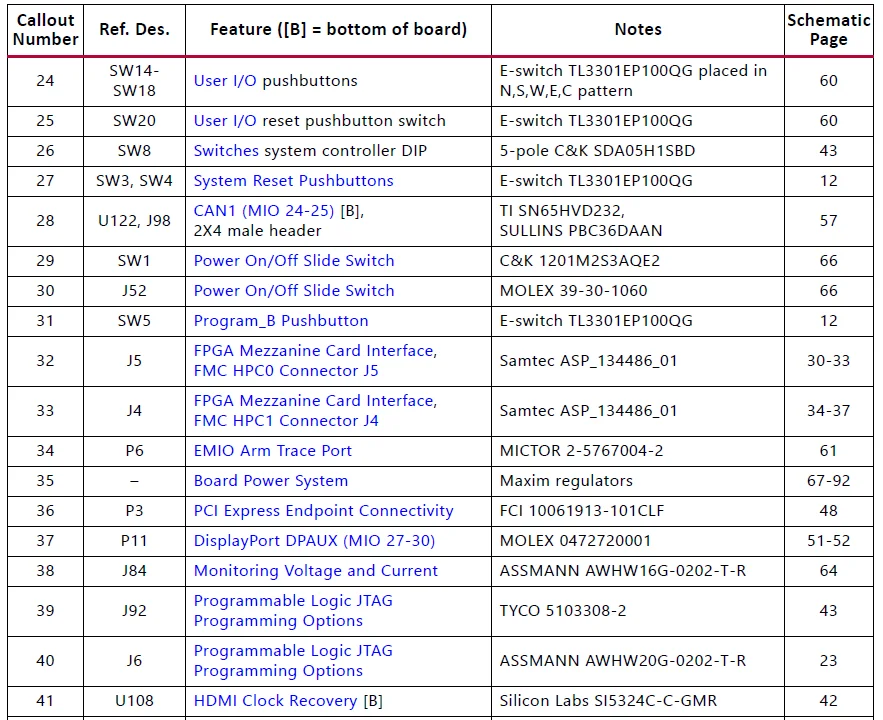
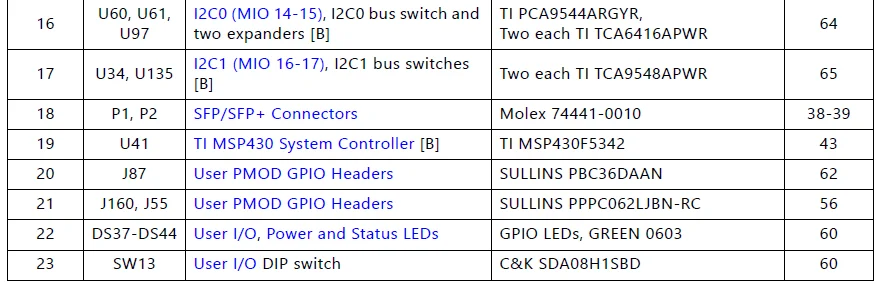
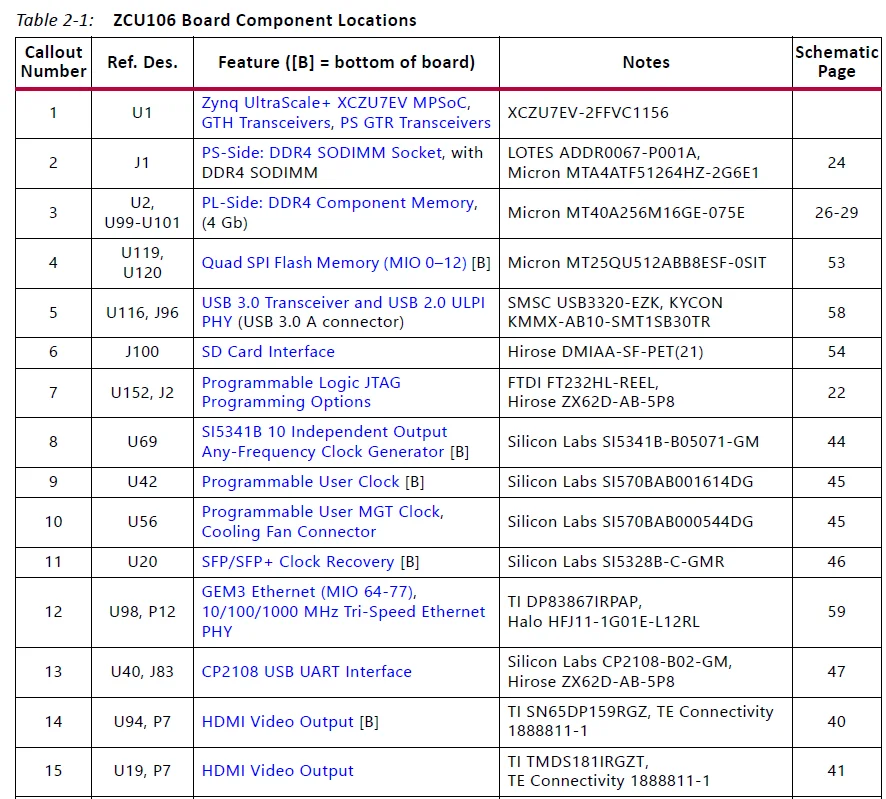
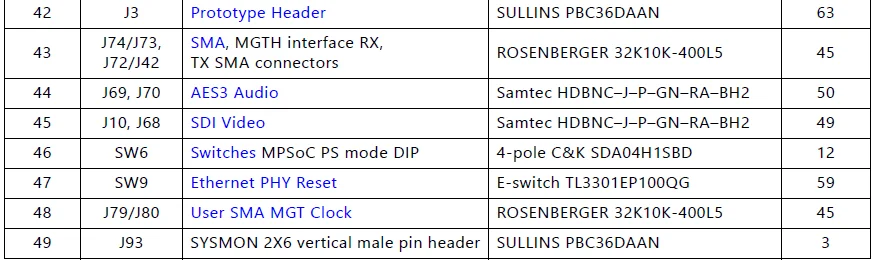
Figure 2-1 shows the ZCU106 board component locations. Each numbered component shown in the figure is keyed to Table 2-1. Table 2-1 identifies the components, references the respective schematic (0381770) page numbers, and links to a detailed functional description of the components and board features in Chapter 3.
IMPORTANT: Figure 2-1 is for visual reference only and might not reflect the current revision of the board.
IMPORTANT: There could be multiple revisions of this board. The specific details concerning the differences between revisions are not captured in this document. This document is not intended to be a reference design guide, and the information herein should not be used as such. Always refer to the schematic, layout, and XDC files of the specific ZCU106 version of interest for such details.
Electrostatic Discharge Caution
CAUTION! ESD can damage electronic components when they are improperly handled, and can result in total or intermittent failures. Always follow ESD-prevention procedures when removing and replacing components.
To prevent ESD damage:
- Use an ESD wrist or ankle strap and ensure that it makes skin contact. Connect the equipment end of the strap to an unpainted metal surface on the chassis.
- Avoid touching the adapter against your clothing. The wrist strap protects components from ESD on the body only.
- Handle the adapter by its bracket or edges only. Avoid touching the printed circuit board or the connectors.
- Put the adapter down only on an antistatic surface such as the bag supplied in your kit.
- If you are returning the adapter to Xilinx Product Support, place it back in its antistatic bag immediately.
- Round callout references a component on the front side of the board
- Square callout references a component on the back side of the board
Default Jumper and Switch Settings
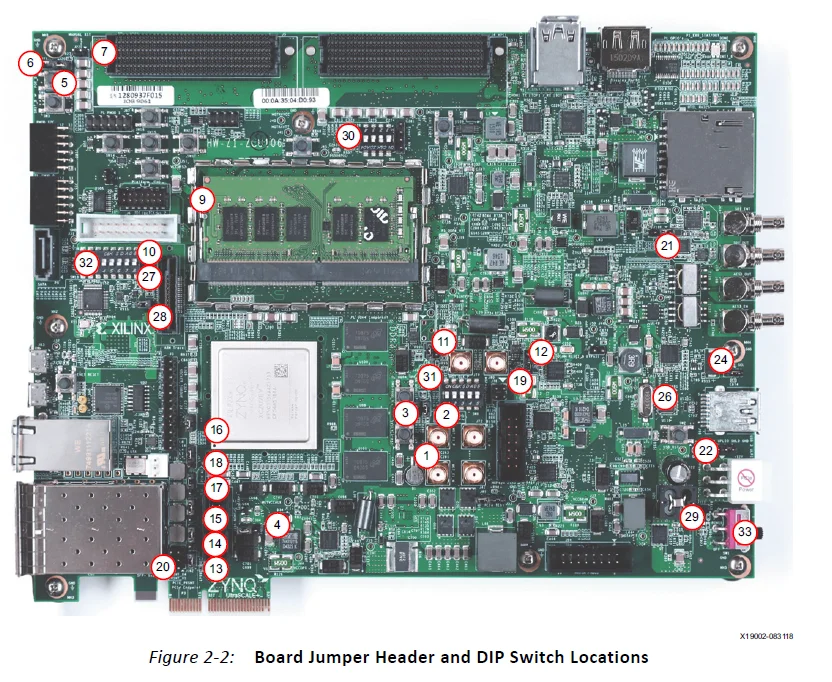
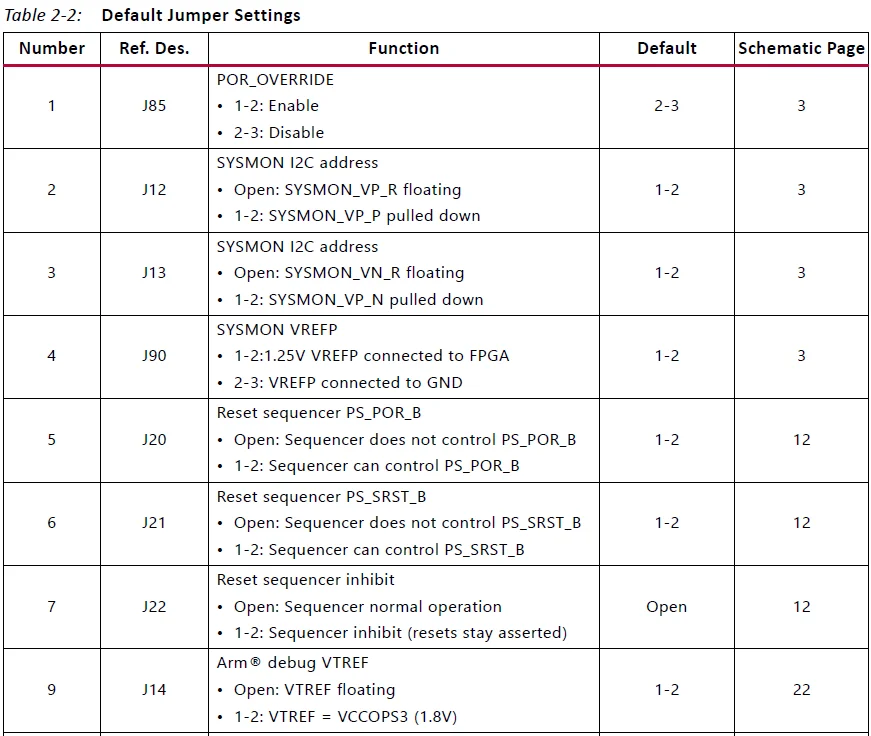
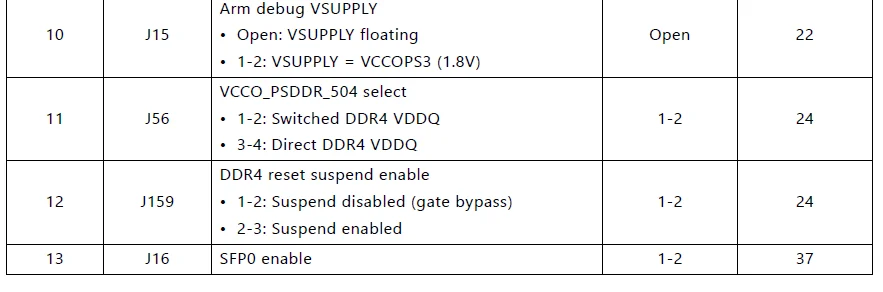
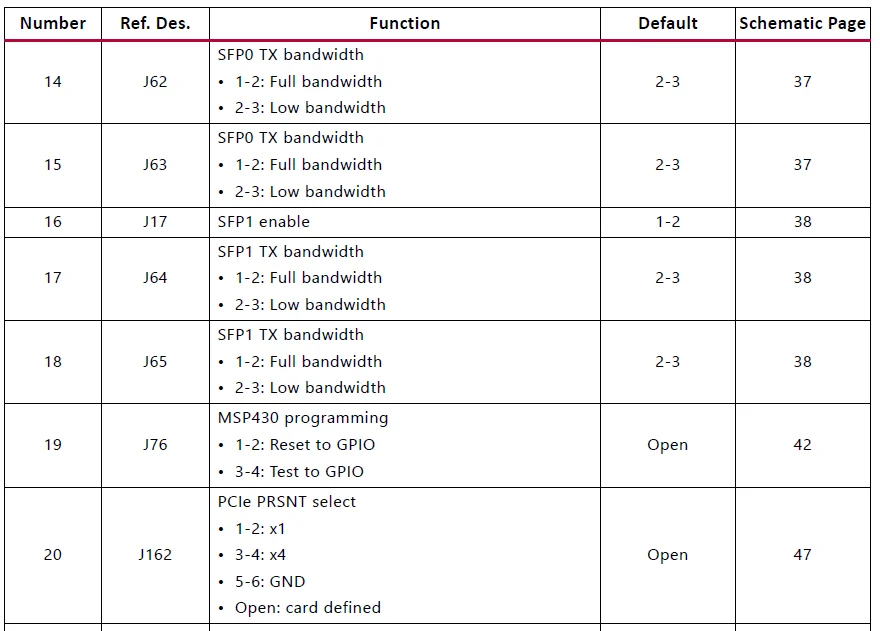
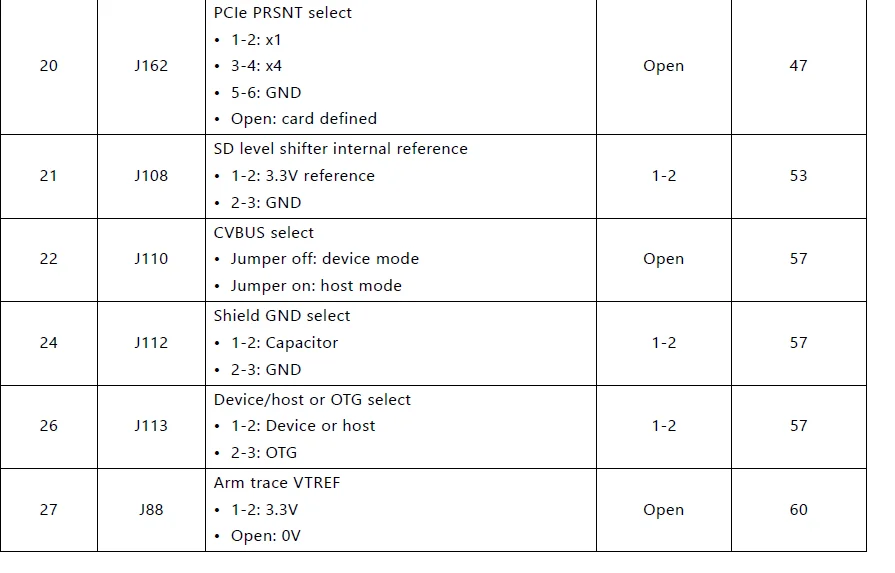
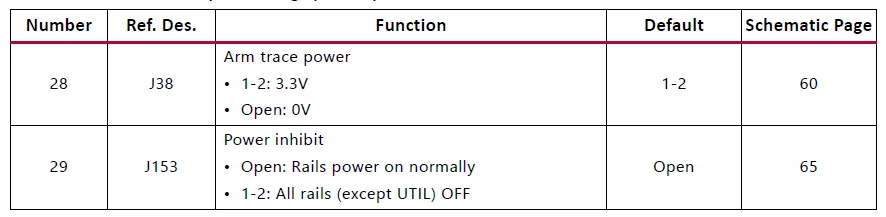
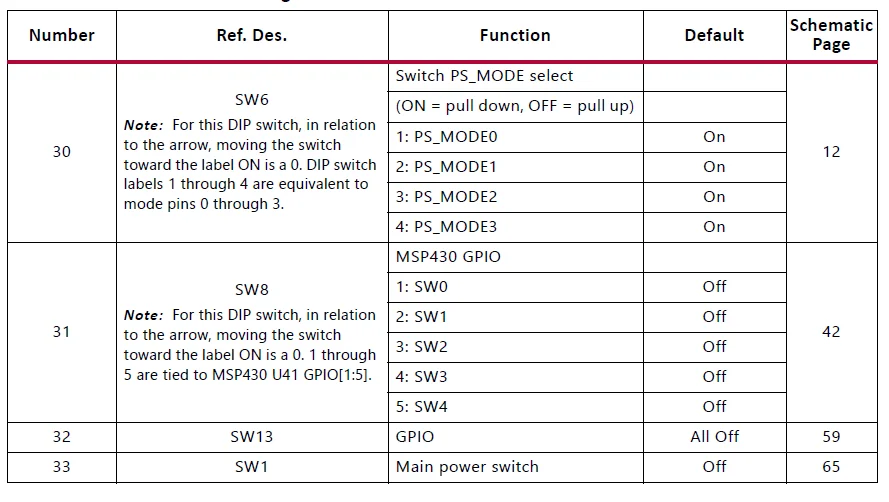
Figure 2-2 shows the ZCU106 board jumper header and DIP switch locations. Each numbered component shown in the figure is keyed to Table 2-2 or Table 2-3 (for default switch settings). Both tables reference the respective schematic (0381770) page numbers.
Jumpers
Switches
Installing the ZCU106 Board in a PC Chassis
Installation of the ZCU106 board inside a computer chassis is required when developing or testing PCI Express® functionality. When the ZCU106 board is installed in the PCIe® slot, power is provided from the ATX power supply 4-pin peripheral connector through the ATX adapter cable (Figure 2-3), which is plugged into J52 on the ZCU106 board. The Xilinx® part number for this cable is 2600304. See [Ref 25] for ordering information.
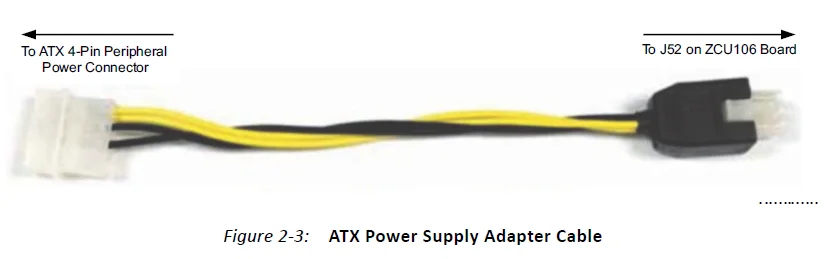
To install the ZCU106 board in a PC chassis:
- On the ZCU106 board, remove the seven screws retaining the six rubber feet with their standoffs and the PCIe bracket. Reinstall the PCIe bracket using two of the previously removed screws.
- Power down the host computer and remove the power cord from the PC.
- Open the PC chassis following the instructions provided with the PC.
- Select a vacant PCIe expansion slot and remove the expansion cover (at the back of the chassis) by removing the screws on the top and bottom of the cover.
IMPORTANT: The ZCU106 board height exceeds the standard PCIe board dimension, so the PC chassis top cover should remain off while using the ZCU106. - Plug the ZCU106 board into an open PCIe expansion slot.
- Install the top mounting bracket screw into the PC expansion cover retainer bracket to secure the ZCU106 board in its slot.
- Connect the ATX power supply to the ZCU106 board using the ATX power supply adapter cable shown in Figure 2-3.
- Plug the 6-pin 2 x 3 Molex connector on the adapter cable into J52 on the ZCU106 board.
- Plug the 4-pin 1 x 4 peripheral power connector from the ATX power supply into the 4-pin adapter cable connector.
CAUTION! Do NOT plug a PC ATX power supply 6-pin connector into the ZCU106 board power connector J52. The ATX 6-pin connector has a different pinout than J52. Connecting an ATX 6-pin connector to J52 damages the ZCU106 evaluation board and voids the board’s warranty.
- Slide the ZCU106 board power switch SW1 to the ON position. The PC can now be powered on.
MPSoC Device Configuration
Zynq UltraScale+ XCZU7EV MPSoC devices use a multi-stage boot process as described in the “Boot and Configuration” chapter of the Zynq UltraScale+ MPSoC Technical Reference Manual (UG1085) [Ref 3]. Switch SW6 configuration option settings are listed in Table 2-4.
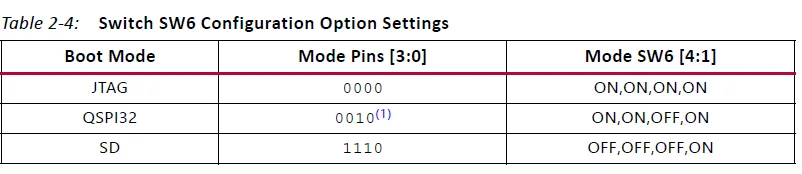
Notes:
- Default switch setting.
- For DIP SW6, in relation to the arrow, moving the switch toward the label ON is a 0. DIP switch labels 1 through 4 are equivalent to mode pins 0 through 3.
JTAG
Vivado® Design Suite, SDK, or third-party tools can establish a JTAG connection to the Zynq UltraScale+ MPSoC device through one of these provided JTAG interfaces:
- Xilinx platform USB or cable PC4 connector (J8)
- Arm 20-pin JTAG connector (J6)
- FTDI FT232HL USB-to-JTAG bridge U152 with micro-USB connector (J2)
Quad SPI
To boot from the dual Quad SPI nonvolatile configuration memory:
- Store a valid Zynq UltraScale+ MPSoC boot image in the Quad SPI flash devices connected to the MIO Quad SPI interface.
- Set the boot mode pins SW6 [3:0] PS_MODE[3:0] as indicated in Table 2-4 for Quad SPI32.
- Either power-cycle or press the power-on reset (POR) pushbutton. SW6 is callout 46 in Figure 2-1.
SD
To boot from an SD card:
- Store a valid Zynq UltraScale+ MPSoC boot image file onto an SD card (plugged into SD socket J100) connected to the MIO SD interface.
- Set the boot mode pins SW6 [3:0] PS_MODE[3:0] as indicated in Table 2-4 for SD.
- Either power-cycle or press the power-on reset (POR) pushbutton. SW6 is callout 46 in Figure 2-1.
See the Zynq UltraScale+ MPSoC Technical Reference Manual (UG1085) [Ref 3] for more information about Zynq UltraScale+ MPSoC configuration options.
Board Component Descriptions
Overview
This chapter provides a detailed functional description of the board’s components and features. Table 2-1 identifies the components, references the respective schematic page numbers, and links to the corresponding detailed functional description in this chapter. Component locations are shown in Table 2-1.
Component Descriptions
Zynq UltraScale+ XCZU7EV MPSoC [Figure 2-1, callout 1]
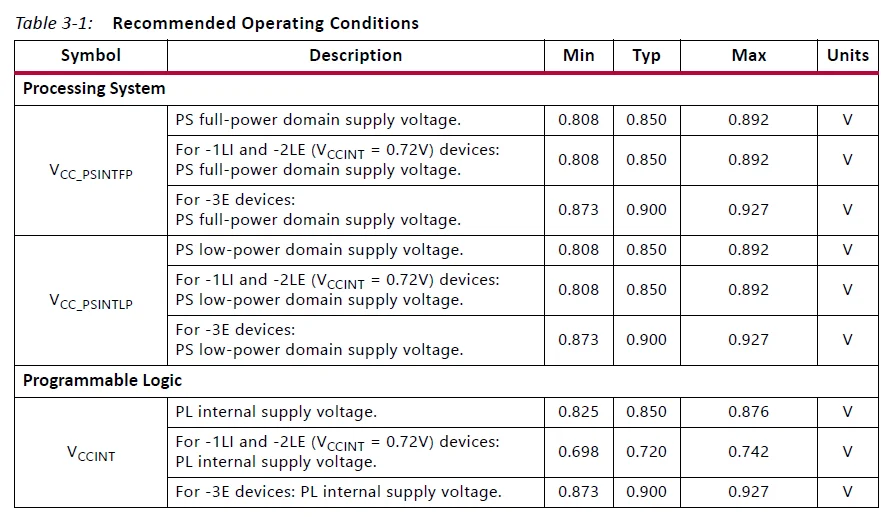
The ZCU106 board is populated with the Zynq UltraScale+ XCZU7EV-2FFVC1156 MPSoC, which combines a powerful processing system (PS) and programmable logic (PL) in the same device. The PS in a Zynq UltraScale+ MPSoC features the Arm® flagship Cortex®-A53 64-bit quad-core processor and Cortex-R5F dual-core real-time processor. Production ZCU106 evaluation boards will ship with -2 speed grade devices. Support of multiple speed grades requires voltage adjustments. The VCCINT supplies are user-adjustable via the PMBus with the voltage ranges listed in Table 3-1 to support multiple Zynq UltraScale+ MPSoC speed grades.
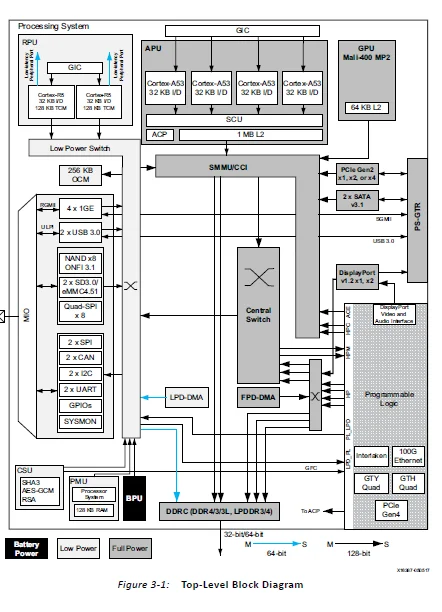
The top-level block diagram is shown in Figure 3-1.
Encryption Key Battery Backup Circuit
The XCZU7EV MPSoC U1 implements bit stream encryption key technology. The ZCU106 board provides the encryption key backup battery circuit shown in Figure 3-2.
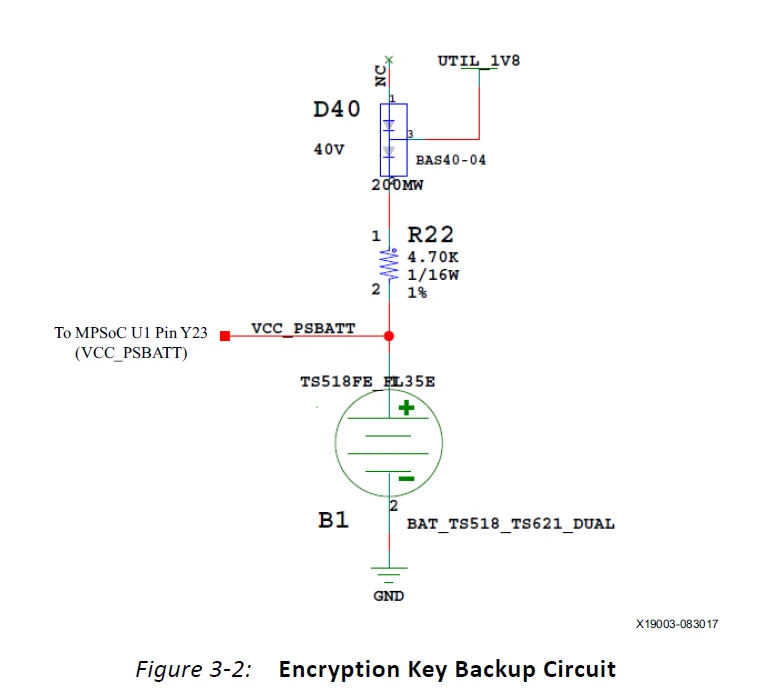
The Seiko TS518FE rechargeable 1.5V lithium button-type battery B1 is soldered to the board with the positive output connected to the XCZU7EV MPSoC U1 VCC_PSBATT pin Y23. The battery supply current IBATT specification is 150 nA maximum when the board power is off. B1 is charged from the UTIL_1V8 1.8V rail through a series diode with a typical forward voltage drop of 0.38V and a 4.7 ΩK current limit resistor. The nominal charging voltage is 1.42V. On MPSoC devices, the encryption key battery is also used for the battery-backed RAM and the real-time clock (RTC) supply voltage. See the Zynq UltraScale+ MPSoC Data Sheet: DC and AC Switching Characteristics (DS925) [Ref 2].
Quad SPI Flash Memory (MIO 0–12)
[Figure 2-1, callout 3]
The Micron dual MT25QU512ABB8ESF serial NOR flash Quad SPI (QSPI) flash memories can hold the boot image for the MPSoC system. To achieve higher performance, two QSPI flash memory devices are connected in parallel and provide an 8-bit data bus for boot and configuration. This interface is used to support QSPI32 boot mode as defined in the Zynq UltraScale+ MPSoC Technical Reference Manual (UG1085) [Ref 3]. The dual QSPI flash memory located at U119/U120 provides 1 Gb of non-volatile storage that can be used for configuration and data storage.
- Part number: MT25QU512ABB8ESF-0SIT (Micron)
- Supply voltage: 1.8V
- Datapath width: 8-bit
- Data rate: varies depending on single, dual, or quad mode
The connections between the SPI flash memory and the XCZU7EV MPSoC are listed in Table 3-6.
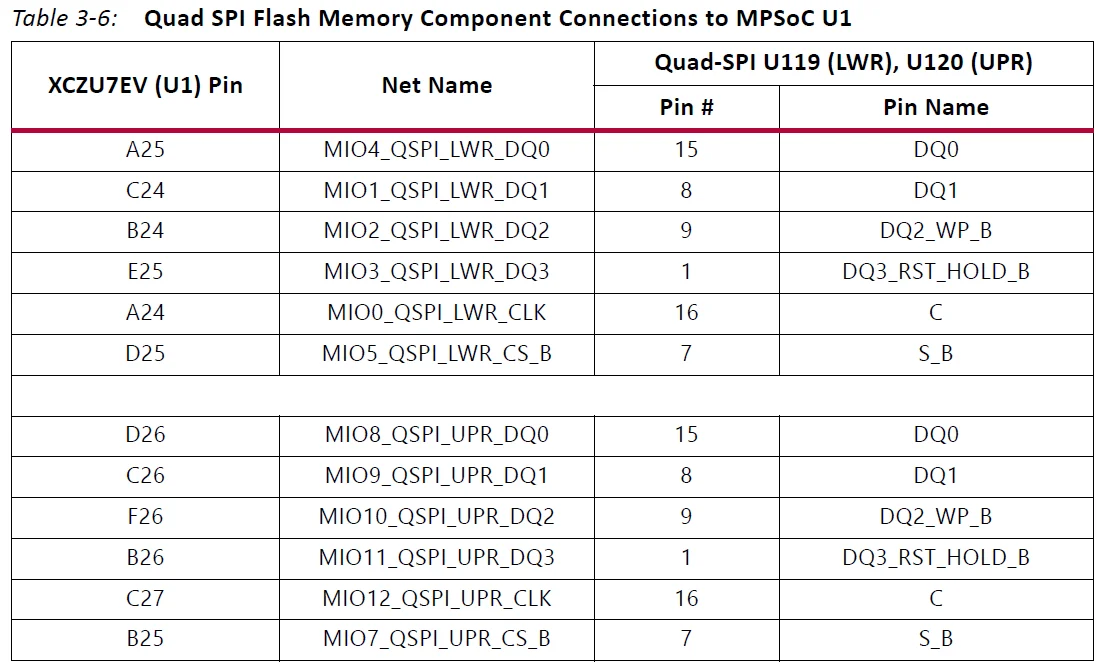
The configuration and Quad SPI flash memory section of the Zynq UltraScale+ MPSoC Technical Reference Manual (UG1085) [Ref 3] provides details on using the memory. For more QSPI details, see the Micron MT25QU512ABB8ESF-0SIT data sheet at the Micron website [Ref 15].
USB0 (MIO 52-63)
The USB interface on the PS side serves multiple roles as a host or device controller. The USB 3.0 interface is supported by the MPSoC GTR interface, while the USB 2.0 capabilities of the SMSC USB3320C controller are shared on a common USB 3.0 USB type A connector (J96).
USB 3.0 Transceiver and USB 2.0 ULPI PHY
[Figure 2-1, callout 5]
The ZCU106 board uses a Standard Microsystems Corporation USB3320 USB 2.0 ULPI transceiver at U116 to support a USB connection to the host computer (see Figure 3-3). The USB3320 is a high-speed USB 2.0 PHY supporting the UTMI+ low pin interface (ULPI) standard. The ULPI standard defines the interface between the USB controller IP and the PHY device, which drives the physical USB bus. Use of the ULPI standard reduces the interface pin count between the USB controller IP and the PHY device.
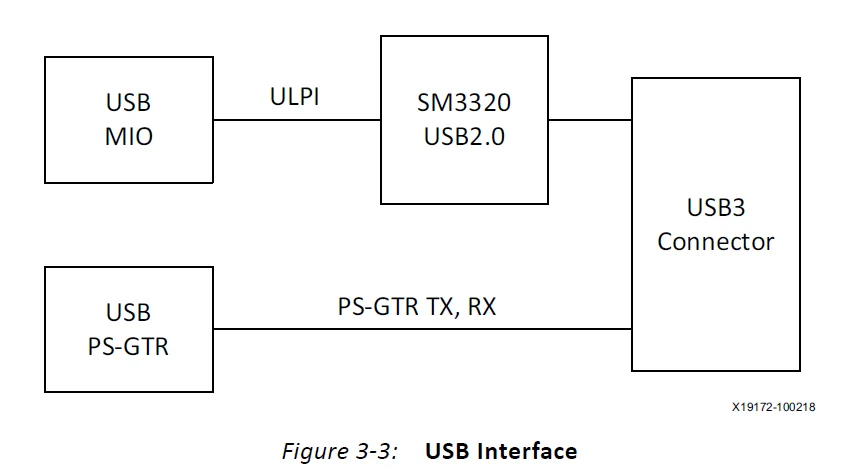
The USB3320 is clocked by a 24 MHz crystal. See the Standard Microsystems Corporation (SMSC) USB3320 data sheet for clocking mode details [Ref 16]. The interface to the USB3320 PHY is implemented through the IP in the XCZU7EV MPSoC PS.
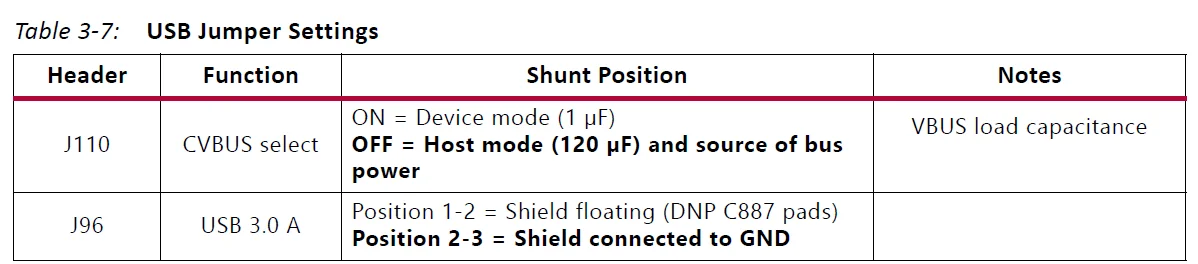
Table 3-7 describes the jumper settings for the USB 2.0 circuit. Bold text identifies the default shunt positions for USB 2.0 high-speed on-the-go (OTG) mode.
The connections between the USB 2.0 PHY at U116 and the XCZU7EV MPSoC are listed in Table 3-8.
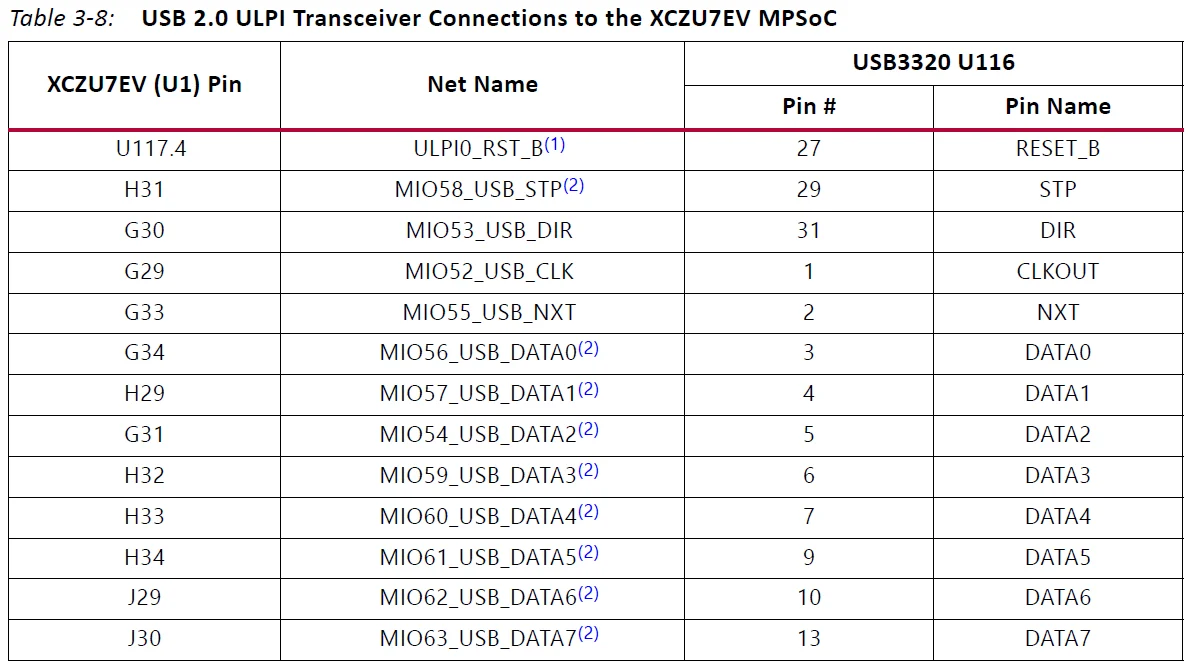
Notes:
- PS_POR_B (U1.M24) or PS_MODE1 (DIP SW6.2) or PB SW2 drive U116 RST_B via OR gate U117.
- These nets are 30Ω series resistors coupled.
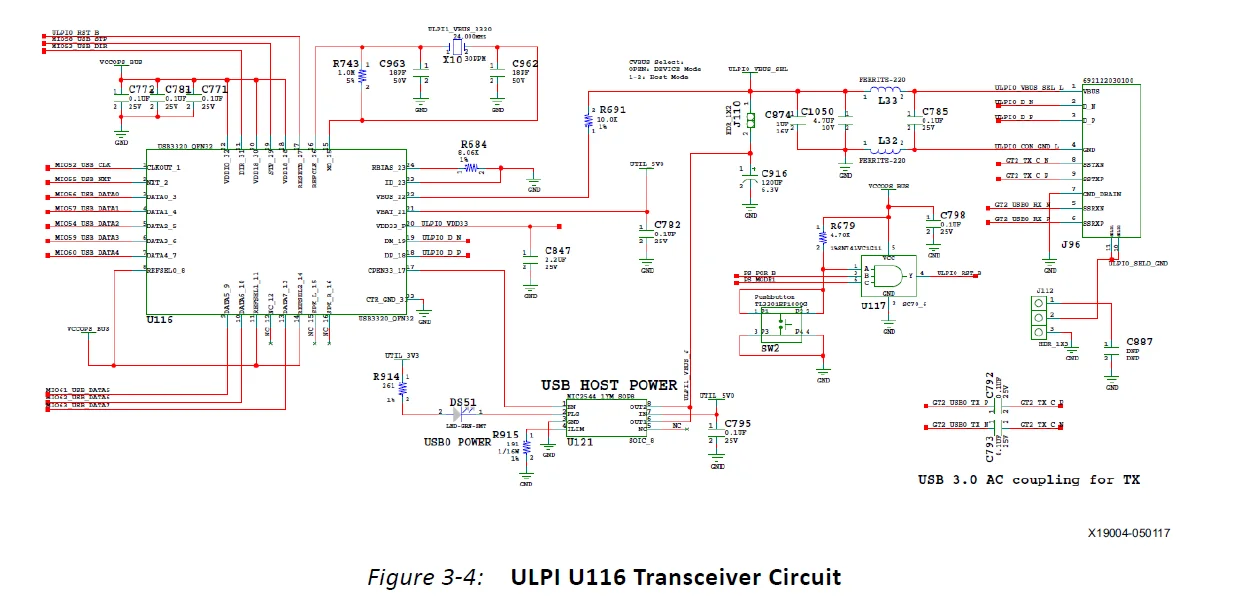
Note: The shield for the USB 3.0 A connector (J96) can be tied to GND by a jumper on header J112 pins 2-3 (default). The USB shield can optionally be connected through a capacitor to GND by installing a capacitor (body size 0402) at location C887 and jumping pins 1-2 on header J112.
The USB3320 ULPI U116 transceiver circuit (see Figure 3-4) has a Micrel MIC2544 high-side programmable current limit switch (U121). This switch has an open-drain output fault flag on pin 2, which turns on LED DS51 if overcurrent or thermal shutdown conditions are detected. DS51 is located in the U116 circuit area near pushbutton SW2 (Figure 2-1, callout 5).
SD1 (MIO 39-51)
A PS-side interface to an SD card connector is provided for booting and file system storage. This interface is used for the SD boot mode and supports SD3.0 access post-boot.
SD Card Interface
[Figure 2-1, callout 6]
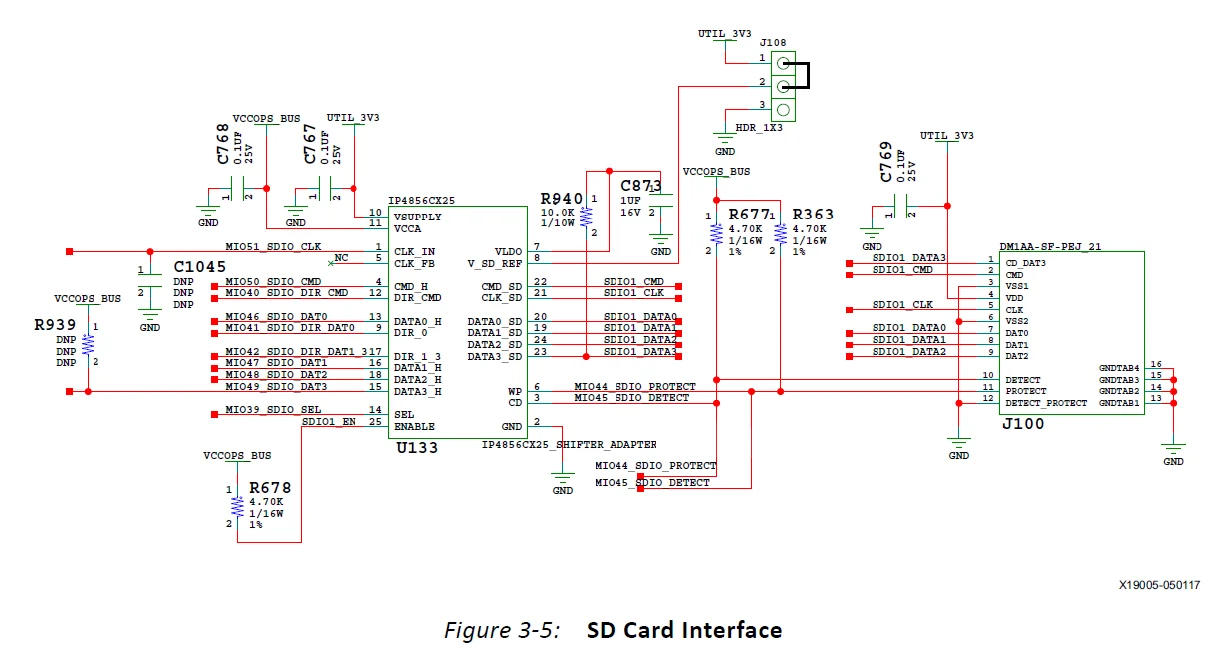
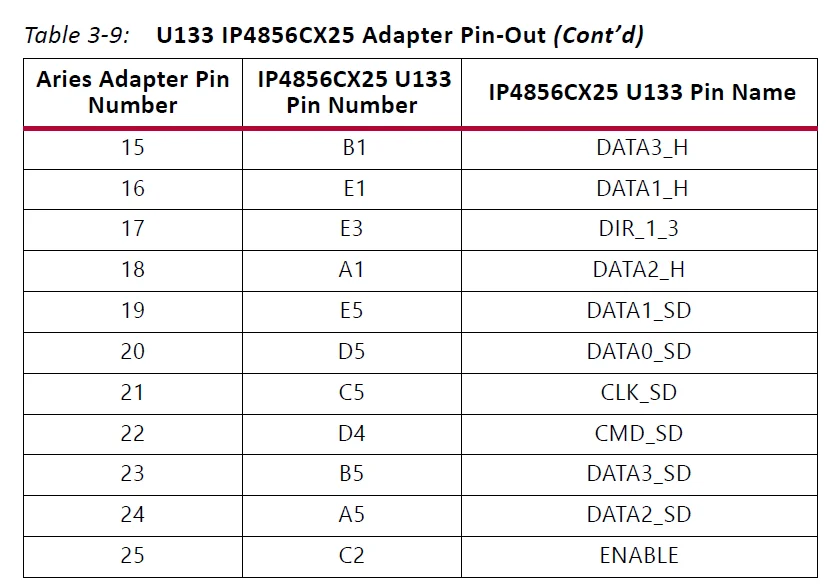
The ZCU106 board includes a secure digital input/output (SDIO) interface to provide access to general-purpose non-volatile SDIO memory cards and peripherals. See the SanDisk Corporation [Ref 17] or SD Association [Ref 18] websites for more information on the SD I/O card specification. The ZCU106 SD card interface supports the SD1_LS configuration boot mode documented in the Zynq UltraScale+ MPSoC Technical Reference Manual (UG1085) [Ref 3]. The SDIO signals are connected to XCZU7EV MPSoC PS bank 501, which has its VCCMIO set to 1.8V. Each of the six MIO[46-51]_SDIO_* nets has a series 30Ω resistor at the source. An NXP IP4856CX25 SD 3.0-compliant voltage level-translator U133 is present between the XCZU7EV MPSoC and the SD card connector (J100). The NXP IP4856CX25 U133 device provides SD3.0 capability with SDR104 performance.
Figure 3-5 shows the connections of the SD card interface on the ZCU106 board.
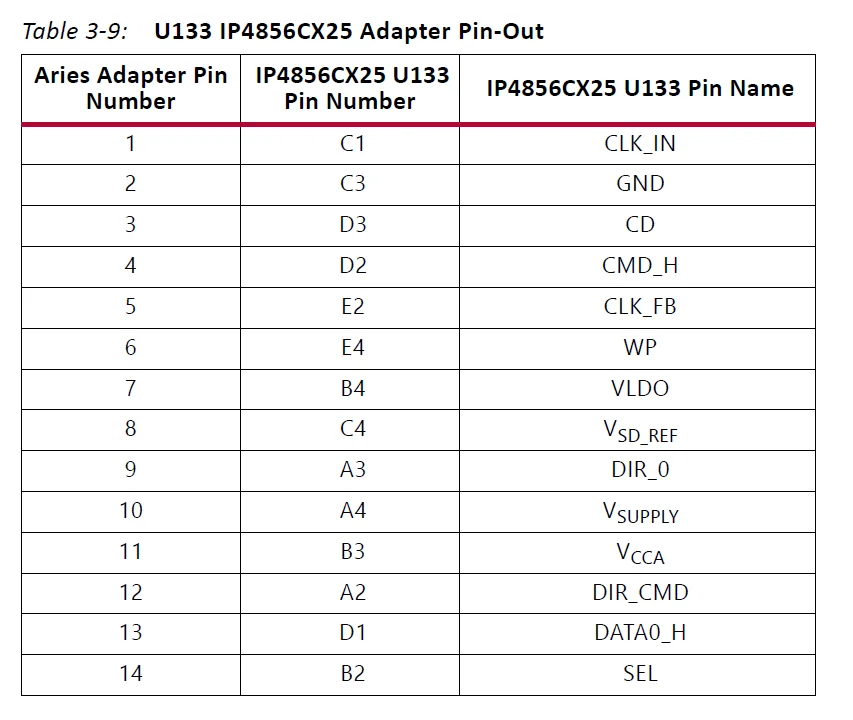
The NXP SD3.0 level shifter is mounted on an Aries adapter board that has the pin mapping listed in Table 3-9.
Programmable Logic JTAG Programming Options
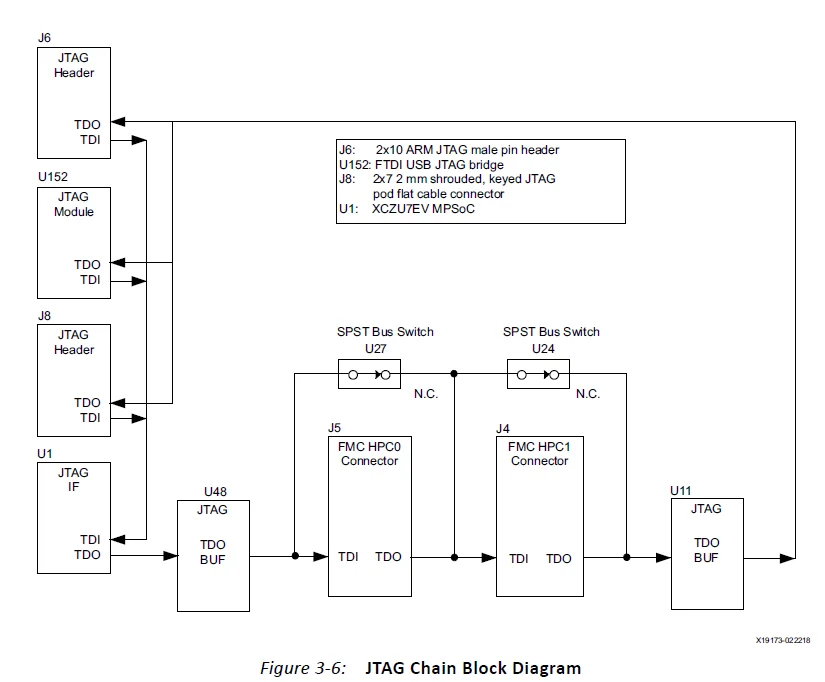
[Figure 2-1, callouts 7 and 39] ZCU106 JTAG chain:
- J2 USB micro AB connector connected to U152 FTDI USB JTAG bridge
- J8 2×7 2 mm shrouded, keyed JTAG pod flat cable connector
- J6 2×10 Arm JTAG male pin header
The ZCU106 board JTAG chain is shown in Figure 3-6.
FMC Connector JTAG Bypass
When an FPGA mezzanine card (FMC) is attached to J5 or J4, it is automatically added to the JTAG chain through electronically controlled single-pole single-throw (SPST) switches U27 and U24. The SPST switches are normally closed and transition to an open state when an FMC is attached. Switch U27 adds an attached FMC to the JTAG chain as determined by the FMC_HPC0_PRSNT_M2C_B signal. Switch U24 adds an attached FMC to the JTAG chain as determined by the FMC_HPC1_PRSNT_M2C_B signal. The attached FMC card must implement a TDI-to-TDO connection using a device or bypass jumper to ensure that the JTAG chain connects to the U1 XCZU7EV MPSoC.
Programmable User Clock
[Figure 2-1, callout 9]
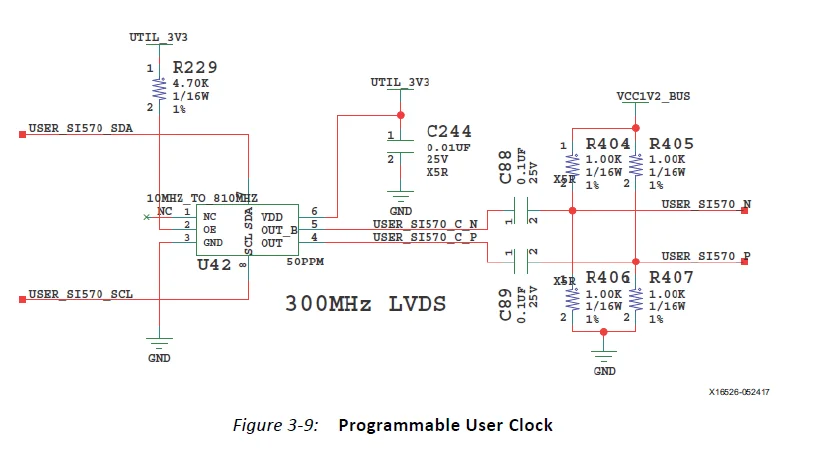
The ZCU106 board has an I2C programmable SI570 low-jitter 3.3V LVDS differential oscillator (U42) connected to the GC inputs of PL bank 66. The USER_SI570_P and USER_SI570_N clock signals are connected to the XCZU7EV MPSoC U1 pins AH12 and AJ12, respectively. On power up, the user clock defaults to an output frequency of 300.000 MHz. User applications can change the output frequency within the range of 10 MHz to 810 MHz through an I2C interface. Power cycling the ZCU106 board reverts this user clock to the default frequency of 300.000 MHz. This oscillator can be reprogrammed from the SP430 system controller U41 (see TI MSP430 System Controller, page 116 for more information).
- Programmable oscillator: Silicon Labs Si570BAB001614DG (10 MHz-810 MHz, 300 MHz default)
- LVDS differential output
- Total stability: 61.5 ppm
Programmable User MGT Clock
[Figure 2-1, callout 10]
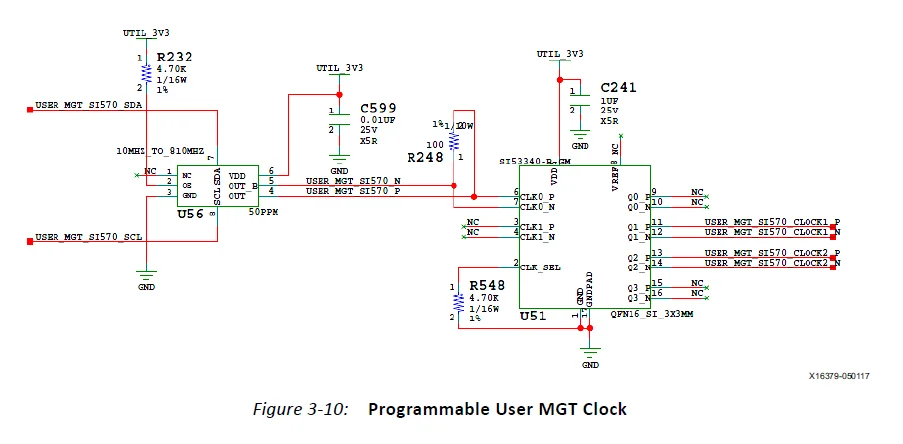
The ZCU106 board has a programmable low-jitter 3.3V LVDS SI570 differential oscillator (U56) connected to a 1-to-2 SI53340 clock driver (U51). On power up, the user clock defaults to an output frequency of 156.250 MHz. User applications can change the output frequency within the range of 10 MHz to 810 MHz through an I2C interface. Power cycling the ZCU106 board reverts this user clock to the default frequency of 156.250 MHz. This oscillator can be reprogrammed from the MSP430 system controller U41 (see TI MSP430 System Controller, page 116 for more information).
- Programmable oscillator: Silicon Labs Si570BAB000544DG (10 MHz-810 MHz, 156.250 MHz default)
- LVDS differential output
- Total stability: 61.5 ppm
The user clock MGT circuit is shown in Figure 3-10. The Silicon Labs Si570 and Si53340 data sheets are available on the Silicon Labs website [Ref 19].
CP2108 USB UART Interface
[Figure 2-1, callout 13]
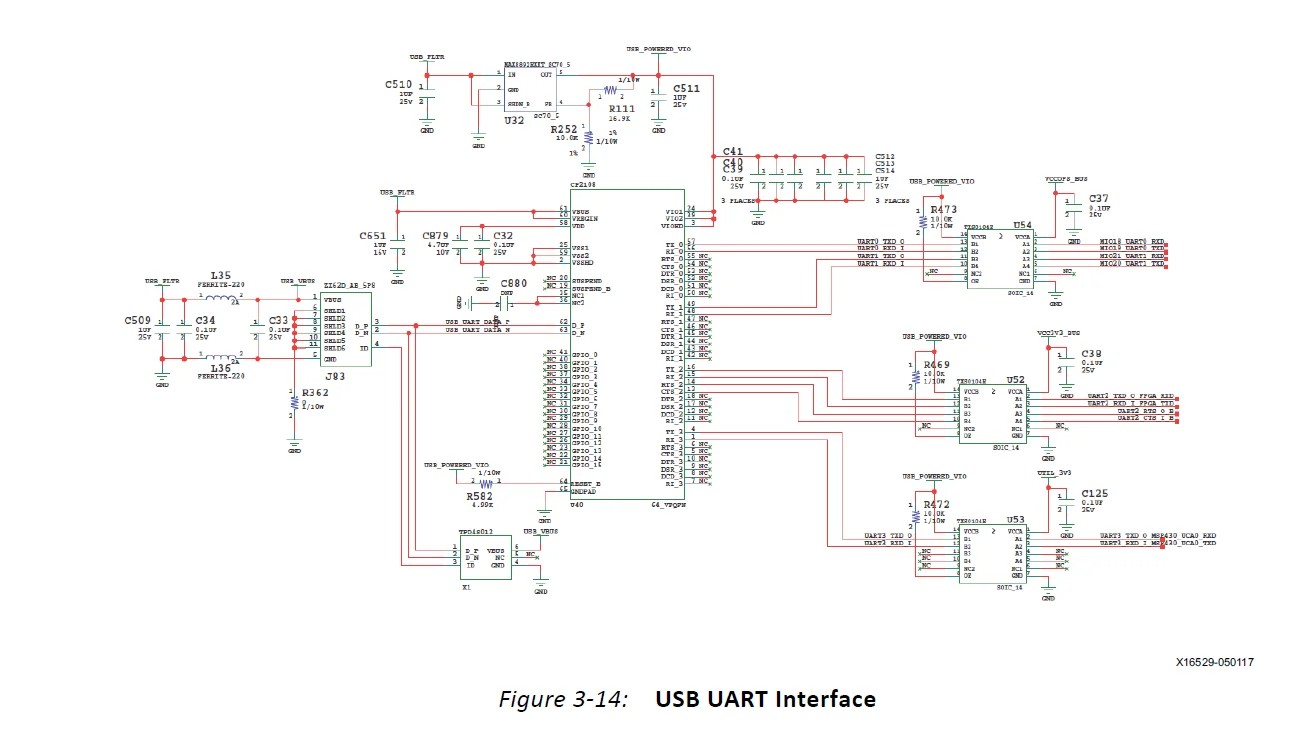
The CP2108 quad USB-UART on the ZCU106 board provides four level-shifted UART connections through a single micro-B USB connector J83. Channels 0 and 1 are PS-side MIO connections described in the UART0 (MIO 18-19) section. Channel 2 is a PL-side connection, and Channel 3 is connected to the MSP430 system controller U41. The USB UART interface circuit is shown in Figure 3-14. The Silicon Labs CP2108 data sheet is available on the Silicon Labs website [Ref 19].
CP2108 Channel 2 PL-Side UART Interface
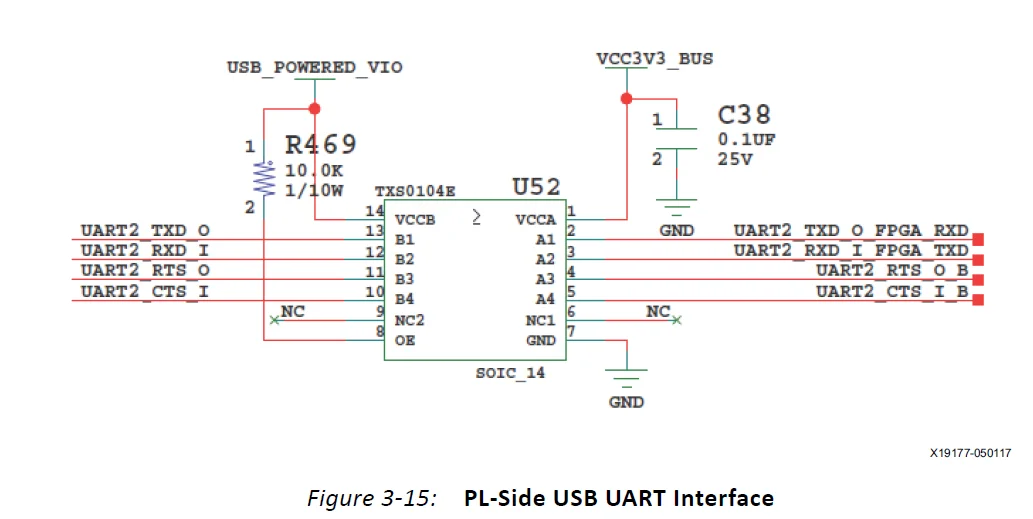
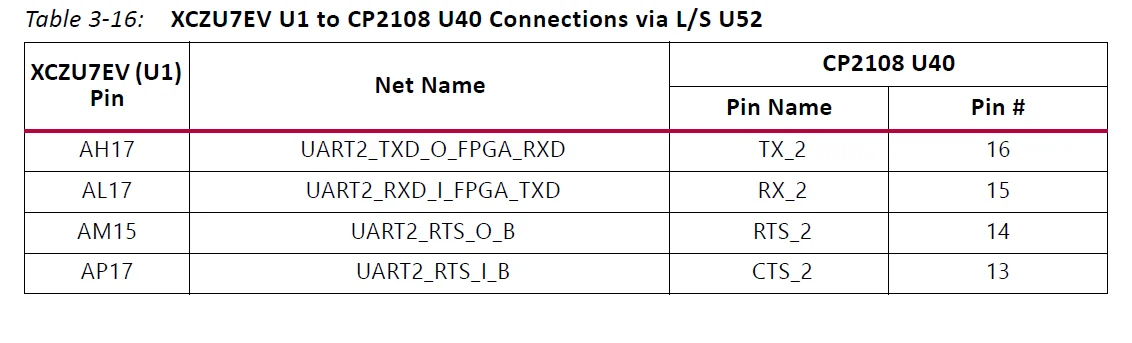
The CP2108 channel 2 bank 64 PL-side UART interface circuit is shown in Figure 3-15. The connections from XCZU7EV MPSoC U1 to CP2108 U40 via TSX0104E level shifter U52 are listed in Table 3-16.
CP2108 Channel 3 MSP430 UART Interface
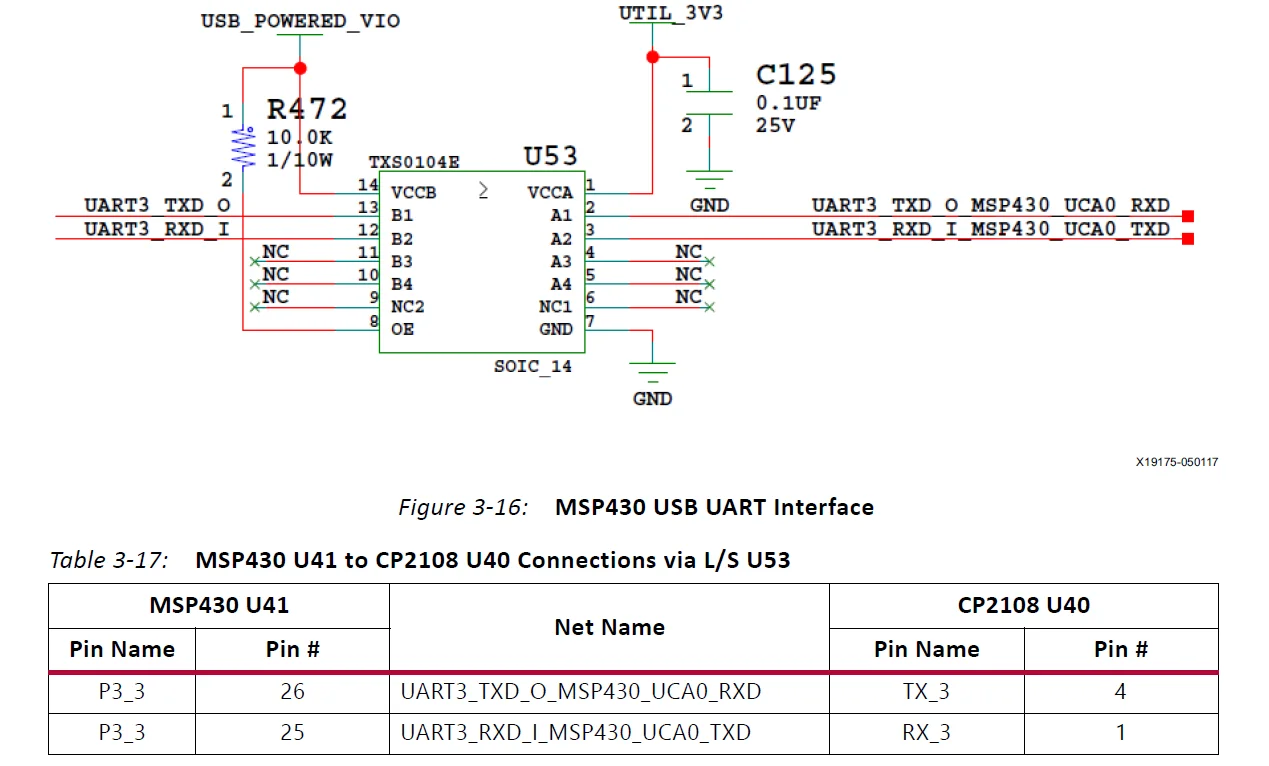
The CP2108 channel 3 MSP430 UART interface circuit is shown in Figure 3-16. The connections from MSP430 U41 to CP2108 U40 via TSX0104E level shifter U53 are listed in Table 3-17.
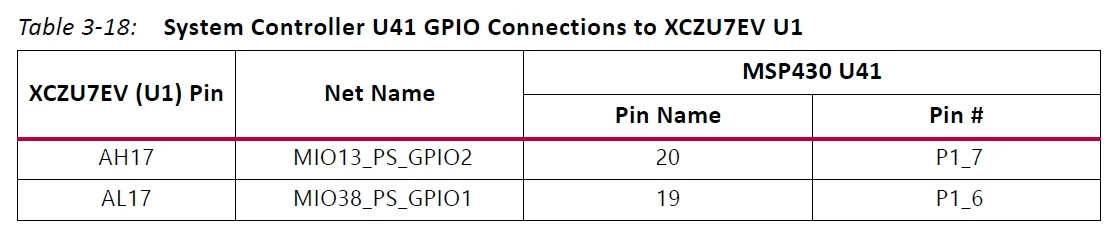
GPIO (MIO 13, 38)
These two GPIO bits are connected to the U41 MSP430 system controller for general-purpose signaling or communications between the Zynq UltraScale+ MPSoC device and the MSP430 system controller. These signals are level-shifted by TSX0108E U141. The connections between the U41 system controller and the XCZU7EV MPSoC are listed in Table 3-18.
For more Blogs, visit ManualsLibraryy
ZCU106 Evaluation Board Kit-FAQs
What is the ZCU106 Evaluation Board Kit?
The ZCU106 Evaluation Board Kit is a development platform based on the AMD Zynq™ UltraScale+™ MPSoC, designed to help engineers quickly prototype and test advanced embedded systems.
What is the ZCU106 mainly used for?
It is commonly used for video conferencing, surveillance systems, ADAS (Advanced Driver Assistance Systems), streaming, and video encoding applications.
What processor does the ZCU106 use?
The board is powered by an AMD Zynq UltraScale+ MPSoC, which combines ARM-based processors with programmable FPGA logic on a single chip.
What is Zynq UltraScale+ MPSoC?
Zynq UltraScale+ MPSoC is a high-performance system-on-chip that integrates 64-bit ARM processors, real-time processors, graphics, and FPGA logic for flexible and powerful designs.
How is Zynq different from a traditional FPGA?
Unlike a standard FPGA, Zynq devices include both a processing system (PS) and programmable logic (PL), allowing software and hardware to work together efficiently.
What development tools are used with the ZCU106 board?
The ZCU106 is supported by AMD Vivado™ Design Suite and Vitis™ Unified Software Platform for hardware and software development.
What programming languages are used with the ZCU106?
Developers commonly use VHDL and Verilog for FPGA logic, along with C/C++ for software running on the ARM processors.
What is the difference between UltraScale and UltraScale+?
UltraScale+ devices use smaller manufacturing processes, offering higher performance and lower power consumption than standard UltraScale devices.
What is the UltraScale+ architecture?
UltraScale+ is an advanced FPGA architecture designed for high bandwidth, better power efficiency, faster routing, and improved performance compared to earlier generations.
What applications benefit most from the ZCU106 board?
Applications that need high-speed data processing, real-time control, AI acceleration, and video handling benefit the most from ZCU106.