
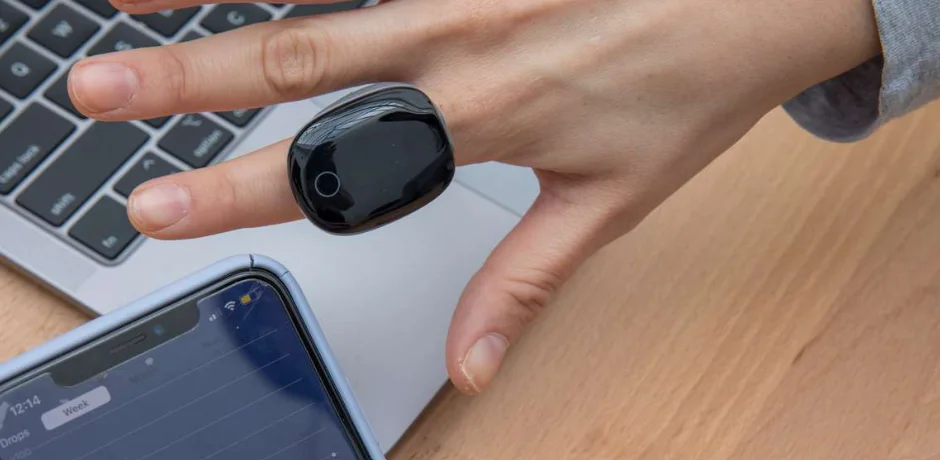

Wellue Fingertip Pulse Oximeter
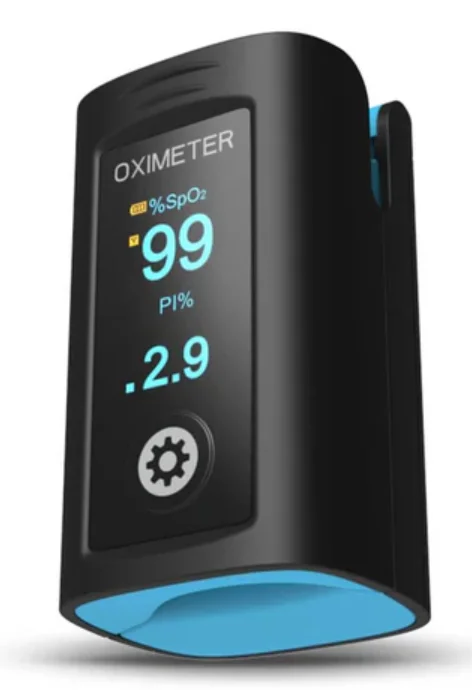
It’s not a medical device. This device is for Sports and Aviation use only and not intended for medical use.
Notes
- Please read the manual very carefully before using this device. Failure to follow these instructions can cause measuring abnormality or damage to the Oximeter.
- The contents contained in this manual are subject to change without notice.
- Information furnished by our company is believed to be accurate and reliable. However, no responsibility is assumed by us for its use, or any infringements of users or other rights of third parties that may result from its use.
Instructions for Safe Operation
- Check the device to make sure that there is no visible damage that may affect the user’s safety or the measurement performance of sensors and clips. It is recommended that the device be inspected minimally before each use. If there is obvious damage, stop using the device.
- Special attention should be paid while the Oximeter is used constantly under the ambient temperature over 37°C, burning hurt may occur because of overheating of the sensor at this situation.
- Necessary maintenance must be performed only by qualified service technicians. Users are not permitted to service this device.
- The Oximeter must not be used with devices and accessories not specified in User Manual.
Cautions
- Explosive hazard—DO NOT use the Oximeter in an environment with inflammable gas such as some ignitable anesthetic agents.
- DO NOT use the Oximeter while the user is under MRI or CT scanning. This device is NOT MRI Compatible.
Warnings
- Discomfort or pain may appear if using the Oximeter continuously on the same location for a long time, especially for user with poor microcirculation. It is recommended that the Oximeter should not be applied to the same location for longer than 2 hours. If any abnormal condition is found, please change the position of the Oximeter.
- DO NOT clip this device on edema or tender tissue.
- The light (the infrared light is invisible) emitted from the device is harmful to the eyes. Do not stare at the light.
- The Oximeter is not a treatment device
- Local laws and Regulations must be followed when disposing of
the device.
Attentions
- Keep the Oximeter away from dust, vibration, corrosive substances, explosive materials, high temperature and moisture.
- The device should be kept out of the reach of children.
- If the Oximeter gets wet, please stop using it and do not resume operation until it is dry and checked for correct operation. When it is carried from a cold environment to a warm and humid environment, please do not use it immediately. Allow at least 15 minutes for the Oximeter to reach ambient temperature.
- DO NOT operate the button on the front panel with sharp materials or sharp points.
- DO NOT use high temperature or high pressure steam disinfection on the Oximeter. Refer to the instructions regarding cleaning and disinfection.
- The equipment is IP22 with protection against harmful solid foreign objects and ingress of liquid.
- Please pay attention to the effects of lint, dust, light (including sunlight), etc.
Declaration of Conformity
The manufacturer hereby declares that this device complies with the following standards: IEC 60601-1: 2012 Medical electrical equipment-Part 1: General requirements for basic safety and essential performance; ISO 80601-2-61: 2017 Medical electrical equipment-Part 2-61: Particular requirements for basic safety and essential performance of pulse oximeter equipment. And it also follows the provisions of the Council Directive MDD 93/42/EEC.
Overview
Appearance
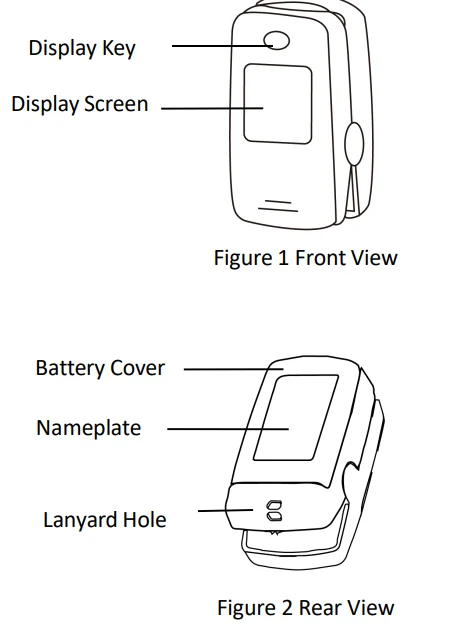
Note: the appearance is for demonstration only, please refer to the oximeter you purchased.
Intended Use
This Fingertip Oximeter is intended for measuring the pulse rate and functional oxygen saturation (SpO2) through a user’s finger. It is intended for sports or aviation use only. It should not be used to diagnose or treat any medical condition.
Configuration
- SpO2, PR
- Plethysmogram
- Auto on/off
- Pulse bar
- Pulse beep
- Measuring Mode: Continuous
- Record list
- Wireless function
Battery Installation
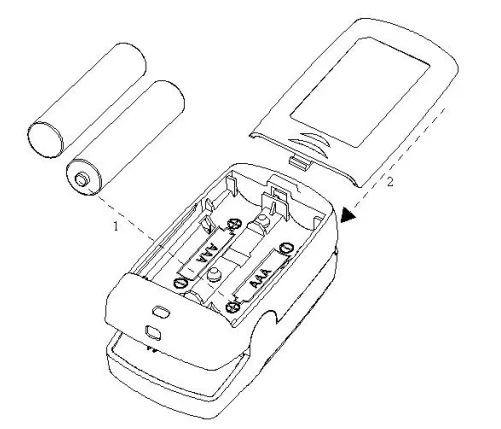
- Refer to Figure 3, insert two AAA-size batteries into the battery compartment properly, and note the polarity markings.
- Replace the cover. Please make sure that the batteries are correctly installed. Incorrect installation may cause the device not to work.
- Please remove batteries if the device is not being used for more than 7 days to prevent and avoid potential damage from the battery leaking. Any such damage is not covered under the product warranty.
Operation
Start
Open the clip and put a finger inside the rubber cushions of the clip (make sure the finger is in the correct position), and then clip the finger, as shown in Figure 4.
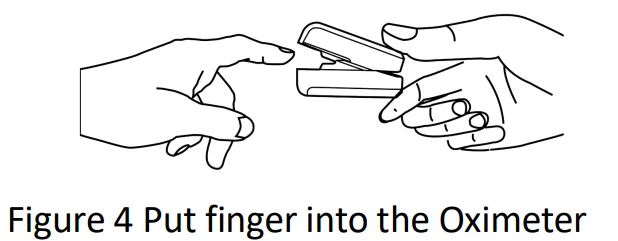
Wait 2 seconds, the Oximeter will power on automatically and start to measure; If you connect the device to the App, you can also check readings in the App.
END.
When the finger is out, the Oximeter shuts down automatically.
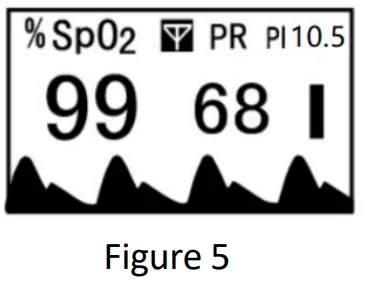
Readings display screen
The screen displays as follows:
Recording & recall
Recording & recall functions are available. At the power off status, pressing the Display key can bring up the record list display screen, as shown in Figure 7. In the record list screen, press the Display key to shift the records page.
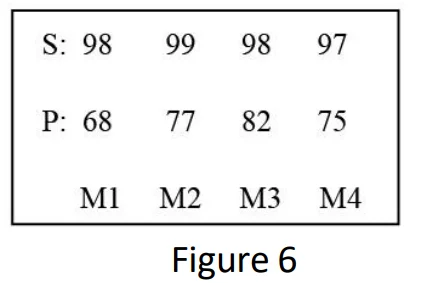
If the time from displaying valid readings to the end of measurement is less than 5 seconds, then no recording will be done. Up to 12 groups of records can be stored in the record list; the newest record is marked as M1, and the oldest record is marked as M12. The new record will override the previous record. If the batteries are removed from the device, then the records will not be kept or volatile.
Menu
When the finger is in the oximeter, long time pressing display key can enter the setup menu screen.
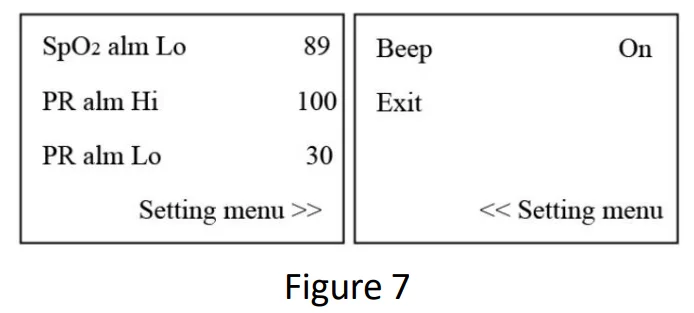
Menu setup: Short-time press the Display Key to choose the setting item; Long-time press the Display Key to activate the setting item, then short-time press it to modify the setting parameter; Next, long-time press the Display Key to confirm the modification and exit from this setting item. At last, move the setting item to “Save, exit menu”, and long time pressing Display Key to store the modification and exit from the setup menu.
“Beep”: Pulse beep option. If it is set to on, every pulse beat makes a beep.
Data transmission
The user could effectively transmit the data to App via Bluetooth.
Attention to the operation
- The finger should be put into the sensor correctly.
- Do not shake the finger and relax during measurement.
- Do not put a wet finger directly into the sensor.
- Avoid placing the device on the same limb that is wrapped with a cuff for blood pressure measurement or during venous infusion.
- Do not let anything block the emitting light from the device, i.e., do not use finger nail polish/paints.
- Vigorous exercise and the interference of an electrosurgical device may affect the measuring accuracy.
- Nail polish may affect the measuring accuracy, and too-long fingernails may cause failure of measurement or an inaccurate result.
- The existence of high-intensity light sources, such as fluorescence light, ruby lamp, infrared heater, or strong sunshine, etc., may cause inaccuracy of measurement results. Please put an opaque cover on the sensor or change the measuring site if necessary.
- If the first reading appears with a poor waveform (irregular or not smooth), then the reading is unlikely true, the more stable value is expected by waiting for a while, or a restart is needed when necessary.
Wireless
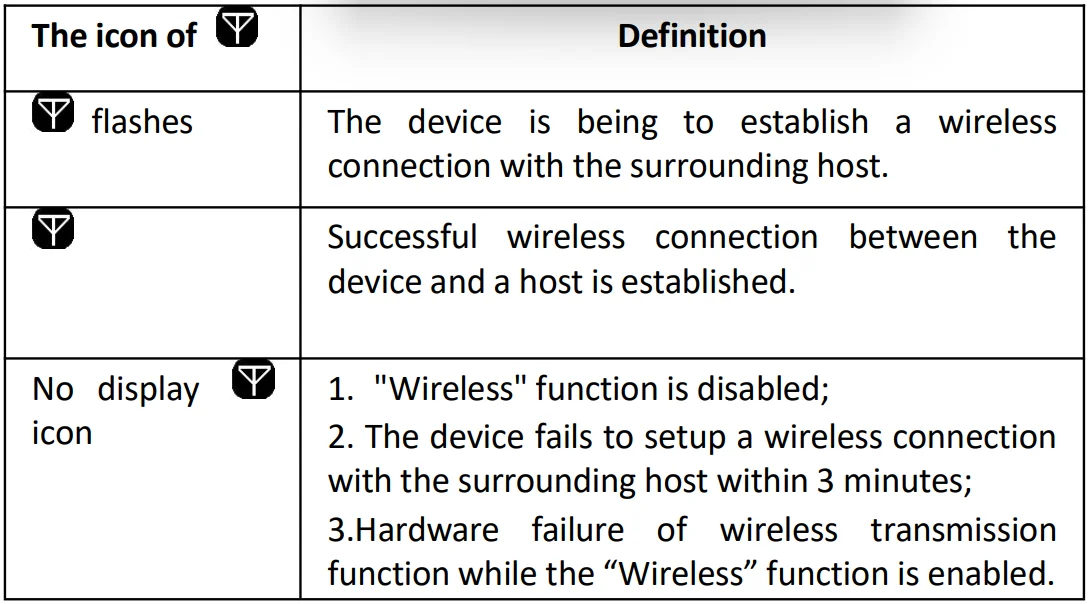
The wireless icon Definition
Download the App

- App name: ViHealth Mobile
- iOS: App Store
- Android: Google Play
Install the App
Install the app on an Apple product or Android-powered device, including smartphones and tablets.
Compatibility
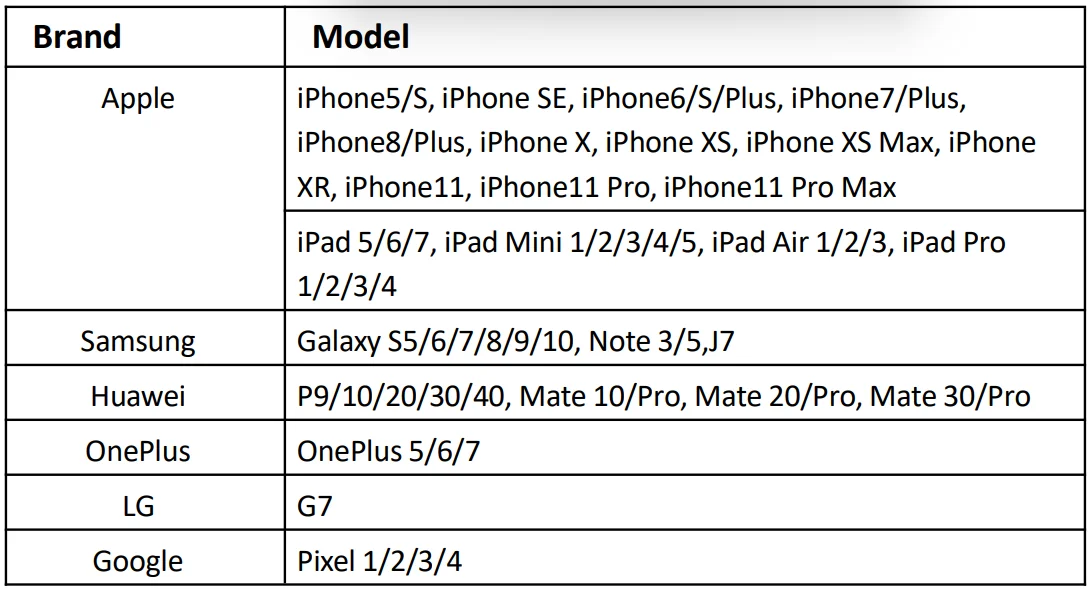
The ViHealth app is compatible with iOS versions 9.0+ and Android versions 5.0+. The compatible smart device models are listed below:
Connecting to the device
- Keep the device on measuring.
- Run the ViHealth App on your smart device.
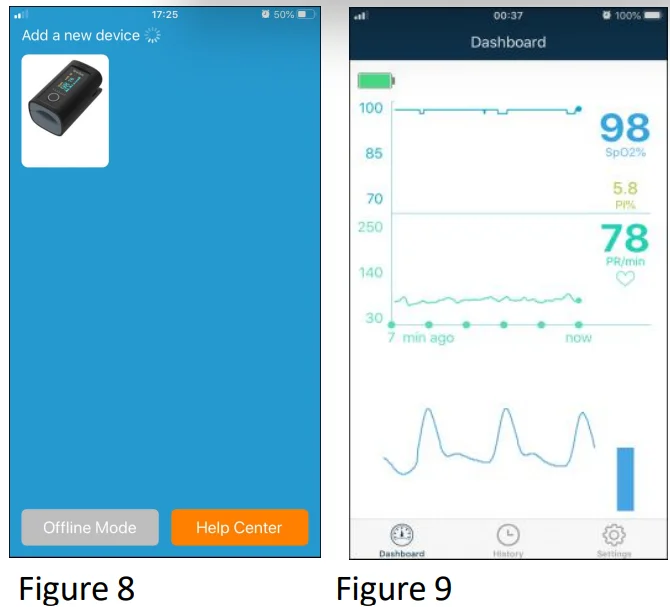
- Click the device icon when ViHealth finds your Pulse Oximeter (see figure 8).
- Follow the screen guide to start pairing.
- Once paired, you can log on to ViHealth.
Caution: Do NOT pair the device in your smart device settings.
For more details about the ViHealth App, please refer to the ViHealth App user manual.
Real-time Monitoring
The ViHealth app supports monitoring SpO2 and HR in real-time on the Dashboard screen (see figure 9).
Syncing Data to Apple Health
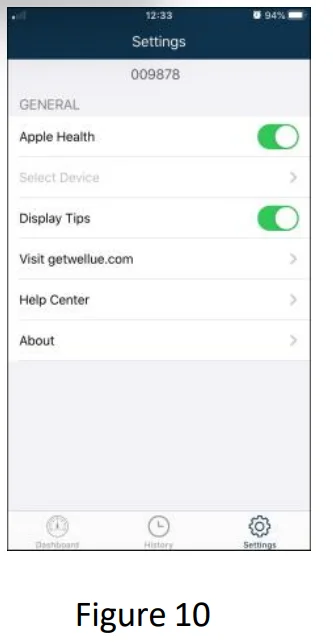
To enable/disable syncing measurement data to the Apple Health App, tap [Settings]-> [Apple Health]->[On/Off]. The measurement data will be transferred to the Apple Health App when the ViHealth App is running.
Note: Refer to the ViHealth user manual for more details.
Technical Specifications
- A. SpO2 Measurement
- Transducer: dual-wavelength LED sensor with wavelength:
- Red light: 663 nm, Infrared light: 890 nm.
- Maximal average optical output power: ≤2mW
- SpO2 display range: 35%~100%
- SpO2 measuring accuracy: ≤ 2% for SpO2 range from 70% to 100%
- B. Pulse Rate measurement
- PR display range: 30bpm~240bpm
- PR measuring accuracy: ±2bpm or ±2% (whichever is greater)
- C. Power supply requirement:
- 2 x LR03 (AAA) alkaline batteries
- Supply voltage: 3.0VDC
- Operating current: ≤40mA
- D. Environmental Conditions:
- Operating Temperature: 5°C ~40°C
- Operating Humidity: 30%~80%
- Atmospheric pressure: 70kPa~106kPa
- E. Low Perfusion Performance:
- The accuracy of SpO2 and PR measurement still meets the precision described above when the modulation amplitude is as low as 0.6%.
- F. Ambient Light Interference:
- The difference between the SpO2 value measured in the condition of indoor natural light and that of the darkroom is less than ±1%.
- G. Dimensions:
- 56 mm (L) × 34 mm (W) × 30 mm (H)
- Net Weight: approx. 60g
- H. Display: OLED
- I. Classification
- The type of protection against electric shock: Internally powered equipment.
- The degree of protection against electric shock: Type BF applied parts.
- The degree of protection against harmful solid foreign objects and ingress of liquid: The equipment is IP22 with protection against harmful solid foreign objects and ingress of liquid.
- Electro-Magnetic Compatibility: Group I, Class B
Packing List
- Fingertip Oximeter
- User Manual
- Batteries
- Pouch
- Lanyard
Note: the items and their quantity are subject to change, please refer to your subject in hand.
Repair and Maintenance
Maintenance
The expected service life (not a warranty) of this device is 5 years. In order to ensure its long service life, please pay attention to the maintenance.
- Please change the batteries when the low-voltage indicator lightens.
- Please clean the surface of the device before using, with 75% alcohol wipes, then let it air dry or wipe it dry. Do not allow liquid to enter the device.
- Please take out the batteries if the Oximeter will not be used any more than 7 days.
- The recommended storage environment of the device:
- ambient temperature: -20ºC ~60ºC, relative humidity 10%~95%, atmospheric pressure: 50kPa~107.4kPa.
- The Oximeter is calibrated in the factory before sale, so there is no need to calibrate it during its life cycle. Any SpO2 simulators should not be used to validate the accuracy of the Oximeter; they can only be used as functional testers to verify its precision. The SpO2 accuracy claimed in this manual is supported by the clinical study conducted by inducing hypoxia on healthy, non-smoking, light-to-dark-skinned subjects in an independent research laboratory.
- If it is necessary to verify the precision of the Oximeter routinely, the user can do the verification by means of a SpO2 simulator, or it can be done by the local third-party test house. Please note that the specific calibration curve (so-called R-curve) should be selected when using the SpO2 simulator, e.g., for the Index 2 series SpO2 simulator from Fluke Biomedical Corporation, please set “Make” to “DownloadMake: KRK”, then the user can use this particular R-curve to test the Oximeter. If the SpO2 simulator does not contain the “KRK” R-curve, please ask the manufacturer for help to download the given R-curve into the SpO2 simulator. High-pressure sterilization cannot be used on the device. Do not immerse the device in liquid. It is recommended that the device be kept in a dry environment. Humidity may reduce the life of the device or even damage it.
Cleaning and Disinfecting Instruction
- Surface-clean sensor with a soft cloth damped with a solution such as 75% isopropyl alcohol. If low-level disinfection is required, use a mild bleach solution.
- Then surface-clean with a cloth damped ONLY with clean water and dry with a clean, soft cloth.
Caution:
- Do not sterilize by irradiation, steam, or ethylene oxide.
- Do not use the Oximeter if it is damaged.
Troubleshooting
Problem:
- The SpO2 and Pulse Rate display are unstable
- Can not turn on the device
- No display
- No display of the wireless icon


Solution
- Place the finger correctly inside and try again.
- Changing batteries.
- Let the user keep calm.
- Hardware failure of the wireless transmission function.
- If the above problem still exists, please contact the local service center.
Key of Symbols
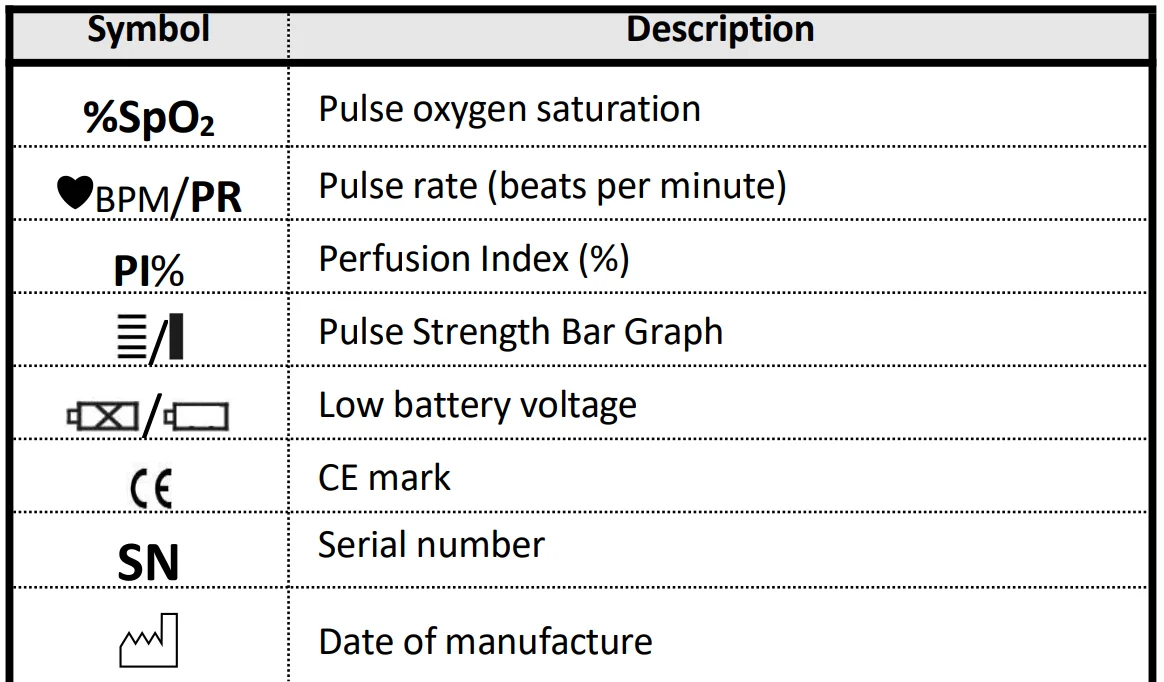
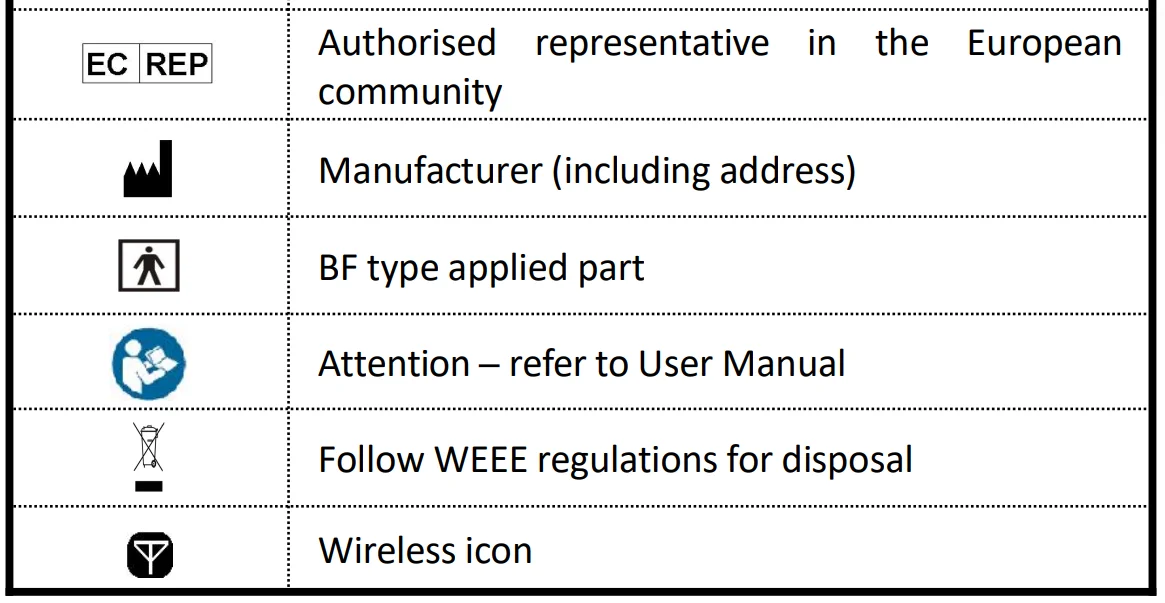
Frequently Asked Questions
- Q: What’s SpO2?
A: SpO2 means the saturation percentage of oxygen in the blood. - Q: What’s the normal range of SpO2 value for healthy people?
A: The normal range varies by individual, but usually over 95%, otherwise, please consult your physician. - Q: What’s the normal range of PR value for healthy people?
A: Usually, the normal range is 60bpm~100bpm. - Q: Why do the display values of SpO2 and PR vary with time?
A: The measured SpO2 and PR value changes in correspondence with the change of the user’s physiological conditions. - Q: What to do if there is no SpO2 and PR reading?
A: Do not shake the finger, and keep calm during the measurement. Please also avoid the Oximeter and the cuff on the same limb for blood pressure and oxygen saturation measurement simultaneously. - Q: How to confirm that the SpO2 reading is true or accurate?
A: Hold breath for a while (50 seconds or more). If the SpO2 value significantly decreases, it means that the SpO2 reading truly reflects the physiological condition change. - Q: When to replace the batteries?
A: The icon of a low battery will appear on the screen when the battery voltage is low. By then, batteries need to be replaced. - Q: What to do if the Oximeter is moistened or sprayed by water?
A: Remove the batteries immediately and dry the Oximeter completely with a hair dryer. - Q: What factors will affect the SpO2 accuracy?
A:- a) Intravascular dyes such as indocyanine green or methylene blue;
- b) Exposure to excessive illumination, such as surgical lamps, bilirubin lamps, fluorescent lights, infrared heating lamps, or direct sunlight;
- c) Vascular dyes or externally used color-up product, such as nail enamel or skin color care;
- d) Excessive user movement;
- e) Placement of a sensor on an extremity with a blood pressure cuff, arterial catheter, or intravascular line;
- f) Exposure to the chamber with high-pressure oxygen;
- g) There is an arterial occlusion proximal to the sensor;
- h) Blood vessel contraction caused by peripheral vessel hyperkinesias or body temperature decreasing;
- i) Low perfusion condition (Perfusion Index is small).
Please contact the local distributor or manufacturer if necessary.
Appendix EMC
The equipment meets the requirements of IEC 60601-1-2:2014.
Table 1
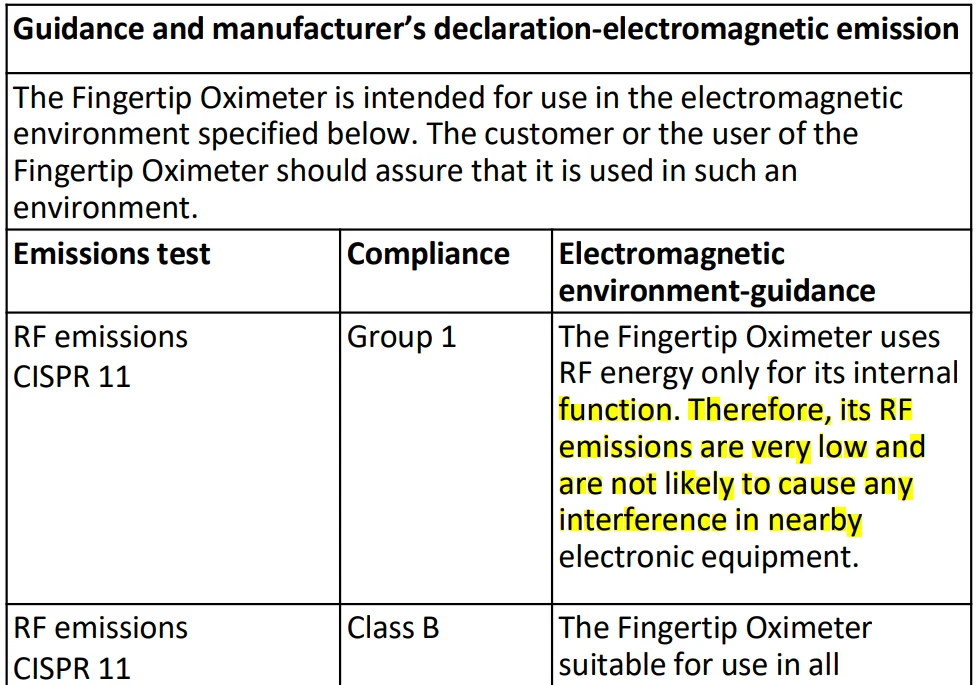
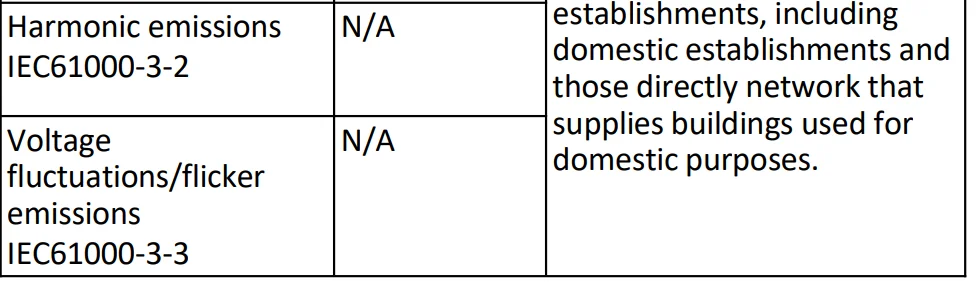
Table 2
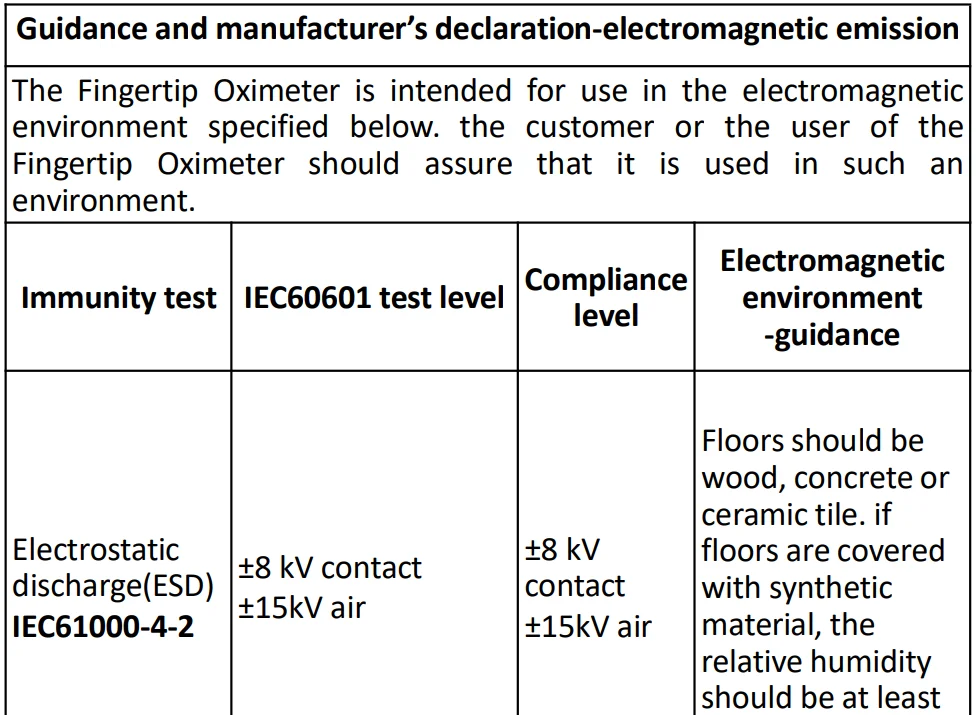
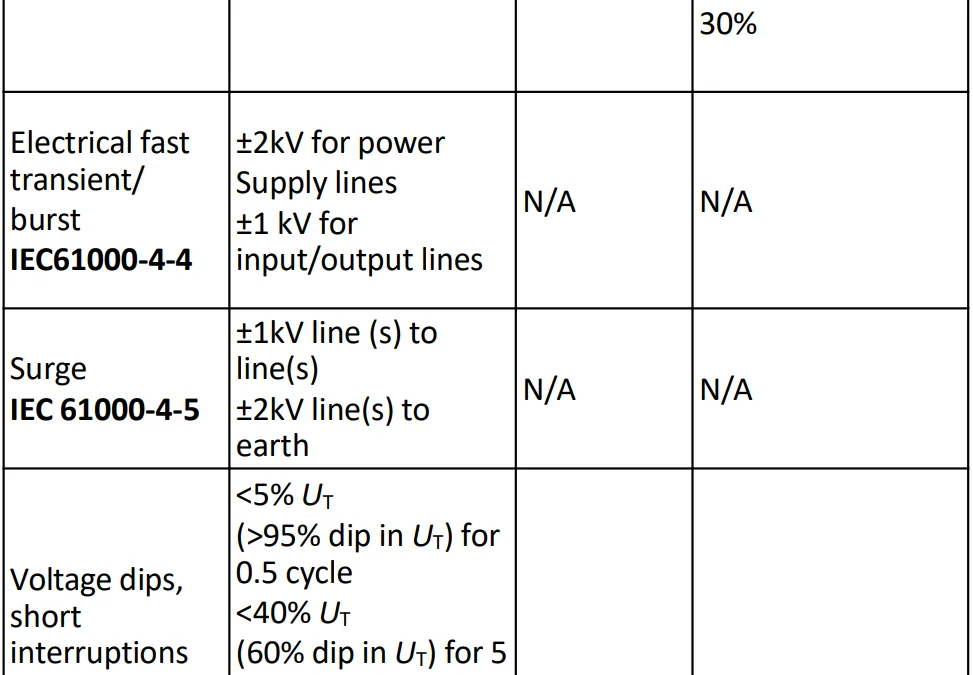
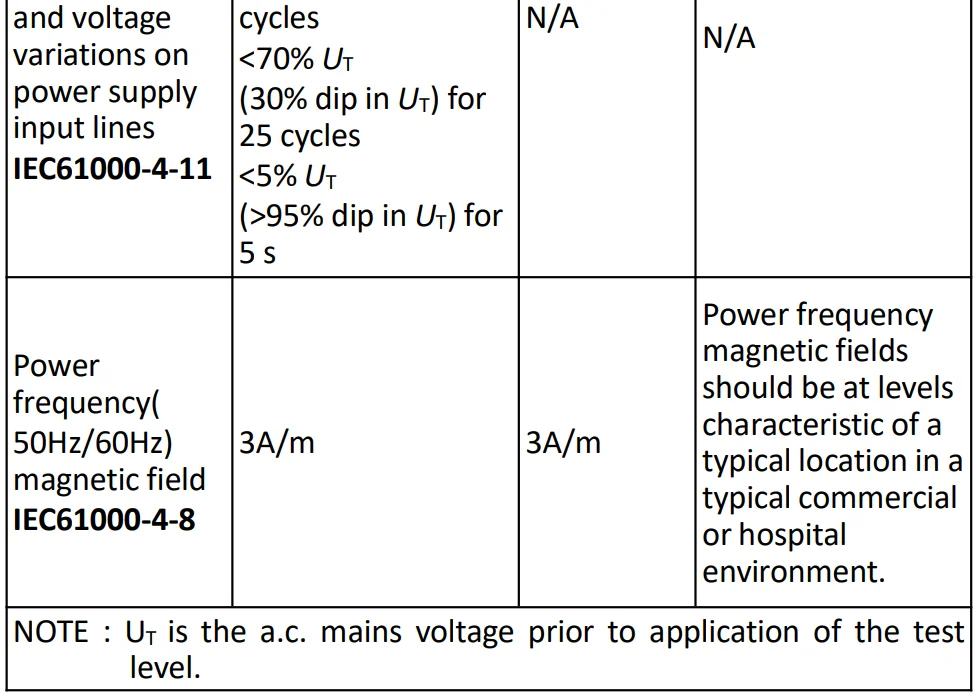 Table 3
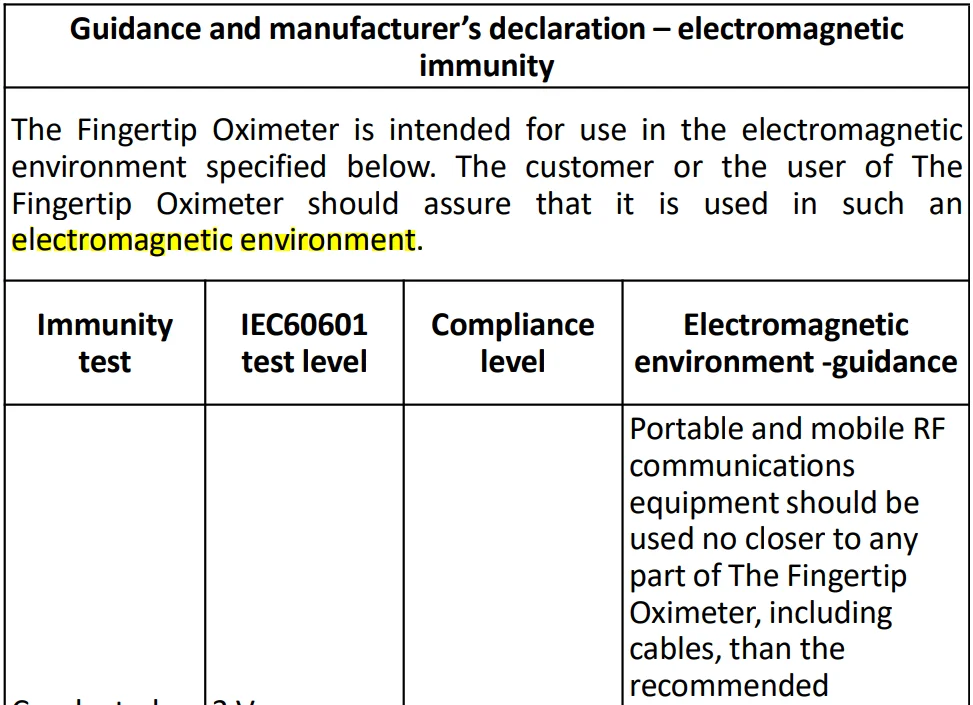
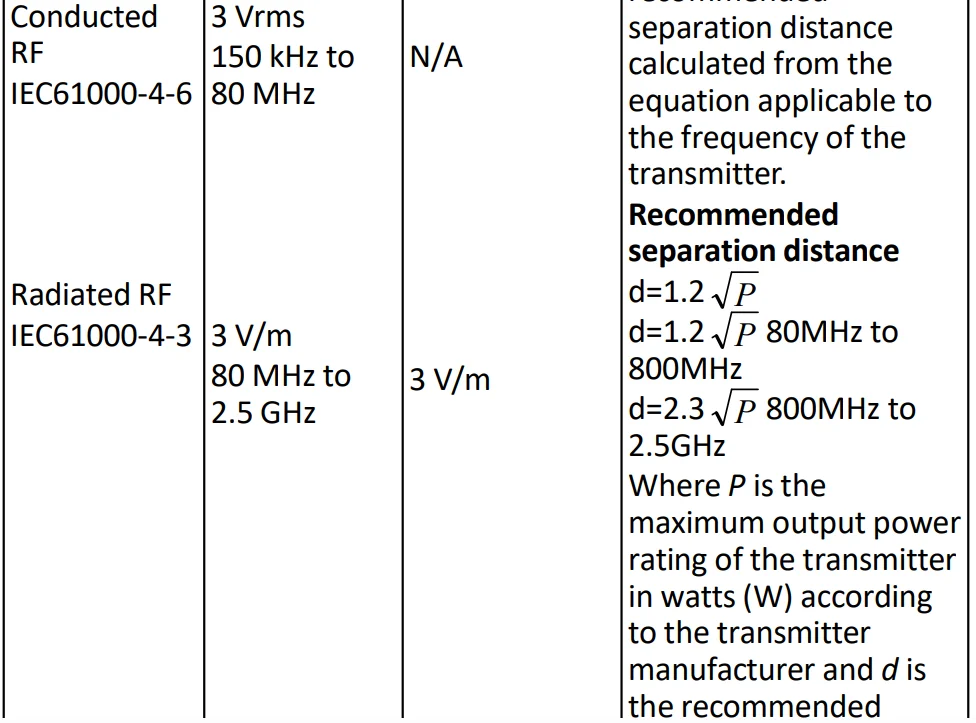
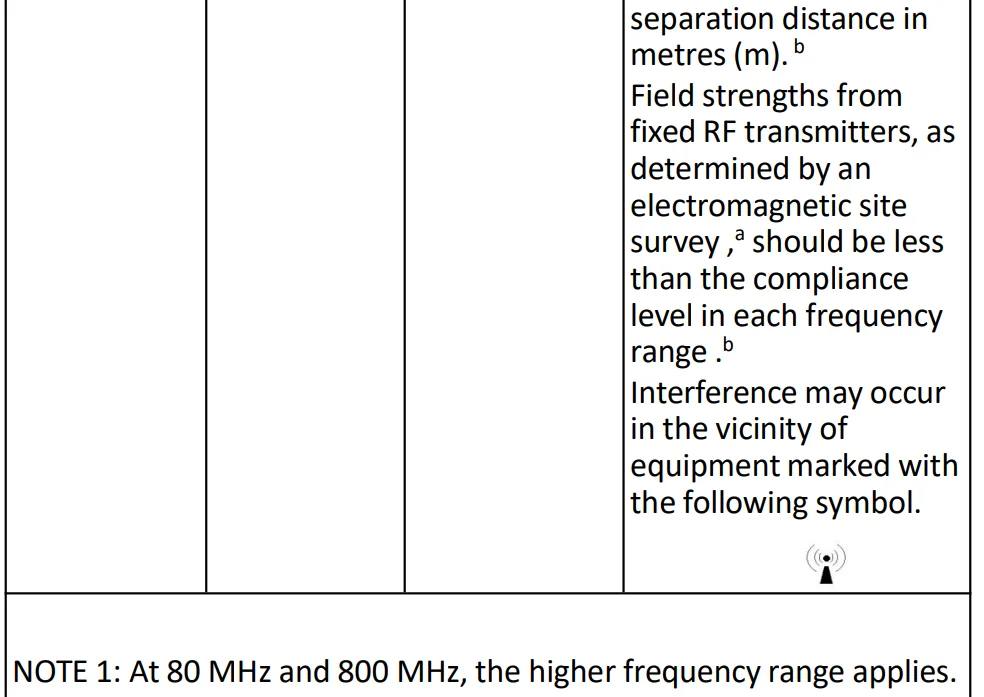
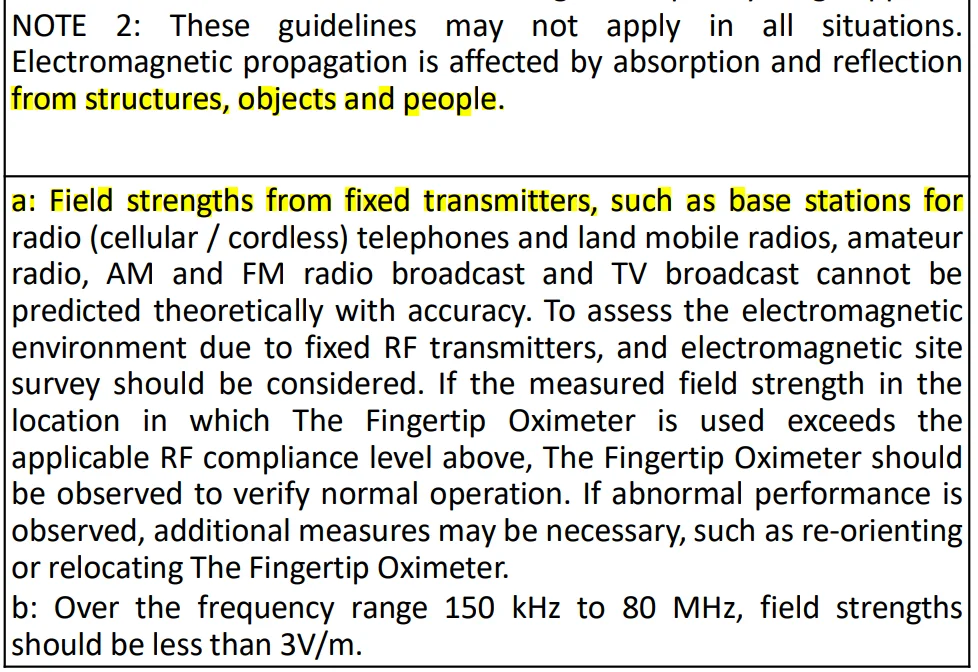
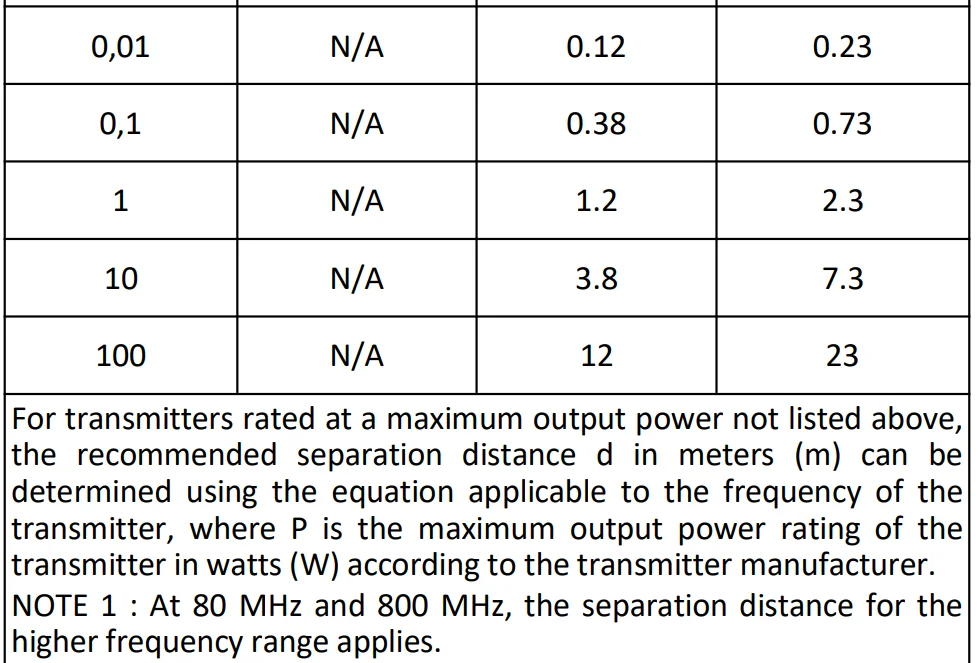
Table 4
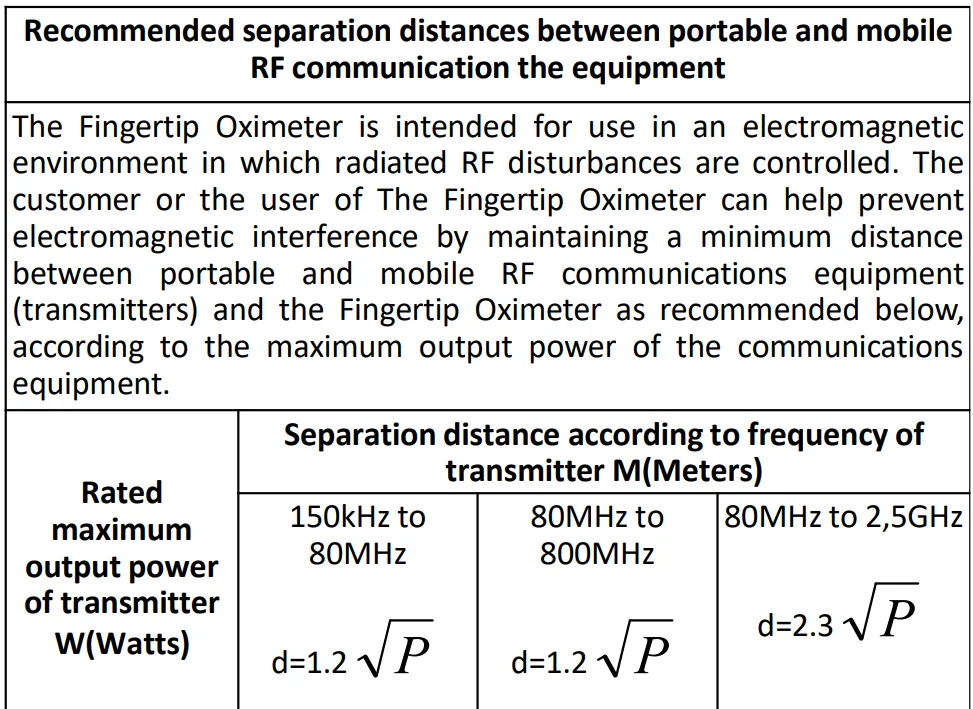

- Version: A
- Shenzhen Viatom Technology Co., Ltd.
- Website: www.getwellue.com
- Email: [email protected]
- Manufacturer: Shenzhen Creative Industry Co., Ltd
For more manuals by Wellue, visit ManualsLibraryy
Wellue Fingertip Pulse Oximeter-FAQs
What is a normal reading on a fingertip pulse oximeter?
A normal oxygen saturation (SpO₂) level for a healthy person typically ranges from 95% to 100% at rest. Slightly lower values can occur at higher altitudes. Readings below 92% may indicate low oxygen levels and should be monitored carefully.
How accurate is a fingertip pulse oximeter?
Fingertip pulse oximeters are generally reliable for home use, but minor variations can occur. On average, readings may differ by a small margin due to factors like movement, skin temperature, or poor circulation. They are best used for regular monitoring rather than precise medical diagnosis.
Can a pulse oximeter detect sleep apnea?
A pulse oximeter cannot directly diagnose sleep apnea, but it can help detect drops in oxygen levels during sleep. Frequent nighttime dips in SpO₂ may suggest a breathing issue and should be evaluated by a healthcare professional.
How do I read a Wellue pulse oximeter?
The device displays two main values: SpO₂ (oxygen saturation) and pulse rate (heart rate). Place your finger inside the clip, stay still, and wait a few seconds for stable readings. Record the highest steady value for accuracy.
Is 92% oxygen level normal during sleep?
Oxygen levels during sleep are usually between 95% and 100%. A reading of 92% is slightly low and may require attention if it happens frequently. Persistent levels below 88% can indicate a serious breathing issue.
How do I use the Wellue fingertip pulse oximeter correctly?
Insert your finger (preferably index or middle finger), keep your hand still, and wait at least 30–60 seconds. Avoid nail polish or cold fingers, as these can affect accuracy. Ensure the device fits snugly for best results.
What are symptoms of low oxygen levels during sleep?
Common signs include restless sleep, morning headaches, fatigue, difficulty concentrating, and mood changes. These symptoms may indicate insufficient oxygen supply overnight.
Which finger gives the most accurate reading?
The index or middle finger usually provides the most reliable results. Ensure your hands are warm and relaxed, as poor circulation can lead to inaccurate readings.
How long should I keep the oximeter on my finger?
Keep the device on your finger for at least one minute, or until the reading stabilizes. For best accuracy, note the value once it remains steady for several seconds.
Can a pulse oximeter show an incorrect heart rate?
Yes, incorrect readings can occur due to movement, weak signals, poor circulation, or external factors like nail polish. Staying still and using the device properly improves accuracy.