
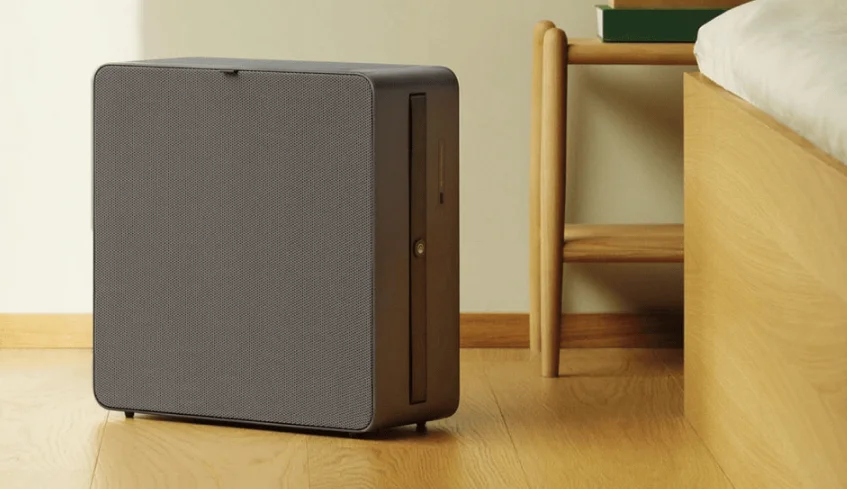

Airthings Renew Smart Air Purifier
WE LIVE AND BREATHE AIR QUALITY
In 2011, Airthings was created with the mission to help people everywhere take control of the air they breathe at home. We make a range of indoor radon and air quality monitors that give homeowners the power to see the invisible and understand what’s really in their air. Renew is our air purifier designed thoughtfully for use in bedrooms. Sound sleep is essential for health and well-being. During the night, your body repairs and renews itself, restoring your energy and helping you to wake refreshed the next morning.
Renew is ultra-quiet and integrates a high-precision particle sensor to track changes in your air quality to ensure you’re always breathing clean and healthy air. This guide will help you get started using your Renew safely and effectively. If you need additional information or help, check our knowledge base online at help.airthings.com or contact our team at [email protected].
IMPORTANT SAFETY INFORMATION
Read and save these instructions. DANGER – To reduce the risk of fire, electric shock, or injury to persons. In the event of a malfunction (sparks, burning smell, etc.), immediately stop the operation, disconnect the power cord, and contact Airthings customer support.
- Do not store or use gasoline or other flammable vapors and liquids in the vicinity of this or any other appliance.
- WARNING: Do not use this fan with any solid-state speed control device.
- Do not let water or any other liquid or flammable detergent enter the unit.
- Do not reach for a unit that has fallen into the water. Unplug it immediately.
- Do not place or store the unit where it can fall or be pulled into a tub or sink.
- Do not place in or drop into water or other liquid.
- WARNING: Do not use replacement parts that have not been recommended by the manufacturer (e.g., parts made at home using a 3D printer).
- Children under 8 years of age should be kept away from the appliance unless continuously supervised. Keep all packaging away from children.
- This appliance can be used by children aged 8 years and above and persons with reduced physical, sensory, or mental capabilities or lack of experience and knowledge if they have been given supervision or instruction concerning the use of the appliance in a safe way and understand the hazards involved. Children shall not play with the appliance. Cleaning and user maintenance shall not be made by children without supervision.
WARNING – To avoid product damage or personal injury
- To avoid fire hazards or electric shock, do not cut, remove, or bypass any prong from the power cord.
- In the event of a malfunction (sparks, burning smell, etc.), immediately stop the operation and disconnect the power cord. Contact Airthings customer support.
- This appliance can be used in a 100–240V, 50–60 Hz power supply without any change.
- Do not use an extension cord or an adapter plug.
- Keep the cord away from heated surfaces.
- Do not operate the unit with a damaged cord or plug, or after the air purifier malfunctions, or has been dropped or damaged in any manner. Contact Airthings customer support.
- Do not pinch, bend, or knot the power cord. Do not cut or damage the power cord. If the power cord is damaged, contact Airthings customer support.
- Ensure that any electrical/electronic equipment is 12 inches (30 cm) away from the unit.
- Do not stop the unit by unplugging the power cord or turning off the power at the electrical box.
- If purchased in the US, this appliance has a polarized plug (one blade is wider than the other). To reduce the risk of shock, this plug is intended to fit only one way in a polarized outlet. If the plug does not fit fully in the outlet, reverse the plug. If it still does not fit, contact a qualified electrician. CAUTION: DO NOT attempt to defeat this safety feature. To do so could result in an electric shock hazard.
CAUTION – To operate the appliance safely
- Do not use outdoors. This product is intended for indoor household use only.
- Do not use in rooms with high humidity, like bathrooms or laundry rooms.
- Do not tilt or move the unit while it is in operation. Shut off and unplug the unit before moving.
- Turn off the unit at the power source when not in use for an extended period.
- Keep the unit at least 3.5 ft (1 m) from heat sources like stoves, radiators, or heaters.
- Do not direct airflow toward fireplaces, candles, or other sources of flame. This can cause flare-ups.
- Only operate the unit with the air filters installed or designed for this unit.
- Do not block or cover the intake area, discharge area, and outlet ports. Do not use it on any soft surface, like a bed, where openings may become blocked.
- When using the wall hanging hook, ensure that the hook is securely fastened. Do not place items on top of a wall-mounted unit. Keep the wall-mounted unit and its power cable away from the reach of children.
- Do not climb on or place objects on the unit. Do not hang objects off the unit. Do not place containers with liquids on the unit.
• Always unplug the unit before changing the filters. Do not attempt to touch the fan blade when removing the filter. - Do not operate the unit with wet hands.
- Do not insert fingers or objects into the air discharge area or the top grill of the unit.
- This unit contains no user-serviceable parts other than replaceable filters. If you suspect the unit to be defective, contact Airthings customer support.
- Do not run cords under carpeting, rugs, runners, furniture, or appliances. This can cause a trip hazard.
- Do not hang onto, climb on, pull the power cord, or place any objects on top of a wall-mounted air purifier.
USE THIS AIR PURIFIER ONLY FOR ITS INTENDED USE AS DESCRIBED IN THIS MANUAL. ANY OTHER USE NOT RECOMMENDED BY THE MANUFACTURER MAY CAUSE FIRE, ELECTRIC SHOCK, OR INJURY TO PERSONS.
TERMS USED IN THIS GUIDE
- CADR: The “Clean Air Delivery Rate,” or CADR, describes the air purifier’s effectiveness based on the volume of clean air produced per minute.
- dB (A): Decibels are units that measure sound intensity. For example, 25 dB is commonly described as quiet as a “whisper” or “library quiet.”
- HEPA-13: HEPA, or high-efficiency particulate air, is a standard to designate the efficiency of an air filter for removing particulates. HEPA-13 filters provide medical-grade particulate filtration, removing 99.97% of particles over 0.2 microns in diameter. These include pollen, mold spores, bacteria, viruses, and other fine particulates.
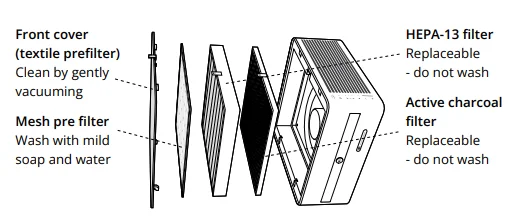
- Pre-filter: A pre-filter removes larger particles before the air is passed through the HEPA-13 filter. Renew has two pre-filters: an audio-grade textile outer pre-filter and a mesh inner pre-filter. Both can be cleaned and help to extend the effective life of the HEPA-13 filter.
- Activated carbon: Sometimes referred to as charcoal filters, these filters use activated carbon pellets that absorb and trap gases and odors from the air. Among many other things, this filter helps to address the odors that can come from pets, cooking, and smoking.
- PM2.5: These are designations that describe airborne particulate matter (PM) types in terms of their maximum diameter as measured in microns (µ). All of these are inhalable, but PM2.5 particles are notable for being small enough to not only enter the lungs but also the bloodstream. Long-term exposure to air with high levels of PM2.5 has been linked to several serious long-term health effects, including heart disease and lung disease. The high-precision PM sensor in Renew measures the concentration of particulates in the room’s air and reports PM2.5 levels in the Airthings app in terms of microns per cubic meter of air (µ/m3).
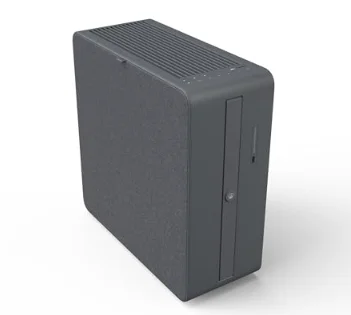
YOUR RENEW AIR PURIFIER
GETTING STARTED
Remove Renew and the power cord from the box. Place the unit on the floor with the control panel facing up.
Quick start guide
STEP 1. Connect the power cable to the unit.
Lay Renew gently on its side so you can access the cable storage compartment on the bottom side. Remove the compartment cover and connect the power cord. With the location of the power outlet and placement of the unit in mind, wind up any excess length of cable in the compartment after replacing the cover.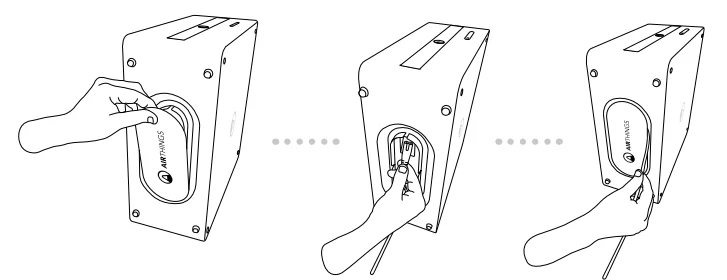
STEP 2. Connect to power
Plug the power cable into an AC 120V (US) or AC 220–240V (EU/UK) electrical outlet. The unit enters Auto mode, and the air quality sensor begins to sample the air.
STEP 3. Connect to WiFi
Download the Airthings app and follow the instructions to create an account, connect to your WiFi, and add Renew to your account. If you already have an Airthings account, tap Add device to add Renew, and you’re ready to go. To disconnect from WiFi, go to the device settings in the app, or see instructions in this manual to “factory reset.”
Note: For WiFi connectivity, Renew requires a 2.4 GHz band router and the Airthings app. The Airthings app requirements can be found in the App Store and Google Play.
Getting the most out of your Renew
Renew is designed to fit easily into your environment and offers a few different placement options.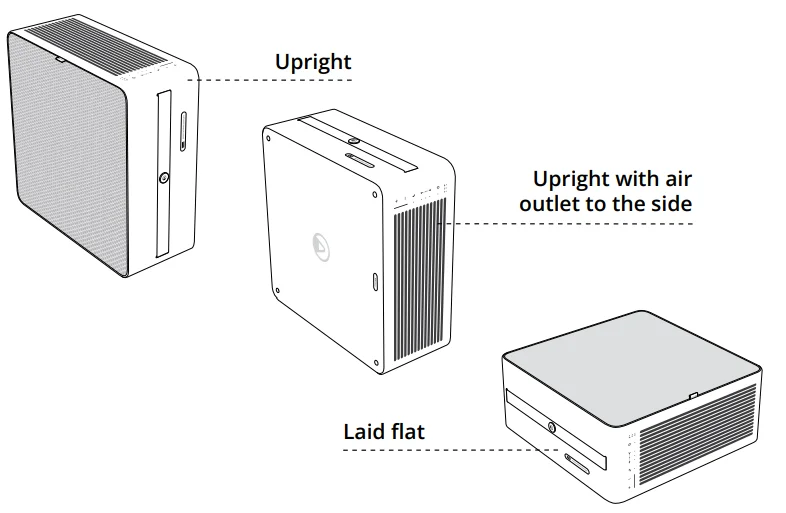
However you choose to place Renew in your room, we suggest you consider the following to get the best performance.
- Only place the unit on a level and stable surface.
- Don’t place anything on top of Renew.
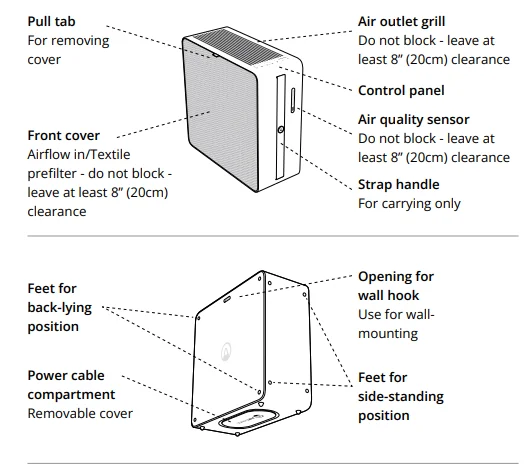
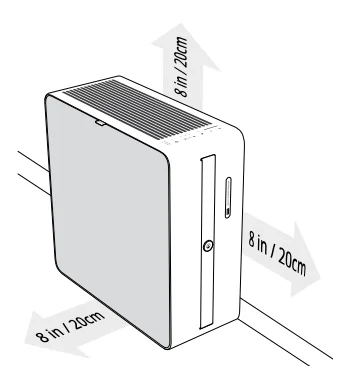
- Renew takes air in through the textile cover and blows it out through the vented surface next to the control panel. Make sure you leave at least 8” (20 cm) of free space so that air can enter and leave freely.
- Avoid blocking the flow of air into the particulate sensor. Leave at least 8” (20 cm) around the opening for the sensor.
- Operate Renew in an enclosed space to get the quickest results and to operate efficiently.

Mounting Renew on a wall
IMPORTANT NOTE: Make sure to use screws, drill bits, and fittings that are suitable for your type of wall material and the weight of the unit (13.5 lbs or 6 kg). Correct installation of the wall hook is essential and your responsibility. If you need help or are unsure, please contact a contractor. We do not accept any liability associated with the hanging of the Renew, including damage or injury resulting from incorrect assembly, mounting, or usage, or liability due to the unit falling, the hook separating, or dislodging from the wall.
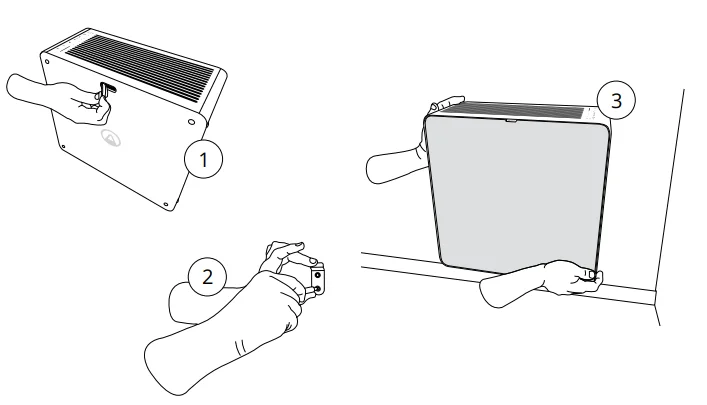
Renew can be mounted to a wall using the wall hook provided in the box. On the back side of the unit, there is an opening for this purpose. You should ONLY mount the unit with the textile cover facing out and the air outlets and control panel facing up. Never use the strap handle to hang the unit — it is not designed for that purpose. We recommend wall-mounting the unit with the bottom side no more than 12” (30 cm) from the floor.
- On the back side of Renew, there’s a small covered opening. Remove this cover and save it somewhere you can find it again. We suggest you use the cable compartment cover to store this piece.
- Using screws and other tools suitable for the wall material, attach the wall hook securely to the wall. Make sure the hook is firmly in place.
- Now hang the unit on the hook using the opening on the back side.

Set it and forget it with Auto mode.
You don’t have to worry about when to turn Renew on or off or how fast to run the fan. We designed Renew with a high-precision, laser-based particulate matter (PM) sensor that keeps track of your room’s air quality. As soon as it detects an increase in PM, it activates the appropriate fan speed to keep air quality from becoming a problem. That’s why we recommend using Auto mode during daytime hours. You can rely on great air quality while avoiding unnecessary energy use.
Fan safe feature
If Renew detects that the fan speed drops abnormally, the motor will automatically stop to avoid any further damage to the fan blades. This typically happens if items are accidentally dropped or fall into the air outlet grill.
USING THE CONTROL PANEL
The panel comprises a row of indicator lights next to control buttons for common operations. Additional operations can be activated by using a combination of buttons, which are also described here.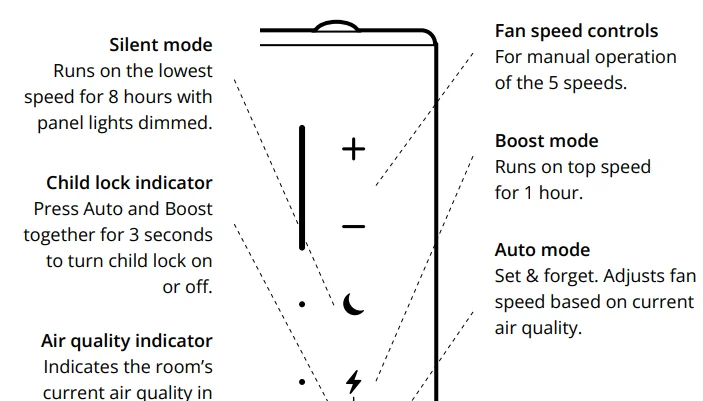

Here are the additional operations you can perform using the onboard control panel: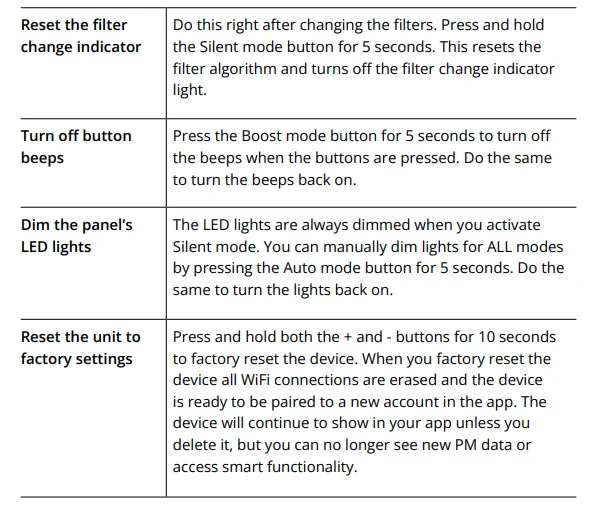
MAINTAINING YOUR RENEWAL
There isn’t much to do to keep your Renew running effectively for years. Along with changing the filters as needed, we recommend keeping the unit clean and free from excess dust.
Changing the filters
Renew tells you when to change the filter based on a smart algorithm. This ensures everyday filter efficiency if the air is more polluted than average. The Filter change indicator on the control panel will illuminate. You can also check the remaining filter life in the app at any time. You can order replacement filters at airthings.com, in the Airthings app, or at selected authorized resellers. Once you have the replacement filters on hand, here’s what to do:
- Unplug the device before changing the filters.
- Remove the textile front cover (outer pre-filter) and inner pre-filter.
- Now remove the old filter and replace it with the new one. Remember to insert the new filter with the pull-tab face up and out. Tip: Place the used filter directly into the bag that the new filter comes in to prevent dust and particles from scattering.
- Reassemble the pre-filters and plug the unit back in.
- Finally, reset the filter change algorithm and turn off the Filter change indicator light. To do this, press and hold the Silent mode button for 5 seconds. Do not try to touch the fan blades when changing the filters.
Keeping it clean
Before cleaning Renew, it’s a good idea to unplug it. Wipe the outside of the unit with a clean, dry cloth to remove any accumulated dust and dirt. Never use cleaning liquids to clean Renew — if you must, only use a lightly damp cloth. Water or moisture should never enter the unit. The front cover (also a pre-filter) should be cleaned using a vacuum at a very low and gentle speed. Be careful not to push hard on the textile, or you risk damaging it.
The mesh pre-filter can be cleaned with water and a small amount of mild dish soap. If you have a handheld shower attachment, that’s the easiest way to do this. Use a gentle stream of water or submerge the filter and gently move it back and forth. You must let the mesh pre-filter dry completely before putting it back in. Moisture can increase the risk of mold growing inside the unit.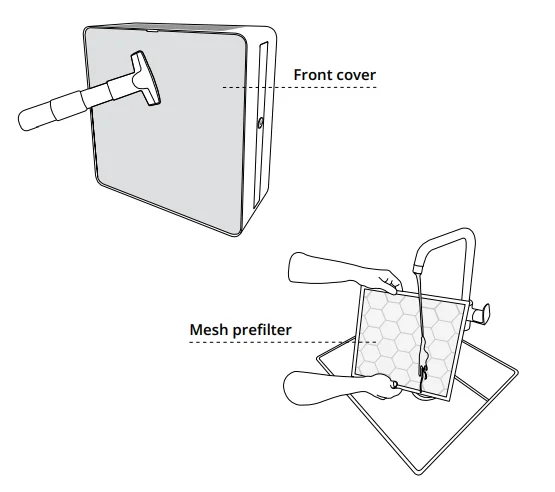
ENERGY EFFICIENCY
This product earned the ENERGY STAR label by meeting strict energy efficiency guidelines set by the U.S. EPA. Room air cleaners have demonstrated the potential for improving air quality and providing health benefits. EPA does not endorse manufacturer claims regarding the degree to which a specific product will produce healthier indoor air. The energy efficiency of this ENERGY STAR-certified model is measured based on a ratio between the model’s CADR for smoke and the electrical energy it consumes, or CADR/Watt.
WARRANTY
Your purchase is covered by your region’s standard warranty.
Need more help?
Find technical articles at help.airthings.com.
Contact our team at [email protected].
For More Manuals By Airthings, Visit ManualsLibraryy.
Airthings Renew Smart Air Purifier -FAQ
What makes the Airthings Renew Smart Air Purifier different from other purifiers?
The Airthings Renew Smart Air Purifier stands out because it combines effective air cleaning with smart app control and a thoughtful design. Its four-stage HEPA-13 filtration system captures 99.97 % of particles and removes odors with an activated carbon filter. It adjusts fan speed based on real-time air quality using a laser-based particulate sensor, and you can monitor trends and control settings remotely through the Airthings app. Its quiet operation and versatile placement options also set it apart.
How does the Airthings Renew purifier improve indoor air quality?
The Renew purifier improves indoor air quality by drawing room air through a multi-stage filtration system that traps large particles, fine dust, pollen, pet dander, gases, and odors. The HEPA-13 filter captures virtually all particles above 0.3 microns, while the activated charcoal filter targets volatile organic compounds and smells. With intuitive sensors, it automatically increases fan speed when pollution rises, helping reduce allergens and contaminants that can affect breathing and sleep.
Is the Airthings Renew suitable for bedrooms or only for larger spaces?
The Airthings Renew is particularly well-suited for bedrooms and smaller living areas but can also work effectively in spaces up to about 525 sq ft. In typical bedrooms, it can cleanse the air in around 10 minutes at optimal settings. Its Silent mode is whisper-quiet at about 23 dB, making it conducive to sleeping environments without distracting noise, which is why many users choose it for bedrooms and nurseries.
How does the Airthings app enhance the user experience?
The Airthings app enhances user control by allowing you to monitor indoor air quality trends, adjust fan modes, and reorder filters from anywhere using your smartphone. The app’s interactive graphs help you understand how air quality changes throughout the day, and it gives visibility into the performance of your purifier. It requires a Wi-Fi connection and brings added convenience compared to manual control on the device alone.
Can the Airthings Renew be integrated with other smart home systems?
As of now, the Airthings Renew does not natively integrate with major smart home ecosystems like Alexa, Google Home, or Apple HomeKit. Users cannot control it with voice commands or create smart home routines involving the purifier. Airthings may expand these capabilities in future updates, but for now, app control is the primary way to manage and monitor the unit.
How often do the filters in the Airthings Renew need to be replaced?
Filter replacement depends on usage and indoor air conditions, but generally, the HEPA-13 and activated charcoal filters will need changing about every six months. Regular replacement ensures the purifier continues to capture fine particles and odors effectively. The Airthings app can help you track and filter status so you know when they are nearing the end of their effective life and need replacement.
Is the Airthings Renew noisy when operating at higher speeds?
In its Silent mode, the Renew operates at about 23 dB, which is extremely quiet and suitable for sleeping. In Auto mode, the unit adjusts fans as needed without loud noise. In Boost or higher speed settings, the noise increases as the purifier works harder to clean the air, which is typical for air purifiers. Most users find the noise acceptable for occasional deeper cleaning needs.
What are common troubleshooting tips if the Airthings Renew won’t connect to Wi-Fi?
If your Renew won’t connect to Wi-Fi, first ensure your router supports 2.4 GHz, as the purifier doesn’t connect to 5 GHz networks. Make sure the device is within range, your app is updated, and your internet is stable. Rebooting the router and power-cycling the purifier can help. If issues persist, Airthings support suggests checking network settings or contacting support with error screenshots for further assistance.
Will using Airthings Renew help with allergies and asthma symptoms?
Many users report that Renew’s HEPA-13 and active charcoal filtration helps reduce airborne allergens like pollen, dust, and pet dander, which can ease allergy symptoms and potentially improve comfort for people with asthma. Cleaner air often contributes to better breathing and sleep quality, though individual results depend on specific health conditions and levels of indoor pollutants. Real-world feedback often highlights noticeable improvements indoors.
Does the Airthings Renew come with a warranty, and where can it be purchased?
The Airthings Renew is available directly from Airthings’ online store, Amazon, and select retailers, with warranties dependent on the seller and region. Standard manufacturer warranties usually cover defects for a limited period, but warranty details vary so check your purchase terms. Official marketplaces often provide more reliable after-sales support and authorized replacement filters. Shipping availability may vary by country.