
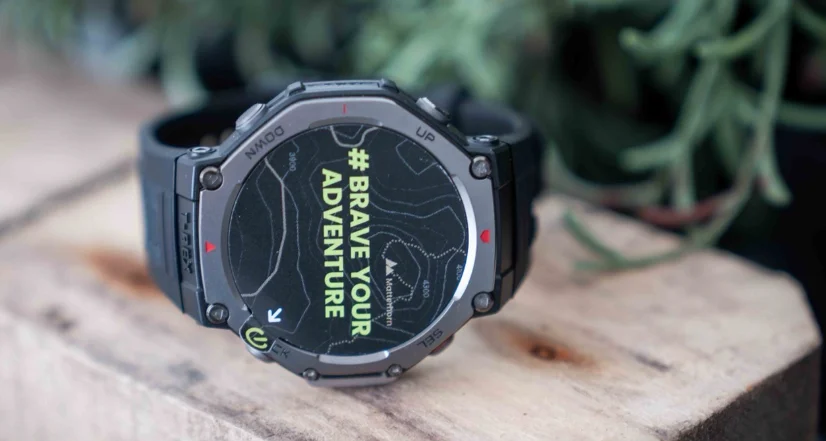

Amazfit T-Rex 3 Pro Smart Watch
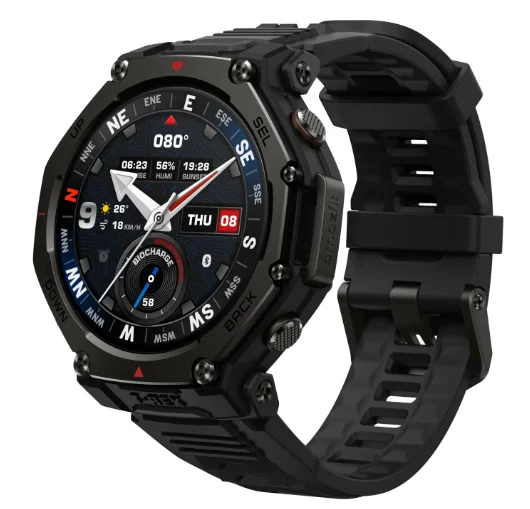
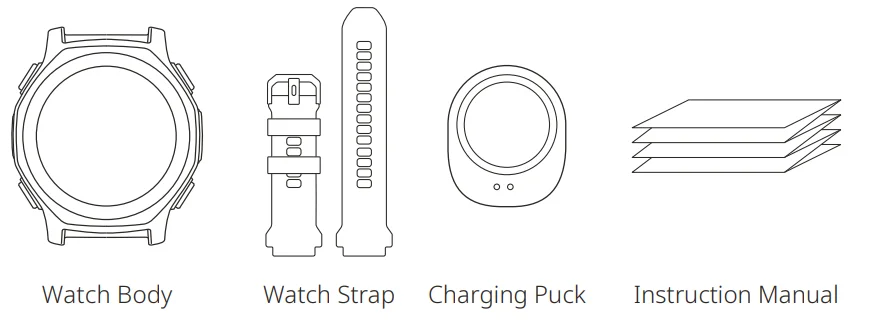
Package Contents
About the Watch
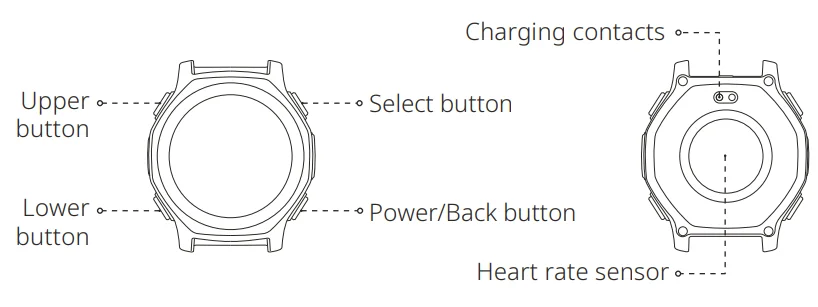
Note: Press and hold the power button to turn on the watch. If the watch cannot be turned on, please charge it and then try again.
Pairing the Watch
Zepp is a must-have app for this watch. It provides scientific sleep and workout guidance and personalized health services to help you start a healthy lifestyle.
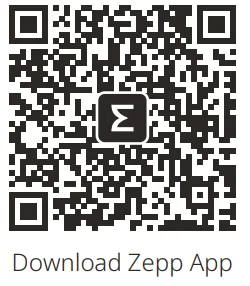
- Use your mobile phone to scan the QR code on the right side to download and install the app, or search for the app in the Google Play Store or Apple App Store and then download and install the latest version of the app.
- Open the app, register an account, and log in.
- Pair the watch as prompted by the app.

Notes:
- For a better user experience, please use the most recent version of the app.
- The operating system needs to be Android 7.0, iOS 15.0, or above.
- Do not pair the watch directly using your mobile phone’s Bluetooth. Follow the steps in the app to pair your watch correctly.
Charging the Watch
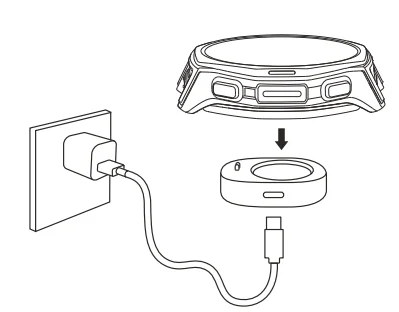
- Use a Type-C USB cable to connect the charging base to a power adapter or computer. Ensure a secure connection for proper charging.
- Put the watch into the charging base. Pay attention to the direction and position of the watch, and make sure that the metal contacts on the back of the watch fit closely with the charging base.
- When charging starts, the watch screen displays the charging progress.

Notes:
- Please use the charging base that comes with the watch. Make sure that the charging base is dry before charging.
- To ensure the best charging speed, it is recommended to use a power adapter with a charging current of 1A or above.
Assembling and Disassembling the Watch Strap
- Take the strap out of the packaging box, ensuring the short strap is on top, and the long strap is on the bottom, with the correct orientation.
- Align the strap pin with the lug hole, insert one end first, then use your finger or a tool to press the spring bar, allowing the other end to snap into the lug hole.
- After installation, gently pull the strap to ensure it is securely installed.
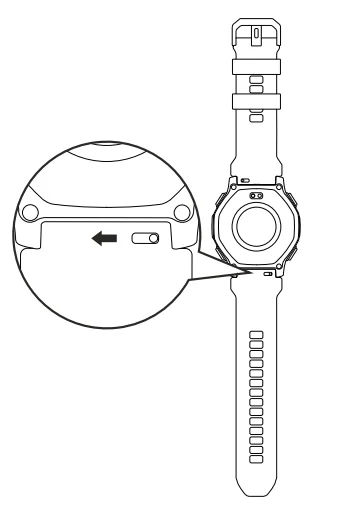
- To remove the strap, please refer to the illustration.

Wearing the Watch
- To ensure the accuracy of heart rate, blood oxygen, and other measurements, please wear your watch at a distance of at least one finger away from the wrist bone and keep the strap at a comfortable snugness.
- For optimal heart rate accuracy during workouts, wear the watch snugly (avoiding wrist movement) and position it at least a finger’s width away from your wrist bone. You may slightly loosen the band post-workout for comfort.
- When measuring blood oxygen saturation, wear the watch correctly. Avoid wearing the watch on the wrist joint, keep your arm flat, maintain a comfortable (appropriately tight) fitting between the watch and the skin of your wrist, and keep your arm still throughout the measurement process.
Note: Factors such as arm sag, arm sway, arm hair, and tattoos can cause measurement inaccuracies.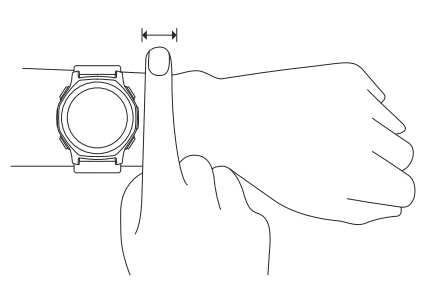
Basic Parameters
- Product name: Smart Watch
- Model number: A2548/A2549
- Input: DC 5 V 800 mA MAX
- Wi-Fi: 2.4 GHz 802.11 b/g/n
- Wi-Fi frequency: 2400–2483.5 MHz
- Wi-Fi output power: <18 dBm
- Bluetooth version: V5.2
- Bluetooth output power: <12 dBm
- BLE output power: <8 dBm
- Working temperature: -30°C–45°C
- Charging temperature: -10℃–45℃
- Water resistance rating: 10 ATM
- Bluetooth frequency: 2400–2483.5 MHz
- View product certification information on the watch’s Settings > System > Regulation page.
- Device requirements: Devices installed with Android 7.0 or iOS 15.0 or above OS versions.
- Package Contents: Watch body, Watch strap, Charging puck, Instruction manual.
- Please refer to the watch user interface to see the software version.
Note: The low temperature mode ensures that the watch can be used in -30℃–10℃ environments, but the touch screen and certain features cannot be used. After the automatic low temperature mode is enabled, the watch will automatically switch between low temperature mode and normal mode according to the temperature. The watch needs to restart during the mode switching process. You can also exit low temperature mode by pressing and holding the back button.
 Bluetooth
 Bluetooth
The Bluetooth word mark and logos are Bluetooth registered trademarks owned by Bluetooth SIG, Inc., and any use of such marks by Anhui Huami Information Technology Co., Ltd. is under license. Other trademarks and trade names are those of their respective owners.
Battery Safety
- This device is equipped with a built-in battery that cannot be removed or replaced. Do not disassemble or modify the battery by yourself.
- Disposal of a battery into fire or a hot oven, or mechanically crushing or cutting a battery, can result in an explosion.
- Leaving a battery in an extremely high temperature environment can result in an explosion or the leakage of flammable liquid or gas.
- A battery subjected to extremely low air pressure may result in an explosion or the leakage of flammable liquid or gas.
- Do not use power adapters or data cables that are not properly certified or incompatible, as this may damage the watch and accessories or cause fire, explosion, or other hazards.
Diving Safety
- Under normal usage conditions, this device has a maximum diving display depth of 45 meters and is intended only for recreational diving and freediving purposes. It must not be used for technical diving, cave diving, mixed-gas diving, or other high-risk scenarios.
- The diving features of this device are intended for use by certified divers only. Please ensure you have received professional training and understand how to operate the device before use. General users conducting breath-hold training, breath-hold testing, or engaging in any diving activities must be accompanied by a coach, an experienced dive buddy, or a professional. The device should not be shared among multiple users, as mixed data may pose potential risks.
- Diving is a high-risk activity. Before beginning, confirm that you are in suitable health to participate. If in doubt, consult a medical professional. Always check the device status before each dive and perform regular maintenance. Do not use the device if any malfunction or damage is found.
- Avoid rapid ascents. Even if a decompression stop is not required, a safety stop of 3 minutes at a depth of 3–5 meters is strongly recommended.
- To reduce the risk of decompression sickness, ensure adequate surface interval after diving, especially after recreational dives. Strictly follow the recommended no-fly time and avoid flying before the interval has elapsed. For detailed pre-flight recommendations, please refer to the guidelines provided by recognized diving safety organizations.
- Note that all electronic devices may malfunction. Depth, dive time, ascent rate, and other data provided by the device are for reference only and may be affected by environmental conditions or how the device is used. Always dive with a professional dive computer or other backup device. Do not rely on a single device when making critical decisions, such as planning decompression stops or determining no-fly times.
- By using this device, you acknowledge and accept that it serves as an auxiliary tool and does not guarantee absolute accuracy or suitability of data, nor can it eliminate the inherent risks associated with diving. Always prioritize safety, make reasonable dive plans, and take responsibility for your personal safety. The applicability of data cannot eliminate the inherent risks of diving activities. Always prioritize safety, develop a reasonable diving plan, and be responsible for your own safety.
Safety Notice
- Do not allow children or pets to bite or swallow the product or its accessories, as this may cause injury.
2. Do not place this product under excessively high or low temperatures, which may cause the product to catch fire or explode. - Do not place this product near heat sources or open flames, such as ovens and electric heaters.
- Some people may experience allergic skin reactions to plastics, leathers, fibers, and other materials, and symptoms such as redness, swelling, and inflammation will occur after long-term contact with this product’s components. If you experience such symptoms, please discontinue use and consult your doctor.
- Do not use power adapters or data cables that are not properly certified or incompatible, as this may damage the watch and accessories or cause fire, explosion, or other hazards.
- The radio waves generated by this product may affect the normal operation of implanted medical devices or personal medical devices, such as pacemakers and hearing aids. If you use any such medical devices, consult the manufacturer for relevant usage restrictions.
- Do not dispose of this device or its accessories as ordinary household waste. Please make sure you dispose of or recycle this device and its accessories in accordance with local laws and regulations.
Repair and Maintenance
- Avoid using detergents such as soap, hand sanitizer, bath foam, or lotion for cleaning to prevent chemical residues from irritating the skin, corroding the device, or degrading the water resistance of the device. If accidentally contacted, immediately rinse with clean water, soak for 30 minutes, then remove and dry the device with a clean soft cloth.
- After wearing the device while bathing (for devices that support bathing), swimming (for devices that support swimming), or sweating, please promptly clean and dry the device.
- After long-term wear, it is recommended to clean the charging contacts with alcohol to prevent sweat, sebum, and dirt from affecting the charging performance.
- When using light-colored watch straps, avoid contact with dark clothing to prevent staining.
- The watch is not suitable for use in situations such as hot showers, hot springs, saunas (steam rooms), etc. After the watch comes into contact with seawater, please rinse all the holes with fresh water to prevent seawater residue and crystallization, which may affect the normal use of the watch.
- Do not place the device in direct sunlight for long periods. Excessively high or low ambient temperature may cause device failure.
- Handle with care during transportation. Keep the device dry and away from humidity.
- Do not wear the watch in MRI examinations and other highly magnetic environments. Otherwise, the watch may be damaged.
Warranty and Return Policy
The Amazfit Limited Warranty covers Amazfit products against manufacturing defects beginning on the original purchase date. The warranty period is 12 months or another specified period as the applicable consumer laws in the consumer’s country of purchase require. Our warranty is in addition to the rights provided by applicable consumer laws.
- Official website: www.amazfit.com
- Please check the FAQ on the website for troubleshooting: support.amazfit.com/en/product-list
Notes:
- This product isn’t a medical device. None of the data or measurements is intended for medical diagnosis or medical monitoring.
- If the product is not in use for a long period of time, it is recommended that you power off the product before storing it. Recharge the battery every 6 months to 100% to prevent battery damage by over-discharge due to long-term storage.
- For detailed operating instructions, safety precautions, and repair and maintenance information, please visit the website https://support.amazfit.com to download the user manual.
For More Manuals By Amazfit, Visit ManualsLibraryy.
Amazfit T-Rex 3 Pro Smart Watch-FAQs
What are the main features of the Amazfit T-Rex 3 Pro Smart Watch?
The Amazfit T-Rex 3 Pro is a rugged outdoor smartwatch designed for adventure and extreme sports. It features a bright AMOLED display protected by sapphire glass, a titanium bezel, and military-grade durability. The watch supports over 180 sports modes, advanced GPS navigation, Bluetooth calling, and offline maps. It also includes a built-in flashlight and advanced health monitoring sensors, making it suitable for outdoor exploration, training, and everyday smartwatch use.
How durable is the Amazfit T-Rex 3 Pro?
The Amazfit T-Rex 3 Pro is built with premium materials designed to handle harsh environments. It uses a Grade-5 titanium bezel and buttons combined with a fiber-reinforced polymer body, which improves strength while keeping the watch lightweight. The display is protected by sapphire crystal glass that resists scratches. This rugged construction makes the smartwatch suitable for activities such as hiking, climbing, and trail running in challenging conditions.
Is the Amazfit T-Rex 3 Pro waterproof?
Yes, the Amazfit T-Rex 3 Pro has a 10 ATM water-resistance rating. This means it can handle water pressure equivalent to around 100 meters, making it suitable for swimming, snorkeling, and some diving activities. The watch is also certified for underwater sports and can function as a diving computer in certain conditions, though users should always follow manufacturer guidelines for safe underwater use.
How long does the battery last on the Amazfit T-Rex 3 Pro?
Battery life is one of the biggest strengths of the Amazfit T-Rex 3 Pro. The larger 48 mm model can last up to about 25 days under typical usage conditions. With heavy use, it may last around 10 days, while GPS tracking can operate for roughly 38 hours in accuracy mode. This long battery performance makes it useful for extended outdoor trips where charging opportunities are limited.
Does the Amazfit T-Rex 3 Pro support GPS and navigation?
Yes, the Amazfit T-Rex 3 Pro includes advanced navigation features designed for outdoor adventures. It supports six satellite positioning systems for improved location accuracy. The smartwatch also offers offline maps, route planning, turn-by-turn navigation, and point-of-interest search. These capabilities make it helpful for hikers, runners, and explorers who need reliable navigation without relying on mobile network coverage.
Can the Amazfit T-Rex 3 Pro make or receive phone calls?
The Amazfit T-Rex 3 Pro supports Bluetooth calling when connected to a smartphone. It includes a built-in microphone and speaker, allowing users to answer or make calls directly from the watch. This feature is convenient during workouts, outdoor activities, or situations where accessing a phone quickly may not be possible.
What health tracking features does the Amazfit T-Rex 3 Pro provide?
The smartwatch includes a BioTracker biometric sensor that supports continuous health monitoring. It can track heart rate, blood oxygen levels, sleep patterns, stress levels, respiratory rate, and recovery metrics. These features help users monitor their overall wellness and performance during workouts. The watch syncs this data with the Zepp mobile app to provide insights and long-term health trends.
How bright is the display on the Amazfit T-Rex 3 Pro?
The Amazfit T-Rex 3 Pro features a high-brightness AMOLED display that can reach up to 3,000 nits. This makes the screen easy to read even in direct sunlight, which is particularly useful during outdoor sports and adventure activities. The display is also protected with sapphire glass to improve durability and scratch resistance.
Is the Amazfit T-Rex 3 Pro compatible with Android and iPhone?
Yes, the Amazfit T-Rex 3 Pro works with both Android and iOS smartphones. It connects through the Zepp mobile app, which allows users to sync fitness data, receive notifications, manage watch settings, and analyze health insights. This compatibility ensures that users from different smartphone ecosystems can easily use the smartwatch.
Who should consider buying the Amazfit T-Rex 3 Pro Smart Watch?
The Amazfit T-Rex 3 Pro is ideal for outdoor enthusiasts, athletes, and adventure travelers who need a tough and reliable smartwatch. Its rugged build, long battery life, advanced GPS navigation, and health tracking features make it suitable for activities like hiking, climbing, trail running, and diving. It is also a good choice for users who want premium outdoor smartwatch features at a more affordable price compared to many high-end competitors.