
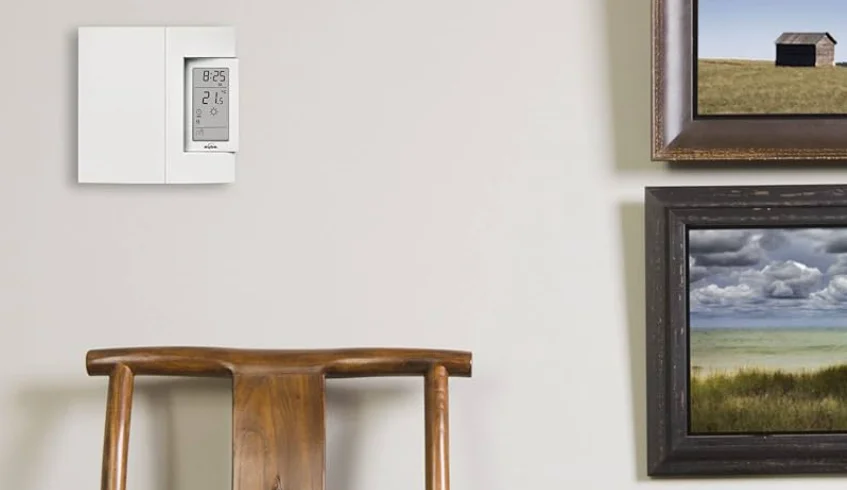

Aube TH106 Programmable Thermostat
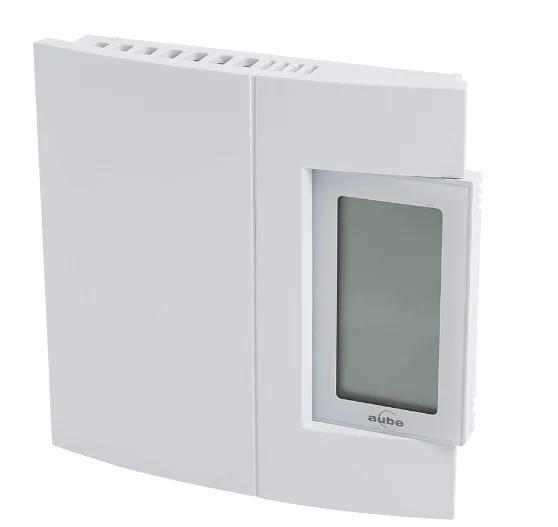
Programmable Thermostat
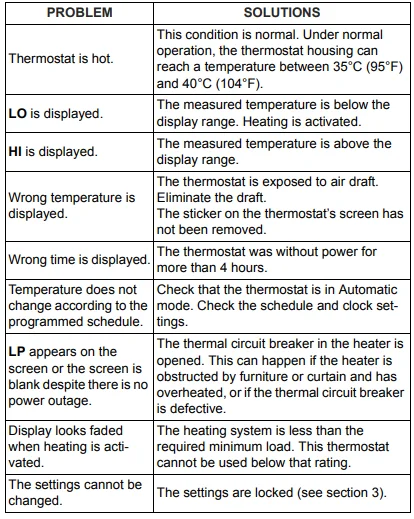
LP appears only for the first two minutes when the thermostat is without power. This can occur during a power outage or when the thermal protection device inside the baseboard heater is opened.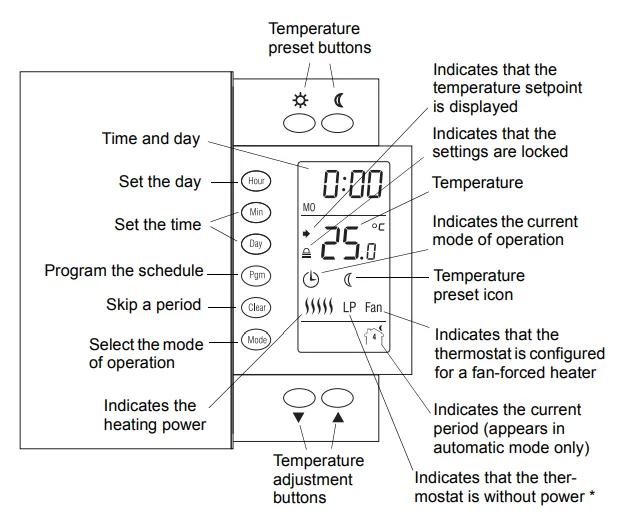
Description
This programmable thermostat can be used to control an electric heating system such as an electric baseboard heater, a radiant ceiling, a radiant floor, a convector, or a fan-forced heater. The thermostat cannot be used with:
- a resistive load over 16.7 A
- a resistive load under 2 A
- a system driven by a contactor or relay (inductive load)
- a central heating system
SUPPLIED PARTS:
- One (1) thermostat
- Two (2) 6-32 screws
- Two (2) solderless connectors
Installation
TURN OFF POWER TO THE HEATING SYSTEM AT THE MAIN POWER PANEL TO AVOID ELECTRICAL SHOCK. THE INSTALLATION MUST BE PERFORMED BY AN ELECTRICIAN.
- All cables and connections must conform to the local electrical code.
- Special CO/ALR solderless connectors must be used when connecting with aluminum conductors.
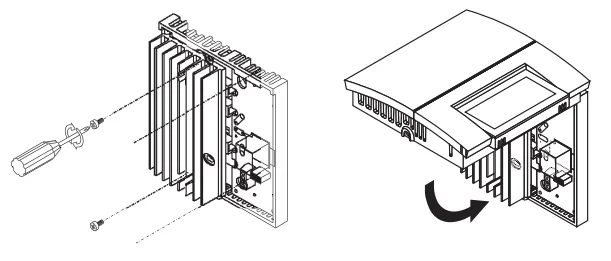
- Install the thermostat onto an electrical box.
- Install the thermostat about 5 feet high, on an inside wall facing the heater.
- Avoid locations where there are air drafts (such as the top of a staircase or an air outlet), dead air spots (such as behind a door), or direct sunlight.
- Do not install the thermostat on a wall that conceals chimney or stove pipes.
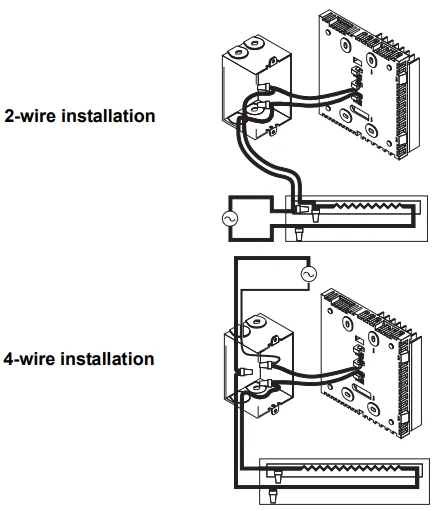
- The thermostat wires are not polarized; either wire can be connected to the load or to the power supply.
- NOTE: Always keep the thermostat’s vents clean and unobstructed.

- Connect the thermostat wires to the line wires and to the load wires using solderless connectors for copper wires.

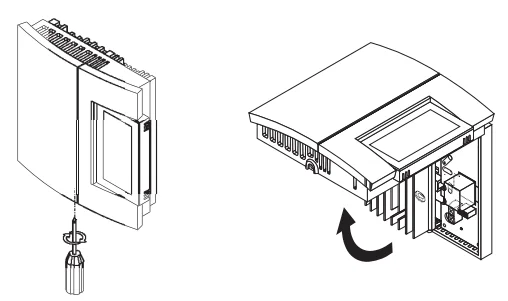
- Push any excess wire back into the electrical box. NOTE: If necessary, before re-installing the front component, configure the thermostat (see section 3).

- Return power to the heating system.
Configuration
The configuration switches are on the back of the thermostat. The factory settings are indicated by the gray cells in the following table.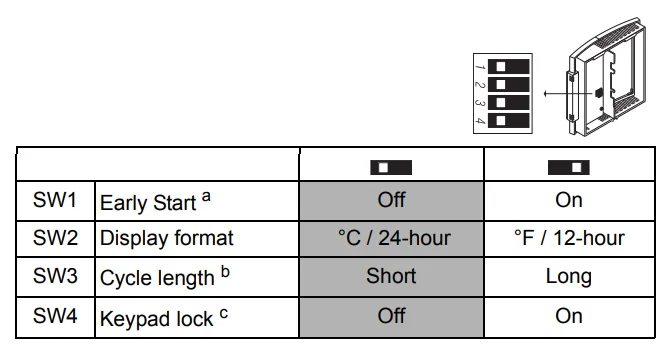
- Early Start can be used in Automatic mode only. When this function is enabled, the thermostat calculates the optimal time to start heating in order to obtain the desired temperature by the set time. The thermostat re-assesses the start time daily based on the previous day’s performance.
- Select short cycles in most cases, as it provides better temperature control. However, you must select long cycles if you have a fan-forced heater. The word FAN is displayed when long cycles are selected.
- The settings are locked. The temperature adjustment buttons only allow you to view the temperature setpoint.
Clock and Day Setting
- Press the Hour button to set the hour.
- Press the Min button to set the minutes.
- Press the Day button to set the day.
- Press the Mode button to end.
Daylight Saving Time
The thermostat can automatically re-adjust its clock at the Daylight Saving Time changeover. When this function is enabled (On), the thermostat switches to Daylight Saving Time on the second Sunday of March and to normal time on the first Sunday of November. NOTE: The function is disabled (default setting) when the clock loses its setting.
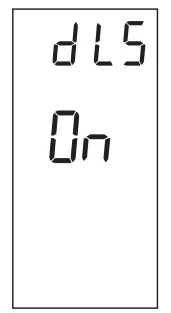
- Press the Day button (3 seconds) until DLS appears on the screen.

- Press either of the ▲▼ buttons to toggle between On (enabled) and Off (disabled).
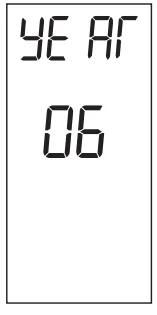
- Press the Day button briefly. The year setting is displayed.

- Press either of the ▲▼buttons to set the current year.
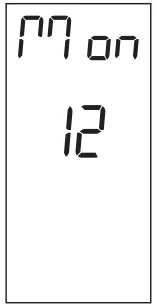
- Press the Day button briefly. The month setting is displayed.

- Press either of the▲▼ buttons to set the current month.
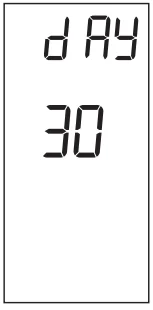
- Press the Day button briefly. The date setting is displayed.

- Press either of the ▲▼buttons to set the current date.
- Press the Mode button to end.
Temperature Setting
Setpoint
The thermostat normally displays the actual temperature. To view the setpoint, press the “▲” or “▼” button briefly. The setpoint will appear for the next 5 seconds. To change the setpoint, press the “▲” or “▼” button until the desired temperature is displayed. To scroll faster, hold the button.
Using a preset temperature
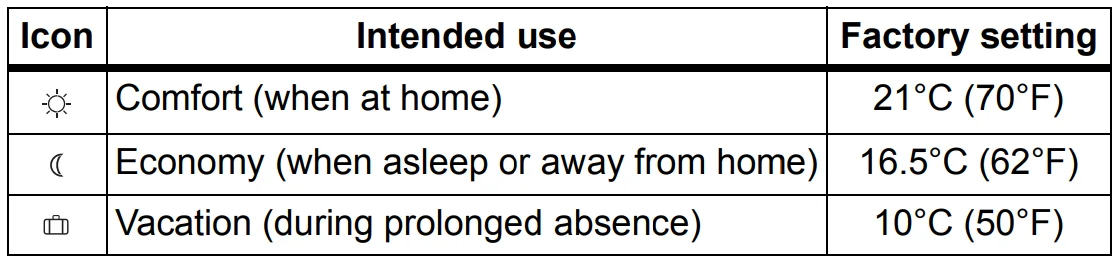
The thermostat has 3 preset temperatures:
- Comfort temperature

- Economy temperature

- Vacation temperature


- To use the Comfort or Economy temperature, press the or button respectively. The corresponding icon will be displayed.
- To use the Vacation temperature, press both or buttons simultaneously. The icon will be displayed.

Storing a preset temperature
To store the Comfort or Economy temperature:
- Set the desired temperature using the “▲” or “▼” button. Press and hold the appropriate button or for approximately 3 seconds until the corresponding icon is displayed.
To store the Vacation temperature:
- Set the desired temperature using the “▲” or “▼” button. Press and hold both or buttons simultaneously for approximately 3 seconds until the icon is displayed.
Modes of Operation
 Automatic- The temperature is set according to the programmed schedule. To place the thermostat in this mode, press the Mode button until it is displayed. The icons of the current period and preset temperature are also displayed.
Temporary Bypass: If you modify the setpoint (by pressing the”▲” “▼”  or
or  button) when the thermostat is in automatic mode, the new setpoint will be used until the end of the current period. When the next period starts, the temperature set for that period becomes the new setpoint. To cancel the bypass, press the Mode button.
 Manual
The programmed schedule is not used. The temperature must be set manually. To place the thermostat in this mode:
- Press the Mode button until it is
 displayed.
 - Set the temperature using the▲▼or or button.
Schedule
The schedule consists of 4 periods per day, which represents a typical weekday. You can program the thermostat to skip the periods that do not apply to your situation. For example, you can skip periods 2 and 3 for the weekend.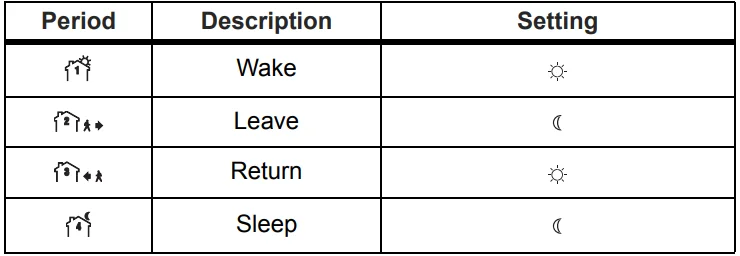
The Comfort ( ) temperature is used in periods 1 and 3, and the Economy ( ) temperature is used in periods 2 and 4. For example, when the period changes from 1 to 2, the setpoint automatically changes from the Comfort setting to the Economy setting . You can have a different program for each day of the week; i.e., each period can start at a different time for each day of the week. The thermostat has been programmed with the following schedule.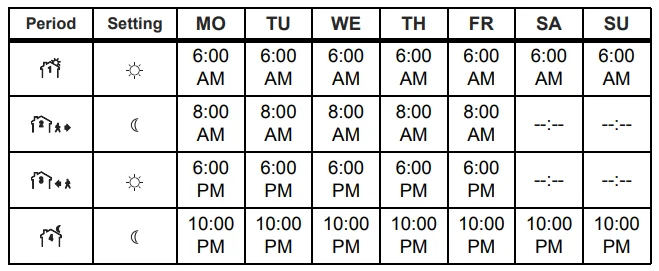
To modify the schedule:
- Press Pgm to access the programming mode. Period 1 is selected.
- Press Day to select the day to program (hold for 3 seconds to select the entire week).
- Press Hour and Min to set the start time of the selected period, or press Clear if you want to skip the period (–:– is displayed).
- Press Pgm to select another period, or press Day to select another day. Then repeat step 3.
- Press Mode to exit the programming mode.
NOTE: If no button is pressed for 60 seconds, the thermostat will automatically exit the programming mode.
Power Outage
During a power outage, LP (Low Power) appears for the first minute. Then the screen becomes blank. The settings are stored in memory. However, if the power failure exceeds 4 hours, the thermostat’s clock must be re-adjusted and, if you are using the automatic Daylight Savings Time changeover function, it must be re-enabled. When power returns, the thermostat will return to the mode of operation active before the power failure.
Troubleshooting
Technical Specifications
- Power: 120/240 VAC, 60 Hz
- Minimum load: 2 A (resistive only)
- 250 W @ 120 VAC
- 500 W @ 240 VAC
- Maximum load: 16.7 A (resistive only)
- 2000 W @ 120 VAC
- 4000 W @ 240 VAC
- Display range: 0°C to 60°C (32°F to 140°F)
- Display resolution: 0.5°C (1°F)
- Setpoint range: 5°C to 30°C (40°F to 86°F)
- Setpoint interval: 0.5°C (1°F)
- Storage: -20°C to 50°C (-4°F to 120°F)
- Approval: c UL us
Warranty
Honeywell warrants this product, excluding battery, to be free from defects in the workmanship or materials, under normal use and service, for a period of three (3) years from the date of purchase by the consumer. If at any time during the warranty period the product is determined to be defective or malfunctions, Honeywell shall repair or replace it (at Honeywell’s option). If the product is defective,
- return it, with a bill of sale or other dated proof of purchase, to the place from which you purchased it, or
- contact Honeywell. Honeywell will make the determination whether the product should be returned or whether a replacement product can be sent to you.
This warranty does not cover removal or reinstallation costs. This warranty shall not apply if it is shown by Honeywell that the defect or malfunction was caused by damage that occurred while the product was in the possession of a consumer.
Honeywell’s sole responsibility shall be to repair or replace the product within the terms stated above. HONEYWELL SHALL NOT BE LIABLE FOR ANY LOSS OR DAMAGE OF ANY KIND, INCLUDING ANY INCIDENTAL OR CONSEQUENTIAL DAMAGES RESULTING, DIRECTLY OR INDIRECTLY, FROM ANY BREACH OF ANY WARRANTY, EXPRESS OR IMPLIED, OR ANY OTHER FAILURE OF THIS PRODUCT. Some provinces, states, or regions do not allow the exclusion or limitation of incidental or consequential damages, so this limitation may not apply to you.
THIS WARRANTY IS THE ONLY EXPRESS WARRANTY HONEYWELL MAKES ON THIS PRODUCT. THE DURATION OF ANY IMPLIED WARRANTIES, INCLUDING THE WARRANTIES OF MERCHANTABILITY AND FITNESS FOR A PARTICULAR PURPOSE, IS HEREBY LIMITED TO THE THREE-YEAR DURATION OF THIS WARRANTY. Some provinces, states, or regions do not allow limitations on how long an implied warranty lasts, so the above limitation may not apply to you. This warranty gives you specific legal rights, and you may have other rights which vary from one province, state, or region to another.
Technical Assistance
705 Montrichard
Saint-Jean-sur-Richelieu, Québec
J2X 5K8
Canada
1-800-831-2823
[email protected]
www.aubetech.com
For More Manuals By Aube Technologies, Visit ManualsLibraryy.
Aube TH106 Programmable Thermostat-FAQs
Are Aube thermostats compatible with all heating systems?
Aube thermostats are not universally compatible with every heating system. The TH106 is typically designed for electric heating applications, especially electric baseboard heaters and radiant systems. Some Aube models can work with forced air gas or oil systems, but compatibility depends on voltage and load requirements. Always verify whether your system is line voltage or low voltage before purchasing to ensure proper operation and safety.
Who makes Aube thermostats?
Aube thermostats are part of the Honeywell family of products. The Aube brand became associated with Honeywell in the early 2000s and has since benefited from Honeywell’s reputation for quality and energy-efficient control systems. Today, Aube products are recognized for their precision and reliability in electric heating control, particularly in residential baseboard and floor heating applications.
Are Aube thermostats easy to use?
Yes, Aube thermostats are known for being user-friendly. Many models, including the TH106, come factory pre-programmed with a 7-day schedule that can be customized to suit your routine. The interface typically allows simple adjustments and easy switching between Fahrenheit and Celsius. Once installed, most users find daily operation straightforward without the need for complicated setup procedures.
What is the best temperature setting for a programmable thermostat?
Energy experts commonly recommend setting your thermostat to around 68°F during winter months for a balance of comfort and efficiency. In summer, 78°F is often suggested to reduce cooling costs. With a programmable thermostat like the TH106, you can schedule lower temperatures while sleeping or away and slightly higher settings when home, helping reduce energy consumption without sacrificing comfort.
Is 20°C warm enough for a house?
For most households, 18°C to 20°C is considered a comfortable indoor temperature during colder seasons. Comfort levels vary based on clothing, humidity, and personal preference, but staying within this range helps manage energy use efficiently. Maintaining moderate temperatures also reduces strain on your heating system and can lower monthly utility bills over time.
How do I correctly set a programmable thermostat schedule?
Start by setting a comfortable temperature for when you are home and awake, typically around 68°F in winter. Program lower settings for nighttime or when the house is empty. Make adjustments gradually, increasing or decreasing by one or two degrees at a time. A consistent schedule helps your heating system operate efficiently while maintaining a stable indoor climate.
How do I reset my thermostat settings?
To reset a thermostat like the TH106, first turn off the power at the breaker for safety. Remove the thermostat cover carefully. Some models include a small reset button inside the panel, which may require a pointed object to press. After resetting, you may need to reprogram your schedule and temperature preferences according to your needs.
Do I need a plumber to install the Aube TH106?
A plumber is usually not required to install a thermostat unless it directly controls a water-based heating system. Because the TH106 is often a line-voltage device, installation involves electrical wiring. For safety, power should always be turned off at the breaker. If you are unfamiliar with electrical work, hiring a qualified electrician is the safest option.
What are common mistakes when installing a thermostat?
Common installation mistakes include failing to turn off power at the breaker, mixing up wire connections, or choosing a thermostat incompatible with your system’s voltage. Installing the thermostat in a poor location, such as near drafts or direct sunlight, can also affect accuracy. Carefully reviewing the wiring diagram and product specifications helps prevent performance and safety issues.
What are the three main types of thermostats?
There are three primary thermostat types: manual, programmable, and smart. Manual thermostats require physical adjustment whenever you want to change the temperature. Programmable models like the TH106 allow you to set schedules in advance. Smart thermostats connect to Wi-Fi and offer remote control through apps, providing greater automation and potential energy savings.