
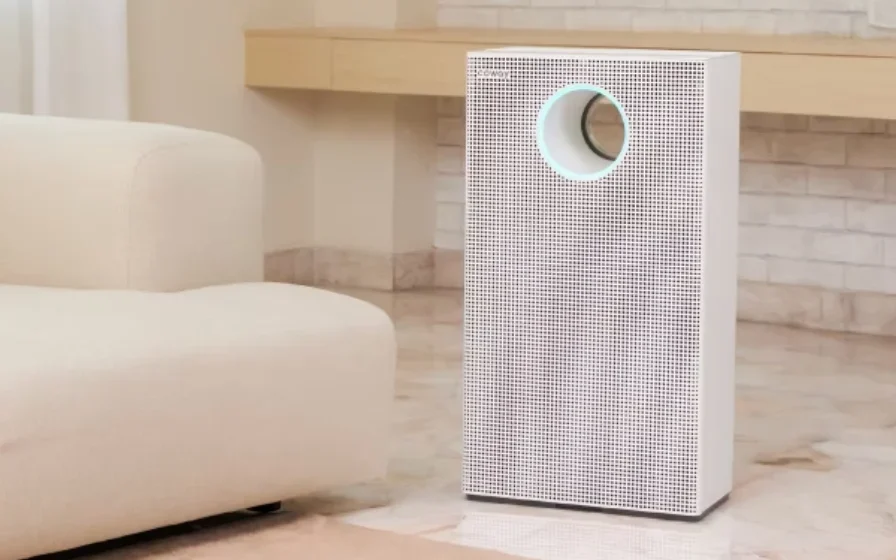

Coway Airmega Storm 2 AP-1523D
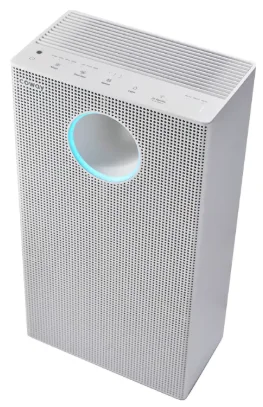
Safety Information
Electric shock/fire
- Do not use a damaged or loose outlet.
- Make sure to connect the power plug to a 220 V- 240 V~ 50 Hz, 60 Hz outlet.
- Do not pull on the power cord to move the device.
- Do not touch the power plug with wet hands.
- To avoid damaging or warping the power cord, do not use excessive force to bend the power cord.
- Do not plug or unplug the power plug repeatedly.
- If water got into the power supply section, then disconnect the power adapter and completely dry it before use.
- Make sure the product is unplugged while it is being repaired, inspected, or when its parts are being replaced.
- If there is any dust or water on the power plug’s pins and contact area, wipe them off completely.
- Do not connect multiple products to one power outlet. Use a separate socket for the product.
- If you don’t use it for a long time, then disconnect the power adapter.
- Do not modify the power cord arbitrarily.
- If the power cord is damaged, do not attempt to replace the cord. Instead, contact the service center to replace it.
Malfunction
- Do not apply excessive force on the product.
- Do not use the product for any purpose other than a purifier.
Injury/Malfunction Injury
- Do not push or lean on the product. The product may fall.
- Do not expose the human body to the discharging wind from the front of the product for a long time.
- Do not put your face close to the discharging wind from the front of the product.
Precautions for Kids: Performance degradation, Malfunction/Electric shoc,k Electric shock/Fire
- Do not spray water on the product.
- Do not arbitrarily open, repair, or improve the product.
- If there is any strange noise, burning smell, or smoke from the product, immediately unplug the power cord and contact the service center.
- Do not place bowls filled with water, chemicals, food, small metals, or flammable substances on top of the product.
- Unplug the power cord before cleaning the product.
- Do not spray water or use benzene or thinner on the product to clean it.
Fire/Performance degradation
- Do not spray flammable substances, such as pesticides or air fresheners, into the air inlet.
Part Names
Front/Rear
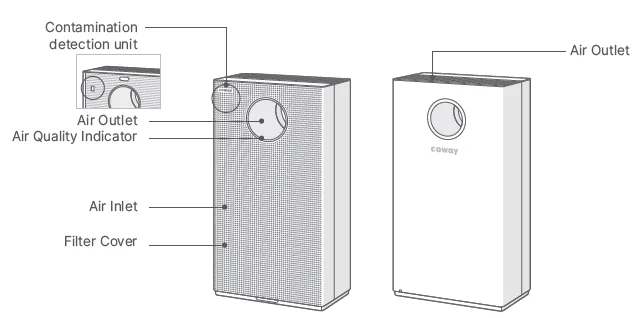
- Do not press the contamination detection part or poke it with a sharp object. There is a risk of breakage.
Top

Accessories
- User Manual
- Self-Care Guide
Filter
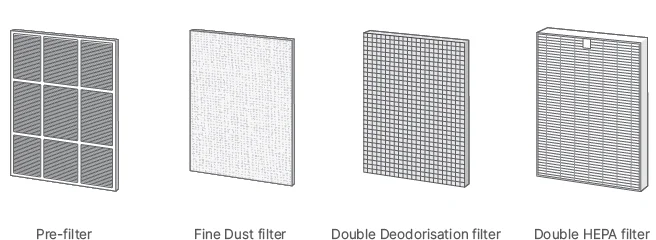
- A Fine Dust filter is provided when purchasing the product for the first time.
Filter Installation and Replacement
Filter Type
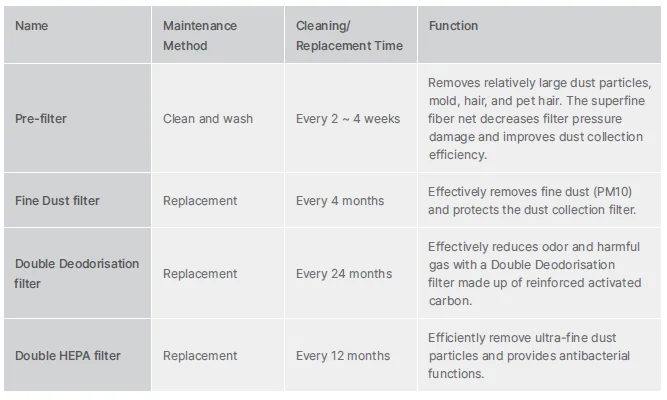
- Based on 24 hours of daily use with Level 1 air speed.
- Filter replacement cycle is just a recommendation, and it depends on the environment of use.
Filter Installation
Before installation
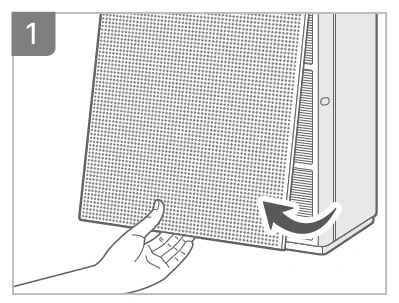
- Pull the center bottom part to open the front cover.

- Remove the plastic packaging of the filters except for the Pre-filter.

- Assemble the Pre-filter and filter.
- Install the Fine Dust filter behind the Prefilter.
- Filter assembly order: Double HEPA filter → Double Deodorisation filter → Fine Dust filter → Pre-filter

- Close the front cover again.
- The product will not operate if the front cover is not attached correctly.
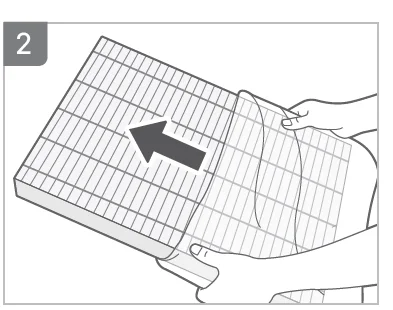
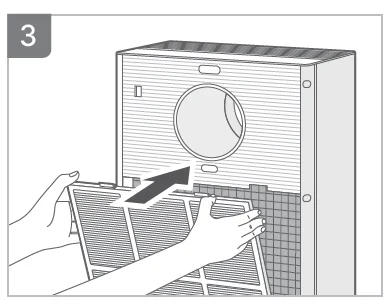
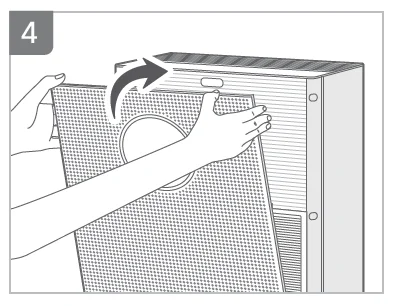
- Be sure to remove the plastic packaging before installing the filter.
- Use the product indoors only.
- Unplug the power cord from the outlet when not using the product.
- Check the front of the filter when installing it.
How to Replace by Filter Type
Fine Dust filter
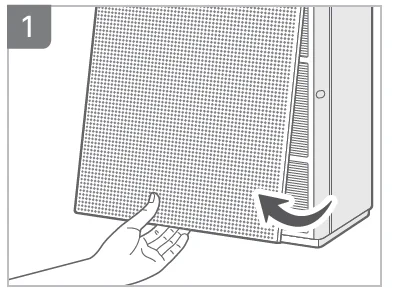
- Pull the center bottom part to open the front cover.

- Detach the Pre-filter from the product.

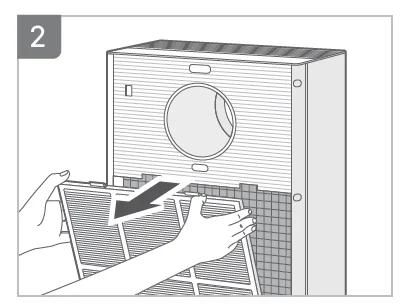
- Remove the Fine Dust filter from the Pre-filter.

- Remove the plastic packaging from the new Fine Dust filter.

- Put the new Fine Dust filter behind the Pre-filter.
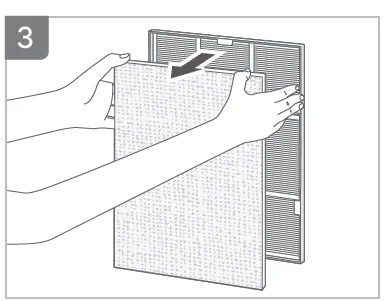
- Assemble the Pre-filter into the product.

- Close the front cover again.
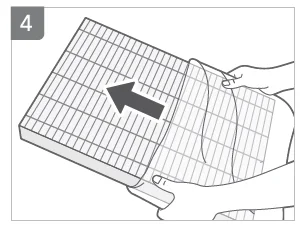
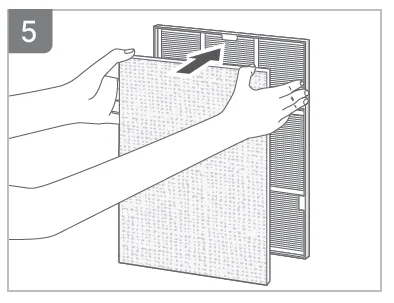
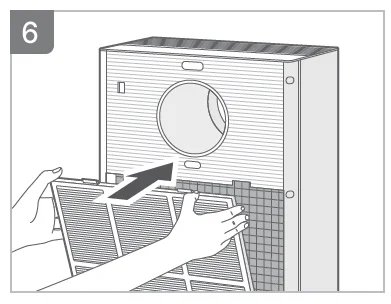
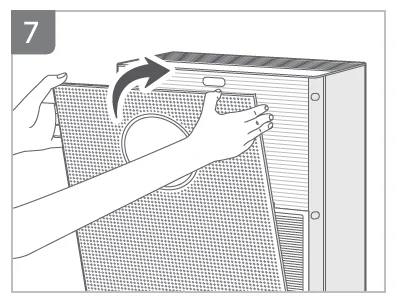
- The filter replacement cycle may vary depending on the usage environment and time.
Deodorisation/Double HEPA filter
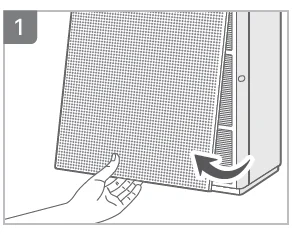
- Pull the center bottom part to open the front cover.

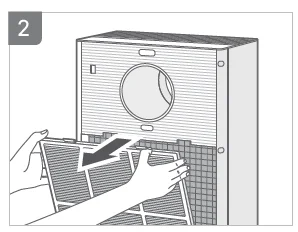
- Remove the Pre-filter and Fine Dust filter from the product.

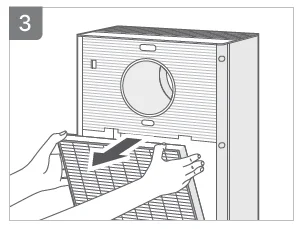
- Separate the Double Deodorisation/Double HEPA filter.
- Remove the plastic packaging from the Double Deodorisation/ Double HEPA filter.

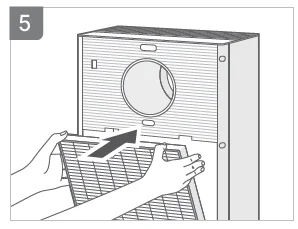
- Replace the new Double HEPA/Double Deodorisation filter.
- Filter assembly order: Double HEPA filter → Double Deodorisation filter → Fine Dust filter → Pre-filter

- Filter assembly order: Double HEPA filter → Double Deodorisation filter → Fine Dust filter → Pre-filter
- Assemble the Fine Dust filter and Pre-filter from the product.

- Close the front cover again.
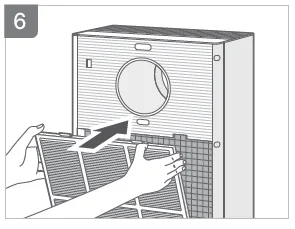
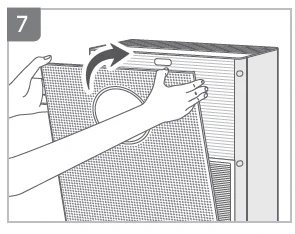
- The filter replacement cycle may vary depending on usage environment and time.
Buttons and Indicators, Operation Method
Top
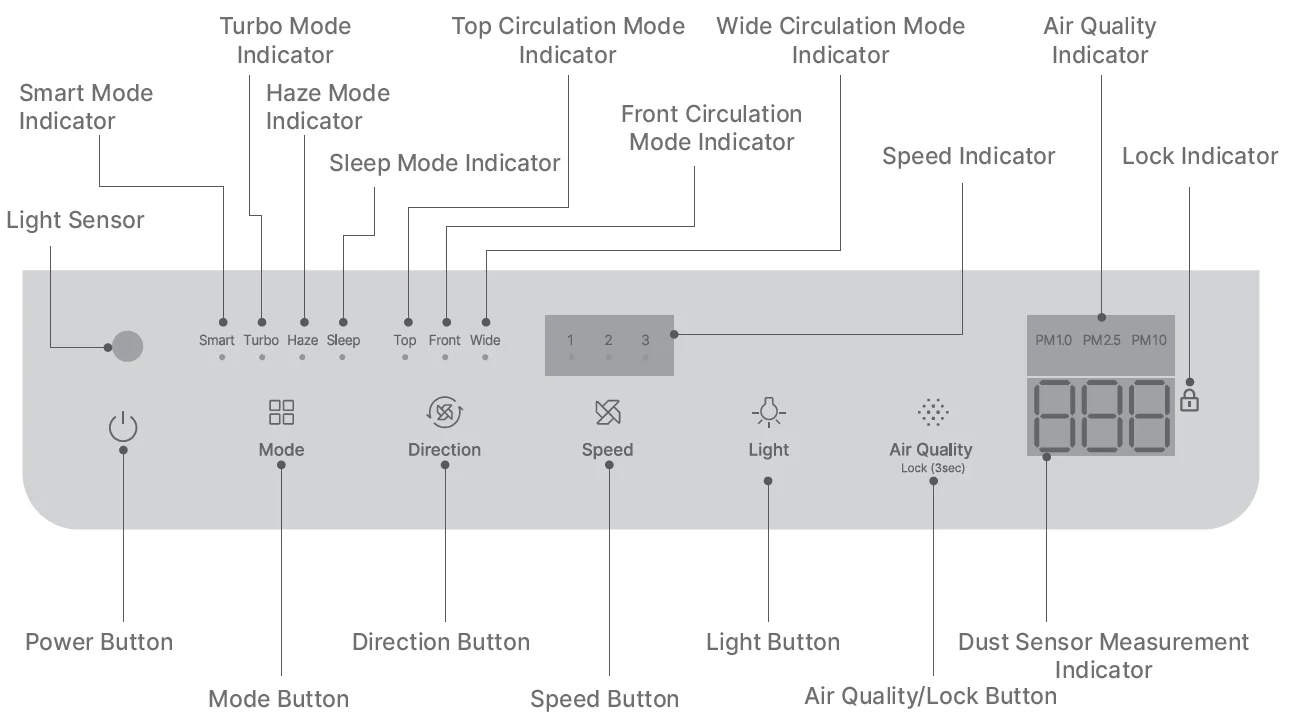
- Power Button
Use the button to turn the product on and off. - Mode Button
Press the Mode button and choose the desired mode. Turbo Mode operates for a certain period of time before it operates as the top circulation Level 3 of Manual Mode. Haze Mode operates for a certain period of time before it operates as Smart Mode.
- Direction Button
Press the Direction button and choose the desired air direction. Press the Direction button to convert to Manual Mode.
- Speed Button
Press the Speed button to select the desired air speed. Press the Speed button to convert directly to Manual Mode.
- Light Button
Press the button to turn the Air Quality Indicator and other Indicators on and off. While the Air Quality Indicator and other Indicators are turned on, pressing the Light button repeatedly executes the following: Air Quality Indicator OFF→ all other Indicators OFF→ all Indicators ON. - Air Quality/Lock Button
[When using the Air Quality Button]
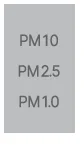
Press the Air Quality Button to select the dust size for measurement display. The selected value will be displayed for 10 seconds before being displayed as the fine dust size with the highest pollution level.
[When using as the Lock button]
You can lock all the buttons by pressing and holding this button for more than 3 seconds. Press the button again for more than 3 seconds to unlock the buttons.




 Smart Mode Indicator
The Indicator lights up when Smart Mode is selected. Turbo Mode Indicator
The Indicator lights up when Turbo Mode is selected. Haze Mode Indicator
The Indicator lights up when Haze Mode is selected. Sleep Mode Indicator
The Indicator lights up when Sleep Mode is selected. Top Circulation Mode Indicator
The Indicator lights up when Top Circulation Mode is selected. Front Circulation Mode Indicator
The Indicator lights up when Front Circulation Mode is selected. Air Quality Indicator
This Indicator displays the indoor air quality in LED colors. Good: Blue, Normal: Green, Bad: Yellow, Very Bad: Red Speed Indicator
The Indicator lights up when air speed is selected. Air Quality Indicator
This indicates the air quality level.- Light Sensor
This sensor detects light around the product.  Lock Indicator
When all buttons are locked, the Indicator blinks twice and lights up. Wide Circulation Mode Indicator
The Indicator lights up when Wide Circulation Mode is selected.
 Smart Mode Indicator
 Turbo Mode Indicator
 Haze Mode Indicator
 Sleep Mode Indicator
 Top Circulation Mode Indicator
 Front Circulation Mode Indicator
 Air Quality Indicator
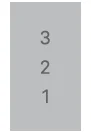 Speed Indicator
 Air Quality Indicator
 Light Sensor
 Lock Indicator
 Wide Circulation Mode Indicator
How to Use
Air Quality Sensor Sensitivity Adjustment
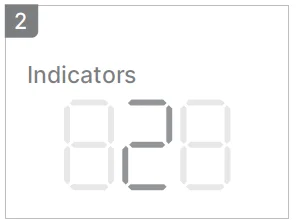
- Press the Mode button and the Speed button at the same time for more than 3 seconds.

- The dust sensor measurement display flashes at an approximately 0.5-second interval.

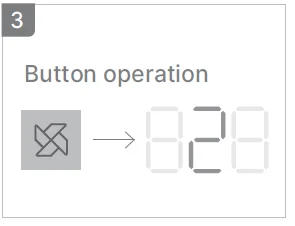
- Press the Speed button to adjust it to the desired sensitivity. (1: Sensitive, 2: Normal, 3: Insensitive)

- Press the Mode button and the Speed button at the same time for more than 3 seconds again.
- The selected sensitivity of the sensor is automatically entered if the Speed/ Direction buttons are not pressed for 10 seconds.
Air Quality Indication Guide

- PM 2.5 concentration guide and color display criteria are based on the guide provided by the Ministry of Environment, and for the numeric expression of concentration, the company’s algorithm is applied. Normal is the default setting for product contamination, and if you change the setting to Sensitive or Insensitive, it will be displayed higher or lower than the default PM 2.5 concentration.
- The concentration of dust displayed on the product measures the indoor environment in real time, so it may differ from the guidelines of the Ministry of Environment, and may differ depending on the place of use, environment of use, measurement method, etc.
- The maximum value of dust concentration displayed on the product (PM1.0 / PM2.5: 500 ㎍/㎥, PM10: 999 ㎍/㎥).
- If the humidifier is operated near the purifier, the air quality measurement may rise.
- As the ultrasonic humidifier has large humidifying droplet particles, the dust sensor can recognize them as dust, thereby causing a malfunction in the dust sensor. So use it away from the purifier.
- If the dust air quality level continues to display the maximum value. Therefore, clean the dust sensor, turn off the power of the product, and then turn it on again so that it can operate normally.
- It displays the color of the bad condition among PM 1.0 / PM 2.5 / PM 10.
Tips
- Plug the power cord into an outlet before operating the product.
- The product operates in Smart Mode by default when turned on.
Mode Selection
It operates automatically according to the set program.
- Press the Power button to turn on the product, and press the Mode button to select the desired mode among Smart/Turbo/Haze/Sleep.
Smart Mode
When the surroundings of the product become dark for more than 3 minutes, it automatically enters the sleep mode (low air volume, low noise, low power consumption operation). If the surroundings of the product become bright again for more than § minutes, the sleep mode is released. In Top Circulation Mode, air is discharged from the air outlet at the top of the product.
Turbo Mode
Maximizes the air speed while operating to create a comfortable environment in a short period of time.
- The turbo operates at a higher speed than the level 3 speed.
- After 10 minutes of operation, it operates in Level 3 of Top Circulation Mode.
Haze Mode
It is an operation mode that can effectively remove indoor dust within the shortest time. It operates automatically and continuously for a certain period of time at the maximum air speed in 3 levels.

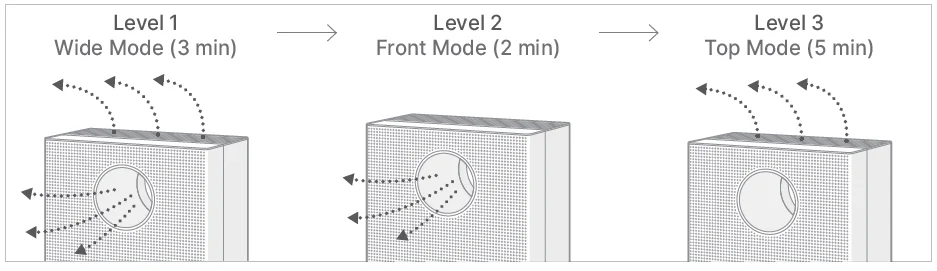
- Haze Mode works only with the turbo air speed.
- In Haze Mode, the airflow direction and Air Quality Indicators operate for each mode. Regardless of the level mode, only the Haze Mode Indicator lights up.
- When 3 levels of Haze Mode are completed, the operation is converted to Smart Mode.
- If you press the Mode/Air direction/Air speed button during the Haze Mode, Haze Mode is canceled.
Sleep Mode
It is a driving mode suitable for a sleeping environment by minimizing the air volume and the indicator light while driving. After about 5 seconds of sleep mode operation, all Indicators other than the sleep mode Indicator will turn off. If you press the Light Button or Air Quality selection Button during sleep mode, the current air quality reading is displayed in low brightness for about 5 seconds.
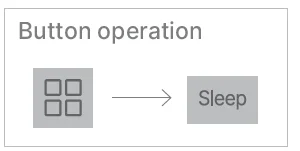
Manual Mode
In Manual mode, the user selects the desired air direction and air speed by pressing the direction/speed button.
To select the direction
Press the Direction button to select the desired air direction.
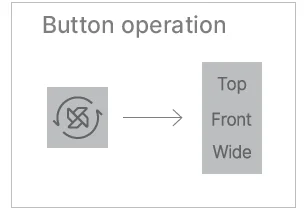
- Even during mode operation (Smart/Turbo/Haze/Sleep), if you press the Direction button immediately, it switches to manual operation.
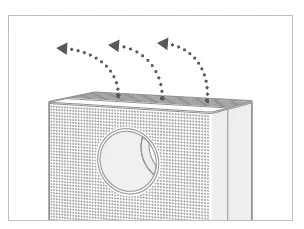
- Top Circulation
Wind comes from the top of the product.
- Front Circulation
Wind comes from the front of the product.
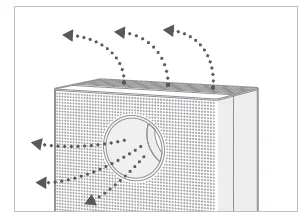
- Wide Circulation
Wind comes from the front and top of the product at the same time.
- Top Circulation

To select the air speed
Press the Speed button to select the desired air speed.
- Even during mode operation (Smart/Turbo/Haze/Sleep), if you press the Speed button immediately, it switches to manual operation.

How to Clean Product
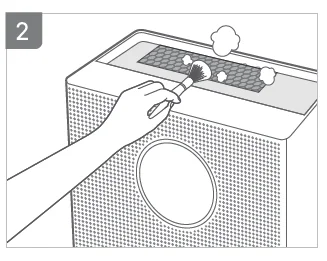
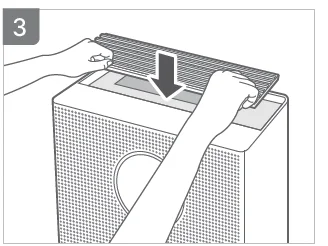
Cleaning the air outlet and detachable outlet grille
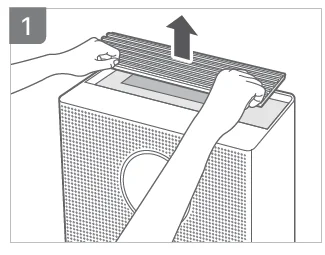
- Lift the detachable outlet grille on top of the air outlet.

- Clean the grille and air outlet with a soft brush or vacuum.
- Do not let dust drop into the air outlet when you clean it.

- Do not let dust drop into the air outlet when you clean it.
- Reassemble the detachable outlet grille on top of the outlet.
Cleaning of Air Quality Sensor (Every 2 months)
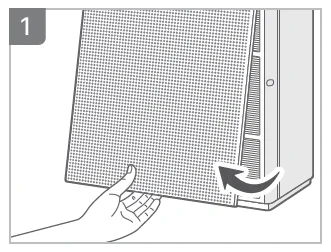
- Pull the center bottom part to open the front cover.

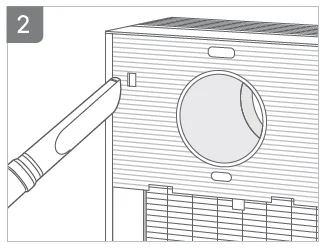
- Use a soft brush or vacuum cleaner to clean the air inlet and the air outlet of the air quality sensor.
- Do not let dust drop into the product when you clean it.

- Do not let dust drop into the product when you clean it.
- Close the front cover again.
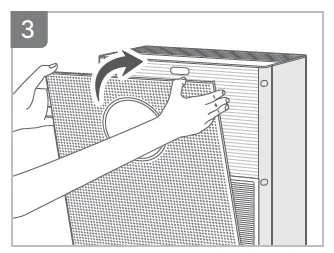
Cleaning of Front Cover
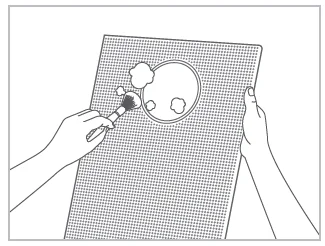
After separating the front cover from the product, use a soft cloth or brush to wipe off dust on the surface.
- If the degree of pollution is severe, use a slightly wet cloth to wipe it. (Do not use an abrasive surface or chemicals for cleaning.)
Cleaning of the Main Body
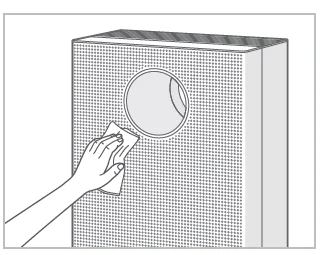
Use a dry and soft cloth to wipe it.
- If the degree of pollution is severe, use a slightly wet cloth to wipe it. (Do not use an abrasive surface or chemicals for cleaning.)
Error Code
If an error code as shown below appears while using the product, check the cause of the error and operate according to the guide.
- Fan Motor Operation
This error will be displayed when there is no RPM signal detected for about 6 seconds while the air purifier is operating. A fan and a motor stop.
[Resolution Guide]
Turn off the power, unplug the power cord, and plug it back in again for operation. - Fan Motor Rotation
This error will be displayed if it operates for about 10 minutes at 100 RPM higher or lower than the set RPM. A fan and a motor stop. [Resolution Guide]
Turn off the power, unplug the power cord, and plug it back in again for operation. - Dust Sensor
This error will be displayed if the dust sensor does not last for more than 10 seconds or if the fan of the dust sensor does not operate while using the product. A fan and a motor stop. [Resolution Guide]
Turn off the power, unplug the power cord, and plug it back in again for operation. - Front and Rear Motion of Direction Control
This error will be displayed when the motion of the wind blade is abnormal during direction control. A fan and a motor stop. [Resolution Guide]
If you press any button in an error state, it tries the operation again after the error is cleared. Make sure there are no debris or bindings in the upper outlet before retrying. - Buttons
This error will be displayed when a button on the control panel is continuously pressed for more than 30 seconds. A fan and a motor stop.
[Resolution Guide]
Check that there are no objects or foreign substances near the control panel and remove them. If what the control panel detects is cleared, it will be automatically restored. - Filter Cover
When the filter cover is not properly installed, it flashes at about 1-second intervals.
[Resolution Guide]
Please check the filter cover and filter again, and mount it.

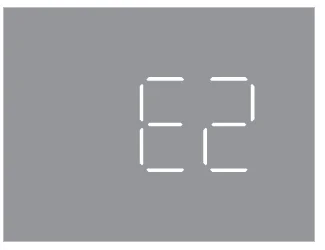 [Resolution Guide]
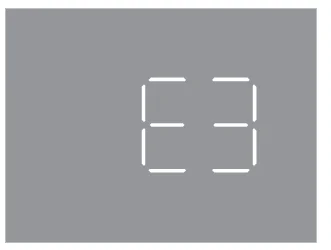 [Resolution Guide]
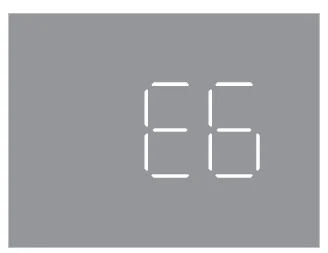 [Resolution Guide]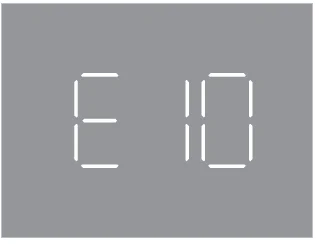

Pre-filter
Clean the Pre-filter every 2~4 weeks. (The cleaning cycle varies depending on the use environment.) Failure to clean the filter for a long time may result in poor product performance.
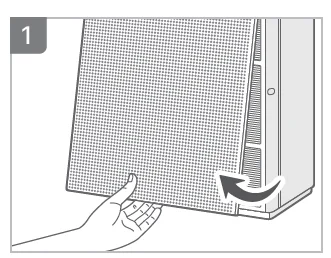
- Pull the center bottom part to open the front cover.

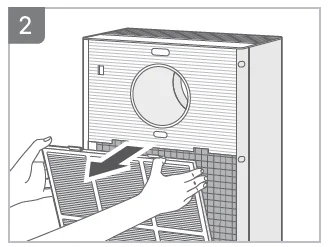
- Detach the Pre-filter from the product.

- Detach the Fine Dust filter from the Pre-filter.

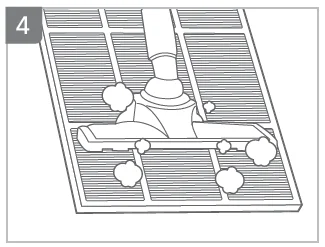
- Remove dust with a vacuum cleaner or water, depending on the degree of contamination.

- When cleaning with water, dry completely in a well-ventilated shade.

- Assemble a Pre-filter and a Fine Dust filter.
- Assemble the Pre-filter into the product.
- Close the front cover again.

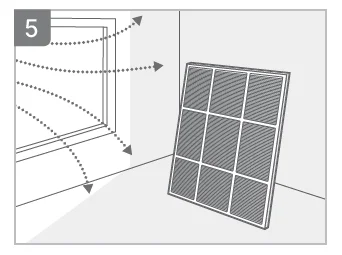
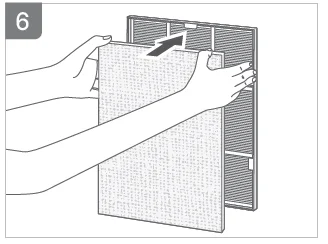
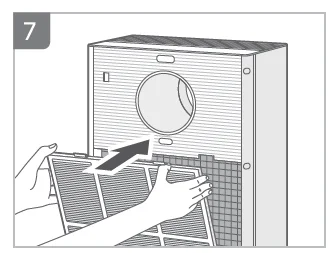
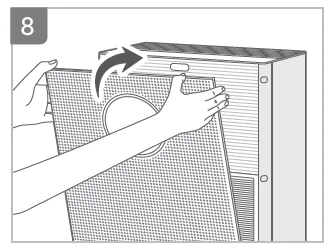
[Precaution] If you dry it in direct sunlight or near a dryer, heater, or other heat-generating devices, the Pre-filter may be deformed, and the product may not function properly.
- Always unplug the power cord before cleaning the filter.
- The Pre-filter can be restored by removing dust or washing with water.
- Failure to clean the Pre-filter for a long time may result in poor product performance.
- Double HEPA filter, Deodorizing filter, and Fine Dust filter cannot be reused after washing.
- Never wash these filters with water.
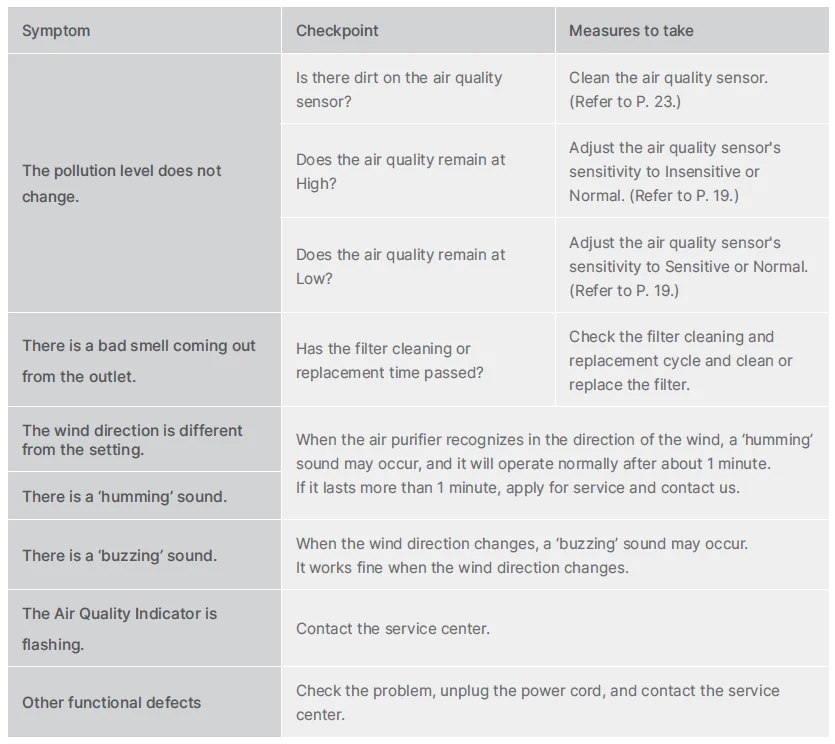
Troubleshooting
The air purifier may malfunction due to a lack of familiarity and minor causes. If the problem persists after checking the items below, please contact the service center.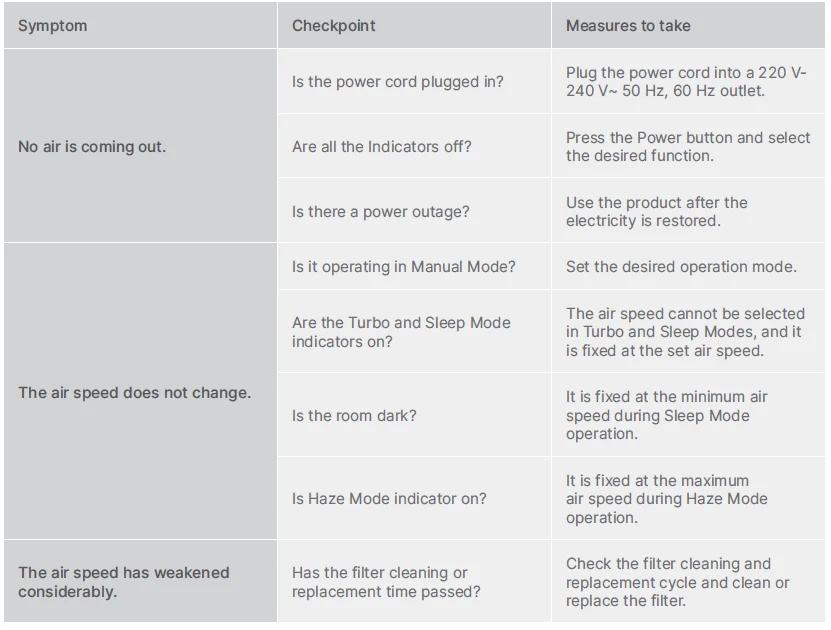
Specification
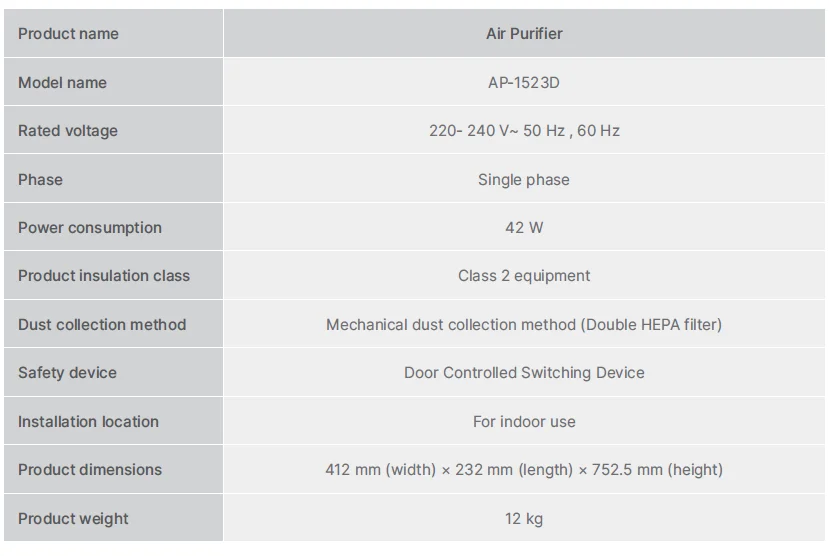
- Design and specification may change without any prior notice for the application of statutes, product improvement, and quality enhancement.
For more manuals by Coway, visit ManualsLibraryy
Coway Airmega Storm 2 AP-1523D-FAQs
Can I leave the Coway Airmega Storm 2 on all the time?
Yes, it is safe and recommended to run the air purifier continuously or at least 8–12 hours daily to maintain consistently clean indoor air.
Is it safe to sleep with the Coway Storm 2 turned on all night?
Absolutely. Running the purifier overnight can improve sleep quality by reducing dust, allergens, and airborne pollutants.
What are the main benefits of the Coway Airmega Storm 2?
The Storm 2 features a 4-stage filtration system that removes up to 99.999% of ultrafine dust and 99.9% of airborne viruses, bacteria, and mold.
What room size is the Coway Storm 2 suitable for?
It is designed to cover areas up to 50 m², making it ideal for bedrooms, living rooms, and medium-sized spaces.
Does the Coway Storm 2 use a True HEPA filter?
Yes, it uses a True HEPA filter, which effectively captures fine dust, allergens, and microscopic airborne particles.
Does the Coway Airmega Storm 2 consume a lot of electricity?
No. It is energy-efficient and typically uses 30–100 watts, depending on the fan speed, making it affordable to run daily.
How often should I clean the Coway Storm 2?
Clean the pre-filter every 2–4 weeks, wipe the exterior regularly, and clean the air quality sensor every 2 months.
Where should I not place the air purifier?
Avoid placing it near heat sources, in damp or humid areas, or directly against walls, as this can restrict airflow.