
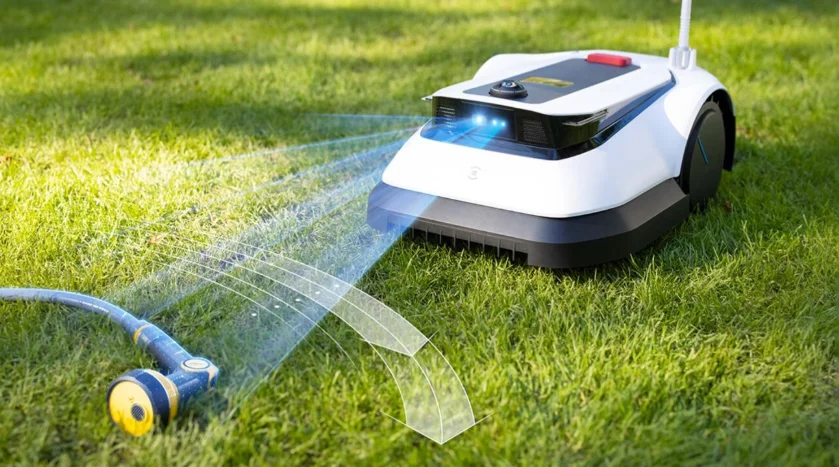

Ecovacs GOAT G1 Robotic Lawn Mower
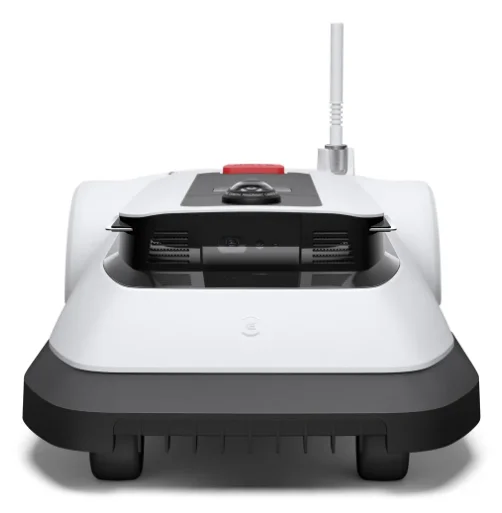
Original Instructions
IMPORTANT
READ CAREFULLY BEFORE USE. KEEP FOR FUTURE REFERENCE
- Read the instructions carefully. Make sure you understand the instructions and are familiar with the controls and the proper use of the appliance. Please understand that you can reduce the risk by following the instructions and warnings in this manual, but you cannot eliminate all the risks.
- Lawn Mowing Robot (hereinafter referred to as “GOAT”) has many built-in safety sensors; however, safety risks still exist.
- All related residual risks have been described or informed in this manual.
- Description of intended use: Intelligent lawn mowers are mainly used in mowing grass, especially in parks, private villa yards, and football fields.
- For machines used in public areas, warning signs shall be placed around the working area of the machine. They shall show the substance of the following text: WARNING! Automatic lawnmower!
- Keep away from the machine! Supervise children!
- DO NOT modify the mower by yourself. Modifications could interfere with mower operations, result in serious injury and/or damage, or void the Limited Warranty. Use only ECOVACS-approved parts and accessories.
WARNING
- Never allow children, persons with reduced physical, sensory, or mental capabilities, or lack of experience and knowledge, or people unfamiliar with these instructions to use the machine. Local regulations may restrict the age of the operator.
- To avoid using the machine and its peripherals in bad weather conditions, especially when there is a risk of lightning.
- Before each mowing session, check that all parts of the mower can function normally.
- Periodically inspect the area where the machine is to be used and remove all stones, sticks, wires, bones, and other foreign objects.
- NEVER allow children to touch the power supply unit, charging station, blades, the battery compartment, or any parts with gaps, such as the wheels.
WARNING
- Never operate the machine and/or its peripherals with defective guards or shields, or without safety devices, or if the cord is damaged or worn.
- Keep away from the rotating blades! DO NOT put hands or feet under or near the rotating blades.
- Keep a safe distance from the mower when operating.
- DO NOT overreach. Keep your balance at all times and always be sure of your footing on slopes. Walk, never run, while operating the machine or its peripherals.
WARNING
- Never allow children to be in the vicinity of or play with the machine when it is operating.
WARNING
- DO NOT touch moving hazardous parts before they have come to a complete stop.
WARNING
- For the purposes of recharging the battery, only use the detachable supply unit provided with this appliance (CH2203).
- This appliance contains batteries that are only replaceable by skilled persons.
Safe Usage:
- Do not connect a damaged cord to the supply or touch a damaged cord before it is disconnected from the supply, because damaged cords can lead to contact with live parts. Keep extension cords away from moving hazardous parts to avoid damage to the cords, which can lead to contact with live parts. Connect the machine and/or its peripherals only to a supply circuit protected by a residual current device (RCD) with a tripping current of not more than 30 mA.
- Unplug the Power Supply from the power socket and then untangle the power cord or the extension cable if it is damaged or entangled during use. During operation, pull the body of the plug rather than the cord to avoid hazards. Contact Customer Service and let a skilled professional repair or replace the cord.
- Please use the extension cable manufactured by ECOVACS. If you have any problem, contact Customer Service.
- If the SUPPLY CORD is damaged, it must be replaced by the manufacturer, its service agent, or similarly qualified persons to avoid a hazard.
- Press the STOP Button at once when the mower makes an abnormal sound or raises the alarm.
- In case of leakage of electrolyte, flush with water or a neutralizing agent. Ask for medical help once it comes into contact with the eyes, etc.
- If there are abnormal vibrations, please restart the mower. If the problem persists, please contact Customer Service.
Instructions to always wear substantial footwear and long trousers while operating the machine with a manual controller.
Additionally, when using the manual controller:
- a) Mow only in daylight or in good artificial light.
- b) Avoid operating the machine in wet grass.
- c) Do not operate the machine when barefoot or wearing open sandals. Always wear substantial footwear and long trousers.
- d) Always be sure of your footing on slopes.
- e) Use extreme caution when reversing the machine towards you.
- f) Always switch on the motor according to instructions with feet well away from the blade(s).
MAINTENANCE
In order to get the best mowing performance and prolong GOAT’s service life, it is necessary to clean and check your GOAT every now and then. The contents below will tell you how to maintain your GOAT.
WARNING
- REMEMBER TO POWER OFF GOAT BEFORE OPERATION.
- ALWAYS WEAR PROTECTIVE GLOVES WHEN REPLACING THE BLADES AND PERFORMING CLEANING.
- COVER THE PANORAMIC CAMERA. PULL THE NUT UPWARD AND TURN IT COUNTERCLOCKWISE TO LAY THE SIGNAL RECEIVER DOWN WHEN REPLACING THE BLADES AND PERFORMING CLEANING.

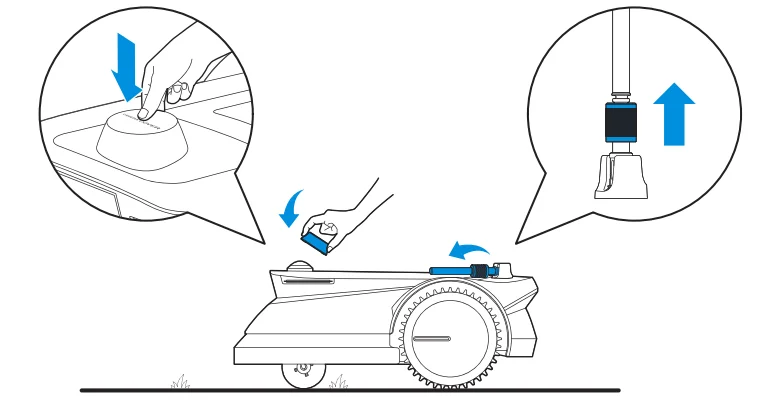
Regular Maintenance
To keep GOAT running at peak performance, perform maintenance tasks and replace parts with the following frequencies: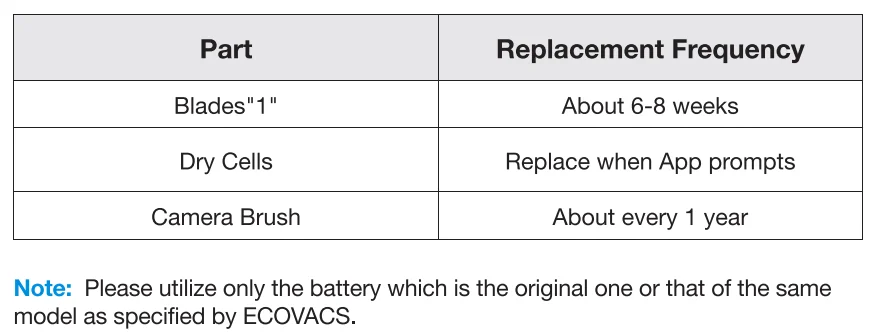
Specific Maintenance
1. Replace the Blades
WARNING
Remember to power off GOAT before operation. ALWAYS wear protective gloves when replacing the Blades. Please only use the Blades manufactured by ECOVACS and use new screws when assembling Blades.
- Power off GOAT.
- PUT ON THE PANORAMIC CAMERA COVER AND LAY THE SIGNAL RECEIVER DOWN.
- GENTLY TURN THE GOAT OVER ON A SOFT SURFACE.
- Loosen the Screws with the screwdriver.
- Remove the Screws and Blades.
- Tighten the new Blades and Screws. Make sure that the Blades can spin freely.

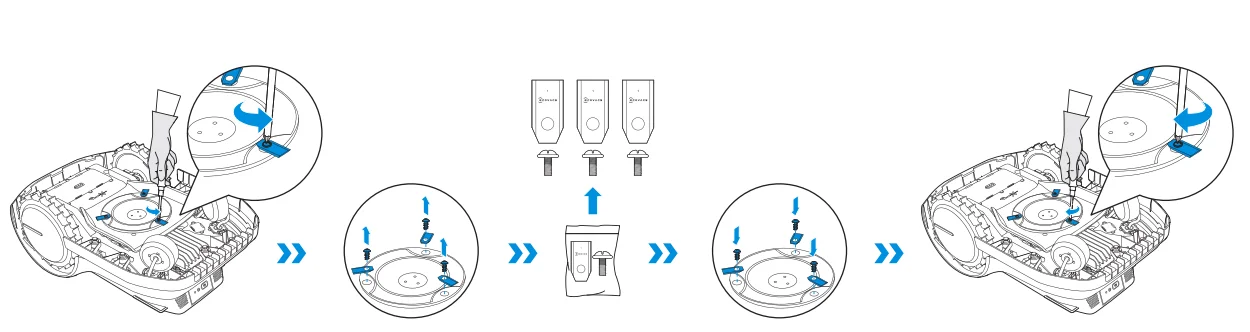
2. Replace the Camera Brush
- Pull the old Camera Brush out from the Station by grabbing the hook on it.
- Slide the new Camera Brush along the slot into the Station until you hear a “click”.

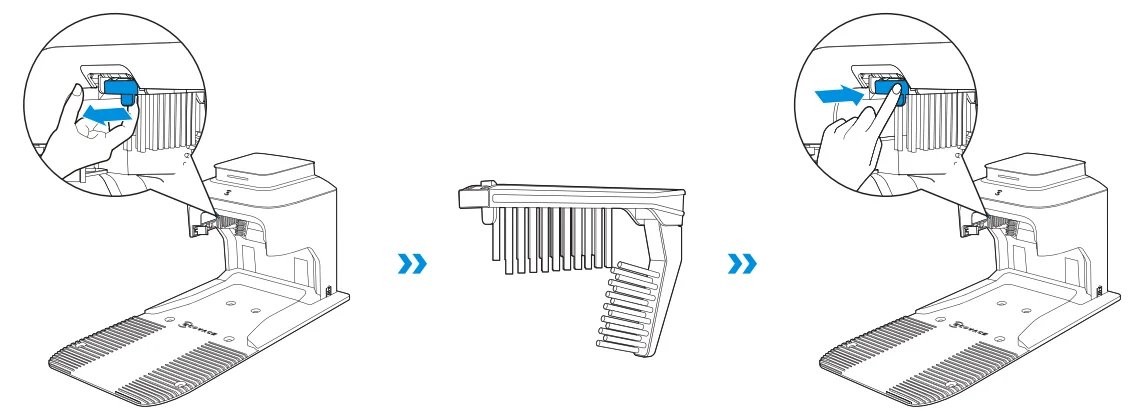
3. Replace the Dry Cells in the navigation beacon
- Turn the Beacon counterclockwise until the projection points at
 and remove the Beacon from the Navigation-assisted Pole.
 - Disassemble the Beacon by turning the upper Beacon counterclockwise.
- Take out the Dry Cells and replace them with new ones.
- Refer to “INSTALL THE NAVIGATION BEACON – Assemble the Navigation Beacon” for detailed Navigation Beacon assembly.

 and remove the Beacon from the Navigation-assisted Pole.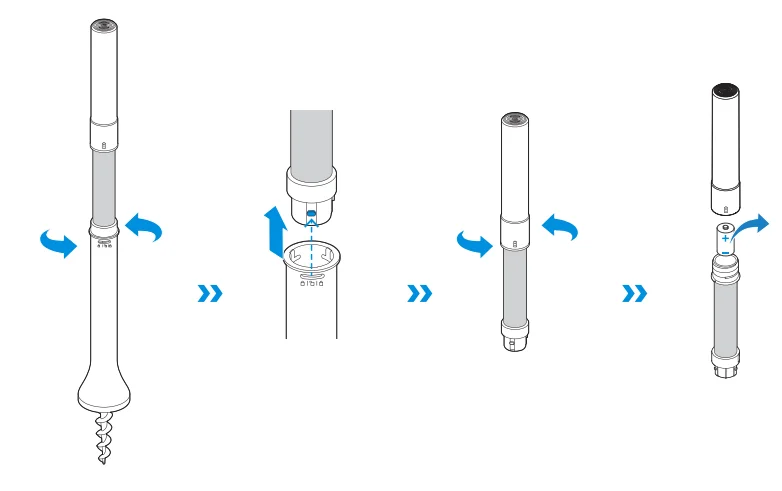
4. Clean the Blade Disc, Chassis, Off-road Wheels, and Front Wheels
WARNING
ALWAYS wear protective gloves. DO NOT use the high-pressure washer. High-pressure water can enter the sealings and damage electronic and mechanical parts.
- Power off GOAT.
- PUT ON THE PANORAMIC CAMERA COVER AND LAY THE SIGNAL RECEIVER DOWN.
- GENTLY TURN THE GOAT OVER ON A SOFT SURFACE.
- Clean the Blade Disc and the chassis with a brush.
- Check that the Blade Disc can rotate freely and the Blades can spin freely.
- Clear the mud from the Off-road Wheels and Front Wheels by using a brush to have a fine grip.

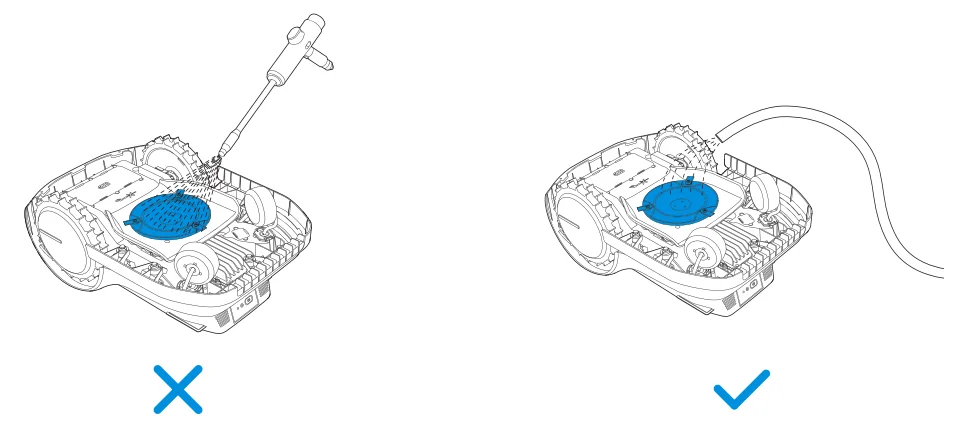
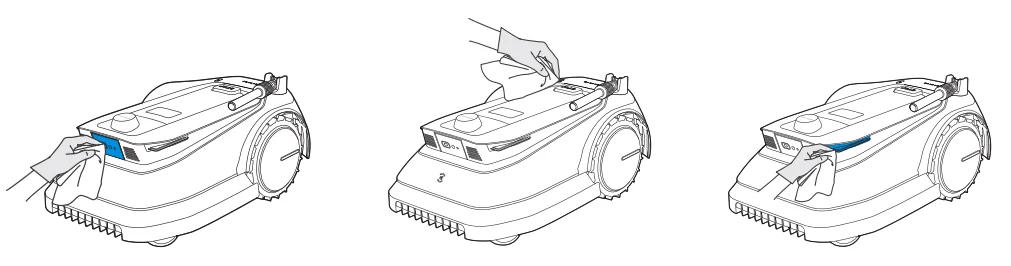
5. Clean the Other Components
- Wipe the components with a clean, dry cloth. Avoid using cleaning sprays or detergents.

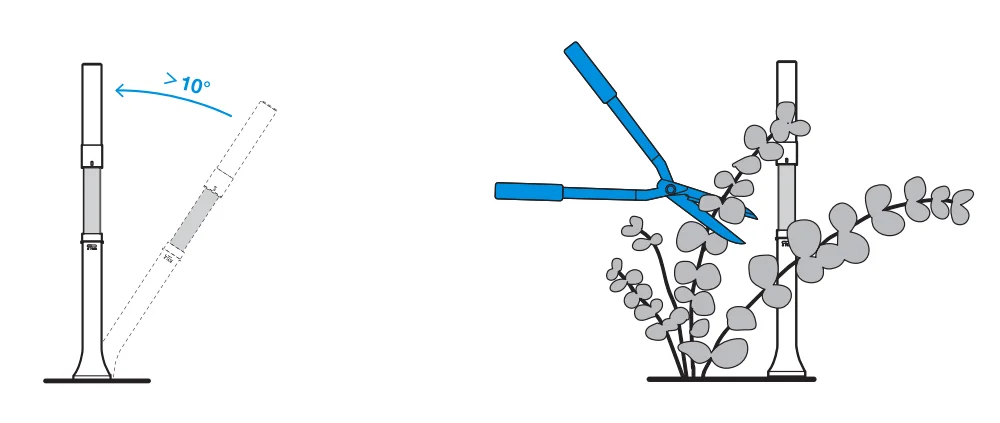
6. Check the Navigation Beacon Regularly
- If the Navigation Beacon tilt angle exceeds 10°, reinstall the Navigation Beacon firmly to the ground at the original position.
- If there are branches and tendrils on the Navigation Beacon that may cause signal interference, please clear them away in time.

STORAGE OVER THE WINTER
GOAT
- Power off your GOAT after it is fully charged.
- Clean it thoroughly.
- Store in a cool, well-ventilated, and dry place indoors.
Station
- Unplug the Power Supply from the power socket.
- Disconnect the Power Supply from the Station.
- Store the Station and Power Supply in a cool, well-ventilated, and dry place away from direct sunlight.
Note: It is necessary to put the Station in its original position for working in a new season. Otherwise, it may lead to a location fault and map invalidation.
Navigation Beacon
- Turn the Beacon counterclockwise until the projection points at and remove it from the Navigation-assisted Pole.
- Store the Beacon in a cool, well-ventilated, and dry place indoors.
- If you do not intend to use the Navigation Beacon for a long time, please take out the Dry Cells.
Note: It is necessary to reinstall the Beacon in its original position. Otherwise, it may lead to a location fault and map invalidation.
TRANSPORTATION
It is recommended to use the original package to protect the GOAT when you intend to transport the GOAT for a long distance. Remember to power off your GOAT before carrying out any transportation and handle it gently. DO NOT pick up your GOAT while it is still running or in the Station.
How to pick up your GOAT properly?
Pick up your GOAT by holding the handle and the head at the same time. Make sure that the Blade Disc faces towards the ground.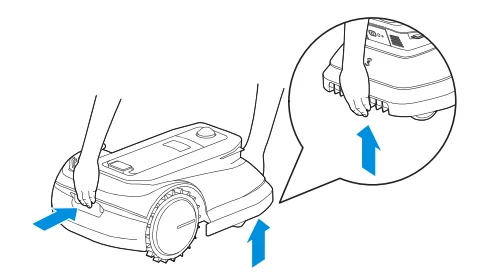
BATTERY
For long-term storage, it is recommended to charge GOAT every 6 months. The Limited Warranty does not cover battery damage caused by over-discharge. The battery CANNOT be charged when the ambient temperature is above 40°C / 104°F or below 5°C / 41°F. The recommended temperature for GOAT operation is between 5-40°C / 41~104°F. The storage temperature range is -20~75°C / -4~167°F.
Note: The life span of the GOAT’s battery depends on the frequency of usage and the total hours of use. It is also non-rechargeable. DO NOT dispose of disused or faulty batteries casually. Check with your Local Authority for advice.
TROUBLESHOOTING
If there is something wrong with your GOAT while working, you can consult the table below. Please contact our Customer Service if the problems still exist.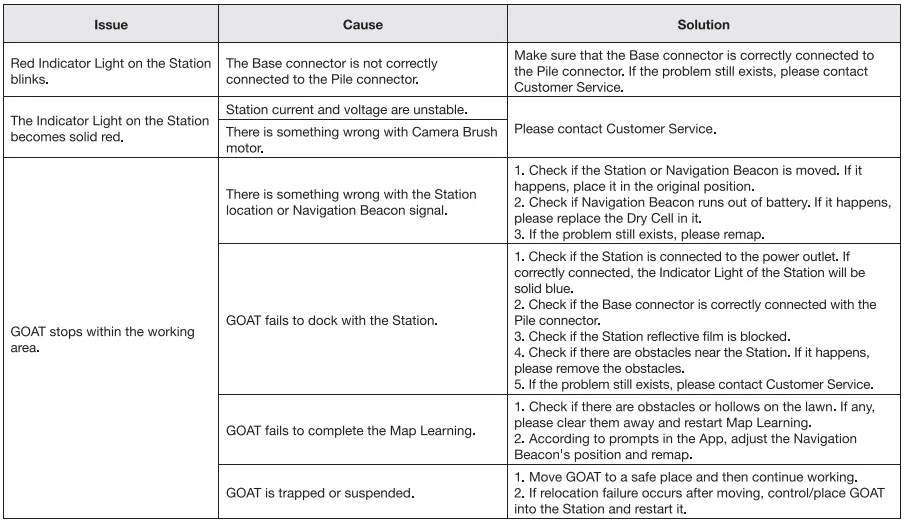

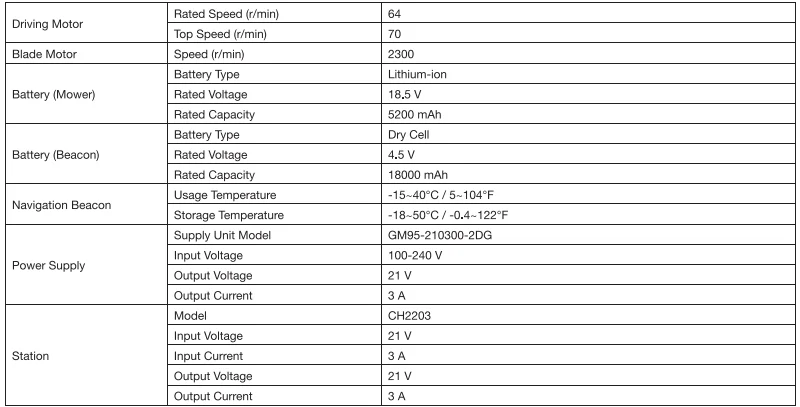
TECHNICAL DATA
Note: Technical and design specifications may be changed for continuous product improvement.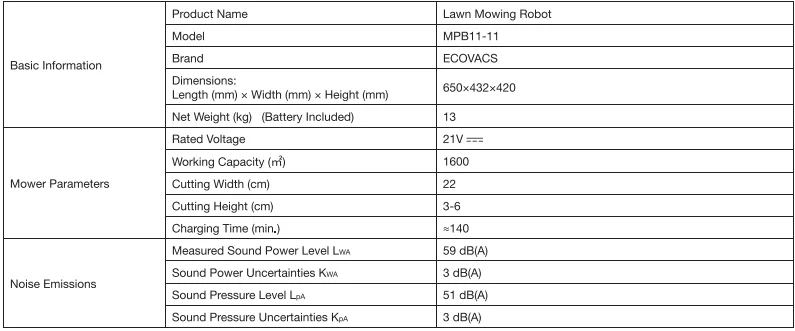

Explore more accessories at https://www.ecovacs.com/global.
For More Manuals By ECOVACS, Visit ManualsLibraryy.
Ecovacs GOAT G1 Robotic Lawn Mower-FAQs
What makes the Ecovacs GOAT G1 different from traditional robotic lawn mowers?
The Ecovacs GOAT G1 Robotic Lawn Mower stands out for using a wire-free boundary setup rather than requiring perimeter cables. It maps your lawn using UWB beacons, cameras, and sensors, making installation much easier and more flexible than conventional robotic mowers that depend on buried wires.
How large a lawn can the Ecovacs GOAT G1 handle?
The GOAT G1 comes in multiple versions designed for lawns up to 800, 1,600, or 2,000 square meters, depending on the model. This makes it suitable for residential yards ranging from small to large, with battery size and included accessories varying with coverage capacity.
Does the Ecovacs GOAT G1 require boundary wires?
No, the GOAT G1 does not need boundary wires. Instead, it uses beacon-based positioning and app-guided mapping to define mowing zones and no-go areas. This significantly reduces installation time and makes it easier to adjust your lawn layout later if needed.
How does the Ecovacs GOAT G1 avoid obstacles?
The mower uses cameras, a fisheye lens, and ToF sensors to detect objects such as trees, toys, pets, and garden furniture. It intelligently slows down and navigates around obstacles, helping improve safety while reducing the risk of collisions during mowing.
Can the Ecovacs GOAT G1 mow in the rain?
The GOAT G1 includes a rain sensor that automatically sends the mower back to its charging station when rain is detected. After conditions improve, it can resume mowing according to the programmed schedule, helping protect both the lawn and the mower.
What cutting height and width does the Ecovacs GOAT G1 offer?
The GOAT G1 features a 22 cm cutting width and supports adjustable cutting heights from 30 to 60 mm. This range allows users to customize mowing based on grass type, seasonal growth, and personal lawn appearance preferences.
Is the Ecovacs GOAT G1 safe to use around pets and children?
Yes, the advanced obstacle detection system is designed to recognize and avoid pets, children, and common garden items. Many users report reliable performance around animals, although supervision is still recommended when the mower is operating in active outdoor spaces.
How is the Ecovacs GOAT G1 controlled?
You can control the mower through the ECOVACS mobile app, where you can create boundaries, set schedules, adjust settings, and monitor progress. Some versions also offer optional 4G connectivity for remote control when Wi-Fi coverage is limited.
Does the Ecovacs GOAT G1 trim lawn edges effectively?
The GOAT G1 provides perimeter mowing, but like many robotic mowers, it may leave a narrow strip of grass near edges and obstacles. Most users still need occasional manual trimming along fences, walls, and flower beds for a perfectly finished look.
Is the Ecovacs GOAT G1 worth buying?
The GOAT G1 is a strong choice for homeowners who want a wire-free robotic mower with smart mapping and advanced obstacle avoidance. It offers convenient automation, though edge trimming and app behavior may require occasional manual touch-ups and updates.