
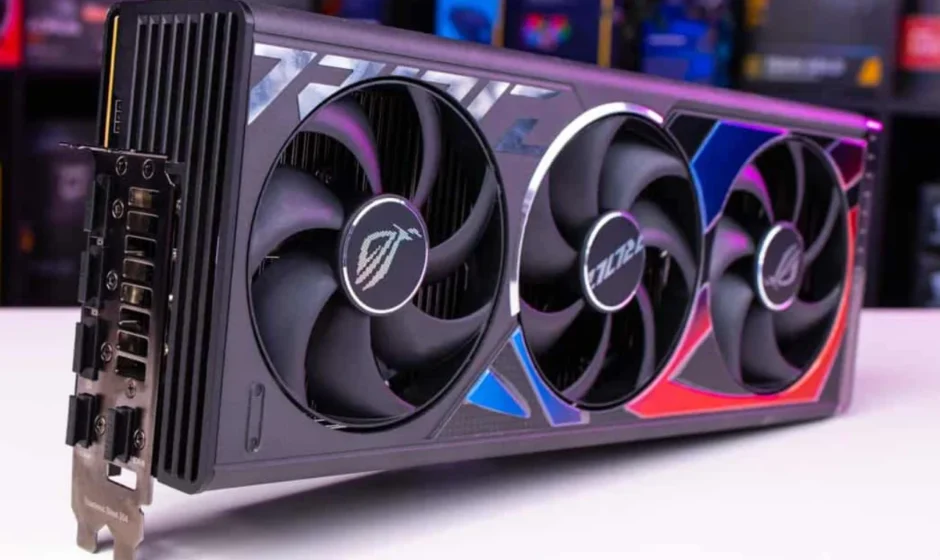
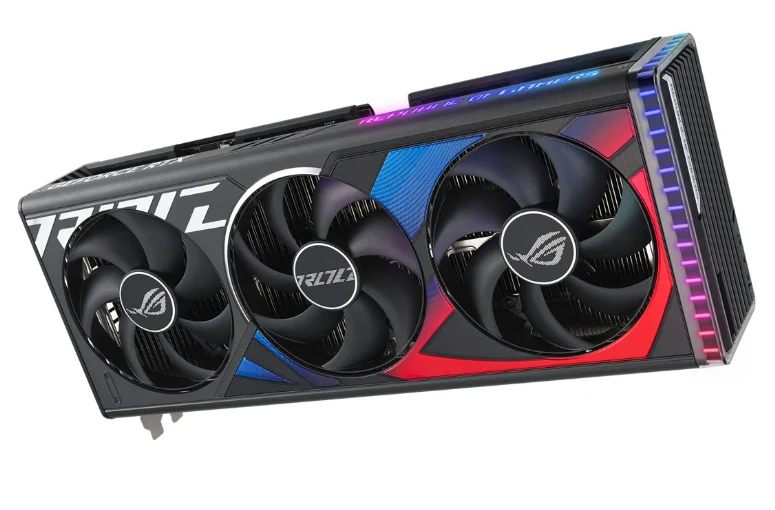
GeForce RTX 4090 Graphics Card
SYSTEM SPECIFICATIONS
Thank you for choosing the NVIDIA® GeForce RTX® 4090 graphics card. Before you begin, please review the following System Specifications to ensure your PC has the appropriate hardware and software for your new graphics card.
System Specifications
- Motherboard: PCI Express graphics slot required.
- Clearance: Must have space for 304mm (L) x 137mm (W) x 61mm (H) card. One additional slot clearance in front of the fans is recommended for better airflow.
- System Power Supply:
- 850 W power rating minimum.
- Supported power connector configurations:
- At least three PCIe 8-pin cables (with RTX 4090 PCIe Gen 5 Power Connector Adapter).
- One 450 W or greater PCIe Gen 5 Cable (16-pin).
- Operating System:
- Microsoft Windows 11 64-bit recommended, or Microsoft Windows 10 64-bit April 2018 Update v1803 or newer.
- Linux, 64-bit.
- Driver Installation: 2 GB of available disk space is required for driver installation.
EQUIPMENT
The following equipment is included in the NVIDIA GeForce RTX 4090 graphics card box.

Attention: Use only the included NVIDIA power connector adapter for your GeForce RTX 40 Series Founders Edition graphics card.
HARDWARE INSTALLATION
- Turn off your computer, disconnect the power cord and remove any existing graphics card(s).
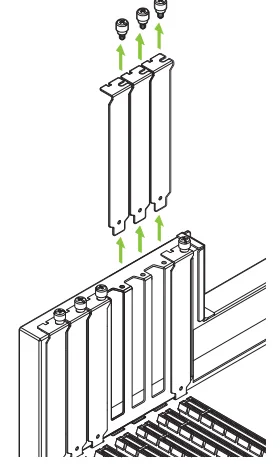
Attention: It is very important that you wait until the graphics card has cooled before taking the card out of the system. - Remove three slot covers if there was no existing graphics card.

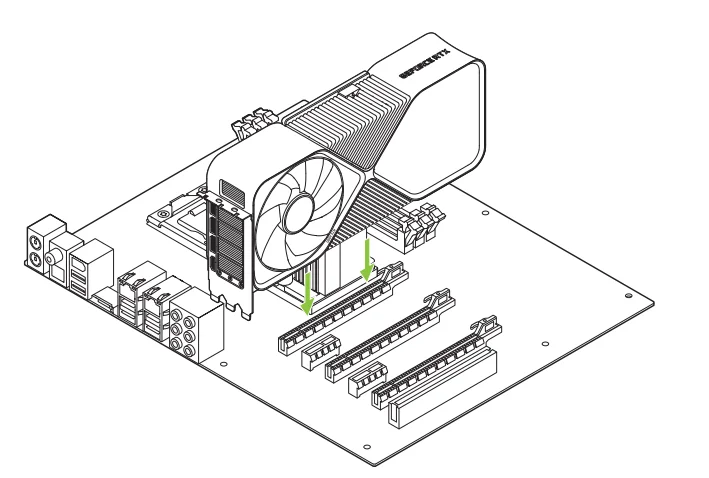
Remove three adjacent slot covers that correspond to the PCI Express slot you are installing the graphics card in. - Install the GeForce RTX 4090 graphics card into the primary PCI Express x16 slot on your motherboard.

Install your GeForce RTX 4090 into the Primary PCI Express x16 slot (the Primary slot is the one closest to the CPU).
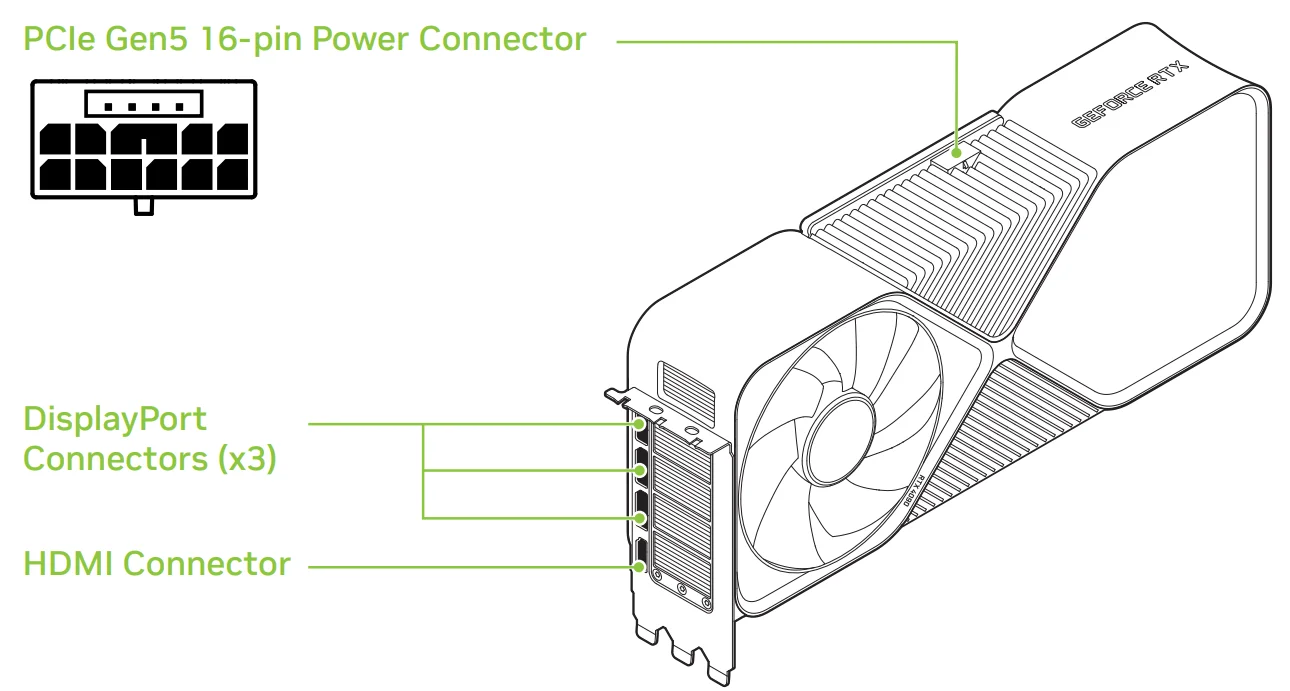
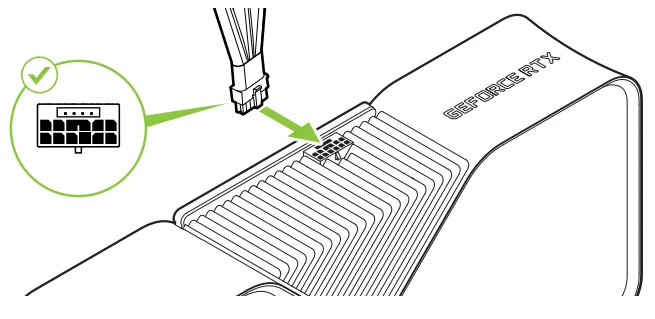
Attention: This GPU card should not be installed with the I/O brackets facing downwards. - Connect the 16-pin plug of the NVIDIA power connector adapter to the power receptacle on the top of the GeForce RTX 4090 graphics card.

Attention: Use only the included NVIDIA power connector adapter for your GeForce RTX 40 Series Founders Edition graphics card. - Reinstall the covers on your computer and reconnect any cables previously removed.
CONNECTING TO THE DISPLAY
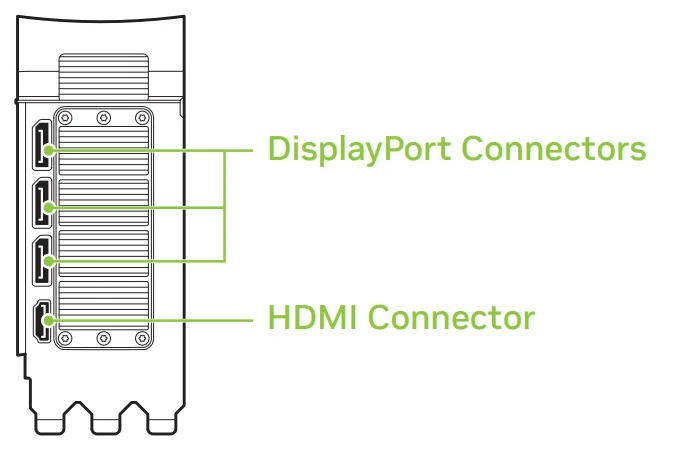
- Connect the display(s) to the graphics card.
- Reconnect your power cord to the PC.

SOFTWARE INSTALLATION AND CONFIGURATION
With the hardware installed, the final step is to install the GeForce Experience software to update your drivers and optimize your games.
- Download and install the GeForce Experience software.
- Go to http://www.geforce.com/geforce-experience and click Download Now.
- Accept the NVIDIA software license agreement by selecting Agree and Continue. GeForce Experience software begins to install.
- Select Close to finish the installation.
- Optimize your installed games.
- Open GeForce Experience and click Scan for Games and click OK to scan your installed games.
- Click on Optimize All to optimize your game settings.
- Get the latest drivers.
- Open GeForce Experience, log in, and select the Drivers tab.
- Select Download Driver. Your GPU driver begins to download.
- Select Express Installation when the download finishes. GeForce Experience begins to install the graphics driver.
Note: It may take several minutes for the installation to take place. Your screen may go blank for a few seconds one or more times during installation. This is normal. - Click CLOSE when the driver installation completes.
- Congratulations! Your GeForce graphics card is now ready to use!
Note: If you have any questions about your NVIDIA product, you can chat live with NVIDIA Customer Care at www.nvidia.com/support or call 1-800-797-6530 (US) or 0800 404 7747 (UK).
Federal Communications Commission (FCC)
This device complies with part 15 of the FCC Rules. Operation is subject to the following two conditions: (1) this device may not cause harmful interference, and (2) this device must accept any interference received, including any interference that may cause undesired operation of the device. This equipment has been tested and found to comply with the limits for a Class B digital device, pursuant to Part 15 of the FCC Rules. These limits are designed to provide reasonable protection against harmful interference in a residential installation. This equipment generates uses and can radiate radio frequency energy and, if not
installed and used in accordance with the instructions, may cause harmful interference to radio communications.
However, there is no guarantee that interference will not occur in a particular installation. If this equipment does cause harmful interference to radio or television reception, which can be determined by turning the equipment off and on, the user is encouraged to try to correct the interference by one or more of the following measures:
- Reorient or relocate the receiving antenna.
- Increase the separation between the equipment and receiver.
- Connect the equipment into an outlet on a circuit different from that to which the receiver is connected.
- Consult the dealer or an experienced radio/TV technician for help.
FCC Warning: The FCC requires that you be notified that any changes or modifications to this device not expressly approved by the manufacturer could void the user’s authority to operate the equipment.
Notice
The information provided in this specification is believed to be accurate and reliable as of the date provided. However, NVIDIA Corporation [“NVIDIA”] does not give any representations or warranties, expressed or implied, as to the accuracy or completeness of such information. NVIDIA shall have no liability for the consequences or use of such information or for any infringement of patents or other rights of third parties that may result from its use. This publication supersedes and replaces all other specifications for the product that may have been previously supplied. NVIDIA reserves the right to make corrections, modifications, enhancements, improvements, and other changes to this specification, at any time and/or to discontinue any product or service without notice. The customer should obtain the latest relevant specification before placing orders and should verify that such information is current and complete. NVIDIA products are sold subject to the NVIDIA standard terms and conditions of sale supplied at the time of order acknowledgement, unless otherwise agreed in an individual sales agreement signed by authorized representatives of NVIDIA and the customer. NVIDIA hereby expressly objects to applying any customer general terms and conditions with regard to the purchase of the NVIDIA product referenced in this specification. NVIDIA products are not designed, authorized, or warranted to be suitable for use in medical, military, aircraft, space, or life support equipment, nor in applications where failure or malfunction of the NVIDIA product can reasonably be expected to result in personal injury, death, or property or environmental damage. NVIDIA accepts no liability for inclusion and/or use of NVIDIA products in such equipment or applications, and therefore, such inclusion and/or use is at the customer’s own risk. NVIDIA makes no representation or warranty that products based on these specifications will be suitable for any specified use without further testing or modification. Testing of all parameters of each product is not necessarily performed by NVIDIA. It is the customer’s sole responsibility to ensure the product is suitable and fit for the application planned by the customer and to do the necessary testing for the application in order to avoid a default of the application or the product. Weaknesses in the customer’s product designs may affect the quality and reliability of the NVIDIA product and may result in additional or different conditions and/or requirements beyond those contained in this specification. NVIDIA does not accept any liability related to any default, damage, costs or problem which may be based on or attributable to:
- the use of the NVIDIA product in any manner that is contrary to this specification or customer product designs.
No license, either expressed or implied, is granted under any NVIDIA patent right, copyright, or other NVIDIA intellectual property right under this specification. Information published by NVIDIA regarding third-party products or services does not constitute a license from NVIDIA to use such products or services or a warranty or endorsement thereof. Use of such information may require a license from a third party under the patents or other intellectual property rights of the third party.
ALL NVIDIA DESIGN SPECIFICATIONS, REFERENCE BOARDS, FILES, DRAWINGS, DIAGNOSTICS, LISTS, AND OTHER DOCUMENTS [TOGETHER AND SEPARATELY, “MATERIALS”) ARE BEING PROVIDED ··As Is.·· NVIDIA MAKES NO WARRANTIES, EXPRESSED, IMPLIED, STATUTORY, OR OTHERWISE WITH RESPECT TO THE MATERIALS, AND EXPRESSLY DISCLAIMS ALL IMPLIED WARRANTIES OF NON INFRINGEMENT, MERCHANTABILITY, AND FITNESS FOR A PARTICULAR PURPOSE. Notwithstanding any damages that the customer might incur for any reason whatsoever, NVIDIA’s aggregate and cumulative liability towards the customer for the products described herein shall be limited in accordance with the NVIDIA terms and conditions of sale for the product.
For more manuals by NVIDIA, visit ManualsLibraryy
GeForce RTX 4090 Graphics Card-FAQs
Is the GeForce RTX 4090 good for gaming?
Yes, the GeForce RTX 4090 is one of the most powerful gaming graphics cards available. It delivers extremely high frame rates and supports advanced technologies such as real-time ray tracing and AI-powered graphics through DLSS. Gamers can enjoy ultra-high settings, detailed textures, and smooth gameplay even in demanding titles. The card is especially ideal for 4K gaming and VR experiences, making it a top choice for enthusiasts who want maximum performance.
Can the RTX 4090 handle 4K gaming?
The RTX 4090 is specifically designed for high-resolution gaming, including 4K. It can run modern games at ultra settings while maintaining high frame rates. With features like DLSS 3 and advanced ray tracing cores, the GPU delivers smooth gameplay and impressive visual quality. Many benchmarks show it achieving well above 100 FPS in optimized games, making it one of the best GPUs available for 4K gaming performance.
How much RAM should you have with an RTX 4090?
For optimal performance with an RTX 4090, most experts recommend at least 32GB of system RAM, especially if you are gaming at 4K or doing heavy tasks like video editing or 3D rendering. While 16GB can still work for some games, 32GB ensures smoother multitasking and better overall system performance. High-speed DDR5 memory is often preferred in modern gaming systems that use this high-end GPU.
What does RTX mean in graphics cards?
RTX stands for Ray Tracing Texel eXtreme. It refers to NVIDIA’s technology that enables real-time ray tracing in graphics cards. Ray tracing simulates how light behaves in real life, producing more realistic reflections, shadows, and lighting in games and applications. RTX cards also include AI-based features like DLSS, which uses machine learning to improve performance and image quality while maintaining high frame rates.
Can the RTX 4090 fit in any PC?
No, the RTX 4090 cannot fit into every computer. Because it is a large and powerful GPU, it requires a spacious PC case, a compatible motherboard with a PCIe slot, and a strong power supply. NVIDIA recommends a power supply of around 850 watts or higher. Users should also ensure proper airflow and cooling to handle the card’s high performance and power consumption.
How many FPS can the RTX 4090 deliver in games?
The RTX 4090 can produce extremely high frame rates depending on the game and resolution. In many modern titles at 4K resolution, the card can deliver around 100–140 FPS when technologies like DLSS are enabled. At lower resolutions such as 1440p or 1080p, the frame rate can be even higher. This makes the GPU ideal for competitive gaming and high-refresh-rate monitors.
Is the RTX 4090 considered a high-end graphics card?
Yes, the RTX 4090 is classified as an enthusiast-level or flagship GPU. It belongs to NVIDIA’s top-tier lineup and is built for extreme performance in gaming, creative workloads, and AI applications. Its advanced architecture, large VRAM capacity, and powerful processing cores place it among the most powerful consumer graphics cards ever released.
Is the RTX 4090 overkill for 1080p gaming?
For most users, the RTX 4090 is considered excessive for 1080p gaming. The card is designed primarily for 4K gaming and demanding workloads, so its full power may not be utilized at lower resolutions. However, some gamers still use it for 1080p competitive gaming with extremely high refresh rates or to ensure their system remains powerful for many years.
How long will an RTX 4090 remain relevant?
The RTX 4090 is expected to stay relevant for several years because of its powerful hardware and advanced features. Many experts believe it can handle new games and demanding software for five years or more, especially if used for 4K gaming or creative work. Its large VRAM and strong processing capability help future-proof systems against increasingly demanding graphics requirements.