


Golds Gym Cycle Trainer 300 Ci Upright Exercise Bike
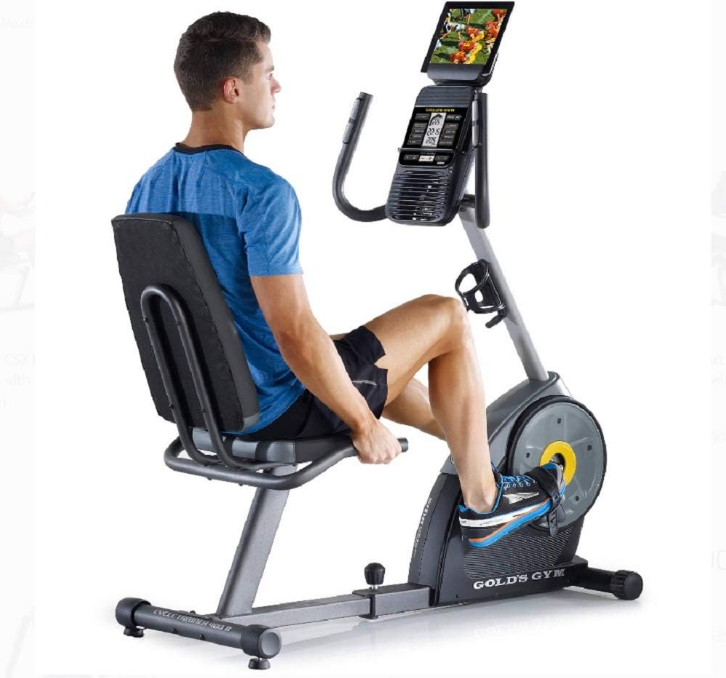
IMPORTANT PRECAUTIONS
WARNING: To reduce the risk of serious injury, read all important precautions and instructions in this manual and all warnings on your exercise bike before using your exercise bike. ICON assumes no responsibility for personal injury or property damage sustained by or through the use of this product.
- It is the responsibility of the owner to ensure that all users of the exercise bike are adequately informed of all precautions.
- Before beginning any exercise program, consult your physician. This is especially important for persons over age 35 or persons with pre-existing health problems.
- The exercise bike is not intended for use by persons with reduced physical, sensory, or mental capabilities or a lack of experience and knowledge, unless they are given supervision or instruction about the use of the exercise bike by someone responsible for their safety.
- Use the exercise bike only as described in this manual.
- The exercise bike is intended for home use only. Do not use the exercise bike in a commercial, rental, or institutional setting.
- Keep the exercise bike indoors, away from moisture and dust. Do not put the exercise bike in a garage or covered patio, or near water.
- Place the exercise bike on a level surface with at least 2 ft. (0.6 m) of clearance around the exercise bike. To protect the floor or carpet from damage, place a mat under the exercise bike.
- Inspect and properly tighten all parts each time the exercise bike is used. Replace any worn parts immediately.
BEFORE YOU BEGIN
Before reading further, please familiarize yourself with the parts that are labeled in the drawing below.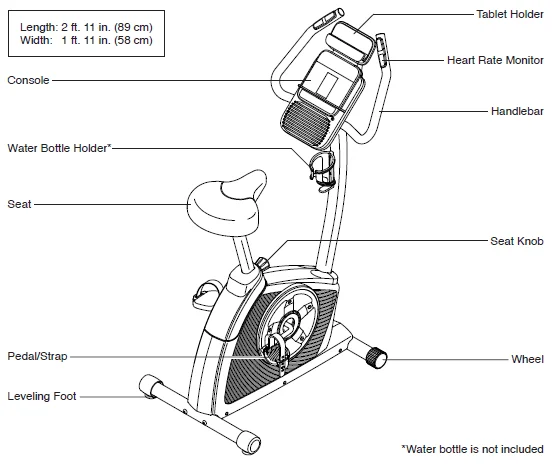
PART IDENTIFICATION CHART
Use the drawings below to identify the small parts needed for assembly. The number in parentheses below each drawing is the key number of the part, from the PART LIST near the end of this manual. The number following the key number is the quantity needed for assembly. Note: If a part is not in the hardware kit, check to see if it has been preassembled. Extra parts may be included.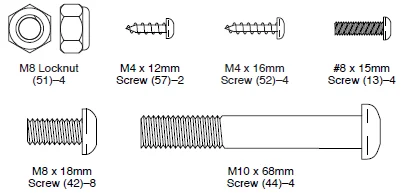
ASSEMBLY
- To hire an authorized service technician to assemble this product, call 1-800-445-2480.
- The assembly requires two persons.
- Place all parts in a cleared area and remove the packing materials. Do not dispose of the packing materials until you finish all assembly steps.
- Left parts are marked “L” or “Left,” and right parts are marked “R” or “Right.”
- To identify small parts, see page 6.
In addition to the included tool(s), assembly requires the following tools:
One Phillips screwdriver, one adjustable wrench
Assembly may be easier if you have a set of wrenches. To avoid damaging parts, do not use power tools.
- Go to www.workoutwarehouse.com/registration on your computer and register your product. Activates your warranty. Saves you time if you ever need to contact Customer Care. Allows us to notify you of upgrades and offers. Note: If you do not have internet access, call Customer Care (see the front cover of this manual) and register your product.
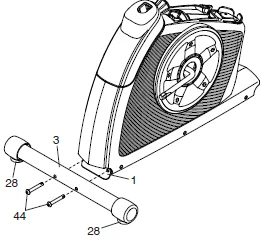
- If there are shipping brackets on the rear of the Frame (1), remove the screws from the shipping brackets and discard the screws and the shipping brackets. Identify the Rear Stabilizer (3), which has a Leveling Foot (28) near each end. Set a sturdy piece of packing material (not shown) under the rear of the Frame (1). Orient the Rear Stabilizer (3) as indicated by the sticker. Attach the Rear Stabilizer to the Frame (1) with two M10 x 68mm Screws (44). Then, remove the packing material.

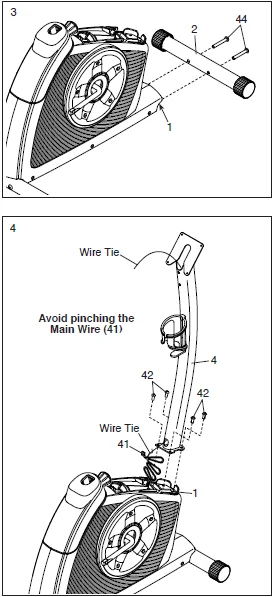
- If there are shipping brackets on the front of the Frame (1), remove the screws from the shipping brackets and discard the screws and the shipping brackets. Set a sturdy piece of packing material under the front of the Frame (1). Orient the Front Stabilizer (2) as indicated by the sticker. Attach the Front Stabilizer to the Frame (1) with two M10 x 68mm Screws (44). Then, remove the packing material.
- Orient the Upright (4) as shown. Tip: Avoid pinching the Main Wire (41). Attach the Upright (4) to the Frame (1) with four M8 x 18mm Screws (42); start all the Screws, and then tighten them. Locate the wire tie in the Upright (4). Tie the lower end of the wire tie to the Main Wire (41). Then, pull the upper end of the wire tie until the Main Wire is routed through the Upright. Tip: To prevent the Main Wire (41) from falling into the Upright (4), secure the Main Wire with the wire tie. Insert the excess Main Wire (41) into the Upright (4).

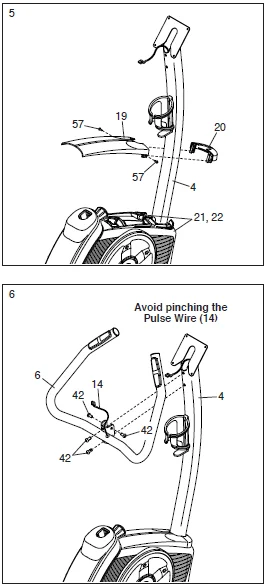
- Orient the Rear and Front Upright Covers (19, 20) as shown. Press the Rear and Front Upright Covers (19, 20) together around the Upright (4), and join them with two M4 x 12mm Screws (57). Then, press the Rear and Front Upright Covers (19, 20) downward onto the Left and Right Shields (21, 22).
- Orient the Handlebar (6) as shown. Tip: Avoid pinching the Pulse Wire (14). Attach the Handlebar (6) to the Upright (4) with four M8 x 18mm Screws (42); start all the Screws, and then tighten them.

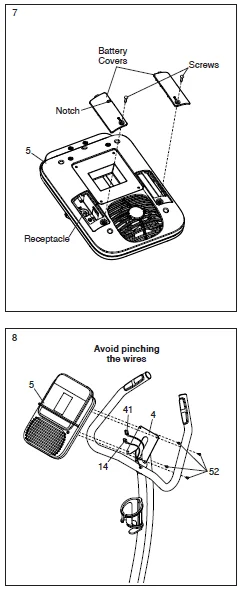
- The Console (5) can use four D batteries (not included); alkaline batteries are recommended. Do not use old and new batteries together or alkaline, standard, and rechargeable batteries together. IMPORTANT: If the Console has been exposed to cold temperatures, allow it to warm to room temperature before you insert batteries. Otherwise, you may damage the console displays or other electronic components. Remove the screws and the battery covers, insert batteries into the battery compartments, and then reattach the battery covers. Make sure to orient the batteries as shown by the diagrams inside the battery compartments. To purchase an optional power adapter, call the telephone number on the cover of this manual. To avoid damaging the console, use only a manufacturer-supplied regulated power adapter. Plug one end of the power adapter into the receptacle inside the indicated battery compartment; route the power adapter through the notch in the battery cover. Then, plug the other end into an outlet installed in accordance with all local codes and ordinances.
- Untie and discard the wire tie on the Main Wire (41). While a second person holds the Console (5) near the Upright (4), plug the Main Wire (41) and the Pulse Wire (14) into the receptacles on the Console. The connectors on the Wires (41, 14) should slide easily into the receptacles and snap into place. If a connector does not slide easily into a receptacle, turn the connector and try again. If you do not connect the connectors properly, the console may become damaged when you use the exercise bike. Insert the excess wire into the Upright (4). Tip: Avoid pinching the wires. Attach the Console (5) to the Upright (4) with four M4 x 16mm Screws (52); start all the Screws, and then tighten them.

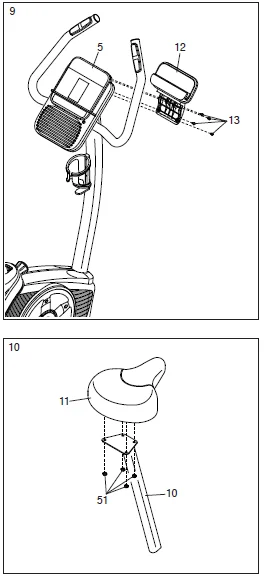
- Attach the Tablet Holder (12) to the back of the Console (5) with four #8 x 15mm Screws (13).
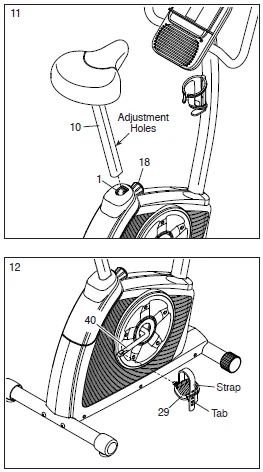
- Attach the Seat (11) to the Seat Post (10) with four M8 Locknuts (51). Note: The Locknuts may be preattached to the Seat.

- Orient the Seat Post (10) as shown. Loosen the Post Knob (18) a few turns, pull it outward, and insert the Seat Post into the Frame (1). Next, slide the Seat Post (10) upward or downward to the desired position, and release the Post Knob (18) into one of the adjustment holes in the Seat Post. Move the Seat Post upward or downward slightly to make sure that the Post Knob is engaged in one of the adjustment holes in the Seat Post. Then, tighten the Post Knob.
- Identify the Right Pedal (29). Using an adjustable wrench, firmly tighten the Right Pedal (29) clockwise into the right arm of the Crank (40). Firmly tighten the Left Pedal (not shown) counterclockwise into the left arm of the Crank (not shown). IMPORTANT: You must turn the Left Pedal counterclockwise to attach it. Adjust the strap on the Right Pedal (29) to the desired position, and press the end of the strap onto the tab on the Right Pedal. Adjust the strap on the Left Pedal (not shown) in the same way.

- After the exercise bike is assembled, inspect it to make sure that it is assembled correctly and that it functions properly. Make sure that all parts are properly tightened before you use the exercise bike. Note: Extra parts may be included. Place a mat beneath the exercise bike to protect the floor.
HOW TO USE THE EXERCISE BIKE
HOW TO ADJUST THE HEIGHT OF THE SEAT
For effective exercise, the seat should be at the proper height. As you pedal, there should be a slight bend in your knees when the pedals are in the lowest position.
To adjust the height of the seat, first loosen the post knob a few turns. Next, pull the knob outward, slide the seat post upward or downward to the desired position, and then release the knob into one of the adjustment holes in the seat post. Move the seat post upward or downward slightly to make sure that the knob is engaged in one of the adjustment holes in the seat post. Then, tighten the knob.
HOW TO ADJUST THE PEDAL STRAPS
To adjust the pedal straps, first pull the ends of the straps off the tabs on the pedals. Then, adjust the straps to the desired position, and press the ends of the straps onto the tabs.
HOW TO LEVEL THE EXERCISE BIKE
If the exercise bike rocks slightly on your floor during use, turn one or both of the leveling feet under the rear stabilizer until the exercise bike is level.
HOW TO USE THE TABLET HOLDER
IMPORTANT: The tablet holder was designed for use with most full-size tablets. Do not place any other electronic device or object in the tablet holder.
To insert a tablet into the tablet holder, set the bottom edge of the tablet in the tray. Make sure that the tablet is firmly secured in the tablet holder. Reverse these actions to remove the tablet from the tablet holder.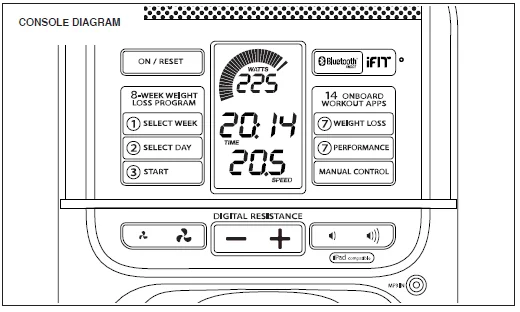
FEATURES OF THE CONSOLE
The advanced console offers an array of features designed to make your workouts more effective and enjoyable.
When you use the manual mode of the console, you can change the resistance of the pedals with the touch of a button. As you exercise, the console will provide continuous exercise feedback. You can even measure your heart rate using the handgrip heart rate monitor or a compatible heart rate monitor. See page 19 for information about purchasing an optional chest heart rate monitor.
You can also connect your smart device to the console and use an iFit® app to record and track your workout information.
Lose unwanted pounds with the progressive 8-week weight-loss program. Each workout in the program controls the resistance of the pedals as it guides you through an effective workout.
The console also offers a selection of preset workouts. Each preset workout automatically changes the resistance of the pedals and prompts you to maintain a target speed as it guides you through an effective workout.
You can even connect your personal audio player to the console sound system and listen to your favorite music or audiobooks while you exercise.
To use the manual mode, see page 15. To use an 8-week weight-loss workout, see page 17. To use a preset workout, see page 18.
To use the sound system, see page 19. To connect your smart device to the console, see page 19. To connect your heart rate monitor to the console, see page 20. To use the settings mode, see page 20.
Note: Before using the console, make sure that batteries are installed (see assembly step 7 on page 10). If there is a sheet of plastic on the display, remove the plastic.
HOW TO USE THE MANUAL MODE
Turn on the console.
Press any button or begin pedaling to turn on the console.
When you turn on the console, the displays will turn on, a tone will sound, and the console will be ready for use.
Select the manual mode.
When you turn on the console, the manual mode will be selected automatically.
If you have selected a workout, reselect the manual mode by pressing the Manual Control button.
Begin pedaling and change the resistance of the pedals as desired.
As you pedal, change the resistance of the pedals by pressing the Digital Resistance increase and decrease buttons.
Note: After you press the buttons, it will take a moment for the pedals to reach the selected resistance level.
Follow your progress with the displays.
The speed meter: This display will provide a visual representation of your pedaling speed. As you increase or decrease your pedaling speed, bars will appear or disappear in the speed meter.
Note: During a preset workout, this display will show a target speed zone for each segment of the workout.
The upper display: This display will show your pedaling speed in revolutions per minute (RPM) and your power output in watts. The display will change every few seconds. This display will also show the resistance level of the pedals for a few seconds each time the resistance level changes. This display will also show your heart rate (BPM) when you use the handgrip heart rate monitor or a compatible heart rate monitor (see step 5).
The center display: This display will show the distance (Dist..) you have pedaled in miles or kilometers and the elapsed time. The display will change every few seconds.
Note: During a preset workout, the display will show the time remaining in the workout instead of the elapsed time.
The lower display: This display will show your pedaling speed in miles per hour or kilometers per hour and the approximate number of calories (Cals.) you have burned. The display will change every few seconds. Change the volume level of the console by pressing the volume increase and decrease buttons. To pause the console, stop pedaling. When the console is paused, the displays will pause. To continue your workout, simply resume pedaling. To reset the displays to zero, press the On/Reset button.
Note: The console can show pedaling speed and distance in either miles or kilometers. To change the unit of measurement, see THE SETTINGS MODE on page 19.
When you are finished exercising, the console will turn off automatically.
If the pedals do not move for several seconds, a series of tones will sound, the console will pause, and the time will flash in the display. If the pedals do not move for several minutes, the console will turn off and the displays will be reset.
MAINTENANCE AND TROUBLESHOOTING
MAINTENANCE
Regular maintenance is important for optimal performance and to reduce wear. Inspect and properly tighten all parts each time the exercise bike is used. Replace any worn parts immediately.
To clean the exercise bike, use a damp cloth and a small amount of mild soap. IMPORTANT: To avoid damage to the console, keep liquids away from the console and keep the console out of direct sunlight.
CONSOLE TROUBLESHOOTING
Most console problems are the result of low batteries. To replace the batteries, see assembly step 7 on page 10.
If the console does not display your heart rate when you use the handgrip heart rate monitor, see step 5 on page 16.
HOW TO ADJUST THE REED SWITCH
If the console does not display correct feedback, the reed switch should be adjusted.
To adjust the reed switch, you must remove the rear and front upright covers as described below.
See assembly step 5 on page 9. Using a standard screwdriver, release the tabs along the bottom edges of the Rear and Front Upright Covers (19, 20), remove the two M4 x 12mm Screws (57), and then remove the Rear and Front Upright Covers.
Locate the Reed Switch (35). Turn the Crank (40) until a Magnet (39) is aligned with the Reed Switch. Loosen, but do not remove, the two indicated M4.5 x 12mm Flange Screws (36). Slide the Reed Switch slightly closer to or away from the Magnet, and then retighten the Flange Screws.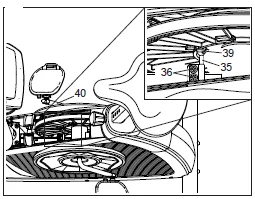
Turn the Crank (40) so that the Magnet (39) passes the Reed Switch (35) repeatedly. Repeat these actions until the console displays correct feedback.
When the reed switch is correctly adjusted, reattach the rear and front upright covers.
EXPLODED DRAWING
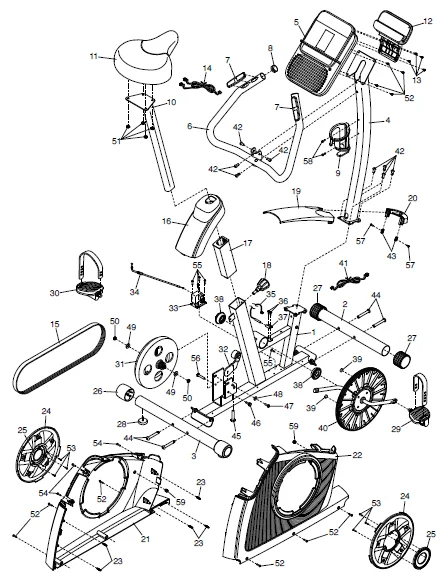
ORDERING REPLACEMENT PARTS
To order replacement parts, please see the front cover of this manual. To help us assist you, be prepared to provide the following information when contacting us:
- the model number and serial number of the product (see the front cover of this manual)
- the name of the product (see the front cover of this manual)
- the key number and description of the replacement part(s) (see the PART LIST and the EXPLODED DRAWING near the end of this manual)
For more Manuals by Golds Gym, visit ManualsLibraryy
Golds Gym Cycle Trainer 300 Ci Upright Exercise Bike-FAQs
What is the weight limit of the Golds Gym Cycle Trainer 300 Ci?
The bike supports a maximum user weight of 300 lbs (136 kg), ensuring safe and stable workouts.
How do I start using the Golds Gym Cycle Trainer 300 Ci?
Place the bike on a flat surface, sit comfortably, adjust the seat, plug it in, and turn on the console. Select a program or manual mode to begin pedaling.
How do I adjust the resistance?
Use the resistance dial or console buttons (depending on your model) to increase or decrease the difficulty level while cycling.
How can I track my workout stats?
The console displays key metrics such as time, speed, distance, calories burned, and heart rate if using the hand pulse sensors.
Is 20–30 minutes on this exercise bike enough for daily exercise?
Yes, 20–30 minutes of moderate-to-high intensity cycling daily can improve cardiovascular health and burn calories effectively.
Can this bike help with weight loss?
Regular cycling on the Cycle Trainer 300 Ci, combined with a balanced diet, can help reduce body fat and improve overall fitness.
How do I maintain the bike?
Wipe the frame and console regularly, check pedals and screws for tightness, and keep the bike away from moisture to ensure long-lasting performance.
Can older adults safely use this bike?
Yes, older adults can use it safely. Start with lower resistance and shorter sessions, gradually increasing as stamina improves.
Can I use the bike if I have knee problems?
Yes, cycling is low-impact and easier on joints compared to running. Adjust seat height and resistance to reduce strain on the knees.
How do I reset the bike or console?
Turn off the bike, unplug it for a few minutes, then plug it back in. This clears minor console errors and restores normal function.