

GS350i Portable Inverter Lithium Power Station
INTRODUCTION
Read and understand the manual completely m before using the product. Failure to completely understand the manual and product couldresult in serious injury. If any section of this manual is not understood, contact Customer Service at 855-888-3598, or www.a-ipower.com for starting, operating, and servicing procedures. The owner is responsible for proper maintenance and safe use of the unit. SAVE THESE INSTRUCTIONS for future reference. This manual contains important instructions that must be followed during placement, operation and maintenance of the unit and its components. Always supply this manual to any individual who will use this unit.
GENERAL SAFETY PRECAUTIONS
DANGER
- DO NOT charge, use or store the unit in a bathroom or in an area exposed to rain or moisture.
- DO NOT disassemble, repair or modify the unit or the battery.
- DO NOT place the unit close to or in a fire or expose it to heat. Keep out of direct sunlight. Only use the output socket to power external devices. Never connect the output to mains
power under any circumstances. - DO NOT touch the unit or the plug-in points if your hands are wet.
- DO NOT use any inappropriate or damaged power cords.
- DO NOT operate the unit above the specified input voltage.
- DO NOT use the unit if it is not functioning correctly.
- DO NOT move the unit if it is recharging or in use.
- DO NOT connect any metallic objects to the AC input or output.
- DO NOT rub your eyes if fluid from inside the unit gets on your hands
- Do not dispose of the unit together with household waste.
WARNING
- Use and store the unit only in a clean and dry environment. DO NOT use and store in dusty or wet environments.
- Check the unit before every use. DO NOT use the unit if it is damaged or broken.
- DO NOT use the unit if the power cord is damaged or broken.
- DO NOT use or store the unit in an area or environment with high temperatures.
- DO NOT charge the unit via power supply systems that operate outside of 100-120V.
- DO NOT place the unit on its side or upside down while in use or storage.
- Keep the unit away from children. DO NOT let children use the power supply unit.
- Keep this product away from pets.
- Should fluid from inside of the unit come in contact with your skin or clothing, wash the affected areas with tap water
- In a storm, unplug the power cord from the socket.
CAUTIONS
- Ensure that the device you are connecting to is turned off before attempting to connect.
- Only charge, use, and store the unit within an ambient temperature of 0 °C to 40°C(32°F-104°F)
- Make sure that the unit is properly secured when transporting it in a motor vehicle.
- If rust, peculiar odors, overheating or other abnormal circumstances are observed, stop using the unit immediately and contact our customer service team.
- Carefully read the instructions for the electric devices that you intend to connect to your portable power station.
- Turn the unit off immediately if it has accidentally fallen, been dropped, or been exposed to vibrations.
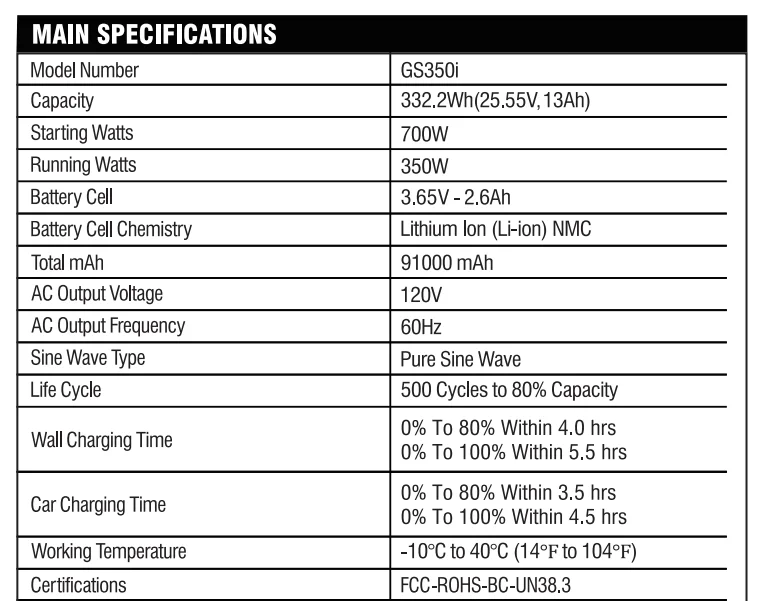
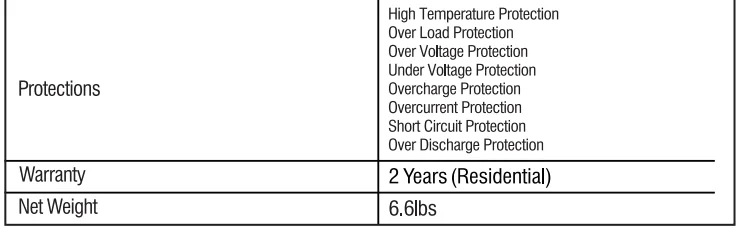
MAIN SPECIFICATIONS
PURE SINE WAVE
The output voltage of a sine-wave inverter has a sine-wave form like the sine-wave form of the mains/utility voltage. In a sine wave, the voltage rises and falls smoothly with a smoothly changing phase angle and also changes Its polartty instantly when it crosses 0 volts. The unit provides a pure sine wave output and can be compatible with AC electrical appliance that works with a sinusoidal waveform. Appliances that use an AC motor are going to work to full capacity on a pure sine wave, such as an electrical fan. Appliances like refrigerators, microwaves, and compressors that use AC motors and some delicate equipment will be better use with our pure sine wave inverter.
WHAT’S INSIDE THE BOX
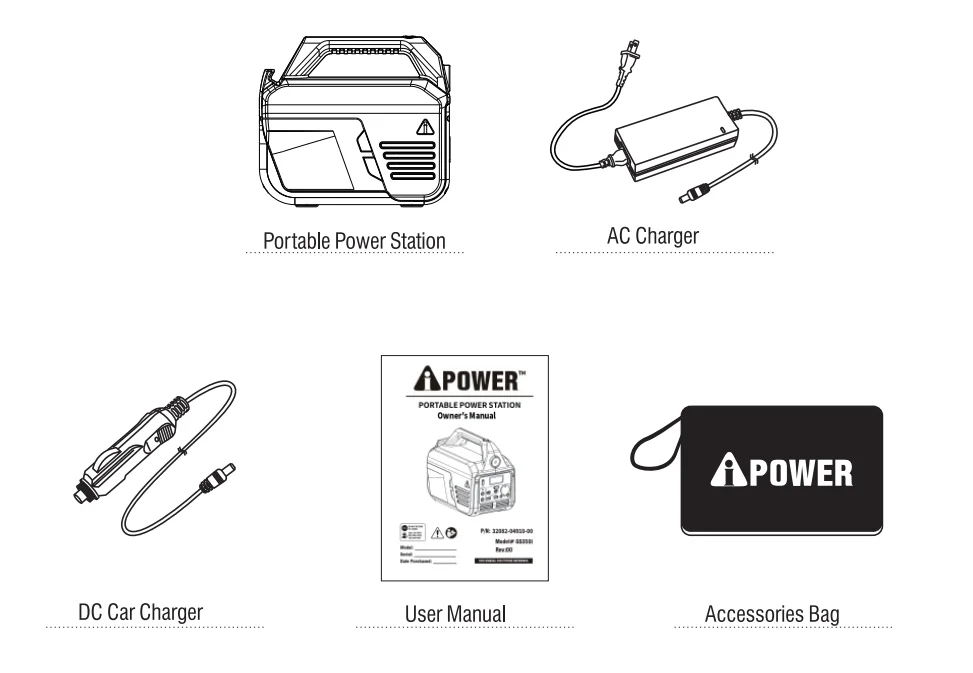
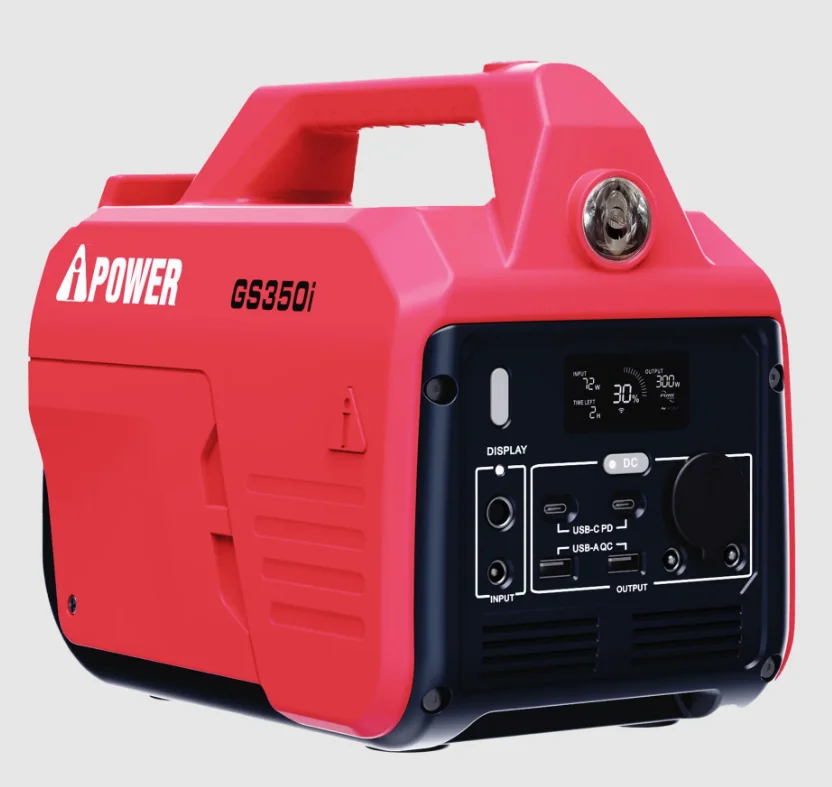
GET TO KNOW YOUR PPS
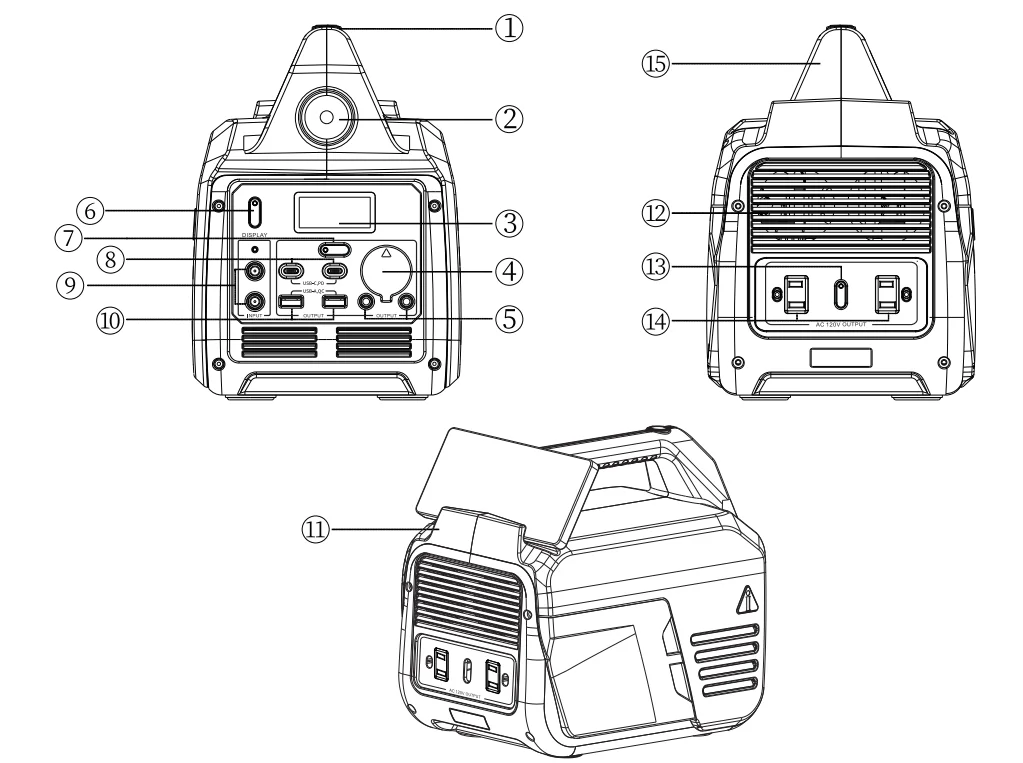
- Flashlight ON/OFF button
- Flashlight
- LCD display (Data Center)
- Car output: 13.6V, Up to BA
- DC5521 output x2: 12V, Up to 4A(Per each outlet) Total Amp from car and 2x DC5521 outputs: BA
- Main power switch with indicator light
- DC power ON/OFF button with indicator light
- USB-C PD output: 5V/9V/12V/15V/20V, up to 3.2A (65W max/outlet), total 130W.
- DC7909 inputs:
- A. Wall charging: 20V, up to 3.2A, (64W max);
- Car charging: 12V, up to B.3A, (100W max);
- Solar charging with 60W Solar panel AP60: 1 BV-24V (60W max);
- Solar charging with 1 00W Solar panel AP100: 1 BV-24V (1 00W max).
- USB-A QC output: 5V-2.5A, 9V-2A, 12V-2A (24W max)
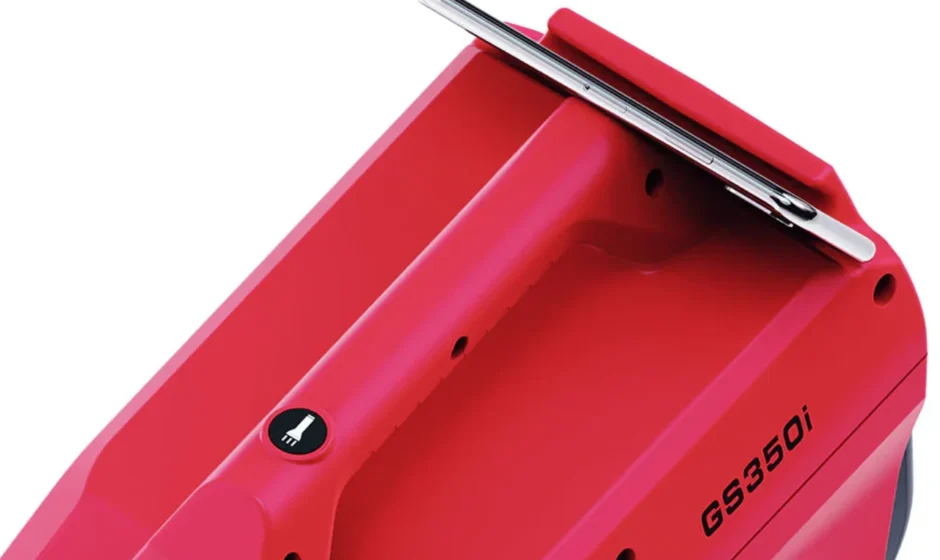
- Phone holder
- Cooling fan
- AC power ON/OFF button with indicator light
- AC outputX2120V: 120V~60Hz, Upto 2.5Noutlet, total 300W
- Handle
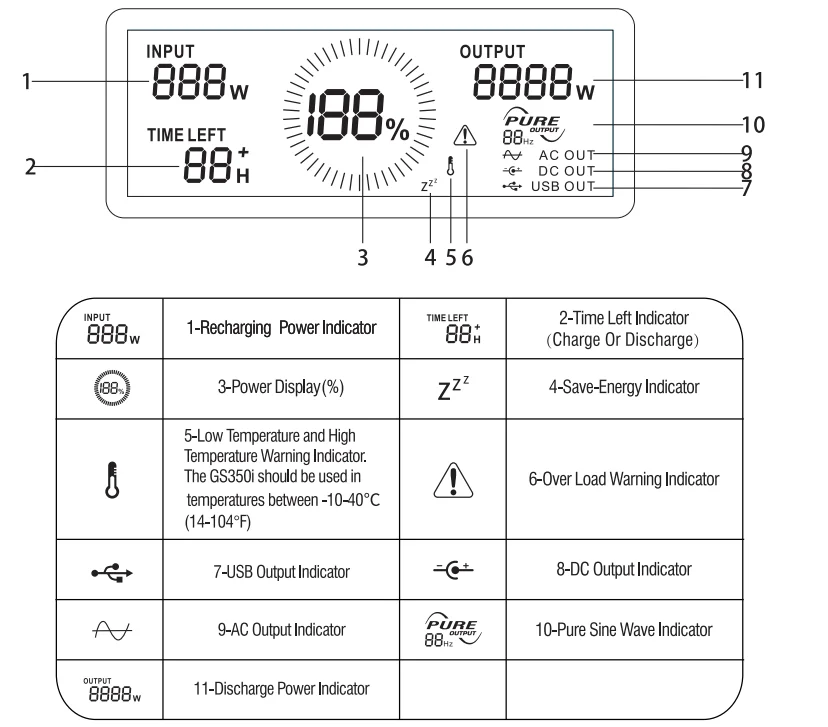
LCD DISPLAY (DATA CENTER) GUIDE
HOW TO USE THE FLASHLIGHT
- Press the flashlight ON/OFF button once to turn the light ON.
- Press the button again to make the light 50% brightness.
- Press the button a third time to turn the light OFF.
SOS MODE: While the light is on, hold down the flashlight button for 3 seconds to activate SOS mode. Single-press to turn SOS mode off.
WARNING: Do not look directly into the light. May cause damage due to the strong light.
USING YOUR PPS GS350i
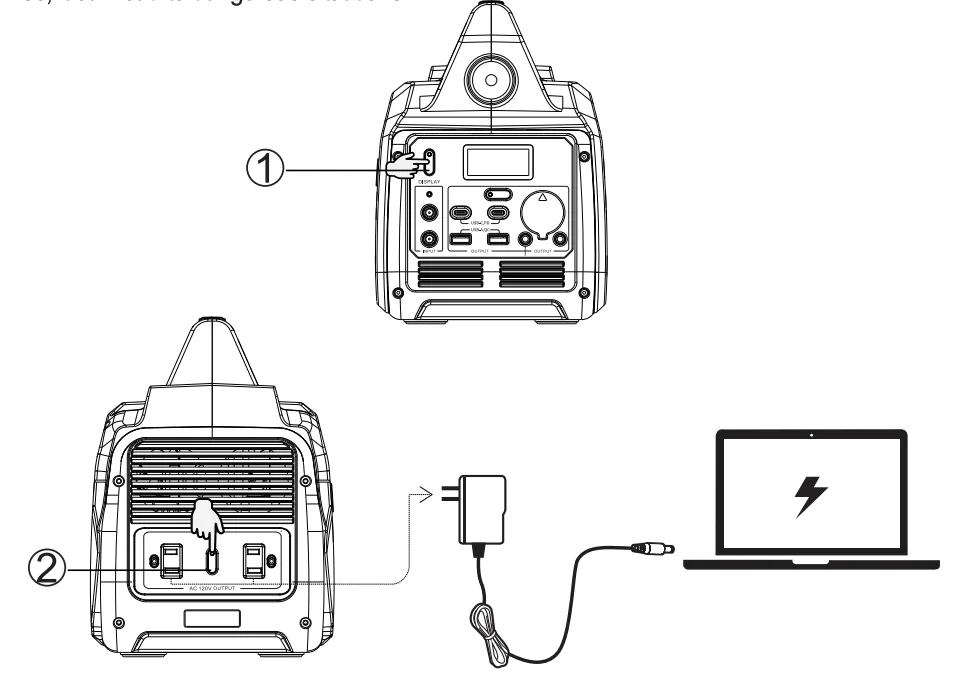
Press the main power button to turn on the unit. The button will illuminate green when It is ON. The LCD (Data Center) lights up and displays necessary information. The unit is now in standby mode and ready to use. Double-click the main power button to deactivate the LCD to save energy (Energy Saving Mode). Press the main power and hold for more than 3 seconds to turn off the unit. Using AC output (120V). Before use, plug your PPS into the wall until It is fully charged.
- Make sure the appliance you are plugging in is turned off.
- Connect the power cable plug of the electrical appliance to the AC outlet of the unit
- Press the main power button to turn on the unit. The button will illuminate green when it is ON.
- Press the AC power OflVQFf button. The button will illuminate green when It is ON. The LCD indicates the AC output icon
 . The interval time between pressi1g AC output button should not be less than 3 seconds.
 - Tum AC appliance ON. The LCD Display will display the real-time wattage of the appliance.
 . The interval time between pressi1g AC output button should not be less than 3 seconds.
When finished, hold the main power switch for more than 3 seconds to turn off the unit, and remove the power cable. Press the AC power OFF button to turn the AC outlets off. (f you leave the AC Power button ON It will drain the battery.) Then, press the main power and hold for more than 3 seconds to turn off the unit.
NOTICE: With the total output exceeding 350W, the power station will automatically shut off. Please ensure the power consumption is less than 350W, then press the AC OrvOFF power button.
WARNING: The AC outlets, AC voltage, and frequency are different according to different countries. Please carefully check whether the product specifications are consistent with the appliance specifications before use; otherwise, it can lead to dangerous situations.
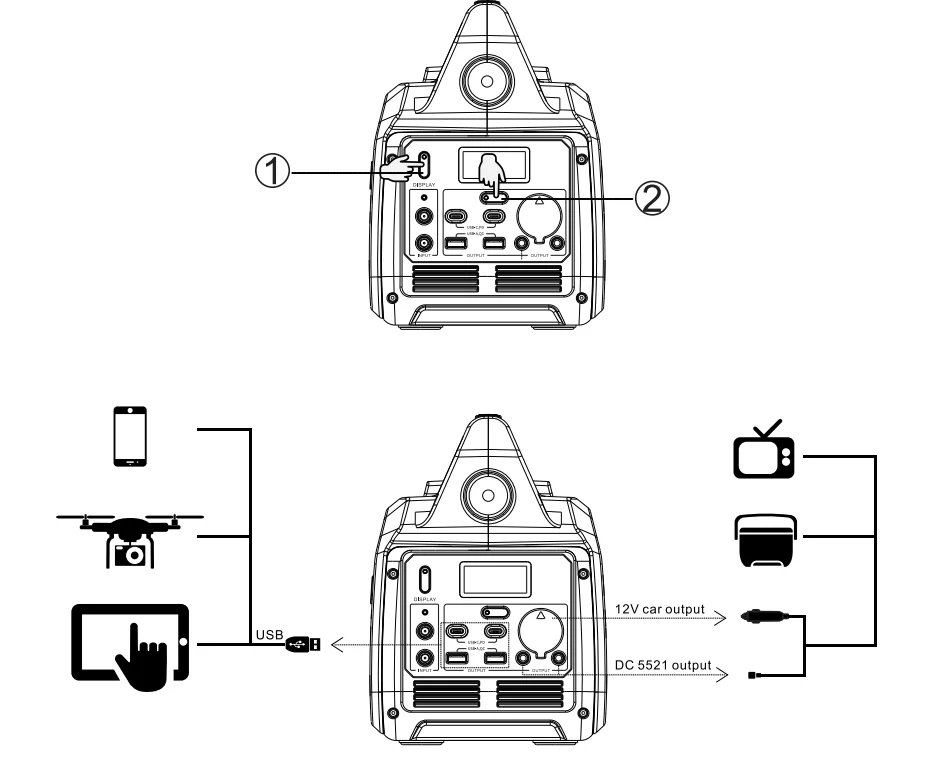
USING DC OUTPUT (USB-A QC, USB-C PD, DC 5521, and DC Car Outlets)
Before use, plug your PPS into the wall until it is fully charged.
- Connect the power cable plug of the electrical device to the DC outlet of the uni,t including:
- USB-A QC (Qty:2)
- USB-C PD (Qty:2)
- DC 5521 output (Qty:2)
- 12V car output (Qty:1)
- Press the main power button to turn on the unit. The button will illuminate green when it is ON.
- Press the DC power ON/OFF button. The button will illuminate green when it is ON. The LCD indicates a USB icon or a DC icon. The LCD Display will display the real-time wattage of the appliance.
When finished, hold the main power switch for more than 3 seconds to turn off the device, and remove the power cable. Press the DC power ON/OFF button to turn the DC outlets off (If you leave the DC Power button on it will drain the battery.) Then, press the main power and hold for more than 3 seconds to turn off the unit.
NOTICE: If the total output exceeds the wattage output of the DC outlet, the power station will automatically shut off. Please ensure the power consumption is less than what the outlet is rated for before using the device.
RECHARGING YOUR PPS
Your PPS can be recharged by:
- 1-AC Charger: Using the included AC charger cable, plug the unit into a standard wall outlet to charge the unit. You will know the unit is charging when the green LED battery indicator light is ON. The unit is fully charged when all battery indicators on the LCD are illuminated. Recharge time: within 4 hours (0-80%) or within 4.5 hours (0-100%)
- 2-DC Car Charger:
Using the included DC car charger cable, plug the unit into a 12V cigarette lighter (carport) in your car to charge the unit. You will know the unit is charging when the green LED battery indicator light is ON. The unit is fully charged when all battery Indicators on the LCD are illuminated.
Note: To avoid car battery power loss, charging this unit through your car’s cigarette lighter is only available when your car engine is started. - Recharge time: within 3 hours (0-80%) or within 4 hours (0-100%)
- 3-Solar Panel (not included): Make sure to use a panel with Dc7909 output plug.
Note: Power generated by the solar panel is dependent on the weather. A sunny day will allow for optimal performance. A cloudy day may lessen the power output. Place the solar panel where it will get as much direct sunlight as possible.
Plug the output of the solar panel into the DC input (DC7909) on your PPS. You will know the unit is charging when the green LED battery indicator light is ON. The unit is fully charged when all battery indicators on the LCD are illuminated. Below are the Solar Panels available to purchase. Call our Customer Service Center for availability.
The above data is from ideal experimental data for reference only. The data will fluctuate up and down depending on the environment, the use method, and other factors.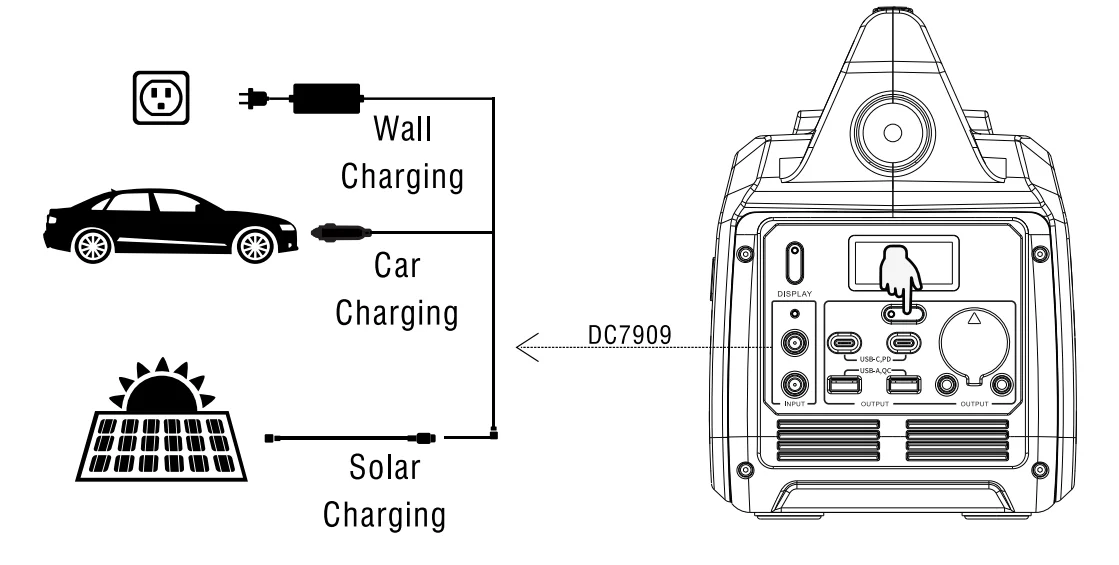
COLD WEATHER CHARGING
Cold temperatures (below freezing) can affect the unit’s battery capacity due to the chemical characteristics of the battery. If you’ll be living off-grid in sub-zero conditions, we recommend you keep your unit in an insulated cooler and connected to a power source (solar panels). The natural heat generated by the unit contained in an insulated cooler will keep battery capacity at its highest.
LIMITED WARRANTY
KEEP YOUR RECEIPT. Proof of purchase will be required to substantiate any warranty claim. WHAT IS COVERED: A-iPower Corp. warants to the original retail purchaser that this product is free of defects in material and workmanship and agrees, at A-iPower Carp’s direction, to either repair, provide replacement parts for, or replace (without charge for parts or labor) any product or component with a material defect for a period of 2 years from the date of purchase, subject to exclusions noted herein. Warranty service and replacement parts are warranted only for the duration of the warranty on the original product. All replaced parts or products become the property of A-iPower Corp. Thank you for choosing A-iPower products. To ensure proper registration of your product Warranty, please submit your Warranty registration along with proof of purchase within 1 0 days of the date of purchase. This can be done by:
- Completing the Warranty Registration form at the back of this manual and mailing it to: A-IPOWER CORP 10887 COMMERCE WAY UNIT A FONTANA CA 92337 USA
- Visit us at www.a-ipower.com and click the product registration icon. WARRANTY TERMS A-iPower Corp. will provide 2 years limited warranty for any A-iPower portable power station products purchased through any authorized A-iPower dealer in North America that fail to operate during the applicable warranty period due to any defect in workmanship or material. If a valid claim is made during the applicable period, A-iPower Corp., at its option, will either (1) repair the product or (2) exchange the product with a product that is of equal value. A replacement product assumes the remaining warranty of the original product or ninety (90) days from the date of replacement, whichever is greater. For questions regarding coverage, please contact Customer Service Dept. 855-888-3598 or email [email protected]. Please have the necessary information available – Model Number, Serial Number, and Proof of Purchase.
DO NOT RETURN THE PRODUCT TO THE PLACE OF PURCHASE. A-iPower’s Customer Service Dept will assist with all product’s related questions and will help troubleshoot issues, and send any replacement parts as necessary while the product is within the warranty period at no charge. If the issue cannot be resolved, A-iPower Customer Service Dept, at Its discreion, may authorize diagnosis and repair through one of its authorized Service Centers. A-iPower Corp, at its discretion, may choose to provide replacement of a part, component, or product. Service or replacement of parts at any unauthorized repair facility without prior authorization will not be covered by this warranty.
WARRANTY EXCLUSIONS
This warranty does not cover the following: Regular wear and maintenance
- This warranty will not cover repair when normal use has exhausted the lifetime of a part(s) or the unit.
- Installation and Maintenance – this warranty does not cover improper or unauthorized assembly, alteration, modification, or any other damage resulting from misuse or neglect.
- Cosmetic defects such as scratches to paint, decals, etc.
- Costs of normal maintenance and adjustments.
- Repairs or diagnostics performed by individuals other than an A-iPower Authorized Service Dealer (unless approved by A-iPower)
- Failures due to normal wear and tear, accident, misuse, abuse, negligence, or improper use.
- Failures caused by any external cause or act of God, including but not limited to, collision, theft, vandalism, riot, war, fire, freezing, lightning, earthquake, windstorm, hail, water, flood, tornado, or hurricane.
- Damage related to rodent and/or insect infestation.
- Any incidental, consequential, or indirect damages caused by defects in materials or workmanship, or any delay in repair or replacement of the defective part(s).
- Failure due to misapplication.
- Telephone, cellular phone, facsimile, internet access, or other communication expenses.
- Expenses related to “customer instruction” or troubleshooting where no manufacturing defect is found.
- Overnight freight or special shipping costs for replacement part(s).
- Overtime, holiday or emergency labor.
DO NOT RETURN THE PRODUCT TO THE PLACE OF PURCHASE
A-iPower Customer Service Dept will assist with all product-related questions, will help troubleshoot issues, and will send any replacement parts as necessary while the product is within the warranty period at no charge. If the issue cannot be resolved, then A-iPower Customer Service Dept, at its discretion determine and authorizes diagnosis and repair through one of its authorized Service Centers. A-iPower Corp, at its discretion, may choose to provide a replacement of a part, component, or product. Service or replacement of parts at any unauthorized repair facility without prior authorization will not be covered by this warranty.
MERCHANDISE RETURN GUIDELINES
- All products must be returned in original or equivalent packaging, if determined by A-ipower customer service. Improperly packaged returns will not be accepted.
- Must have adequate packing for transportation.
- Return to the address provided in the return authorization, using the parcel service required. Units returned without authorization will not be honored.
- Please Note: Refunds will not be granted for items that have been modified or damaged by abuse or usage not in accordance with product instructions.
For more manuals by A-iPower, visit ManualsLibrayy
GS350i Portable Inverter Lithium Power Station-FAQs
Does the inverter stop charging when the battery is full?
Yes, modern inverters have an auto-shutoff or overcharge protection to prevent battery damage.
Can a 12V battery last long with the inverter?
It depends on the inverter load. For example, a 500W load will last ~2.4 hours, while a smaller load (5%) can last up to 48 hours.
How to avoid lithium battery explosions?
Only use certified batteries and chargers, avoid overheating, overcharging, or physical damage, and follow manufacturer safety guidelines.
Can a power station run a whole house?
Not typically. Portable stations are ideal for small devices, appliances, and emergency backup—not full household loads.
Can a portable power station run a refrigerator?
Yes, for short outages or low-power fridges. Make sure your fridge’s starting wattage does not exceed the station’s peak output.
How big of a battery or station do I need to run a fridge?
Check your fridge’s wattage. A 350–500W station works for small fridges, while larger fridges may need 1,000Wh or more.
How long does it take to fully charge the GS350i?
Charging time depends on the power source: wall outlet (few hours), car socket (longer), solar panel (varies by sunlight).
How do I check the health of my lithium battery?
Use the battery display or a multimeter to check voltage and ensure it holds charge properly.