
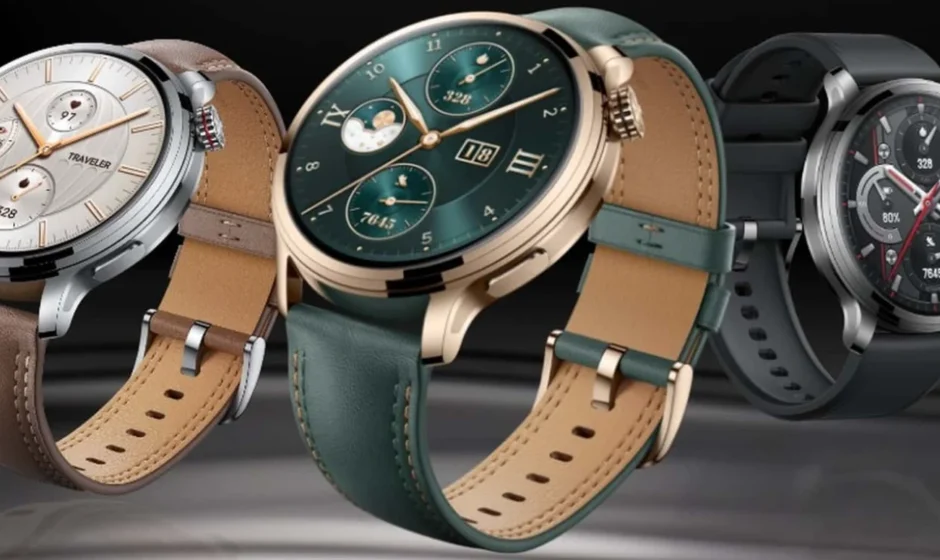

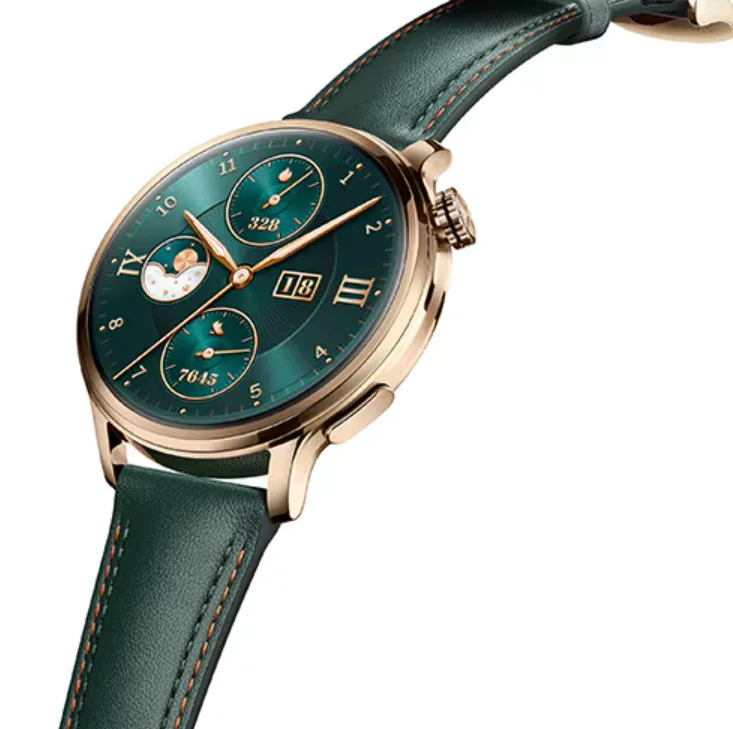
HONOR Watch 4 Pro
Charging
Connect the metal contacts on the charging dock to those on the back of the device, then put them on a flat surface. Connect the charging dock to a power supply, and the device’s screen will light up and display the battery level.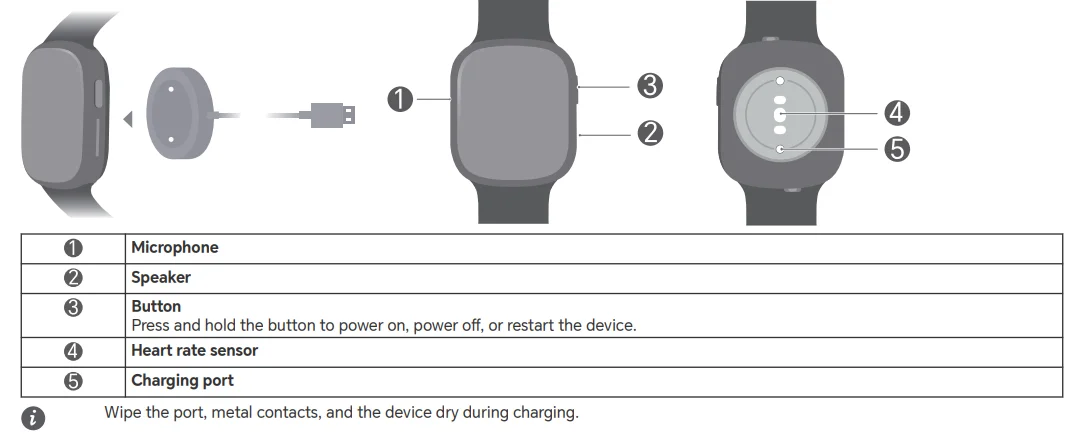
Downloading app
Scan the QR code to download and install the app for managing the device.
Copyright © Honor Device Co., Ltd. 2023. All rights reserved.
THIS DOCUMENT IS FOR INFORMATION PURPOSES ONLY, AND DOES NOT CONSTITUTE ANY KIND OF WARRANTIES.
Trademarks and Permissions
The Bluetooth® word mark and logos are registered trademarks owned by Bluetooth SIG, Inc., and any use of such marks by Honor Device Co., Ltd. is under license. Other trademarks, products, services, and company names mentioned may be the property of their respective owners.
Privacy Policy
To better understand how we protect your personal information, please see the privacy policy at https://www.hihonor.com/privacy-policy/worldwide/.
Blasting Caps and Areas
Turn off your mobile phone or wireless device when in a blasting area or in areas posted “turn off two-way radios” or “electronic devices” to avoid interfering with blasting operations.
Areas with Flammables and Explosives
Do not use the device where flammables or explosives are stored (in a gas station, oil depot, or chemical plant, for example). Using your device in these environments increases the risk of explosion or fire. In addition, follow the instructions indicated in the text or symbols. Do not store or transport the device in containers with flammable liquids, gases, or explosives.
Operation and safety
 To prevent possible hearing damage, do not listen at a high volume for long periods.
- Using an unapproved or incompatible power adapter, charger, or battery may cause fire, explosion, or other hazards.
- Ideal temperatures: -20°C to +35°C for operating, -20°C to +45°C for storage.
- Keep the battery away from fire, excessive heat, and direct sunlight. Do not place it on or in heating devices. Do not disassemble, modify, throw, or squeeze it. Do not insert foreign objects into it, submerge it in liquids, or expose it to external force or pressure, as this may cause it to leak, overheat, catch fire, or even explode.
- Do not attempt to replace the battery yourself — you may damage the battery, which could cause overheating, fire, and injury. The built-in battery in your device should be serviced by Honor or an authorized service provider.
- When charging, an adapter should be plugged into a socket nearby and easily accessible. Use approved power adapters and chargers.
- Please consult your doctor and the device manufacturer to determine if the operation of your device may interfere with the operation of your medical device.
- This product is not designed to be a medical device, and is not intended to diagnose, treat, cure, or prevent any disease. All data and measurements should be used for personal reference only.
- If you experience skin discomfort when wearing the device, take it off and consult a doctor.
- Wipe the charging port dry before charging.
- Adult supervision is advised if children are to use or come into contact with this product.
- Switch off your wireless device when requested to do so in hospitals, clinics, or health care facilities. These requests are designed to prevent possible interference with sensitive medical equipment.
- Some wireless devices may affect the performance of hearing aids or pacemakers. Consult your service provider for more information.
- Pacemaker manufacturers recommend that a minimum distance of 15 cm be maintained between a device and a pacemaker to prevent potential interference with the pacemaker.
- If using a pacemaker, hold the device on the side opposite the pacemaker and do not carry the device in your front pocket.
- Observe local laws and regulations while using the device. To reduce the risk of accidents, do not use your wireless device while driving.
- To prevent damage to your device’s parts or internal circuits, do not use it in dusty, smoky, damp, or dirty environments or near magnetic fields.
- Do not use, store, or transport the device where flammables or explosives are stored (in a gas station, oil depot, or chemical plant, for example). Using your device in these environments increases the risk of explosion or fire.
- Dispose of this device, the battery, and accessories according to local regulations. They should not be disposed of in normal household waste. Improper battery use may lead to fire, explosion, or other hazards.
- If the battery leaks, ensure that the electrolyte does not make direct contact with your skin or eyes. If the electrolyte touches your skin or splashes into your eyes, immediately flush with clean water and consult a doctor.
- Do not place sharp metal objects, such as pins, near the microphone. The microphone may attract these objects and result in injury.
- Wireless devices may interfere with the airplane’s flight system. Do not use your device where wireless devices are not allowed according to the airplane company’s regulations.
- Switch off your wireless device whenever you are instructed to do so by airport or airline staff. Consult the airline staff about the use of wireless devices on board the aircraft. If your device offers a flight mode, this must be enabled before boarding an aircraft.
- Ensure that the power adapter meets the requirements of Clause Q.1 in IEC62368-1/EN62368-1 and has been tested and approved according to national or local standards.
- To ensure the best audio performance of your device’s microphone, use a cloth to wipe the area of the microphone that has been exposed to water. Do not use the microphone until the wet areas are totally dry.
- Protect the wearable and its accessories from strong impact, strong vibration, scratches, and sharp objects; these may damage the device.
- Make sure that the wearable and its accessories stay clean and dry. Do not wear the wearable too loosely or too tightly during workouts. Clean your wrist and device after the workout. Rinse and dry the device to clean it before putting it back on.
- If the wearable is built for swimming and showering, make sure to regularly clean the strap, dry your wrist, and the device before wearing it again.
- Use the radio equipment in good reception conditions to reduce the amount of radiation received.
- Keep radio equipment away from the belly of pregnant women.
- Keep radio equipment away from the lower abdomen of teenagers.
- Respect the restrictions of use specific to certain places (hospitals, planes, service stations, schools, etc.).
 To prevent possible hearing damage, do not listen at a high volume for long periods.
Disposal and Recycling Information
 The symbol on the product, battery, literature, or packaging means that the products and batteries should be taken to separate waste collection points designated by local authorities at the end of their lifespan. This will ensure that EEE waste is recycled and treated in a manner that conserves valuable materials and protects human health and the environment. For more information, please contact your local authorities, retailer, or household waste disposal service, or visit the website https://www.hihonor.com/.
Reduction of hazardous substances
This device and any electrical accessories are compliant with local applicable rules on the restriction of the use of certain hazardous substances in electrical and electronic equipment, such as EU REACH, RoHS, and Batteries (where included) regulations, etc. For declarations of conformity about REACH and RoHS, please visit our website https://www.hihonor.com/global/legal/certification/.
EU Regulatory Compliance Statement
Hereby, Honor Device Co., Ltd. declares that this device, TMA-B19, complies with the following Directives: RED 2014/53/EU, RoHS 2011/65/EU. The most recent and valid version of the DoC (Declaration of Conformity) can be viewed at https://www.hihonor.com/global/legal/certification/. This device may be operated in all member states of the EU. Observe national and local regulations where the device is used. This device may be restricted for use, depending on the local network.
UK Regulatory Compliance
Hereby, Honor Device Co., Ltd. declares that this device, TMA-B19, complies with the following Regulations: Radio Equipment Regulations 2017, The Restriction of the Use of Certain Hazardous Substances in Electrical and Electronic Equipment Regulations 2012. The full text of the UK declaration of conformity and the most recent information about accessories and software are available at the following internet address: https://www.hihonor.com/global/legal/certification/.
RF Exposure Information
Important safety information regarding radio frequency (RF) radiation exposure: RF exposure guidelines require that the device be used at a minimum of 1 cm from the human face and wrist, worn only. Failure to observe this guideline may result in RF exposure exceeding limits. For countries that adopt the SAR limit of 2.0 W/kg over 10 grams of tissue: The device complies with RF specifications when used near your head at a distance of 1 cm. The highest reported SAR value: head SAR: 0.15 W/kg, with a limit of 2.0 W/kg over 10 g, at a distance of 1 cm.
Frequency Bands and Power
- Frequency bands in which the radio equipment operates: Some bands may not be available in all countries or all areas. Please contact the local carrier for more details.
- Maximum radio-frequency power transmitted in the frequency bands in which the radio equipment operates: The maximum power for all bands is less than the highest limit value specified in the related Harmonized Standard.
- The frequency bands and transmitting power (radiated and/or conducted) nominal limits applicable to this radio equipment are as follows: Bluetooth 2.4 GHz: 20 dBm, NFC 13.56 MHz: 42 dBμA/m @ 10 m.
Accessories and Software Information
It is recommended that the following accessories be used:
- Charging dock: HE-050100C01
- The product software version is 7.0.55.99.
Software updates will be released by the manufacturer to fix bugs or enhance functions after the product has been released. All software versions released by the manufacturer have been verified and are still compliant with the related rules. All RF parameters (for example, frequency range and output power) are not accessible to the user and cannot be changed by the user. For the most recent information about accessories and software, please see the DoC (Declaration of Conformity) at https://www.hihonor.com/global/legal/certification/. Please visit https://www.hihonor.com/global/support/ or the recently updated hotline and email address in your country or region. Please go to Settings > About > Regulatory information on the device to view the E-label screen.
For More Manuals By Honor, Visit ManualsLibraryy
HONOR Watch 4 Pro-FAQS
Can I make calls with the HONOR Watch 4 Pro?
Yes. The HONOR Watch 4 Pro supports Bluetooth calling, allowing you to make and receive calls directly from your wrist.
What is the price of the Honor Watch 4 Pro in Pakistan?
The exact pricing varies by retailer, but it generally falls in the premium smartwatch range according to local online listings.
How do I set up the HONOR Watch 4 Pro?
Power on the watch, choose your language, open the HONOR Health app on your phone, and go to Device > Add device. Select your watch when it appears and follow the steps to pair.
How is HONOR Watch 4 Pro different from other models like Huawei Watch Fit 4 Pro?
The Huawei Watch Fit 4 Pro uses a titanium frame, sapphire glass, and a 1.82-inch AMOLED display with 3000 nits brightness. HONOR Watch 4 Pro focuses on classic round-dial styling, premium build, strong battery life, and Bluetooth calling.
Does HONOR Watch 4 Pro have ECG?
No. ECG is not available on the Honor Watch 4 Pro. ECG is available on Huawei Watch Fit 4 Pro and Honor Watch 5 Pro.
Does the HONOR Watch 4 Pro support NFC?
NFC availability depends on region and supported apps. Some models include NFC for quick access or payments, but usage varies by country.
Does the HONOR Watch 4 Pro have built-in GPS?
Yes. The watch includes built-in GPS for accurate route tracking during outdoor workouts.
Does the HONOR Watch 4 Pro monitor blood oxygen (SpO₂)?
Yes. It tracks blood oxygen levels along with heart rate, stress, and sleep monitoring.
Can I pair the HONOR Watch 4 Pro with any Android phone?
Yes. You can pair it with most Android phones using the HONOR Health app.