
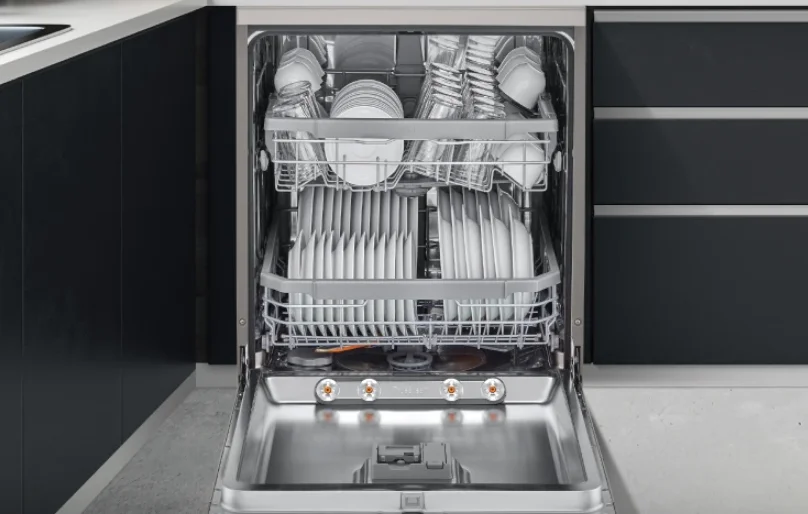

Kenwood KDW60W20 Full-Size Dishwasher
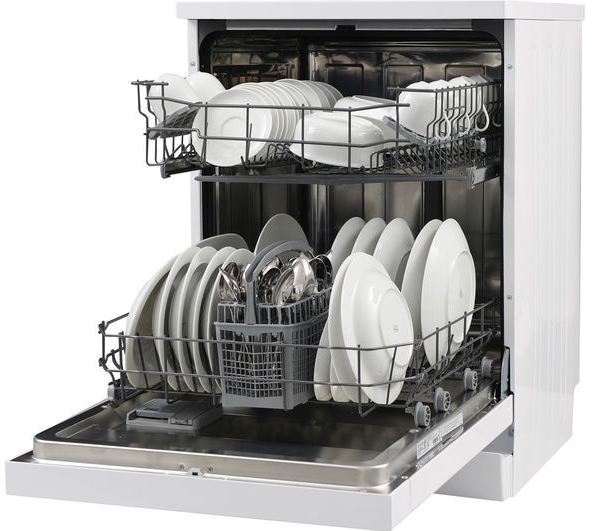
Installation
Thank you for purchasing your new Kenwood Dishwasher. These operating instructions will help you use it properly and safely. We recommend that you spend some time reading this installation/instruction manual so that you fully understand all the operational features it offers. Read all the safety instructions carefully before use and keep this installation/instruction manual for future reference.
Unpacking
Remove all packaging from the unit. Retain the packaging. If you dispose of it, please do so according to local regulations. The following items are included: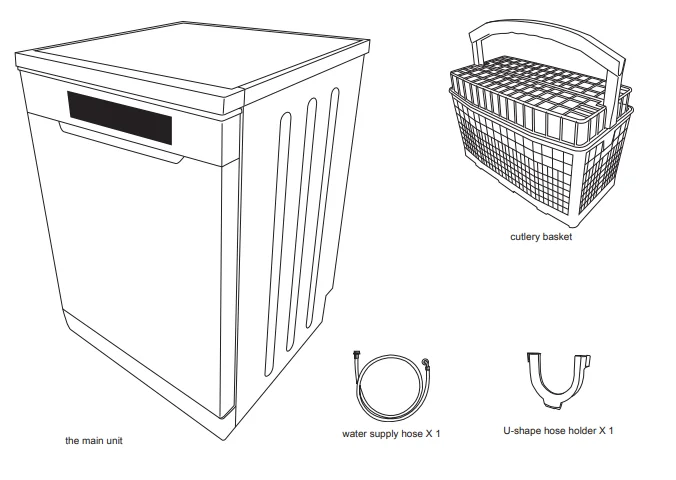
Location
When selecting a position for your dishwasher, you should make sure the installation surface is flat and firm, and the room is well ventilated. Avoid locating your dishwasher near a heat source, e.g. cooker, boiler, or radiator. Extreme cold ambient temperatures may also cause the appliance to not perform properly. This dishwasher is not designed for use in a garage or outdoor installation.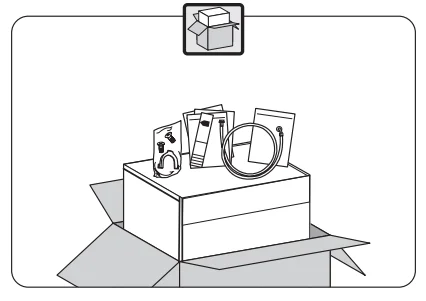
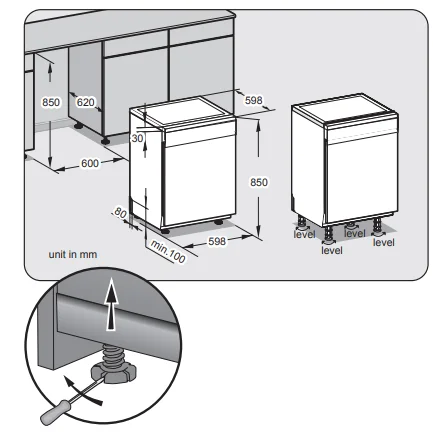
- Please ensure the dishwasher is installed by a qualified technician. Refer to the tools required (not included).

- Ensure there is sufficient clearance on each side of the unit to allow slight sideways movement for servicing when required. Good levelling is essential for the correct closure and sealing of the door. When the unit is correctly levelled, the door should not catch the inner liner on either side of the cabinet. The adjustable feet may be loosened or tightened in order to obtain the optimum levelling of the unit. All parts removed must be saved to do the reinstallation in the future. Ensure the dishwasher is unplugged and empty. We recommend that 2 people handle the dishwasher during installation.
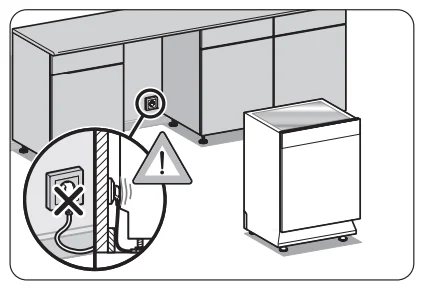
- Do not connect the unit to the mains socket before installation. Ensure you are not installing the unit right in front of the mains socket. This is to avoid potential damage to the back of the unit.

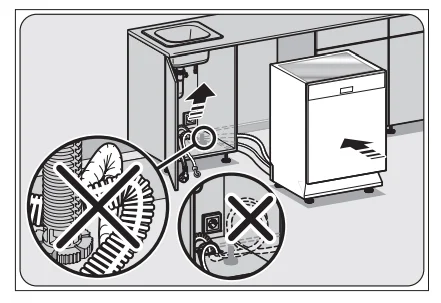
- Position the dishwasher next to a water tap and a drain. Ensure the water inlet and drain hoses are not kinked or squashed. The unit must not stand on the mains cable.

- Make sure your plumbing is suitable for use with the dishwasher. If in doubt, contact a qualified plumber. This unit MUST BE connected to COLD WATER MAINS using the new water supply hose. OLD HOSE SETS MUST NOT BE RE-USED. The water pressure from the water mains needs to be at a minimum of 0.04 MPa and a maximum of 1.00 MPa.

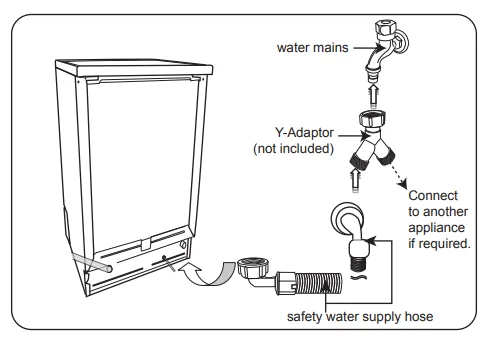
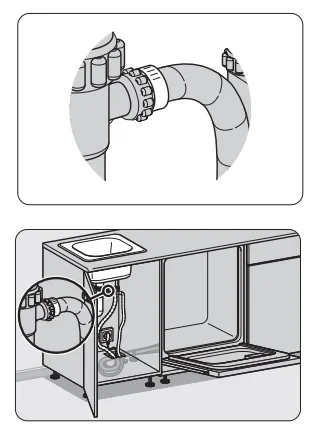
- Connect one end of the water supply hose to your dishwasher, and then connect the other end of the hose to your water mains. Please ensure the black rubber seal is in place.
- After connecting the hose, turn on your water mains and check for leaks.
- Connect the dishwasher to the mains socket.
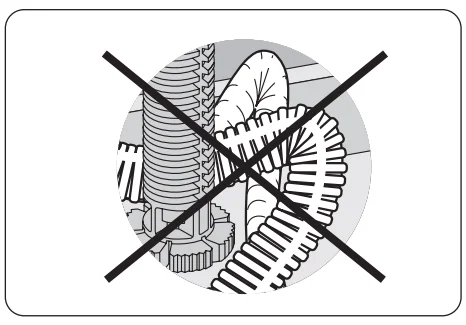
- Do not bend or kink your drain hose.

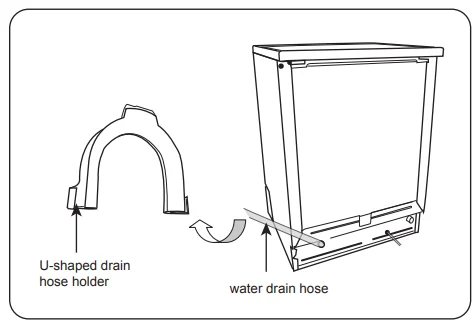
- You may use the U-shaped drain hose holder to secure your drain hose and to avoid kinking it.

- Secure the water drain hose to the waste pipe to avoid it coming off during the washing process.

 The waste pipe must only be connected to the foul drains and not the surface water drainage system.
- The water drain hose should be placed between 40 cm and 100 cm from the floor level and must not be extended; otherwise, the unit may not be able to expel the wastewater properly.
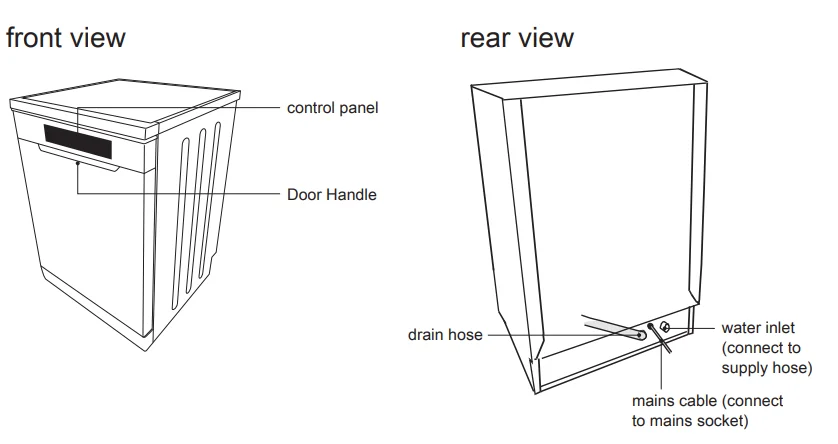
Product overview
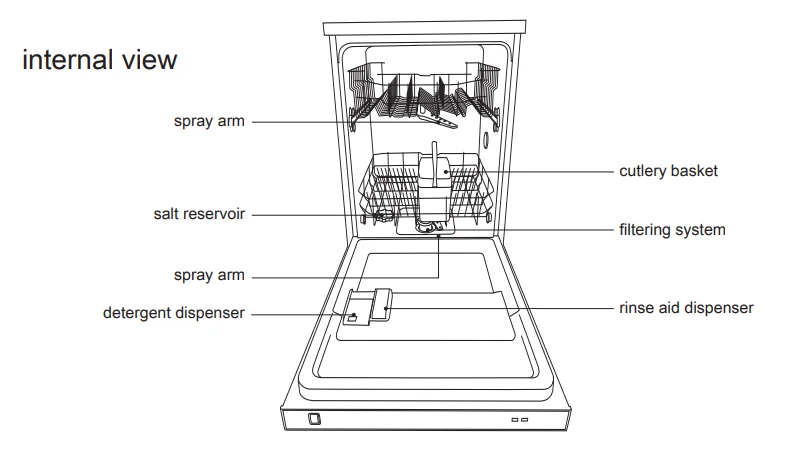
Control panel ﹠ display window
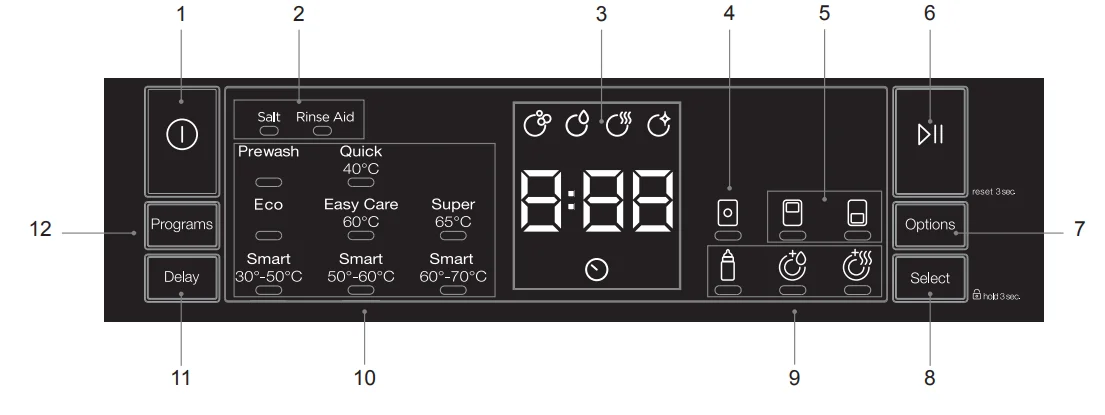
1. ON/OFF button
- turns the dishwasher on and off.
2. Salt low warning indicator light
- illuminates when there is not sufficient softening salt in the dishwasher. The rinse aid low indicator light
- illuminates when there is not sufficient rinse aid in the dishwasher.
3. display
- Displays programme time.
- shows the wash progress.
- shows if a delay time is set.
4. tablet indicator
- displays when the tablet option is selected.
5. Half-load indicator LED
- displays when half load has been selected, the top or bottom basket.
6. The play/pause button
- starts or pauses a programme. When paused, the selected programme indicator will flash.
- Press and hold to reset a programme
7. options button
- Press to scroll through the available extra options.
8. select button
- Press to select extra options.
- Press and hold for 3 seconds to lock the display panel.
9. Extra hygiene indicator light
- illuminates when extra hygiene has been selected.
Extra rinse indicator light
- illuminates when the extra rinse option has been selected.
Extra dry indicator light
- illuminates when the extra-dry option has been selected.
10. Programme indicator LEDs
- Displays selected programme.
11. Delay timer button
- delays the start of a preset washing programme by up to 23 hours.
- Each press increases the delay time by 1 hour.
12. Programme button
- selects your required washing programme.
Before operating
Opening the door
- Pull the door handle.
- If the door is opened during operation, first open the door slightly to avoid water spillage.
Closing the door
- After loading the dishes, push the baskets fully into the dishwasher.
- Lift the door upwards and push until it clicks into position.
- Do not slam the dishwasher door.
Items not suitable for use in the dishwasher
When purchasing new crockery and cutlery, please make sure it is dishwasher-proof. Some items are not suitable for dishwashers.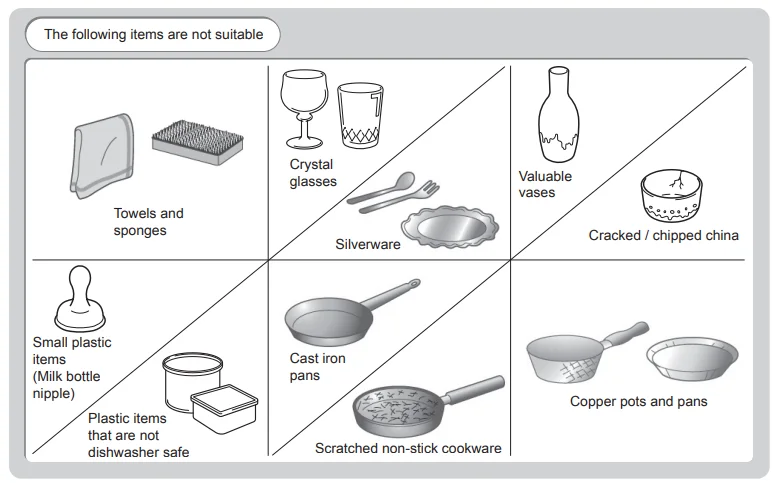
- Wooden cutlery and crockery or items with wooden parts may discolour and fade. The glue used in these items is not dishwasher-proof, and wooden handles may come loose after being washed in a dishwasher.
- Craft items, antiques, valuable vases, and decorative glassware are also not suitable for dishwashers.
- Plastic items (e.g., Tupperware) that are not heat-resistant may melt or lose shape due to the high temperature in the dishwasher.
- Copper, brass, tin, and aluminium items may discolour or become matt.
- Clouding may occur on glasses and delicate glassware after frequent washing. Do not wash delicate glassware or glassware containing lead crystal in a dishwasher. Wash delicate glassware by hand instead.
- Silver and aluminium parts tend to discolour during washing. Residues like egg white, egg yolk, and mustard often cause discolouring and staining on silver. Therefore, please clean the residues from the silver immediately after use.
adding detergent
Only use detergents specifically designed for use in dishwashers. To be more environmentally friendly, please use no more than the correct amount of detergent. Fill the detergent dispenser with detergent powder or a tablet.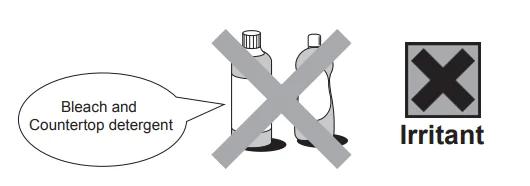
- Keep detergents and bleaches out of the reach of children.
- Irritating to the eyes.
- Avoid contact with the eyes. In case of contact with the eyes, rinse immediately with plenty of water and seek medical advice.
- If swallowed, seek medical advice immediately.
Please follow the steps below to fill the detergent dispenser.
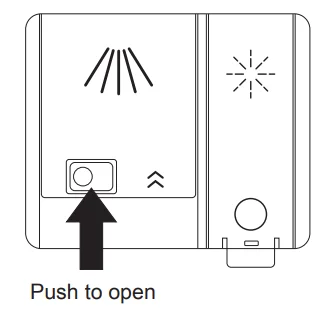
- Push the button on the lid of the detergent dispenser; the flap will slide open.

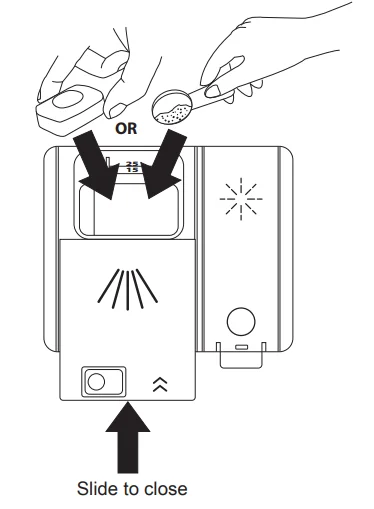
- Fill the detergent dispenser with detergent powder or insert the detergent tablet. The marking indicates the filling level.
- Slide the lid firmly so that it clicks into place.

Adding rinse aid
Rinse aid helps to ensure that washed crockery dries quickly and is free of marks. Only use rinse aid that is made for domestic dishwashers. This model is designed to use liquid rinse aids only. The correct amount needed will be dispensed automatically.
Please follow the steps below to fill the rinse aid reservoir.
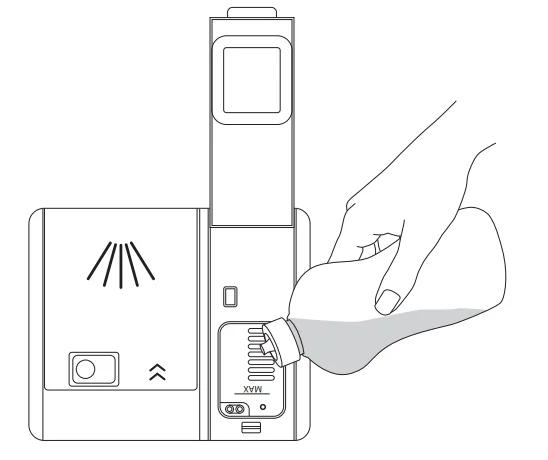
- Open the rinse aid compartment.
- Fill the compartment with rinse aid up to the MAX level mark. Be careful not to overfill the reservoir. Wipe up any spills.
- Close the rinse aid compartment.
- The rinse aid warning light will illuminate when the reservoir needs refilling.

Adjusting the rinse aid setting
The rinse aid reservoir has five settings. Both the recommended setting and the factory setting are “4.” If the dishes are not drying properly or are spotted, adjust to the next higher number until your dishes are spot-free. If you find they are spotted with rinse aid when the cycle has finished, then reduce the level.
- Immediately after turning the dishwasher on, press and hold the P button for 5 seconds until you see ‘rA’ in the display.

- Press the P button to scroll through the levels. The r number will change with each press. See the table below for details.
- Switch the dishwasher OFF to save the settings.


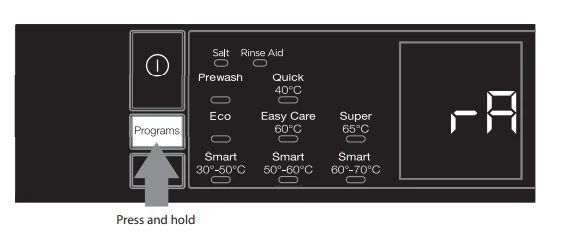
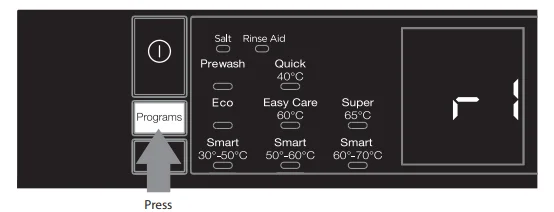
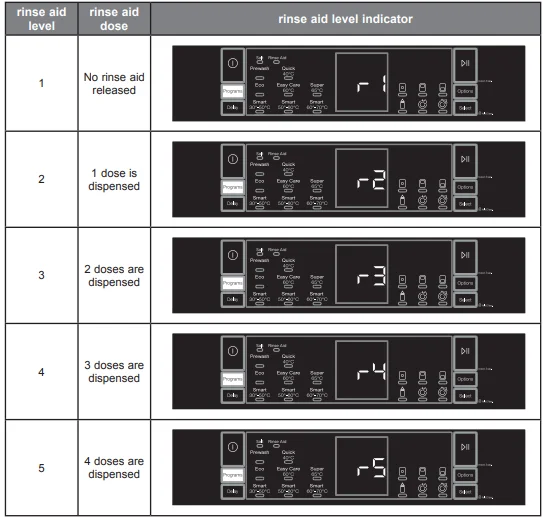
Testing your water hardness
The washing effectiveness of your machine depends on the softness of the tap water. For this reason, your machine is equipped with a system that reduces the hardness in the mains water supply. The washing effectiveness will increase when the system is correctly set. To find out the water hardness level of water in your area, contact your local water board or determine the water hardness level by using the test strip (if available).
- Open the testing strip.
- Run your cold tap for a minute, then fill a cup/glass with water.
- Dip the testing strip into the water for 1 second.
- Shake off the excess water and wait 1 minute for the result.

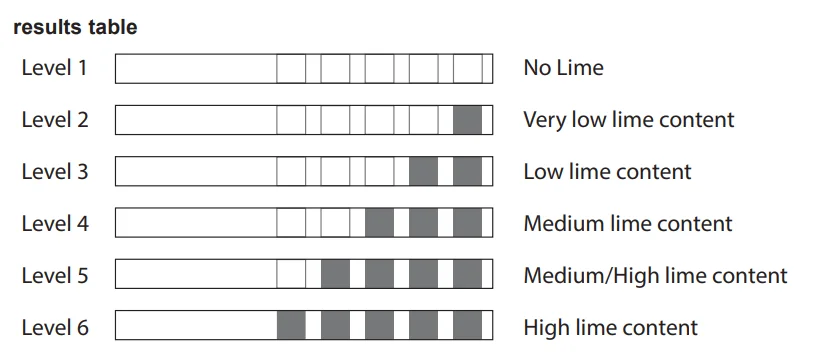
Now that you have your water hardness result, you can set your dishwasher’s salt consumption level to match.
adjusting salt consumption
Salt consumption must be adjusted to correspond to the water hardness level in your area. If you don’t know how hard the water in your home is, please ask the company that supplies water in your area. It is recommended that adjustments be made in accordance with the following chart. To adjust your dishwasher for the local water hardness, please follow these steps and refer to the table above.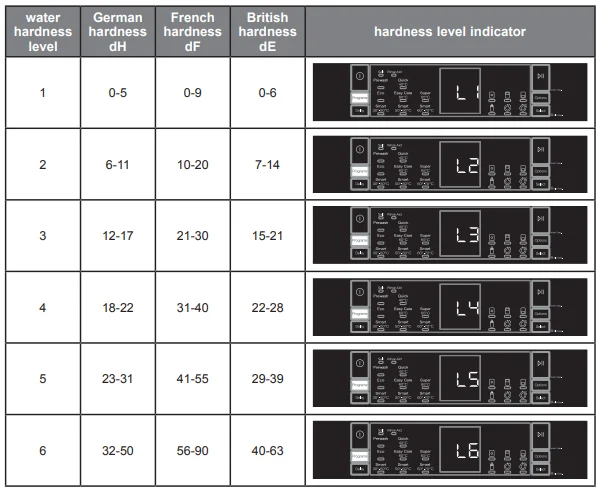
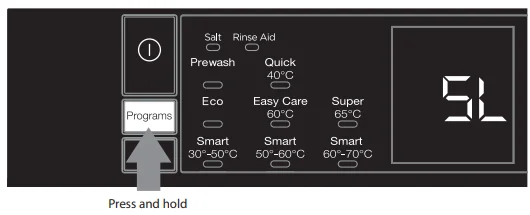
- With the dishwasher switched on, press and hold the P button; SL will appear in the display.

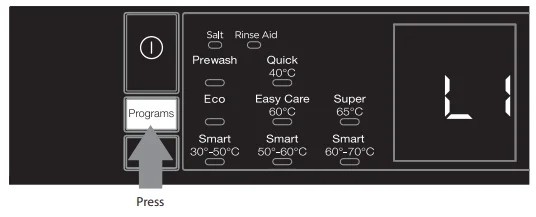
- Press the P button to scroll through the levels. The L number will change with each press. See the table above for details.
- To save your settings, switch the dishwasher off by pressing the POWER button.

adding salt
If you live in a hard water area, deposits may form on your dishes and utensils. Using salt softens the water and reduces the formation of deposits. Please follow the steps below to fill the salt reservoir. The water hardness level will also need to be set.
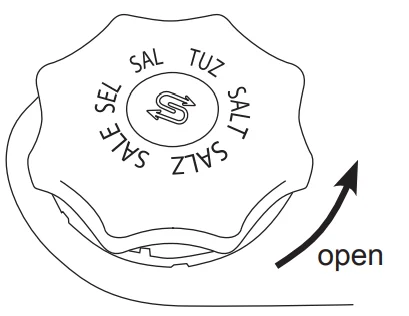
- Remove the lower basket and turn the reservoir cap anticlockwise.
- Pour in approximately 1 kg of dishwasher salt.
- Fill the reservoir with water until it overflows (first use only).
- Clean any excess salt from around the reservoir opening, and then screw the cap on again firmly.
- Run the “Rinse” programme P1 immediately (without any crockery in the dishwasher) to remove any traces of salt from the compartment.

loading the dishwasher
before loading the dishwasher
Please observe the following notes before loading your cutlery and crockery into the basket.
- Remove lipstick stains and any food residues from crockery and dishes. Rinse if necessary.

- Dishes and cutlery must not lie inside one another or cover each other.
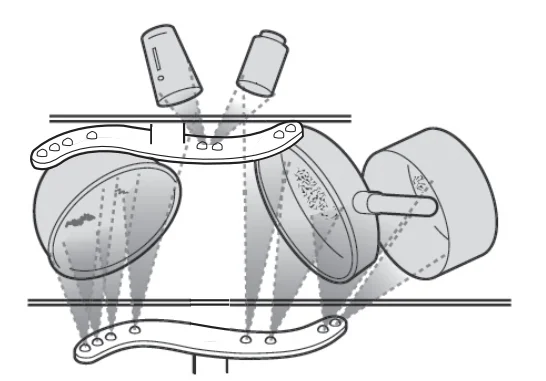
- Load your cutlery and crockery so that water can access all surfaces.

- Ensure all items are securely positioned.
- Hollow items such as cups, glasses, pans, etc. must be placed upside down in the basket.
- Wide-based items should be placed at an angle so that water can run off them freely.
- The spray arms must not be blocked by items that are too tall or hang through the baskets. If in doubt, test for free movement by manually rotating the spray arms.
- Ensure that small items cannot fall through the holders in the baskets.
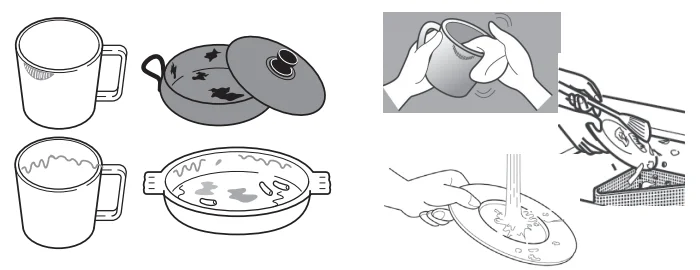
 Do not wash items soiled with ash, sand, wax, lubricating grease, or paint in the dishwasher. Ash does not dissolve and can be distributed in the dishwasher. Wax, sand, lubricating grease, and paint can cause damage to the dishwasher.
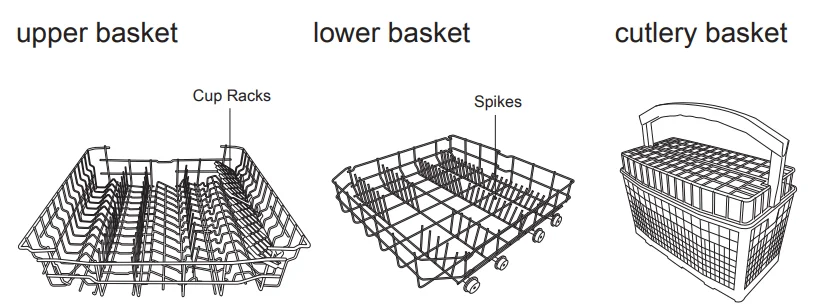
upper basket
Use the upper basket for small and lightweight items such as cups, saucers, glasses, dessert bowls, etc. Shallow pans or casserole dishes can also be placed in the upper basket. Long items such as soup ladles, mixing spoons, and long knives should be placed lying down across the front of the upper basket.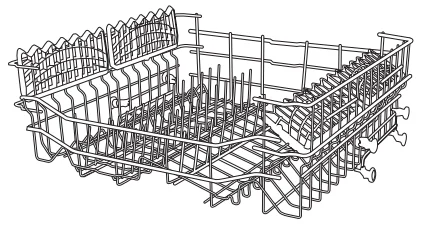
adjusting the upper basket
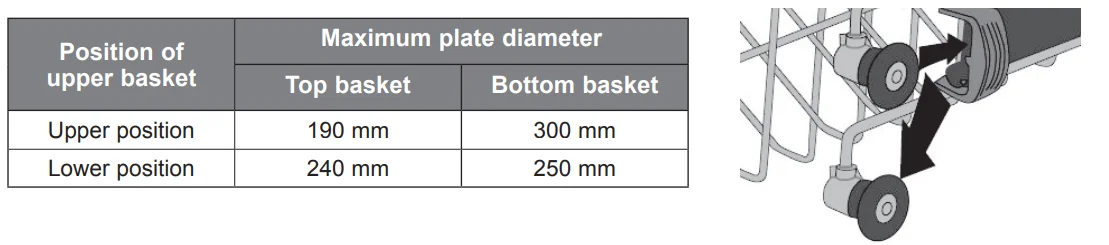
More space can be created for large items on the upper or lower baskets by adjusting the height of the upper basket. To adjust the height of the upper basket:
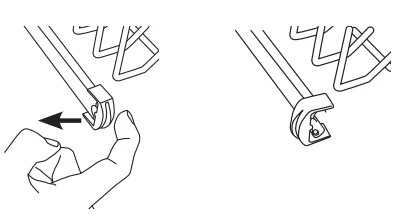
- Push back the rail stops on both sides.
- Slide the basket out from the rails and replace it at the desired height.

- Replace the rail stops in their original positions.

using the dishwasher
- Ensure the unit is connected to the mains power and the water supply is on.
- Open the door and load the baskets. It is recommended that the lower basket be loaded first and then the upper basket. Push the baskets back into the dishwasher.
- Pour in the detergent or place the detergent tablet in the detergent compartment and close firmly afterwards.
- Press the
 ON/OFF button.
 - Select the wash cycle programme based on the loading and soil requirements. Please refer to the section “Wash Cycle Table.”
- The display will indicate the selected programme.
- Close the dishwasher door. A click should be heard when the door is closed correctly. Do not slam the door.
- Press the START/PAUSE button; the washing cycle will begin shortly.
changing the programme
To change the programme once a washing cycle has already started, follow the steps below.
- Press the START/PAUSE button to pause the programme.
- Open the door slightly to avoid water spillage before opening the door fully. Check if the unit has dispensed the detergent or detergent tablet. This will depend on how long the washing cycle has been running for. The last selected programme will appear on the display.
- If the detergent dispenser lid is opened, we suggest that you allow the wash cycle to finish.
- If the detergent dispenser lid is still closed, press the PROGRAMS button to select another programme and close the dishwasher door.
- Press the START/PAUSE button, and the new washing cycle will start shortly.
cancelling a programme
You can cancel a programme at any time.
- Press and hold the START/PAUSE button for 3 seconds; the programme will stop and the dishwasher will discharge any water. This will take around 30 seconds.
at the end of the programme
At the end of the programme, the dishwasher will beep and the word End will be displayed.
switching the dishwasher off
To save energy, remember to switch the dishwasher off using the  ON/OFF button. The dishwasher will continue to use electricity until it is switched off with the ON/OFF button. If the dishwasher is not going to be used for a long period of time, e.g., you are going on holiday, please disconnect the dishwasher from the mains supply and switch off the water supply.
delay start
You can set a delay timer on your dishwasher; you can delay the start of a programme for up to 23 hours.
- After selecting your desired programme, press the DELAY button; continue pressing the button to increase the delay time up to 23 hours. To deactivate a delay time, either continue pressing the button until 0 is displayed or switch the dishwasher OFF. Close the door and press START/PAUSE; the programme will start after your selected delay time has expired.
half load
A half-load option can be selected if you do not have enough dishes for a full load. There are three options that can be selected: lower basket, upper basket, and both baskets. This will help save hot water and electricity. To use these functions, please follow the steps below.
- Open the dishwasher door and load your soiled dishes and crockery into the basket. Remember, if you want to only wash the top or bottom baskets, then just load your chosen basket.
- Press the ON/OFF button to turn on the dishwasher.
- Select your preferred programme.
- Half load options:
Upper Basket
If you have only a few dishes in the upper basket, press the OPTIONS button until the top basket is highlighted, then press the SELECT button to confirm that option.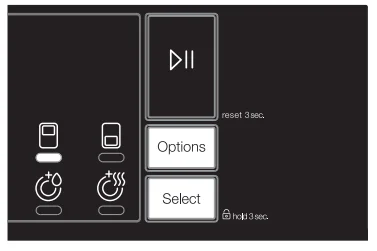
Lower Basket
If you have only a few dishes in the lower basket, press the OPTIONS button until the lower basket is highlighted, then press the SELECT button to confirm that option.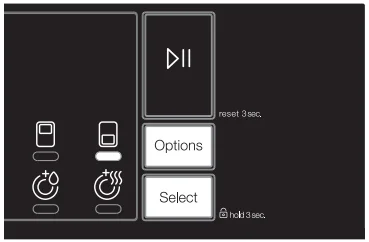
Both Baskets
If you have only a few dishes in both lower and upper baskets, press the OPTIONS button until the top basket is highlighted, then press the SELECT button to confirm that option. Then press the OPTIONS button until the bottom basket is highlighted, then press the SELECT button to confirm that option. Both upper and lower indicators should be lit.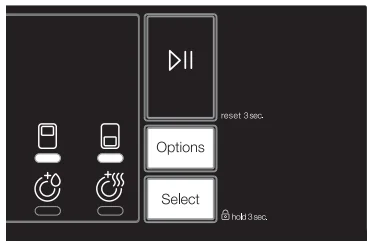
- Press START/PAUSE; the programme will start.
For More Manuals By Kenwood, Visit ManualsLibraryy.
Kenwood KDW60W20 Full-Size Dishwasher-FAQs
Why is my Kenwood dishwasher beeping and flashing lights?
Beeping and flashing lights indicate an error code. Turn off the dishwasher and unplug it for five minutes to reset. Then, check the water inlet valve, filters, and drain hose for blockages or clogs.
What does the E4 error code mean on my Kenwood dishwasher?
The E4 code signals a drainage or overflow issue. Water may be building up in the base due to poor drainage or excess pressure. Clean the drain pump, check for hose kinks, and make sure the water flows freely.
What does the FF error mean on the Kenwood KDW60W20?
The FF error indicates a water fill fault. Inspect the inlet hose and float switch for blockages or restricted movement. Ensure the water supply is turned on and not obstructed.
How do I reset my Kenwood dishwasher?
Press and hold the Start/Reset button for a few seconds, or power off the unit at the wall for 5 minutes. This will clear temporary faults and restore normal function.
How do I clean the Kenwood dishwasher filter?
Remove the lower rack and twist the filter counterclockwise to lift it out. Rinse under warm water and gently scrub away trapped food or grease before reinstalling it securely.
How can I tell if my dishwasher filter is clogged?
Signs of a clogged filter include standing water, food debris on dishes, or unpleasant smells. If your dishwasher isn’t draining properly or dishes come out dirty, clean the filter and spray arms.
What does the S symbol mean on my Kenwood dishwasher?
The S-shaped icon refers to dishwasher salt. It appears on the lid of the salt reservoir or as a light on the control panel, reminding you to refill the salt compartment.
Why are my dishes still dirty after a full cycle?
Dirty dishes may result from overloading, clogged filters, or blocked spray arms. Ensure proper loading, clean the filter, and check that water can circulate freely during the wash.
What is the most common issue with dishwashers?
The most frequent problems include poor drainage, leaks, dirty filters, and error beeps. Regular cleaning of filters and checking hose connections can prevent most faults.