
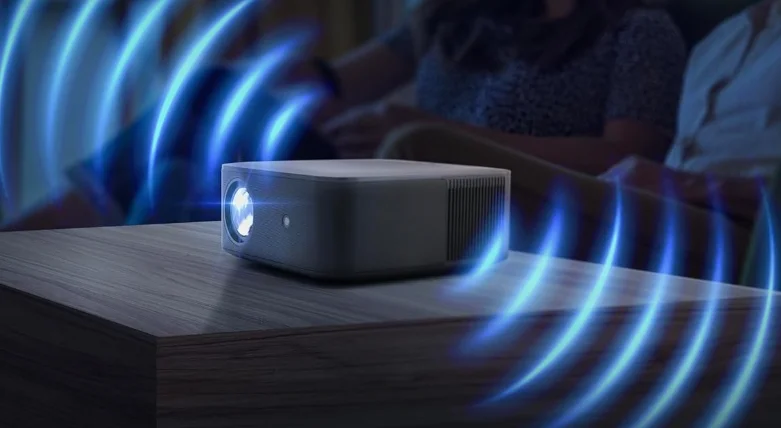

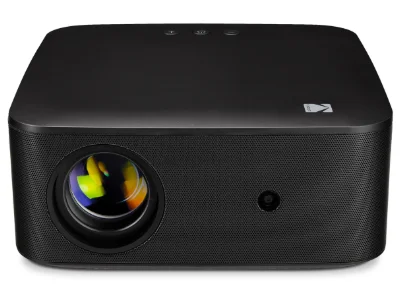
KODAK Flik X20 1080p Smart Projector
PRODUCT OVERVIEW
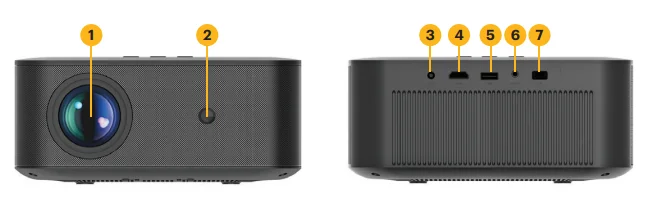
- Lens
- Autofocus camera
- Power input
- HDMI port
- USB port
- Audio out jack
- IR receive

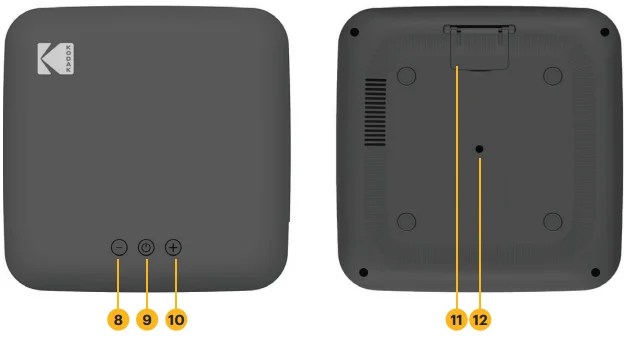
- Volume down
- Power on/off
- Volume up
- Built-in stand
- ¼” mounting-type tripod port

REMOTE CONTROL OVERVIEW
- Power on/off
- Account
- Return
- Home
- Volume
- Mute
- YOUTUBE
- PRIME VIDEO
- Input source
- GOOGLE Assistant
- Projector setting
- Confirm
- Direction pad
- GTV setting menu
- Auto focus
- Manual focus
- NETFLIX
- DISNEY+

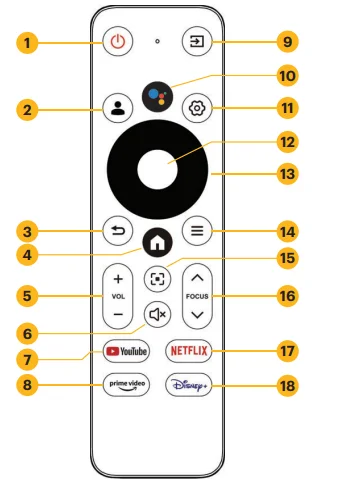
The projector will automatically connect to the remote upon startup. For manual pairing, press and hold the Back and Home buttons simultaneously for five (5) seconds.
SETTING UP THE PROJECTOR
- Place the projector in front of a suitable screen or wall and plug it in. Your projector can be front-ceiling mounted or placed on a tabletop.
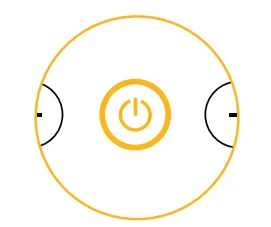
- Press and hold the power button to turn the device on.

SETTING UP ANDROID TV
There are three ways to set up ANDROID TV on your projector:
Method 1: Set Up with an ANDROID Device
- When your projector says, “Quickly set up your projector with your ANDROID phone?” choose “Continue” or “Yes.”
- Open the Google app on your phone and type or say, “Set up my device.”
- Follow the on-screen instructions until you get a code.
- Enter the code on the projector and tap the name of the projector on your phone when it shows up.
- Follow the on-screen instructions to complete setup.
Method 2: Set up with an iOS Device
- When your projector says, “Quickly set up your projector with your ANDROID phone?” choose “Skip.”
- Make sure your device and projector are on the same Wi-Fi network.
- Visit androidtv.com/setup on your device.
- Enter the code that appears on your projector screen.
- Follow the on-screen instructions to complete setup.
Method 3: Set Up with the Remote Control
- When your projector says, “Quickly set up your projector with your ANDROID phone?” choose “Skip.”
- Press the Google TV settings button on your remote to open Google TV settings.
- Go to Network and select your network. Enter your password and wait for your projector to connect.
- Go to Account and select Add Account.
- Enter your email address and password and press Confirm. You will now be able to enjoy your apps on Google TV.
PROJECTOR SETTINGS
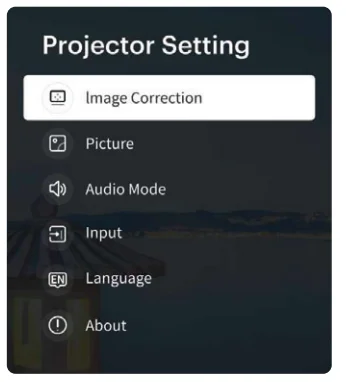
Press the Projector Settings button to access image correction, picture, audio, input, language, and about options.
- Image Correction: Access Focus, Keystone, Zoom, Screen Alignment, Obstacle Avoidance, and Projection Mode.
- Manual Keystone: Adjust the keystone manually.
- Auto Keystone: Turn the keystone on or off.
- Projection Mode: Select between front projection, front ceiling projection, rear front projection, or rear ceiling projection.
- Front: The projector is placed on a table in front of the screen.
- Ceiling: The projector is suspended upside-down in front of the screen. A ceiling/wall mount kit is required (not included).
- Rear: The projector is placed on a table behind the screen. A special rear projector screen is required (not included).
- Rear Ceiling: The projector is suspended upside-down from behind the screen.
- Picture: Adjust picture settings like Colors and Picture Mode.
- Audio: Adjust audio settings.
- Input: Choose from GTV, USB, and HDMI inputs.
- About: Access system information like Device Name, Device Model, and System Version, and perform a Factory Reset, if needed.

CASTING CONTENT VIA GOOGLE CAST
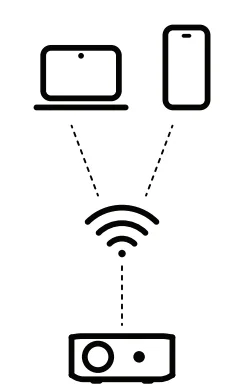
- Connect your device to the same Wi-Fi® network as your projector.
- Open a Google Cast-enabled app that has content you want to cast and find and select “Cast.”
- On your device, select the name of your projector. Wait for the Cast symbol to change color, indicating a successful connection.

MIRRORING OR CASTING CONTENT FROM iOS
First, you’ll need to install the AirScreen app from Google Play on your projector. Once installation is complete, follow these steps:
From iPhone or iPad
- Make sure your iOS device and projector are on the same network.
- Swipe down on your home screen and tap the AirPlay icon.
- Select the device you want to cast to.
From Mac
- Make sure your Mac and projector are on the same network.
- Click the AirPlay icon on the Mac and select your projector to start mirroring.
- The AirPlay icon will turn blue once AirPlay is active.
MIRRORING OR STREAMING CONTENT FROM AN ANDROID
- Make sure your ANDROID device and projector are on the same network.
- Download the Google Home app on your ANDROID device.
- Open the Google Home app and choose “Kodak Flik X20.”
- Tap “Cast my screen.”
NOTE: Copyrighted content from HULU, NETFLIX, and other similar services cannot be mirrored or screencast. To view copyrighted content from these services, download and use the official apps directly through the projector.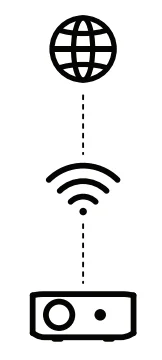
CONNECTING EXTERNAL DEVICES
USB Drives
Insert the USB drive into the USB port. A pop-up File Commander window will appear, asking if you want to access the connected storage device. Select “OK” and locate the content you want to view.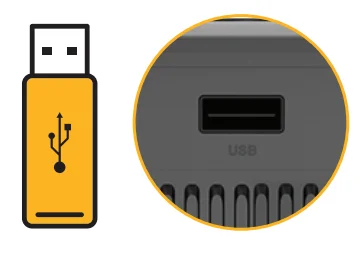
HDMI Compatible Devices
Connect an HDMI cable from the device to your projector. Then, press the Projector Settings button, and under “Input” select “HDMI.”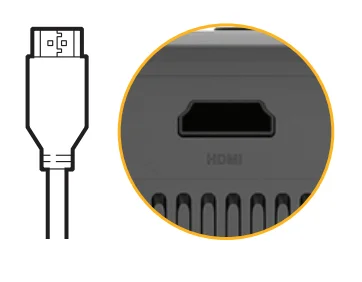
Connecting Headphones or Speakers via BLUETOOTH
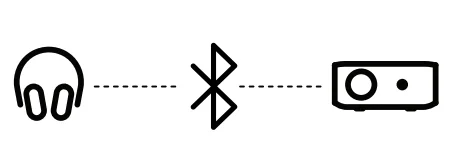
- Open the Google TV Settings and select “Remote & Accessories.” Click “Add Accessory.”
- Activate pairing mode on the device you want to connect and select it from the list.
- Wait for the two devices to successfully pair together.

GOOGLE ASSISTANT 

With GOOGLE Assistant, you can navigate through the apps and streaming services with your voice.
- Press the GOOGLE Assistant button on your remote.
- Follow the on-screen instructions to complete setup.
- Once setup is complete, press the GOOGLE Assistant button to ask a question or give a command.

CUSTOMER SERVICE
Should you experience any problems with your product, please contact us before returning the item to the place of purchase. We’re here to help!
- U.S. Support: [email protected]
- International Support: [email protected]/ www.kodakprojectors.caglobal.com.
LIMITED WARRANTY TO ORIGINAL CONSUMER
This KODAK FLIK X20 Full HD Multimedia Smart Projector (“Product”), including any accessories included in the original packaging, as supplied and distributed by an authorized retailer, is warranted by C&A Marketing, Inc. (the “Company”) as follows:
To receive Warranty service, the original consumer purchaser must contact the Company or its authorized service provider for problem determination and service procedures. Proof of purchase in the form of a bill of sale or receipted invoice, evidencing that the Product is within the applicable Warranty period(s), MUST be presented to the Company or its authorized service provider to obtain the requested service.
Service options, parts availability, and response times may vary and may change at any time. In accordance with applicable law, the Company may require that you furnish additional documents and/or comply with registration requirements before receiving warranty service. Please contact our customer service for details on obtaining warranty service:
- USA: [email protected], 844-516-1539
- International: [email protected], +1-844-516-1540
Shipping expenses to the Company’s Return Facility are not covered by this warranty and must be paid by the consumer. The consumer likewise bears all risk of loss or further damage to the Product until delivery to said facility.
EXCLUSIONS AND LIMITATIONS
The Company warrants the Product against defects in materials and workmanship under normal use for a period of ONE (1) YEAR from the date of retail purchase by the original end-user purchaser (“Warranty Period”). If a hardware defect arises and a valid claim is received within the Warranty Period, the Company, at its sole option and to the extent permitted by law, will either (1) repair the Product defect at no charge, using new or refurbished replacement parts, (2) exchange the Product with a Product that is new or which has been manufactured from new or serviceable used parts and is at least functionally equivalent to the original device, or (3) refund the purchase price of the Product.
A replacement Product or part thereof shall enjoy the warranty of the original Product for the remainder of the Warranty Period, or ninety (90) days from the date of replacement or repair, whichever provides you with longer protection. When a Product or part is exchanged, any replacement item becomes your property, while the replaced item becomes the Company’s property. Refunds can only be given if the original Product is returned.
This Warranty does not apply to:
- (a) Any non-KODAK FLIK X20 Full HD Multimedia Smart Projector product, hardware, or software, even if packaged or sold with the Product;
- (b) Damage caused by use with non-KODAK FLIK X20 Full HD Multimedia Smart Projector products;
- (c) Damage caused by accident, abuse, misuse, flood, fire, earthquake, or other external causes;
- (d) Damage caused by operating the Product outside the permitted or intended uses described by the Company;
- (e) Damage caused by third-party services;
- (f) A Product or part that has been modified to alter functionality or capability without the written permission of the Company;
- (g) Consumable parts, such as batteries, fuses, and bulbs;
- (h) Cosmetic damage; or
- (i) If any KODAK FLIK X20 Full HD Multimedia Smart Projector serial number has been removed or defaced.
This Warranty is valid only in the country where the consumer purchased the Product and only applies to Products purchased and serviced in that country. The Company does not warrant that the operation of the Product will be uninterrupted or error-free. The Company is not responsible for damage arising from your failure to follow instructions relating to its use.
NOTWITHSTANDING ANYTHING TO THE CONTRARY AND TO THE MAXIMUM EXTENT PERMITTED BY APPLICABLE LAW, THE COMPANY PROVIDES THE PRODUCT “AS-IS” AND “AS-AVAILABLE” FOR YOUR CONVENIENCE AND THE COMPANY AND ITS LICENSORS AND SUPPLIERS EXPRESSLY DISCLAIM ALL WARRANTIES AND CONDITIONS, WHETHER EXPRESSED, IMPLIED, OR STATUTORY, INCLUDING THE WARRANTIES OF MERCHANTABILITY, FITNESS FOR A PARTICULAR PURPOSE,
TITLE, QUIET ENJOYMENT, ACCURACY, AND NON-INFRINGEMENT OF THIRD-PARTY RIGHTS. THE COMPANY DOES NOT GUARANTEE ANY SPECIFIC RESULTS FROM THE USE OF THE PRODUCT, OR THAT THE COMPANY WILL CONTINUE TO OFFER OR MAKE AVAILABLE THE PRODUCT FOR ANY PARTICULAR LENGTH OF TIME. THE COMPANY FURTHER DISCLAIMS ALL WARRANTIES AFTER THE EXPRESS WARRANTY PERIOD STATED ABOVE.
YOU USE THE PRODUCT AT YOUR OWN DISCRETION AND RISK. YOU WILL BE SOLELY RESPONSIBLE FOR (AND THE COMPANY DISCLAIMS) ANY AND ALL LOSS, LIABILITY, OR DAMAGES RESULTING FROM YOUR USE OF THE PRODUCT. NO ADVICE OR INFORMATION, WHETHER ORAL OR WRITTEN, OBTAINED BY YOU FROM THE COMPANY OR THROUGH ITS AUTHORIZED SERVICE PROVIDERS, SHALL CREATE ANY WARRANTY.
IN NO EVENT WILL THE COMPANY’S TOTAL CUMULATIVE LIABILITY ARISING FROM OR RELATED TO THE PRODUCT, WHETHER IN CONTRACT OR TORT OR OTHERWISE, EXCEED THE FEES ACTUALLY PAID BY YOU TO THE COMPANY OR ANY OF ITS AUTHORIZED RESELLERS FOR THE PRODUCT AT ISSUE IN THE LAST YEAR FROM YOUR PURCHASE. THIS LIMITATION IS CUMULATIVE AND WILL NOT BE INCREASED BY THE EXISTENCE OF MORE THAN ONE INCIDENT OR CLAIM.
THE COMPANY DISCLAIMS ALL LIABILITY OF ANY KIND OF ITS LICENSORS AND SUPPLIERS. IN NO EVENT WILL THE COMPANY OR ITS LICENSORS, MANUFACTURERS, AND SUPPLIERS BE LIABLE FOR ANY INCIDENTAL, DIRECT, INDIRECT, SPECIAL, PUNITIVE, OR CONSEQUENTIAL DAMAGES (SUCH AS, BUT NOT LIMITED TO, DAMAGES FOR LOSS OF PROFITS, BUSINESS, SAVINGS, DATA, OR RECORDS) CAUSED BY THE USE, MISUSE, OR INABILITY TO USE THE PRODUCT.
Nothing in these terms shall attempt to exclude liability that cannot be excluded under applicable law. Some countries, states, or provinces do not allow the exclusion or limitation of incidental or consequential damages or allow limitations on warranties, so certain limitations or exclusions may not apply to you. This warranty gives you specific legal rights, and you may have other rights that vary from state to state or province to province. Contact your authorized retailer to determine if another warranty applies. Distributed by C&A Marketing, Inc., 114 Tived Lane East, Edison, NJ 08837 USA. © 2024. C&A IP Holdings LLC. All Rights Reserved. Made in China.
REGISTER YOUR PRODUCT!
Scan the QR code below or visit kodakprojectors.caglobal.com/pages/register-your-product to activate your one-year limited warranty and get important information regarding product updates, recommendations, maintenance, and safety. Product serial number and proof of purchase needed for product registration.
For More Manuals By KODAK, Visit ManualsLibraryy.
KODAK Flik X20 1080p Smart Projector-FAQs
What is the KODAK Flik X20 1080p Smart Projector?
The KODAK Flik X20 is a compact Full HD smart projector designed for home entertainment, streaming, gaming, and presentations. It features native 1080p resolution, built-in Google TV support, wireless streaming options, and automatic image adjustment features for convenient everyday use.
Does the KODAK Flik X20 support Netflix and streaming apps?
Yes, the KODAK Flik X20 includes Google TV support, giving users access to popular streaming services like Netflix, YouTube, Disney+, Prime Video, and thousands of additional apps. Built-in Chromecast and wireless connectivity also make streaming content from phones and tablets much easier.
How bright is the KODAK Flik X20 projector?
The KODAK Flik X20 offers around 300 ANSI lumens of brightness, making it suitable for dark or dimly lit rooms. While it can handle casual viewing environments, brighter rooms may reduce picture clarity and contrast, especially when projecting larger screen sizes during daytime use.
Is the KODAK Flik X20 good for movies and gaming?
The KODAK Flik X20 works well for casual movie nights, streaming, and console gaming thanks to its Full HD resolution and large screen support. Its compact design and automatic setup tools make it convenient, although serious gamers may prefer brighter projectors with lower input lag.
Does the KODAK Flik X20 support 4K content?
The KODAK Flik X20 supports 4K video input and decoding, but its native display resolution remains Full HD 1080p. This means users can play 4K content while the projector scales it down to 1080p for display on the projected image.
Is the KODAK Flik X20 easy to set up?
Yes, the KODAK Flik X20 includes autofocus, automatic keystone correction, auto screen alignment, and obstacle avoidance features that simplify setup. These smart adjustments help users quickly achieve a properly aligned and focused image without manually repositioning the projector repeatedly.
Can the KODAK Flik X20 connect wirelessly to phones?
The KODAK Flik X20 supports wireless screen mirroring through Chromecast, AirPlay, Miracast, Wi-Fi, and Bluetooth connectivity. Users can stream videos, presentations, and mobile content directly from compatible smartphones, tablets, and laptops without relying heavily on physical cable connections.
How large a screen can the KODAK Flik X20 project?
The KODAK Flik X20 can project images up to around 200 inches, depending on room size and placement distance. Most users achieve the best balance of brightness and image clarity using moderate screen sizes in darker viewing environments for movies and entertainment.
Does the KODAK Flik X20 have built-in speakers?
Yes, the KODAK Flik X20 includes dual built-in 3W speakers with Dolby audio support for casual listening. While the internal speakers are suitable for smaller rooms, many users connect external Bluetooth speakers or sound systems for a stronger home theater experience.
Is the KODAK Flik X20 worth buying?
The KODAK Flik X20 is a reasonable option for users seeking an affordable portable smart projector with streaming features and easy setup. It performs best in darker environments, though buyers wanting higher brightness and premium cinematic quality may consider more expensive projector alternatives.