
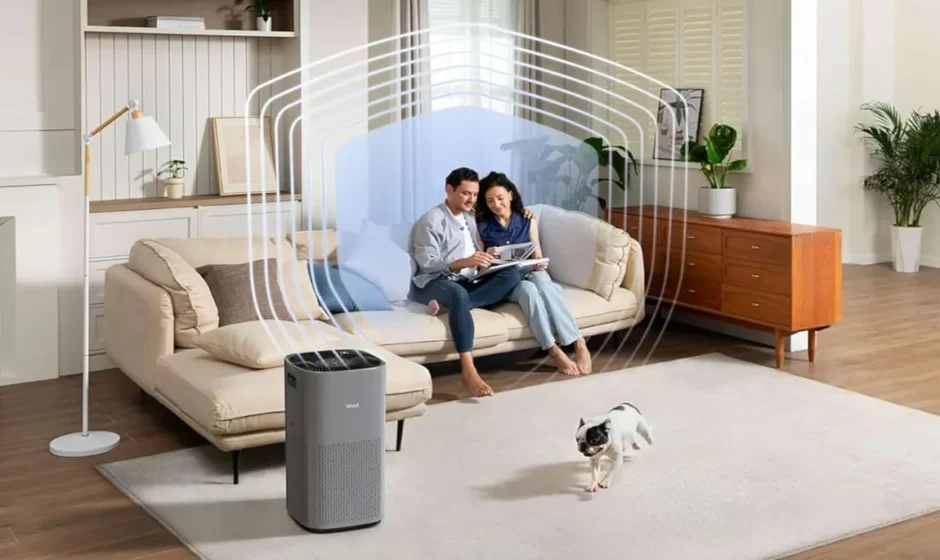

LEVOIT Core 600S-P Gray Air Purifier
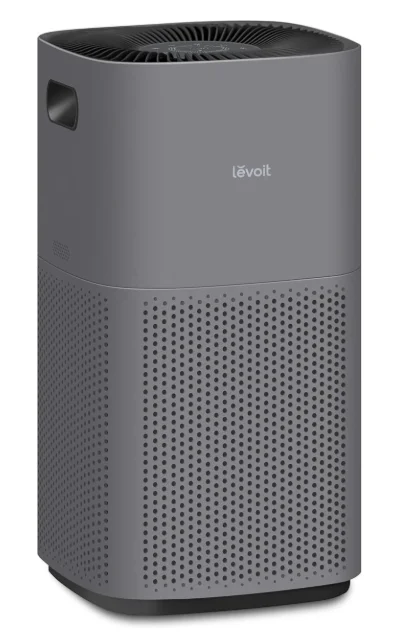
Package Contents
- 1 x Smart Air Purifier
- 1 x 3-Stage Original Filter (Pre-Installed)
- 1 x User Manual
- 1 x Quick Start Guide
Specifications
- Power Supply: AC 120V, 60Hz
- Rated Power: 66W
- Operating Conditions
- Temperature: 14°-104°F 1 -10°-4o°C
- Humidity: < 85% RH
- Dimensions: 12.3 X 12.3 X 23.6 in / 31.3 x 31.3 x 60 cm
- Weight: 13.7 lb / 6.2 kg
Note: To access additional smart functions, download the free VeSync app (see page B).
SAFETY INFORMATION
READ AND SAVE THESE INSTRUCTIONS
To reduce the risk of fire, electric shock, or other injury, follow all instructions and safety guidelines.
General Safety
- Only use your air purifier as described in this manual.
- Do not use without removing the plastic wrap from the filter. The air purifier will not filter air, and may overheat, causing a fire hazard.
- Do not use the air purifier outdoors.
- Keep the air purifier away from water and wet areas. Never place in water or liquid.
- Do not use in excessively humid areas or near humidifiers.
- Keep the air purifier away from heat sources.
- Do not use where combustible gases, vapors, metallic dust, aerosol (spray) products, or fumes from industrial oil are present.
- Keep 5 ft/ 1.5 m away from where oxygen is being administered.
- Supervise children when they are near the air purifier. Do not allow children to play with the air purifier.
- Do not place anything into any opening in the air purifier.
- Do not sit on or place heavy objects on the air purifier.
- Keep the inside of the air purifier dry. To prevent moisture buildup, avoid placing it in rooms with major temperature changes or underneath air conditioners.
- Always unplug the air purifier before servicing, cleaninggning or other maintenance (such as changing the filter).
- Do not use the air purifier if it is damaged or not working correctly, or if the cord or plug is damaged. Do not try to repair it yourself. Contact Customer Support (see page 25).
- WARNING: To reduce the risk of fire or electric shock, do not use this air purifier with any solid-state speed controls (such as a dimmer switch).
- Children should not clean or perform maintenance on the air purifier without supervision.
- This air purifier is not to be used by persons (including children) with reduced physical, sensory, or mental capacities, or a lack of experience and knowledge, unless they have been given supervision or instruction concerning the use of the appliance by a person responsible for their safety.
- Not for commercial use. Household use only.
- WARNING: To Reduce The Risk Of Fire, Electric Shock, Or Injury To Persons, Do Not Use Replacement Parts That Have Not Been Recommended By The Manufacturer (e.g., Parts Made At Home Using A 3D Printer).
- CAUTION: This equipment should be inspected frequently, and the collected dirt should be removed from it regularly to prevent excessive accumulation that may result in flashover or a risk of fire.
Power & Cord
- Keep the air purifier near the outlet it is plugged into.
- Never place the cord near any heat source.
- Do not cover the cord with a rug, carpet, or other covering. Do not place the cord under furniture or appliances.
- Keep the cord out of areas where people walk often.
- Place the cord where it will not be tripped over.
- This appliance has a polarized plug (one blade is wider than the other). To reduce the risk of electric shock, this plug is intended to fit in a polarized outlet only one way. If the plug does not fit fully in the outlet, reverse the plug. If it still does not fit, contact a qualified electrician. Do not attempt to defeat this safety feature.
- This air purifier uses standard North American 120V, 60Hz outlets. If using outside the US or Canada, check for compatibility.
- If the power supply cord is damaged, it must be replaced by Arovast Corporation or similarly qualified persons in order to avoid an electric or fire hazard. Please contact Customer Support (see page 25).
Electromagnetic Fields (EMF)
Your Levoit air purifier complies with all standards regarding electromagnetic fields (EMF). If handled properly and according to the instructions in this user manual, the appliance is safe to use based on scientific evidence available today.
GETTING TO KNOW YOUR SMART AIR PURIFIER
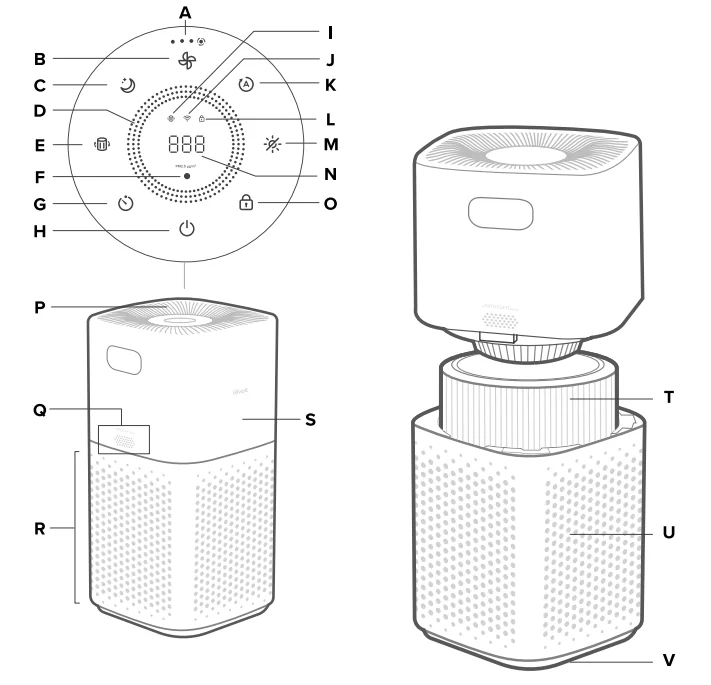
- A. Fan Speed Indicators
- B. Fan Speed Button
- C. Sleep Mode Button
- D. Air Quality Indicator Rings
- E. Check Filter Indicator Reset Button
- F. Light Sensor
- G. Timer Button
- H. On/Off Button
- I. Check Filter Indicator
- J. Wi-Fi® Indicator
- K. Auto Mode Button
- L. Display Lock Indicator
- M. Button
- N. PM2.5/Timer Display
- O. Display Lock Button
- P. Air Outlets
- Q, AirSight Plus™ Laser Dust Sensor
- R. Air Inlets
- S. Air Purifier Top
- T. 3-Stage Original Filter
- U. Air Purifier Bottom
- V. Anti-Skid Pads
CONTROLS & DISPLAY
Note: You can also use the VeSync app to control these functions, as well as additional app-only features (see page 13).

On/Off Button
- Turns the air purifier on/off.
- Press and hold for 5 seconds to configure the air purifier. See the VeSync in-app instructions for more information.
- Press and hold for 15 seconds to reset the air purifier and disconnect from Wi-Fi (see page 8).

Air Quality Indicator Rings
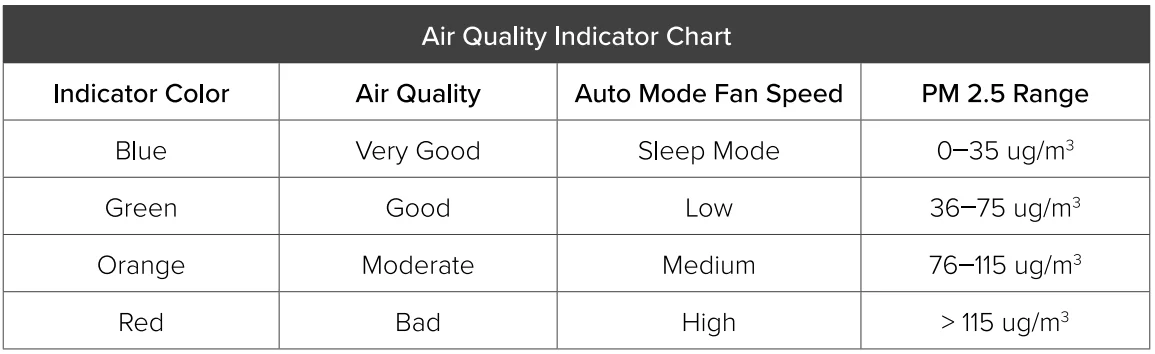
- These indicators use an automatic sensor to display the air quality: Blue (Very Good), Green (Good), Orange (Moderate), and Red (Bad).

Wi-Fi Indicator
- Turns on, off, or blinks to indicate pairing status. See the VeSync in-app instructions for more information.

Light Sensor
- When Light Detection is turned on in the VeSync app, this sensor detects the amount of light in the room to automatically adjust air purifier settings (see page 12).
- Press and hold the display button for 3 seconds, which also turns on/off the light detection function.

Fan Speed Button
- Cycles through fan speeds: low (1 indicator will light up), medium (2 indicators), high (3 indicators), and turbo (4 indicators).
- Tapping the Fan Speed Button while the air purifier is in Auto Mode or Sleep Mode (if the display is on) will exit that mode.

Sleep Mode Button
- Turns Sleep Mode on/off (see page 9).

Timer Button
- Cycles through timer options (see page 11).
- Press and hold
 for 2 seconds to begin cycling through the timer options in 1-hour increments.

Auto Mode Button
- Turns Auto Mode on/off (see page 10).

Button
- Turns the (see page 11).
- Tap any button (except ) to turn the display back on.

Display Lock Button
- Prevents current settings from being changed (see page 11). Press and hold for 3 seconds to turn Display Lock on/off.
- The Display Lock Indicator (
 ) will blink when any other button is tapped to indicate that Display Lock is on.
 - Check Filter Indicator Reset Button
- Press and hold for 3 seconds to reset the

Check Filter Indicator.
- The Check Filter Indicator (
 ) lights up when the filter should be checked (see page 16).
GETTING STARTED
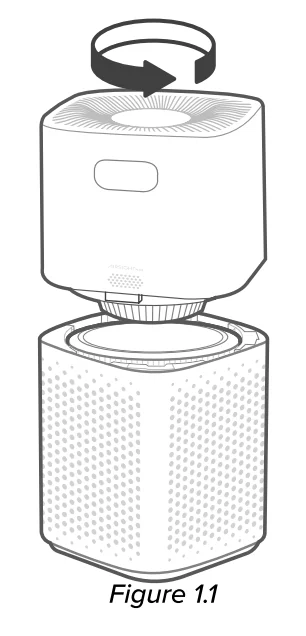
- Place the air purifier on a flat, stable surface with the display facing up. Twist the top half of the air purifier counterclockwise and lift to remove it. [Figure 1.1]

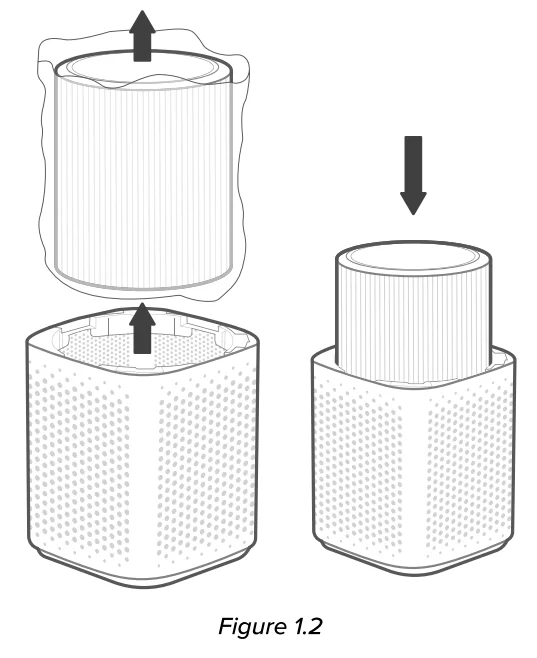
- Remove the filter from inside the bottom half of the air purifier. Remove the plastic packaging from the filter and place the filter back into the air purifier. [Figure 1.2]

- Place the top half of the air purifier directly back onto the bottom half of the air purifier, aligning each corner. Press down to snap the top into place. [Figure 1.3]
- The top of the air purifier can face in any direction, as long as the corners align.

- The top of the air purifier can face in any direction, as long as the corners align.
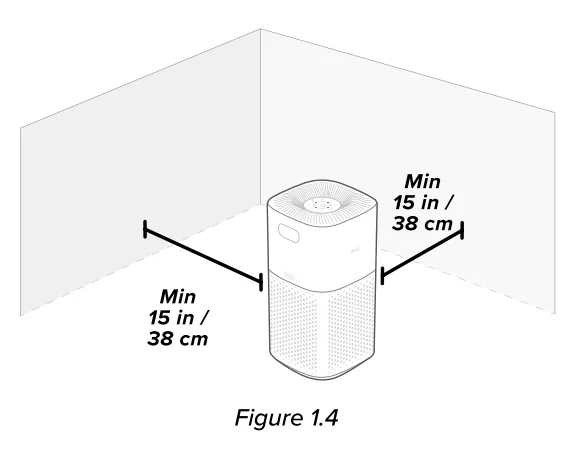
- When using the air purifier, allow at least 15 inches/ 38 cm of clearance on all sides. Keep away from anything that would block airflow, such as curtains. [Figure 1.4]


VeSync App Setup
Note: Due to ongoing updates and improvements. The VeSync app may be slightly different from what is shown in the manual. In case of any differences, follow the in-opp instructions.
- To download the VeSync app, scan the QR code or search ·vesync” in the Apple App Store® or Google Play Store.
 Note: For Android~ users, choose “Allow” to use VeSync.
 - Open the VeSync app. Log In or Sign Up.
Note: You must create your own VeSync account to use third-party services and products. These will not work with a guest account. With a VeSync account, you can also allow your family and friends to control your smart air purifier. - Follow the in-a pp instructions to set up your smart air purifier.
Note: Your phone must have Location turned on while your phone is connecting to your smart air purifier. This is required to establish the Bluetooth connection. You can turn Location off after your smart air purifier is finished connecting to the VeSync app.
 Note: For Android~ users, choose “Allow” to use VeSync.
Wi-Fi Connection
- To disconnect Wi-Fi, press and hold the On/Off button for 15 seconds until the Wi-Fi indicator turns off. This will restore the smart air purifier’s default settings and disconnect it from the VeSync app.
- To reconnect, please follow the instructions in the VeSync app for adding a device.
Connect with Amazon Alexa or Google Assistant™
You can use the VeSync app to connect your smart air purifier to Amazon Alexa or Google Assistant. Please follow the in-a pp instructions to set up your voice assistant.
Note: You must create your own VeSync account to access voice assistants.
USING YOUR SMART AIR PURIFIER
Note: Using the VeSync app allows you to control your air purifier remotely and access additional functions and features (see page 13).
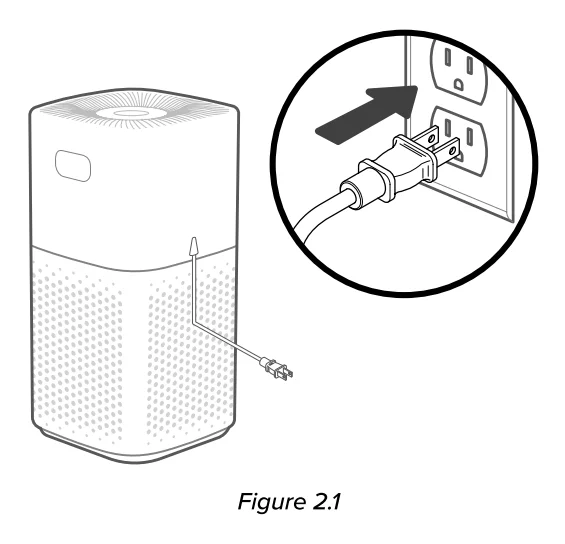
- Plug in and tap
 to turn on the air purifier. [Figure 2.1]
 - Optionally, tap
 to change fan speed between low, medium, high, and turbo.
Note:- The fan speed indicators will light up when active. 1 indicator will light up for low, 2 for medium, 3 for high, and 4 for turbo.
- Turbo speed is the loudest, but it cleans the air the quickest.
- For best results, or to address a specific air quality issue such as smoke, run the air purifier at turbo speed for 15-20 minutes before using a lower speed.
- To effectively clean the air, keep windows and doors closed while the air purifier is on.
- Tap
 to turn off the air purifier.
Sleep Mode
Sleep Mode operates quietly by using a fan speed lower than low speed.
- Tap
 to turn Sleep Mode on/off.
 - Sleep Mode will turn off the display after 6 seconds if no other buttons are tapped.
Note:- When the display is turned off, tap any button (except ) to turn the display back on. /fyou don’t tap another button, the display will turn off again after 6 seconds.
- The Check Filter Indicator will still turn on and stay on if it’s time to check your filter (see page 16).
- When the display is turned off, tap any button (except
Auto Mode
Auto Mode uses AirSight Plus™, a smart laser dust sensor inside the air purifier, to adjust the fan speed automatically based on air quality. For example, if the air quality is bad, the fan will automatically be set to high speed.
Note:
- The air purifier will take 5 seconds to detect the air quality each time it is turned on. During this time, the air quality indicator rings will be blue. After 5 seconds, the air quality indicator rings will change color based on the detected air quality.
- Auto Mode does not use the turbo fan speed.
- The VeSync Opp also supports additional auto modes: Quiet Auto Mode, Efficient Auto Mode, and ECO Auto Mode (see page 13).
PM2.S Display
The PM2.5 value on the display shows the amount of airborne particles (μg} that are detected per 1 cubic meter (m3) of air volume. PM2.5 refers to particulate matter (PM) that is less than or equal to 2.5 microns (μm) in diameter. These particles, also known as “fine particles are so small that they can only be detected with an electron microscope, and they stay in the air longer than heavier particles such as dust and mold.
Your air purifier’s AirSight Plus Laser Dust Sensor detects the amount of PM2.5 particles that are in a given space (μg/m3). Generally, the lower the number, the better your air quality. A number above 115 indicates that there is an unhealthy amount affine particles in the air.
Timer
You can set a timer for 1-12 hours.
- Tap
 . . The display will switch from showing the PM2.5 reading to the time you’ve selected.
 - Tap repeatedly to select a time in 1-hour increments. If you don’t touch any buttons for 5 seconds, the display will switch to showing the PM2.5 reading, and the timer will start automatically.
- Note: Press and hold for 2 seconds to cycle through timer options automatically in 1-hour increments.
- Note: Press and hold
- The timer will count down from your selected time.
Note:- While a timer is active, tapping will show the remaining time, rounded up to the nearest hour. Tap again within 5 seconds to add more time in 1-hour increments.
- You can see the exact remaining time in the VeSync app.
- While a timer is active, tapping
- When the timer is finished, the air purifier will turn off.
- To cancel a timer, tap repeatedly until the display reads “–H”.
Note:- You can change the fan speed at any time while the timer is on.
- The timer will restart if the time is changed.
- The air purifier will remember the last timer setting while turned off, but the timer will be cancelled and needs to be restarted.
- You can set a timer for 1-24 hours in the VeSync app.
This turns off the display lights on the air purifier, including button lights and indicator lights (except the Check Filter Indicator).
- Tap
 to turn off the display.
 - Tap any button (except ) or to temporarily turn the display back on. If you don’t tap another button, the display will turn back off after 6 seconds.
- Tap to turn the display back on. The display will stay on.
Note:- The Check Filter Indicator will still turn on and stay on if it’s time to check your filter (see page 17).
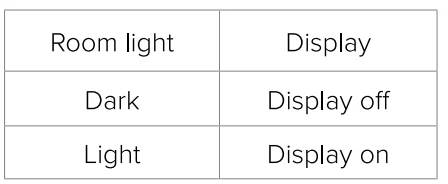
- With light detection on, it is unable to keep the screen lit in a dark roroomf you prefer to keep the display lit up, you can turn off the light detection by pressing and holding the display button for 3 seconds or using the Vesync APP.
Display Lock
When the air purifier is on, you can lock the display to prevent settings from being accidentally changed. Buttons will not respond to being tapped.
- Press and hold
 for 3 seconds to lock the display. The indicator will light up in the center of the display.
Note: If the display is turned off, the indicator will flash 3 times to show that the display has been locked, then turn off. - The indicator will blink when any other button is tapped to indicate that Display Lock is on.
- Tap and hold again for 3 seconds to unlock the display. The indicator will turn off.
Note:- If the display is turned off, the indicator will flash 3 times to show that the display has been unlocked.
- Display Lock can still be used when the air purifier is in Standby Mode.
- If the display is turned off, the
Standby Mode
The air purifier is in Standby Mode when it is turned off, but plugged in.
Note: Display Lock can be used while the air purifier is in Standby Mode to keep the air purifier from being turned back on. The laser dust sensor will still detect the surrounding air quality and give you updates in the VeSapp opp.
Memory Function
When the air purifier is plugged in and turned off, it will remember its previous fan speed, Sleep Mode, Auto Mode, Display Lock, and Light Detection settings. When the air purifier is unplugged and turned off, it will only remember its previous fan speed, Sleep Mode, Auto Mode, and Light Detection settings.
Note: The air purifier will remember the last timer setting chosen (1-12 hours), but it will not automatically resume the timer. You will need to restart the timer after the air purifier is turned back on.
Light Detection
- The light sensor is off by default. You can turn on/off Light Detection in the Vesync APP. You can also press and hold the display button for 3 seconds to turn on/ off Light Detection, and the air quality indicator blinks once when the operation is complete.
- While the air purifier is operating, the Light sensor will detect the brightness of the room and work according to the ambient light.
Note:
- When the light is on and the room is in darkness, if the air purifier is in Auto Mode or Pet Mode, it will not use the high or turbo fan speed to avoid making too much noise.
- When the room becomes light again, the air purifier will return to its previous setting. The display will automatically turn back on.
- With the light detection on, if you click, the screen will stay off; however, you can’t get the screen to stay on in a dark room.
VeSync App Functions
The VeSync app allows you to access additional smart air purifier functions, including those listed below. As the app develops, more features may become available.
Remote Control
- Change any air purifier settings through the app, even while Display Lock is on.
Air Quality Updates
- View real-time PM2.5 updates in the app.
- See your air quality history for the last four weeks.
Light Detection
- Access Light Detection, which uses the light sensor to detect the amount of light in the room and automatically adjust air purifier settings (see page12).
Schedules
- Create and customize schedules for your air purifier to match your routines.
Timer Function
- Set a timer between 1 and 24 hours.
- Easily view the exact time remaining on a timer.
Filter Replacement Info
- Keep tabs on the remaining filter life by checking the filter life percentage in the app.
- Shop for replacement filters.
Auto Mode
- Access additional auto modes: Quiet Auto Mode, Efficient Auto Mode, and ECO Auto Mode.
- Quiet Auto Mode only uses the low and medium fan speeds, even when the air quality is poor, to avoid making too much noise.
- Efficient Auto Mode lets you choose the size of the area you want to purify.
- The air purifier will use the highest fan speed (turbo) to clean the air for a designated amount of time. This time is based on 1 ACH and the size of the room, meaning how long it takes for the air purifier to clean all the air in your room one time, regardless of the air quality. After this, the mode will adjust the fan speed according to the actual detected air quality in the room.
- Note: Efficient Auto Mode is useful for purifying odors from the air. The air purifier’s sensor can only detect particles in the air, not smells. Efficient Auto Mode does not rely only on the sensor, but also on the room size.
- ECO Auto Mode allows the fan speed to turn on/off intermittently when the air quality is Very Good, to save electricity. When air quality is poor, the fan speed will be increased, like standard Auto Mode.
ABOUT THE FILTER
The air purifier uses a 3-stage filtration system to purify the air.
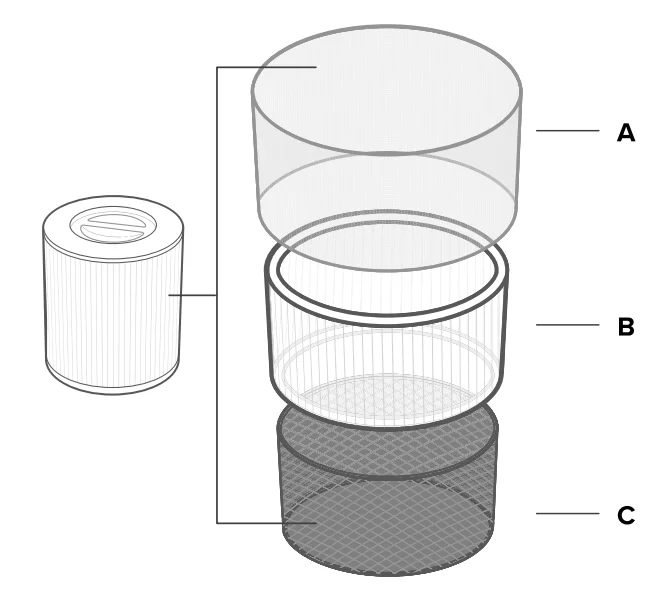
- A. Pre-FIiter
- Captures large particles such as dust, lint, fibers, hair, and pet fur.
- Maximizes the filter’s life by protecting it.
- B. Main filter
- Traps small particles such as fine dust, smoke particles, pollen, and pet dander.
- C. Custom High-Efficiency Activated Carbon Filter
- Physically adsorbs smoke, odors, and fumes.
- Customized using Levoit’s exclusive ARC Formula to be especially effective for cooking smells and pet odors in a multi-pet household.
- Filters compounds such as formaldehyde, benzene, ammonia, hydrogen sulfide, and volatile organic compounds (VOCs).
Note: Levoit air purifiers filter airborne particles 0.3 microns in size. Arovast Corporation makes no claims that this air purifier helps reduce the COVID-19 virus.
Humidity
Moisture may damage the filter. This air purifier should be used in an area with a humidity level below 85% RH. If you use the air purifier in excessively humid areas, the surface of the filter may become moldy.
Note: Water or moisture will allow mold to grow. To solve a mold problemGetet rid of the source of the moisture and clean up the mold.
Essential Oils
Do not add essential oils to the air purifier or filter. The filter will become damaged by the oil and will eventually release an unpleasant smell. Do not use diffusers near the air purifier.
TROUBLESHOOTING
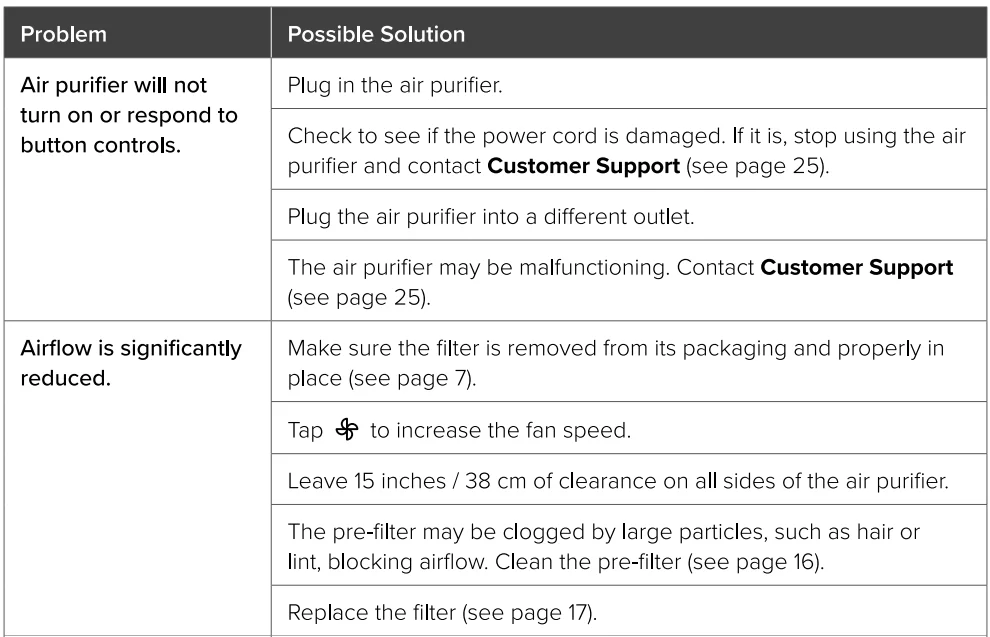
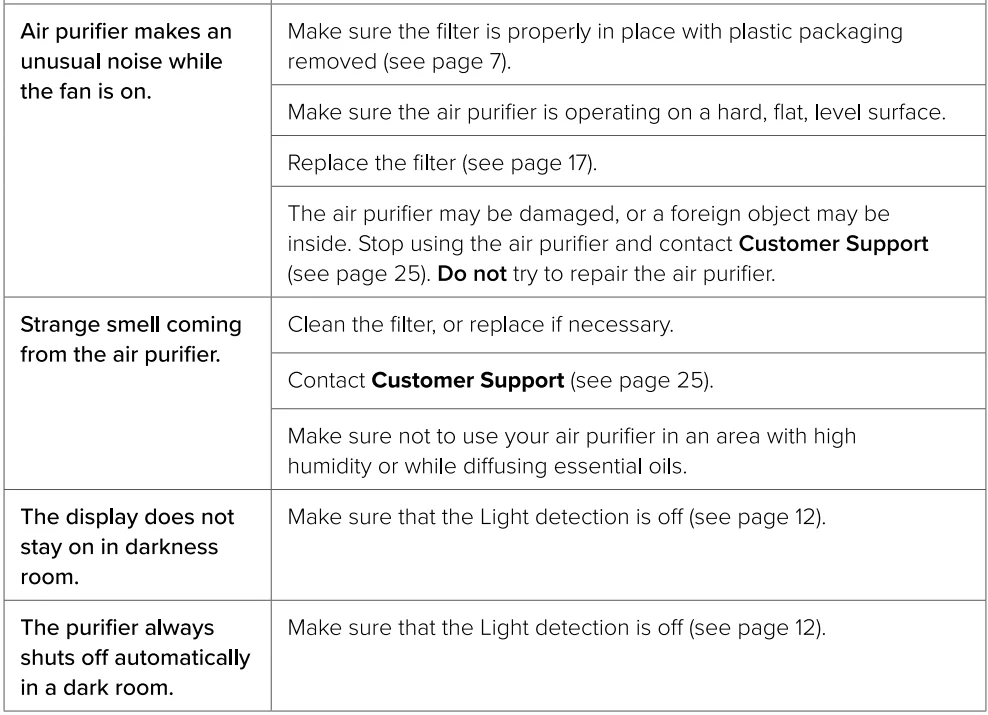
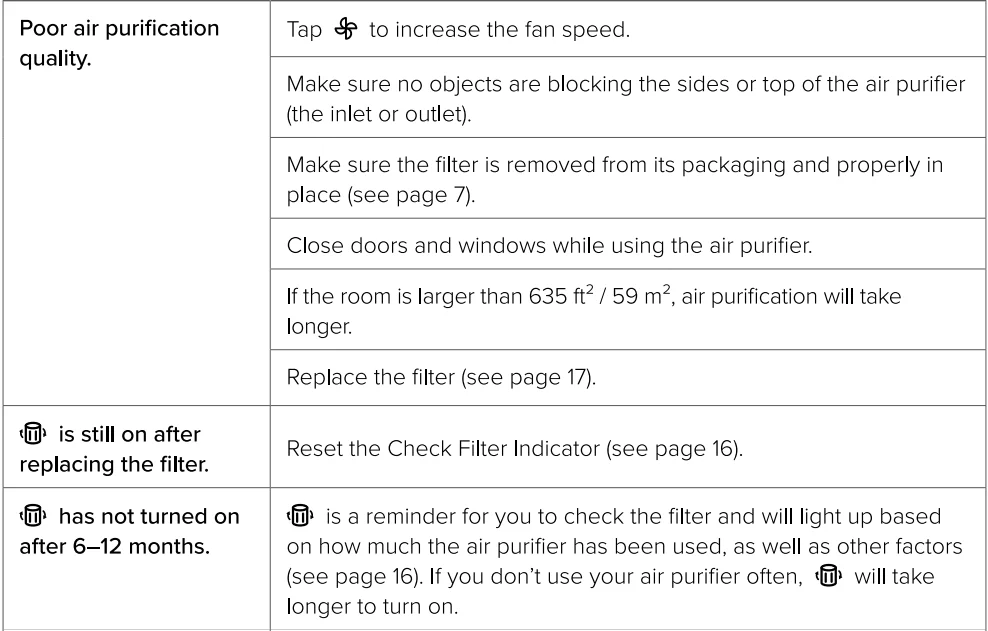

If your problem is not listed, please contact Customer Support (see page 25).
VESYNC APP TROUBLESHOOTING
My smart air purifier isn’t connecting to the VeSync app.
- Make sure your phone has Bluetooth® turned on and is not currently connected to another Bluetooth device.
- During the setup process, you must be on a secure 2.4GHz Wi-Fi® network. Confirm that the network is working correctly.
- Make sure the Wi-Fi password you entered is correct.
- There should be no spaces at the beginning or end of the password.
- Test the password by connecting a different electronic device to the router.
- If you’re manually typing in the SSID and password, double-check that both are entered correctly.
- Try moving your air purifier closer to the router. Your phone should be as close as possible to your air purifier.
- Your router may need to be at a higher location, away from obstructions.
- Make sure your air purifier and router are away from appliances (such as microwave ovens, refrigerators, electronic devices, etc.) to avoid signal interference.
- If you’re using a VPN, make sure it’s turned off while setting up your air purifier.
- Disable portal authentication for your Wi-Fi network. If portal authentication is enabled, the air purifier will not be able to access your Wi-Fi network, and setup will fail.
Note: Portal authentication means that you need to sign in to your Wi-Fi network through a web page before you can use the Internet.
My air purifier is offline.
- Make sure the air purifier is plugged in and has power, then refresh the VeSync menu by swiping down on the screen.
- Make sure your router is connected to the internet, and your phone’s network connection is working.
- Delete the offline air purifier from the VeSync app. Swipe left (iOS®) or press and hold {Android~). Then tap Delete. Reconfigure the air purifier with the VeSync app.
Note: Power outages, internet outages, or changing Wi-Fi routers may cause the air purifier to go offline.
If your problem is not listed, please contact Customer Support (see page 2 5).
Any limitations for app support
I0S operating system version i0S12 or later,
Android operating system version, Android6 and above
For more manuals by LEVOIT, visit ManualsLibraryy
LEVOIT Core 600S-P Gray Air Purifier- FAQs
What is the Levoit Core 600S-P Air Purifier?
The Levoit Core 600S-P is a smart air purifier with a 3-stage filtration system. It can filter a room up to 635 sq. ft. five times per hour, removing dust, allergens, mold spores, and odors efficiently.
What are the 3 filtration stages?
It includes a pre-filter for large particles, a True HEPA filter for fine particles, and an activated carbon filter for odors and chemicals.
How do I operate the Levoit 600S-P?
You can control it using the touch panel, remote, or the VeSync app. It has manual and smart auto modes for automatic fan speed adjustment based on air quality.
Where should I place my Levoit air purifier?
Place it in an open area with good airflow. Keep it away from walls and furniture, ideally 1–3 meters from your bed if used in a bedroom.
Should I leave it running all the time?
Yes. Continuous operation ensures cleaner air, and Auto Mode adjusts the fan for optimal performance.
Can I sleep with the purifier running?
Yes. It runs quietly at night and provides clean air while you sleep.
Can it remove mold spores?
Yes. The True HEPA filter captures mold spores, dust, allergens, and bacteria.
Is it energy-efficient?
Yes. It consumes 30–100 watts depending on fan speed, similar to running a few light bulbs or a small fan.