
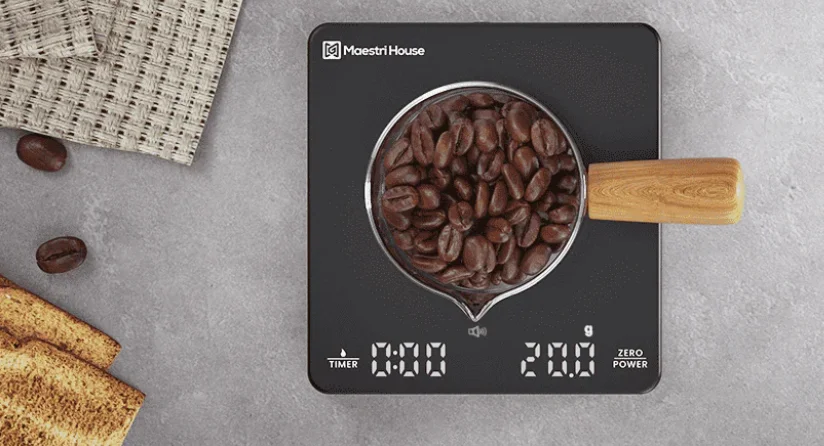

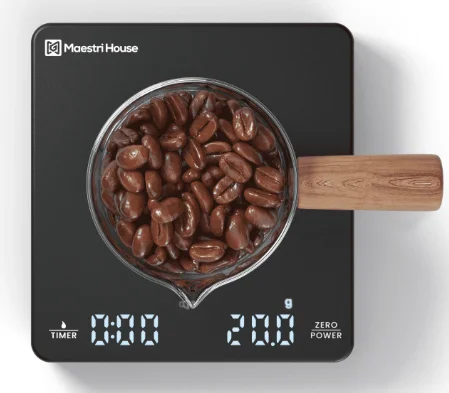
Maestri House KC200 Mini Coffee Scale
SAFETY PRECAUTION
Prepare Before Use
Open the packing box carefully, save all the packing materials inside, take out the scale to check whether it is complete, and read the manual carefully to check whether the accessories are complete. Clean the coffee scale before first use, and remove dust or production residue according to the cleaning and maintenance schedule.
Precautions
- The electronic scale is not waterproof. Please do not wash it, and keep the charging port dry.
- The weighing range of the electronic scale is 2KG. Please do not weigh objects that are too heavy to cause damage.
- The surface temperature of the product is -10 degrees Celsius to 60 degrees Celsius, and after placing the heat insulation pad, it is -20 degrees Celsius to 100 degrees Celsius.
- The electronic scale needs to be used on a static level. The parts of the electronic scale are precise, so please do not bump them vigorously or drop them at will.
- Do not use the product during charging.
KNOW YOUR MAESTRI HOUSE COFFEE SCALE
Product Accessories
- Smart coffee scale*1
- Silicone pad*1
- TYPE-C charging cable*1

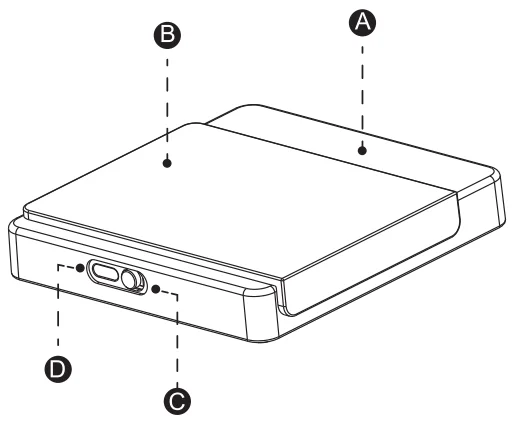
- A: Coffee Scale
- B: Silicone Pad
- C: On/Off
- D: Charging C Port
Function Introduction
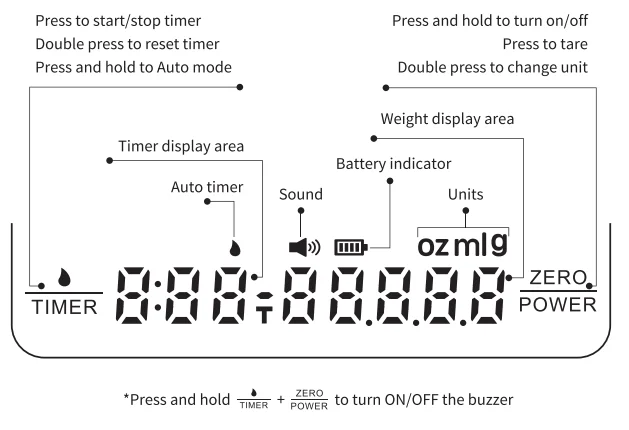
FEATURE FUNCTION OF MAESTRI HOUSE COFFEE SCALE
Product Specification
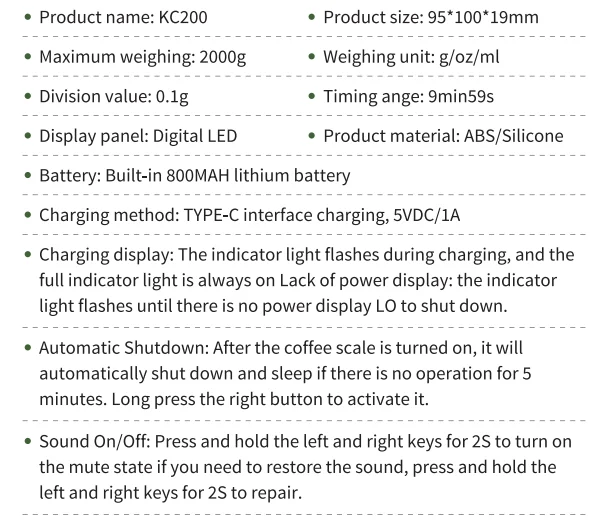
OPERATING YOUR MAESTRI HOUSE COFFEE SCALE
How To Use
Ordinary Weighing Mode: Turn on the back switch and toggle it to the ON state, place the coffee scale on a flat table, and the coffee scale will automatically detect, and all the numbers will return to zero (if the weighing display has not returned to zero, click the right button to tare and clear). Click the left button to start timing, click again to pause timing, and click again to continue timing. Double-click the left button to reset the timer and restart it. Right-click to tare and clear, double-click to switch the weighing unit g/ml/oz.
Automatic Weighing and Timing Mode: Long-press the left button for 2 seconds to enter the automatic weighing and timing mode. At this time, the water droplets icon appears, and all the displayed numbers are reset to zero (if the display has not been reset to zero, click the right button to tare and clear). Place the water cup on the scale, and click the right button to reset it to zero (reminder: for people in a particular use or with special needs, you can also click the left button to reset it).
When the liquid is poured in, the weighing number starts to display and increases continuously, and the automatic timing function starts after the water flow is constant and stable (the timing start time will be slightly delayed according to the stability of the water flow state). When the coffee scale stops weighing and counting when the liquid is contained, the time and weight can generally be read at this time. If you need to restart the automatic mode weighing and timing again, click the left button to reset all to zero and continue the operation.
Espresso Machine Automatic Timing and Weighing Mode
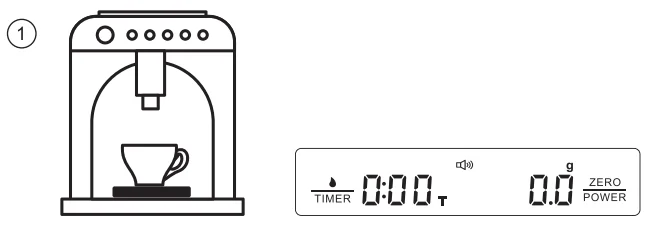
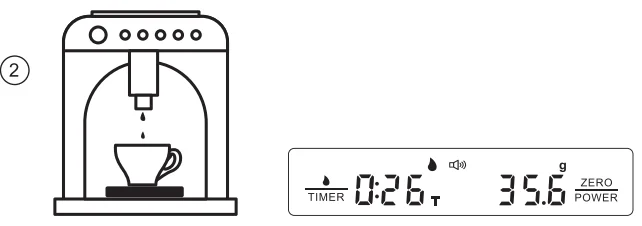
- After turning on the machine, place the coffee scale flat on the tray of the espresso machine. After automatic detection, after turning on, put the coffee cup on the platform of the coffee scale, right-click to reset, and press and hold the TIMER button to enter the automatic weighing and timing mode.

- Press the TIMER button for 2 seconds to enter the automatic weighing and timing mode; the water drop symbol is displayed. Turn on the espresso machine and start making coffee. When the coffee flows into the coffee cup, the coffee scale starts weighing, and the timer begins counting simultaneously. When the coffee machine stops making coffee, the coffee stops flowing into the cup, and the coffee scale stops weighing and timing. If it is necessary to re-weigh and count, click the left button to clear all and start making the next cup of coffee.

Pour-Over Coffee Regular Mode
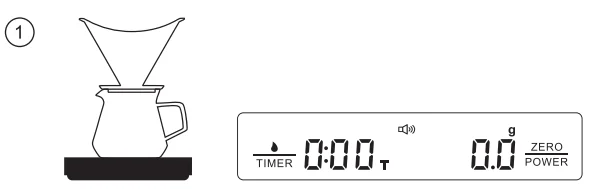
- Place the coffee scale flat on the table after turning on the machine. After the automatic detection of the coffee scale is completed, place the hand-pouring utensils on the scale in turn. After soaking the coffee paper, short-press the right button to tare.

- Add the ground coffee powder, and at the same time, pay attention to check the specific weighing value.

- Short-press the right button again to tare, and the weight value will reset to zero. The coffee is now ready for brewing. Short press the left button timing button to start the timing function, and the timer will help you better control the steaming and water injection time.

- After brewing, short-press the left button to stop timing, and the coffee scale will accurately display the brewing data for you.

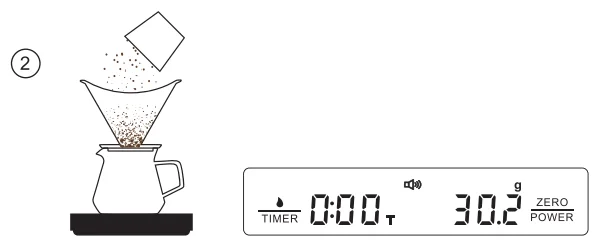
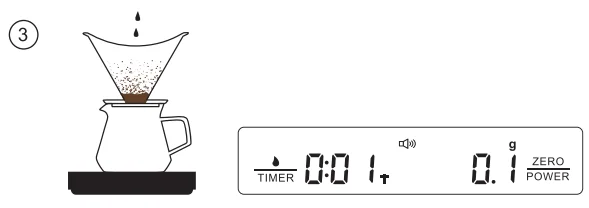
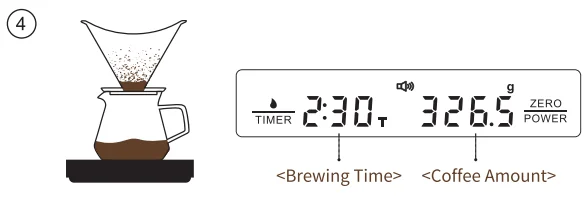
Pour-Over Coffee Automatic Timing Mode
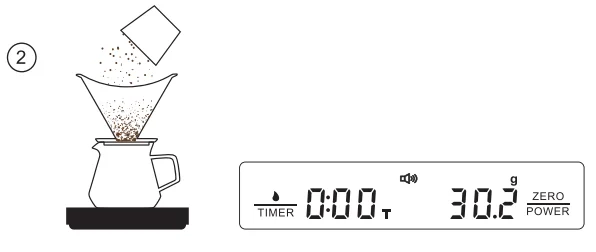
- Place the coffee scale flat on the table after turning on the machine. After the automatic detection of the coffee scale is completed, place the hand-pouring utensils on the scale in turn. After soaking the coffee paper, short-press the right button to tare.

- Add the ground coffee powder, and at the same time, pay attention to check the specific weighing value.

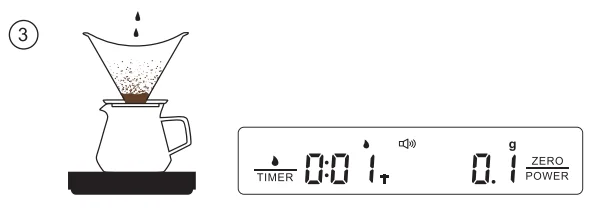
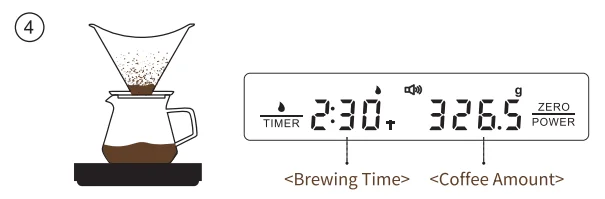
- Long-press the timing button, and the coffee scale will enter the automatic timing/weighing state (water drop display), and all displays will be reset to zero. Now it is ready for coffee brewing. When the water is injected, the timing and weighing will run automatically. The start time will be slightly delayed according to the stability of the water flow state, which is a normal detection delay.

- After brewing, the coffee scale stops timing and weighing, and the coffee scale will accurately display the brewing data for you. Take away the coffee utensil, and short-press the left button for timing, and all the weighing/timing data will be cleared. A new coffee brewing can be performed again.

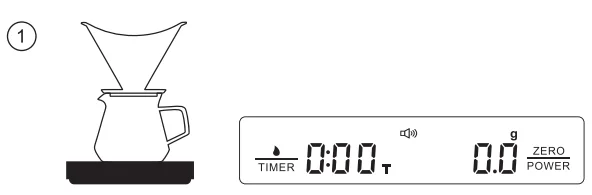
DISCARD & RECYCLE
- Dispose of packaging in accordance with local waste regulations. Cardboard and paper are classified as recycled paper, and plastic is classified as resource recovery (potentially recyclable). After the product is scrapped, it cannot be treated as domestic waste directly and must be sent to a special recycling site. This product has shown in the instructions and packaging that it cannot be thrown into the trash can (mark X on the trash can).
- For questions about how to dispose of used cups, please consult your local recycling point (the recycling point for old equipment at the municipality’s point of disposal). All materials are reusable according to the label, and whether you use material recycling or other forms of reuse of aging equipment, you are doing your part to protect the environment.
CUSTOMER SUPPORT
Thank you for purchasing Maestri House home appliances. Please do not hesitate to contact us if you need any help. Our Emails: [email protected], Website: www.maestrihouse.com.
For More Manuals By Maestri House, Visit ManualsLibraryy.
Maestri House KC200 Mini Coffee Scale-FAQs
What is the Maestri House KC200 Mini Coffee Scale used for?
The Maestri House KC200 Mini Coffee Scale is designed to measure coffee grounds, water, and extraction time for precise brewing. It helps users maintain consistent ratios for espresso and pour-over coffee, improving flavor accuracy and repeatability in daily coffee preparation routines.
Does the KC200 coffee scale include a timer function?
Yes, the KC200 features both manual and automatic timer modes. The automatic timer can start when liquid flow is detected, which is useful for espresso shots and pour-over brewing, while the manual mode allows full control over timing during coffee preparation.
How accurate is the Maestri House KC200 Mini Coffee Scale?
The KC200 offers high-precision measurements suitable for coffee brewing, allowing users to track small weight changes accurately. This level of precision helps ensure proper coffee-to-water ratios, which are essential for achieving balanced flavor in espresso and filter coffee.
Is the KC200 scale rechargeable or battery-powered?
This coffee scale comes with a built-in rechargeable battery and uses a USB-C charging port. It eliminates the need for disposable batteries and supports long usage periods, making it convenient for regular coffee brewing without frequent recharging.
What measurement units does the KC200 support?
The scale supports multiple units, including grams, ounces, and milliliters. Users can easily switch between these units depending on their brewing method or preference, making it versatile for different coffee recipes and measurement styles.
Can the KC200 be used for both espresso and pour-over coffee?
Yes, the KC200 is suitable for both espresso and pour-over brewing. Its compact size fits under espresso machines, while the timer and precision features make it equally effective for controlling bloom and pour timing in manual brewing methods.
How compact is the Maestri House KC200 Mini Coffee Scale?
The KC200 is designed to be ultra-compact, making it easy to fit under espresso machine drip trays or in small kitchen spaces. Its small footprint allows for portability and convenience without sacrificing functionality for precise coffee measurements.
Does the KC200 have an auto shut-off feature?
Yes, the scale includes an automatic power-off function that activates after a period of inactivity. This helps conserve battery life and ensures the device remains efficient, especially for users who may forget to turn it off after brewing.
Is the KC200 coffee scale water-resistant or heat-resistant?
The KC200 includes a heat-resistant surface and a removable silicone pad that protects the scale from hot brewing equipment. Its design also offers some resistance to water splashes, making it suitable for everyday coffee brewing environments.
Is the Maestri House KC200 Mini Coffee Scale good for beginners?
Yes, the KC200 is beginner-friendly due to its simple controls, clear display, and automatic features. While it offers advanced functions like auto-timing, its intuitive design allows new users to quickly learn and improve their coffee brewing skills with minimal effort.