
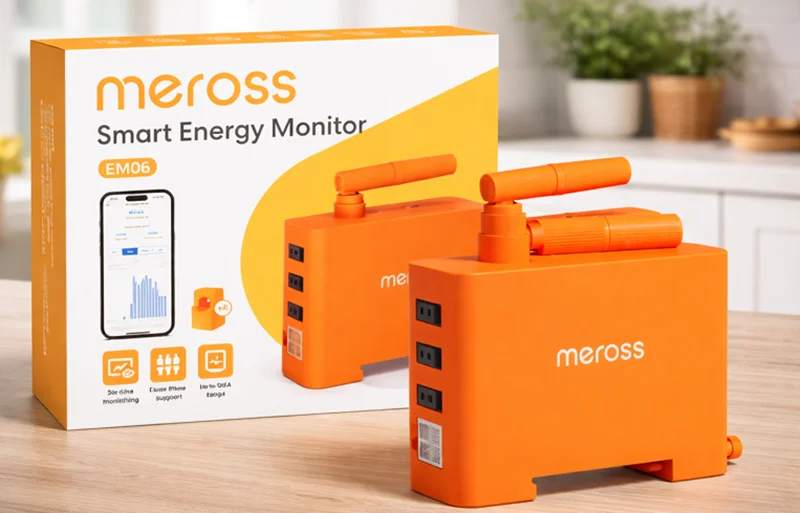

Meross EM06 Smart Energy Monitor
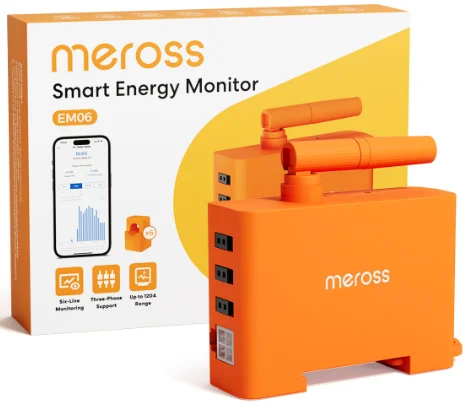
Safety Information
- Always wear Personal Protective Equipment (PPE) when installing the Meross EM06.
- Only use the Meross EM06 as specified in this installation guide and avoid any other usage.
- If you suspect any damage to the Meross EM06 equipment, do not attempt to use it.
- Avoid installing the Meross EM06 in humid environments and keep it away from direct sunlight.
- Make sure the Meross EM06 is not connected to the power supply during any manual processes, such as installation or removal.
- The current transformer (CT) is rated at 120 A and saturated at 150 A. The current to be detected will be limited to a maximum of 150 A.
Need Help?
If you have any questions during the hardware installation or setup process, please contact us at: http://www.meross.com/support/faqs.
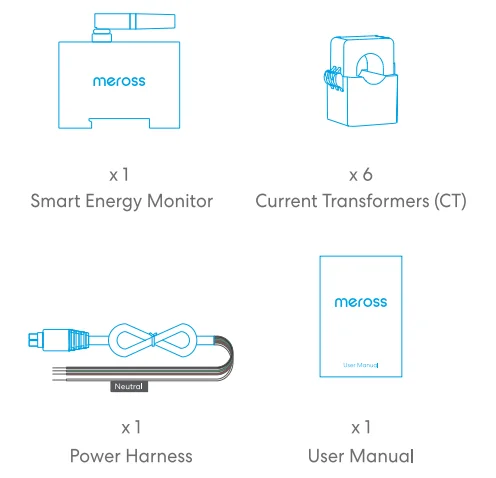
Package Content
Installation Guide
- Download the Meross app. Scan the QR code to download the Meross app and register an account.

- Preparation for installation. Before starting the installation process, it is essential to turn off the main circuit breaker in your electrical panel. This will ensure that the panel where you plan to install the equipment is completely de-energized and safe to work with. Additionally, make sure to allocate enough space in the electrical panel for the equipment. This will allow for easy mounting on DIN rails.
- Plug in the power harness. Insert the power harness into the designated side of the monitor, ensuring a secure and proper connection. It should snap into place. The power harness is designed to support the capture of single-phase and three-phase voltages while providing power to the EM06 device. Additionally, make sure to allocate enough space in the electrical panel for the equipment. This will allow for easy mounting on DIN rails.
Caution! When connecting the current transformers (CT) later, ensure that each current transformer (CT) is correctly aligned with the corresponding voltage harness to ensure accurate data collection.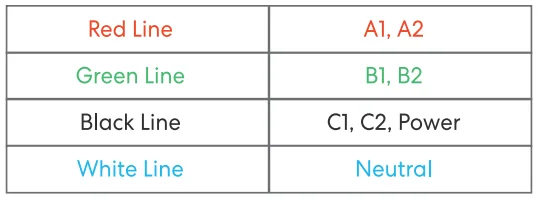
- The voltage captured by the red line corresponds to the current in the A1 and A2 lines.
- The voltage collected on the green line corresponds to the current in the B1 and B2 lines.
- The black line collects the voltage corresponding to the current in lines C1 and C2, and supplies power to the EM06.
- The white wire is the neutral wire.
4. Wire connection
- Single-phase circuit: In a single-phase circuit, all 6 current transformers (CTs) have the same voltage, allowing you to monitor any 6 lines in the electrical panel.

- Two-phase circuit: When monitoring a two-phase circuit, it is crucial to ensure the correct correspondence between the voltage lines and the current ports listed in step 3. Failing to establish the correct matching relationship may result in inaccurate consumption metering results.

- Three-phase circuit: When monitoring a three-phase circuit, it is crucial to ensure the correct correspondence between the voltage lines and the current ports listed in step 3. Failing to establish the correct matching relationship may result in inaccurate consumption metering results.

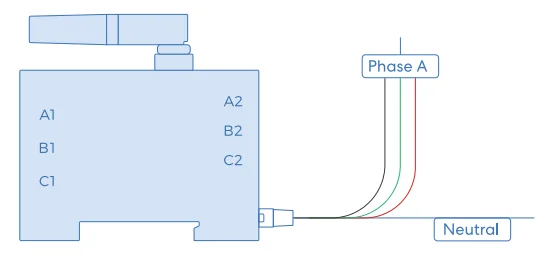
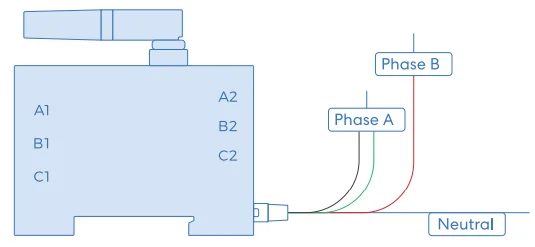
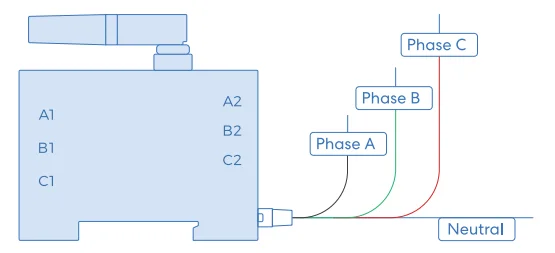
5. Installation of CT.
Clip your current transformer (CT) to the corresponding line according to the correspondence between the voltage line and the current port listed in step 3.
6. Set up the device
- Launch the Meross app and log in to your account, or if you are a new user, tap Sign up to create a new account.
- Tap the “+” icon to select the type “Smart Energy Monitor”, then you can just follow the setup wizard to finish the configuration.
NOTE:
- This smart device needs to be set up via Bluetooth. Please make sure the Meross app is granted access to the required system permissions and that the Bluetooth of your smartphone has been enabled.
- Find more at https://www.meross.com/support.
LED Rules
Green light blinking:
- The device is in pairing mode. To connect, ensure Bluetooth is turned on and use the Meross app to discover your device.
- Firmware upgrade is currently in progress.
Red light is continuously on:
- The device is connected to the router, but the router does not currently have an available network connection.
Red light blinking:
- Your device is disconnected from the router. Please check the router connection and ensure it is properly connected.
Button Function
Press and hold the button for 5 seconds and then release the button; the device will reset. The device will enter pairing mode after completing the reset; the green light blinks.
Technical Specifications
- Power Supply: 100-240V~
- Voltage-current Correspondence:
- Red -> A1, A2
- Green -> B1, B2
- Black -> C1, C2
- CT Range: Maximum 120A for single line
- Dimensions (W x D x H): 7.3 x 5.2 x 2.45 cm (Monitor size)
- CT Line Length: 90 cm
Operating Frequency
No restrictions exist in the use of radio frequencies or frequency bands in all EU member states, EFTA countries, Northern Ireland, and Great Britain. Operating Frequency / Max Output Power: 2400MHz~2483.5MHz/20dBm.
FAQ
Why can’t the Meross app find my device after installing EM06?
- Check that the main circuit breaker is on.
- Check that the circuit breaker supplying power to the EM06 is turned on.
- Check if the device LED is blinking slowly in green (once every 0.5s). If not, press and hold the button for 5 seconds to reset and try again.
- Make sure that your phone is authorized for the Meross app and has Bluetooth turned on.
Why is the Meross app unable to obtain real-time current and consumption data from the EM06?
- Check that the current transformer is securely plugged into the monitor.
- Check that the cable with the transformer clipped to it is working with a load device.
Why is the reading of the sales volume in the Meross app showing as a negative number?
It may be due to the CT sensor’s direction being reversed. Reversing the direction of the CT sensor should resolve the issue. The correct wiring direction is when the current direction matches the direction indicated on the CT sensor (K->L). In the correct wiring configuration, a positive value indicates power consumption by appliances, while a negative value indicates generation (such as monitoring home power generation devices, etc.).
Warranty
Meross products are covered by a 24-month limited warranty from the date of purchase. Please visit https://www.meross.com/support/warranty for the detailed warranty policy and product registration.
Support
For technical support, user guide, warranty, FAQs, and other information, please visit https://www.meross.com/support/.
Declaration of Conformity
Meross declares that this product bearing the CE marking complies with the following EU directives: 2014/53/EU, 2014/30/EU, 2011/65/EU & (EU) 2015/863. Compliance with these Directives implies conformity to harmonized European standards that are noted in the EU Declaration of Conformity, which may be found at: https://www.meross.com/support/eudoc.
Disclaimer
- The function of this smart device is tested under a typical circumstance described in our specifications. Meross does NOT guarantee that the smart device shall perform the same as described under all circumstances.
- Meross’s total liability is limited to what is expressly covered in its Privacy Policy.
- Damages arising from ignorance of the SAFETY INFORMATION shall not be covered by Meross’s after-sales service, nor does Meross take any legal responsibility therefrom. Customers acknowledge their understanding of these articles clearly by reading this manual.
For More Manuals By Meross, Visit ManualsLibraryy.
Meross EM06 Smart Energy Monitor-FAQs
What is the Meross EM06 Smart Energy Monitor used for?
The Meross EM06 Smart Energy Monitor is designed to track household electricity usage in real time. It helps users monitor power consumption across multiple circuits, identify energy-hungry devices, and make informed decisions to reduce electricity bills and improve overall energy efficiency.
How many circuits can the Meross EM06 monitor simultaneously?
The device supports monitoring up to six different circuits at once using individual clamps. This allows users to track energy consumption across multiple appliances or areas of the home, offering a detailed breakdown of where electricity is being used most effectively and where savings can be made.
Does the Meross EM06 provide real-time energy data?
Yes, the monitor delivers real-time measurements including voltage, current, power, and power factor. This instant feedback allows users to observe energy usage as it happens, making it easier to detect unusual consumption patterns or inefficiencies and respond quickly to reduce waste.
Can the Meross EM06 store historical energy data?
The device stores historical energy data in the cloud for up to three years. Users can review daily, weekly, and monthly trends through charts, helping them analyze long-term consumption patterns and better understand seasonal or behavioral changes in electricity usage.
Is the Meross EM06 compatible with solar energy systems?
Yes, the monitor supports tracking energy generated by solar panels or wind systems. It can measure both consumption and production, allowing users to understand how much energy they generate versus use, which is especially useful for optimizing renewable energy setups.
How is the Meross EM06 installed?
The device is designed for DIN rail installation inside an electrical panel, making it suitable for structured setups. It requires proper wiring, including a neutral connection, and the correct placement of current transformers to ensure accurate readings and safe operation during use.
Does the Meross EM06 offer safety alerts?
Yes, it includes intelligent alert features that notify users of abnormal conditions like overloads or short circuits. These alerts help protect the home’s electrical system by providing early warnings, allowing users to take action before issues escalate into serious safety risks.
Can the Meross EM06 integrate with smart home systems?
The device is compatible with platforms like Home Assistant, enabling automation and advanced monitoring setups. Users can integrate energy data into smart home routines, making it easier to optimize usage patterns and create energy-efficient automation scenarios based on real-time data.
How accurate is the Meross EM06 energy monitoring?
The monitor offers high accuracy with measurements typically within ±1%. This level of precision ensures reliable tracking of energy usage, making it suitable for both general household monitoring and more detailed energy management applications where accuracy is important.
Is the Meross EM06 suitable for beginners?
While the interface and app are user-friendly, installation may require basic electrical knowledge or professional assistance. Once installed, the system is easy to use, offering intuitive charts and data visualization that make energy monitoring accessible even for users new to smart home devices.