
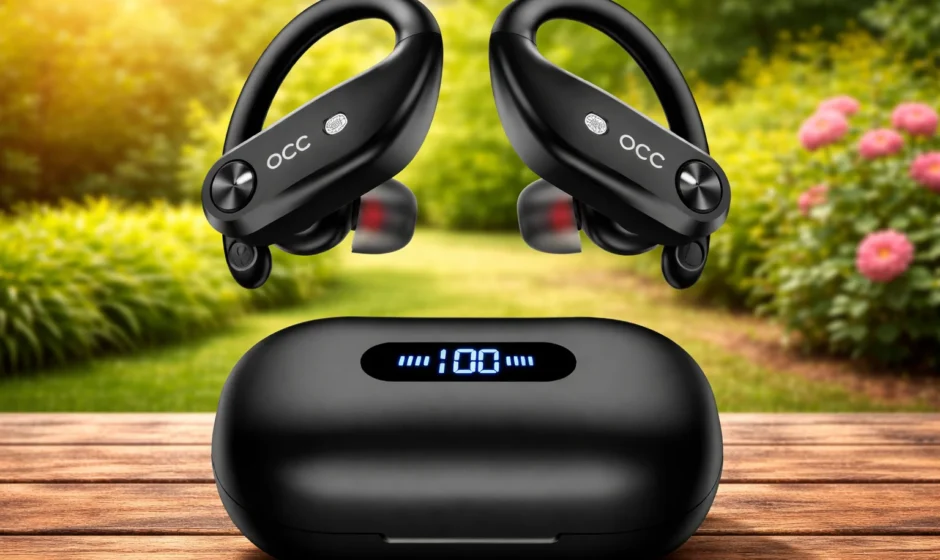

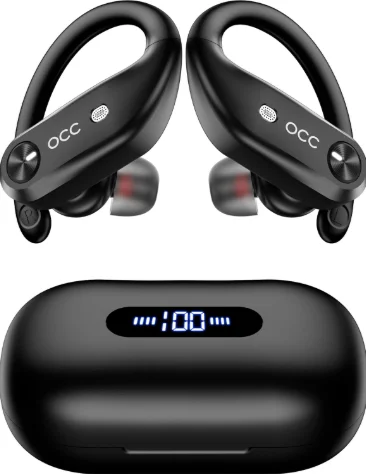
Occiam T18 Sports Wireless Earbuds
What’s in the box?
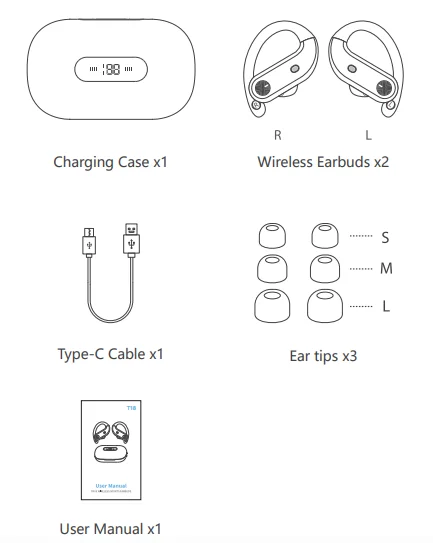
Note: Please remove protective films from the LED power display and charging contacts before using them.
Overview
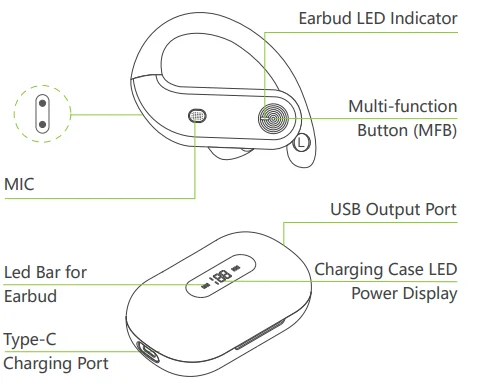
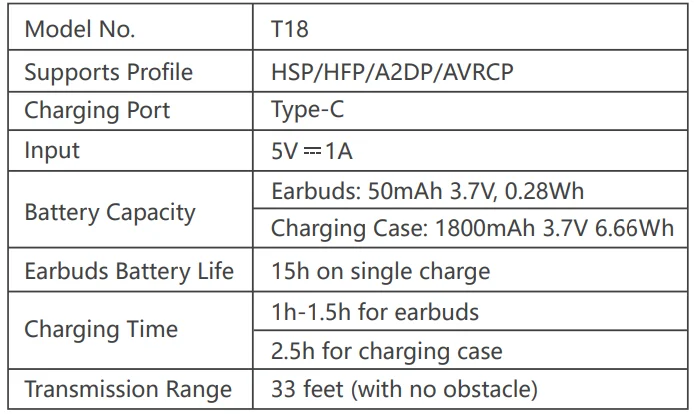
Product Parameters
Bluetooth Connection
Prior to first use (or not in use for a long time), please charge both earbuds and the charging case with the supplied Type-C charging cable.
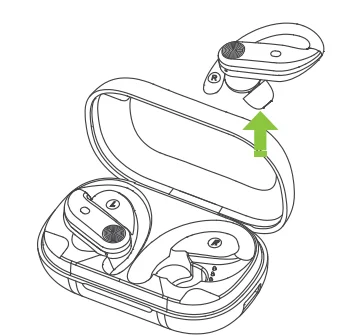
- Take out the twin earbuds from the charging case. They will automatically power on and enter pairing mode. At this time, the LED indicator of the vice earbud goes off, and the LED indicator of the master earbud flashes white slowly.

- Activate the Bluetooth setting on your phone, search for and connect to “T18”. Once connected, the LED indicator of the master earbud goes off.

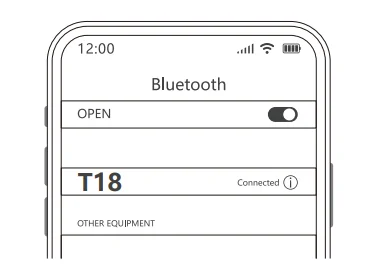
Note: If the earbuds are not connected to your device for over 3 minutes, the earbuds will power off.
For the Second Time and Subsequent Use
If your device has already connected with the earbuds, the second time using them, when you take out the earbuds from the charging case, they will connect with your device automatically.
Connect with Other Devices
If you want to connect the earbuds with other devices, there are three methods as follows:
- Delete “T18” from the Bluetooth list of the previously connected device.
- Before they connect to other devices, please turn off the Bluetooth of the previously connected device.
- Reset the earbuds.
Mono Mode (Only Left/Right Earbud Is Being Used)
- You can use one earbud alone, leaving another earbud in the charging case. Turn on the Bluetooth on your device, search for “T18”, and click to connect.
- Two earbuds can be used alone in two devices at the same time, like you have two completely separate earphones. Just make sure the two earbuds are over 10 meters apart before connecting them to your two different devices. After the connection is successful, even if the two earbuds are close together, they will not interfere with each other.
Note: If you want to get them back to stereo mode from mono mode, please reset them.
Factory Restore Setting
When should I reset?
- When only one side plays music.
- When you can’t use the two earbuds together.
- When both earbuds fail to pair with each other or experience connection-related issues.
How to reset?
- Deactivate the Bluetooth setting of all devices near the earbuds.
- Pick up two earbuds from the charging case. The earbuds will power on automatically.
- Quickly press 5 times on the button of both earbuds until the earbud LED indicator flashes 3 times quickly (if you wear the earbud, you will hear a voice prompt “power off”), then the earbud will power off, which means resetting is finished.

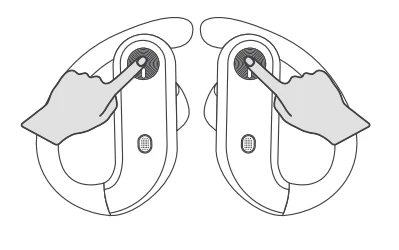
Note: After resetting, the pairing record between the earbuds and all your devices will be cleared. In case there is any unsuccessful message on your devices, please consider deleting the historical record of T18 and try the pairing process again.
Power On / Power Off
Auto Power On
Take out the earbuds from the charging case, and the earbuds will automatically power on and start pairing.
Auto Power Off
Put the earbuds back into the charging case, and the earbuds will automatically power off and enter charging mode.
Manual Power On
If the earbuds are not in the charging case, press and hold each earbud for 3 seconds.
Manual Power Off
If the earbuds are not in the charging case, press and hold each earbud for 5 seconds.
How to wear
Gently push the earbuds into your ear and adjust them to get a comfortable fit.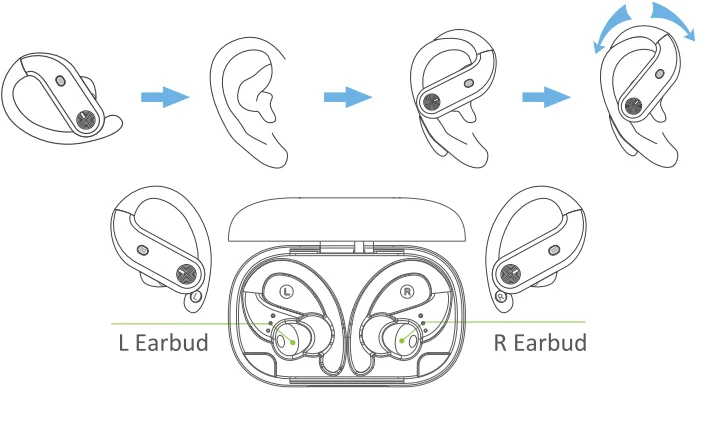
Functions
 For Music
 For Music
[Functions on “R Earbud”]
- Play / Pause: Click Once
- Next Track: Quick Double-Click
- Volume: Long Press MFB

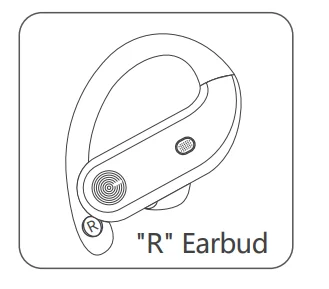
[Functions on “L Earbud”]
- Play / Pause: Click Once
- Previous Track: Quick Double-Click
- Volume: Long Press MFB

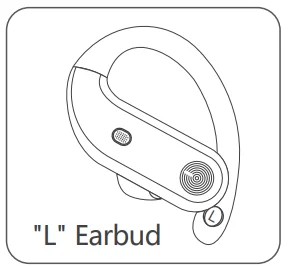
Note: In mono mode, a single earbud does not support volume adjustment.
 For Call
 For Call
- Answer Call: Click Once
- End Call: Click Once
- Reject Call: Long Press 2s

Switch to the third-party call while hanging up your current call: Click Once. Decline the third-party call and keep your current call: Long-press MFB.
 Voice Assistance
 Voice Assistance
Activate Siri or other voice assistants: Quick Triple-Click.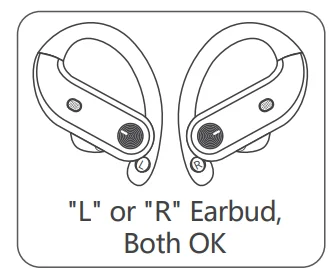
Earbuds Charging
Low Battery Alert
When the battery power is less than 10% (and the voltage is lower than 3.3V), a voice prompt “Low Battery” will be advised. After several instances of low battery alert, the earbuds will shut down as normal.
Earbuds Charging
Put the earbuds into the charging case, and they will power off and be charged. When the earbud LED indicator flashes white light, it means that the earbud is being charged from the charging case. Meanwhile, the LED bar for the earbud on the charging case flashes white light from the 1st grid to the 4th grid repeatedly. Once fully charged, the earbud LED indicator will turn off, and the LED bar for the earbud on the charging case will be off too.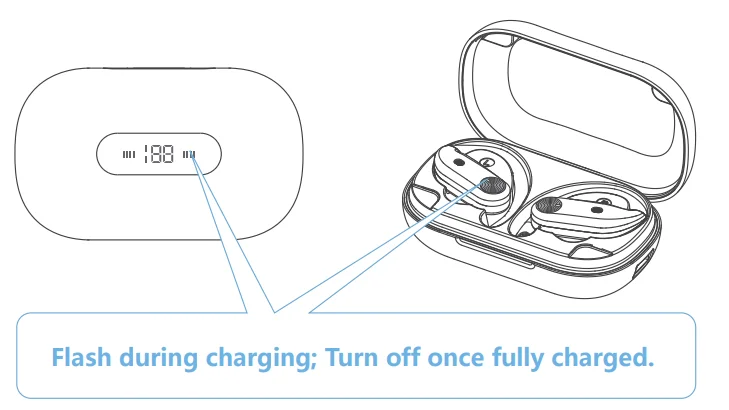
Charging Warning
- After using a period of time, the earbuds don’t charge or cannot even can’t turn on because there may be an oxidized layer or something else on the charging connector or charging pin. You can handle this problem by using an alcohol rag to clean the magnet connector on the earbuds and the charging pin on the charging case.
- Earbuds can automatically turn off immediately and start charging when you put them back into the charging case. Also, they will automatically power on and pair when being picked up.
How to connect devices
 Windows 10
 Windows 10
- Open Settings, then press “Windows Key + I” and click on the “Device”.
- Go to the left-pane menu and click “Bluetooth & other devices”.
- Under “Mouse, keyboard, pen”, you will see a battery percentage indicator on the right side.
 Mac
Mac
 Mac
MacOption 1
- Click the Apple icon and then “System Preferences” from the menu bar.
- Select “Bluetooth”.
- Mark the checkbox for “Show Bluetooth” in the menu bar.
- To check battery levels, click the “Bluetooth” button from the menu bar. Select your device, and the pop-up menu will display the battery level.
 Android Phone
 Android Phone
- Pair and connect a Bluetooth device to your Android phone.
- Open the Settings app and go to “Connect Devices”.
- Tap on the word “Bluetooth” (not the switch next to it), and you will see a complete list of all connected devices and their battery level.
 Compatible Bluetooth Devices on iOS Phone
 Compatible Bluetooth Devices on iOS Phone
- Open the Bluetooth function of your phone and pair your Bluetooth device.
- Open the “Today View” settings and click the “Edit” button.
- Once in the “Add Widgets” menu, tap the green plus (+) icon next to the “Batteries” widget under “More Widgets”.
- Then you can check the battery usage situation on “Today View”.
Charging Case Charging
Type-C USB Charging
There is a Type-C USB charging cable in the small white box of the package. Please use the 5V / 1A adapter with the Type-C charging cable to charge the charging case. During charging, the charging case LED power display will flash and display the battery in real time. After a full charge, the number is displayed as 100.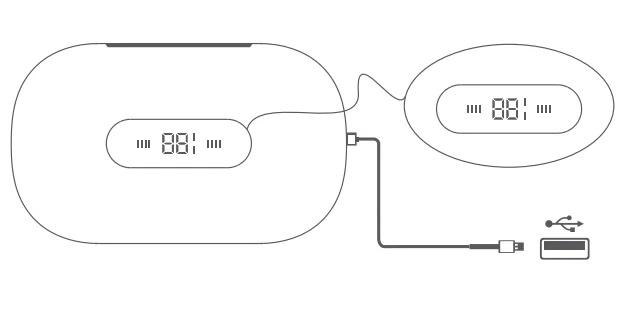
Type-A USB Charging
When charging a cell phone, please use Type-A to connect the charging case.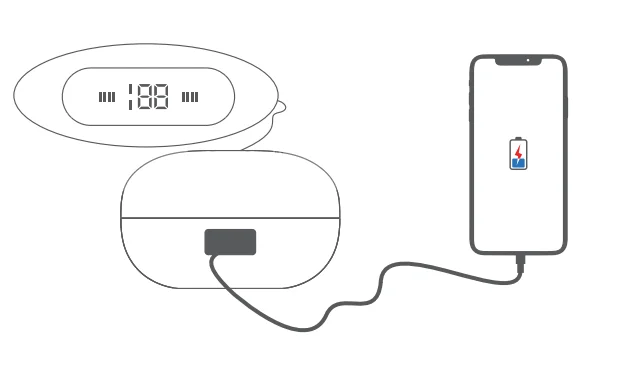
Battery Warning
Using the wrong battery can cause fire and other hazards (for example, in the case of some lithium battery types).
- Disposal of a battery into fire or a hot oven, or mechanically crushing or cutting a battery, which can result in an explosion.
- Do not leave a battery in an extremely high temperature environment, which can result in an explosion or the leakage of flammable liquid or gas.
- A battery subjected to extremely low air pressure that may result in an explosion or the leakage of flammable liquid or gas.
Storage and Maintenance
- If the earbuds have been unused for more than 3 months, we recommend that you charge them.
- Please use chargers that are FCC (Federal Communications Commission) approved.
- Do not disassemble earbuds.
- Adult supervision is required for children aged 6 and under.
- Do not expose the earbuds to high or low temperatures, and do not use the earbuds in a thunderstorm. Avoid falling or violent impact of the device. Keep the device away from fire, and do not put the device in water.
- Do not use oil or any volatile liquid to clean this product.
FCC Caution
Changes or modifications not expressly approved by the party responsible for compliance could void the user’s authority to operate the equipment. This equipment has been tested and found to comply with the limits for a Class B digital device, pursuant to Part 15 of the FCC Rules. These limits are designed to provide reasonable protection against harmful interference in a residential installation. T
his equipment generates uses and can radiate radio frequency energy and, if not installed and used in accordance with the instructions, may cause harmful interference to radio communications. However, there is no guarantee that interference will not occur in a particular installation. If this equipment does cause harmful interference to radio or television reception, which can be determined by turning the equipment off and on, the user is encouraged to try to correct the interference by one or more of the following measures:
- Reorient or relocate the receiving antenna.
- Increase the separation between the equipment and receiver.
- Connect the equipment into an outlet on a circuit different from that to which the receiver is connected.
- Consult the dealer or an experienced radio/TV technician for help.
- This device complies with part 15 of the FCC Rules.
Operation is subject to the following two conditions:
- This device may not cause harmful interference, and
- This device must accept any interference received, including interference that may cause undesired operation.
- This equipment complies with FCC radiation exposure limits set forth for an uncontrolled environment. This equipment should be installed and operated with a minimum distance of Ocm between the radiator and your body.
For More Manuals By Occiam, Visit ManualsLibraryy.
Occiam T18 Sports Wireless Earbuds -FAQs
What are Occiam T18 Sports Wireless Earbuds?
Occiam T18 Sports Wireless Earbuds are Bluetooth earbuds designed specifically for active lifestyles, like workouts, running, and outdoor exercise. They combine a secure fit, sweat-resistant design, and wireless connectivity for comfort and convenience during physical activity. These earbuds focus on stable performance during movement and typically include features like touch controls and decent sound quality for fitness use.
How do I pair Occiam T18 earbuds with my device?
To pair Occiam T18 earbuds, take them out of the charging case—this usually turns them on automatically. Enable Bluetooth on your phone, tablet, or laptop and search for nearby devices. Select “Occiam T18” from the list to connect. Once paired, they should reconnect automatically when taken out of the case in the future, as long as Bluetooth remains enabled on your device.
Are Occiam T18 earbuds suitable for sports and workouts?
Yes, Occiam T18 earbuds are designed with sports in mind. They often include features like water or sweat resistance and ergonomic ear tips that help keep them in place during movement. This makes them a reliable option for gym sessions, running, cycling, and other workouts. Always ensure you pick the right ear tip size for a secure and comfortable fit during activity.
How long does the battery last on Occiam T18 earbuds?
Battery life varies by use and volume, but Occiam T18 earbuds usually offer several hours of continuous playback on a single charge. The charging case can provide extra charges, extending total listening time throughout the day. To get the best battery performance, avoid very high volume levels and store the earbuds back in the case when not in use.
How do I charge Occiam T18 wireless earbuds?
Place both earbuds into the charging case, making sure the metal contacts on the earbuds align with the case connectors. Close the lid if your case has one. The charging case itself must be charged using a USB-C or micro-USB cable (depending on the model). A full charge of the case and earbuds ensures maximum battery life for daily use.
Why are my Occiam T18 earbuds not connecting?
If Occiam T18 earbuds won’t connect, first ensure Bluetooth is enabled on your device and the earbuds are charged. Turn off Bluetooth on your device, turn it back on, and try reconnecting. If the problem persists, reset the earbuds by placing them in the charging case, then removing them back out and initiating pairing again. Also check for signals from nearby devices that may interfere.
Can I use only one earbud at a time?
Many true wireless earbuds, including the Occiam T18, allow single-earbud mode, meaning you can use either the left or right bud independently. This is useful for calls or when you want awareness of your surroundings. Check the user manual to confirm single-earbud operation and any specific steps needed to enable this mode without the other bud.
How do I reset Occiam T18 earbuds?
Resetting Occiam T18 earbuds helps fix issues like pairing problems or unresponsive touch controls. To reset, put both earbuds in the charging case and leave them for several seconds. Then remove them together and follow the pairing steps again. The exact reset process can vary slightly by version, so refer to the user guide if available for exact button sequences.
Do Occiam T18 earbuds support hands-free calls?
Yes, Occiam T18 Sports Wireless Earbuds support hands-free calling thanks to built-in microphones. When paired to your phone, you can answer, reject, or end calls using touch controls on the earbuds. They also allow you to talk without holding your phone, but call quality can vary depending on background noise and microphone placement.
Are Occiam T18 earbuds sweat and water resistant?
Occiam T18 Sports Wireless Earbuds are typically designed with sweat-resistant features to withstand workouts and light rain. This means they can handle sweat from exercise, but they may not be fully waterproof for swimming or heavy water exposure. Always check your specific model’s IP rating to confirm its level of water resistance and avoid submerging the earbuds.