
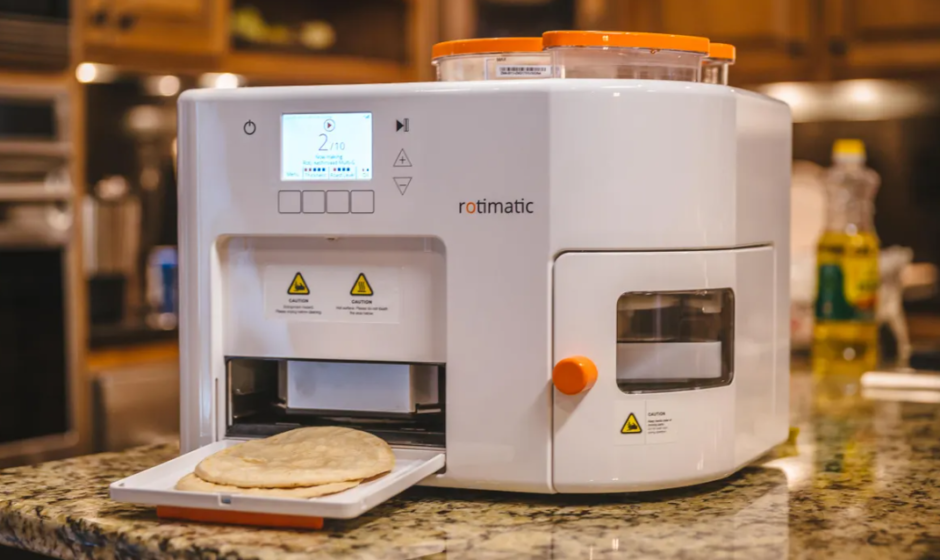

Rotimatic Plus Robotic Roti Maker
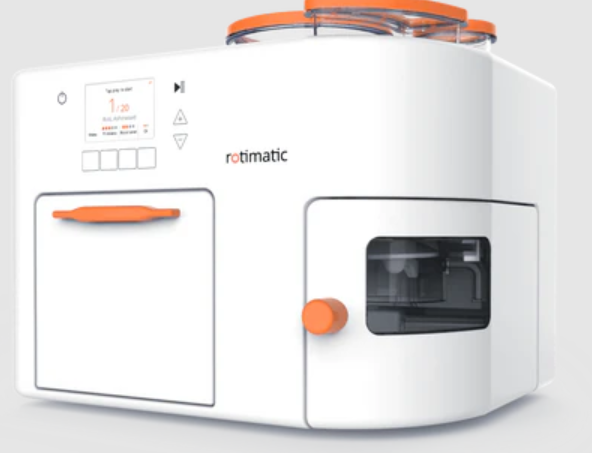
Before You Begin
Unpacking Instructions
Carefully unpack the product immediately and check the container to make sure all the parts are in the package and are in good condition.
Claims
For issues, such as missing components or parts, damage not related to shipping, or concealed damage, email us at [email protected] within 7 days of delivery. In addition, keep the box and contents for inspection.
Disclaimer
The information and specifications contained in this User Manual are subject to change without notice. Zimplistic reserves the right to revise or recreate this manual at any time. Download the latest version from rotimatic.com
Important Safeguards
YOUR SAFETY IS IMPORTANT TO US
THESE SAFETY PRECAUTIONS ARE A PART OF YOUR ROTIMATIC. READ THEM CAREFULLY BEFORE USING ROTIMATIC.
Basic Precautions
- Rotimatic is designed to prepare rotis in accordance with the instructions and Important Safeguards included in this User Manual. Do not use your Rotimatic for any purpose other than its intended use.
- Rotimatic is designed for indoor use, in non-extreme temperatures and humidity conditions. Do not use it outdoors, and protect the Rotimatic from direct sunlight and water.
- Rotimatic is intended for household use only. Do not use it for commercial purposes.
- Rotimatic is not intended for use by children. Please make sure that Rotimatic and its electrical cords are kept out of reach of children. Close supervision is necessary when Rotimatic is used
near children. - Rotimatic is not intended for use by people with reduced physical, sensory or mental capabilities, or a lack of experience and knowledge, unless they use it under supervision or are given instructions concerning the use of the Rotimatic by a person responsible for their safety.
Installation
- Always place your Rotimatic on a flat, horizontal, stable and even surface. The surface must be heat-resistant and should be impermeable to fluids in case of spill, and strong enough to bear the weight of the Rotimatic (44lbs/ 20 kgs).
- Keep your Rotimatic at least 10cm/ 4 inches away from walls or any object on the same countertop.
- Do not block the cooling fans located at the side and back of the Rotimatic.
- Do not use accessories or attachments other than those recommended by the manufacturer.
Avoid Risk of Electric Shock and Fire
- Keep the power cord away from heat, dampness and sharp edges. Contact [email protected] for replacement or repair of a damaged cord or plug.
- Plug your Rotimatic into suitable and grounded electrical sockets only.
- Ensure that the voltage of the power source corresponds to the voltage indicated on the rating plate on the back of your Rotimatic.
- Do not operate another high-wattage appliance on the same circuit as your Rotimatic.
- Always attach the Rotimatic power cord to the Rotimatic first, then connect the electrical plug into the power outlet. To disconnect, power off your Rotimatic, then remove the plug from the power outlet.
- In case of emergency, immediately switch off the power and disconnect the Rotimatic.
- Never place your Rotimatic on or beside hot surfaces such as radiators, stoves, ovens, gas burners, open flame or similar conditions to avoid hazardous damage.
Safe Operation of Rotimatic
- Do not close the front door while the Rotimatic is in use to avoid overheating.
- Ensure that there are no liquid spills on any surface, especially on the top, inside the flour container, inside the flour slot, inside the flour dispensing tunnel and inside the machine.
- Do not open the side door during the roti-making process to avoid the danger of injury from moving parts inside. Open only when prompted by the Rotimatic or for cleaning after rotimaking is complete.
- Do not remove the flour container or its lid during the roti-making process to avoid the danger of injury from moving parts inside. Open only for refilling flour when prompted by the Rotimatic or after roti-making is complete.
- Do not operate the Rotimatic after a malfunction or if it has been damaged in any manner. Contact [email protected] for examination, adjustment, repair or replacement.
- Regularly clean the Rotimatic in accordance with instructions to avoid the risk of fire or food contamination.
- Power off your Rotimatic when not in use and before cleaning. Allow the heating pans to cool for 25 minutes before cleaning, removing or reattaching parts.
Product specifications
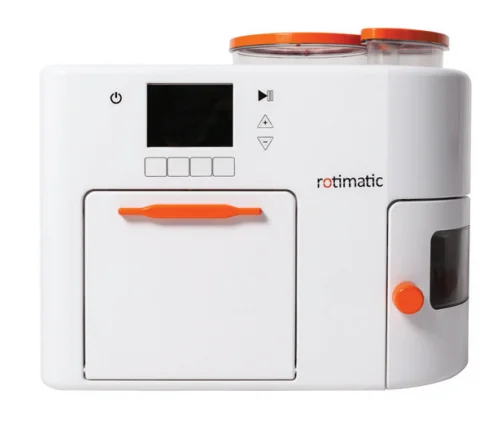
- Dimensions
- 40 cm x 40 cm x 45 cm
- 16 x 16 x 18 inches
- Weight
- 20 kgs
- 44 lbs
- Voltage and power rating
- Rated Input Voltage: 110 – 120V AC (ZMA0111A model)
220 – 240V AC (ZMA0111 model) - Rated Input Power: 1600 – 1800 Watts
- Rated Input Voltage: 110 – 120V AC (ZMA0111A model)
In the box
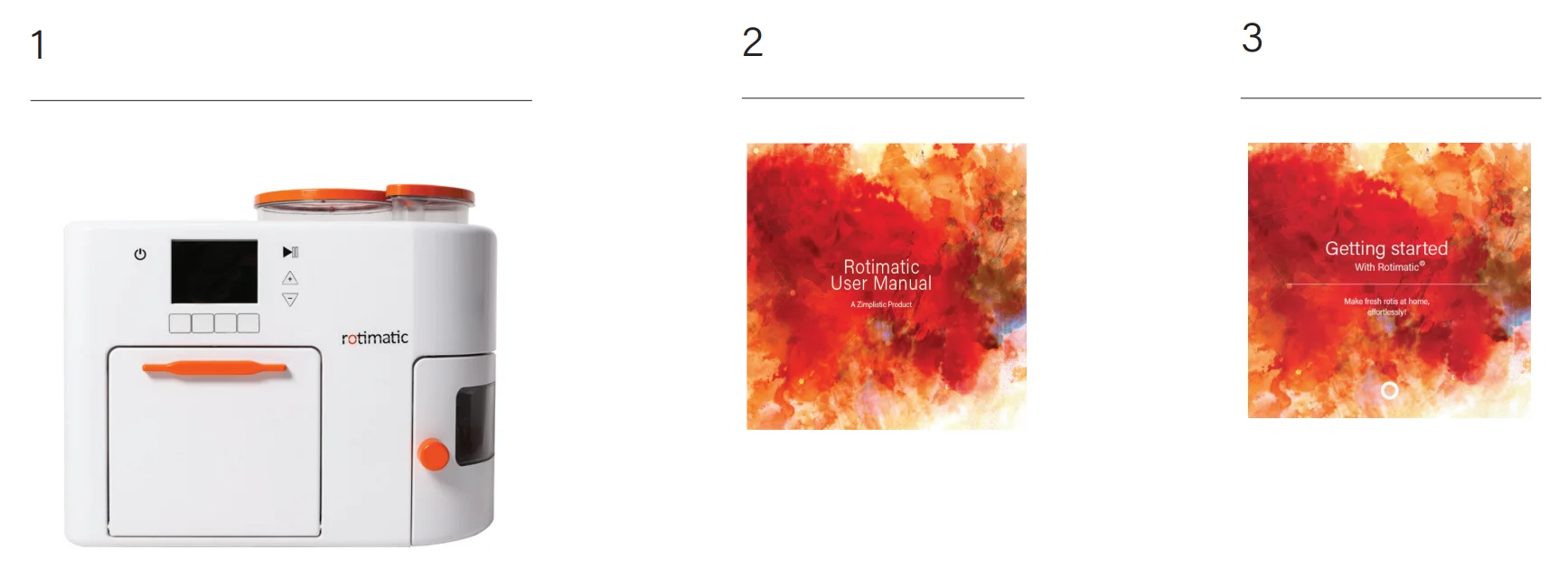
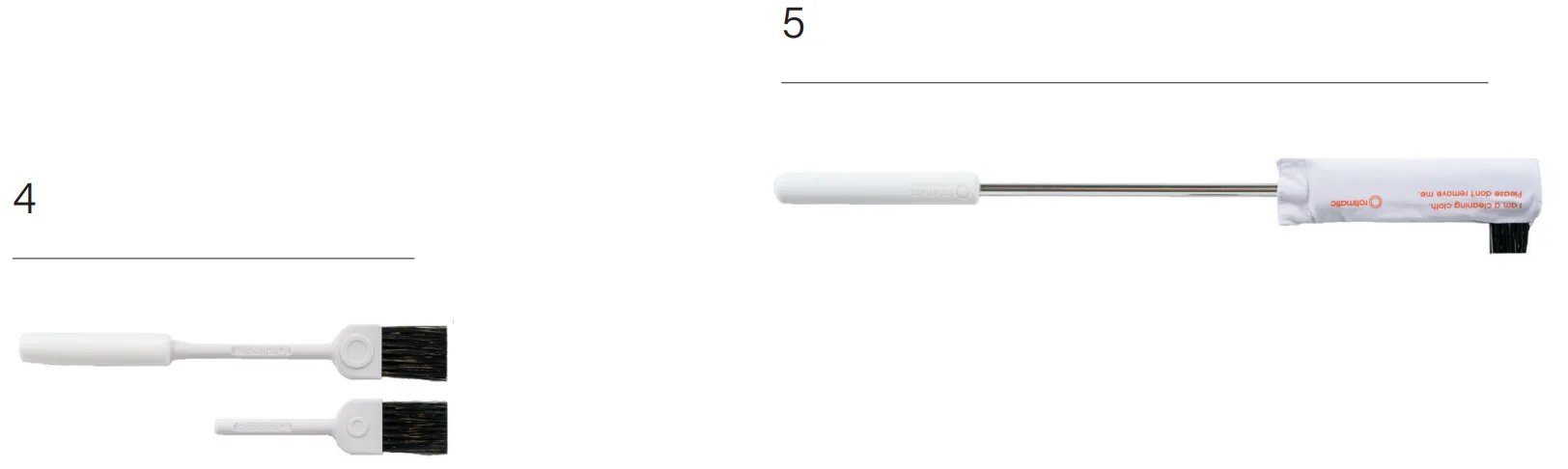
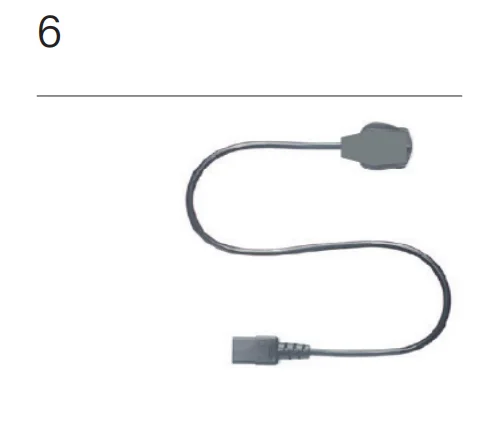
- Rotimatic
- User Manual
- Quick Start Guide
- Magic Brush
- Magic Stick
- Power Cord
Rotimatic at a glance
Rotimatic sections
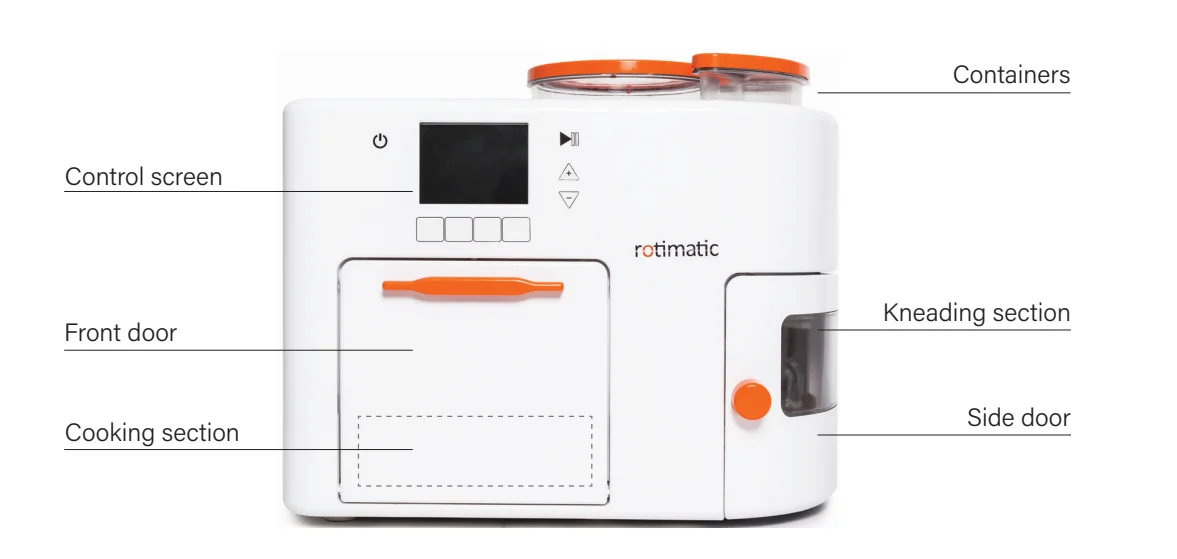
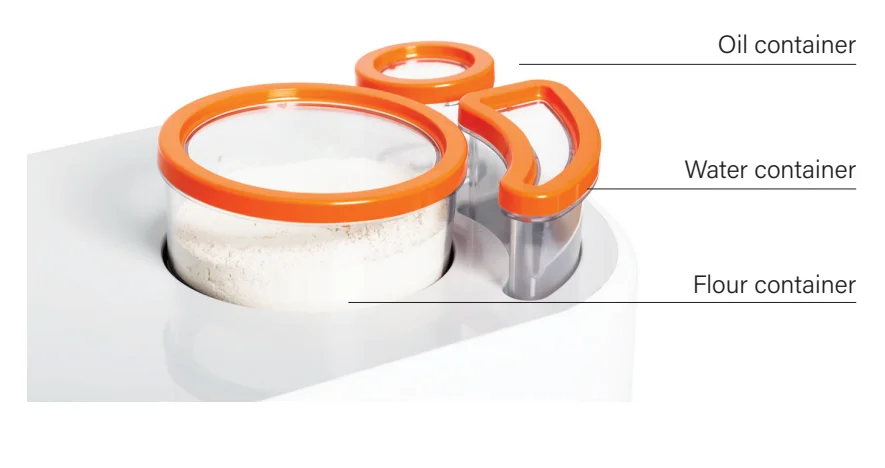
Storage Containers
Kneading section
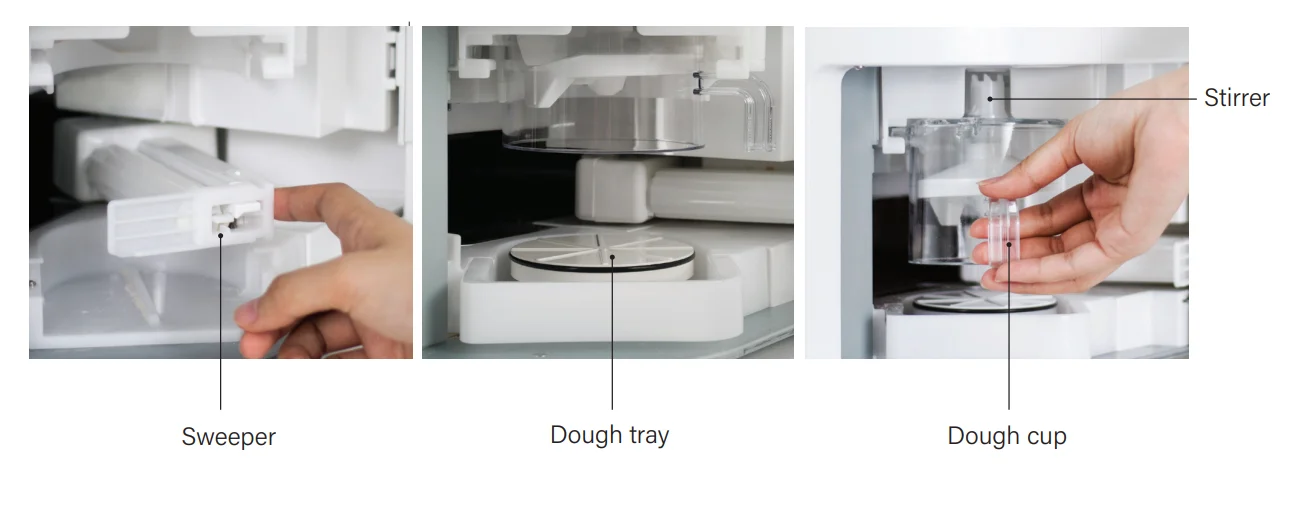
Cooking section
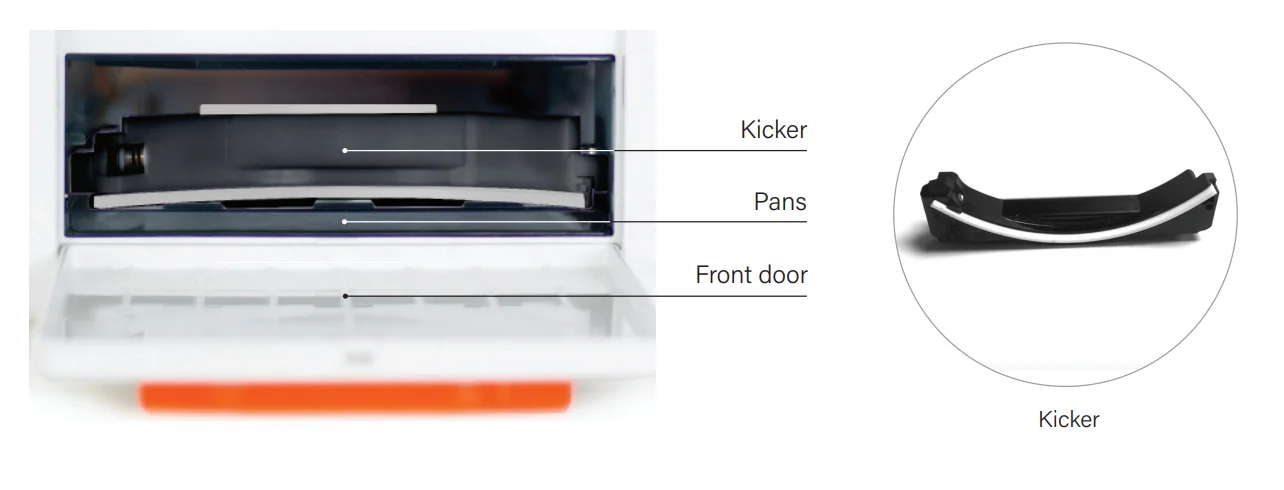
Control screen
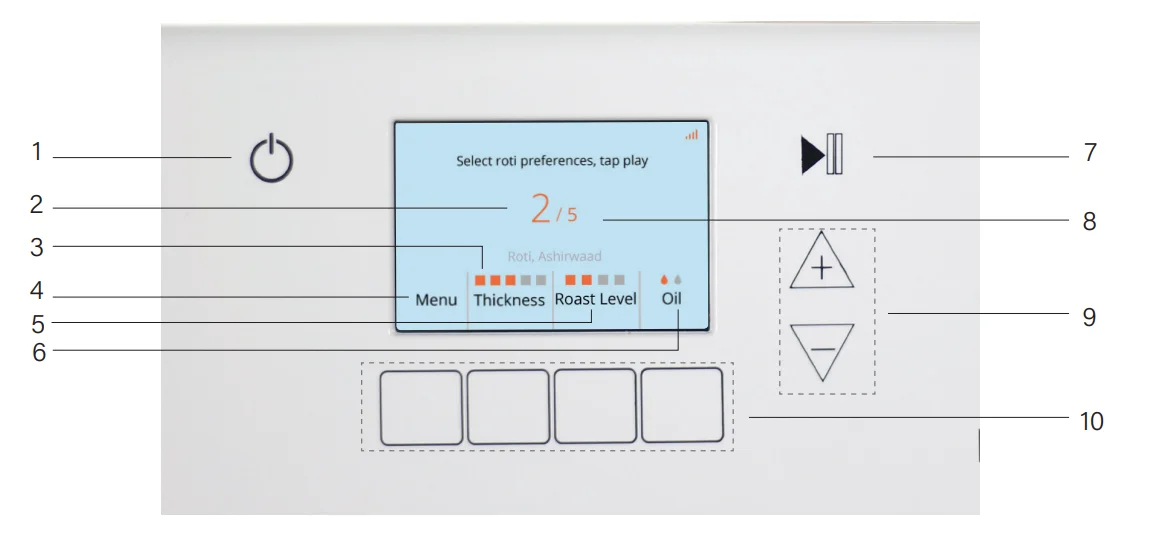
- Power button
- Number of rotis made
- Thickness level
- Menu (choose flour options)
- Roast level
- Oil level
- Start/ Stop button
- Number of rotis to be made
- Increase/ decrease roti quantity
- Input buttons.
Before first use
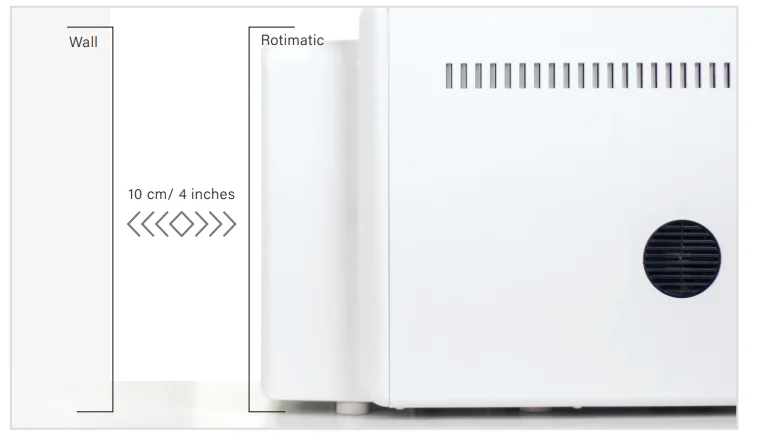
- After unboxing Rotimatic, place it on a flat, stable, and heat-resistant surface. Rotimatic has two fans located at the rear and left side. Keep it at least 10 cm/ 4 inches away from any wall, cabinet or heated oven to prevent overheating.

- Open the front door.

- Remove the protection foam from the pan slot.


- Follow the instructions in Section D, Connect to Wi-Fi (page 17) to update the Rotimatic software, before first use.
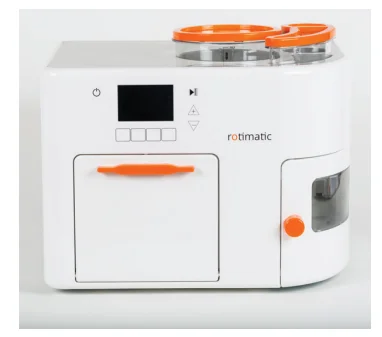
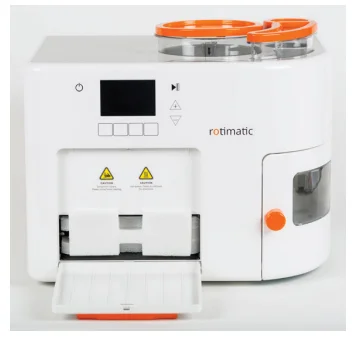

Connect to Wi-Fi
Install Rotimatic App
Before we start making rotis, you must connect your Rotimatic to your home Wi-Fi with a 2.4GHz band network. This is very important to ensure you get all the latest firmware upgrades, remote troubleshooting capabilities, live chat support and many more exciting features. To connect Rotimatic to Wi-Fi and to access live chat support, download the Rotimatic App and follow the instructions in the App – a must to get started.
App installation
How to install the Rotimatic App.
Rotimatic App

- Go to the App Store on your iPhone or iPod Touch.
- Search for Rotimatic in the App Store.
- Select the App and select Get, then select Install.
- If asked, enter your password. You can also use Touch ID for App purchases.
- The App then downloads to your device.


- Open the Google Play Store on your Android phone.
- Search for Rotimatic in the Play Store.
- Select the Rotimatic App, then select Install.
- Follow the on-screen instructions to download the App to your device.
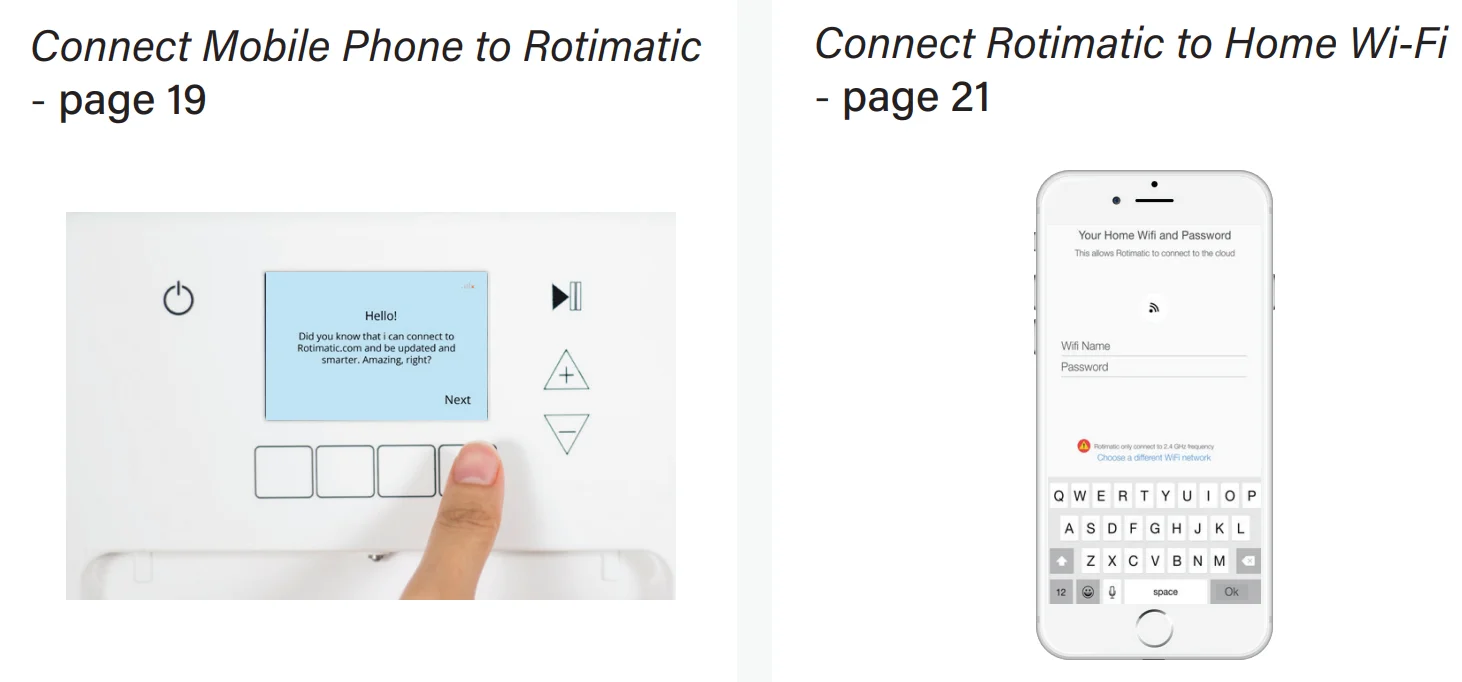
Connect the mobile phone to Rotimatic
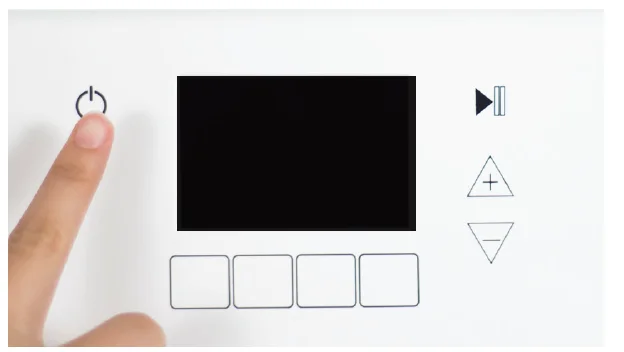
- Power on your Rotimatic. Wait for Rotimatic to complete the startup and Final check process.

- Once you see the Hello screen, tap the Next button. This screen appears only when you power on Rotimtaic for the first time.

- To reconfigure Wi-Fi, tap the power button and then select the WiFi option. This step also applies if you skipped the Hello screen the first time.

- Once you have downloaded and installed the Rotimatic App on your mobile device, tap the Next button. (Page 18, App installation)

- Open the Rotimatic App on your mobile device and sign up. Please ensure that your mobile data is turned off and your mobile is connected to the home Wi-Fi with the 2.4 GHz band to avoid any problems in connecting.

- After signing up successfully, connect your phone to the Rotimatic Wi-Fi.

- Your mobile phone is now synced to Rotimatic.
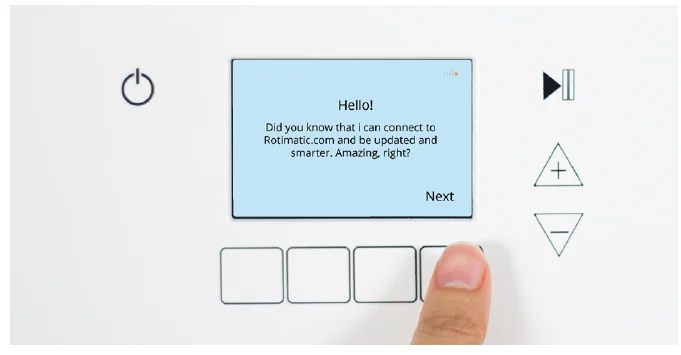
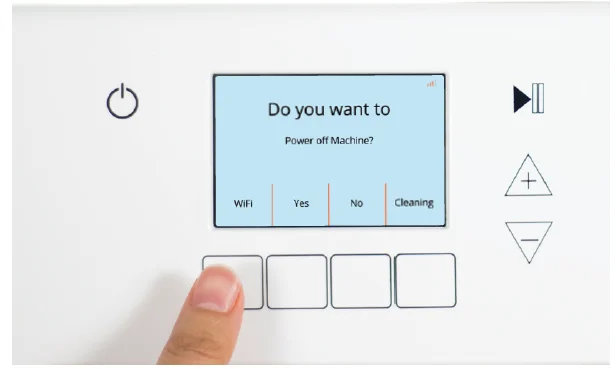
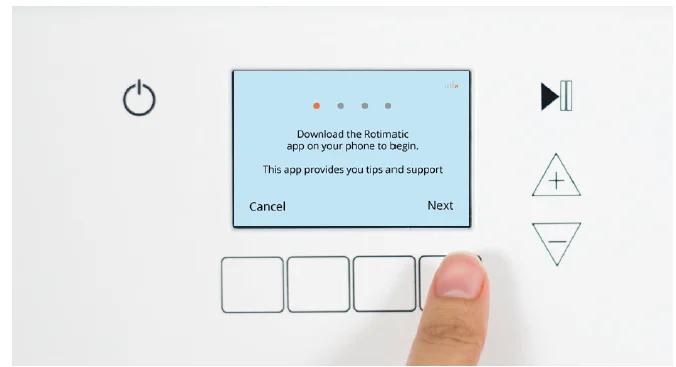

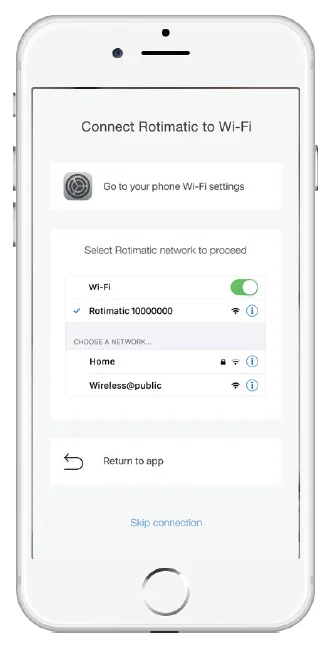
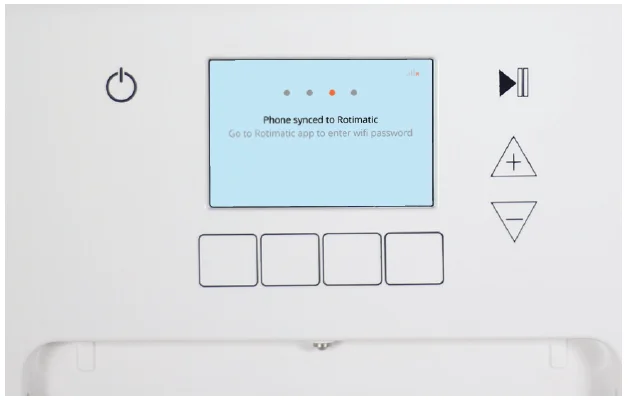
Connect Rotimatic to Home Wi-Fi
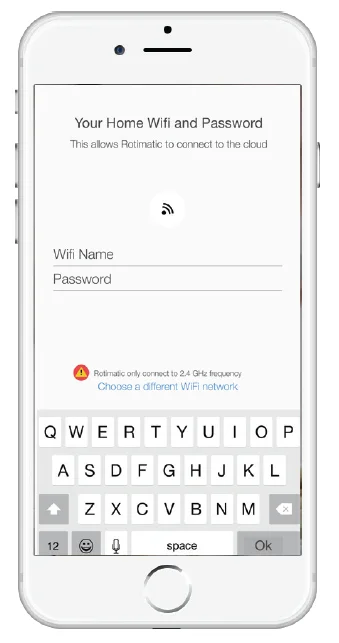
- In the Rotimatic App, enter the name and password of your home Wi-Fi and click Connect.

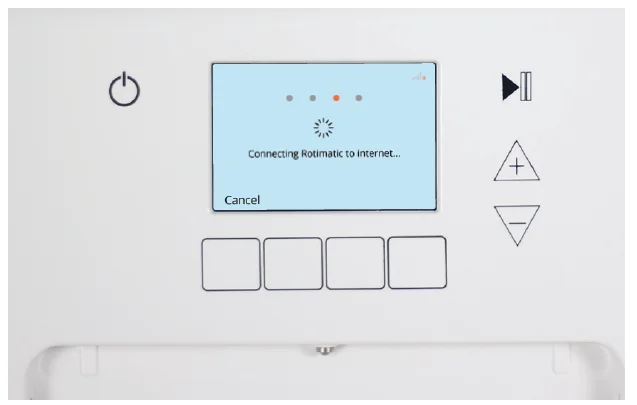
- The Rotimatic screen displays the Connecting Rotimatic to the internet message.

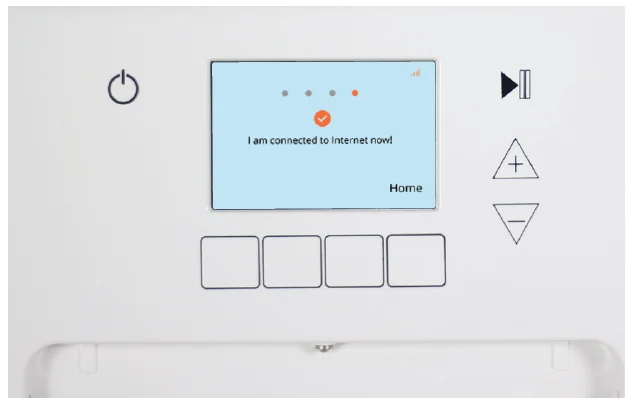
- Your Rotimatic is now connected to Wi-Fi..

- If the connection is successful, your Rotimatic screen will display the Connected message. Whereas the Rotimatic App on your mobile device may take a little longer to show the connected message. In case you see an error message, refer to the troubleshooting section.

Let’s make rotis
Important notes
- Always use the Rotimatic-approved power cord to reduce the risk of electric shock.
- Use the power cord provided along with Rotimatic and avoid using long extensions to reduce the chances of entanglement or tripping over a longer cord.
- An extension cord is used; it must be the Earthed type (3-pin) and compatible with Rotimatic’s electrical rating.
- To ensure safety, plug your Rotimatic into an earthed electrical socket only. Verify that the voltage indicated on the ating plate on the back of the unit corresponds with your electrical power source.
- Always check if the flour container is completely dry before filling up flour. Any water or dampness inside the flour container can affect the flow of flour during roti-making.
- Only use the recommended flour types.
- No estimation of ingredient quantity is required. Simply fill up the containers, and Rotimatic will automatically measure the amount required.
- Always keep the front door open during operation to prevent overheating.
- Rotimatic buttons are designed with capacitive touch sensing. Just tap gently with your fingertips. Do not press. Use your thumb tip for a wider touch surface if needed.
- Expect some noise at times in the beginning of the roti-making cycle, as Rotimatic is trying to detect the
placement of the stirrer. - As the dispensing system and heating pans need time to warm up, the first few rotis might not be perfect.
- Rotimatic is a smart machine with built-in AI technology that takes into account the flour and water properties. It learns and improves the dough quality over time. Rotimatic uses the information from the first few dough balls to adjust the following dough formations.
- The steam inside a freshly-puffed roti will continue cooking the rot even after it leaves Rotimatic. To keep rotis fresh, please cover them with a soft, absorbent cloth or tissue and store in a casserole for a few minutes before consumption.
- Wait for at least 25 minutes before closing the front door and unplugging from the main power source, as the cooling fans run to cool down the Rotimatic.
- The ingredient containers of Rotimatic are also storage containers. It is not necessary to clean the containers after every use.
Prepare ingredients
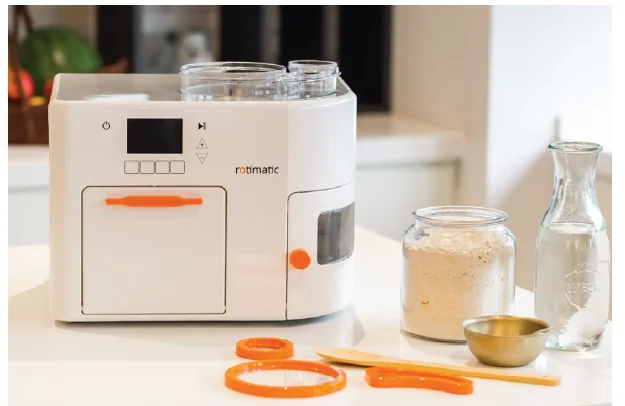
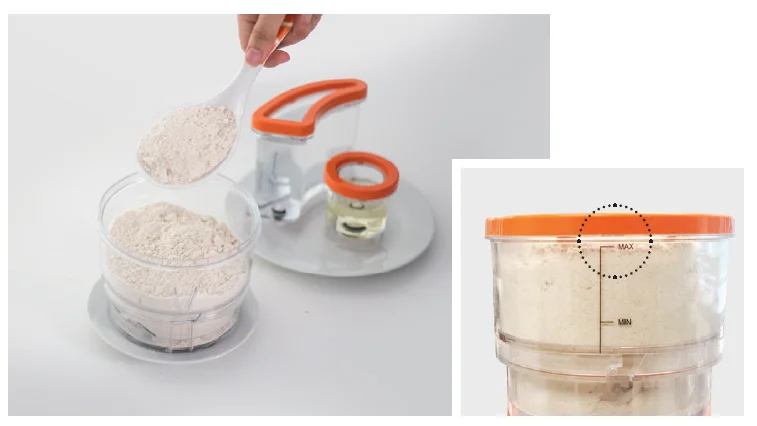
- To add ingredients, remove the lid of all three storage containers.

- Ensure the flour container is completely dry. Fill up flour to the MAX marking for the best flour flow.
DO NOT overfill or compress flour while filling to ensure a steady dispensing flow.
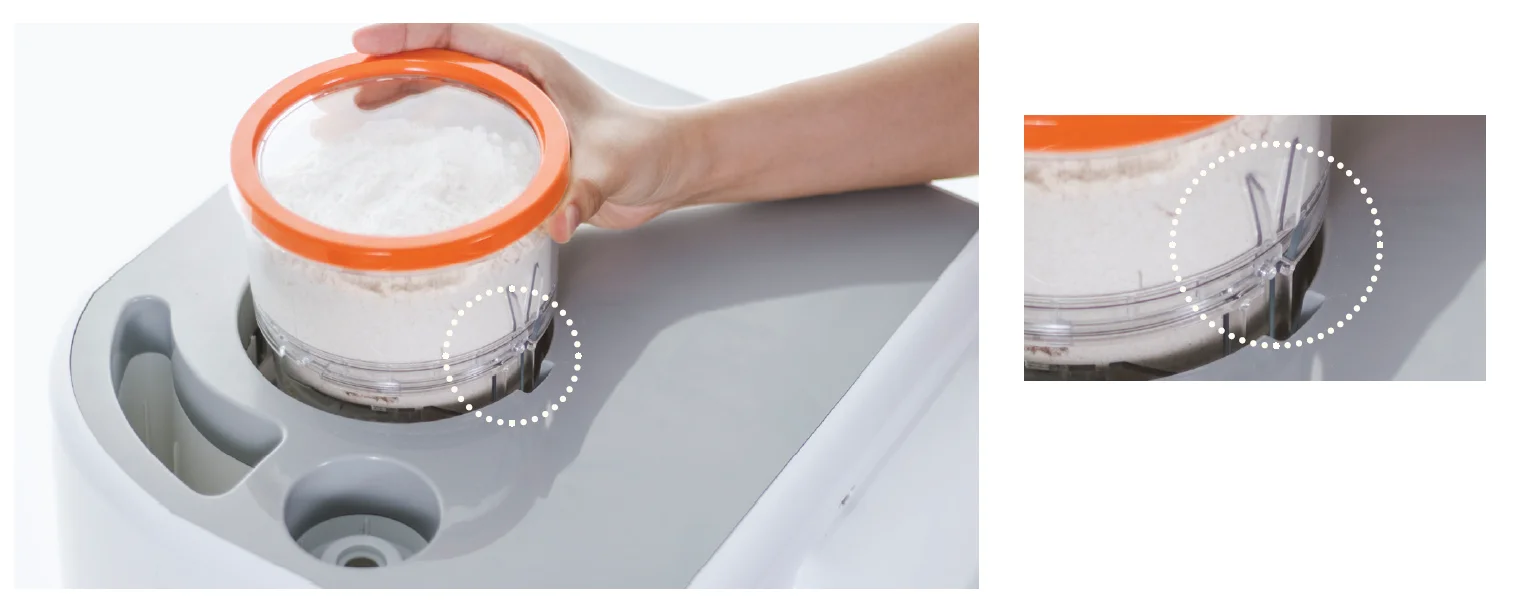
- To reinstall the flour container, insert the flour container by aligning the ridges on the flour container with the groove in the flour slot.

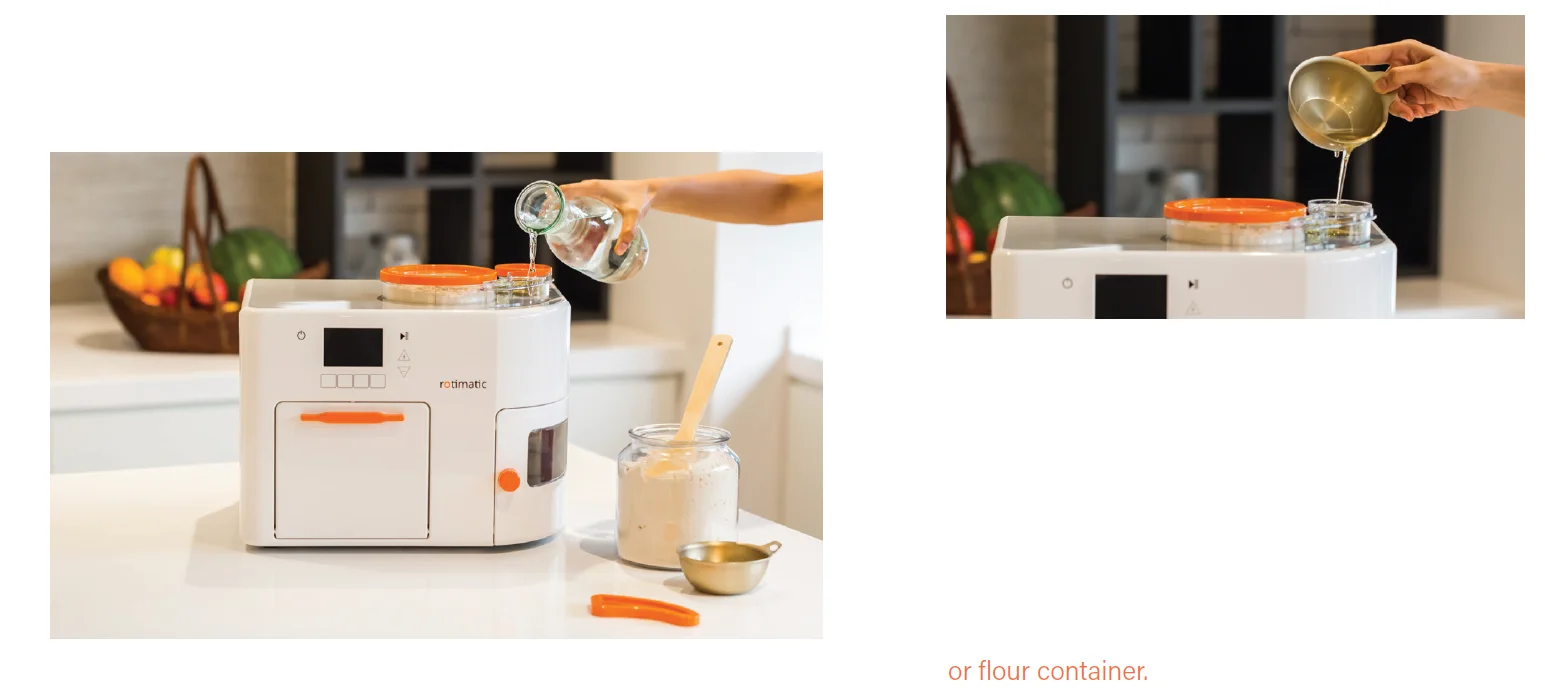
- Fill the water container with fresh, portable, and room-temperature water. Place it in the water container slot and press it down. Fill the oil container. Place it in the oil container slot, press it all the way down firmly until you hear a clicking sound.
DO NOT spill water or oil into the flour slot or flour container.
Cleaning
Important notes
- Rotimatic is designed for easy cleaning. It will take less than 10 minutes to complete the regular/advanced cleaning steps for the kneading parts and pans after every use.
- It is not necessary to clean the ingredient containers after every use. In a low to medium humidity environment, simply store the ingredients in Rotimatic for the next use.
In a high-humidity environment, store the filled flour container in the fridge to avoid flour spoilage. Clean the flour tunnel to avoid leaving any traces of flour in the Rotimatic. - Only use the provided accessories to clean Rotimatic.
- To prevent irreversible damage, do not clean any parts with metal scouring pads, scouring powder, steel wool pads, or any other abrasive materials.
- Only use the Magic stick to clean the pans. Do not use any other materials or objects. The pans could be hot. Do not touch the pans directly. Allow the pans to cool down.
- Do not immerse the Rotimatic in water or other liquids.
- Ensure all the parts are dry before you place them inside Rotimatic.
- Do not spill water or any liquid into the flour container or flour slot during cleaning, filling up, or removing the ingredient containers.
- Do not spill flour into the water or oil slot during cleaning, filling up, or removing ingredient containers.
- It is recommended to perform advanced cleaning at least once every 2 weeks.
- The advanced cleaning process includes cleaning storage (flour, water, and oil) containers, the flour dispensing tunnel, the front door, the pan area, and behind the Kicker and Sweeper.
- Rotimatic is designed with special cleaning modes to help you clean less accessible areas, including areas under the VT (Vertical Tray – the plastic part under the Dough Tray), areas behind the Kicker, and behind the Sweeper.
Regular cleaning
Rotimatic should be powered off for at least 25 mins to cool down after use before starting the cleaning process, to prevent burn injury.
CLEAN & REINSERT KNEADING PARTS
The regular cleaning includes: cleaning of Dough Tray, Dough Cup, Stirrer, and the area under VT and flour tunnel. The advanced cleaning includes: cleaning of the oil/ water tunnel, front door, pan area, and behind the Kicker and Sweeper.
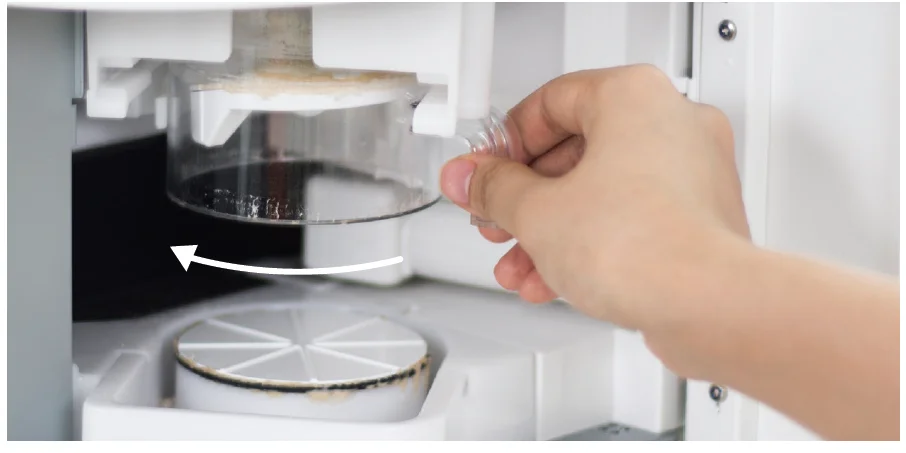
- Open the side door.
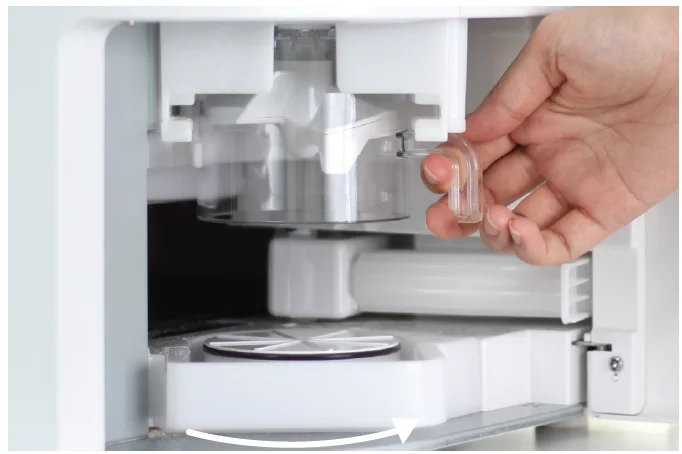
Hold the Dough Cup handle and rotate to the left out of the locked position.
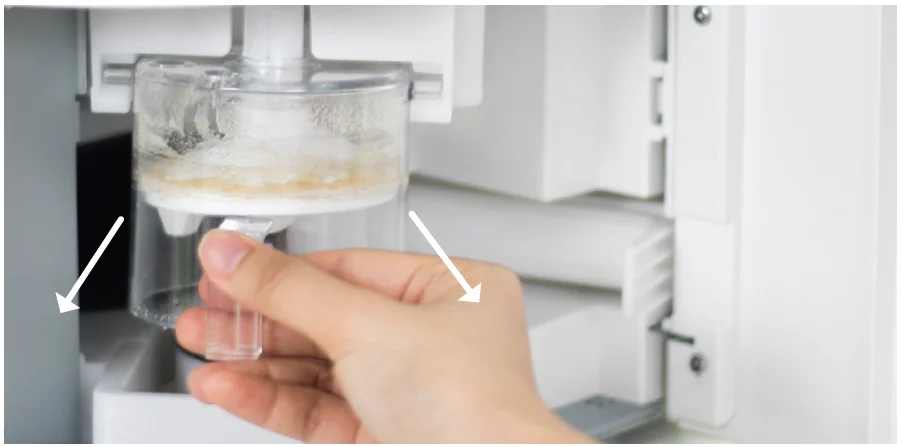
- Gently slide the Dough Cup out of the slot.
Use the Magic Brush to clear any residue around the kneading section and on the Sweeper.
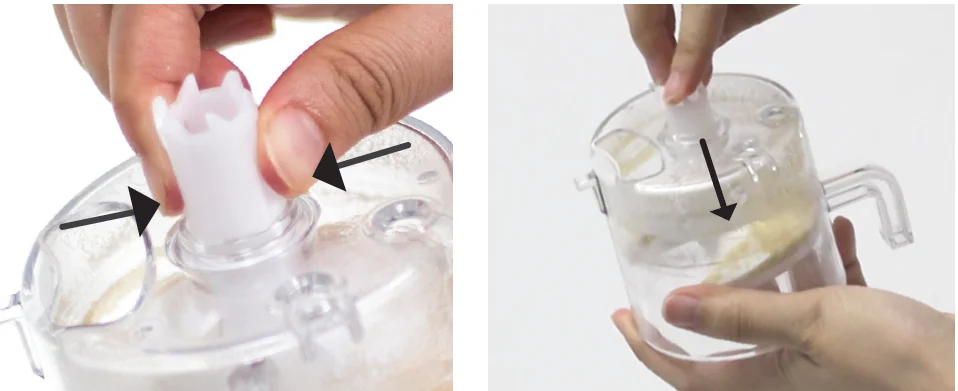
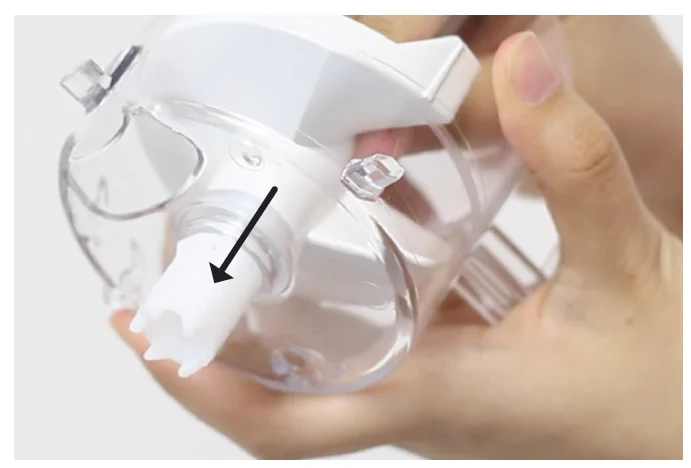
- Press the two tabs at the top of the stirrer. Push the Stirrer inwards to remove it from the Dough Cup. Put aside for washing.

- Pull the Dough Tray towards you to remove it.

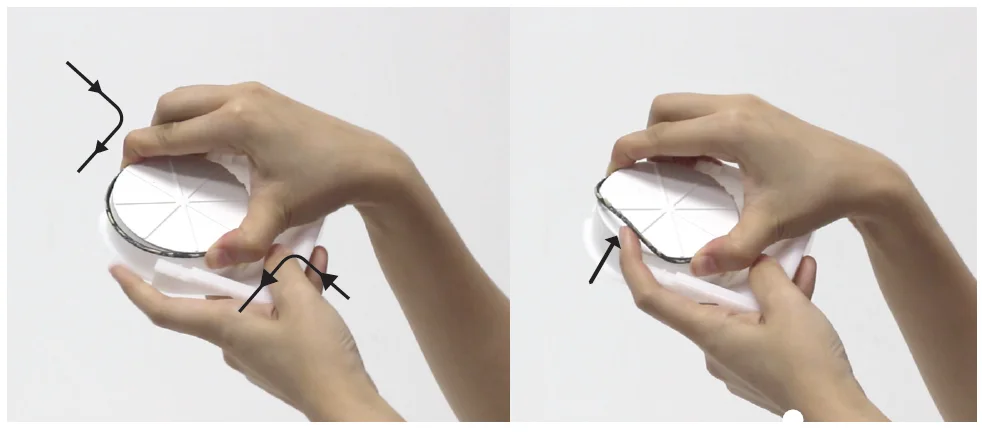
- Squeeze the black rubber band and pull it out from the Dough Tray to clean.
Handwash all parts with mild detergent or use the upper basket in the dishwasher. Wipe each part and let it dry before inserting them inside Rotimatic.
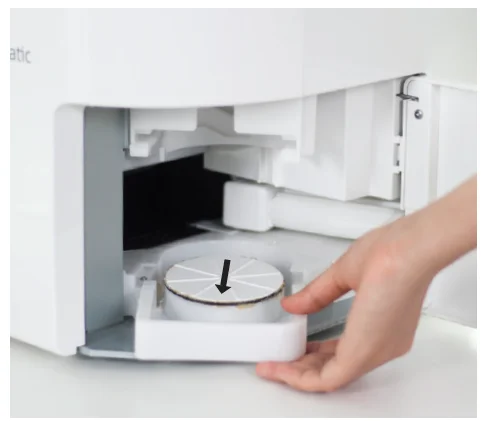
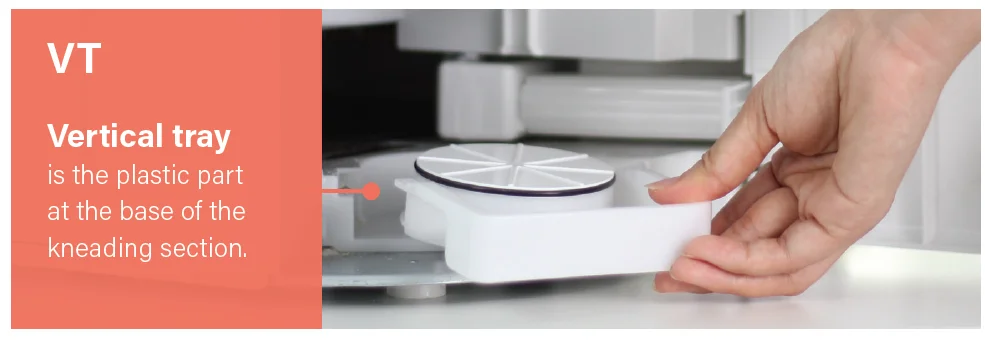
- To insert the Dough Tray, slide it into its slot on the VT (Vertical Tray – the plastic part at the base of the kneading section).

- Insert the stirrer into the Dough Cup by pushing it in until you hear a clicking sound.

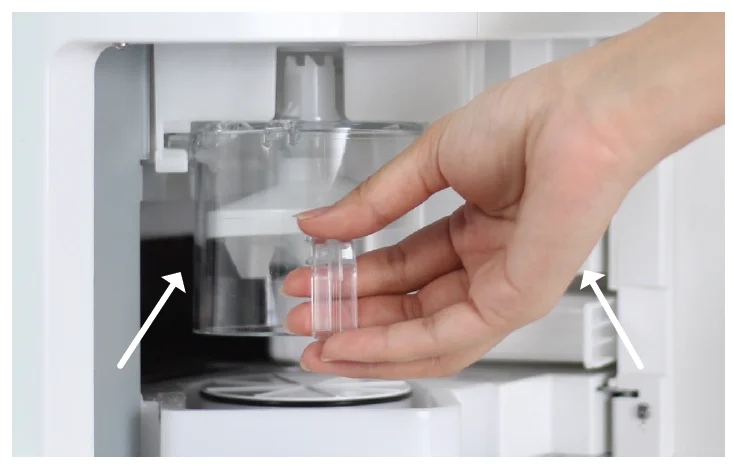
- Hold the Dough Cup handle while its tip is facing up. Slide the Dough Cup in the slot fully, using the guiding tabs on top.

- Gently lift the Dough Cup upwards while rotating it to the right into the locked position. Close the side door.
CLEAN FLOUR TUNNEL
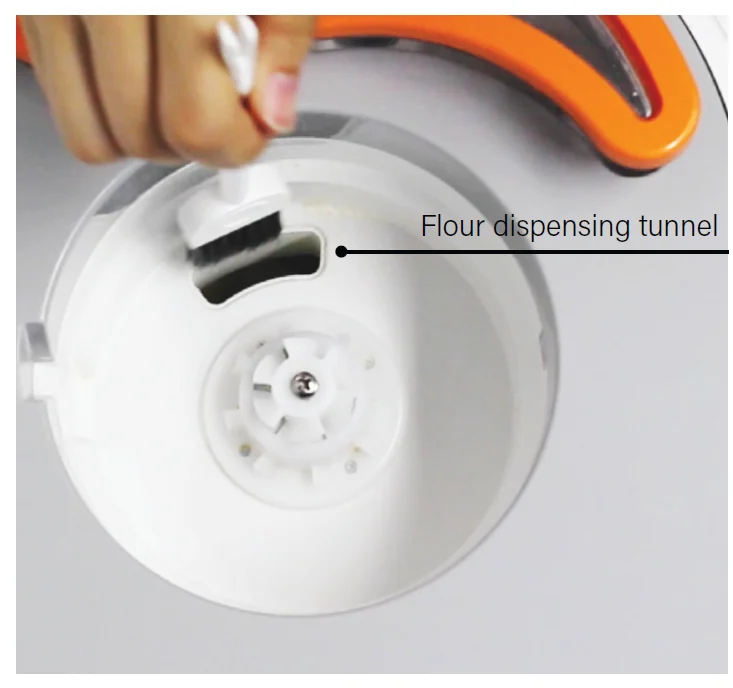
- Use the Magic Brush to brush off any flour residue down to the kneading area through the flour dispensing tunnel.
- Use a dry cloth or tissue to remove any flour clog. Ensure the flour slot and flour dispensing tunnel are completely dry before re-inserting the flour container.
- Clean any flour residue that may have dropped down to the kneading area.
Advanced cleaning
Wait for at least 25 minutes to allow the pans to cool down and ensure the power is off prior to cleaning.
CLEAN INGREDIENT CONTAINERS
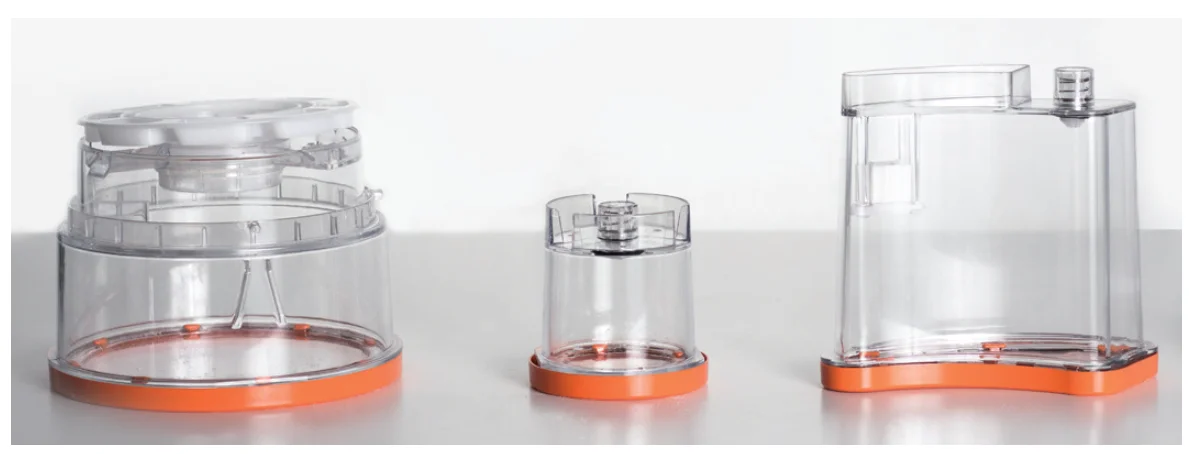
- Pull the 3-ingredient containers up and out of the slots. Empty and put aside for washing.
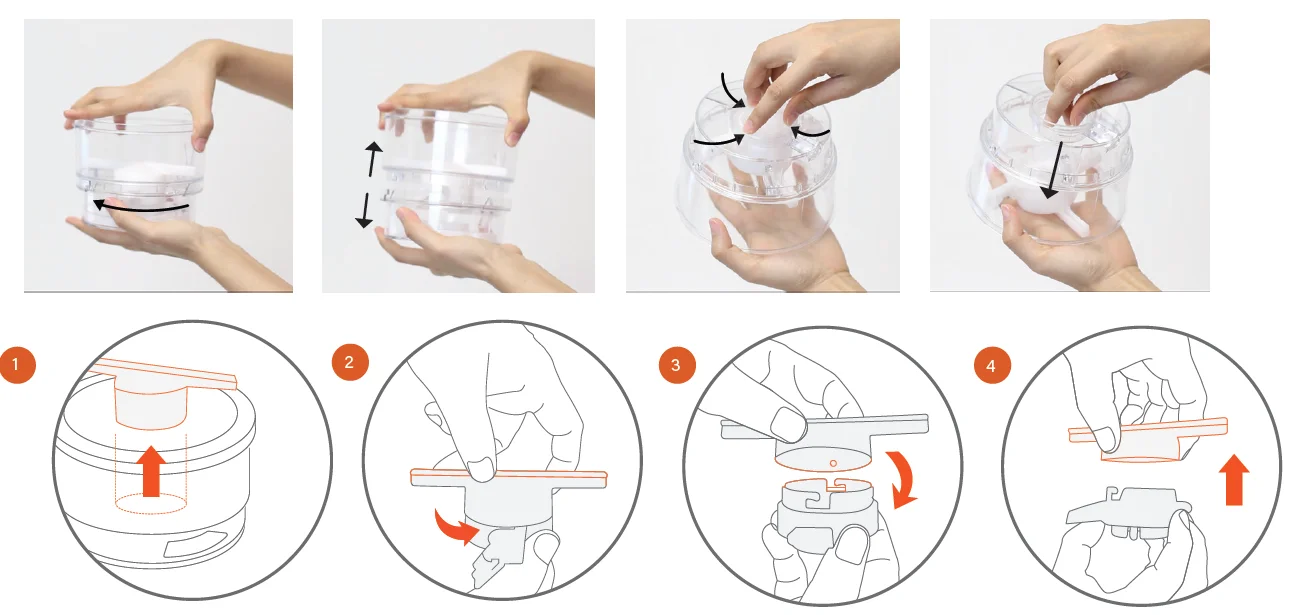
- DISASSEMBLE FLOUR CONTAINER

Hold the top in one hand and the bottom in the other hand. Turn the Flour Container counter-clockwise to separate the top and bottom parts. Remove the white ring from the bottom. Hold the top of the container in your one hand, pinch the 3 tabs of the white flour dispensing blade, and push them inside to remove the flour dispensing blade from the container.- Remove the white flour dispensing blade.
- Twist in the opposite direction.
- Match and push down.
- Pull out.
- Handwash all three containers and their parts with a mild detergent or wash in the top rack of a dishwasher. Wipe and let dry completely before filling up the ingredients and inserting them back in your Rotimatic.
DO NOT fill up flour in a wet container. Any water or dampness inside the flour container can affect flour flow during operation. Empty and clean the flour and water container when not in use for more than three days. - ASSEMBLE FLOUR CONTAINER

- Place the white ring into the bottom part with the toothed center facing up.
- To assemble the flour dispensing blade, twist and lock the two parts.
- Insert the white flour dispensing blade into the top part of the container until you hear a clicking sound.
- Align the notches on the top part of the container with the slots on the bottom part.
- Twist the top counterclockwise until you hear a clicking sound.

Troubleshooting
If you encounter any error message during roti-making:
- Follow the instructions on the screen.
- Tap OK to proceed.
If the issue persists:
- Check the kneading section and the cooking section for any unfinished roti, dough or residue.
- Remove the unfinished roti, dough, or residue using the Magic Stick (cleaning brush provided with the Rotimatic).
- Make sure the dough cup, dough tray, and pans are free from excessive flour residues.
- Resume roti-making.
If the issue persists, check if any flour has clogged inside the flour slot, flour container or the flour dispensing tunnel. If so:
- Clean the flour dispensing tunnel, wipe dry completely.
- Clean the flour container. Let it dry completely. Fill up the flour container to the ‘MAX’ marking on the container.
- Resume roti-making.
In case Rotimatic hangs, or the power button is not responsive:
- Unplug Rotimatic from the power source.
- Wait for two minutes, then reconnect Rotimatic to the power source and switch on the power.
- Tap the Rotimatic power button to restart Rotimatic.
In case you are not able to connect Rotimatic to the Wi-Fi:
- Please ensure that your mobile phone’s data mode is turned off and your mobile phone is connected to the home Wi-Fi.
- There might be an installation problem with the Rotimatic App. Uninstall and try installing the App again.
- Please make sure you have enabled 2.4Ghz frequency for your Wi-Fi router. Rotimatic does not support 5.0Ghz frequency with Wi-Fi.
- If the issue persists, contact [email protected]. For more detailed troubleshooting instructions and video guides, visit: https://rotimatic.com/
Exclusive Limited Warranty
Zimplistic’s warranty obligations for all products sold by Zimplistic on this site are limited to the terms set forth below: Zimplistic will provide the repair and replacement services described in further detail below for the Rotimatic (excluding software) and associated Zimplistic hardware products against defects in materials, design, and workmanship under normal use for a period of one year from the date of delivery to the original end-user purchaser (“Warranty Period”). Zimplistic’s repair and replacement services under this Exclusive Limited Warranty described herein do not serve, and shall not be interpreted as making any representation concerning the Rotimatic or Zimplistic. Zimplistic does not represent or claim through its Exclusive Limited Warranty that all products will be completely free of defects, and this Exclusive Limited Warranty shall not serve as an express or implied warranty about the Rotimatic in any manner whatsoever. If a product defect arises and a valid claim is received within the Warranty period, at Zimplistic’s sole option and to the extent permitted by law, Zimplistic will either
- repair the product defect at no charge, using new or refurbished replacement parts, or
- exchange the product with a product that is new or refurbished by Zimplistic or that has been manufactured from new or serviceable used parts and is at least functionally equivalent to the original product.
If Zimplistic is unable to repair or replace such products within a timeframe determined by Zimplistic, acting reasonably, Zimplistic will refund you the amounts paid for such defective or non-conforming Products. Zimplistic may request that you replace defective parts with new or refurbished user-installable parts that Zimplistic provides in fulfillment of its warranty obligation. A replacement product or part, including a user-installable part that has been installed in accordance with instructions provided by Zimplistic, assumes the remaining warranty of the original product or ninety (90) days from the date of replacement or repair, whichever provides longer coverage for you. When a Product or part is exchanged, any replacement item becomes your property, and the replaced item becomes Zimplistic’s property. Parts provided by Zimplistic in fulfillment of its warranty obligation must be used in products for which warranty service is claimed. When a refund is given, the product for which the refund is provided must be returned to Zimplistic unless specified otherwise. In order to be eligible for a refund, the returned products must not be damaged by misuse, abuse, or disassembly.
For more manuals by Rotimatic, visit ManualsLibraryy
Rotimatic Plus Robotic Roti Maker-FAQs
What is the difference between Rotimatic and Rotimatic Plus?
The Rotimatic Plus is an upgraded version with improved performance and quieter operation. It uses a low-vibration motor during pressing, which reduces noise significantly. It also offers better consistency, smarter controls, and enhanced overall efficiency compared to the earlier model.
How does the Rotimatic Plus work?
It is a fully automatic machine that measures flour, adds water and oil, kneads the dough, flattens it, and cooks rotis automatically. With just one button, it delivers fresh rotis in about 90 seconds without manual effort.
Is Rotimatic Plus suitable for daily use?
Yes, it is ideal for daily use, especially for families who consume rotis regularly. It simplifies the cooking process and ensures consistent results every time.
What are the disadvantages of using Rotimatic Plus?
Some drawbacks include its high price, the space it occupies on the countertop, and the need for regular cleaning. Also, the taste and texture may differ slightly from handmade rotis for some users.
Are rotis made by Rotimatic Plus healthy?
Yes, the rotis are fresh and free from preservatives. Since you control the ingredients, you can make healthy, homemade rotis tailored to your dietary needs.
Can Rotimatic Plus make rotis without oil?
Yes, it allows you to customize oil usage. You can choose to use very little or no oil at all, making it suitable for low-fat and healthier cooking preferences.
Which type of flour works best in Rotimatic Plus?
Whole wheat flour (atta) works best for soft and fluffy rotis. The machine can adjust water levels automatically, so it also supports different flour brands and blends with good results.
Is the Rotimatic Plus worth buying?
Yes, it is a great option for busy households or beginners. It saves time, reduces effort, and provides fresh rotis anytime. While it is expensive, many users find its convenience and automation worth the investment.