
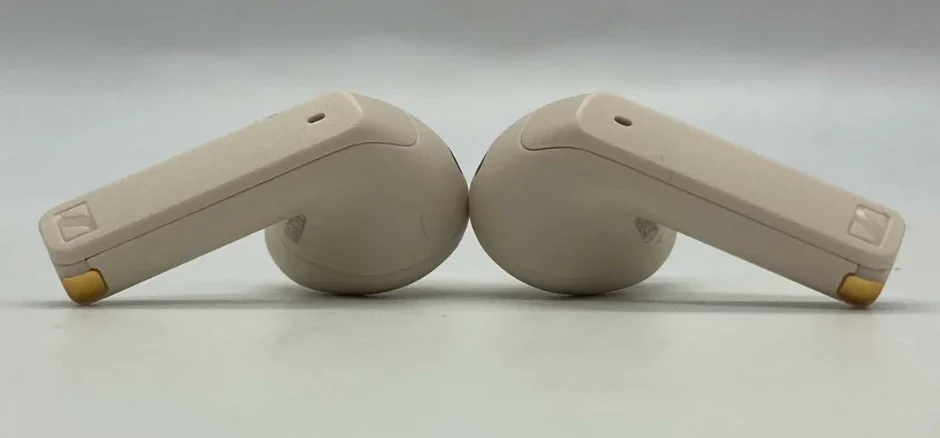

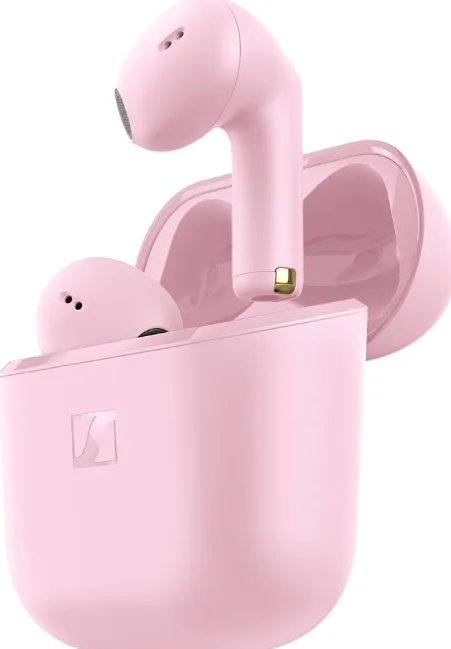
Sennheiser ACCENTUM Open Wireless Earbuds
Important safety instructions
- Read this instruction manual carefully and completely before using the product.
- Always include this instruction manual when passing the product on to third parties.
- Do not use the product if it is obviously defective or makes a loud, unusual (whistling or beeping) noise.
- Only use the product in environments where Bluetooth® wireless transmission is permitted.
Preventing damage to health and accidents
- Protect your hearing from high volume levels. Permanent hearing damage may occur when earbuds are used at high volume levels for long periods of time. Sennheiser earbuds sound exceptionally good at low and medium volume levels.
- Do not insert the earbuds too deeply into your ears. Always remove the earbuds slowly and carefully from your ears.
- The product generates stronger permanent magnetic fields that could cause interference with cardiac pacemakers, implanted defibrillators (ICDs), and other implants. Always maintain a distance of at least 3.94″/ 10 cm between the product component containing the magnet (earbuds and charging case) and the cardiac pacemaker, implanted defibrillator, or other implant.
- Keep the product, accessories, and packaging parts out of reach of children and pets to prevent accidents. Swallowing and choking hazard.
- Do not use the product in an environment that requires your special attention (e.g., in traffic).
Preventing damage to the product and malfunctions
- Always keep the product dry and do not expose it to extreme temperatures (hairdryer, heater, extended exposure to sunlight, etc.) to avoid corrosion or deformation. The normal operating temperature is from 0 °C to 40 °C/32 °F to 104 °F.
- Do not use if immersed in liquid.
- Use only attachments/accessories/spare parts supplied or recommended by Sonova Consumer Hearing.
- Clean the product only with a soft, dry cloth.
Safety instructions for Lithium rechargeable batteries
WARNING
If abused or misused, rechargeable batteries may leak. In extreme cases, they may even present a risk of:
- explosion
- heat and fire development
- smoke and/or gas development
- damage to health and/or the environment
Notes on the ingress protection rating of the earbuds
The earbuds feature an IPX4 ingress protection rating, which means they are protected from the ingress of water (protection class according to International Protection Marking (IP code), IEC standard 60529, tested under laboratory conditions). The earbuds can be used in the rain, for example. However, they are not suitable for water immersion or for wearing in the shower. In case of permanent moisture/wetness, the ingress protection can be reduced, and the product can be damaged.
- Do not charge wet earbuds. Completely dry wet earbuds with a dry cloth before charging them. The charging case is not splashproof.
- Do not use if immersed in liquid.
- Always keep the charging case dry.
- Make sure that the charging socket is free from moisture and contamination.
- Only use high-quality USB charging cables with USB-IF certification.
- If the charging case has become damp:
- Dry the charging case completely with a dry cloth.
- Allow the charging case to dry at room temperature for at least 24 hours before using and charging it again.
- Do not continue to use the product if it is obviously defective.
Intended use/Liability
These headphones have been designed as an accessory for Bluetooth-compliant devices. They are intended for wireless audio communication such as music playback and phone calls via Bluetooth wireless technology. It is considered improper use when the product is used for any application not named in the corresponding product documentation. Sonova Consumer Hearing GmbH does not accept liability for damage arising from misuse or improper use of this product and its attachments/accessories. Sonova Consumer Hearing GmbH is not liable for damages to USB devices that are not consistent with the USB specifications. Sonova Consumer Hearing GmbH is not liable for damages resulting from the loss of connection due to flat or overaged rechargeable batteries or exceeding the Bluetooth transmission range. Before putting the product into operation, please observe the respective country-specific regulations.
Package contents
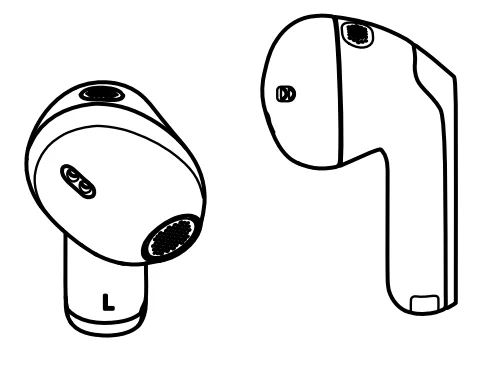
- Earbud R for right ear (model: OTW1 R) and earbud L for left ear (model: OTW1 L)
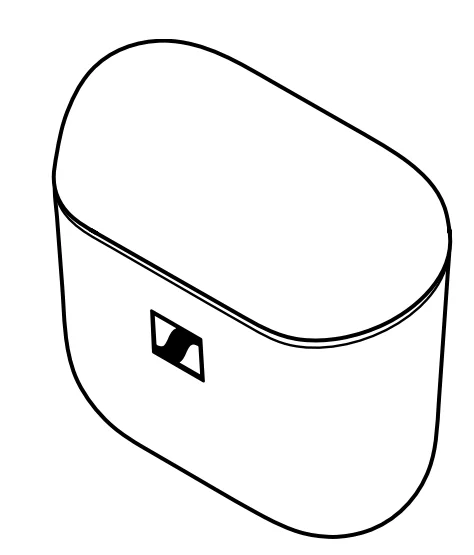
- Charging case (model: OTW1 C) with built-in rechargeable battery for the earbuds
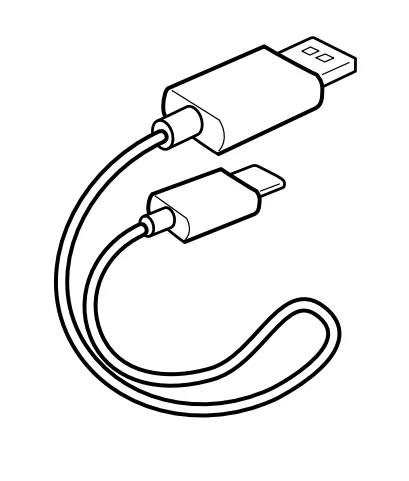
- USB charging cable with USB-C and USB-A connectors, approx. 0,4 m

- Quick guide

- Safety guide

- Compliance sheet
Online, you can find:
- This detailed instruction manual and additional information (www.sennheiser-hearing.com/download)
- the option to purchase online or contact your local Sonova Consumer
Hearing partner: www.sennheiser-hearing.com/service-support
Product overview
Charging case
Model: OTW1 C
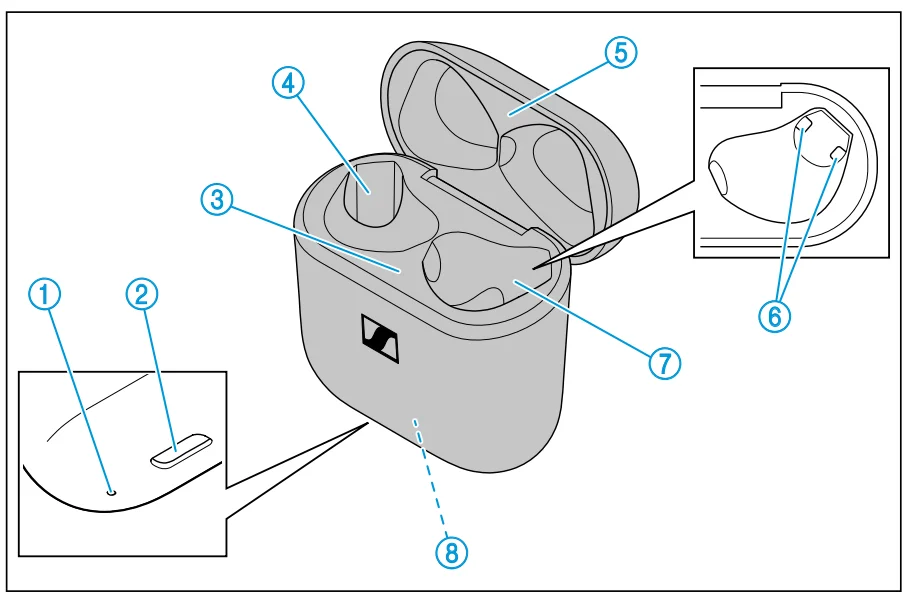
- LED display
indicates the charging process/charge status of the rechargeable battery of the charging case or of the earbuds (when inserted into the charging case) - Input for USB-C connector for charging the rechargeable batteries
- Bottom cradle
- Charging compartment for the left earbud L
- Top cradle
- Charging contacts
- Charging compartment for the right earbud R
- Built-in rechargeable battery for charging the earbuds on the go
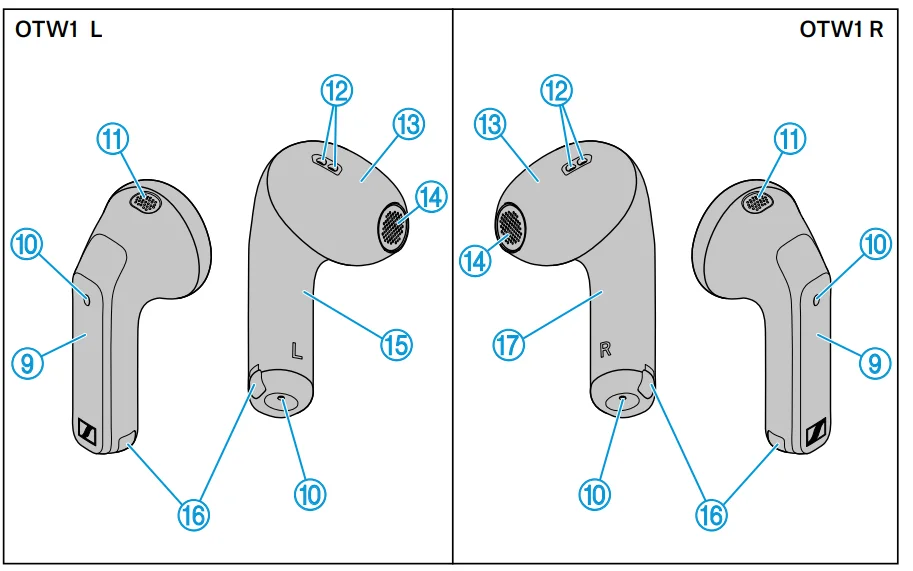
Earbuds
Model: OTW1 R and OTW1 L
- Touch control panel
- Microphones for beamforming noise reduction
- Acoustic rear ventilation
- Acoustic front ventilation
- Built-in rechargeable battery
- Speaker
- Left earbud L
- Charging contacts
- Right earbud R
Overview of the LED display of the charging case
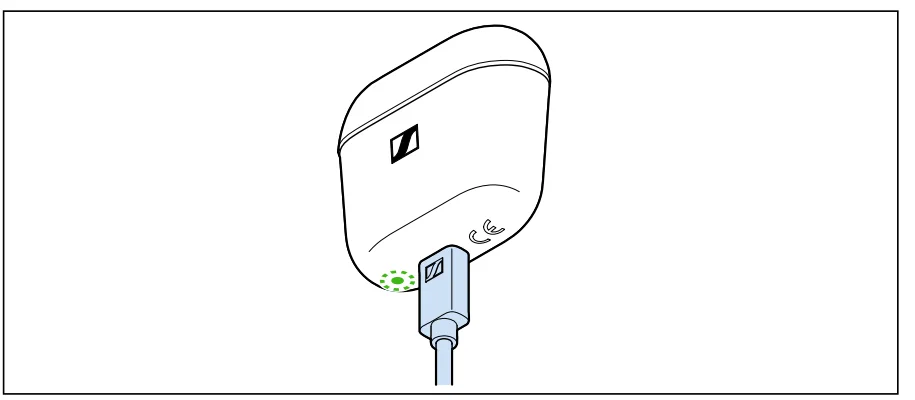
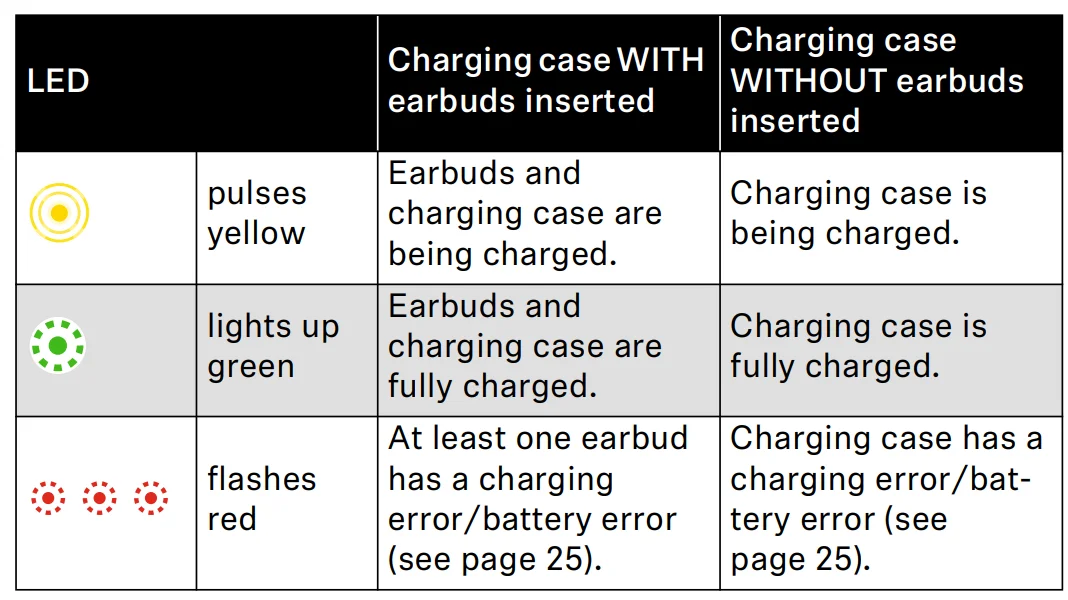
When a USB cable is connected to the USB socket of the charging case, the LED of the charging case permanently displays the charging process:
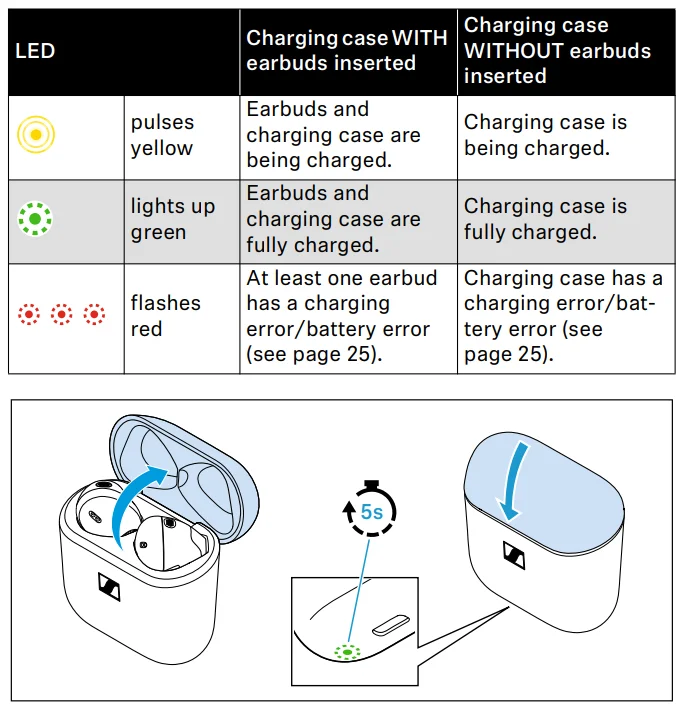
If you open the charging case lid and no USB cable is connected, the charging case LED displays the earbuds’ battery charge status or the charging process. If you close the charging case lid, the LED display switches off after 5 seconds.
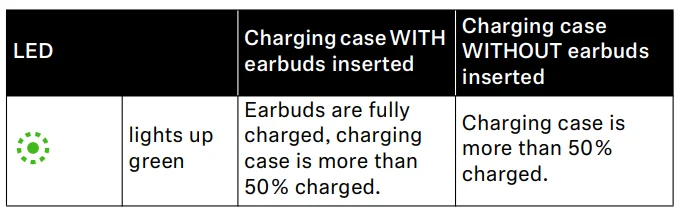
If the LED display does not light up:
- Clean the contacts on the earbuds and in the charging case (see page 24).
- Charge the rechargeable batteries of the charging case and the earbuds until the LED display lights up again (at least 30 minutes) (see page 14).
Notes on tone prompts
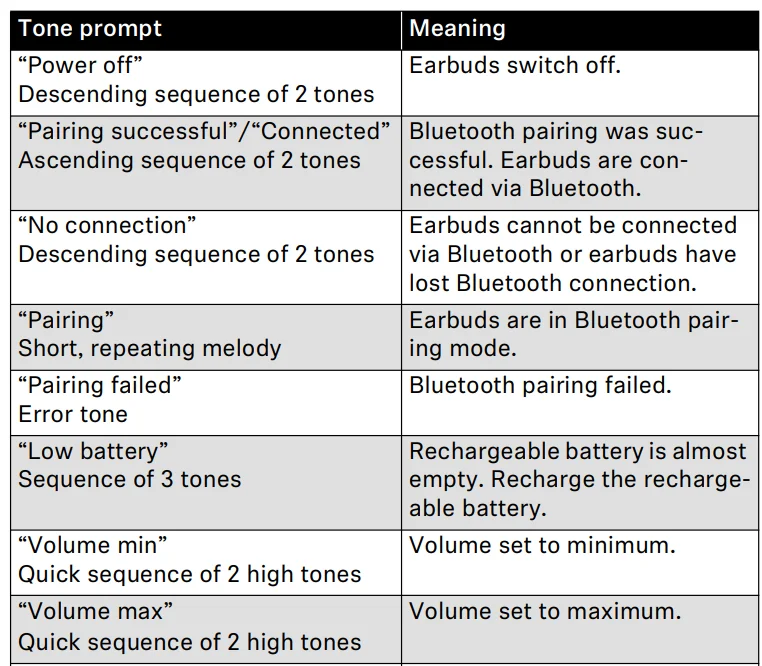
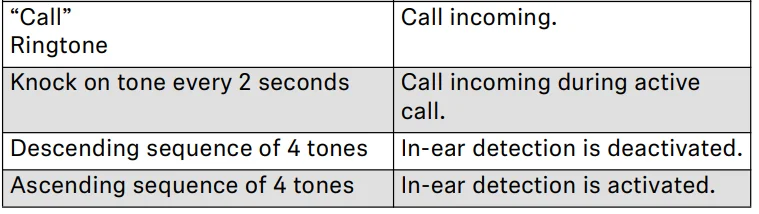
The earbuds output signal tones and ringtone sounds for events (the table gives some examples). If you tap the touch control panels on the earbuds, you will hear corresponding tone prompts as feedback.
Getting started
- Waking up the earbuds and the charging case, and charging the rechargeable batteries

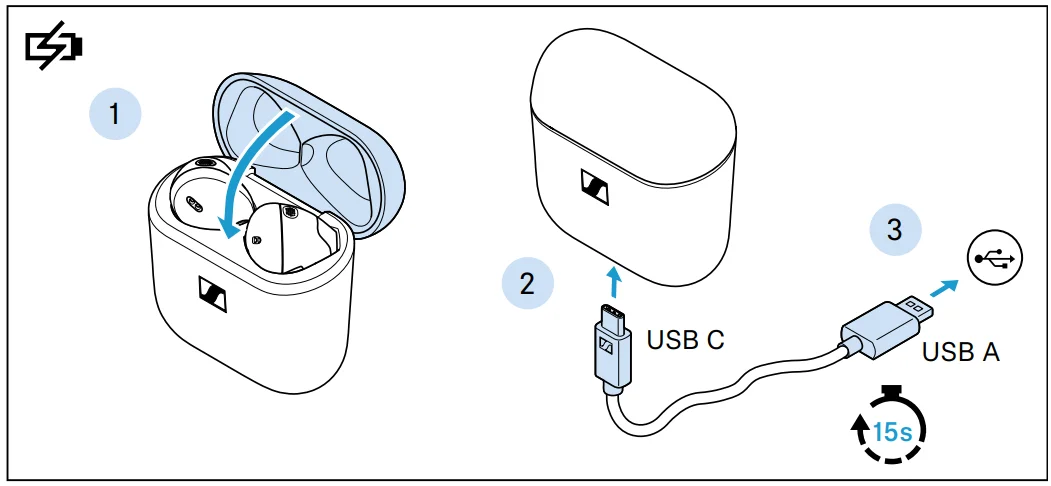
Upon delivery, the rechargeable batteries of the earbuds and the charging case are in sleep mode and have to be woken up by connecting them to a USB power source once.- Insert the earbuds into the charging case and close the lid of the charging case.
- Connect the USB-C cable to the charging case.
- Connect the cable to a USB power source (see page 14) and charge the rechargeable batteries for at least 15 seconds. The earbuds and the charging case are turned on, and the rechargeable batteries are being charged. The earbuds are now ready for use.
We recommend charging the earbuds and the charging case for a complete charging cycle without interruption before using them for the first time.
- Inserting the earbuds in your ears
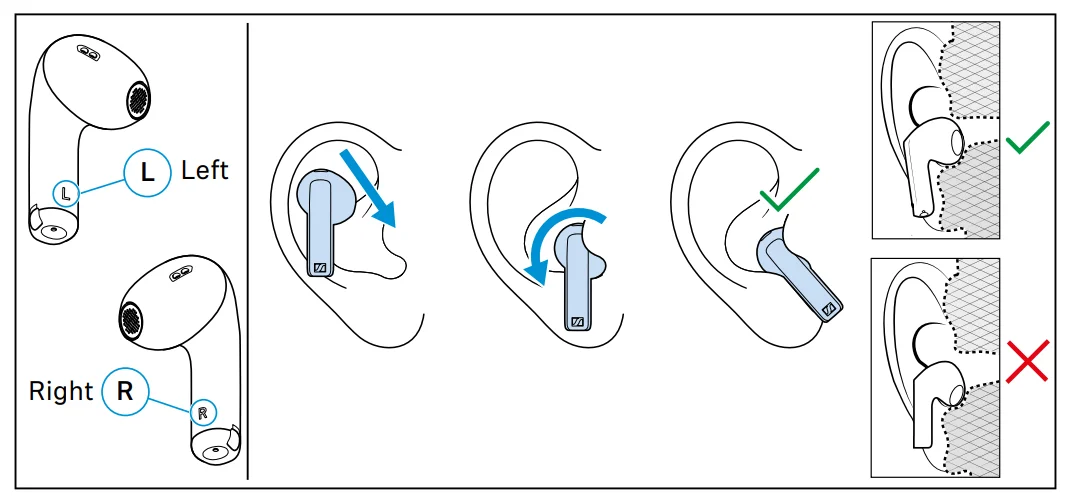
The correct fit of the earbuds in your ears gives you the best sound quality, the best voice quality for phone calls, and the best wearing comfort.
- Assign the right earbud to your right ear and the left earbud to your left ear.
- Insert the earbuds straight into your ears with the stem pointing downwards.
- Twist the earbuds slightly in the ear so that the stem points towards your mouth until the earbuds sit comfortably and snugly in the ear.
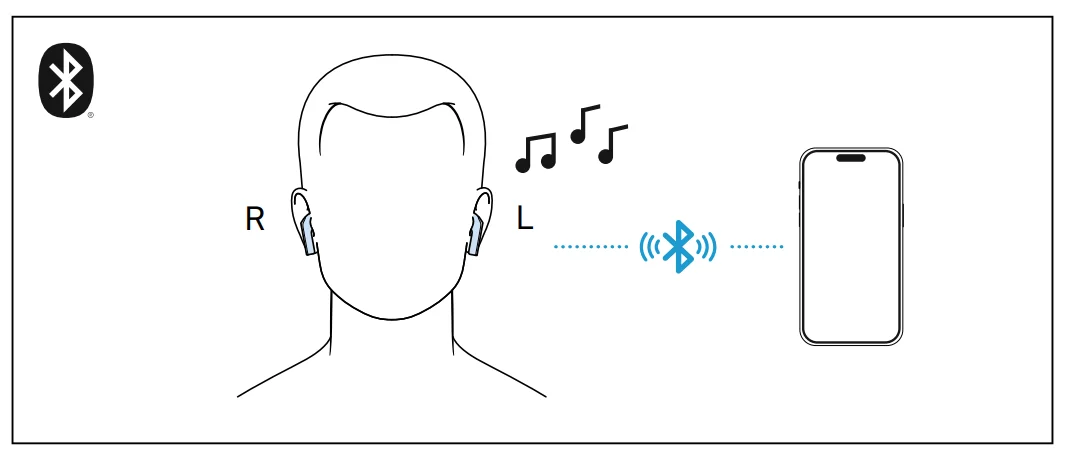
- Connecting the earbuds to a Bluetooth device

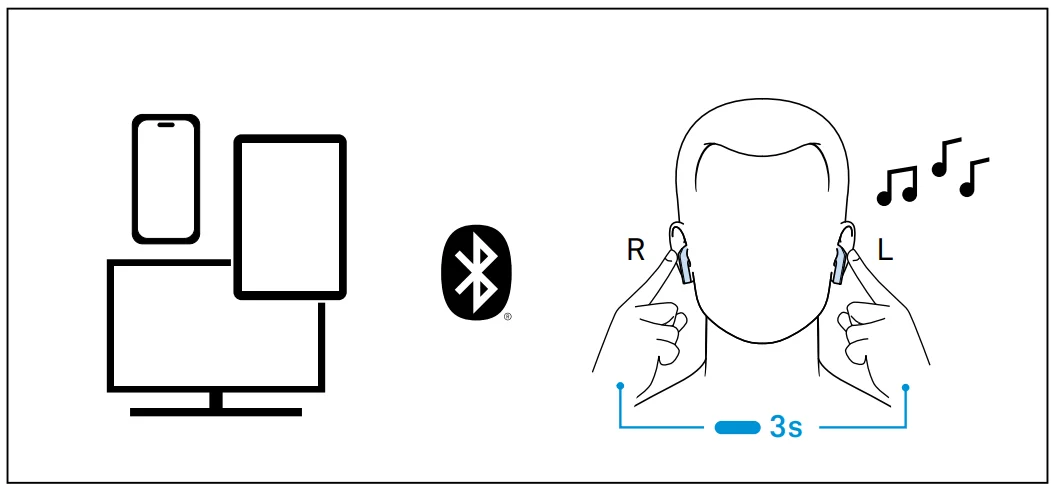
When you take the earbuds out of the charging case for the first time after initial charging, they automatically switch to Bluetooth pairing mode. If the earbuds have not yet been paired with any Bluetooth device (the pairing list is empty), pairing mode remains permanently activated.
As soon as the earbuds are in pairing mode, you will hear a short, repetitive melody.- Connect the earbuds to your smartphone via Bluetooth (see page 16).
- Connecting additional Bluetooth devices

- If desired, connect the earbuds to additional devices via Bluetooth (see page 16).
The earbuds can save the connection profiles of up to eight Bluetooth devices with which they have been paired. The earbuds can have two active Bluetooth connections to two different Bluetooth devices at the same time. Audio playback is only possible from one device at a time.
- If desired, connect the earbuds to additional devices via Bluetooth (see page 16).
Using the earbuds
Information on the rechargeable battery, the charging process, and the first use
The earbuds and the charging case each have a built-in rechargeable battery. To charge the rechargeable batteries, you can use the supplied USB cable. The earbuds must be inserted into the charging case for charging. Thus, even on the go, the earbuds are always safely stored and charged. Upon delivery, the rechargeable batteries of the earbuds and the charging case are in sleep mode and have to be woken up by connecting them to a USB power source for at least 15 seconds. The lid of the charging case must be closed during this process. A complete charging cycle of the charging case and the earbuds takes about 1 hour. The quick charge function gives you approx 1.5 hours of playback time after 10 minutes of charging. The charging time can vary depending on the power source used and the ambient temperature. We recommend charging the earbuds and the charging case for a complete charging cycle without interruption before using for the first time. When a USB cable connected to a power source is connected to the charging case, the rechargeable battery of the charging case is being charged. When the earbuds are inserted into the charging case, their rechargeable batteries are being charged at the same time. The LED display of the charging case indicates the charging process (see page 8). When the charge status of the earbuds’ rechargeable batteries drops to a critical level, you will hear a sequence of three tones. The charge status of the rechargeable battery of the charging case is indicated by the LED display on the charging case (see page 8). At the end of its operational lifetime, this product with its built-in rechargeable battery must be disposed of separately from normal household waste. You can find more information here: see page 31.
Charging the rechargeable batteries using the USB cable
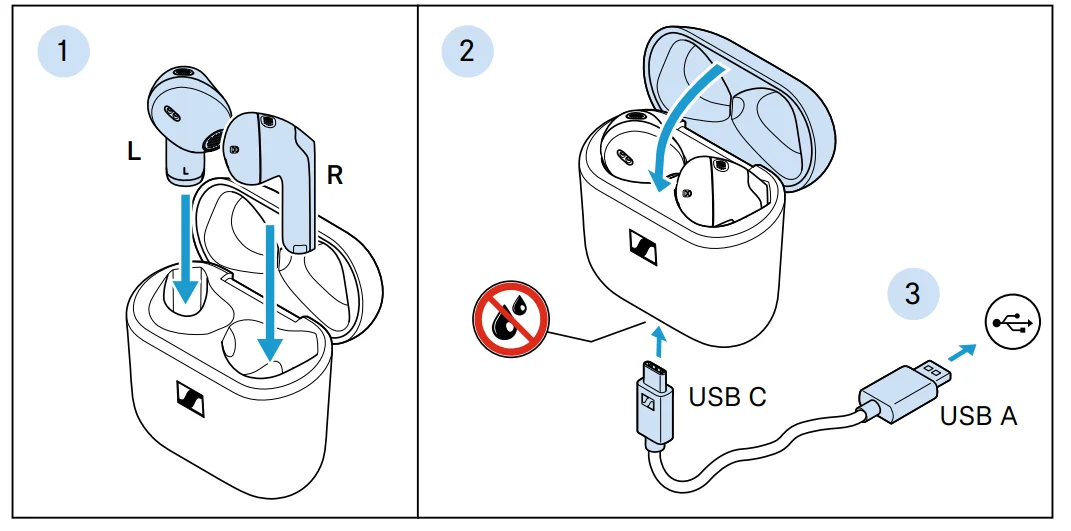
- Open the charging case by overcoming a slight magnetic resistance, and insert the left earbud into the left charging compartment and the right earbud into the right charging compartment. The earbuds are magnetically pulled into the charging compartments.
- Close the lid of the charging case and make sure that the charging socket is free from moisture and contamination. Connect the USB-C connector of the charging cable to the USB socket of the charging case.
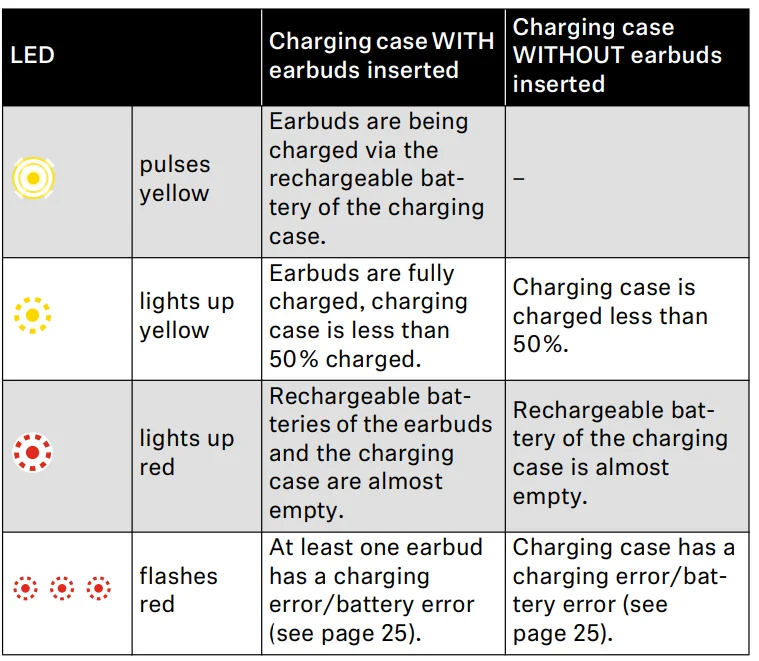
- Connect the USB A connector to a corresponding socket of a USB power source (to be ordered separately). Make sure that the USB power source is connected to the power supply system. The rechargeable batteries of the earbuds and the charging case are being charged. If no earbuds are inserted into the charging case, only the rechargeable battery of the charging case is being charged. The LED display of the charging case indicates the charge status:
If the LED display does not light up:
- Clean the contacts on the earbuds and in the charging case (see page 24).
- Clean the USB-C socket of the charging case.
- Charge the rechargeable batteries of the charging case and the earbuds until the LED display lights up again (at least 30 minutes).
Connecting the earbuds to a Bluetooth device
To be able to use the Bluetooth wireless connection, you must register both devices (earbuds and Bluetooth device, e.g. smartphone) via the settings of your Bluetooth device. This process is called pairing. If the operation differs from the steps mentioned, also refer to the instruction manual of the Bluetooth device you are using.
- When you switch on the earbuds for the first time after initial charging, they automatically switch to Bluetooth pairing mode.
Information on the Bluetooth wireless connection
The earbuds are Bluetooth 5.3 certified. If your audio source supports the high-resolution audio encoding method AAC, music is automatically played in high audio quality. Otherwise, the earbuds will play back your music in normal audio quality (SBC). Paired devices establish the Bluetooth wireless connection immediately after switch-on and are ready for use. When switched on, the earbuds will automatically try to connect to the last two Bluetooth devices used. The earbuds can save the connection profiles of up to eight Bluetooth devices with which they have been paired. Audio playback is only possible from one device at a time. If you pair the earbuds with the ninth Bluetooth device, the connection profile of the first connected Bluetooth device will be overwritten. If you want to connect to this Bluetooth device again later, you have to pair the earbuds again.
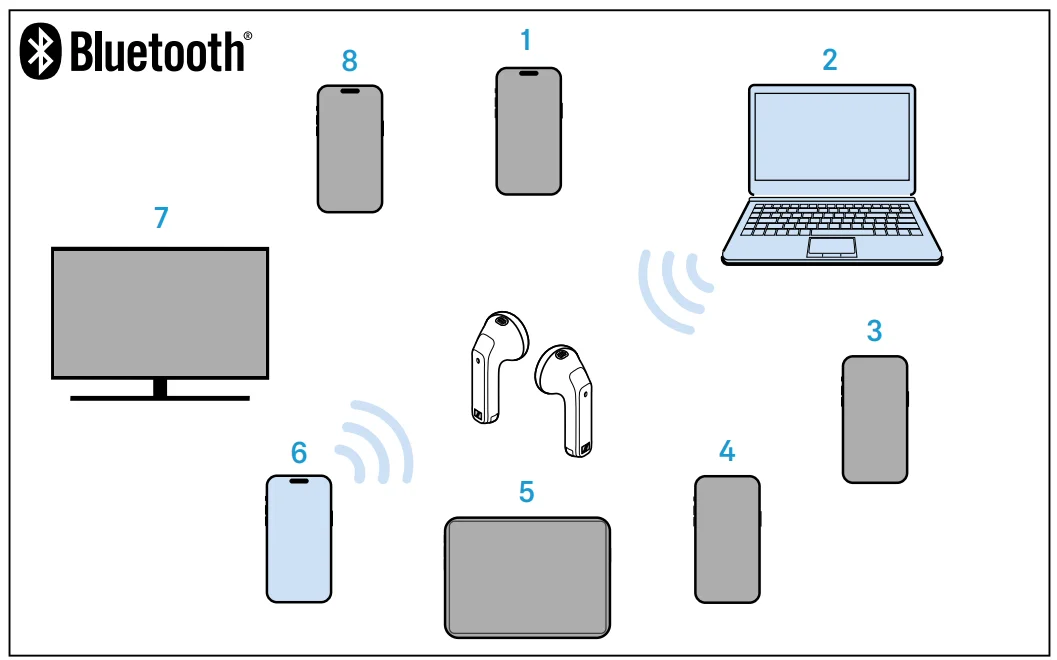
- Paired and connected Bluetooth device
- Paired Bluetooth device (currently not connected)
Pairing the earbuds with a Bluetooth device
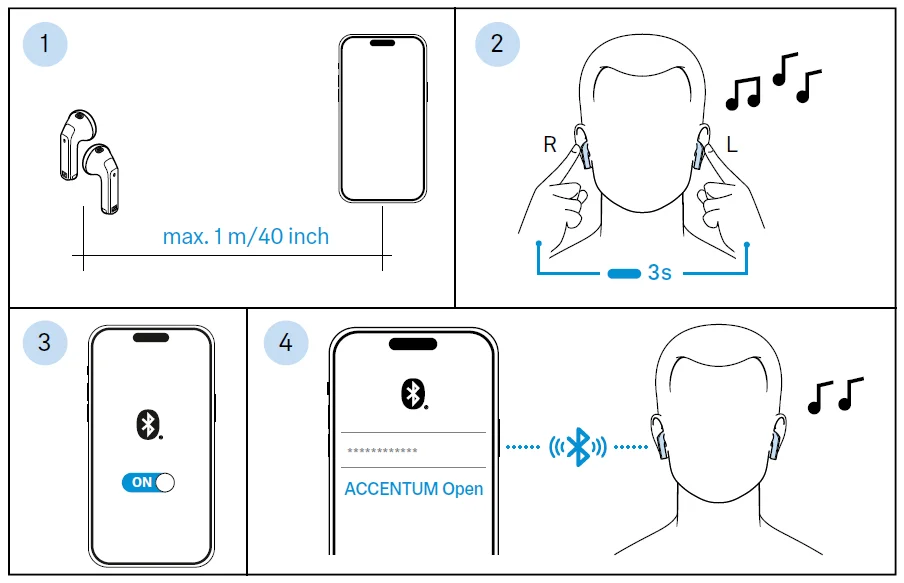
- Take both earbuds out of the charging case and insert them into your ears (see page 17). The distance between the earbuds and the Bluetooth device should not exceed 40″/1 m.
- Simultaneously touch and hold the right and the left touch control panel for 3 seconds until you hear a short, repetitive melody.
- Activate Bluetooth on your Bluetooth device.
- Via the menu of your Bluetooth device, start the search for new Bluetooth devices.
All active Bluetooth devices in the proximity of your device are displayed. From the list of found Bluetooth devices, select “ACCENTUM Open”. If necessary, enter the default pin code “0000”. If pairing was successful, you hear an ascending sequence of two tones.
- If no connection is established within 2 minutes, pairing mode is terminated and the earbuds switch to idle mode. If necessary, repeat the steps described above. If the earbuds are not paired with any Bluetooth device (the pairing list is empty), pairing mode is permanently active.
Disconnecting the earbuds from a Bluetooth device
- Via the menu of your Bluetooth device, disconnect the connection to the earbuds. The earbuds are disconnected from the Bluetooth device and you hear a descending sequence of two tones. The earbuds search for other paired devices. If no device is found, the earbuds switch to idle mode.
If you want to clear the Bluetooth pairing list of the earbuds, reset the earbuds to the factory default settings (see page 28).
Inserting the earbuds into the ears
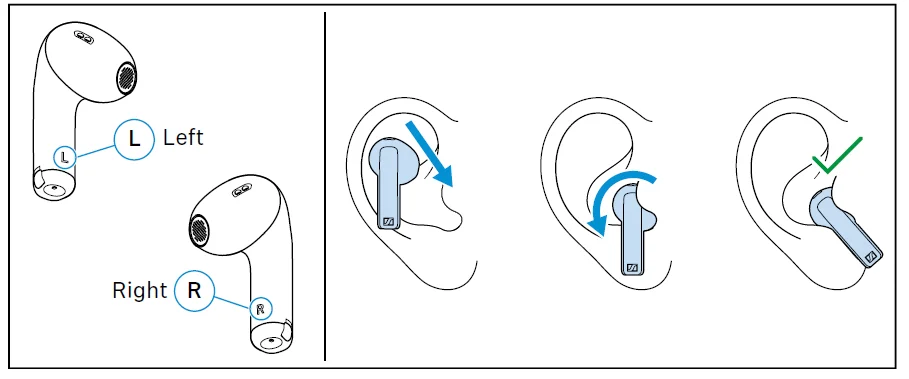
- Assign the right earbud to your right ear and the left earbud to your left ear.
- Insert the earbuds straight into your ears with the stem pointing downwards.
- Twist the earbuds slightly in the ear so that the stem points towards your mouth until the earbuds sit comfortably and snugly in the ear.
Info:
- The right or left earbud can be used alone. If you insert one earbud into the charging case during use, a short interruption of playback may occur in the other earbud.
- The Smart Pause function automatically stops music playback when you remove an earbud from the ear (see page 19).
Switching the earbuds on
WARNING
Danger due to high volume levels!
Listening at high volume levels can lead to permanent hearing defects.
- Before inserting the earbuds into your ears, adjust the volume to a low level (see page 18).
- Do not continuously expose yourself to high volume levels.
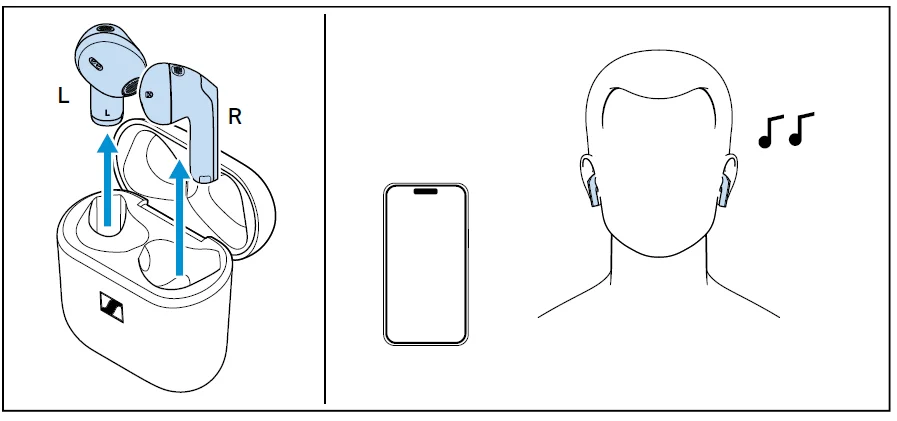
The earbuds switch on automatically as soon as the lid of the charging case is opened.
- Open the lid of the charging case and take out both earbuds.
- Insert the earbuds into your ears (see page 17). If a paired Bluetooth device is within the transmission range, the earbuds automatically establish a connection and you hear an ascending sequence of two tones.
The earbuds automatically switch to idle mode if no paired Bluetooth device can be found within 15 minutes. You can wake up the earbuds from idle mode by touching their touch control panels 1x or by briefly inserting them into the charging case.
Switching the earbuds off
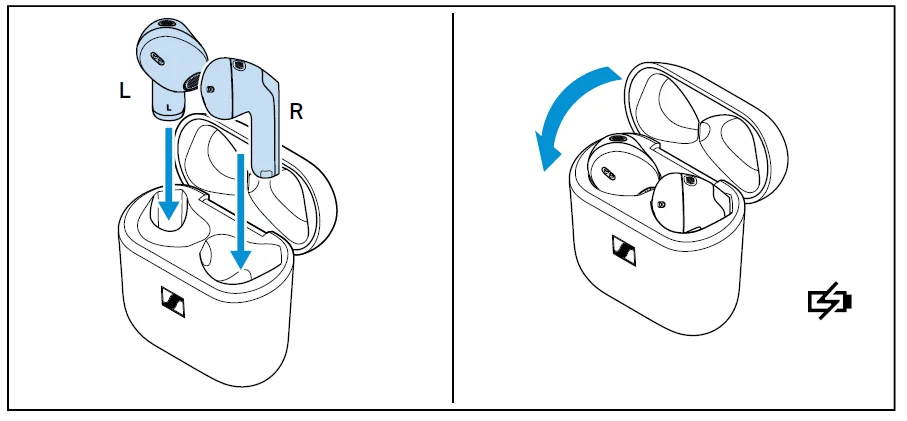
The earbuds do not have to be switched off explicitly.
- Insert the earbuds into the charging case and close the lid to switch them off.
As soon as the earbuds are inserted into the charging case and the lid of the charging case is closed, the earbuds switch off and are being charged (see page 14).
FAQ/If a problem occurs…
If a problem has occurred, proceed in the following order until the problem is solved, and you can use the earbuds again:
- Insert the earbuds into the charging case and close the lid. Wait for at least 10 seconds (see page 27).
- Reset the earbuds to the factory default settings (see page 28).
- Check the list of frequently asked questions to see if there is a solution to the problem (see page 26).
- Contact your Sonova Consumer Hearing partner to solve the problem (see page 26).
Current list of frequently asked questions (FAQ)
Visit the ACCENTUM Open product page at www.sennheiser-hearing.com
There you will find a current list of frequently asked questions (FAQ) and suggested solutions.
Your question has not been answered, or the problem persists?
If a problem occurs that is not listed in the FAQ section, or if the problem cannot be solved with the proposed solutions, please contact your Sonova Consumer Hearing partner for assistance. To find a partner in your country, search at www.sennheiser-hearing.com/service-support
Leaving the Bluetooth transmission range
Wireless calling and streaming are only possible in the Bluetooth transmission range of your smartphone. The transmission range largely depends on environmental conditions such as wall thickness, wall composition, etc. With a free line of sight, the transmission range of most smartphones and Bluetooth devices is up to 10 meters. If you, and therefore the earbuds, leave the Bluetooth transmission range of your Bluetooth device, the sound quality deteriorates increasingly until the connection breaks down completely. In this case, you will hear a descending sequence of two tones. If you immediately re-enter the Bluetooth transmission range of your device, the connection is automatically re-established, and you hear an ascending sequence of two tones. If this is not the case, tap the touch control panel of one earbud one time.
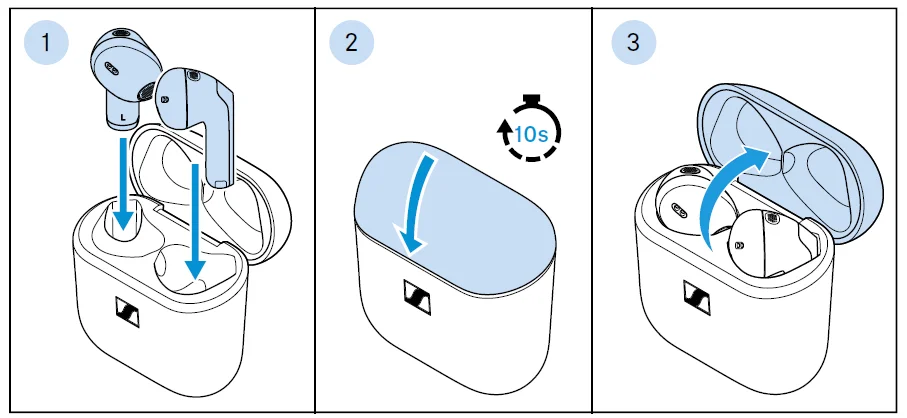
Resetting the earbuds
If the function of the earbuds is disturbed, perform a reset. Individual settings, such as the pairing settings, are not deleted.
- Insert the earbuds into the charging case.
- Close the lid of the charging case and wait at least 10 seconds.
- Open the lid again. The earbuds will restart (reset).
Specifications
ACCENTUM Open
Model: OTW1, OTW1 R, OTW1 L, OTW1 C
Bluetooth
For more manuals by Sennheiser, visit ManualsLibraryy
Sennheiser ACCENTUM Open Wireless Earbuds-FAQs
Are the Sennheiser ACCENTUM Open Wireless Earbuds worth buying?
Yes, the Sennheiser ACCENTUM Open Wireless Earbuds are a solid choice for users who want balanced sound quality, comfortable wear, and reliable wireless performance at a reasonable price. They offer good everyday audio performance, making them suitable for music, calls, and streaming.
Do Sennheiser ACCENTUM Open earbuds have good sound quality?
These earbuds deliver clear vocals, detailed mids, and balanced bass for an enjoyable listening experience. Sennheiser is known for premium audio tuning, and the ACCENTUM Open earbuds provide rich sound suitable for casual listeners and music lovers alike.
Do the ACCENTUM Open Wireless Earbuds support noise cancellation?
The earbuds focus on open and natural listening comfort. Depending on the model version, they may include noise-reduction features for calls, but they are mainly designed to keep users aware of their surroundings while listening.
How long does the battery last on Sennheiser ACCENTUM Open earbuds?
The earbuds offer long battery life for daily use, including several hours of playback on a single charge. The charging case provides additional power, helping users enjoy extended listening throughout the day.
Are Sennheiser ACCENTUM earbuds comfortable for long use?
Yes, the lightweight and ergonomic design makes them comfortable for extended listening sessions. Their open-style fit reduces ear pressure and allows better airflow for all-day comfort.
Can I use Sennheiser ACCENTUM Open earbuds for phone calls?
Yes, the earbuds include built-in microphones that help deliver clear voice quality during phone and video calls. They are suitable for online meetings, voice chats, and hands-free calling.
Are Sennheiser earbuds better than Sony earbuds?
Both brands offer high-quality audio products. Sennheiser is often preferred for balanced and detailed sound, while Sony is widely known for strong active noise cancellation and smart features. The better option depends on your listening preferences.
What is the difference between ANC and ENC in earbuds?
ANC (Active Noise Cancellation) reduces surrounding noise so you can focus on music or videos. ENC (Environmental Noise Cancellation) improves microphone clarity during calls by minimizing background noise for the listener.
Can I connect the ACCENTUM Open earbuds to multiple devices?
Many modern Sennheiser wireless earbuds support Bluetooth multipoint connectivity, allowing users to switch between devices like smartphones, tablets, and laptops more easily.