
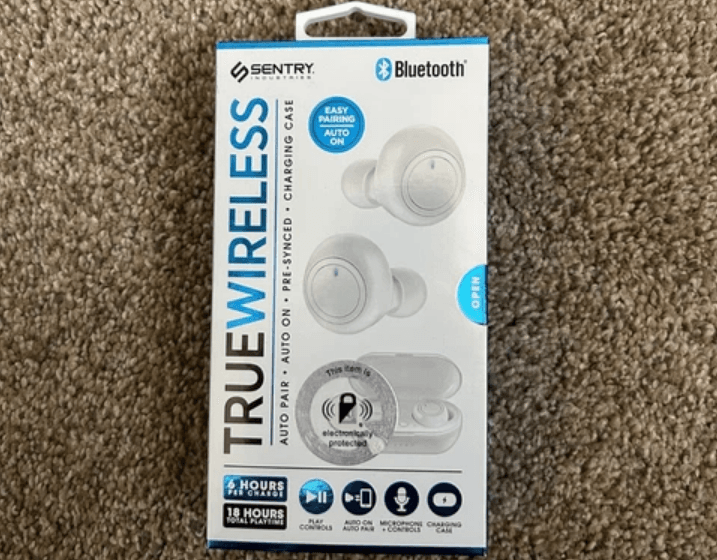

Sentry BT975 True Wireless Earbuds
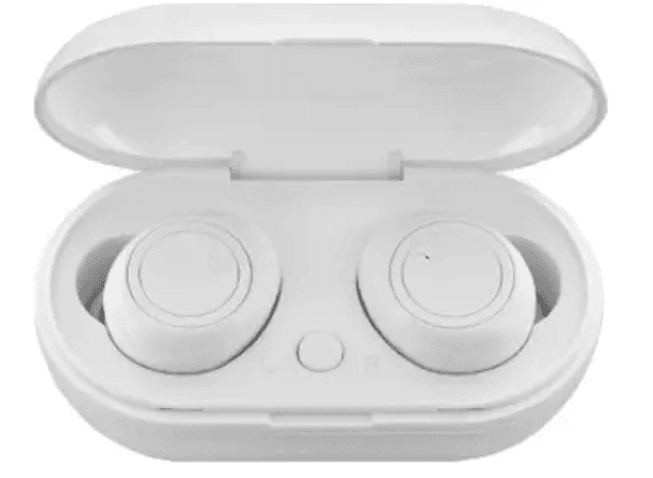
Using your True Wireless Earphones
Before use
Charge both earbuds by placing them inside the charging case.
STEP 1
Turn off the Bluetooth function on your music device. E.g.. Mobile phone or music device.
STEP 2
Please take out the earbuds from the charging case after they have charged. The earphones will be automatically on and paring. When pairing successfully, the left earphone will flash blue and the right earphone will flash red and blue alternately.
STEP 3
When auto-pairing failed, or dual earphones disconnected. Press the power button on the left and right earphones to turn the earbuds off and on again; the left and right earphones will be connected manually.
* If pairing still does not work, please long-press both buttons on the earbuds for 10 seconds to force the earbuds to restart. They should then resume pairing mode.
STEP 4
You can now turn on the Bluetooth function of your mobile phone. Search and select BT975, click it to connect.
Button Function
On/Off Buttons
Pairing dual earphones: Long-press press left and right earphone buttons for 3 seconds, turn on or off the earphones.
Pairing single earphones: Long-press press left or right earphone button for 3 seconds to turn on the earphones, enter single earphone pairing. Then long-press for 3 seconds, turn off the earphones.
( When powered on, the earphones will flash blue. When the power is off, the light is off. )
Answer / Hang Up
When coming call, click the button on the left or right earphone to answer the phone. During the call, click the button on the left or right earphone to hang up the call.
Reject / Call Back
When receiving a call, long-press the left or right earphone to refuse the call. Three-click the right earphone button to resume back to the last call, three-click the left earphone button to open the voice assistant.
Play / Pause Music
While playing music, click the button of the left or right earphone to play or pause the music.
If one of the earbuds has run out of battery, the other one will continue to work until it runs out of power too.
Last / Next Song Control
When playing, double-click the left earphone button to switch to the Last song; double-click the right earphone button to switch to the next song.
Charging Function
Charge the Charging Box
- There is aaSB charging cable in the package, you can connect the power adapter for charging.
The blue LED lights will keep flashing when it is charging. If all 4 blue LED lights on the front turn on, that means the charging case is fully charged. - Press the charging compartment button. When the indicator light turns blue, it means the charging case has sufficient power. If the blue light flashes slowly, it means the battery is low. When there is no power left in the charging case, the light will be off when the button is pressed.
Charge for Earphones
Please double-check and confirm the charging compartment has sufficient power, then put the earphones into the correct position for charging.
If the earbuds are not placed securely into the case, they may not charge. Please take out the earbuds and re-insert them in the case. Also, make sure the lid is properly closed so that charging the earbuds can start. Some large earpads could also obstruct the closure of the case, and so may need to be removed. A red light will appear to confirm that charging has started.
Frequently asked questions
Why can’t Bluetooth earbuds can not turn on?
- Can you check if the earbuds are powered or not? If not, please fully charge it before turning it on.
- Please long-press the power on /off button. (For the detailed operation, please refer to the manual.)
Why Bluetooth earbuds’ signal unstable
- Restart the Bluetooth earbuds.
- Please kindly check the compatibility and calling communication quality of the mobile phone.
- Please confirm if the distance between the earbuds and the phone is too far or if there is are interference. If too far or there is interference, the signal will be unstable.
- Please don’t stay in the signal reflective environment.
Why can’t the Bluetooth earbuds hear the voice
- Please kindly check if the Bluetooth earbuds are in mute status.
- Please kindly check if the Bluetooth earbuds and phone are connected well.
- Then confirm if the distance between the earbuds and the phone is too far or if there is interference surrounding.
If, after some time, the earbuds are not pairing correctly, please delete the earbuds from your phone by going to the phone’s Bluetooth settings. Then reset the earbuds by long-pressing both buttons on the earbuds for 10 seconds. Then follow Steps 1-4 on the first page of this manual to connect your earbuds to your phone device.
If after some time, the earbuds stop charging, pls try to use the cotton swab to clean the earbud bottom and the inductive pins to avoid any dust and sweat.
Specifications
- Model: BT975
- Bluetooth Version: 5.0
- Power Input: DC 5V
- Earphone Working Time: About 4 hours at 50% volume
- Earphone battery capacity: 50mAh+50mAh=100mAh
- Charging Case battery capacity: 200mAh
- Support Protocol: HSP/HFP/A2DP/AVRCP
Limited 90-Day Warranty
Sentry warrants this product to be free from defects in materials and workmanship for 90 days from the date of original purchase. This warranty does not pertain to damage resulting from accident, abnormal use, misuse, or neglect. Any defective product will be replaced if returned to an authorized Sentry dealer or Sentry directly at: PO Box 885, One Bridge Street, Hillburn, NY 10931. Please enclose a $5 check for return shipping.
- The Bluetooth® word mark and logos are registered trademarks owned by Bluetooth SIG, Inc., and any use of such marks by Sentry Industries. Inc. is under license. Other trademarks and trade names are those of their respective owners.
Sentry Industrie Inc. declares that radio equipment BT975 complies with Directive 2014/53/EU. The EU declaration of conformity is available at
https://sentryindustries.com/european-declaration-of-conformity/
Conformity with Directives
This product is CE marked to denote conformity with Directives 73/23/EEC (low voltage) and 89/336/EEC (Electromagnetic Compatibility), as amended.
Environmental Protection
Waste electrical products should not be disposed of with household waste. Please recycle where facilities exist. Check with your Local Authority or retailer for recycling advice.
Supplier’s Declaration of Conformity 47 CFR 47 CFR Part 15.21, 15.105(b) Compliance Information Sentry Bluetooth
Responsible Party –
SENTRY INDUSTRIES INC
ONE BRIDGE STREET, HILLBURN, NY 10931 USA
TEL +1 8457532910
FCC Compliance Statement
“This device complies with part 15 of the FCC Rules. Operation is subject to the following two conditions: (1) This device may not cause harmful interference, and (2) this device must accept any interference received, including interference that may cause undesired operation.”
FCC ID:2ACP4CBT975 Model #BT975
“NOTE: This equipment has been tested and found to comply with the limits for a Class B digital device, under 15 of the FCC Rules. These limits are designed to provide reasonable protection against harmful interference in a residential installation. This equipment generates, uses, and can radiate radio frequency energy and, if not installed and used by the instructions, may cause harmful interference to radio communications.
However, there is no guarantee that interference will not occur in a particular installation. If this equipment does cause harmful interference to radio or television reception, which can be determined by turning the equipment off and on, the user is encouraged to try to correct the interference by one or more of the following measures:
- Reorient or relocate the receiving antenna.
- Increase the separation between the equipment and receiver.
- Connect the equipment to an outlet on a circuit different from that to which the receiver is connected.
- Consult the dealer or an experienced radio/TV technician for help
Warning: Changes or modifications to this unit not expressly approved by the party responsible for compliance could void the user’s authority to operate the equipment.”
For more manuals by Sentry, visit ManualsLibraryy
Sentry BT975 True Wireless Earbuds- FAQs
Q1. How do I set up my Sentry BT975 earbuds for the first time?
Make sure the charging case and earbuds are fully charged. Turn off Bluetooth on your phone, remove the earbuds from the case, and wait a few seconds for them to connect to each other. Then, enable Bluetooth on your device and select “Sentry BT975” from the list.
Q2. How do I pair the Sentry earbuds with my device?
Press and hold the earbud power buttons for about 3 seconds to turn them on. The LEDs will blink, showing they are in pairing mode. Open your phone’s Bluetooth settings, select “Sentry BT975,” and confirm the connection.
Q3. How can I tell if my earbuds are fully charged?
When charging, the earbuds show a red light. Once they are fully charged, the indicator changes to green or solid white depending on the model.
Q4. How long does it take to charge Sentry BT975 earbuds?
It usually takes 1–2 hours for a full charge when placed inside the charging case.
Q5. How do I check the battery level of my earbuds?
You can check the status through the LED indicator on the earbuds or charging case, your phone’s Bluetooth settings, or via a voice prompt if supported.
Q6. Do the earbuds blink while charging?
Yes. A pulsing light usually means they are charging. A solid light means they are fully charged.
Q7. How do I reset the Sentry BT975 earbuds?
Delete the earbuds from your phone’s Bluetooth list. Then, press and hold both earbud buttons for about 10 seconds until the lights flash, resetting them to factory mode.
Q8. How do I control music and calls with my earbuds?
Use the touch-sensitive area or buttons on each earbud. You can play/pause music, answer/end calls, adjust volume, or activate your phone’s voice assistant depending on the tap or press pattern.
Q9. How do I activate single earbud mode?
Press and hold just one earbud button for 3 seconds to power it on and connect it individually.