
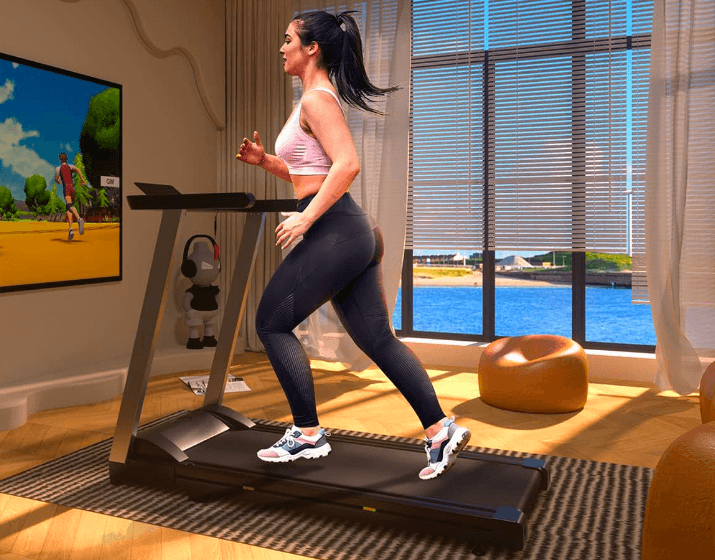

Star Power AS01 Folding Treadmill
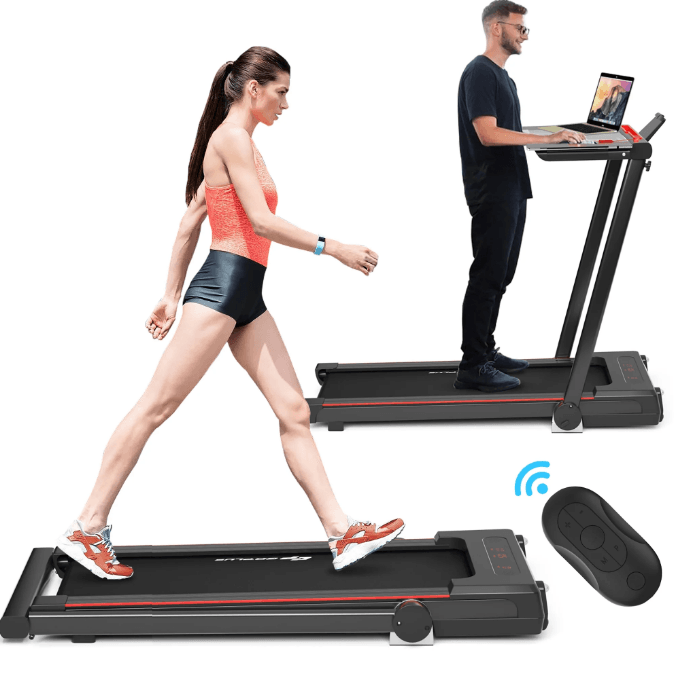
Safety Instructions
- Before using the treadmill, make sure it is properly grounded to avoid any accidents or dangers.
- While using the treadmill, attach the safety lock (red) clip your clothes properly, so that in case of emergency, the safety lock can be pulled off immediately to stop the treadmill for your safety.
- Consult your healthcare provider before exercising.
- Wear suitable workout clothes for exercise (no running with soft-soled shoes, as the soft soles might get drawn into the motor and control system, causing the treadmill to malfunction).
- Keep the room clean and tidy to avoid clumps being brought into the treadmill by electrostatic adsorption, resulting in the malfunction of the treadmill.
- The maximum weight capacity of the treadmill is 300lbs.
- The treadmill is designed for the use of one person. When the treadmill is operating, keep little children or pets away to avoid any accidents.
- The minimum distance (between the treadmill and walls and furniture) required for the treadmill when it is fully unfolded should be no less than 3fts at the front, left, and right sides and 6fts at the rear side.
- Do not use the treadmill if the power cord is damaged.
- Do not use the treadmill if the treadmill is damaged or broken. Contact your local distributor for repair immediately.
- Do not touch any moving parts with your hands. Do not press against or stuff any objects into the treadmill.
- The treadmill is for indoor use only. Avoid using it outdoors or in a gym.
- Place the treadmill on clean and flat ground, keep the treadmill well ventilated, make sure there’s no sharp object nearby, and do not use the treadmill near water and heat sources.
- Use the handrail when getting on and off the treadmill. Do not get off before the treadmill stops completely. For any emergency when you need to jump off, remove the safety lock to stop the treadmill immediately.
- Do not use the treadmill while using respiratory equipment or sprays near the treadmill.
- In order to maintain the proper operation of the treadmill, do not install or attach any accessories or parts that are not provided by the manufacturer of the treadmill.
- All parts of the treadmill must be properly and firmly assembled.
- Turn off the power and unplug the treadmill immediately after using it.
Packing Details
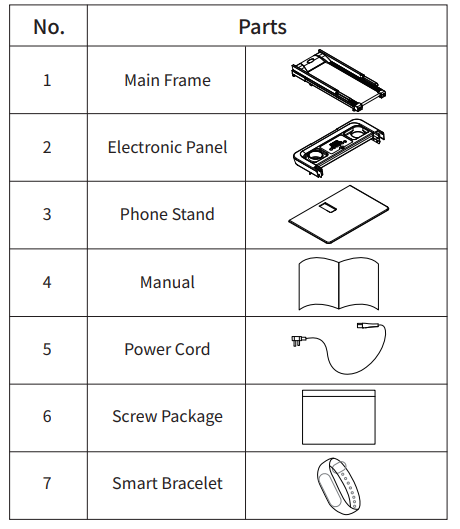
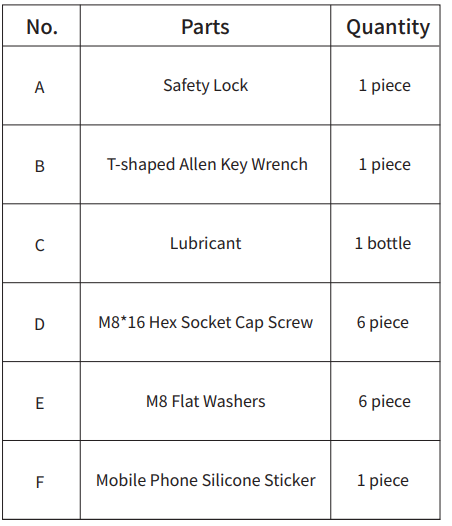
Accessories
Assembly
Step 1
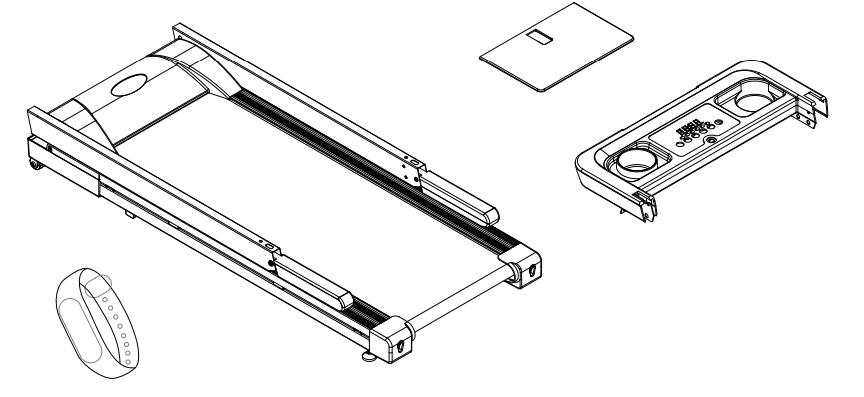
- Take the main frame, electronic panel, phone stand, and smart bracelet out of the carton, and open the cable ties binding the frames.

Step 2
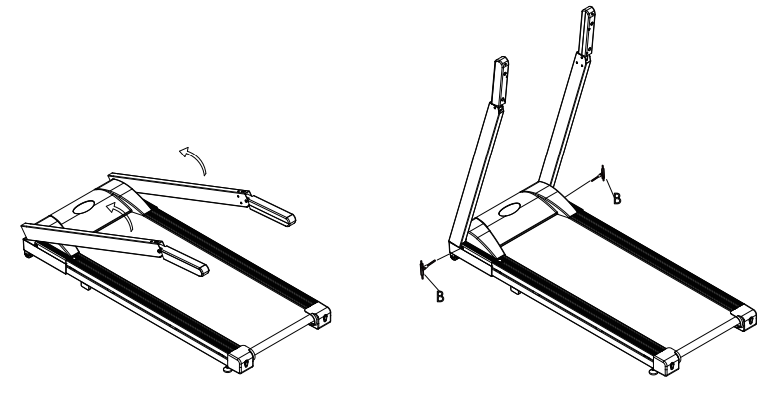
- Unfolding the frame: follow the demonstration below, hold the column with your hands and pull up slowly in the direction of the arrows, and use B# (T-shaped Allen Key Wrench) to fasten the bolts in the main frame in the direction of the arrows (clockwise).

Step 3
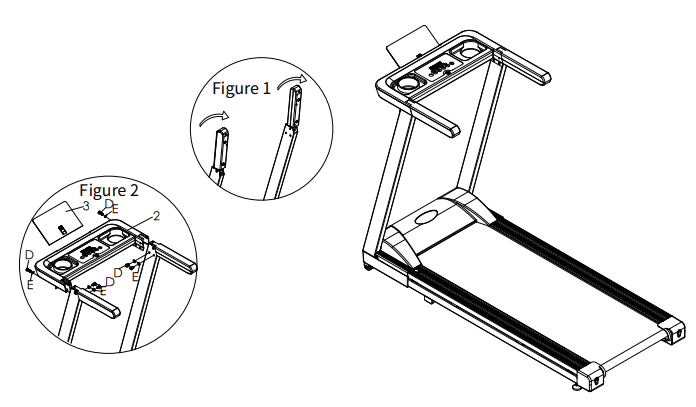
- Rotate the armrest in the direction of the arrows to the corresponding position of the column (as shown in Figure 1). Connect the 4-core wire in 2# (electronic panel) and the 4-core wire in the column (as shown in Figure 2). Push the electronic panel horizontally in the direction of the arrow, clamp and fix it on the column with D# (8\*16, hex socket head bolts) and E# (flat washer). Insert 3# (Phone Stand) into 2# (electronic panel) (as shown in Figure 2), and then paste F# (mobile phone silicone sticker) onto it.

Step 4
- Product usage: when the power is on, wait till the light in the electronic panel turns on. The treadmill is ready for use with a single press of the START button!

Step 5
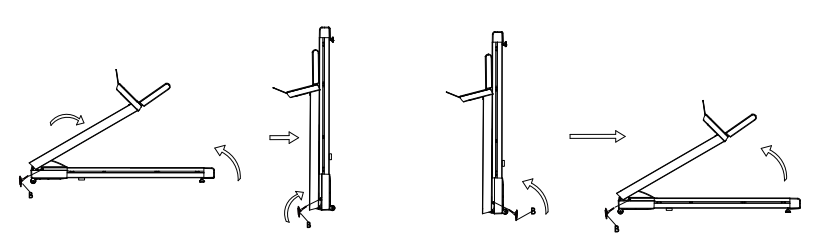
- Folding: fold the treadmill as shown in the figure below if it is not used for a long time. First, loosen the special bolt in the column with a T-shaped Hex Allen Wrench in the direction of the arrows and unplug the power cord (5) in the direction of the arrow, place the column back to the main frame in the direction of the arrow, hold the rear end of the treadmill with your hands, lift the treadmill slowly in the direction of the arrow, and lean it against a wall.
- Unfolding: lay the treadmill flat on the floor as shown in the figure below, lift the column slowly in the direction of the arrow, and use the T-shaped Hex Allen Wrench to tighten the special bolt in the column in the direction of the arrow, and plug the power cord (5).

Electric Control
Using The Treadmill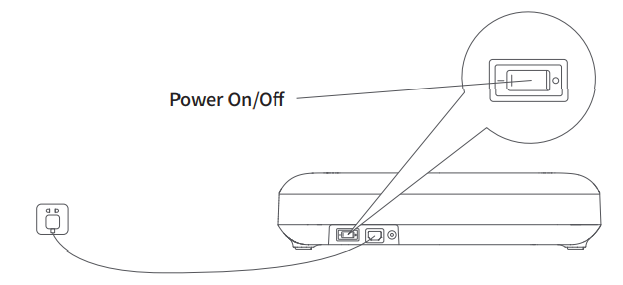
Plug on the treadmill and turn on the switch (red).
- Wait for the screen to light up and enter the start interface.
Safety lock
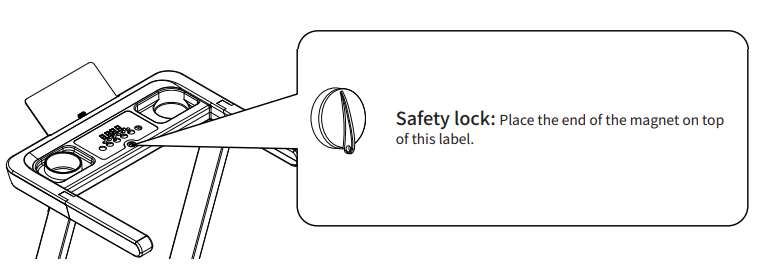
- Put the safety lock in the designated area on the electronic panel to start the treadmill; attach the safety lock clip to your clothes. In case of any emergency, pull off the safety lock to stop the motor of the treadmill immediately. To continue using the treadmill, just put the safety lock back. In any case, you can stop the treadmill by pulling off the safety lock.
System Operation
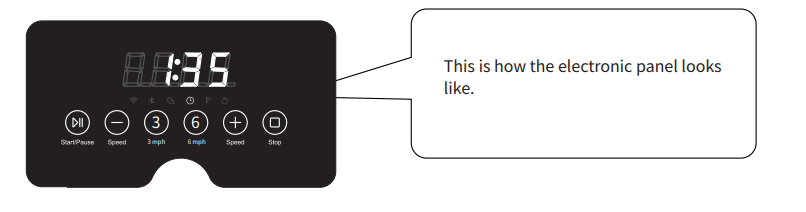
Time Display:
- Display running time as (mm\:ss) for the time range (0-99:59) and (hh\:mm) for the time range longer than 100 minutes.
- Display the error code when any malfunction occurs.
Distance Display:
- Display the distance of movement in miles with a precision of 0.001 miles.
Calorie Display:
- Display the calories consumed in kcal with a precision of 0.01 kcal.
Speed Display:
- Display the running speed in miles/hour (mile/h) with a precision of 0.1 mile/h.
- Once the operation starts, the display switches every 5s.
Keys and Functions
Start/Pause button:
- In the standby state of the treadmill, press the Start button to activate the treadmill, and press the button again to start the treadmill. In the operating state of the treadmill, press the Start button to pause the treadmill while keeping the existing data of the exercises, and press the button again to continue exercising.
Stop Button:
- In the operating state of the treadmill, press the Stop button to stop the treadmill and clear the data of exercises.
Speed Increase and Speed Decrease buttons:
In the operating state of the treadmill, there are three interactions with the Speed Increase and Speed Decrease buttons.
- Press the button in 1 second to increase/decrease the speed by 1.0 mile/h each time.
- Long-press and hold the button for over 1 second to increase/decrease the speed by 0.5 mile/h each time.
- Quickly press the button multiple times in 0.5 seconds each to change the speed by 0.5 mile/h each time. While displaying other indicators, adjusting speed will lead back to the Speed Display.
Speed Shortcuts:
- Touch the Speed Shortcut key 3 to set the speed to 3.0 mile/h and key 6 to 6.0 mile/h, and jump back to the Speed Display.
Safety Lock:
- In any state, pulling off the safety lock will stop the operation immediately and display “SAFE” on the electronic panel.
Unmanned Shutdown:
- In the operating state of the treadmill, if the treadmill detects an unmanned state for more than 10 seconds, it will automatically stop. In the standby state, press and hold key 3 and key 6 for more than 5 seconds to cancel the Unmanned Shutdown function till the buzzer beeps. The treadmill will automatically resume the Unmanned Shutdown function after a power cut.
Normal operating function
- In the standby state, touch the screen to bring the screen back to the display state. Press the Start button to activate the treadmill and press the button again to start the treadmill.
- In the operating state, press the Speed Increase and Speed Decrease buttons to set the desired speed.
- In the operating state, press the Stop button, or Power On/Off, or pull off the safety lock to stop the treadmill.
Maintenance
- De-dust the treadmill on a regular basis to keep the parts clean.
- After using the treadmill each time, wipe the meters and other parts with a clean towel or cloth to remove the sweat and debris. Be careful to keep the electrical components and running belt away from water.
- Keep the treadmill in a clean and dry environment and make sure the power is off and the treadmill is unplugged.
- To facilitate the moving of the treadmill, it is equipped with wheels. Before moving the treadmill, make sure to disconnect the power supply and fold the treadmill properly.
- Check all parts of the treadmill frequently and lock them properly, and replace the damaged part immediately if any.
- To better maintain and extend the life span of the treadmill, it is highly recommended to limit the exercise to 30 minutes each time and let the treadmill cool down for 10 minutes before restarting.
- The running belt has been properly adjusted at the ex-work stage, but after use, the running belt may be stretched more or less, which may cause damage to the belt due to its deviation from the center and rubbing against the side bars and the rear cover. It is common to see the running belt stretched after using it for a while. If the running belt becomes slippery or stuck when using the treadmill, you may adjust the tightness of the running belt.
Belt adjustment:
If the running belt becomes too loose, insert the hex Allen Wrench provided with the treadmill into the adjustment hole at the left foot guard of the treadmill, turn it by 1/4 of a cycle clockwise, and repeat the same process with the right foot guard. Keep in mind to adjust both sides synchronously to tighten the belt while avoiding its deviation from the center. If the running belt is too tight, adjust both sides synchronously counterclockwise.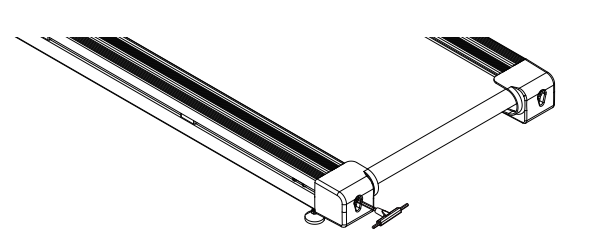
Running Belt Off-Center Adjustment
While using the treadmill, the pressure on the running belt is not balanced because the acting force from the left and right feet is not exactly the same while running, which could easily cause the running belt to become off-center. That’s a normal deviation. It will return to the center automatically when nobody is using the treadmill. Otherwise, you may need to bring the running belt back to the center.
Operate the treadmill without anyone on it, adjust the speed to level 6, and observe the distance between the left and right side bars.
- If it is too close to the left side, use a hex Allen wrench to turn the left screw 1/4 of a cycle clockwise.
- If it is too close to the right side, use a hex Allen wrench to turn the right screw 1/4 of a cycle clockwise.
- If the belt is still not well centered, repeat the above adjustments until it comes back to the center.
- After adjusting the running belt to the center, set the speed to level 6 and observe if there’s any deviation of the running belt from the center or any slipping of the running belt. If the deviation persists, repeat the above steps to further adjust
Lubricant
- The treadmill is lubricated before it leaves the plant, but frequent inspection of the lubrication status of the treadmill helps keep it in its best condition. The treadmill must be lubricated after one year of use or 100 hours of operation.
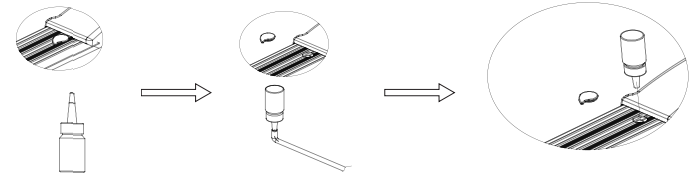
- After using for 30 hours or 30 days, whichever comes first, while the treadmill is stationed, lift the running belt from one side and reach out to the surface underneath the running belt to determine the lubrication status. You do not need to add more lubricant if you can touch the lubricant. But if it’s dried up, follow the instructions below to refill the lubricant. (Please only use non-petroleum-based lubricant)
- Follow the figure below to properly add the lubricant. Open the refilling cover on the left front side of the side bar, use scissors or a utility knife to cut the lubricant bottle at the position shown in the figure below, and add the lubricant according to the figure at the bottom. Insert the thin rod at the front end of the lubricant bottle into the filling port on the running board and fill in the lubricant.

General Troubleshooting
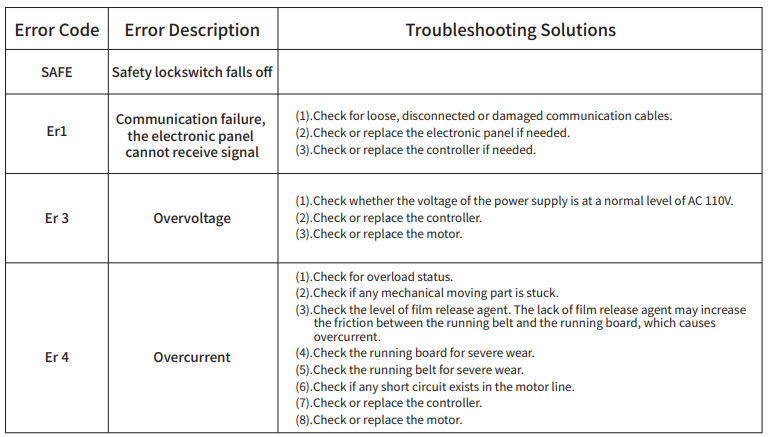
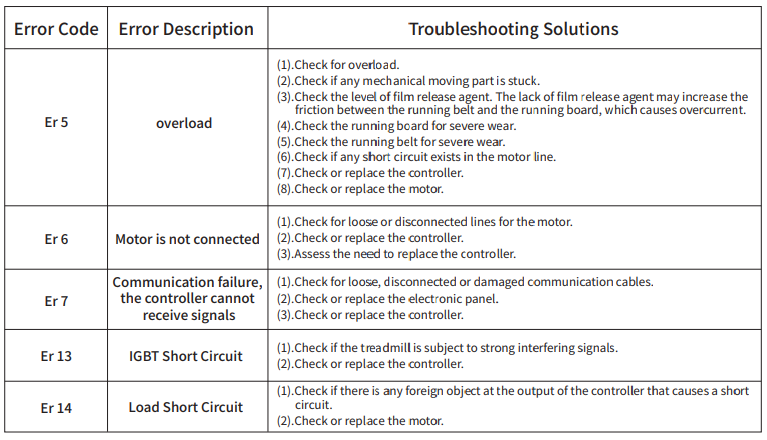
Error codes displayed on the electronic panel and related troubleshooting solutions
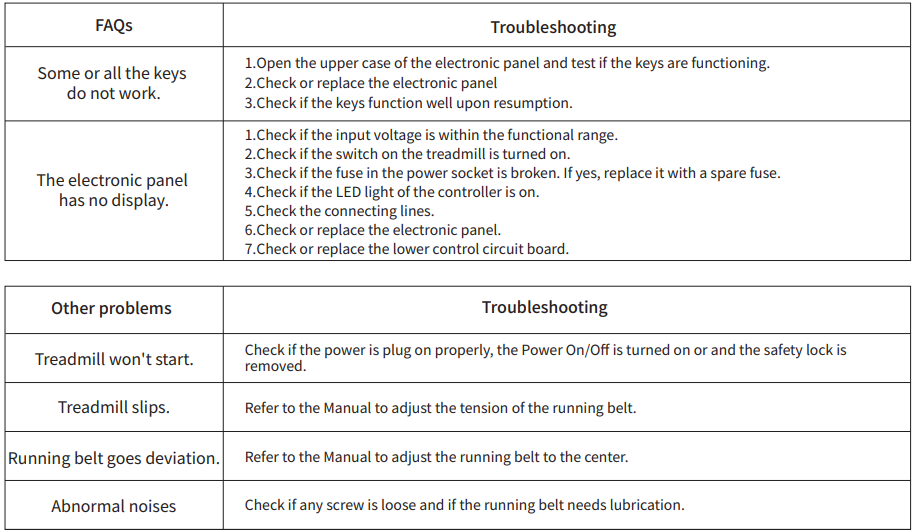
FAQs and Troubleshooting
Warranty Terms
Warranty scope
Non-artificial damage occurring during normal use and proper maintenance of the treadmill excludes the following conditions.
- Damage caused by abuse, negligence, accident, or unauthorized modification;
- Damage caused by improper adjustment of the running belt and drive belt;
- Damage caused by improper maintenance; or
- Damage caused by other improper operations
Notes for Exercises
- Consult your doctor before starting exercises or a training program, and follow your doctor’s advice and instructions.
- Consult your doctor to set goals for exercises, make sure your plan is realistic, and start your training program, in no rush.
- You may add some cardio workout to your training program, such as walking, jogging, swimming, dancing, and cycling. Check your pulse frequently. If you do not have an electronic heartbeat monitor, consult your doctor for the correct way to measure your pulse by hand from your wrist or neck. In addition, you must set a target heart rate based on the limitations of your age and physical conditions.
- Drink plenty of water during the workout. You must replenish enough fluids through intensive exercise to avoid dehydration. Avoid drinking large quantities of ice water.r or beverages. It’s best to have the drinks at room temperature
Warm-up Exercises
Warm up and Relaxation:
A successful training program includes warm-up, cardio, and relaxation. It’s recommended to exercise at least two or three times weekly, having one day off after one day of exercise. After a few months, you may exercise four to five days a week. Warm-up is a crucial part of your workout, and you should always warm up your body before exercising.
A moderate warm-up helps prepare your body for more intense exercises because it gently stretches your muscles and releases the tension in them, improves blood circulation, raises the pace of your pulse, and sends more oxygen to your muscles. After cardio exercises, repeated warm-up exercises can help reduce your muscle soreness. We recommend the following warm-up and soothing exercises.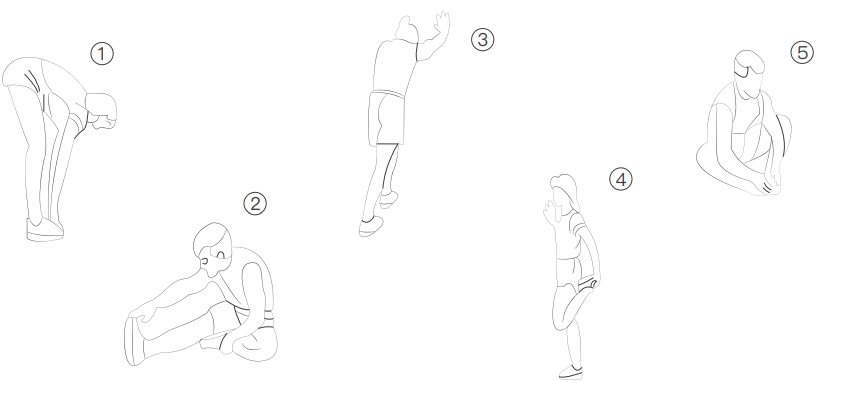
FCC Regulations:
This device complies with part 15 of the FCC Rules. Operation is subject to the following two conditions:
- This device may not cause harmful interference, and
- This device must accept any interference received, including interference that may cause undesired operation.
This equipment has been tested and found to comply with the limits for a Class B digital device, pursuant to part 15 of the FCC Rules. These limits are designed to provide reasonable protection against harmful interference in a residential installation. This equipment generates, uses, and can radiate radio frequency energy and, if not installed and used in accordance with the instructions, may cause harmful interference to radio communications.
However, there is no guarantee that interference will not occur in a particular installation. If this equipment does cause harmful interference to radio or television reception, which can be determined by turning the equipment off and on, the user is encouraged to try to correct the interference by one or more of the following measures:
- Reorient or relocate the receiving antenna.
- Increase the separation between the equipment and receiver.
- Connect the equipment into an outlet on a circuit different from that to which the receiver is connected.
- Consult the dealer or an experienced radio/TV technician for help. Changes or modifications not expressly approved by the manufacturer could void the user’s authority to operate the equipment.
FCC RF Radiation Exposure Statement
This equipment complies with FCC radiation exposure limits set forth for an uncontrolled environment. To comply with FCC RF Exposure compliance requirements, this grant is applicable only to Mobile Configurations. The antennas used for the transmitter must be installed to provide a separation distance of at least 20cm from all persons and must not be co-located or operating in conjunction with any other antenna or transmitter.
For More Manuals By Star Power, Visit ManualsLibraryy.
Star Power AS01 Folding Treadmill -FAQs
How do I start the Star Power treadmill?
Plug the treadmill into a wall outlet, turn on the power switch (usually at the front base), and insert the safety key. Without the key, the treadmill will not start.
How do I turn on a foldable treadmill for the first time?
Ensure the treadmill is unfolded and locked in place. Plug it in, flip the power switch, attach the safety key, and press the Start button or use the remote/app to begin.
What is the weight limit on the Star Power AS01 treadmill?
This treadmill supports up to 300 lbs (136 kg).
How do I use a treadmill if I’m a beginner?
Start with walking:
Speed: 2–2.5 mph (comfortable pace).
Time: 15–20 minutes if new, then gradually increase.
Always hold the handles until you feel balanced.
How do I use the incline feature?
The Star Power treadmill has a 3-level manual incline (up to 10%). Adjust the incline by setting the back stand at your preferred level before starting your workout.
How do I fold and store the treadmill?
Lift the running deck until it locks into place. To unfold, release the latch carefully and lower the deck slowly until flat.
Why is my fingerprint not working?
Lift the belt slightly and apply treadmill lubricant in the middle section of the deck. Run the treadmill at a slow speed for a few minutes to spread the oil evenly. Avoid WD-40 or petroleum products.
Do I need to oil my treadmill often?
Yes. Lubricate every 3 months or every 130 miles, whichever comes first. Frequent users may need to check more often.