
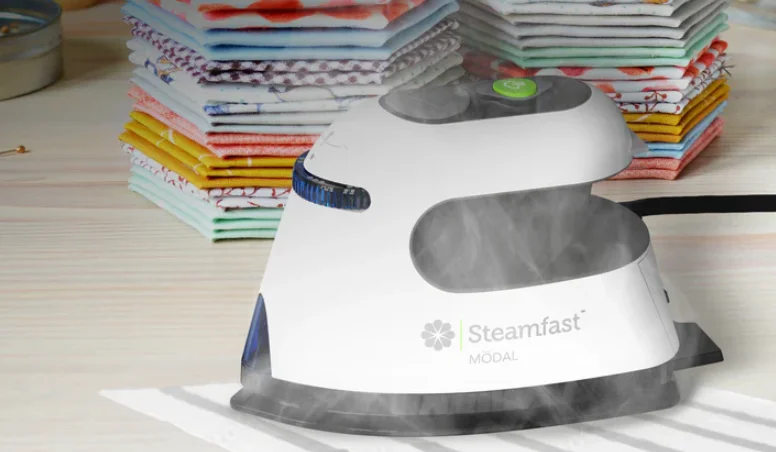

Steamfast Modal Dual-Voltage Travel+Craft Steam Iron
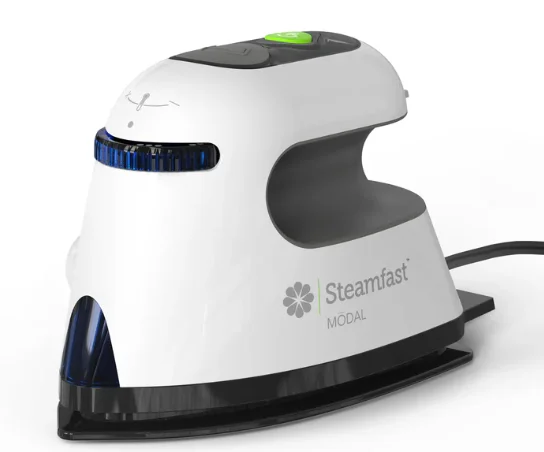
IMPORTANT SAFETY INSTRUCTIONS
This owner’s guide and any additional inserts are considered part of the product. They contain important information about safety, use, and disposal. Before using the product, please familiarize yourself with all operating and safety instructions. Please keep all documents for future reference and pass these documents on, together with the product, to any future owner. See steamfast.com to view, download, and print the most current version of this owner’s guide. When using an iron, basic precautions should always be followed, including:
INTENDED USE: Use the appliance only for its intended use. This product is intended to be used indoors for steam ironing in the United States. This product is not intended for commercial or industrial use. The manufacturer assumes no responsibility for damage or injury due to unauthorized use or product modification. Failure to follow these directions will void the product warranty. This mini travel iron is not intended for regular use.
WARNING: Risk to Children and Impaired Persons. Supervision is required during the installation, operation, cleaning, and maintenance of this product by children 12 years of age and younger and anyone with reduced physical, sensory, or mental capabilities. Children should be supervised to ensure that they do not play with the appliance, its parts, or packaging material.
- Close supervision is required for any appliance used by or near children and pets. Do not leave the iron unattended while the iron is connected or on an ironing board.
WARNING: BURN HAZARD – To reduce the risk of burns or injury to persons, observe the following:
- Use caution when handling this steam unit. Burns could occur from touching hot metal parts, hot water, or steam. Use caution to avoid contact with hot water when turning the product upside down to empty the reservoir.
- Avoid contact with the hot metal ironing plate.
- Do not point steam vents at people or pets, as serious injury or damage can occur.
- Do not iron or steam articles while wearing. Remove the article before using this appliance.
- To reduce the risk of contact with hot water emitted from steam vents, check the appliance before each use by holding it away from the body and operating the steam button. Do not operate the unit if the steam vents are blocked.
SERVICING WARNING—To reduce the risk of fire, electrical shock, and injury to persons, observe the following:
- Do not operate the unit if the unit has been dropped or damaged. Do not use this product if it has a damaged power cord or plug. To avoid the risk of electrical shock, do not attempt to repair or replace parts. Only original replacement parts may be used. If the power cord is damaged, it must be replaced by the manufacturer, its service agent, or similarly qualified persons to avoid a hazard. For information about available products and parts replacement, visit steamfast.com or contact Steamfast Consumer Service by phone (1-800-711-6617) or email [email protected].
- If the Power Light does not illuminate when the unit is turned ON, the unit is not operating normally. Immediately unplug and have the unit serviced by qualified service personnel.
- If the Heating Indicator Light does not illuminate when the Temperature Control Dial is turned to a selected heat setting, the unit is not operating normally. Immediately unplug and contact Steamfast Consumer Service.
- Clean your product regularly, only as instructed in this manual. Before cleaning, turn off the power to your product and unplug it. Do not use gasoline, thinners, solvents, ammonia, or other chemicals for cleaning. Refer to the cleaning instructions provided.
PRODUCT INFORMATION
- IRONING PLATE: The heated, non-stick surface is used to press fabrics, remove wrinkles, and create creases.
- MAIN BODY: Contains the unit’s internal heating components.
- HEATING INDICATOR LIGHT: Illuminates while heating up to one of the four heat settings on the Temperature Control Dial.
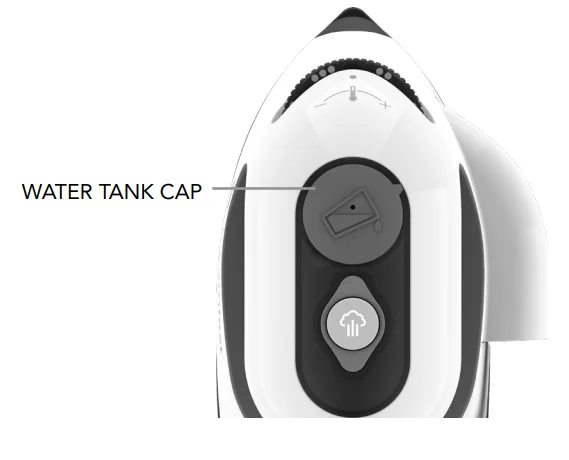
- WATER TANK CAP
 : Covers the Water Tank fill hole. The Water Tank Cap is tethered to the unit and cannot be completely removed.
 - WATER TANK WINDOW: Monitor the level of water in the Water Tank. The unit must be sitting upright to correctly read the water level.
- STEAM BUTTON
 : Press to activate the unit’s steam function. Locking the Steam Button down disables steam; pressing the Steam Button releases it into the unlocked position, enabling steam.
 - TEMPERATURE CONTROL DIAL: Turn to select one of the four heat settings and to turn heating off.
- HAND GRIP: Ergonomically designed for user comfort. The Hand Grip contains the unit’s Water Tank.
- WATER TANK (INTERNAL):,Located inside the Hand Grip and designed to hold up to 1.1 oz (32 ml) of water.
- 10 STANDS: Three supports located at the rear of the Main Body. The Stands are designed to support the unit in an upright position when the Ironing Plate is hot, to help prevent damage to surfaces.
- VOLTAGE SELECTOR: The recessed switch is used to set the unit to either 100-127V or 220-240V electrical voltage standards. By default, the Voltage Selector is set to 100-127V.
- MEASURING CUP: Designed to help you easily and consistently fill the Water Tank with the optimum amount of water.
- TRAVEL BAG: For easy storage.

 : Covers the Water Tank fill hole. The Water Tank Cap is tethered to the unit and cannot be completely removed.
 : Press to activate the unit’s steam function. Locking the Steam Button down disables steam; pressing the Steam Button releases it into the unlocked position, enabling steam.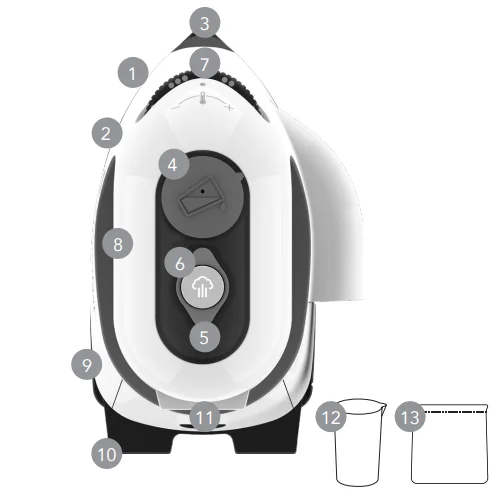
SETTING VOLTAGE
This product features dual-voltage functionality, which allows it to function correctly in regions with either 100-127V or 220-240V electrical voltage standards. Voltage is set using the Voltage Selector. For use in Canada or North America, the voltage selector switch should be placed in the 120 volt position. For use in most foreign countries, the selector switch must be placed in the 240 volt position. CONFIRM the voltage available at each location before using the iron. NOTE: For connection to a 240 volt supply, an adaptor plug may be needed.
IMPORTANT: By default, the Voltage Selector is set to the 100-127V setting. Be sure to select the correct voltage for your location before plugging the power cord into an electrical outlet.
To change the voltage setting:
NOTE: These steps assume that the Voltage Selector is still set to the 100-127V default.
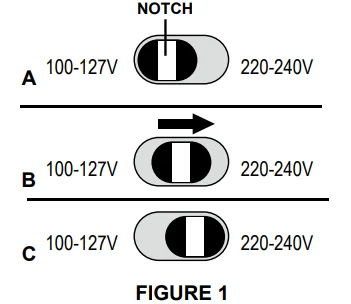
- Locate Voltage Selector, recessed inside slot at rear of Main Body. Note the open notch in the middle of the Voltage Selector (FIGURE 1-A).
- Find a tool with a fine tip – a pen is ideal.
- Carefully insert the tip of the pen into the notch. Slide Voltage Selector to the right, towards the 220-240V label (FIGURE 1-B). IMPORTANT: Be sure that the Voltage Selector is moved as far to the right as possible for the voltage setting to take effect correctly. Voltage Selector should appear as shown (FIGURE 1-C).

- Unit is now ready for use in a 220V region. To set the unit back to 100V, reverse STEPS 2 & 3, this time sliding the Voltage Selector as far to the left (towards the 100-127V label) as possible.
FILLING WATER TANK (FOR STEAM IRONING)
- Turn off and unplug the unit.
- Place the unit (Ironing Plate down) on a flat, heat-resistant surface.
- Fill Measuring Cup with water up to (1.1 oz. / 32 ml.). NOTE: In order to extend the life of your unit and keep it functioning at its maximum potential, it is highly recommended that distilled or de-mineralized water be used in the Water Tank. Using tap water could result in mineral buildup, which could block the steam vents. This will reduce the effectiveness of this unit and may cause the unit to spit or spurt hot water. Follow the cleaning instructions provided.
- Open Water Tank Cap. Pour water from the measuring cup into the Water Tank. Close the water tank cap.
While steam ironing, the Water Tank Windows let you monitor the water level in the Water Tank. When the water level becomes low:
- Turn off and unplug the unit. Allow to cool for at least 5 minutes.
- Follow STEPS 1-3 above.
- Plug the power cord back in and resume ironing as usual.

OPERATING UNIT
DRY IRONING
IMPORTANT: Make sure the Steam Button is locked in the lowered position before dry ironing. This will prevent any water from accidentally dripping.
- Plug the power cord into a convenient electrical outlet.
- Turn Temperature Control Dial clockwise so that (•) is centered above one of the four heat settings on the Dial. The heating indicator light will illuminate. NOTE: It is recommended to start with lower temperatures first, as high settings designed for heavy materials can damage delicate fabrics.
- When the Heating Indicator Light turns off, the Ironing Plate is heated and ready for use.
CAUTION: BURN HAZARD. Do NOT touch the Ironing Plate or the surrounding area. During use, the Heating Indicator Light will cycle on and off as the unit works to maintain a consumer-controlled temperature.
NOTE: Heating Indicator Light is not intended to indicate whether the ironing plate is HOT.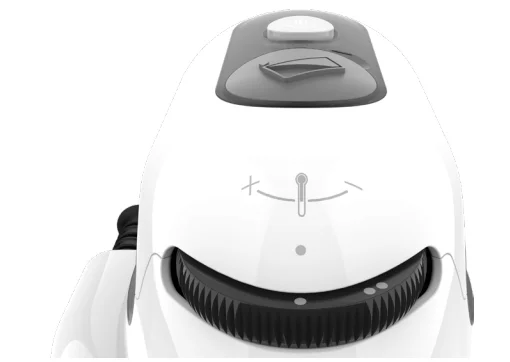
STEAM IRONING
- Plug the power cord into a convenient electrical outlet.
- Turn Temperature Control Dial clockwise as far as possible to set unit to high temperature (••••). Heating Indicator Light will illuminate.
- When the Heating Indicator Light turns off, press the Steam Button. The button will lock into the raised position, and the unit will begin emitting steam from the steam vents on the Ironing Plate. NOTE: Unit is designed to steam horizontally. Steam flow will stop whenever the unit is in a vertical upright position. If the unit is leaking excessively in the vertical position, check that the steam button is disengaged. CAUTION: Burn Hazard. Hot steam may temporarily vent when the unit is positioned vertically.
- To stop steam flow during use, press the Steam Button again to lock it into the lowered position. This will prevent dripping in the upright position.
Once all ironing tasks are finished, immediately turn the Temperature Control Dial counter-clockwise until it is set to the OFF position. Be sure that the Steam Button is locked in the lowered position – this will prevent water from accidentally dripping during the next use. Prop unit upright on Stands to cool, and refer to CARE & STORAGE for proper cleaning and storage.
STORAGE & CARE
CLEANING & STORAGE
- Turn Temperature Control Dial to OFF (•) position. Unplug the power cord.
- Prop the unit upright on Stands and allow the Ironing Plate to cool for 30 minutes.
- Open the water tank cap and drain any remaining water into a sink or tub. Close the cap when finished.
- Wipe the main body and Ironing Plate with a soft cloth lightly moistened with water.
- DO NOT clean the Ironing Plate with detergents or descalers.
- DO NOT clean the Ironing Plate with abrasive or corrosive products.
- DO NOT submerge the unit or hold the unit under running water.
- Bundle the cord with the supplied cable tie when storing. DO NOT wrap the cord around the product.
- Place the unit and Measuring Cup inside the Travel Bag and store in a cool, dry location.
MINERAL BUILD-UP
- Follow STEPS 1-3 under the CLEANING & STORAGE section above; however, leave the Water Tank Cap open.
- Make a mixture of 0.5 oz. distilled water and 0.5 oz. vinegar. Never add soap, detergent, or other cleaners, as this could cause damage to the product.
- Using the included Measuring Cup, pour the water-vinegar solution into the Water Tank. Close the water tank cap.
- Follow normal steam ironing procedure. Allow the unit to steam out the full contents of the Water Tank. When finished, lock the Steam Button in the lowered position and unplug the unit.
- Allow to cool for 5 minutes, then refill the Water Tank with fresh distilled water. Repeat STEP 4 until the vinegar odor dissipates.
- Store unit as normal.
CAUTION: Burn Hazard. Using tap water could result in mineral buildup, which could block the steam outlets, causing this unit to spit or spurt hot water. Follow the cleaning instructions provided.
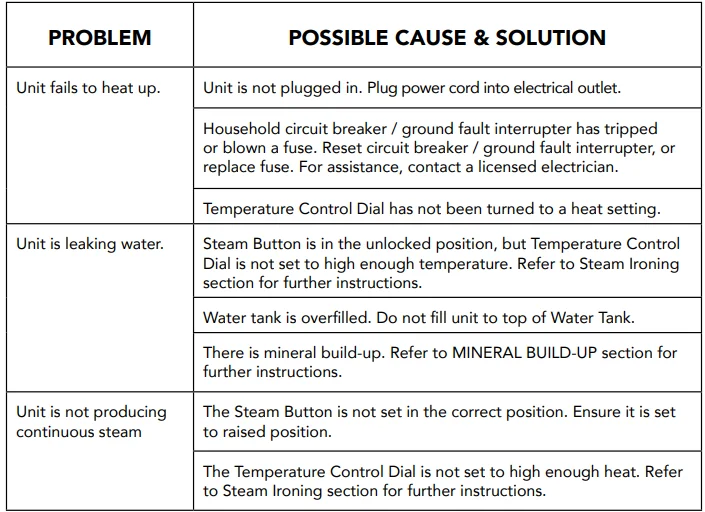
TROUBLESHOOTING
WARRANTY
Steamfast, a division of Vornado Air, LLC. Steamfast warrants to the original consumer or purchaser that this Steamfast (“Product”) is free from defects in material or workmanship for a period of two (2) years from the date of purchase. If any such defect is discovered within the warranty period, Vornado, at its discretion, will repair or replace the Product at no cost.
For warranty service: Call 1-800-711-6617 or email [email protected] to obtain a Return Authorization (“RA”). Please have or include your Product’s model number and serial number, as well as your name, address, city, state, Zip code, email, and phone number when contacting Vornado for warranty service. To file a contactless warranty claim, visit www.steamfast.com/contact.
This warranty does not apply to defects resulting from abuse of the Product, modification, alteration, mishandling, improper maintenance, commercial use, or repair or service of the Product by anyone other than Vornado; damages that occur in shipment or are attributed to acts of God. Improper product use, which includes using an external device that alters or converts the voltage or frequency of electricity, or shipping a Vornado product to a country not intended for use, will void all warranties. Any unauthorized product modification, repair by an unauthorized repair center, or use of non-approved replacement parts is not recommended, and any consequences will not be covered by support services or product warranties.
The product warranty will be honored only on models that are being used in the country intended. REPAIR OR REPLACEMENT AS PROVIDED UNDER THIS WARRANTY IS THE EXCLUSIVE REMEDY OF THE CONSUMER. VORNADO SHALL NOT BE LIABLE FOR ANY INCIDENTAL OR CONSEQUENTIAL DAMAGES FOR BREACH OF ANY EXPRESS OR IMPLIED WARRANTY ON THIS PRODUCT. EXCEPT TO THE EXTENT PROHIBITED BY APPLICABLE LAW, ANY IMPLIED WARRANTY OF MERCHANTABILITY OR FITNESS FOR A PARTICULAR PURPOSE ON THIS PRODUCT IS LIMITED IN DURATION TO THE DURATION OF THIS WARRANTY.
Some states do not allow the exclusion or limitation of incidental or consequential damages, or allow limitations on how long an implied warranty lasts, so the above limitations or exclusions may not apply to you. This warranty gives you specific legal rights, and you may have other rights that vary from state to state. The manufacturer assumes no responsibility for damage or injury caused by failure to follow these instructions, improper product use, or unauthorized product modifications. Any such actions will invalidate the product warranty.
All company names and product names are trademarks of their respective owners. © All rights reserved. All technical information, data, and instructions for the installation, connection, and operation contained in these instructions for use correspond to the latest available information at the time of printing. The contents of this manual may differ slightly from the actual product. Observe any additional supplements. © 2025 Vornado Air, LLC. Andover, KS 67002, U.S. Specifications subject to change without notice. Steamfast® is a trademark owned by Vornado Air, LLC. Manufactured in China.
For More Manuals By Steamfast, Visit ManualsLibraryy.
Steamfast Modal Dual-Voltage Travel+Craft Steam Iron-FAQ
What is the Steamfast Modal Dual-Voltage Travel + Craft Steam Iron, and who is it best for?
The Steamfast Modal Dual-Voltage Travel + Craft Steam Iron is a compact, lightweight steam iron designed for travel, crafts, and quick at-home use. Its dual-voltage capability means it can adapt to both 100–127 V and 220–240 V electrical systems, making it convenient for trips abroad. Its portability, included travel bag, and ergonomic design make it ideal for frequent travelers, hobbyists, or anyone needing quick wrinkle removal on the go.
How long does the Modal steam iron take to heat up?
This steam iron warms up in about 90 seconds, so you can start ironing right away after plugging it in. When you select a temperature setting with the control knob, a heating indicator light shows that the iron is warming up and turns off once it’s reached that setting. The quick heat-up time is helpful when you’re traveling or need fast wrinkle removal.
What does dual-voltage mean, and why does it matter?
Dual-voltage means the Modal iron can operate on both 100–127 V and 220–240 V electrical systems. This is important when traveling internationally because you can use the iron in countries with different power standards without needing a bulky converter. Just switch the voltage selector before plugging it in in a new region.
What features help the iron glide over fabrics easily?
The iron uses a non-stick sole plate, which helps it glide smoothly across fabrics without sticking or scorching. This makes ironing quicker and safer for delicate materials. Combined with on-demand steam control and adjustable temperature settings, the non-stick sole plate helps achieve smooth, wrinkle-free results on a variety of fabrics.
How much water does the Steamfast Model iron hold?
The internal water tank holds approximately 1.1 ounces (32 ml) of water. This capacity supports the steam function for light bursts of steam when ironing. Because the water reservoir is compact, this iron is more suited to quick touch-ups and smaller garments rather than extended ironing sessions, which keeps it lightweight and travel-friendly.
Can you adjust the temperature and steam output?
Yes, the iron includes a temperature control knob that lets you choose among heat levels suitable for different fabric types. For steam, there’s a one-touch steam button that you press when the iron has reached its set temperature. Using the right combination of heat and steam helps gently remove wrinkles without damaging delicate materials.
Is it suitable for both travel and crafting?
Absolutely. Its compact size, dual-voltage capability, and included travel bag make it great for travel, while the precise temperature control and steam function also support crafting tasks like setting seams and removing small wrinkles in fabric. It can slide easily into luggage or a craft bag for versatile use.
Are there any limitations or fabrics it struggles with?
Some users find that while it works well for lightweight garments and small touch-ups, the Modal iron may struggle with very heavy fabrics or larger ironing tasks compared to a full-size iron. It’s best regarded as a travel-friendly or supplementary tool rather than a full replacement for a traditional heavy-duty iron.
How should you care for and maintain the iron?
After each use, turn off and unplug the iron, allow it to cool completely, then drain any remaining water to help prevent mineral buildup. Using distilled or de-mineralized water can keep steam vents clearer and performance more consistent. Keeping the sole plate clean enhances glide and extends the iron’s lifespan.
What accessories come with the Modal steam iron?
The package typically includes a travel bag for easy storage, a fill cup for adding water precisely, and often a cord wrap to keep the power cord neat. These accessories improve portability and make it easier to pack the iron for travel or store it compactly at home.