
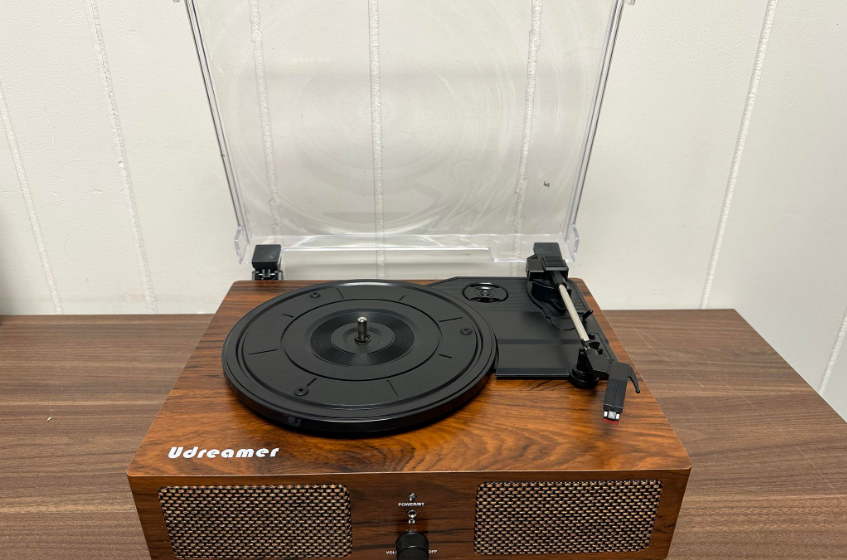

Udreamer UD001 Wireless Turntable
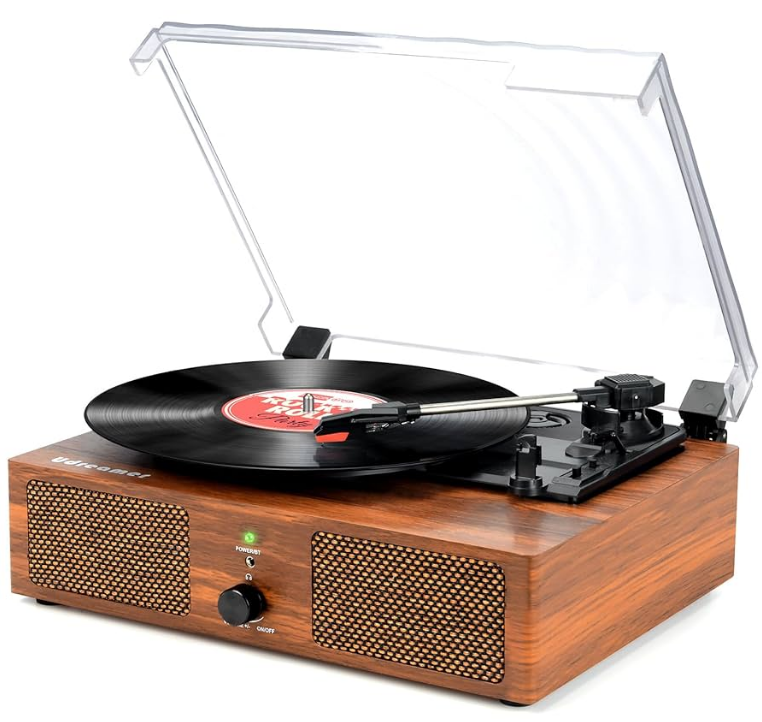
WARNING: PREVENT FIRE OR SHOCK HAZARD, DO NOT USE THIS PLUG WITH AN EXTENSION CORD, RECEPTACLE, OR OTHER OUTLET UNLESS THE BLADES CAN BE FULLY INSERTED TO PREVENT BLADE EXPOSURE. TO PREVENT FIRE OR SHOCK HAZARD, DO NOT EXPOSE THIS APPLIANCE TO RAIN OR MOISTURE
IMPORTANT SAFETY INSTRUCTIONS
- Read these instructions
- Keep these instructions.
- Heed all warnings.
- Follow instructions.
- Do not use this apparatus near water
- Clean only with a dry cloth,
- Do not block any ventilation openings. Install n accordance with the manufacturer’s instructions.
- Do not install near any heat sources such as radiators, heat registers, stoves, or other apparatus (including amplifiers) that produce heat,
- Do not defeat the safety purpose of the polarized or grounding type PUG. A polarized plug has two blades with one wider than the other. A grounding type plug has two blades and a third grounding prong. The wide blade or the prong i provided for your safety. I the provided plug does not fit into your outlet, consult an electrician for replacement of the obsolete outlet.
- Protect the power cord from being walked on or stepped on, particularly at lugs, convenience receptacles, and the point where they exit from the apparatus.
- Only the attachments accessories specified by the manufacturer,
- Use only with a cart, stand, tripod, backer, or table recommended by the manufacturer, or sold with the product. When a cat is used, use caution when moving the cart/apparatus combination to avoid injury from tp-over.
- Unplug this apparatus during lightning storms or when unused for long periods of time
- Refer all servicing to qualified service personnel. Servicing is required when the apparatus has been damaged in any way, such as the power-supply cord or plug is damaged, uid has been spilled or objects have fallen into the apparatus, the apparatus has been exposed to rain or moisture, does not operate normally, or has been dropped.
- This appliance shall not be exposed to cipping or slashing water, and no object filled with liquid, such as a vase, shall be placed on the apparatus.
- Do not overload the wall outlet. Use only the power source as indicated.
- Use the replacement part as specified by the manufacturer
- Upon completion of any service or repairs to this product, ask the service technician to perform safety checks.
- Power Sources. This product should be operated only from the type of power source indicated on the marking label. If you are not sure of the type of power supply to your home, consult your product dealer or local power company. For products intended to operate from battery power or other sources, refer to the operating instructions.
- Object and Liquid Entry- Never push objects of any kind into this product through openings, as they may touch dangerous voltage points or short-out parts that could result in air or electric shock. Never spi quid of any kind on product
- Damage Requiring Service- Unplug this product from the wall outlet and refer servicing to qualified service personnel under the following conditions:
- When the power-supply cord or plug is damaged,
- If liquid has been spilled, objects have fallen into the product,
- If the product has been exposed to air or water,
- The product does not operate normally by following the operating instructions. Adjust only those controls that are covered by the operating instructions, as an improper adjustment of the controls may result in damage and will often require extensive work by a qualified technician to restore the product to its normal operation
- If the product has been dropped or damaged in any way,
- When the product exhibits a distinct change in performance, this indicates a need for service.
- The main plug is used as a disconnect device, and it should remain ready operable during intended use. In order to disconnect the apparatus from the mains completely, the mains plug should be disconnected from the mains socket outlet.
- Excessive sound pressure from earphones and headphones can cause hearing Loss
- Minimum distances of 10 cm around the apparatus for sufficient ventilation.
- The ventilation should not be impeded by covering the ventilation openings with items, such as newspapers, able-cloths, curtains, etc.
- No naked flame sources, such as lighted candles, should be placed on the apparatus
- The use of apparatus in moderate climates
Highlight Features
- Beltdriven System
- Builtin 2°3W Speakers
- Bluetooth InputFreely listen to phone music via Bluetooth (Note: This record player only supports Bluetooth input, not Bluetooth output)
- US8 Input: You can transfer music from another device via USB and play it on the rntable
- RCA Line-out Allows convenient connection of external speakers (Note: for active speakers, pls connect the turntable with the active speakers directly via RCA line out for passive speakers, pls connect the turntable with the amplifier first via RCA, then connect the amplifier with the passive speakers)
- Aux Input: Connect devices with AUX Output, like an iPad, via the AUX input jack at the back of the record player to play music on the turntable
- Support 3 Speads:33,1/3RPM, ASRPM;78RPM;Play 3 Sizes of Records:7″,10,12″
- Headphone Jack; 45 Adaptor; Tone Arm Lifter;Removable Dust Cover;5V 1.5 Power Adaptor
- Bluetooth Mode: The Indicator Light: Blue
- LP Mode: The Indicator Light: GreenA

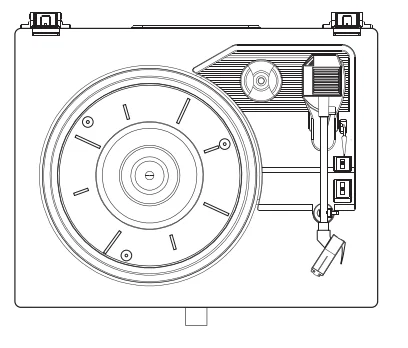
What is Included in the Package
After opening the package, please check the items as below carefully before using.
- Turntable*1pcs
- User Manual*1 pcs
- DC Adaptor 100-240V, 5V, 1.5A * 1 pcs
Service
- Tech support email: [email protected]
- Tech support site: www.turntables.vip
Udreamer WARRANTY
- Warranty Terms
Within 1 month from the date of purchase, any problems caused by the product’s performance under normal operation, without overhaul, can be replaced for a new turntable. Within half a of year from the date of purchase, any problems caused by the product’s performance under normal operation, without overhaul,can be accepted by maintenance service. - This Warranty Card Automatically Expires under the Following Circumstances
Tances.But Customer Can Still Enjoy Fee-Based Maintenance Services.- No “Udreamer” trademarks disqualified products.
- Disassembling, replacing the failed product without authorization
- The product has with series number missing or altered.
- The fault or damage caused by man-made or abnormal operations. (subject to the environment with too wet or too dry, unstable voltage or current, zero ground voltage is too large, etc.)
- For all damages from outside forces, including liquid, cracks, improper plugging, insect pests, etc.
- Natural consumption. ( the nature consumption of shell, patch components, wear, and aging).
- Damage caused by force majeure ( e.g., fire, flood, earthquake, and other disasters)
- The fault was caused by software operation outside the scope of the Udreamer permission.
- The failed product does NOT belong to Udreamer.
- Maintenance Service Notices
The user must send the product for repair or maintenance. Before sending it, please contact the post-sales department of Udreamer to ascertain the cause of fault and fill up the maintenance application form. The original or a copy of the purchase voucher(invoice) is needed when the consumer sends the product to Udreamer. The service of “warranty” or “maintenance” is applicable to electrical components only(the hardware board). It does not include the shell, manual, packing or other accessories - Particularly Declaration
Udreamer shall NOT be responsible for any mechanical failure or a result of direct or indirect losses caused by software problems. The native consumer is protected by the consumer protection laws of their local country. If the consumer buys a product in a foreign country, the consumer must follow the foreign country’s
Product Structure and Component
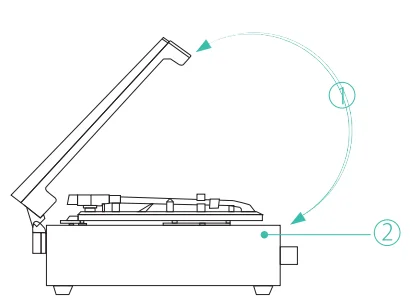
- Dust Cover
- Turntable
- 45 RPM Adaptor

- Tone Arm Raise Lever
- Tone Arm
- Tone Arm Clip
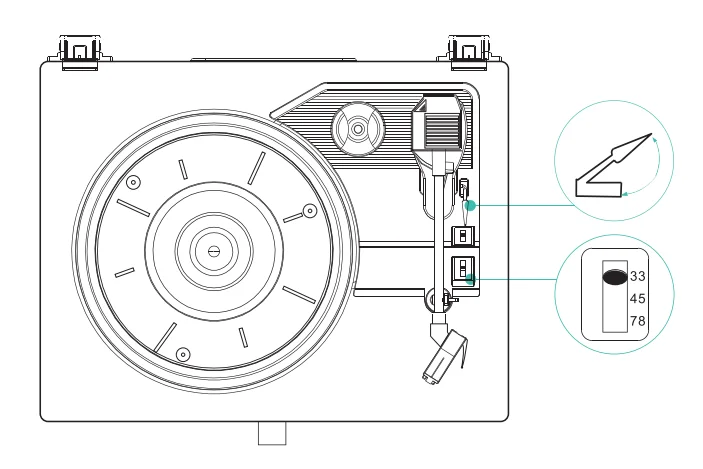
- Auto Stop Switch
- LP Speed Switch
- Stylus
- Light Indicator

- Headphone Jack
- Power Button And Volume Control
- Rotate R/L To Turn On/Off
- Rotate R/L To Turn Up/Down The Volume

- USB Input Jack
- Aux input Jack
- RCA Output Jack
- Power Adaptor Jack
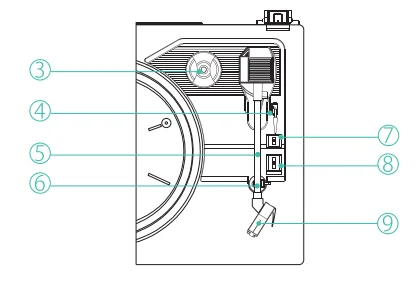
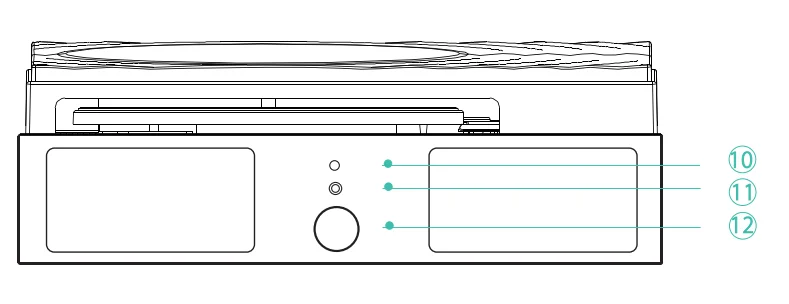
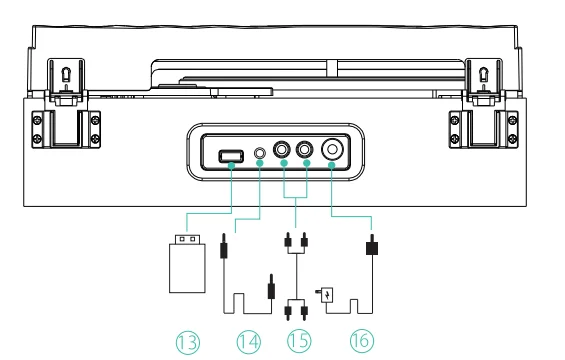
Connection
- Connect the power adaptor to the power adaptor jack.
- Rotating the power knob (12) clockwise to turn on the unit, the power indicator will light on.

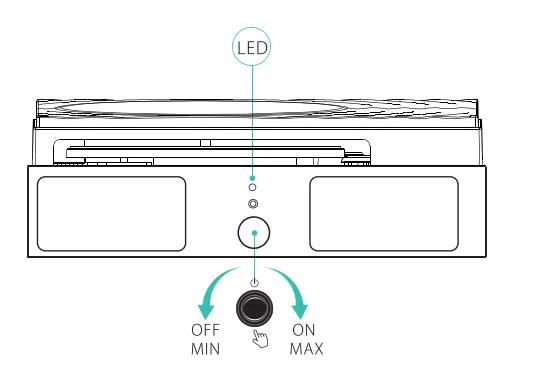
How to Play Bluetooth
- When you turn on the record player, it will show a flashing blue light, which means the turntable is searching and waiting to connect to Bluetooth
- Switch the Bluetooth function of your Bluetooth output device on (such as a mobile phoneJand select the Bluetooth equipment code “Turntable” to connect
- When the Bluetooth device has connected successfully, the blue light will no longer flash but will be static
- Start playback of the music on your Bluetooth device and enjoy the music through the speakers of this turntable
Notes
- When play vio! record you cannot use the Bluetooth function, you need to stop. playing vinyl record and putting the arm down, when the indicator shows a blue light flashing, you can connect with your phone or other Bluetooth devices.
- You want to connect the unit 0 another Bluetooth-enabled device after you’ve already successfully paired, turn off the Bluetooth on the device that was previously paired with the unit. The ight wil be ashing blue again, repeat step 1-4 above.
- This record player only supports Bluetooth input, not support Bluetooth output. You Wank to connect an external speaker, least connect t a RCA jack.
How to Play a Vinyl Record
Note: Remove the stylus protector.
- Place the record on the turntable, and use the 45 rpm adaptor required.
- Set the speed selector to the correct position, depending on the record to be played
- Push the Wt ever up to the tone arm from the arm rest, and then slowly move. #10 the record side. The turntable will start to rotate. (Turn on the “AUTO STOP” switch, the turntable will keep on rotating)
- Put down the Ht eve 10 op the tone arm and touch the record gently. Vinyl playing starts now.
- Push the If ever upward to a se the tone arm from the rm est, the turtable wil still be rotating but vin! playing wil 5109. To continue playing, the If lever needs to be put down.
- Adjust the volume to the desired level
- At the end of a record, push the ft lever upward to raise the tone arm and move & the arm rest, and then put it ver
- Turn off the turntable or stop the manual (LA the tone arm from the record and return #10 the arm rest),
How to Use the Auto Stop Switch
- When you turn on” the AUTO STOP switch the turntable will stop spinning automatically.
- When you choose “turn off” the AUTO STOP switch, the turbine will keep spinning
- If your vinyl has few songs, we advise you to turn on the tater music finishing, ft will 109 spinning
- If your vinyl has many songs, we advise you to turn it off; it may stop playback the middle, and you turn it on
- Note Sometimes. When your record has been scratched or damaged, it may still keep spinning or repeat skipping even if you turn on the AUTO STOP switch, in this case. We advise you to change the record or pass the tone arm to its original place to top it.

How to Use Aux Input
Audio JACK/Aux in play mode: Put the tone arm back to the arm rest, the connect the external audio device (such as CD player) through the AUX IN jack (13) on the back panel. An audio signal from the external audio device can be played through the system. The player will switch into Aus In play mode automatically once the audio cable is inserted into the Aux In jack(13).
How to Connect External Speakers
- For Active Speakers: Connect the RCA audio cable to the RCA Output Jack at the back of the turntable, then plug the other end into your active speakers. The sound will be transferred from the turntable to your external active speakers
- For Passive Speakers: Connect the RCA audio cable to the RCA Output Jack at the back of the turntable, then plug the other end into an amplifier. Next, connect the amplifier with your passive speakers, and the sound will finally be transferred from the turntable to your passive speakers
Warning
Do not manually lower the tone arm onto the LP disk to avoid LP disk and stylus(9) damage!
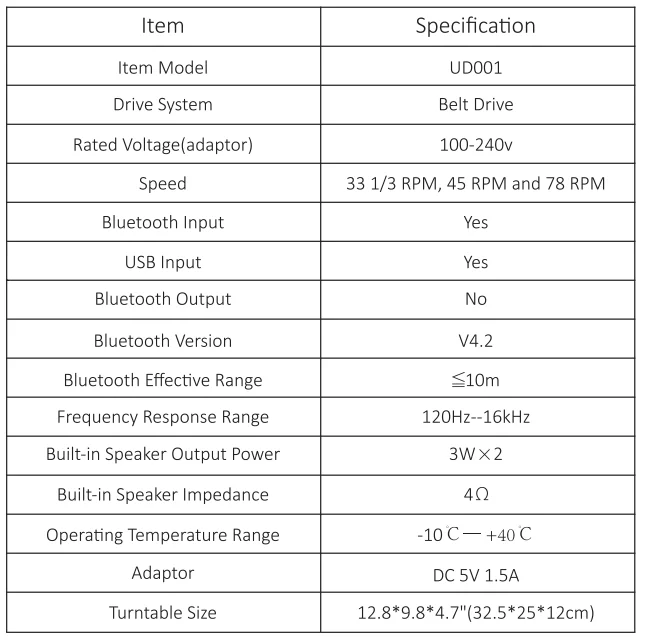
Turntable Specification
For more manuals by Udreamer, visit ManualsLibraryy
Udreamer UD001 Wireless Turntable-FAQs
How do I connect the UD001 turntable to Bluetooth?
Plug in the power adapter and switch the turntable ON. Turn the Mode knob to BT IN mode. Then, enable Bluetooth on your phone or tablet, search for “Turntable”, and select it to pair. Once connected, you can stream music wirelessly.
Why isn’t my Udreamer turntable spinning?
If the platter doesn’t spin, the drive belt may be loose or worn out. Open the platter carefully and check the belt. Replace it if it looks stretched or damaged, as it’s essential for proper record rotation.
Can the Udreamer UD001 play all record sizes?
Yes, it supports three speeds—33⅓, 45, and 78 RPM—allowing playback of 7-inch, 10-inch, and 12-inch vinyl records. Use the speed selector switch to match your record type.
Does the Udreamer turntable have a built-in preamp?
Yes. The UD001 comes with a built-in phono preamp, which means you can connect it directly to powered speakers or amplifiers using the LINE OUT option without needing an external preamp.
How do I connect my Udreamer turntable to external speakers?
You can connect using RCA cables to powered speakers or amplifiers. If you’re using Bluetooth speakers, switch to BT OUT mode and pair the devices as you would with a phone.
Why is there no sound coming from my turntable?
Ensure the volume is turned up and all cables are firmly connected. If you’re using external speakers, make sure they’re powered on and the preamp switch is set to LINE, not PHONO.
How do I adjust or check the playback speed?
Use the speed selector knob (33, 45, or 78 RPM) to match your vinyl record. If the record plays too fast or slow, clean the belt or ensure it’s properly aligned around the motor spindle and platter.
Can I use the Udreamer without external speakers?
Yes. The UD001 has built-in speakers, so you can enjoy your records without needing extra equipment. However, connecting external or Bluetooth speakers can improve sound quality.