
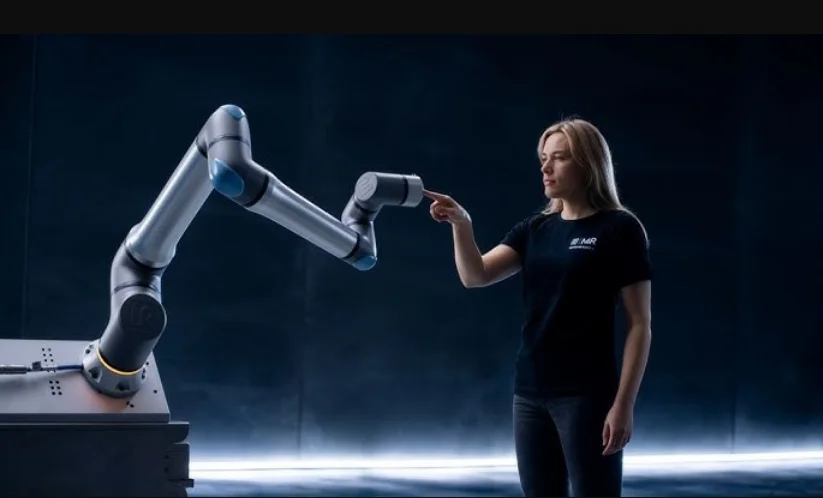

Universal Robots UR15
Liability and Intended Use
Limitation of Liability
Description
Any information provided in this manual must not be construed as a warranty by UR, that the industrial robot will not cause injury or damage, even if the industrial robot complies with all safety instructions and information for use.
Intended Use
Description
NOTICE
Universal Robots takes no responsibility and assumes no liability for unapproved uses of its robots or uses for which its robots are not intended, and Universal Robots will provide no support for unintended uses.
READ MANUAL
Failure to use the robot in accordance with the intended use can result in hazardous situations.
- Read and follow the recommendations for intended use and the specifications provided in the User Manual.
Universal Robots robots are intended for industrial use, to handle tools/end effectors and fixtures, or to process or transfer components or products.
All UR robots are equipped with safety functions, which are purposely designed to enable collaborative applications, where the robot application operates together with a human. The safety function settings must be set to the appropriate values as determined by the robot application risk assessment. The robot and Control Box are intended for inside use where, normally, only nonconductive pollution occurs,,.e. Pollution degree 2 environments.
Collaborative applications are only intended for non-hazardous applications, where the complete application, including tool/end effector, work piece, obstacles, and other machines, is low risk according to the risk assessment of the specific application.
 Warning
Using UR robots or UR products outside of the intended uses can result in injuries, death and/or property damage. Do not use the UR robot or products for any of the following unintended uses and applications:
- Medical use, i.e., uses relating to disease, injury, or disability in humans including the following purposes:
- Rehabilitation
- Assessment
- Compensation or alleviation
- Diagnostic
- Treatment
- Surgical
- Healthcare
- Prosthetics and other aids for the physically impaired
- Any use in proximity to patient/s
- Handling, lifting, or transporting people
- Any application requiring compliance with specific hygienic and/or sanitation standards, such as proximity or direct contact with food, beverage, pharmaceutical, and /or cosmetic products.
- UR joint grease leaks, and can also be released as vapor into the air.
- UR joint grease is not “food grade”.
- UR robots do not meet any food, National Sanitization Foundation (NSF), Food and Drug Administration (FDA), or hygienic design standards.
Hygienic standards, for example ISO 14159 and EN 1672-2, require a hygiene risk assessment too be conducted.
- Any use orr any application, deviatingg from the intended use, specifications, and certifications of UR robots or UR products.
- Misuse is prohibited as the result could be death, personal injury, and /or property damage.
UNIVERSAL ROBOTS EXPRESSLY DISCLAIMS ANY EXPRESS OR IMPLIED WARRANTY OF FITNESS FOR ANY PARTICULAR USE.
Warning
Failure to consider the added risks due to the reach, payloads, operating torques and speeds associated with robot applications can result in injury or death.
- Your application risk assessment shall include the risks associated with the application’s reach, motion, payload a,, nd speed of the robot, end effector, and workpiece.
Your Robot
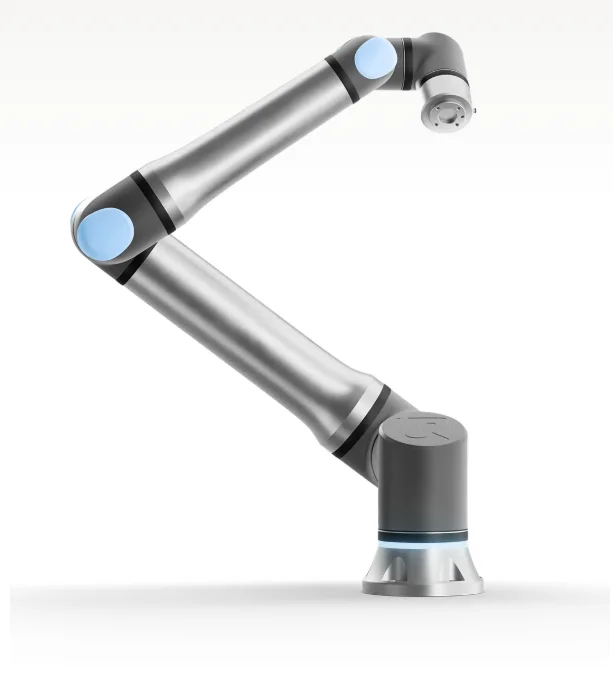
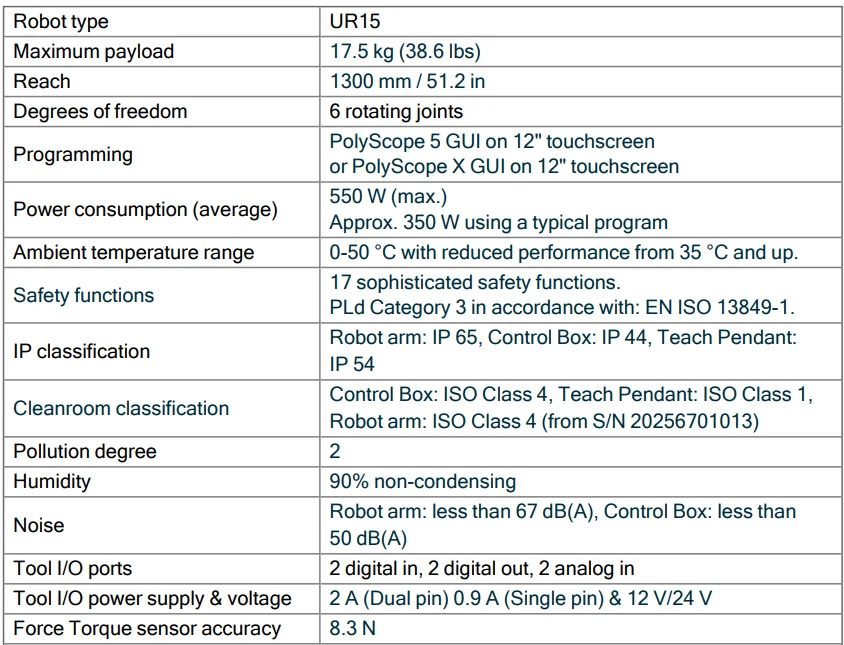
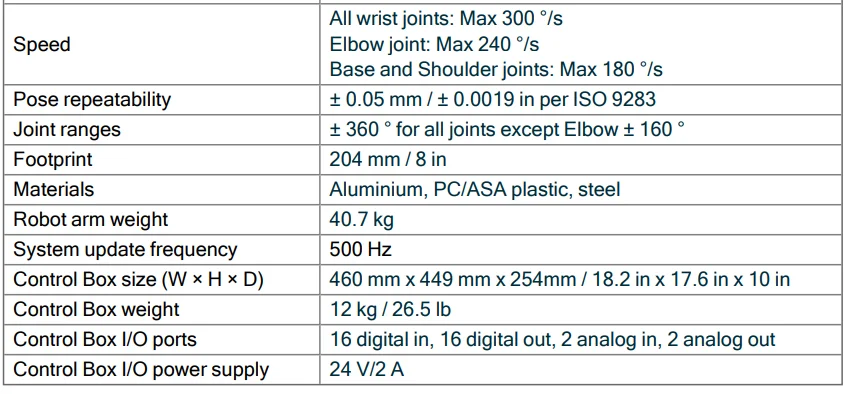
Technical Specifications UR15
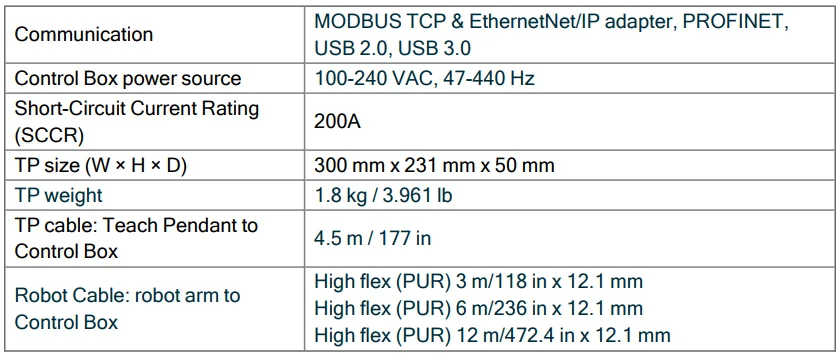
What Is In The Box
In the boxes
- Robot arm
- Control Box
- Teach Pendant or a 3PE Teach Pendant
- Mounting bracket for the Control Box
- Mounting bracket for the 3PE Teach Pendant
- Key for opening the Control Box
- Cable for connecting the robot arm and the Control Box (multiple options available depending on robot size)
- Mains cable or power cable compatible with your region
- Round sling or lifting sling (depending on robot size)
- Tool cable adapter (depending on robot version)
- This manual
Robot Arm
About the robot arm
The Joints, Base and Tool Flange are the main components of the robot arm. The controller coordinates joint motion to move the robot arm. Attaching an end effector (tool) to the Tool Flange at the end of the robot arm allows the robot to manipulate a workpiece. Some tools have a specific purpose beyond manipulating a part, for example, QC inspection, applying adhesives, and welding.
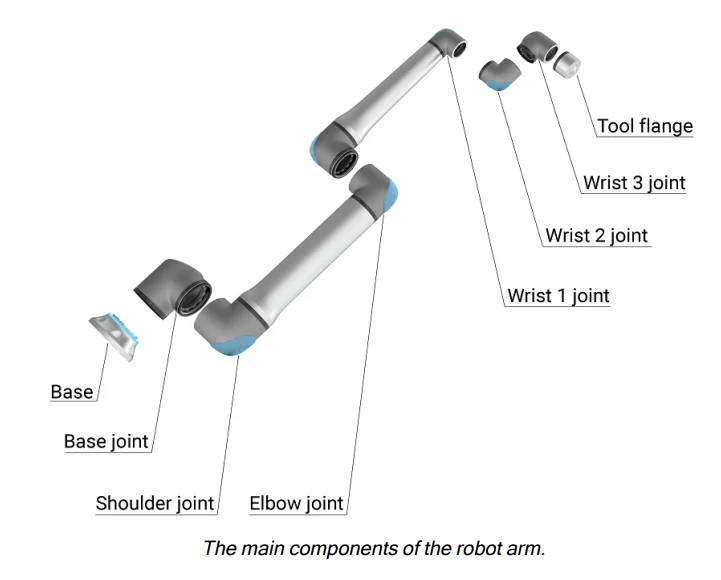
- Base: where the robot arm is mounted.
- Shoulder and Elbow: make larger movements.
- Wrist 1 and Wrist 2: make finer movements.
- Wrist 3: where the tool is attached to the Tool Flange.
The robot is partly completed machinery, as suchh,,a Declaration of Incorporation is provided. A risk assessment is required for each robot application.
Light Ring
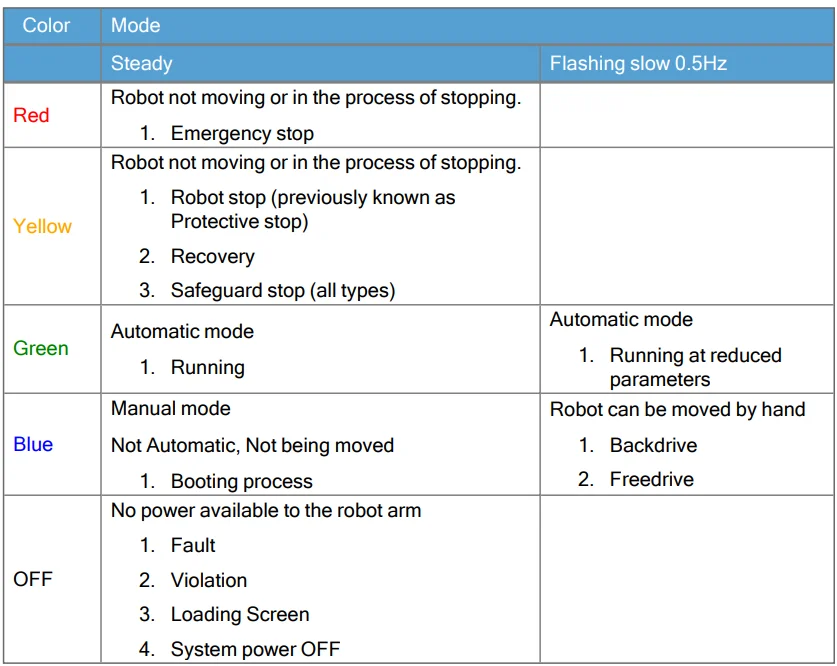
Description: The light ring at the base of the robot arm provides status indication as described in the table below.
NOTICE
The light ring configuration can be modified and/or disabled by the user. See the Script Directory for further information.
NOTICE
The color spectrum of the light ring can deviate at maximum ambient temperature.
Robot base
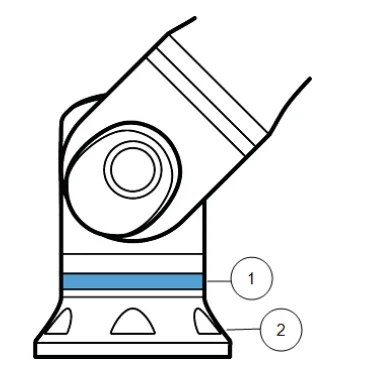
- Light ring
- Base
Color codes
Control Box
About the Control Box
The Control Box houses the connection ports and Controller Inputs and Outputs (I/O) used in robot arm programs and installations. The connection ports are used for external connections. The IIS/O is are group of electrical interfaces used for communication and configuration.
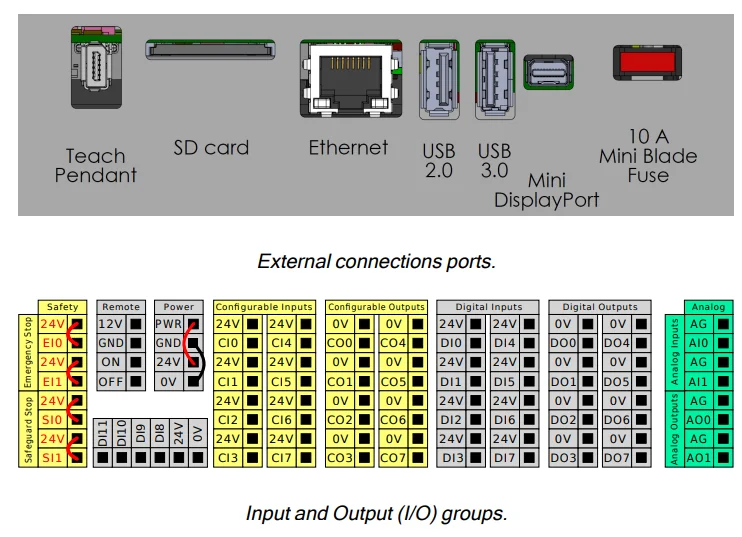
For detailed descriptions of the Control Box connection ports and the Controller I/O, see the Installation.
Teach Pendant with 3-Position Enabling Device
Description
Depending on the robot generation, your Teach Pendant can include a built-in 3PE device. This is called a 3-Position Enabling Teach Pendant (3PE TP). Higher payload robots can only use the 3PE TP.
If you are using a 3PE TP, the buttons are located on the underside of the Teach Pendant, as illustrated below. You can use either button, according to your preference.
If the Teach Pendant is disconnected, you are required to connect and configure an external 3PE device. The 3PE TP functionality extends to the PolyScope interface, where there are additional functions in the Header.
NOTICE
- If you have bought a UR15, UR20 or UR30 robot, a Teach Pendant without the 3PE device will not work.
- Using a UR15, UR20, or UR30 robot requires an external enabling device or a 3PE Teach Pendant when programmingg oteaching withinnin the reach of the robot application. See ISO 10218-2.
- The 3PE Teach Pendant is not included with the purchase of the OEM Control Box, so enabling device functionality is not provided.
Overview of TP
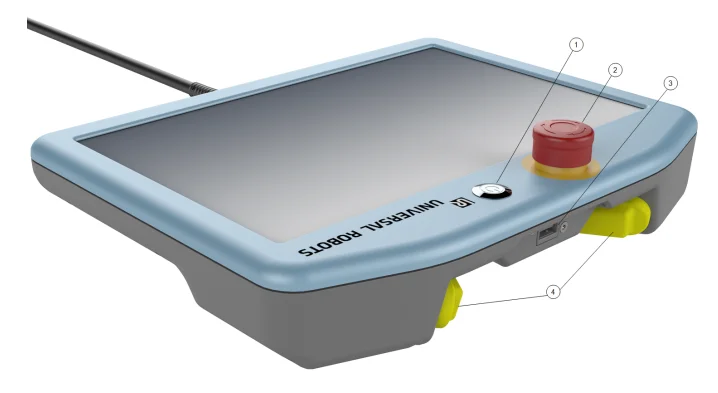
- Power button
- Emergency Stop button
- USB port (comes with a dust cover)
- 3PE buttons
Freedrive
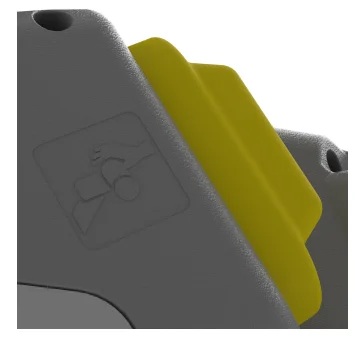
A Freedrive robot symbol is located under each 3PE button, as illustrated below.
3PE Teach Pendant Button Functions
Description
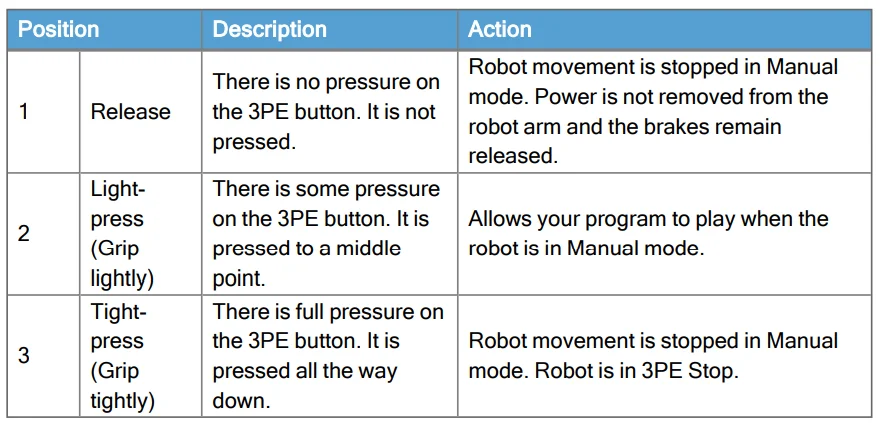
NOTICE: The 3PE buttons are only active in Manual mode. In Automatic mode, robot movement does not require the 3PE button action.
The table below describes the functions of the 3PE buttons.
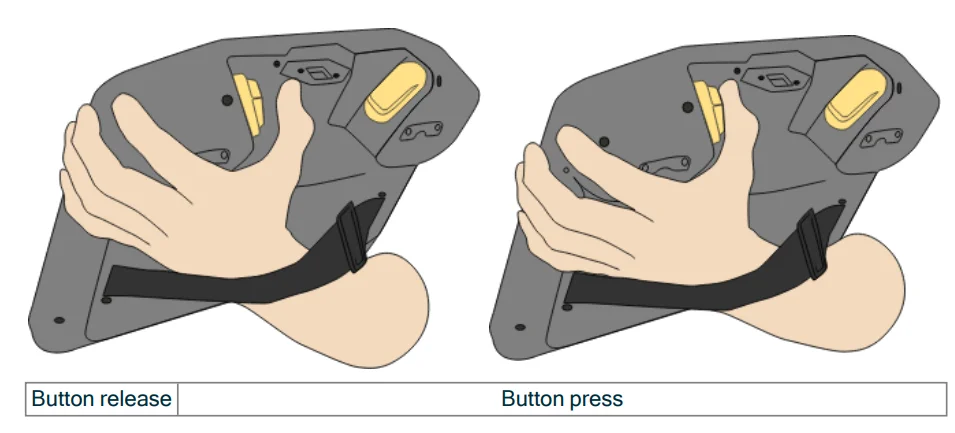
Using the 3PE Buttons
Using the 3PE
- To play a program
- On PolyScope, ensure the robot is set to Manual mode, or switch to Manual mode.
- Maintain a light-press on the 3PE button.
- On PolyScope, tap Play to run the program.
The program runs if the robot arm is in the first position of the program.
If the robot is not in the first position of the program, the Move Robot into Position screen appears.
- To stop a program
- Release the 3PE button or, on PolyScope, tap Stop.
- To pause a program
- Release the 3PE button, or, in PolyScope, tap Pause.
To continue the program execution, keep the 3PE button light pressed and tap Resume in PolyScope.
- Release the 3PE button, or, in PolyScope, tap Pause.
Freedrive with 3PE Buttons
Description: Freedrive allows the robot arm to be manually pulled into desired positions and/or poses.
Use the 3PE button to free the robot arm.
Rapidly light-press, release, light-press again, and keep holding the 3PE button in this position. Now you can pull the robot arm into a desired position, while the light-press is maintained.
Using Move Robot into Position
Description: Move Robot into Position allows the robot arm to move to that start position, after you complete a program. The robot arm must be in the start position before you can run the program.
Move into position
To use the 3PE button to move the robot arm into position:
- When your program is complete, press Play.
- Select Play from the beginning.
On PolyScope, the Move Robot into Position screen appears, displaying robot arm movement. - Light-press and hold the 3PE button.
- Now, on PolyScope, press and hold Automove for the robot arm to move to the start position.
The Play Program screen appears. - Maintain a light-press on the 3PE button to run your program. Release the 3PE button to stop your program.
PolyScope Overview
Descriptio::n PolyScope is the Graphical User Interface (GUI) on the Teach Pendant that operates the robot arm via a touch screen. You create, l,oad and execute programs for the robot in PolyScope. The PolyScope interface is divided as shown in the following illustration:
- A: Header with icons/tabs that make interactive screens available to you.
- B: Footer with buttons that control your loaded program/s.
- C: Screen with fields and options to manage and monitor robot actions.
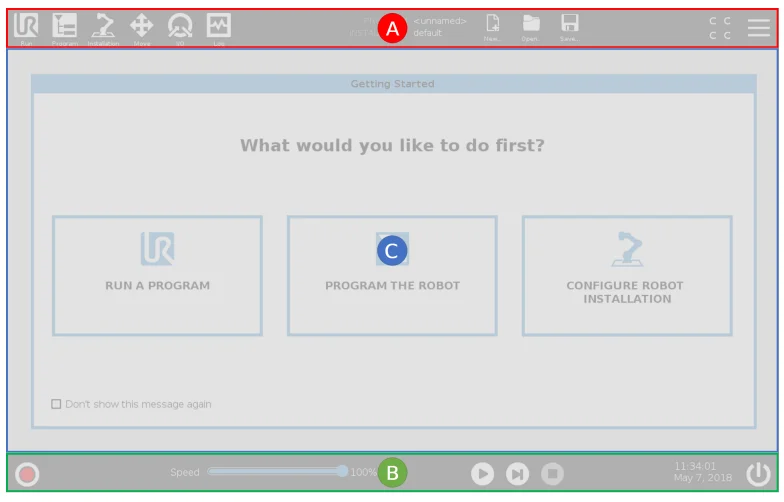
Using the Touch Screen
The touch sensitivity is designed to avoid false selections on PolySpe, and to prevent unexpected motion of the robot.
The Teach Pendant touch screen is optimized for use in industrial environments. Unlike consumer electronicsthe , the Teach Pendant touch screen sensitivity is, by design, more resistant to environmental factors such as:
- water droplets and/or machine coolant droplets
- radio wave emissions
- other conducted noise from the operating environment.
For best results, use the tip of your finger to make a selection on the screen. In this manual, this is referred to as a “tap”. A commercially available stylus may be used to make selections on the screen if desired.
Safety
Description: Read the safety information here to understand key safety guidelines, important safety messages, and your responsibilities when working with the robot. System design and installation are not covered here.
General
Description: Read the general safety information and the instructions and guidanceabouto risk assessment and the intended use. Subsequent sections describe and define safety-related functions particularly relevant for collaborative applications.
Read and understand the specific engineering data relevant to mounting and installation, in order to understand the integration of UR robots before the robot is powered on for the first time.
It is essential to observe and follow all assembly instructions in the following sections of this manual.
NOTICE
Universal Robots disclaims any liability if the robot (arm Control Box with or without Teach Pendant) is damaged, changed,, or modified in any way. Universal Robots cannot be held responsible for any damages caused to the robot or any other equipment due to programming errors, unauthorized access to the UR robot and its contents, or malfunctioning of the robot.
General Warnings and Cautions
Description: The followinwarnings messages can be repeated, explained, or detailed in subsequent sections.
Warning
Failure to adhere to the general safety practices listed below,an result in injury or death.
- Verify the robot arm and tool/end effector are properly and securely bolted in place.
- Verify the robot application has ample space to operate freely.
- Verify the personnel are protected during the lifetime of the robot application in,cluding transport, installation, commissioning, programming/ teaching, operation and use, dismantling a,,nd disposing.
- Verify that robot safety configuration parameters are set to protect personnel, including those who can be within reach of the robot application.
- Avoid using the robot if it is damaged.
- Avoid wearing loose clothing or jewelry when working with the robot. Tie back long hair.
- Avoid placing any fingers behind the internal cover of the Control Box.
- Inform users of any hazardous situations and the protection that is provided, explain any limitations of the protection,, and the residual risks.
- Inform users of the location of the emergency stop button(s) and how to activate the emergency stop in case of an emergency or an abnormal situation.
- Warn people to keep outside the reach of the robot, including when the robot application is about tstart upup.
- Be aware of the robot orientation to understand the direction of movement when using the Teach Pendant.
- Adhere to the requirements in ISO 10218-2.
Warning
Handling tools/end effectors with sharp edges and/or pinch points can result in injury.
- Make sure tools/end effectors have no sharp edges or pinch points.
- Protective gloves and/or protective eyeglasses could be required.
Integration and Responsibility
Description: The information in this manual does not cover designing, installing, integrating,, and operating a robot application, nor does it cover all peripheral equipment that can influence the safety of the robot application. The robot application must be designed and installed in accordance with the safety requirementoutlined inn the relevant standards and regulations of the country where the robot is installed.
The person/s integrating the UR robot are responsible for ensuring that the applicable regulations in the country concerned are observed and that any risks in the robot application are adequately reduced. This includes, but is not limited to:
- Performing a risk assessment for the complete robot system
- Interfacing with other machines and additional safeguarding if required by the risk assessment
- Setting the correct safety settings in the software
- Ensuring safety measures are not modified
- Validating the robot application is designed, installed, and integrated
- Specifying instructions for use
- Marking the robot installation with relevant signs and contact information of the integrator
- Retaining all documentation, including the application risk assessment, this manual,, and additional relevant documentation.
Maintenance and Repair
Description: Any maintenance work, inspecti,,on and calibration shall be conducted in compliance with all safety instructions in this manual, the UR Service Manual, and according to local requirements. Repair work shall be done by Universal RoboClient-designatedated, trained individuals can do repair work, provided they follow the Service Manual.
Safety for Maintenance
The purpose of maintenance and repair is to ensure the system is kept functioning as expected.
When working on the robot arm or control box, you must observe the procedures and warnings below.
Warning
Failure to adhere to any of the safety practices listed below,an result in injury.
- Unplug the main power cable from the bottom of the Control Box to ensure that it is completely unpowered. Power off any other source of energy connected to the robot arm or Control Box. Take necessary precautions to prevent other persons from powering on the system during the repair period.
- Check the earth connection before re-powering the system.
- Observe ESD regulations when parts of the robot arm or Control Box are disassembled.
- Prevent water and dust from entering the robot arm or Conthe trol Box.
Testing Stopping Performance
Description
Test periodically to determine if stopping performance is degraded. Increased stopping times can require safeguarding be modified, possibly with changes to the installation. If stop time and/or stop distance safety functions are used and are the basis of the risk reduction strategy, no monitoring or testing of stopping performance is required. The robot does continuous monitoring.
Robot Arm Cleaning and Inspection
Description
As part of regular maintenance,, the robot arm can be cleaned, in accordance with the recommendations in this manual and local requirements.
Cleaning Methods
To address the dust, dirt, or oil on the robot arm and/or Teach Pendant, simply use a cloth alongside one of the cleaning agents provided below.
- Surface Preparation: Before applying thsolutions belowns, surfaces may need to be prepared by removing any loose dirt or debris.
- Cleaning agents:
• Water
• 70% Isopropyl alcohol
• 10% Ethanol alcohol
• 10% Naphtha (Use to remove grease.) - Application: The solution is typically applied to the surface that needs cleaning using a spray bottle, brush, sponge, or cloth. It can be applied directly or diluted further depending on the level of contamination and the type of surface being cleaned.
- Agitation: For stubborn stains or heavily soiled areas, the solution may be agitated using a brush, scrubber, or other mechanical means to help loosen the contaminants.
- Dwell Time: If necessary, the solution is allowed to dwell on the surface for up to 5 minutes to penetrate and dissolve the contaminants effectively.
- Rinsing: After the dwell time, the surface is typically rinsed thoroughly with water to remove the dissolved contaminants and any remaining cleaning agent residue. It’s essential to ensure thorough rinsing to prevent any residue from causing damage or posing a safety risk risk
hazard. - Drying: Finally, the cleaned surface may be left to air dry or dried using towels.
Warning
DO NOT USE BLEACH in any diluted cleaning solution.
Warning
Grease is an irritant and can cause an allergic reaction. Contact, inhalation,, or ingestion can cause illness or injury. To prevent illness or injury, adhere to the following:
- PREPARATION:
- Ensure that the area is well ventilated.
- Have no food or beverages around the robot and cleaning agents.
- Ensure that an eye wash station is nearby.
- Gather the required PPE (gloves, eye protection)
- WEAR:
- Protective glovesOil-resistantnt gloves (Nitrile),, impermeable and resistant tthe o product.
- Eye protection is recommended to prevent accidental contact with grease.
- DO NOT INGEST.
- In the event of
- contact with skin, wash with water and a mild cleaning agent
- a skin reaction, get medical attention
- contact with the eyes, use an eyewash station, and get medical attention.
- Inhalation of vapors or ingestion of grease, get medical attention
- After greasing work
- clean contaminated work surfaces.
- Dispose responsibly of any used rags or paper used for cleaning.
- Contact with children and animals is prohibited.
For more manuals by Universal Robots, visit ManualsLibraryy
Universal Robots UR15- FAQs
What is the maximum speed of the UR15 robot?
The UR15 can move at a top speed of 5 meters per second. This high speed helps reduce cycle time and improves overall productivity while still maintaining accuracy for heavy-duty industrial tasks.
How does a Universal Robot like UR15 work?
Universal Robots cobots are designed to work safely alongside humans. The UR15 is programmed using a touch-screen teach pendant or by manually guiding the robot arm into position, making it easy to use even without advanced coding skills.
What is the expected lifespan of a Universal Robot?
Universal Robots are built for long-term use. The drive systems are engineered to last at least 35,000 operating hours, making them reliable for industrial environments.
What software is used to program the UR15?
The UR15 uses PolyScope 5, Universal Robots’ standard software. It provides an intuitive interface that allows users to program tasks quickly and efficiently.
Which programming language does Universal Robots use?
Universal Robots use URScript, a custom programming language developed specifically to control UR cobots. It also supports integration with external systems and advanced automation tasks.
What industries or applications can use the UR15?
The UR15 is suitable for many applications, including machine tending, assembly, material handling, packaging, quality inspection, and welding, especially where speed and precision are required.
Can the UR15 operate continuously for long hours?
Yes, the UR15 is capable of operating 24 hours a day, provided proper maintenance is maintained. This makes it ideal for high-volume production and continuous workflows.
What type of motor is used in the UR15?
The UR15 uses servo motors, which provide precise control of position, speed, and torque, ensuring smooth and accurate movements.
Can the UR15 work safely alongside humans?
Yes, the UR15 is a collaborative robot (cobot) designed with built-in safety features that allow it to operate safely near human workers without traditional safety cages.